automatic CHEVROLET CORVETTE 2012 6.G Repair Manual
[x] Cancel search | Manufacturer: CHEVROLET, Model Year: 2012, Model line: CORVETTE, Model: CHEVROLET CORVETTE 2012 6.GPages: 434, PDF Size: 6.96 MB
Page 197 of 434
Black plate (11,1)Chevrolet Corvette Owner Manual - 2012
Infotainment System 7-11
FM Stereo
FM signals only reach about
16 to 65 km (10 to 40 mi). Although
the radio has a built-in electronic
circuit that automatically works to
reduce interference, some static
can occur, especially around tall
buildings or hills, causing the
sound to fade in and out.
XM™Satellite Radio Service
XM Satellite Radio Service gives
digital radio reception from coast to
coast in the 48 contiguous United
States, and in Canada. Just as
with FM, tall buildings or hills can
interfere with satellite radio signals,
causing the sound to fade in and
out. In addition, traveling or standing
under heavy foliage, bridges,
garages, or tunnels may cause loss
of the XM signal for a period of time.
Cellular Phone Usage
Cellular phone usage may cause
interference with the vehicle's radio.
This interference may occur when
making or receiving phone calls,
charging the phone's battery,
or simply having the phone on.
This interference causes an
increased level of static while
listening to the radio. If static is
received while listening to the
radio, unplug the cellular phone and
turn it off.
Diversity Antenna System
The AM-FM antenna is a hidden
self‐tuning system. It optimizes the
AM and FM signals relative to the
vehicle's position and radio station
source. No maintenance or
adjustments are needed.
Satellite Radio Antenna
For vehicles with XM Satellite Radio
Service, the antenna is located on
the roof or on the trunk lid of the
vehicle. Keep the antenna clear of
obstructions for clear radio
reception.
Page 198 of 434
Black plate (12,1)Chevrolet Corvette Owner Manual - 2012
7-12 Infotainment System
Audio Players
CD Player
Care of the CD Player
Do not add labels to a CD; it could
get caught in the CD player. Use a
marking pen to write on the top of
the CD if a description is needed.
Do not use CD lens cleaners, they
could damage the CD player.
Notice:If a label is added to a
CD, more than one CD is inserted
into the slot at a time, or an
attempt is made to play scratched
or damaged CDs, the CD player
could be damaged. While using
the CD player, use only CDs in
good condition without any label,
load one CD at a time, and keep
the CD player and the loading slot
free of foreign materials, liquids,
and debris.
If an error displays, see “CD
Messages” later in this section.
Care of CDs
Store CDs in their original cases or
other protective cases and away
from direct sunlight and dust. The
CD player scans the bottom of the
disc. If the bottom of a CD is
damaged it may not play properly or
at all. Do not touch the bottom of a
CD while handling it. Pick up CDs
by grasping the outer edges or the
edge of the hole and the outer edge.
If the surface of a CD is dirty, take a
soft, lint‐free cloth or dampen a
clean, soft cloth in a mild, neutral
detergent solution mixed with water,
and clean it. Make sure the wiping
process starts from the center to
the edge.
Using the CD Player
The CD player can play smaller
8 cm (3 in) single CDs with an
adapter ring.
A CD in the player stays in the
player when the ignition is turned
off. When the ignition or radio is
turned on, the CD starts to play
where it stopped, if it was the
last selected audio source.
Loading a CD
Insert the CD partway into the slot,
label side up, until the player pulls
the CD in. The CD begins playing
automatically.
The CD symbol displays when a
CD is inserted, and the track
number displays when each
new track starts to play.
M(Load):Press to load CD into
the CD player.
Page 199 of 434
Black plate (13,1)Chevrolet Corvette Owner Manual - 2012
Infotainment System 7-13
To insert CD:
1. Press
M.
2. Load a CD and insert the CD partway into the slot, label side
up when INSERT CD displays.
The player pulls the CD in.
Playing a CD
O/e(Tune): Turn to go to the
next or previous track.
{(Reverse): Press and hold to
reverse within the current track.
|(Fast Forward): Press and hold
to fast forward through the current
track.
tSEEKu: Press the left arrow
to go to the start of the current track
if more than eight seconds have
played. Press the right arrow to go
to the start of the next track. If either
arrow is held or pressed more than
once, the player continues moving
backward or forward through
the CD.
tSCANu: To scan one CD,
press and hold either arrow for
more than two seconds until SCAN
displays and a beep sounds. The
radio goes to the next track, plays
for 10 seconds, then goes to the
next track. Press either arrow again
to stop scanning.
AUTO EQ (Automatic
Equalization): Press to select the
equalization setting while playing a
CD. The equalization is stored
when a CD is played. For more
information on AUTO EQ, see
“AUTO EQ” listed previously in
this section.
BAND: Press to listen to the radio
when a CD is playing. The inactive
CD remains inside the radio for
future listening.
CD AUX (Auxiliary): Press to play
a CD when listening to the radio.
CD displays when a CD is in the
player. If your system has a remote
playback device, pressing this
button a second time allows the
remote device to play.X(Eject): Press to eject a
CD from the CD Radio.
CD Radio: Press
Xto eject a CD.
RPT (Repeat): Press to hear a
track or an entire CD over again.
Single CD Radio:
Press RPT to hear a track over
again; REPEAT displays. Press
again to turn off repeat; REPEAT
OFF displays.
RDM (Random): Press to hear
the tracks in random, rather than
sequential order.
CD Radio:
Press and release RDM until
RANDOM DISC PLAY displays.
Press and release RDM until
RANDOM OFF displays to turn off
random play.
Page 200 of 434
Black plate (14,1)Chevrolet Corvette Owner Manual - 2012
7-14 Infotainment System
R(Song List):The Song List
feature can save 20 track selections.
To save tracks:
1. If S-LIST is displayed, press
R
to turn it off.
2. Select the desired CD by pressing the numbered
pushbutton and then use
u
orO/eknob to select the
track to be saved.
3. Press and hold
Runtil a beep
sounds and ADDED SONG
displays.
4. Repeat Steps 2 and 3 to save other selections.
SONGLIST FULL displays if more
than 20 selections are stored.
To play tracks:
1. Press
R. One beep sounds and
S-LIST displays. The recorded
tracks begin to play in the order
they were saved. 2. Press
toruto go back or
forward within the saved tracks.
To delete tracks:
1. Press
Rto turn song list on.
S-LIST displays.
2. Press
toru, and use
the
O/eknob to select the
desired track to be deleted.
3. Press and hold
Runtil SONG
REMOVED displays.
After a track has been deleted, the
remaining tracks are moved up the
list. When another track is added to
the song list, the track is added to
the end of the list.
To delete the entire song list:
1. Press
Rto turn song list on.
S-LIST displays.
2. Press and hold
Rfor more than
four seconds. One beep sounds
and SONGLIST EMPTY displays
to confirm that the song list has
been deleted. If a CD is ejected, and the song list
contains saved tracks from that CD,
those tracks are automatically
deleted from the song list. Any
tracks saved to the song list again
are added to the bottom of the list.
To end song list mode, press
R.
One beep sounds and S-LIST is
removed from the display.
MP3 Format
Radios with the MP3 feature can
only play CD-R discs. Do not mix
standard audio and MP3 files on
the same disc.
Supported File Structure
Radios with the MP3 feature support
up to:
.50 folders
.11 folders in depth
.50 playlists
.255 files
.10 sessions
Page 213 of 434
Black plate (1,1)Chevrolet Corvette Owner Manual - 2012
Climate Controls 8-1
Climate Controls
Climate Control Systems
Dual Automatic Climate ControlSystem . . . . . . . . . . . . . . . . . . . . . . 8-1
Air Vents
Air Vents . . . . . . . . . . . . . . . . . . . . . . 8-6
Maintenance
Passenger Compartment AirFilter . . . . . . . . . . . . . . . . . . . . . . . . . 8-6
Climate Control Systems
Dual Automatic Climate Control System
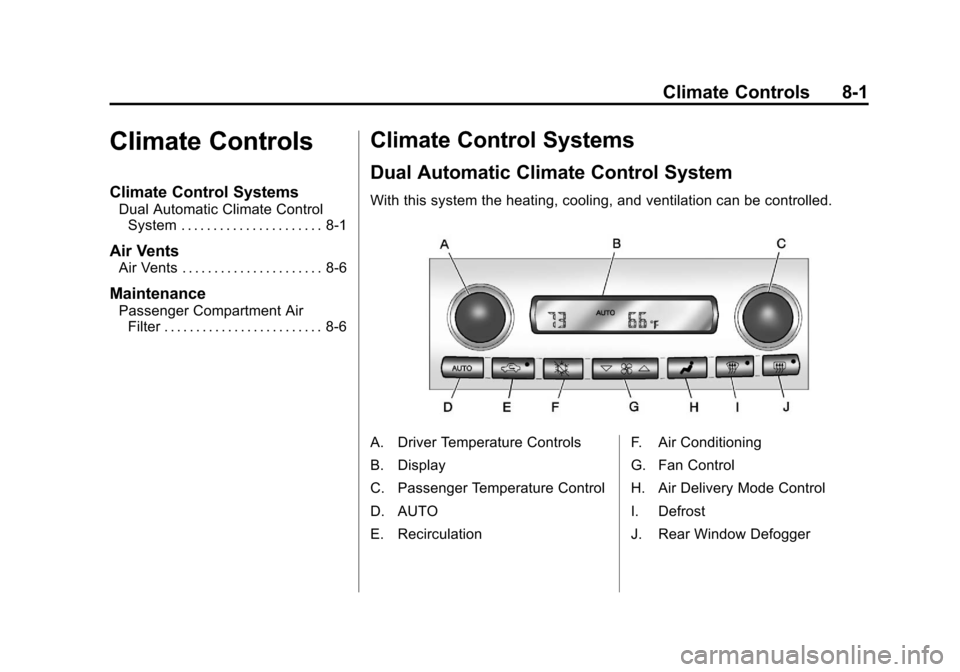
With this system the heating, cooling, and ventilation can be controlled.
A. Driver Temperature Controls
B. Display
C. Passenger Temperature Control
D. AUTO
E. Recirculation F. Air Conditioning
G. Fan Control
H. Air Delivery Mode Control
I. Defrost
J. Rear Window Defogger
Page 214 of 434
Black plate (2,1)Chevrolet Corvette Owner Manual - 2012
8-2 Climate Controls
When the vehicle is first started,
the display shows the driver's
temperature setting, the outside
temperature, the fan speed, and the
air delivery, for about 10 seconds.
The outside temperature is shown in
the center of the display. The digital
display will show the readings in
Fahrenheit or Celsius. See
“Personal Options”underVehicle
Personalization on page 5‑55 for
information on changing your
display.
Automatic Operation
AUTO (Automatic): Press the
AUTO button to place the entire
system in the automatic mode.
When automatic operation is active,
the system automatically controls
the inside temperature, the air
delivery mode, and the fan speed.
After a 10 second display of the
current settings, the word AUTO,
the driver's temperature setting and
the outside temperature will be
shown. The system operates to
reach the set temperature as quickly as possible. The AUTO control
system works best with the windows
up and the removable roof installed
or the convertible top up.
1. Press the AUTO button.
2. Adjust the temperature to a
comfortable setting between
16°C (60°F) and 32°C (90°F).
Choosing the coldest or warmest
temperature setting will not
cause the system to heat or cool
any faster. A setting of 23°C
(73°F) is suggested.
In cold weather, the system will
start at reduced fan speeds to
avoid blowing cold air into your
vehicle until warmer air is
available. The system starts out
blowing air at the floor but may
change modes automatically as
the vehicle warms up to maintain
the chosen temperature setting.
The length of time needed for
warm up depends on the outside
temperature and the length of
time that has elapsed since the
vehicle was last driven. 3. Wait for the system to regulate.
This may take from 10 to
30 minutes. Then adjust the
temperature, if necessary.
Do not cover the solar sensor
located in the center of the
instrument panel, near the
windshield. For more information on
the solar sensor, see “Sensors”later
in this section.
Manual Operation
Driver Power/Temperature: Press
the driver temperature knob to turn
the climate control system off. This
is the only setting that completely
shuts off the fan. The digital display
shows only the outside temperature.
The driver and the passenger set
temperature and the air intake mode
can still be adjusted when the
climate control is off.
Passenger Power/Temperature:
Press the passenger temperature
knob to turn the passenger's climate
control system on or off. Turn the
knob to increase or decrease the
temperature for the passenger.
Page 215 of 434

Black plate (3,1)Chevrolet Corvette Owner Manual - 2012
Climate Controls 8-3
If the passenger's climate control
system is off, the driver's
temperature knob will control the
temperature for the entire vehicle.
x 9 w(Fan):Press to increase
or decrease the fan speed. The fan
speed setting will appear in the
display.
Pressing the arrows will delete
AUTO from the digital display. The
fan graphics with the fan speed bars
will be shown. The AUTO button
must be pressed to return to the
automatic fan control.
If the airflow seems low when the
fan speed is at the highest setting,
the passenger compartment air filter
may need to be replaced. For more
information, see Passenger
Compartment Air Filter on page 8‑6.
N(Air Delivery Mode Control):
Press this button to manually lock in
the current air delivery setting and
to stop the automatic mode control.
Pressing
Ndeletes AUTO from
the digital display and the mode
graphics will be shown. To change the setting, press
N
again. The AUTO button must be
pressed to return to the automatic
mode selection.
To change the current mode, select
one of the following:
H(Vent):
Air is directed to the
instrument panel outlets, with some
air directed to the floor outlets.
%(Bi-Level): Air is divided
between the instrument panel and
floor outlets.
6(Floor): Air is directed to the
floor outlets, with some air directed
to the windshield and side window
defogger outlets.
-(Floor/Defog): This mode clears
the windows of fog or moisture. Air
is directed to the windshield and the
floor outlets, with a small amount to
the side window outlets. In this
mode, the system automatically
turns off the recirculation and runs
the air conditioning compressor
unless the outside temperature is at or below freezing. The recirculation
mode cannot be selected while in
the defog mode.
1(Defrost):
This mode clears the
windows of fog or frost more quickly.
Air is directed to the windshield, with
a small amount directed to the side
window outlets. The indicator light
comes on and the digital display will
show the defrost mode symbol and
fan speed when the front defrost
mode is being used. In this mode,
the system automatically turns off
the recirculation and runs the air
conditioning compressor, unless the
outside temperature is at or below
freezing. Recirculation cannot be
selected while in the defrost mode.
Pressing
1again will return the
system to the last operating mode.
For severe ice conditions, turn the
driver's temperature knob to 32°C
(90°F) while in defrost mode.
Do not drive the vehicle until all the
windows are clear.
Page 216 of 434
Black plate (4,1)Chevrolet Corvette Owner Manual - 2012
8-4 Climate Controls
^(Air Conditioning Off):Press to
turn the air conditioning compressor
off. Press AUTO to return to
automatic operation. When in
AUTO, the air conditioning
compressor comes on automatically,
as needed.
Air conditioning does not operate at
temperatures below about 2°C to
4°C (35°F to 40°F). In temperatures
above 4°C (40°F), the air
conditioning cannot be turned off in
defrost and defog, as it helps to
remove moisture from the vehicle.
It also helps to keep the windows
clear.
You may notice a slight change in
engine performance when the air
conditioning compressor shuts off
and turns on again. This is normal.
The system is designed to make
adjustments to help with fuel
economy while still maintaining the
selected temperature.
On hot days, open the windows to
let hot inside air escape; then close
them. This helps to reduce the time it takes for the vehicle to cool down.
It also helps the system to operate
more efficiently.
For quick cool down on hot days
press the AUTO button and adjust
the temperature to a cool,
comfortable setting. To achieve
maximum cool down, do the
following:
1. Select
Hmode.
2. Press
?.
3. Select the a/c on.
4. Select the coolest temperature.
5. Select the highest fan speed.
Using these settings together for
long periods of time may cause the
air inside of your vehicle to become
too dry. To prevent this from
happening, after the air in the
vehicle has cooled, turn the
recirculation mode off.
The air conditioning system
removes moisture from the air, so a
small amount of water might drip under the vehicle while idling or
after turning off the engine.
This is normal.
?(Recirculation):
Press to turn
the recirculation mode on or off. An
indicator light comes on to show
that recirculation is on. This mode
prevents outside air from entering
your vehicle. It can be used to
prevent outside air and odors from
entering your vehicle and to help
cool the air inside your vehicle more
quickly. Recirculation mode is not
available in defrost or defog mode.
Sensors
The solar sensor on the vehicle
monitors the solar heat and uses
the information to maintain the
selected temperature when
operating in AUTO mode by
automatically adjusting the
temperature, fan speed, and air
delivery system. The system may
also supply cooler air to the side of
the vehicle facing the sun. The
recirculation mode will also be
activated, as necessary.
Page 217 of 434
Black plate (5,1)Chevrolet Corvette Owner Manual - 2012
Climate Controls 8-5
Do not cover the solar sensor
located on the top of the instrument
panel near the windshield or the
system will not work properly.
There is also a sensor located
behind the front bumper. This
sensor reads the outside air
temperature and helps to maintain
the temperature inside the vehicle.
Any cover on the front of the vehicle
could give a false reading in the
temperature.
If the outside temperature goes up,
the displayed temperature will not
change until:
.The vehicle's speed is above
19 km/h (12 mph) for
five minutes.
.The vehicle's speed is above
52 km/h (32 mph) for two and
one‐half minutes.
These delays prevent false
readings. If the temperature goes
down, the outside temperature will
be shown when you start the
vehicle. If it has been turned off for less than three hours, the
temperature will be recalled from the
previous vehicle operation.
There is also an inside temperature
sensor located to the left of the
ignition switch. The automatic
climate control system uses this
sensor to receive information, so if
you block or cover it, the system will
not function properly.
Rear Window Defogger
The rear window defogger uses a
warming grid to remove fog or frost
from the rear window.
The rear window defogger only
works when the engine is running.
=(Rear Window Defogger):
Press to turn the rear window
defogger on or off. Be sure to clear
as much snow from the rear window
as possible. An indicator light
comes on to show that the rear
window defogger is on.
The rear window defogger turns off
about 10 minutes after the button is
pressed when traveling less than 48 km/h (30 mph). If turned on
again, the defogger only runs for
about five minutes before turning
off. The defogger can also be turned
off by turning off the engine.
The vehicle has heated outside
rearview mirrors. The mirrors will
heat to help clear fog or frost from
the surface of the mirrors when the
rear window defogger button is
pressed.
For vehicles with a power
convertible top, the rear window
defogger and heated mirrors are
automatically disabled when the
power convertible top is moving
or down.
Notice:
Do not use anything
sharp on the inside of the rear
window. If you do, you could cut
or damage the warming grid, and
the repairs would not be covered
by the vehicle warranty. Do not
attach a temporary vehicle
license, tape, a decal, or anything
similar to the defogger grid.
Page 221 of 434
Black plate (1,1)Chevrolet Corvette Owner Manual - 2012
Driving and Operating 9-1
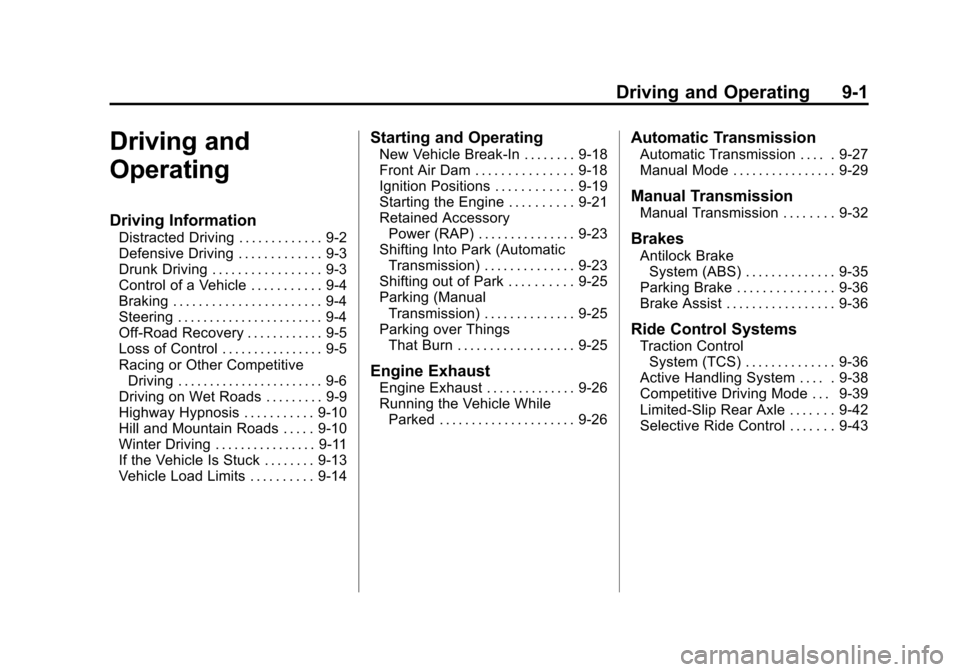
Driving and
Operating
Driving Information
Distracted Driving . . . . . . . . . . . . . 9-2
Defensive Driving . . . . . . . . . . . . . 9-3
Drunk Driving . . . . . . . . . . . . . . . . . 9-3
Control of a Vehicle . . . . . . . . . . . 9-4
Braking . . . . . . . . . . . . . . . . . . . . . . . 9-4
Steering . . . . . . . . . . . . . . . . . . . . . . . 9-4
Off-Road Recovery . . . . . . . . . . . . 9-5
Loss of Control . . . . . . . . . . . . . . . . 9-5
Racing or Other CompetitiveDriving . . . . . . . . . . . . . . . . . . . . . . . 9-6
Driving on Wet Roads . . . . . . . . . 9-9
Highway Hypnosis . . . . . . . . . . . 9-10
Hill and Mountain Roads . . . . . 9-10
Winter Driving . . . . . . . . . . . . . . . . 9-11
If the Vehicle Is Stuck . . . . . . . . 9-13
Vehicle Load Limits . . . . . . . . . . 9-14
Starting and Operating
New Vehicle Break-In . . . . . . . . 9-18
Front Air Dam . . . . . . . . . . . . . . . 9-18
Ignition Positions . . . . . . . . . . . . 9-19
Starting the Engine . . . . . . . . . . 9-21
Retained Accessory Power (RAP) . . . . . . . . . . . . . . . 9-23
Shifting Into Park (Automatic Transmission) . . . . . . . . . . . . . . 9-23
Shifting out of Park . . . . . . . . . . 9-25
Parking (Manual Transmission) . . . . . . . . . . . . . . 9-25
Parking over Things That Burn . . . . . . . . . . . . . . . . . . 9-25
Engine Exhaust
Engine Exhaust . . . . . . . . . . . . . . 9-26
Running the Vehicle WhileParked . . . . . . . . . . . . . . . . . . . . . 9-26
Automatic Transmission
Automatic Transmission . . . . . 9-27
Manual Mode . . . . . . . . . . . . . . . . 9-29
Manual Transmission
Manual Transmission . . . . . . . . 9-32
Brakes
Antilock BrakeSystem (ABS) . . . . . . . . . . . . . . 9-35
Parking Brake . . . . . . . . . . . . . . . 9-36
Brake Assist . . . . . . . . . . . . . . . . . 9-36
Ride Control Systems
Traction Control System (TCS) . . . . . . . . . . . . . . 9-36
Active Handling System . . . . . 9-38
Competitive Driving Mode . . . 9-39
Limited-Slip Rear Axle . . . . . . . 9-42
Selective Ride Control . . . . . . . 9-43