radio controls CHEVROLET CORVETTE 2014 7.G User Guide
[x] Cancel search | Manufacturer: CHEVROLET, Model Year: 2014, Model line: CORVETTE, Model: CHEVROLET CORVETTE 2014 7.GPages: 376, PDF Size: 4.94 MB
Page 155 of 376
Black plate (51,1)Chevrolet Corvette Owner Manual (GMNA-Localizing-U.S./Canada/Mexico-
6007198) - 2014 - CRC - 2/5/14
Instruments and Controls 5-51
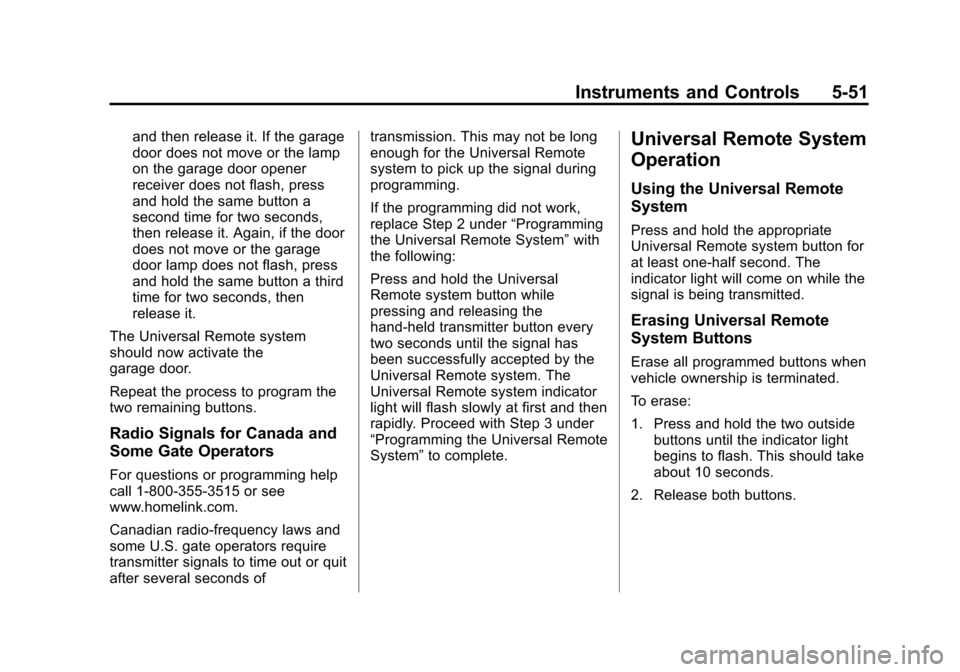
and then release it. If the garage
door does not move or the lamp
on the garage door opener
receiver does not flash, press
and hold the same button a
second time for two seconds,
then release it. Again, if the door
does not move or the garage
door lamp does not flash, press
and hold the same button a third
time for two seconds, then
release it.
The Universal Remote system
should now activate the
garage door.
Repeat the process to program the
two remaining buttons.
Radio Signals for Canada and
Some Gate Operators
For questions or programming help
call 1-800-355-3515 or see
www.homelink.com.
Canadian radio-frequency laws and
some U.S. gate operators require
transmitter signals to time out or quit
after several seconds of transmission. This may not be long
enough for the Universal Remote
system to pick up the signal during
programming.
If the programming did not work,
replace Step 2 under
“Programming
the Universal Remote System” with
the following:
Press and hold the Universal
Remote system button while
pressing and releasing the
hand-held transmitter button every
two seconds until the signal has
been successfully accepted by the
Universal Remote system. The
Universal Remote system indicator
light will flash slowly at first and then
rapidly. Proceed with Step 3 under
“Programming the Universal Remote
System” to complete.
Universal Remote System
Operation
Using the Universal Remote
System
Press and hold the appropriate
Universal Remote system button for
at least one-half second. The
indicator light will come on while the
signal is being transmitted.
Erasing Universal Remote
System Buttons
Erase all programmed buttons when
vehicle ownership is terminated.
To erase:
1. Press and hold the two outside
buttons until the indicator light
begins to flash. This should take
about 10 seconds.
2. Release both buttons.
Page 266 of 376
Black plate (38,1)Chevrolet Corvette Owner Manual (GMNA-Localizing-U.S./Canada/Mexico-
6007198) - 2014 - CRC - 2/5/14
10-38 Vehicle Care
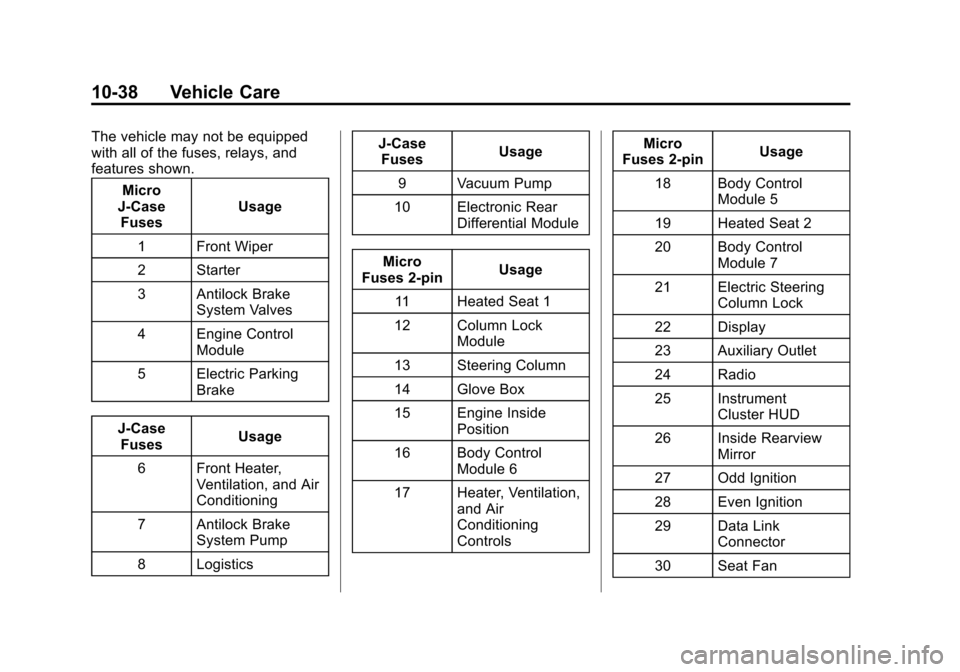
The vehicle may not be equipped
with all of the fuses, relays, and
features shown.Micro
J-Case Fuses Usage
1 Front Wiper
2 Starter
3 Antilock Brake System Valves
4 Engine Control Module
5 Electric Parking Brake
J-Case Fuses Usage
6 Front Heater, Ventilation, and Air
Conditioning
7 Antilock Brake System Pump
8 Logistics J-Case
Fuses Usage
9 Vacuum Pump
10 Electronic Rear Differential Module
Micro
Fuses 2-pin Usage
11 Heated Seat 1
12 Column Lock Module
13 Steering Column
14 Glove Box
15 Engine Inside Position
16 Body Control Module 6
17 Heater, Ventilation, and Air
Conditioning
Controls Micro
Fuses 2-pin Usage
18 Body Control Module 5
19 Heated Seat 2
20 Body Control Module 7
21 Electric Steering Column Lock
22 Display
23 Auxiliary Outlet
24 Radio
25 Instrument Cluster HUD
26 Inside Rearview Mirror
27 Odd Ignition
28 Even Ignition
29 Data Link Connector
30 Seat Fan