key CHEVROLET CORVETTE 2014 7.G Workshop Manual
[x] Cancel search | Manufacturer: CHEVROLET, Model Year: 2014, Model line: CORVETTE, Model: CHEVROLET CORVETTE 2014 7.GPages: 376, PDF Size: 4.94 MB
Page 162 of 376
Black plate (6,1)Chevrolet Corvette Owner Manual (GMNA-Localizing-U.S./Canada/Mexico-
6007198) - 2014 - CRC - 2/5/14
6-6 Lighting
The rear compartment lights only
come on when the rear
compartment is opened.
To turn the courtesy lamps on or off,
turn the instrument panel brightness
knob completely clockwise or
counterclockwise.
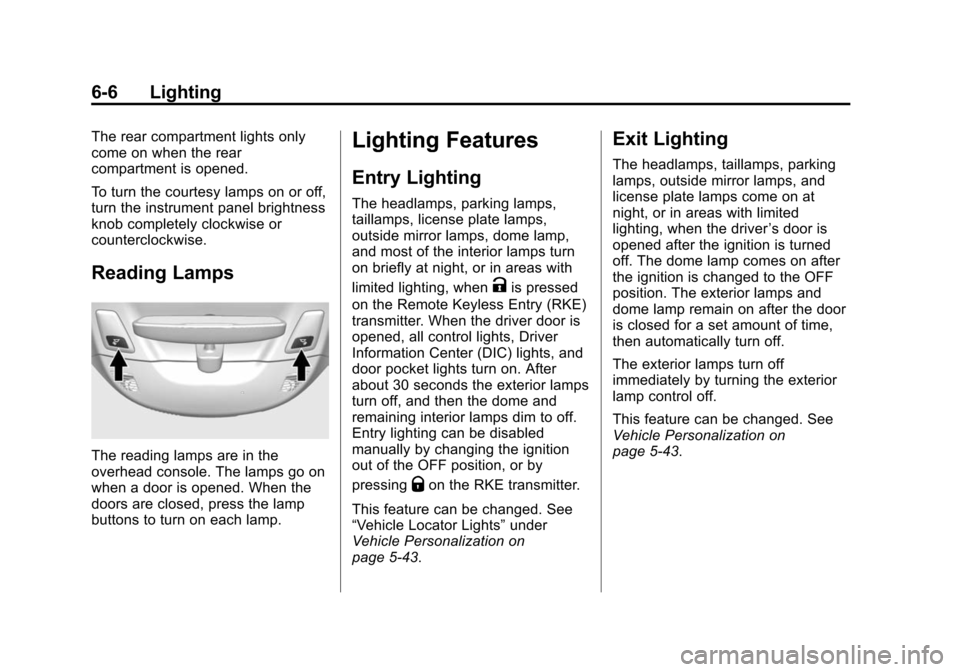
Reading Lamps
The reading lamps are in the
overhead console. The lamps go on
when a door is opened. When the
doors are closed, press the lamp
buttons to turn on each lamp.
Lighting Features
Entry Lighting
The headlamps, parking lamps,
taillamps, license plate lamps,
outside mirror lamps, dome lamp,
and most of the interior lamps turn
on briefly at night, or in areas with
limited lighting, when
Kis pressed
on the Remote Keyless Entry (RKE)
transmitter. When the driver door is
opened, all control lights, Driver
Information Center (DIC) lights, and
door pocket lights turn on. After
about 30 seconds the exterior lamps
turn off, and then the dome and
remaining interior lamps dim to off.
Entry lighting can be disabled
manually by changing the ignition
out of the OFF position, or by
pressing
Qon the RKE transmitter.
This feature can be changed. See
“Vehicle Locator Lights” under
Vehicle Personalization on
page 5-43.
Exit Lighting
The headlamps, taillamps, parking
lamps, outside mirror lamps, and
license plate lamps come on at
night, or in areas with limited
lighting, when the driver ’s door is
opened after the ignition is turned
off. The dome lamp comes on after
the ignition is changed to the OFF
position. The exterior lamps and
dome lamp remain on after the door
is closed for a set amount of time,
then automatically turn off.
The exterior lamps turn off
immediately by turning the exterior
lamp control off.
This feature can be changed. See
Vehicle Personalization on
page 5-43.
Page 191 of 376
Black plate (19,1)Chevrolet Corvette Owner Manual (GMNA-Localizing-U.S./Canada/Mexico-
6007198) - 2014 - CRC - 2/5/14
Driving and Operating 9-19
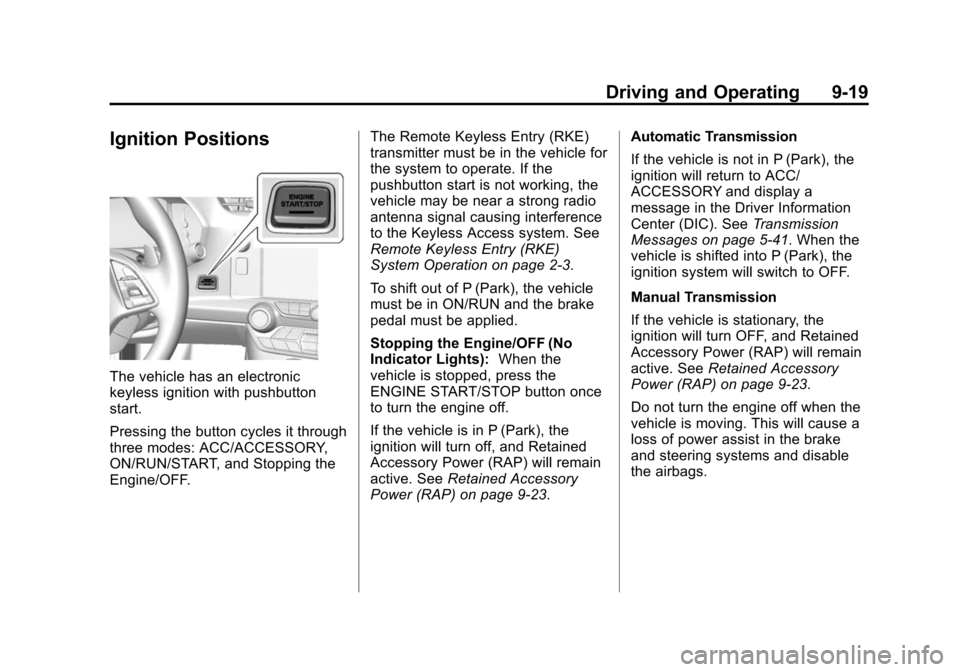
Ignition Positions
The vehicle has an electronic
keyless ignition with pushbutton
start.
Pressing the button cycles it through
three modes: ACC/ACCESSORY,
ON/RUN/START, and Stopping the
Engine/OFF.The Remote Keyless Entry (RKE)
transmitter must be in the vehicle for
the system to operate. If the
pushbutton start is not working, the
vehicle may be near a strong radio
antenna signal causing interference
to the Keyless Access system. See
Remote Keyless Entry (RKE)
System Operation on page 2-3.
To shift out of P (Park), the vehicle
must be in ON/RUN and the brake
pedal must be applied.
Stopping the Engine/OFF (No
Indicator Lights):
When the
vehicle is stopped, press the
ENGINE START/STOP button once
to turn the engine off.
If the vehicle is in P (Park), the
ignition will turn off, and Retained
Accessory Power (RAP) will remain
active. See Retained Accessory
Power (RAP) on page 9-23. Automatic Transmission
If the vehicle is not in P (Park), the
ignition will return to ACC/
ACCESSORY and display a
message in the Driver Information
Center (DIC). See
Transmission
Messages on page 5-41. When the
vehicle is shifted into P (Park), the
ignition system will switch to OFF.
Manual Transmission
If the vehicle is stationary, the
ignition will turn OFF, and Retained
Accessory Power (RAP) will remain
active. See Retained Accessory
Power (RAP) on page 9-23.
Do not turn the engine off when the
vehicle is moving. This will cause a
loss of power assist in the brake
and steering systems and disable
the airbags.
Page 193 of 376
Black plate (21,1)Chevrolet Corvette Owner Manual (GMNA-Localizing-U.S./Canada/Mexico-
6007198) - 2014 - CRC - 2/5/14
Driving and Operating 9-21
The instruments and audio systems
will operate as they do in ON/RUN,
but the vehicle will not be able to be
driven. The engine will not start in
Service Only Mode. Press the
button again to turn the vehicle off.
Starting the Engine
Move the shift lever to P (Park) or
N (Neutral) for an automatic
transmission. For a manual
transmission the vehicle can be
started in Neutral or any other gear
as long as the clutch pedal is
pressed. To restart a vehicle with a
manual transmission when it is
already moving, use the Neutral
position only. To restart a vehicle
with an automatic transmission
when it is already moving, use
N (Neutral).
{Caution
Do not try to shift to P (Park) if the
vehicle is moving. If you do, you
could damage the transmission.
Shift to P (Park) only when the
vehicle is stopped.
The RKE transmitter must be inside
the vehicle for the ignition to work.
Cell phone chargers can interfere
with the operation of the Keyless
Access system. Battery chargers
should not be plugged in when
starting or turning off the engine.
To start the vehicle:
1. For vehicles with an automatic transmission, press the brake
pedal, then press the ENGINE
START/STOP button on the
instrument panel. For vehicles
with a manual transmission,
press the clutch pedal first, then
press the ENGINE START/
STOP button. If there is no RKE transmitter in
the vehicle or if there is
something causing interference
with it, the DIC will display a
message. See
Key and Lock
Messages on page 5-36.
2. When the engine begins cranking, let go of the button and
the engine cranks automatically
until it starts. If the battery in the
RKE transmitter is weak, the
DIC will display a message. The
vehicle can still be driven.
See “Starting the Vehicle with a
Low Transmitter Battery” under
Remote Keyless Entry (RKE)
System Operation on page 2-3.
If the remote transmitter battery
is dead, insert it into the steering
column transmitter pocket to
enable engine starting. See “NO
REMOTE KEY WAS
DETECTED PLACE KEY IN
TRANSMITTER POCKET THEN
START YOUR VEHICLE” under
Key and Lock Messages on
page 5-36.
Page 195 of 376
Black plate (23,1)Chevrolet Corvette Owner Manual (GMNA-Localizing-U.S./Canada/Mexico-
6007198) - 2014 - CRC - 2/5/14
Driving and Operating 9-23
parking brake after turning off the
engine by pressing and holding the
ENGINE START/STOP button.
If the RKE transmitter is not
detected inside the vehicle when it
is turned to off, the DIC displays a
message.
SeeKey and Lock Messages on
page 5-36.
Retained Accessory
Power (RAP)
These vehicle accessories can be
used for up to 10 minutes after the
engine is turned off:
.Audio System
.Power Windows
These features continue to work up
to 10 minutes after the engine is
turned off or until either door is
opened. If a door is opened, the
power windows and audio system
will shut off.
Shifting Into Park
1. Hold the brake pedal down and set the parking brake. See
Electric Parking Brake on
page 9-34.
2. Move the shift lever into P (Park) by holding in the button on the
lever and pushing the lever all
the way toward the front of the
vehicle.
3. Press the ENGINE START/ STOP button to turn the
engine off.
Leaving the Vehicle with the
Engine Running (Automatic
Transmission)
{Warning
It can be dangerous to leave the
vehicle with the engine running.
It could overheat and catch fire.
(Continued)
Warning (Continued)
It is dangerous to get out of the
vehicle if the shift lever is not fully
in P (Park) with the parking brake
firmly set. The vehicle can roll.
Do not leave the vehicle when the
engine is running. If you have left
the engine running, the vehicle
can move suddenly. You or others
could be injured. To be sure the
vehicle will not move, even when
you are on fairly level ground,
always set the parking brake and
move the shift lever to P (Park).
SeeShifting Into Park on
page 9-23.
Page 222 of 376
Black plate (50,1)Chevrolet Corvette Owner Manual (GMNA-Localizing-U.S./Canada/Mexico-
6007198) - 2014 - CRC - 2/5/14
9-50 Driving and Operating
Warning (Continued)
traffic. Failure to use proper care
before backing may result in
injury, death, or vehicle damage.
Always check behind and around
the vehicle before backing.
An image appears on the
infotainment screen when the
vehicle is shifted into R (Reverse).
The infotainment screen goes to the
previous screen after approximately
10 seconds once the vehicle is
shifted out of R (Reverse).
To return to the previous screen
sooner, do one of the following:
.Press a hard key on the
infotainment system.
.Shift into P (Park), for an
automatic transmission.
.Reach a vehicle speed of
8 km/h (5 mph). Guidance Lines
The RVC system may have a
guidance line overlay that can help
the driver align the vehicle when
backing into a parking spot.
To turn the guidance lines on or off:
1. On the infotainment system,
press the Settings screen
button, or turn the MENU knob
to highlight Settings and
press MENU.
2. Select Rear Camera.
3. Select Guidance Lines and then select OFF or ON.
Rear Vision Camera Error
Messages
SERVICE REAR VISION CAMERA
SYSTEM: This message can
display when the system is not
operating properly.
If any other problem occurs or if a
problem persists, see your dealer.
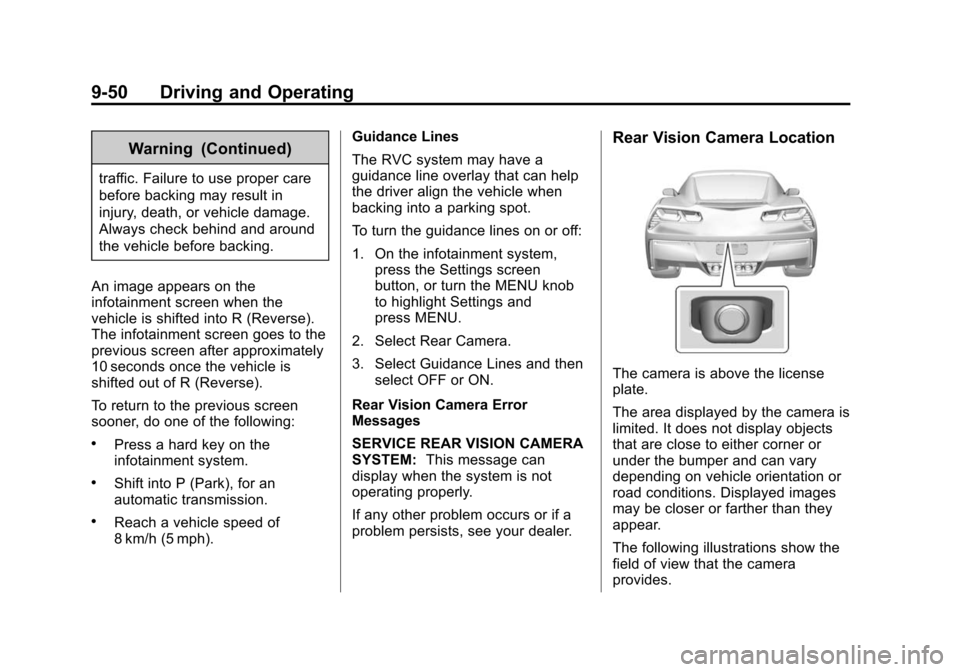
Rear Vision Camera Location
The camera is above the license
plate.
The area displayed by the camera is
limited. It does not display objects
that are close to either corner or
under the bumper and can vary
depending on vehicle orientation or
road conditions. Displayed images
may be closer or farther than they
appear.
The following illustrations show the
field of view that the camera
provides.
Page 230 of 376
Black plate (2,1)Chevrolet Corvette Owner Manual (GMNA-Localizing-U.S./Canada/Mexico-
6007198) - 2014 - CRC - 2/5/14
10-2 Vehicle Care
When It Is Time for NewTires . . . . . . . . . . . . . . . . . . . . . . 10-58
Buying New Tires . . . . . . . . . . . 10-59
Different Size Tires and Wheels . . . . . . . . . . . . . . . . . . . 10-60
Uniform Tire Quality Grading . . . . . . . . . . . . . . . . . . . 10-61
Wheel Alignment and Tire Balance . . . . . . . . . . . . . . . . . . . 10-62
Wheel Replacement . . . . . . . . 10-63
Tire Chains . . . . . . . . . . . . . . . . . 10-64
If a Tire Goes Flat . . . . . . . . . . 10-65
Tire Sealant and Compressor Kit . . . . . . . . . . . 10-66
Storing the Tire Sealant and Compressor Kit . . . . . . . . . . . 10-74
Jump Starting
Jump Starting . . . . . . . . . . . . . . 10-74
Towing the Vehicle
Towing the Vehicle . . . . . . . . . 10-77
Recreational VehicleTowing . . . . . . . . . . . . . . . . . . . . 10-77
Appearance Care
Exterior Care . . . . . . . . . . . . . . . 10-78
Interior Care . . . . . . . . . . . . . . . . 10-83
Floor Mats . . . . . . . . . . . . . . . . . . 10-86
General Information
For service and parts needs, visit
your dealer. You will receive
genuine GM parts and GM-trained
and supported service people.
Genuine GM parts have one of
these marks:
California Proposition
65 Warning
Most motor vehicles, including this
one, contain and/or emit chemicals
known to the State of California to cause cancer and birth defects or
other reproductive harm. Engine
exhaust, many parts and systems,
many fluids, and some component
wear by-products contain and/or
emit these chemicals.
California Perchlorate
Materials Requirements
Certain types of automotive
applications, such as airbag
initiators, safety belt pretensioners,
and lithium batteries contained in
Remote Keyless Entry transmitters,
may contain perchlorate materials.
Special handling may be necessary.
For additional information, see
www.dtsc.ca.gov/hazardouswaste/
perchlorate.
Accessories and
Modifications
Adding non‐dealer accessories or
making modifications to the vehicle
can affect vehicle performance and
safety, including such things as
airbags, braking, stability, ride and
Page 310 of 376
Black plate (82,1)Chevrolet Corvette Owner Manual (GMNA-Localizing-U.S./Canada/Mexico-
6007198) - 2014 - CRC - 2/5/14
10-82 Vehicle Care
Caution (Continued)
or sodium chloride. These
chlorides are used on roads for
conditions such as ice and dust.
Always wash the chrome with
soap and water after exposure.
{Caution
To avoid surface damage, do not
use strong soaps, chemicals,
abrasive polishes, cleaners,
brushes, or cleaners that contain
acid on aluminum or
chrome-plated wheels. Use only
approved cleaners. Also, never
drive a vehicle with aluminum or
chrome-plated wheels through an
automatic car wash that uses
silicone carbide tire cleaning
brushes. Damage could occur
and the repairs would not be
covered by the vehicle warranty.
Steering, Suspension, and
Chassis Components
Visually inspect steering,
suspension, and chassis
components for damaged, loose,
or missing parts or signs of wear at
least once a year.
Inspect power steering for proper
hook-up, binding, leaks, cracks,
chafing, etc.
Visually check constant velocity joint
boots and axle seals for leaks.
Body Component Lubrication
Lubricate all key lock cylinders,
hood hinges and liftgate hinges,
unless the components are plastic.
Applying silicone grease on
weatherstrips with a clean cloth will
make them last longer, seal better,
and not stick or squeak.
Underbody Maintenance
At least twice a year, spring and fall,
Use plain water to flush dirt and
debris from the vehicle's underbody.
Your dealer or an underbody carwashing system can do this. If not
removed, rust and corrosion can
develop.
Composite Springs
{Caution
Do not use acidic or corrosive
cleaning products, engine
degreasers, or aluminum cleaning
agents on fiberglass springs as it
may cause damage. The repairs
would not be covered by the
vehicle warranty. Use only
approved cleaners.
Body Damage
If the vehicle is damaged and
requires sheet metal repair or
replacement, make sure the body
repair shop applies anti-corrosion
material to parts repaired or
replaced to restore corrosion
protection.
Page 329 of 376
Black plate (13,1)Chevrolet Corvette Owner Manual (GMNA-Localizing-U.S./Canada/Mexico-
6007198) - 2014 - CRC - 2/5/14
Service and Maintenance 11-13
UsageFluid/Lubricant
Chassis Lubrication Chassis Lubricant (GM Part No. 12377985, in Canada 88901242) or lubricant meeting requirements of NLGI #2, Category LB or GC-LB.
Automatic Transmission DEXRON
®-VI Automatic Transmission Fluid.
Manual Transmission See your dealer. Key Lock Cylinders Multi-Purpose Lubricant, Superlube (GM Part No. 12346241, in Canada 10953474).
Rear Axle DEXRON
®LS Gear Oil. See Rear Axle on page 10-31 for information on
checking the fluid.
Hood Latch Assembly, Secondary Latch, Pivots, Spring Anchor, and Release Pawl Lubriplate Lubricant Aerosol (GM Part No. 89021668, in Canada 89021674)
or lubricant meeting requirements of NLGI #2, Category LB or GC-LB.
Hood and Door Hinges Multi-Purpose Lubricant, Superlube (GM Part No. 12346241, in Canada 10953474).
Weatherstrip Conditioning Weatherstrip Lubricant (GM Part No. 3634770, in Canada 10953518) or Dielectric Silicone Grease (GM Part No. 12345579, in Canada 10953481).
Page 352 of 376
Black plate (14,1)Chevrolet Corvette Owner Manual (GMNA-Localizing-U.S./Canada/Mexico-
6007198) - 2014 - CRC - 2/5/14
13-14 Customer Information
These data can help provide a
better understanding of the
circumstances in which crashes and
injuries occur. NOTE: EDR data are
recorded by your vehicle only if a
non-trivial crash situation occurs; no
data are recorded by the EDR under
normal driving conditions and no
personal data (e.g., name, gender,
age, and crash location) are
recorded. However, other parties,
such as law enforcement, could
combine the EDR data with the type
of personally identifying data
routinely acquired during a crash
investigation.
To read data recorded by an EDR,
special equipment is required, and
access to the vehicle or the EDR is
needed. In addition to the vehicle
manufacturer, other parties, such as
law enforcement, that have the
special equipment, can read the
information if they have access to
the vehicle or the EDR.
GM will not access this data or
share it with others except: with the
consent of the vehicle owner or,if the vehicle is leased, with the
consent of the lessee; in response
to an official request by police or
similar government office; as part of
GM's defense of litigation through
the discovery process; or, as
required by law. Data that GM
collects or receives may also be
used for GM research needs or may
be made available to others for
research purposes, where a need is
shown and the data is not tied to a
specific vehicle or vehicle owner.
OnStar®
If the vehicle is equipped with
OnStar®and has an active
subscription, additional data may be
collected through the OnStar
system. This includes information
about the vehicle’s operation;
collisions involving the vehicle; the
use of the vehicle and its features;
and, in certain situations, the
location and approximate GPS
speed of the vehicle. Refer to the OnStar Terms and Conditions and
Privacy Statement on the OnStar
website.
Infotainment System
If the vehicle is equipped with a
navigation system as part of the
infotainment system, use of the
system may result in the storage of
destinations, addresses, telephone
numbers, and other trip information.
See the infotainment manual for
information on stored data and for
deletion instructions.
Radio Frequency
Identification (RFID)
RFID technology is used in some
vehicles for functions such as tire
pressure monitoring and ignition
system security, as well as in
connection with conveniences such
as Remote Keyless Entry (RKE)
transmitters for remote door locking/
unlocking and starting, and
in-vehicle transmitters for garage
door openers. RFID technology in
Page 356 of 376
Black plate (2,1)Chevrolet Corvette Owner Manual (GMNA-Localizing-U.S./Canada/Mexico-
6007198) - 2014 - CRC - 2/5/14
14-2 OnStar
For the automatic dimming rearview
mirror, the status is provided
through the Display on Demand
Icons.
.Three Color Icons: The system
is enabled and active.
.No Icons: The vehicle is in
motion or the OnStar
subscription is inactive
.Blinking: Button has been
pressed.
.Solid: On a call.
.~(Fault Icon On): Indicates a
problem.
OnStar Commands
Push
|or call 1-888-4-ONSTAR
(1-888-466-7827) to speak to an
Advisor.
Press
Qto:
.Make a call, end a call,
or answer an incoming call.
.Give OnStar Hands-Free Calling
voice commands.
.Give OnStar Turn-by-Turn
Navigation voice commands.
Requires the available Directions
and Connections service plan.
Press
|to connect to a live
Advisor to:
.Verify account information or
update contact information.
.Get driving directions. Requires
the available Directions and
Connections service plan.
.Receive On-Demand
Diagnostics for a check of the
vehicle’s key operating systems.
.Receive Roadside Assistance.
Press the OnStar Emergency button
Uto get a priority connection to
an Emergency Advisor available
24/7 to:
.Get help for an emergency.
.Be a Good Samaritan or
respond to an AMBER Alert.
.Get assistance in severe
weather or other crisis and get
evacuation routes.
OnStar Services
Emergency
With Automatic Crash Response,
the built-in system can automatically
connect to help in most crashes,
even if help cannot be requested.
Press
Uto connect to an
Emergency Advisor. GPS
technology is used to identify the
vehicle location and can provide
critical information to emergency
personnel. The Advisor is also
trained to offer critical assistance in
emergency situations.
Security
OnStar provides services like Stolen
Vehicle Assistance, Remote Ignition
Block, and Roadside Assistance,
if equipped. OnStar can unlock the
vehicle doors remotely, if equipped
with automatic door locks, and can
help police locate the vehicle if it is
stolen.