steering CHEVROLET CORVETTE 2020 Owner's Guide
[x] Cancel search | Manufacturer: CHEVROLET, Model Year: 2020, Model line: CORVETTE, Model: CHEVROLET CORVETTE 2020Pages: 336, PDF Size: 5.21 MB
Page 117 of 336
Chevrolet Corvette Owner Manual (GMNA-Localizing-U.S./Canada/Mexico-
12470550) - 2020 - CRC - 4/23/20
116 Instruments and Controls
Vehicle
Personalization
The following are all possible
vehicle personalization features.
Depending on the vehicle, some
may not be available.
For System, Apps, and Personal
features and functions, see
“Settings”in the infotainment
manual.
To access the vehicle
personalization menu:
1. Touch the Settings icon on the Home Page of the infotainment
display.
2. Touch Vehicle to display a list of available options.
3. Touch to select the desired feature setting.
4. Touch
9orRto turn a feature
off or on.
5. Touch
zto go to the top level
of the Settings menu.
The menu may contain the
following:
Z-Mode
Z-Mode cluster and HUD themes
can be set in the cluster.
Touch and the following may
display:
. Engine Sound
. Steering
. Suspension
. Powertrain
. Brake Response
Engine Sound
Touch Stealth, Tour, Sport, or Track.
See Driver Mode Control 0184.
Steering
Touch Tour, Sport, or Track.
See Driver Mode Control 0184.
Suspension
Touch Tour, Sport, or Track.
See Driver Mode Control 0184.
Powertain
Touch Normal, Sport, Track,
or Weather. See
Driver Mode Control 0184.
Brake Response
Touch Tour, Sport, or Track.
See Driver Mode Control 0184.
My Mode
My Mode cluster and HUD themes
can be set in the cluster.
Touch and the following may
display:
.
Engine Sound
. Steering
. Suspension
. Brake Response
Engine Sound
Touch Stealth, Tour, Sport, or Track.
See Driver Mode Control 0184.
Steering
Touch Tour, Sport, or Track.
See Driver Mode Control 0184.
Suspension
Touch Tour, Sport, or Track.
Page 118 of 336
Chevrolet Corvette Owner Manual (GMNA-Localizing-U.S./Canada/Mexico-
12470550) - 2020 - CRC - 4/23/20
Instruments and Controls 117
SeeDriver Mode Control 0184.
Brake Response
Touch Tour, Sport, or Track.
See Driver Mode Control 0184.
Climate and Air Quality
Touch and the following may
display:
.
Auto Fan Speed
. Auto Cooled Seats
. Auto Heated Seats
. Auto Defog
. Auto Rear Defog
Auto Fan Speed
This setting specifies the amount of
airflow when the climate control fan
setting is Auto Fan.
Touch Low, Medium, or High.
Auto Cooled Seats
When enabled, this feature will
automatically activate the ventilated
seats at the level required by the
interior temperature. See Heated
and Ventilated Front Seats 053. Touch Off or On.
Auto Heated Seats
This setting automatically turns on
and regulates the heated seats
when the cabin temperature is cool.
The auto heated seats can be
turned off by using the heated seat
buttons on the center stack. See
Heated and Ventilated Front Seats
0
53.
If equipped with Auto Heated
Steering Wheel, this feature will turn
on when the Auto Heated Seats
turn on.
Touch Off or On.
Auto Defog
This setting, when set to On, will
automatically react to temperature
and humidity conditions that may
cause fogging.
Touch Off or On.
Auto Rear Defog
This setting automatically turns the
rear window defogger on when it is
cold outside.
Touch Off or On.
Collision / Detection Systems
Touch and the following may
display:
. Park Assist
. Side Blind Zone Alert
. Rear Cross Traffic Alert
Park Assist
This allows the feature to be turned
on or off. See Assistance Systems
for Parking or Backing 0200.
Touch Off or On.
Side Blind Zone Alert
This allows this feature to be turned
on or off. See Side Blind Zone Alert
(SBZA) 0202.
Touch Off or On.
Rear Cross Traffic Alert
This setting specifies if an alert will
display when the vehicle detects
approaching rear cross traffic when
in R (Reverse). See Assistance
Systems for Parking or Backing
0 200.
Touch Off or On.
Page 120 of 336
Chevrolet Corvette Owner Manual (GMNA-Localizing-U.S./Canada/Mexico-
12470550) - 2020 - CRC - 4/23/20
Instruments and Controls 119
.Remote Start Auto Cool Seats
. Remote Start Auto Heat Seats
. Remote Window Operation
. Passive Door Unlock
. Passive Door Lock
. Remote Left in Vehicle Alert
. Remote Removed from Vehicle
Alert
Remote Unlock Light Feedback
This setting flashes the exterior
lamps when the vehicle is unlocked
with the remote key.
Touch Off or Flash Lights.
Remote Lock Feedback
This setting specifies how the
vehicle responds when the vehicle
is locked with the remote key.
Touch Off, Lights and Horn, Lights
Only, or Horn Only.
Remote Door Unlock
This setting specifies whether all
doors, or just the driver door, unlock
when pressing
Kon the remote key. Touch All Doors or Driver Door.
Remote Start Auto Cool Seats
This setting automatically turns on
the ventilated seats when using the
remote start function on warm days.
See
Heated and Ventilated Front
Seats 053 and
Remote Vehicle Start 015.
Touch Off or On.
Remote Start Auto Heat Seats
This setting automatically turns on
the heated seats when using the
remote start function on cold days.
See Heated and Ventilated Front
Seats 053 and
Remote Vehicle Start 015.
If equipped with Auto Heated
Steering Wheel, this feature will turn
on when the Remote Start Auto
Heat Seats turn on.
Touch Off or On. Remote Window Operation
When enabled, this feature allows
the windows to be opened remotely
when pressing and holding
Kon the
remote key. See Remote Keyless
Entry (RKE) System Operation 09.
Touch Off or On.
Passive Door Unlock
This setting specifies which doors
unlock when using the button on the
driver door handle to unlock the
vehicle.
Touch Off, All Doors, or Driver
Door Only.
Passive Door Lock
This setting specifies if the vehicle
will automatically lock, or lock and
provide an alert after all the doors
are closed, and you walk away from
the vehicle with the remote key. See
Remote Keyless Entry (RKE)
System Operation 09.
Touch Off, On with Horn
Chirp, or On.
Page 121 of 336
Chevrolet Corvette Owner Manual (GMNA-Localizing-U.S./Canada/Mexico-
12470550) - 2020 - CRC - 4/23/20
120 Instruments and Controls
Remote Left in Vehicle Alert
This feature sounds an alert when
the remote key is left in the vehicle.
Touch Off or On.
Remote Removed from Vehicle
Alert
This feature beeps the horn 3 times
when exiting a running vehicle with
the remote key.
Touch Off or On.
Ride Height
Touch and the following may
display:
Location Based Auto Lift
This setting enables the Front Lift to
automatically raise or lower when
the vehicle is near GPS stored
locations. SeeFront Lift System
0 191.
Touch Off or On.
Seating Position
Touch and the following may
display:
. Seat Entry Memory
. Seat Exit Memory
Seat Entry Memory
This feature automatically recalls
the previously stored 1 or 2 button
positions when the ignition is
changed from off to on. See
Memory Seats 050.
Touch Off or On.
Seat Exit Memory
This feature automatically recalls
the previously stored exit button
positions when the ignition is
changed from on to off if the driver
door is open or opened. See
Memory Seats 050.
Touch Off or On.
Teen Driver
See “Teen Driver” under“Settings”
in the infotainment manual.
Valet Mode
This will lock the infotainment
system and steering wheel controls.
It may also limit access to vehicle
storage locations, if equipped.
To enable valet mode:
1. Enter a four-digit code on the keypad.
2. Touch Enter to go to the confirmation screen.
3. Re-enter the four-digit code.
Touch Lock or Unlock to lock or
unlock the system. Touch Back to
go back to the previous menu.
To configure the Performance Data
Recorder (PDR) to automatically
record in Valet mode, see “Settings”
in Performance Data Recorder
(PDR) 0132.
Page 136 of 336
Chevrolet Corvette Owner Manual (GMNA-Localizing-U.S./Canada/Mexico-
12470550) - 2020 - CRC - 4/23/20
Infotainment System 135
.Lateral G-Force Graphic: Left
and Right G-Forces are
displayed. The graphic fills to the
left or the right depending on the
measure value. The measured
G-Force displays as a number at
the top of the graphic.
. Event Odometer: This displays
the distance driven since the
recording began.
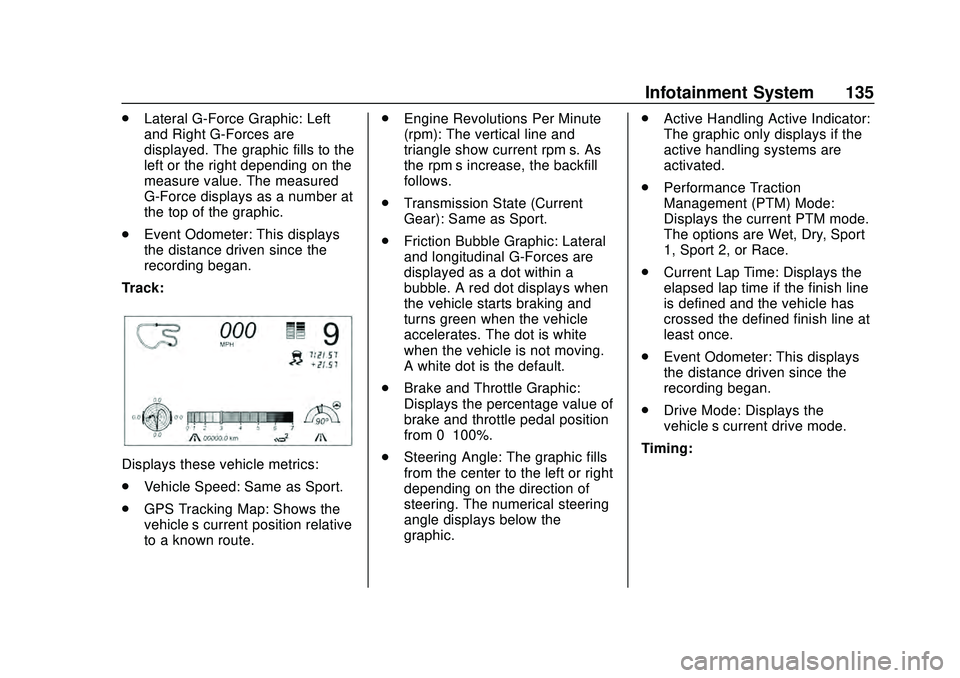
Track:
Displays these vehicle metrics:
. Vehicle Speed: Same as Sport.
. GPS Tracking Map: Shows the
vehicle’s current position relative
to a known route. .
Engine Revolutions Per Minute
(rpm): The vertical line and
triangle show current rpm’s. As
the rpm’ s increase, the backfill
follows.
. Transmission State (Current
Gear): Same as Sport.
. Friction Bubble Graphic: Lateral
and longitudinal G-Forces are
displayed as a dot within a
bubble. A red dot displays when
the vehicle starts braking and
turns green when the vehicle
accelerates. The dot is white
when the vehicle is not moving.
A white dot is the default.
. Brake and Throttle Graphic:
Displays the percentage value of
brake and throttle pedal position
from 0–100%.
. Steering Angle: The graphic fills
from the center to the left or right
depending on the direction of
steering. The numerical steering
angle displays below the
graphic. .
Active Handling Active Indicator:
The graphic only displays if the
active handling systems are
activated.
. Performance Traction
Management (PTM) Mode:
Displays the current PTM mode.
The options are Wet, Dry, Sport
1, Sport 2, or Race.
. Current Lap Time: Displays the
elapsed lap time if the finish line
is defined and the vehicle has
crossed the defined finish line at
least once.
. Event Odometer: This displays
the distance driven since the
recording began.
. Drive Mode: Displays the
vehicle’s current drive mode.
Timing:
Page 143 of 336
Chevrolet Corvette Owner Manual (GMNA-Localizing-U.S./Canada/Mexico-
12470550) - 2020 - CRC - 4/23/20
142 Climate Controls
Avoid using recirculation for long
periods of time in cold or damp
conditions. Using recirculation in
cold or damp conditions can result
in window fogging.
A/C :Press to turn the air
conditioning on or off. An indicator
light comes on to show that the air
conditioning is enabled. If the fan is
turned off, the air conditioner will not
run. The A/C light will stay on even
if the outside temperatures are
below freezing. If the A/C is turned
off, the air temperature coming
through the climate control system
may be warmer than the ambient
temperature. It is recommended to
use auto climate control to maintain
comfort.
Rear Window Defogger
1REAR : If equipped, press to
turn the rear window defogger on or
off. An indicator light on the button
comes on to show that the rear
window defogger is on. The rear window defogger only
works when the engine is running.
The defogger turns off if the ignition
is turned off or to ACC/
ACCESSORY.
If equipped with heated outside
mirrors, press
1REAR to turn
them on or off. See Heated Mirrors
0 31.
Caution
Using a razor blade or sharp
object to clear the inside rear
window can damage the rear
window defogger. Repairs would
not be covered by the vehicle
warranty. Do not clear the inside
rear window with sharp objects. Remote Start Climate Control
Operation :
If equipped with remote
start, the climate control system
may run when the vehicle is started
remotely. If equipped with heated or
ventilated seats or a heated steering
wheel, these features may come on
during a remote start. See Remote
Vehicle Start 015, Heated and
Ventilated Front Seats 053, and
Heated Steering Wheel 087.
Page 146 of 336
Chevrolet Corvette Owner Manual (GMNA-Localizing-U.S./Canada/Mexico-
12470550) - 2020 - CRC - 4/23/20
Driving and Operating 145
Driving and
Operating
Driving Information
Driving for Better FuelEconomy . . . . . . . . . . . . . . . . . . . . 146
Distracted Driving . . . . . . . . . . . . 146
Defensive Driving . . . . . . . . . . . . . 147
Drunk Driving . . . . . . . . . . . . . . . . . 147
Control of a Vehicle . . . . . . . . . . . 148
Braking . . . . . . . . . . . . . . . . . . . . . . . 148
Steering . . . . . . . . . . . . . . . . . . . . . . 148
Off-Road Recovery . . . . . . . . . . . 149
Loss of Control . . . . . . . . . . . . . . . 150
Track Events and Competitive Driving (Z51 Only) . . . . . . . . . . 150
Driving on Wet Roads . . . . . . . . 156
Hill and Mountain Roads . . . . . 157
Winter Driving . . . . . . . . . . . . . . . . 158
If the Vehicle Is Stuck . . . . . . . . 159
Vehicle Load Limits . . . . . . . . . . . 160
Starting and Operating
New Vehicle Break-In . . . . . . . . . 163
Front Air Dam (and Splitter) . . . . . . . . . . . . . . . . . . . . . 164
Composite Materials . . . . . . . . . . 164
Ignition Positions . . . . . . . . . . . . . 165 Starting the Engine . . . . . . . . . . . 166
Retained Accessory
Power (RAP) . . . . . . . . . . . . . . . . 168
Shifting Into Park . . . . . . . . . . . . . 168
Shifting out of Park . . . . . . . . . . . 169
Parking over Things That Burn . . . . . . . . . . . . . . . . . . . 169
Active Fuel Management . . . . . 169
Extended Parking . . . . . . . . . . . . 169
Engine Exhaust
Engine Exhaust . . . . . . . . . . . . . . 170
Running the Vehicle While Parked . . . . . . . . . . . . . . . . . . . . . . 171
Dual Clutch Transmission
Dual Clutch Transmission . . . . 171
Manual Mode . . . . . . . . . . . . . . . . . 174
Brakes
Electric Brake Boost . . . . . . . . . . 179
Antilock BrakeSystem (ABS) . . . . . . . . . . . . . . . 179
Electric Parking Brake . . . . . . . . 179
Brake Assist . . . . . . . . . . . . . . . . . . 181
Hill Start Assist (HSA) . . . . . . . . 181
Ride Control Systems
Traction Control/Electronic Stability Control . . . . . . . . . . . . . 182
Hill Rollback Control . . . . . . . . . . 184
Driver Mode Control . . . . . . . . . . 184 Front Lift System . . . . . . . . . . . . . 191
Competitive Driving Mode . . . . 192
Limited-Slip Differential
(without Z51) . . . . . . . . . . . . . . . . 195
Limited-Slip Differential
(with Z51) . . . . . . . . . . . . . . . . . . . 195
Cruise Control
Cruise Control . . . . . . . . . . . . . . . . 196
Driver Assistance Systems
Driver Assistance Systems . . . 199
Assistance Systems forParking or Backing . . . . . . . . . . 200
Side Blind Zone Alert (SBZA) . . . . . . . . . . . . . . . . 202
Fuel
Top Tier Fuel . . . . . . . . . . . . . . . . . 204
Recommended Fuel . . . . . . . . . . 204
Prohibited Fuels . . . . . . . . . . . . . . 205
Fuels in Foreign Countries . . . 205
Fuel Additives . . . . . . . . . . . . . . . . 205
Filling the Tank . . . . . . . . . . . . . . . 205
Filling a Portable FuelContainer . . . . . . . . . . . . . . . . . . . 207
Trailer Towing
General TowingInformation . . . . . . . . . . . . . . . . . . 208
Page 148 of 336
Chevrolet Corvette Owner Manual (GMNA-Localizing-U.S./Canada/Mexico-
12470550) - 2020 - CRC - 4/23/20
Driving and Operating 147
governments have enacted laws
regarding driver distraction. Become
familiar with the local laws in
your area.
To avoid distracted driving, keep
your eyes on the road, keep your
hands on the steering wheel, and
focus your attention on driving.
.Do not use a phone in
demanding driving situations.
Use a hands-free method to
place or receive necessary
phone calls.
. Watch the road. Do not read,
take notes, or look up
information on phones or other
electronic devices.
. Designate a front seat
passenger to handle potential
distractions.
. Become familiar with vehicle
features before driving, such as
programming favorite radio
stations and adjusting climate
control and seat settings.
Program all trip information into
any navigation device prior to
driving. .
Wait until the vehicle is parked
to retrieve items that have fallen
to the floor.
. Stop or park the vehicle to tend
to children.
. Keep pets in an appropriate
carrier or restraint.
. Avoid stressful conversations
while driving, whether with a
passenger or on a cell phone.
{Warning
Taking your eyes off the road too
long or too often could cause a
crash resulting in injury or death.
Focus your attention on driving.
Refer to the infotainment manual for
more information on using that
system and the navigation system,
if equipped, including pairing and
using a cell phone.
Defensive Driving
Defensive driving means “always
expect the unexpected.” The first
step in driving defensively is to wear
the seat belt. See Seat Belts055.
. Assume that other road users
(pedestrians, bicyclists, and
other drivers) are going to be
careless and make mistakes.
Anticipate what they may do and
be ready.
. Allow enough following distance
between you and the driver in
front of you.
. Focus on the task of driving.
Drunk Driving
Death and injury associated with
drinking and driving is a global
tragedy.
{Warning
Drinking and then driving is very
dangerous. Your reflexes,
perceptions, attentiveness, and
(Continued)
Page 149 of 336
Chevrolet Corvette Owner Manual (GMNA-Localizing-U.S./Canada/Mexico-
12470550) - 2020 - CRC - 4/23/20
148 Driving and Operating
Warning (Continued)
judgment can be affected by even
a small amount of alcohol. You
can have a serious—or even
fatal —collision if you drive after
drinking.
Do not drink and drive or ride with
a driver who has been drinking.
Ride home in a cab; or if you are
with a group, designate a driver
who will not drink.
Control of a Vehicle
Braking, steering, and accelerating
are important factors in helping to
control a vehicle while driving.
Braking
Braking action involves perception
time and reaction time. Deciding to
push the brake pedal is perception
time. Actually doing it is
reaction time. Average driver reaction time is
about three-quarters of a second. In
that time, a vehicle moving at
100 km/h (60 mph) travels 20 m
(66 ft), which could be a lot of
distance in an emergency.
Helpful braking tips to keep in mind
include:
.
Keep enough distance between
you and the vehicle in front
of you.
. Avoid needless heavy braking.
. Keep pace with traffic.
If the engine ever stops or a brake
fault occurs, the brakes may lose
power assist. More effort will be
required to stop the vehicle. It may
take longer to stop.
Steering
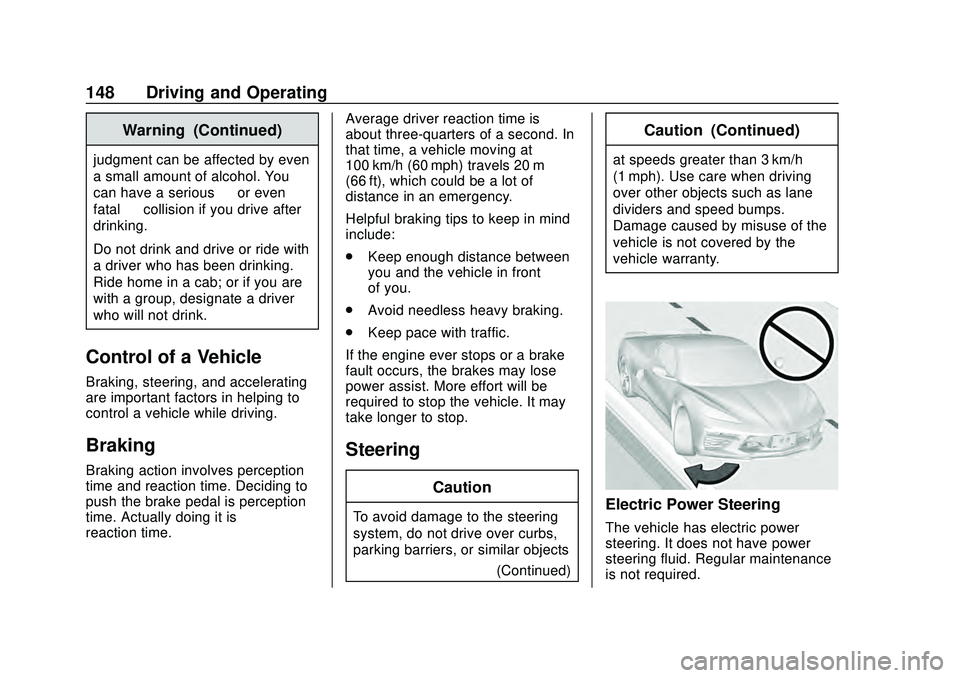
Caution
To avoid damage to the steering
system, do not drive over curbs,
parking barriers, or similar objects (Continued)
Caution (Continued)
at speeds greater than 3 km/h
(1 mph). Use care when driving
over other objects such as lane
dividers and speed bumps.
Damage caused by misuse of the
vehicle is not covered by the
vehicle warranty.
Electric Power Steering
The vehicle has electric power
steering. It does not have power
steering fluid. Regular maintenance
is not required.
Page 150 of 336
Chevrolet Corvette Owner Manual (GMNA-Localizing-U.S./Canada/Mexico-
12470550) - 2020 - CRC - 4/23/20
Driving and Operating 149
If power steering assist is lost due
to a system malfunction, the vehicle
can be steered, but may require
increased effort.
If the steering assist is used for an
extended period of time while the
vehicle is not moving, power assist
may be reduced.
If the steering wheel is turned until it
reaches the maximum rotation and
is held at that position for an
extended period of time, power
steering assist may be reduced.
Normal use of the power steering
assist should return when the
system cools down.
See your dealer if there is a
problem.
Dynamic Rack Travel
If equipped with Magnetic Ride
Control, Dynamic Rack Travel
(DRT) is a steering system feature
which enhances driving by providing
additional maximum steering wheel
rotation to allow a tighter turning
radius during low speed driving
conditions. If the vehicle speedincreases or if the suspension
encounters significant wheel travel,
such as a driveway, while at
maximum steering rotation, DRT
may gently push the steering back a
small amount to prevent the front
tires from contacting the vehicle.
This is normal operation. There is
no customer interface or display for
this feature. DRT is not available
when in Track Mode.
Curve Tips
.
Take curves at a reasonable
speed.
. Reduce speed before entering a
curve.
. Maintain a reasonable and
steady speed through the curve.
. Wait until the vehicle is out of
the curve before accelerating
gently into the straightaway.
Steering in Emergencies
.
There are some situations when
steering around a problem may
be more effective than braking. .
Holding both sides of the
steering wheel allows you to turn
180 degrees without removing
a hand.
. The Antilock Brake System
(ABS) allows steering while
braking.
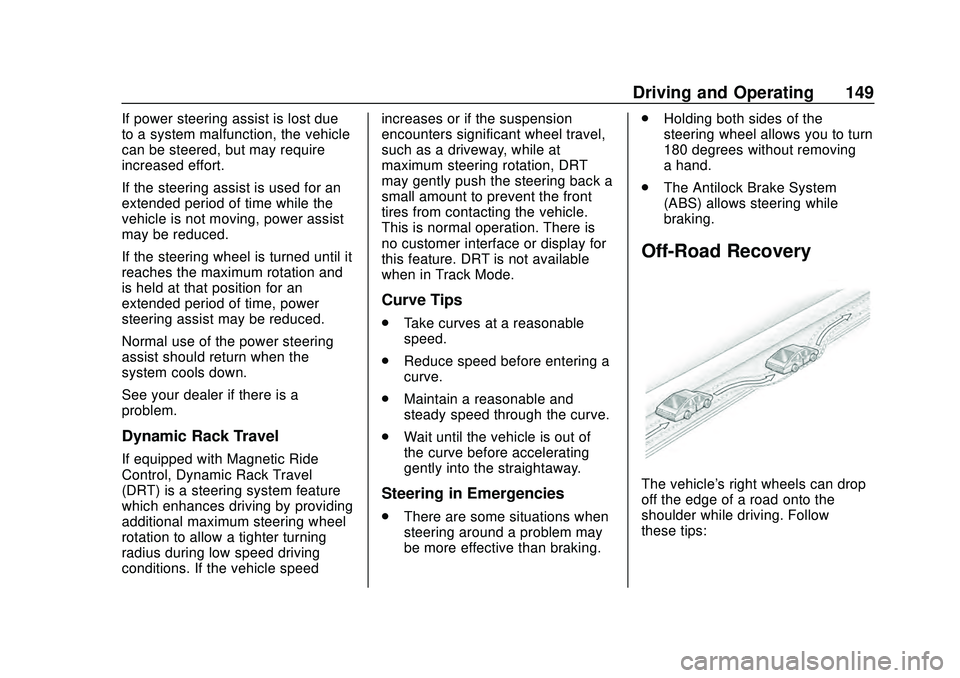
Off-Road Recovery
The vehicle's right wheels can drop
off the edge of a road onto the
shoulder while driving. Follow
these tips: