steering CHEVROLET CORVETTE 2020 Service Manual
[x] Cancel search | Manufacturer: CHEVROLET, Model Year: 2020, Model line: CORVETTE, Model: CHEVROLET CORVETTE 2020Pages: 336, PDF Size: 5.21 MB
Page 191 of 336
Chevrolet Corvette Owner Manual (GMNA-Localizing-U.S./Canada/Mexico-
12470550) - 2020 - CRC - 4/23/20
190 Driving and Operating
‐Not upshifting when the
accelerator is released to
avoid unnecessary shifts if the
accelerator is re-applied
‐ Recognizing sporty driving and
anticipate upcoming corners
with the appropriate gear
selection entering and exiting
. Driver Modes
‐Driver influenced changes are
effective in all driving modes,
however the aggressiveness
of the transmission response
will increase between Tour,
Sport, and Track Modes
respectively.
Active Fuel Management (engine
cylinder shuts off)
. Normal with Dual Clutch
Transmission: The engine uses
8-cylinder mode when
accelerating, but changes to
4-cylinder mode when coasting.
Active Fuel Management is a preset
of Powertrain and cannot be
modified or changed independently. Engine Sound
Changes when the variable exhaust
valves open.
Steering (Assist Effort)
Adjusts from a lighter steering feel
to reduced assist for more
steering feel.
Magnetic Ride Control (if
equipped)
Adjusts the shock dampening
firmness based on driving
conditions to improve comfort and
performance.
Driver Mode Customization
The vehicle is equipped to modify
the following vehicle settings base
on vehicle content. Through the
center stack, under Vehicle
Settings, select Drive Mode to
customize and personalize My
Mode and/or Z-Mode.
Engine Sound:
Engine Sound adjusts the volume of
engine noise. Setting range from
quietest to loudest volume as you
move from Stealth through Track..
Stealth, Tour, Sport, Track
Steering:
This setting adjusts the effort
required to turn the steering wheel.
The steering wheel offers better
feedback but requires more effort as
you move from Tour to Track.
. Tour, Sport, Track
Suspension:
This setting adjusts the firmness of
the suspension in the vehicle.
Suspension adjust stiffness of the
shocks and / or springs. The ride is
more comfortable at lower settings
and is stiffer at higher settings for
better control.
. Tour, Sport, Track
Powertrain:
This setting adjusts the throttle
response, gear shifting and engine
performance. An increased throttle
response enhances the acceleration
feel as you move toward Track, but
with a comfort trade-off due to more
aggressive gear shifting.
. Normal, Tour, Sport, Track
Page 192 of 336
Chevrolet Corvette Owner Manual (GMNA-Localizing-U.S./Canada/Mexico-
12470550) - 2020 - CRC - 4/23/20
Driving and Operating 191
Brake Response:
This setting adjusts the brake pedal
response. Settings range from a
slower response for more
comfortable driving to the quickest
response for quicker deceleration.
Brake pedal travel decreases and
caliper pressure increases as you
move from Tour to Sport. Track
allows for improved pedal precision
at higher decelerations for high
performance driving.
.Tour, Sport, Track
Display:
This setting adjusts the cluster
display theme (this setting is only
configured through the cluster using
the steering wheel controls).
. Tour, Sport, Track, Weather (and
any informational tiles set-up).
Front Lift System
A two-position lift actuator (one per
damper) with 35 mm (1.5 in) of
stroke will hydraulically raise the
front of the vehicle to provide
approximately 50 mm (2 in) of increased clearance in
approximately three seconds (height
and time will vary by vehicle). The
Front Lift System will allow you to lift
the front of the vehicle to enter a
driveway, driving over curbs, speed
bumps or onto ramps or a trailer.
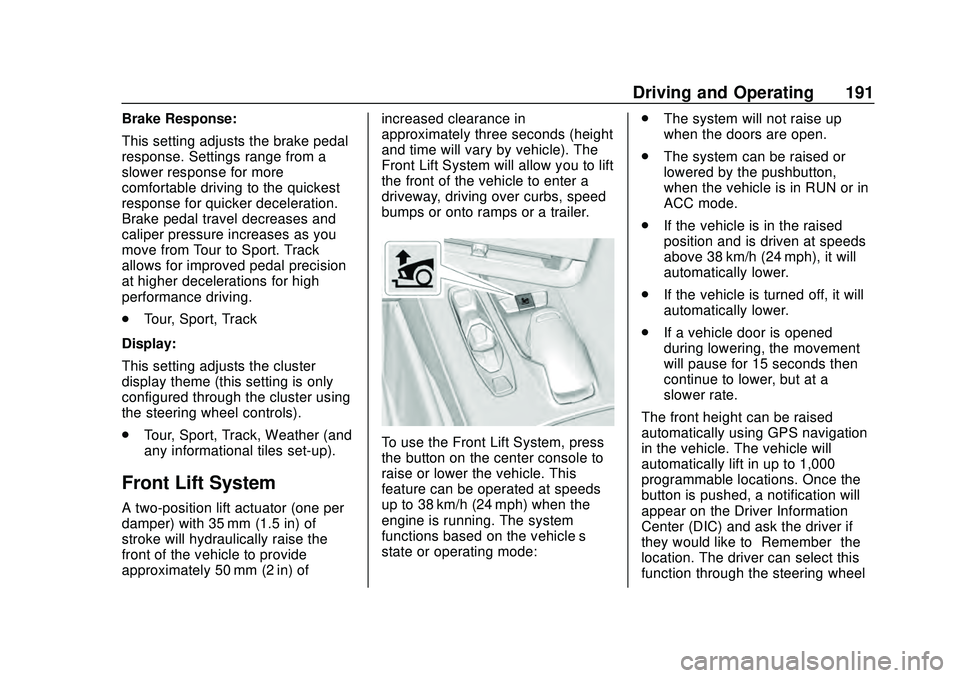
To use the Front Lift System, press
the button on the center console to
raise or lower the vehicle. This
feature can be operated at speeds
up to 38 km/h (24 mph) when the
engine is running. The system
functions based on the vehicle’
s
state or operating mode: .
The system will not raise up
when the doors are open.
. The system can be raised or
lowered by the pushbutton,
when the vehicle is in RUN or in
ACC mode.
. If the vehicle is in the raised
position and is driven at speeds
above 38 km/h (24 mph), it will
automatically lower.
. If the vehicle is turned off, it will
automatically lower.
. If a vehicle door is opened
during lowering, the movement
will pause for 15 seconds then
continue to lower, but at a
slower rate.
The front height can be raised
automatically using GPS navigation
in the vehicle. The vehicle will
automatically lift in up to 1,000
programmable locations. Once the
button is pushed, a notification will
appear on the Driver Information
Center (DIC) and ask the driver if
they would like to “Remember”the
location. The driver can select this
function through the steering wheel
Page 193 of 336
Chevrolet Corvette Owner Manual (GMNA-Localizing-U.S./Canada/Mexico-
12470550) - 2020 - CRC - 4/23/20
192 Driving and Operating
controls, seeSteering Wheel
Controls 087. The driver can also
delete stored locations for the
automatic lift. If the vehicle is raised
automatically using GPS, it will
automatically lower once the vehicle
is located about 60 meters (197 feet)
from the programmed location.
Drivers can disable this function by
turning off GPS location through
their vehicle Front Lift System will
still operate, but only by using the
pushbutton command, and the “Auto
Lift Location Remembered”
confirmation message will not
display.
The Front Lift System can also be
used in accessory mode. Put the
vehicle in ACC/ACCESSORY mode,
then press and hold the button on
the center console for 10
consecutive seconds to
automatically raise the vehicle.
The DIC may display the message
“Lift System Unavailable” if the
following occur:
. Any doors are ajar.
. The hood is open. .
The vehicle is moving over
38 km/h (24 mph).
. Too many lift requests within a
short period.
The Front Lift System should not be
used to service the vehicle. Do not
place anything or body parts under
the vehicle while lifted. See
Recommended Fluids and
Lubricants 0295.
Competitive Driving Mode
If equipped, Competitive Driving
Mode, PTM, and Launch Control are
systems designed to allow
increased performance while
accelerating and/or cornering. This
is accomplished by regulating and
optimizing the engine, brakes, and
suspension performance. These
modes are for use at a closed
course race track and are not
intended for use on public roads.
They will not compensate for driver
inexperience or lack of familiarity
with the race track. Drivers who
prefer to allow the system to have
more control of the engine, brakes, and suspension are advised to turn
the normal traction control and
StabiliTrak/ESC systems on.
Competitive Driving Mode
Competitive Driving Mode allows full
engine power while StabiliTrak/ESC
helps maintain directional control of
the vehicle by selective brake
application. In this mode, the TCS is
off and Launch Control is available.
Adjust your driving style to account
for the available engine power. See
“Launch Control”
later in this
section.
Page 195 of 336
Chevrolet Corvette Owner Manual (GMNA-Localizing-U.S./Canada/Mexico-
12470550) - 2020 - CRC - 4/23/20
194 Driving and Operating
.Requires more driving skill than
mode 2.
. StabiliTrak/ESC is on and more
engine power is available than in
mode 2.
PTM Mode 4 –Sport 2
. For use by drivers who are
familiar with the track.
. Dry conditions only.
. Requires more driving skill than
modes 2 or 3.
. StabiliTrak/ESC is off and
available engine power is the
same as mode 3.
PTM Mode 5 –Race
. For use by experienced drivers
who are familiar with the track.
. Dry conditions only.
. Requires more driving skill than
in other modes.
. StabiliTrak/ESC is off and
engine power is available for
maximum cornering speed. Press and releasegto turn off PTM
and return to the TCS and
StabiliTrak/ESC systems. The
traction off light
iand StabiliTrak
Off light
gwill go out.
Launch Control (Sport and
Track Mode Only)
A Launch Control feature is
available, within Competitive Driving
Mode or PTM, on all vehicles to
allow the driver to achieve high
levels of vehicle acceleration in a
straight line. Launch Control is a
form of TCS that manages tire spin,
and transmissions clutch, while
launching the vehicle. This feature
is intended for use during closed
course race events where
consistent zero to 60 and quarter
mile times are desirable.
Launch Control is only available
when the following criteria are met:
. Competitive Driving Mode or any
of the PTM Modes are selected
(if equipped).
. The vehicle is not moving. .
The wheels and steering wheel
are pointing straight.
Launching the Vehicle
. Ensure the vehicle is in
Competitive Driving Mode or any
of the PTM modes.
. The brake pedal must be firmly
pressed to the floor, equivalent
to a panic brake event.
. While maintaining the brake
pedal, the accelerator pedal is
rapidly applied to wide open
throttle. (If the vehicle rolls due
to wide open throttle, release the
throttle, press the brake pedal
more firmly, and re-apply the
accelerator to wide open
throttle.)
The Launch Control feature will
initially limit engine speed as the
driver rapidly applies the accelerator
pedal to wide open throttle. Allow
the engine rpm’ s to stabilize.
A smooth, quick release of the
brake pedal, while maintaining the
fully pressed accelerator pedal, will
manage tire slip and transmissions
Page 196 of 336
Chevrolet Corvette Owner Manual (GMNA-Localizing-U.S./Canada/Mexico-
12470550) - 2020 - CRC - 4/23/20
Driving and Operating 195
clutch. After the vehicle is launched,
the system continues in Competitive
Driving Mode or PTM.
Competitive Driving Mode, PTM,
and Launch Control are systems
designed for a closed course race
track and not intended for use on
public roads. The systems are not
intended to compensate for lack of
driver experience or familiarity with
the race track.
Caution
The new vehicle break-in period
should be completed before using
the launch control feature,
otherwise performance will be
limited and damage may occur to
the powertrain/engine. SeeNew
Vehicle Break-In 0163.
Limited-Slip Differential
(without Z51)
The mechanical limited-slip
differential can give more traction on
snow, mud, ice, sand, or gravel.
It works like a standard axle most of the time, but when traction is low,
this feature allows the drive wheel
with the most traction to move the
vehicle. See
Competitive Driving
Mode 0192 and
Maintenance Schedule 0286.
Limited-Slip Differential
(with Z51)
The Electronic Limited-Slip
Differential (eLSD) is a hydraulically
actuated clutch system inside the
transaxle. It can infinitely vary the
clutch engagement between 0 and
2250 N*m (1659 lb-ft) of breakaway
torque between the rear wheels.
When necessary it responds from
open to full engagement in fractions
of a second. Smaller clutch
adjustments happen even faster.
The eLSD:
.
Uses the vehicle sensors and
driver inputs to determine the
optimum amount of clutch
engagement for the conditions. .
Improves traction while
cornering by changing the
engagement to achieve a
balance between directional
control and acceleration.
. Provides optimal engagement
for high-speed control and
stability without affecting precise
steering and turn-in.
. Improves vehicle stability during
spirited driving and evasive
maneuvers. It is fully integrated
with the Active Handling and
Performance Traction
Management (PTM) systems (if
equipped).
There are unique calibrations based
on the Traction Control System
(TCS) setting. eLSD modes change
automatically when the traction
control button is pressed. No unique
input from the driver is required.
. Mode 1 is the standard mode
when the vehicle is started.
It provides a touring calibration
with an emphasis on vehicle
stability. Mode 1 is also used in
PTM Wet mode.
Page 198 of 336
Chevrolet Corvette Owner Manual (GMNA-Localizing-U.S./Canada/Mexico-
12470550) - 2020 - CRC - 4/23/20
Driving and Operating 197
+RES :If there is a set speed in
memory, press briefly to resume to
that speed or press and hold to
accelerate. If cruise control is
already engaged, use to increase
vehicle speed.
SET– :Press briefly to set the
speed and activate cruise control.
If cruise control is already engaged,
use to decrease vehicle speed.
*: Press to disengage cruise
control without erasing the set
speed from memory.
The speedometer reading can be
displayed in either English or metric
units. See Instrument Cluster 094.
The increment value used depends
on the units displayed.
Setting Cruise Control
If
1is on when not in use, SET– or
+RES could get pressed and go into
cruise when not desired. Keep
1off
when cruise is not being used.
1. Press
1to turn the cruise
system on.
2. Get up to the desired speed. 3. Press and release SET–
on the
steering wheel.
4. Remove foot from the accelerator.
The cruise control indicator on the
instrument cluster turns green after
cruise control has been set to the
desired speed. See Instrument
Cluster 094.
Resuming a Set Speed
If the cruise control is set at a
desired speed and then the brakes
are applied or
*is pressed, the
cruise control is disengaged without
erasing the set speed from memory.
Once the vehicle reaches about
40 km/h (25 mph) or more, briefly
press +RES. The vehicle returns to
the previous set speed.
Increasing Speed While Using
Cruise Control
Do one of the following:
. Press and hold +RES until the
desired speed is reached, then
release it. .
To increase vehicle speed in
small increments, briefly press
+RES. For each press, the
vehicle goes about 1 km/h
(1 mph) faster.
Reducing Speed While Using
Cruise Control
Do one of the following:
. Press and hold SET– until the
desired lower speed is reached,
then release it.
. To decrease the vehicle speed in
small increments, briefly press
SET–. For each press, the
vehicle goes about 1 km/h
(1 mph) slower.
Passing Another Vehicle While
Using Cruise Control
Use the accelerator pedal to
increase the vehicle speed. When
you take your foot off the pedal, the
vehicle will slow down to the
previously set cruise speed.
Page 242 of 336
Chevrolet Corvette Owner Manual (GMNA-Localizing-U.S./Canada/Mexico-
12470550) - 2020 - CRC - 4/23/20
Vehicle Care 241
FusesUsage
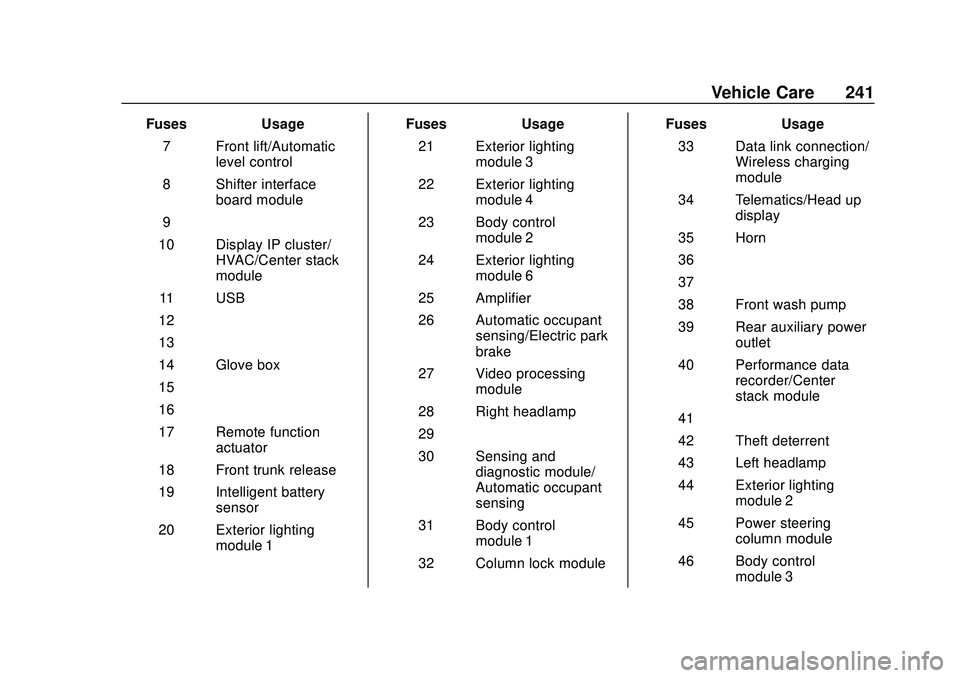
7 Front lift/Automatic level control
8 Shifter interface board module
9 –
10 Display IP cluster/ HVAC/Center stack
module
11 USB
12 –
13 –
14 Glove box
15 –
16 –
17 Remote function actuator
18 Front trunk release
19 Intelligent battery sensor
20 Exterior lighting module 1 Fuses
Usage
21 Exterior lighting module 3
22 Exterior lighting module 4
23 Body control module 2
24 Exterior lighting module 6
25 Amplifier
26 Automatic occupant sensing/Electric park
brake
27 Video processing module
28 Right headlamp
29 –
30 Sensing and diagnostic module/
Automatic occupant
sensing
31 Body control module 1
32 Column lock module Fuses
Usage
33 Data link connection/ Wireless charging
module
34 Telematics/Head up display
35 Horn
36 –
37 –
38 Front wash pump
39 Rear auxiliary power outlet
40 Performance data recorder/Center
stack module
41 –
42 Theft deterrent
43 Left headlamp
44 Exterior lighting module 2
45 Power steering column module
46 Body control module 3
Page 243 of 336
Chevrolet Corvette Owner Manual (GMNA-Localizing-U.S./Canada/Mexico-
12470550) - 2020 - CRC - 4/23/20
242 Vehicle Care
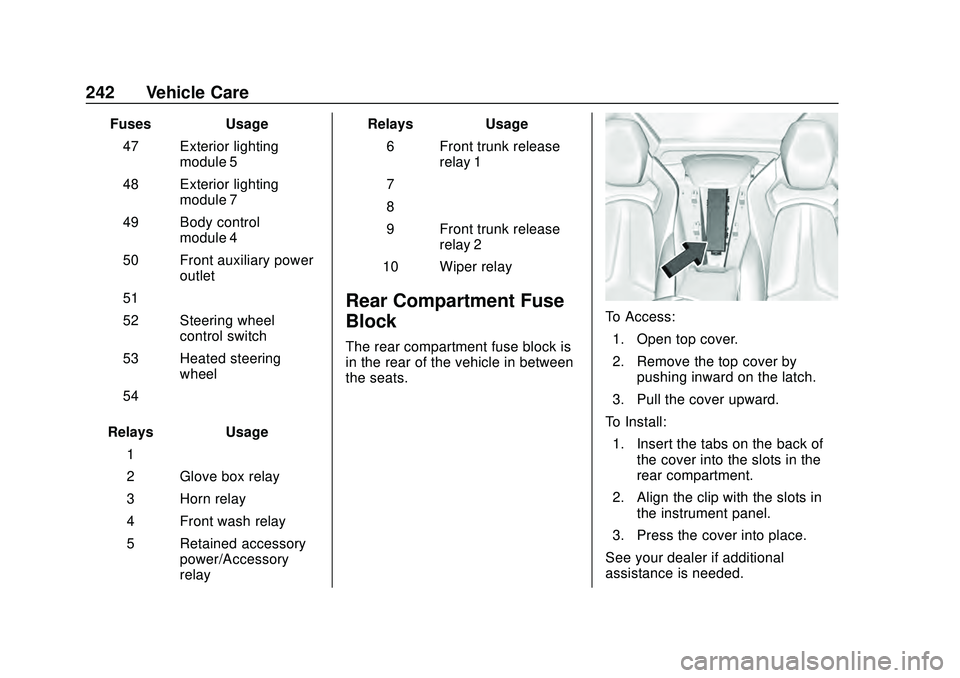
FusesUsage
47 Exterior lighting module 5
48 Exterior lighting module 7
49 Body control module 4
50 Front auxiliary power outlet
51 –
52 Steering wheel control switch
53 Heated steering wheel
54 –
Relays Usage
1 –
2 Glove box relay
3 Horn relay
4 Front wash relay
5 Retained accessory power/Accessory
relay Relays
Usage
6 Front trunk release relay 1
7 –
8 –
9 Front trunk release relay 2
10 Wiper relay
Rear Compartment Fuse
Block
The rear compartment fuse block is
in the rear of the vehicle in between
the seats.
To Access: 1. Open top cover.
2. Remove the top cover by pushing inward on the latch.
3. Pull the cover upward.
To Install: 1. Insert the tabs on the back of the cover into the slots in the
rear compartment.
2. Align the clip with the slots in the instrument panel.
3. Press the cover into place.
See your dealer if additional
assistance is needed.
Page 266 of 336
Chevrolet Corvette Owner Manual (GMNA-Localizing-U.S./Canada/Mexico-
12470550) - 2020 - CRC - 4/23/20
Vehicle Care 265
Road Imperfections/Crown Effects
The vehicle's precise steering and
handling make it very responsive to
road surface feedback. A slight pull
may be felt in the steering
depending on the crown of the road
and/or other road surface variations
such as troughs or ruts. This is
normal and the vehicle does not
require service.
Tire Chatter/Hop
When driving at slow speeds and in
very tight turns, the vehicle may
have tire chatter/hop. This is normal
and the vehicle does not require
service.
Wheel Replacement
Replace any wheel that is bent,
cracked, or badly rusted or
corroded. If wheel nuts keep coming
loose, the wheel, wheel bolts, and
wheel nuts should be replaced.
If the wheel leaks air, replace it.
Some aluminum wheels can be
repaired. See your dealer if any of
these conditions exist.Your dealer will know the kind of
wheel that is needed.
Each new wheel should have the
same load-carrying capacity,
diameter, width, offset, and be
mounted the same way as the one it
replaces.
Replace wheels, wheel bolts,
or wheel nuts with new GM original
equipment parts.
{Warning
Using the wrong replacement
wheels, wheel bolts, or wheel
nuts can be dangerous. It could
affect the braking and handling of
the vehicle. Tires can lose air,
and cause loss of control, causing
a crash. Always use the correct
wheel, wheel bolts, and wheel
nuts for replacement.
{Warning
Replacing a wheel with a used
one is dangerous. How it has
been used or how far it has been
driven may be unknown. It could
fail suddenly and cause a crash.
When replacing wheels, use a
new GM original equipment
wheel.
Caution
The wrong wheel can also cause
problems with bearing life, brake
cooling, speedometer or
odometer calibration, headlamp
aim, bumper height, vehicle
ground clearance, and tire
clearance to the body and
chassis.
Page 268 of 336
Chevrolet Corvette Owner Manual (GMNA-Localizing-U.S./Canada/Mexico-
12470550) - 2020 - CRC - 4/23/20
Vehicle Care 267
If a Tire Goes Flat
It is unusual for a tire to blow out
while driving, especially if the tires
are maintained properly. If air goes
out of a tire, it is much more likely to
leak out slowly. SeeTires0245 for
additional information. But if there
ever is a blowout, here are a few
tips about what to expect and what
to do:
If a front tire fails, the flat tire
creates a drag that pulls the vehicle
toward that side. Take your foot off
the accelerator pedal and grip the
steering wheel firmly. Steer to
maintain lane position, and then
gently brake to a stop, well off the
road, if possible.
A rear blowout, particularly on a
curve, acts much like a skid and
may require the same correction as
used in a skid. Stop pressing the
accelerator pedal and steer to
straighten the vehicle. It may be
very bumpy and noisy. Gently brake
to a stop, well off the road,
if possible. The vehicle has no spare tire, no
tire changing equipment, and no
place to store a tire.
If the vehicle has run-flat tires, there
is no need to stop on the side of the
road to change a flat tire. See
Run-Flat Tires
0247.
{Warning
Special tools and procedures are
required to service a run-flat tire.
If these special tools and
procedures are not used, injury or
vehicle damage may occur.
Always be sure the proper tools
and procedures, as described in
the service manual, are used.
Jump Starting
Jump Starting - North
America
For more information about the
vehicle battery, see Battery - North
America 0234.
If the battery has run down, use
another vehicle and some jumper
cables to start the vehicle. Be sure
to use the following steps to do it
safely.
{Warning
WARNING: Battery posts,
terminals, and related
accessories contain lead and lead
compounds, chemicals known to
the State of California to cause
cancer and birth defects or other
reproductive harm. Batteries also
contain other chemicals known to
the State of California to cause
cancer. WASH HANDS AFTER
(Continued)