lock CHEVROLET CORVETTE 2020 Service Manual
[x] Cancel search | Manufacturer: CHEVROLET, Model Year: 2020, Model line: CORVETTE, Model: CHEVROLET CORVETTE 2020Pages: 336, PDF Size: 5.21 MB
Page 106 of 336
Chevrolet Corvette Owner Manual (GMNA-Localizing-U.S./Canada/Mexico-
12470550) - 2020 - CRC - 4/23/20
Instruments and Controls 105
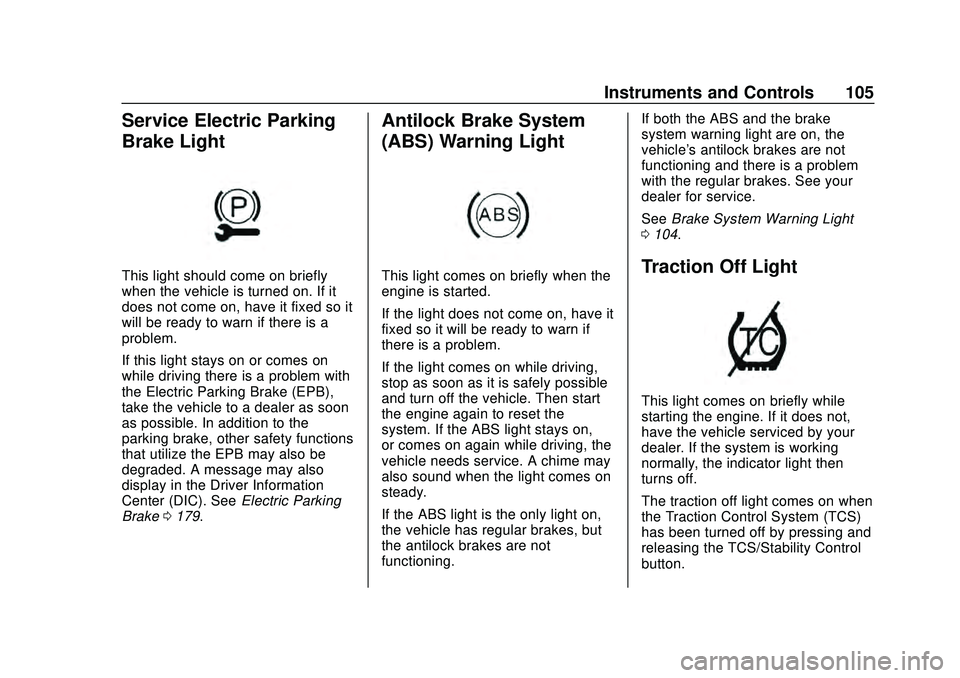
Service Electric Parking
Brake Light
This light should come on briefly
when the vehicle is turned on. If it
does not come on, have it fixed so it
will be ready to warn if there is a
problem.
If this light stays on or comes on
while driving there is a problem with
the Electric Parking Brake (EPB),
take the vehicle to a dealer as soon
as possible. In addition to the
parking brake, other safety functions
that utilize the EPB may also be
degraded. A message may also
display in the Driver Information
Center (DIC). SeeElectric Parking
Brake 0179.
Antilock Brake System
(ABS) Warning Light
This light comes on briefly when the
engine is started.
If the light does not come on, have it
fixed so it will be ready to warn if
there is a problem.
If the light comes on while driving,
stop as soon as it is safely possible
and turn off the vehicle. Then start
the engine again to reset the
system. If the ABS light stays on,
or comes on again while driving, the
vehicle needs service. A chime may
also sound when the light comes on
steady.
If the ABS light is the only light on,
the vehicle has regular brakes, but
the antilock brakes are not
functioning. If both the ABS and the brake
system warning light are on, the
vehicle's antilock brakes are not
functioning and there is a problem
with the regular brakes. See your
dealer for service.
See
Brake System Warning Light
0 104.Traction Off Light
This light comes on briefly while
starting the engine. If it does not,
have the vehicle serviced by your
dealer. If the system is working
normally, the indicator light then
turns off.
The traction off light comes on when
the Traction Control System (TCS)
has been turned off by pressing and
releasing the TCS/Stability Control
button.
Page 119 of 336
Chevrolet Corvette Owner Manual (GMNA-Localizing-U.S./Canada/Mexico-
12470550) - 2020 - CRC - 4/23/20
118 Instruments and Controls
Comfort and Convenience
Touch and the following may
display:
.Chime Volume
. Reverse Tilt Mirror
. Remote Mirror Folding
Chime Volume
This setting determines the chime
volume level.
Touch the controls on the
infotainment system to adjust the
volume.
Reverse Tilt Mirror
When on, both the driver and
passenger, driver, or passenger
outside mirrors will tilt downward
when the vehicle is shifted to
R (Reverse) to improve visibility of
the ground near the rear wheels.
They will return to their previous
driving position when the vehicle is
shifted out of R (Reverse) or the
engine is turned off. See Reverse
Tilt Mirrors 031. Touch Off, On - Driver and
Passenger, On - Driver, or On -
Passenger.
Remote Mirror Folding
When on, the outside mirrors will
automatically fold or unfold when
the
QorKon the remote key is
pressed. See Folding Mirrors 030.
Touch Off or On.
Lighting
Touch and the following may
display:
. Vehicle Locator Lights
. Exit Lighting
Vehicle Locator Lights
This setting flashes the vehicle’ s
headlamps and taillamps when
Kis
pressed on the remote key.
Touch Off or On.
Exit Lighting
This setting specifies how long the
headlamps stay on after the vehicle
is turned off and exited. Touch Off, 30 Seconds, 60 Seconds,
or 120 Seconds.
Power Door Locks
Touch and the following may
display:
.
Auto Door Unlock
. Delayed Door Lock
Auto Door Unlock
This setting allows selection of
which doors will automatically
unlock when the vehicle is shifted
into P (Park).
Touch Off, All Doors, or Driver Door.
Delayed Door Lock
This setting delays the locking of
the vehicle doors.
Touch Off or On.
Remote Lock, Unlock, Start
Touch and the following may
display:
. Remote Unlock Light Feedback
. Remote Lock Feedback
. Remote Door Unlock
Page 120 of 336
Chevrolet Corvette Owner Manual (GMNA-Localizing-U.S./Canada/Mexico-
12470550) - 2020 - CRC - 4/23/20
Instruments and Controls 119
.Remote Start Auto Cool Seats
. Remote Start Auto Heat Seats
. Remote Window Operation
. Passive Door Unlock
. Passive Door Lock
. Remote Left in Vehicle Alert
. Remote Removed from Vehicle
Alert
Remote Unlock Light Feedback
This setting flashes the exterior
lamps when the vehicle is unlocked
with the remote key.
Touch Off or Flash Lights.
Remote Lock Feedback
This setting specifies how the
vehicle responds when the vehicle
is locked with the remote key.
Touch Off, Lights and Horn, Lights
Only, or Horn Only.
Remote Door Unlock
This setting specifies whether all
doors, or just the driver door, unlock
when pressing
Kon the remote key. Touch All Doors or Driver Door.
Remote Start Auto Cool Seats
This setting automatically turns on
the ventilated seats when using the
remote start function on warm days.
See
Heated and Ventilated Front
Seats 053 and
Remote Vehicle Start 015.
Touch Off or On.
Remote Start Auto Heat Seats
This setting automatically turns on
the heated seats when using the
remote start function on cold days.
See Heated and Ventilated Front
Seats 053 and
Remote Vehicle Start 015.
If equipped with Auto Heated
Steering Wheel, this feature will turn
on when the Remote Start Auto
Heat Seats turn on.
Touch Off or On. Remote Window Operation
When enabled, this feature allows
the windows to be opened remotely
when pressing and holding
Kon the
remote key. See Remote Keyless
Entry (RKE) System Operation 09.
Touch Off or On.
Passive Door Unlock
This setting specifies which doors
unlock when using the button on the
driver door handle to unlock the
vehicle.
Touch Off, All Doors, or Driver
Door Only.
Passive Door Lock
This setting specifies if the vehicle
will automatically lock, or lock and
provide an alert after all the doors
are closed, and you walk away from
the vehicle with the remote key. See
Remote Keyless Entry (RKE)
System Operation 09.
Touch Off, On with Horn
Chirp, or On.
Page 121 of 336
Chevrolet Corvette Owner Manual (GMNA-Localizing-U.S./Canada/Mexico-
12470550) - 2020 - CRC - 4/23/20
120 Instruments and Controls
Remote Left in Vehicle Alert
This feature sounds an alert when
the remote key is left in the vehicle.
Touch Off or On.
Remote Removed from Vehicle
Alert
This feature beeps the horn 3 times
when exiting a running vehicle with
the remote key.
Touch Off or On.
Ride Height
Touch and the following may
display:
Location Based Auto Lift
This setting enables the Front Lift to
automatically raise or lower when
the vehicle is near GPS stored
locations. SeeFront Lift System
0 191.
Touch Off or On.
Seating Position
Touch and the following may
display:
. Seat Entry Memory
. Seat Exit Memory
Seat Entry Memory
This feature automatically recalls
the previously stored 1 or 2 button
positions when the ignition is
changed from off to on. See
Memory Seats 050.
Touch Off or On.
Seat Exit Memory
This feature automatically recalls
the previously stored exit button
positions when the ignition is
changed from on to off if the driver
door is open or opened. See
Memory Seats 050.
Touch Off or On.
Teen Driver
See “Teen Driver” under“Settings”
in the infotainment manual.
Valet Mode
This will lock the infotainment
system and steering wheel controls.
It may also limit access to vehicle
storage locations, if equipped.
To enable valet mode:
1. Enter a four-digit code on the keypad.
2. Touch Enter to go to the confirmation screen.
3. Re-enter the four-digit code.
Touch Lock or Unlock to lock or
unlock the system. Touch Back to
go back to the previous menu.
To configure the Performance Data
Recorder (PDR) to automatically
record in Valet mode, see “Settings”
in Performance Data Recorder
(PDR) 0132.
Page 130 of 336
Chevrolet Corvette Owner Manual (GMNA-Localizing-U.S./Canada/Mexico-
12470550) - 2020 - CRC - 4/23/20
Lighting 129
Interior Lighting
Instrument Panel
Illumination Control
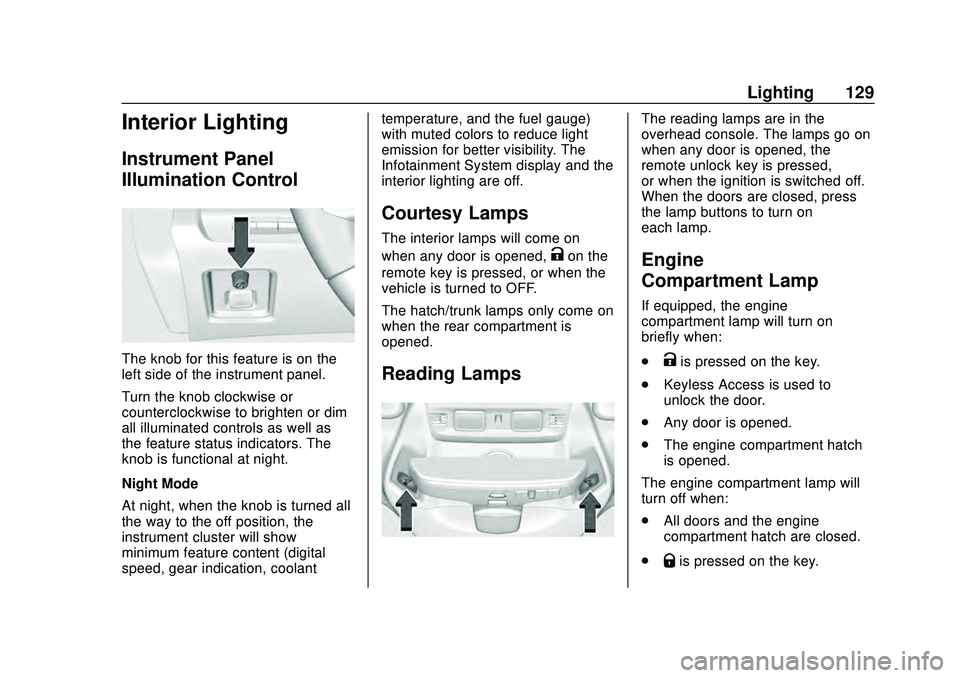
The knob for this feature is on the
left side of the instrument panel.
Turn the knob clockwise or
counterclockwise to brighten or dim
all illuminated controls as well as
the feature status indicators. The
knob is functional at night.
Night Mode
At night, when the knob is turned all
the way to the off position, the
instrument cluster will show
minimum feature content (digital
speed, gear indication, coolanttemperature, and the fuel gauge)
with muted colors to reduce light
emission for better visibility. The
Infotainment System display and the
interior lighting are off.
Courtesy Lamps
The interior lamps will come on
when any door is opened,
Kon the
remote key is pressed, or when the
vehicle is turned to OFF.
The hatch/trunk lamps only come on
when the rear compartment is
opened.
Reading Lamps
The reading lamps are in the
overhead console. The lamps go on
when any door is opened, the
remote unlock key is pressed,
or when the ignition is switched off.
When the doors are closed, press
the lamp buttons to turn on
each lamp.
Engine
Compartment Lamp
If equipped, the engine
compartment lamp will turn on
briefly when:
.
Kis pressed on the key.
. Keyless Access is used to
unlock the door.
. Any door is opened.
. The engine compartment hatch
is opened.
The engine compartment lamp will
turn off when:
. All doors and the engine
compartment hatch are closed.
.
Qis pressed on the key.
Page 131 of 336
Chevrolet Corvette Owner Manual (GMNA-Localizing-U.S./Canada/Mexico-
12470550) - 2020 - CRC - 4/23/20
130 Lighting
.The vehicle begins to move after
shifting out of P (Park).
. The ignition is turned on,
or turned from off to ACC/
ACCESSORY.
If any door or the engine
compartment hatch/trunk remains
open, while the vehicle is off, a timer
will turn the lamp off.Lighting Features
Entry Lighting
Some exterior lamps turn on briefly
at night, or in areas with limited
lighting, when
Kis pressed on the
remote key. After about 30 seconds
the exterior lamps turn off.
When any door is opened or remote
unlock pressed, all interior lights
turn on and then interior lamps dim
to off after approximately
20 seconds.
When the driver door is opened, all
interior lights, Driver Information
Center (DIC) lights, and door pocket
lights turn on and then the dome
and remaining interior lamps dim to
off. Entry lighting can be disabled
manually by turning the ignition to
on or ACC/ACCESSORY, or by
pressing
Qon the remote key.
The entry lighting feature for exterior
lighting can be changed. See
“Vehicle Locator Lights” under
Vehicle Personalization 0116.
Exit Lighting
Some exterior lamps come on at
night, or in areas with limited
lighting, when the driver door is
opened after the ignition is turned
off. The dome lamp comes on after
the ignition is turned off. The
exterior lamps and dome lamp
remain on after the door is closed
for a set amount of time, then
automatically turn off.
The exterior lamps turn off
immediately by turning the exterior
lamp control off.
The exit lighting feature for exterior
lighting can be changed. See
Vehicle Personalization 0116.
Page 144 of 336
Chevrolet Corvette Owner Manual (GMNA-Localizing-U.S./Canada/Mexico-
12470550) - 2020 - CRC - 4/23/20
Climate Controls 143
Air Vents
Use the tab on the air outlets to
change the direction of the airflow or
shut the outlet.
Operation Tips
.Clear away any ice, snow,
or leaves from the air inlets at
the base of the windshield that
may block the flow of air into the
vehicle.
. Clear snow off the hood to
improve visibility and help
decrease moisture drawn into
the vehicle.
. Use of non-GM approved hood
deflectors may adversely affect
the performance of the system.
. Keep the area around the base
of the instrument panel console
and air path under the seats
clear of objects to help circulate
the air inside of the vehicle more
effectively.
Maintenance
Passenger Compartment
Air Filter
The passenger compartment air
filter reduces dust, pollen, and other
airborne irritants from outside air
that are pulled into the vehicle.
Reductions in airflow, which may
occur more often in dusty areas,
indicate that the filter may need to
be replaced. See Maintenance
Schedule 0286.
Caution
Driving without a passenger
compartment air filter in place can
cause water and small particles,
like paper and leaves, to be
pulled into your climate control
system which may cause damage
to it. Make sure you always
replace the old filter with a
new one. The passenger compartment air
filter is located under the hood
between the battery and windshield.
See
Underhood Compartment
Overview 0214.
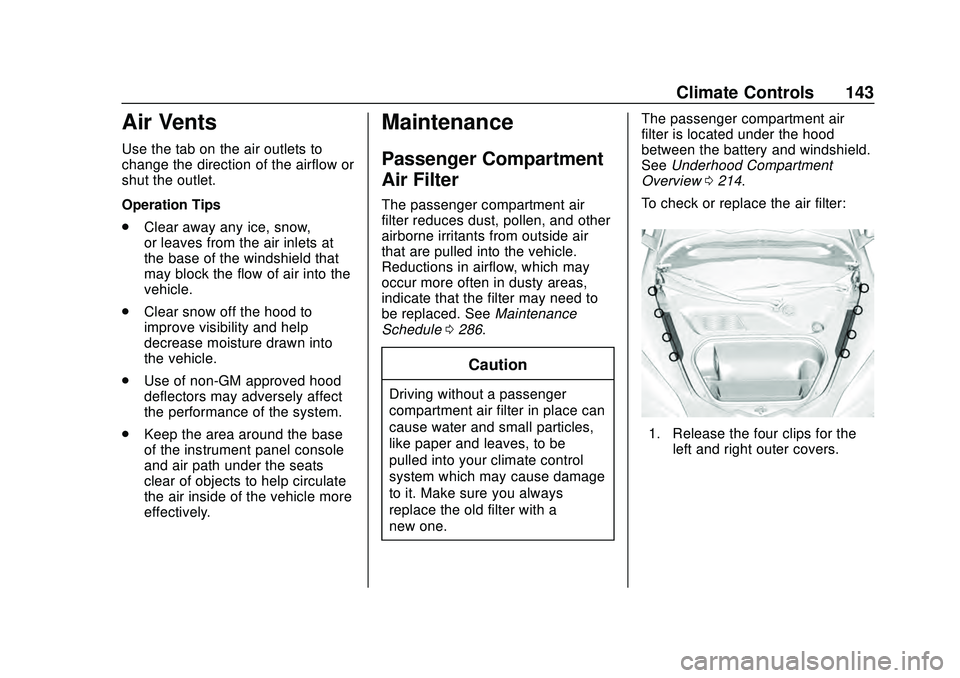
To check or replace the air filter:
1. Release the four clips for the left and right outer covers.
Page 146 of 336
Chevrolet Corvette Owner Manual (GMNA-Localizing-U.S./Canada/Mexico-
12470550) - 2020 - CRC - 4/23/20
Driving and Operating 145
Driving and
Operating
Driving Information
Driving for Better FuelEconomy . . . . . . . . . . . . . . . . . . . . 146
Distracted Driving . . . . . . . . . . . . 146
Defensive Driving . . . . . . . . . . . . . 147
Drunk Driving . . . . . . . . . . . . . . . . . 147
Control of a Vehicle . . . . . . . . . . . 148
Braking . . . . . . . . . . . . . . . . . . . . . . . 148
Steering . . . . . . . . . . . . . . . . . . . . . . 148
Off-Road Recovery . . . . . . . . . . . 149
Loss of Control . . . . . . . . . . . . . . . 150
Track Events and Competitive Driving (Z51 Only) . . . . . . . . . . 150
Driving on Wet Roads . . . . . . . . 156
Hill and Mountain Roads . . . . . 157
Winter Driving . . . . . . . . . . . . . . . . 158
If the Vehicle Is Stuck . . . . . . . . 159
Vehicle Load Limits . . . . . . . . . . . 160
Starting and Operating
New Vehicle Break-In . . . . . . . . . 163
Front Air Dam (and Splitter) . . . . . . . . . . . . . . . . . . . . . 164
Composite Materials . . . . . . . . . . 164
Ignition Positions . . . . . . . . . . . . . 165 Starting the Engine . . . . . . . . . . . 166
Retained Accessory
Power (RAP) . . . . . . . . . . . . . . . . 168
Shifting Into Park . . . . . . . . . . . . . 168
Shifting out of Park . . . . . . . . . . . 169
Parking over Things That Burn . . . . . . . . . . . . . . . . . . . 169
Active Fuel Management . . . . . 169
Extended Parking . . . . . . . . . . . . 169
Engine Exhaust
Engine Exhaust . . . . . . . . . . . . . . 170
Running the Vehicle While Parked . . . . . . . . . . . . . . . . . . . . . . 171
Dual Clutch Transmission
Dual Clutch Transmission . . . . 171
Manual Mode . . . . . . . . . . . . . . . . . 174
Brakes
Electric Brake Boost . . . . . . . . . . 179
Antilock BrakeSystem (ABS) . . . . . . . . . . . . . . . 179
Electric Parking Brake . . . . . . . . 179
Brake Assist . . . . . . . . . . . . . . . . . . 181
Hill Start Assist (HSA) . . . . . . . . 181
Ride Control Systems
Traction Control/Electronic Stability Control . . . . . . . . . . . . . 182
Hill Rollback Control . . . . . . . . . . 184
Driver Mode Control . . . . . . . . . . 184 Front Lift System . . . . . . . . . . . . . 191
Competitive Driving Mode . . . . 192
Limited-Slip Differential
(without Z51) . . . . . . . . . . . . . . . . 195
Limited-Slip Differential
(with Z51) . . . . . . . . . . . . . . . . . . . 195
Cruise Control
Cruise Control . . . . . . . . . . . . . . . . 196
Driver Assistance Systems
Driver Assistance Systems . . . 199
Assistance Systems forParking or Backing . . . . . . . . . . 200
Side Blind Zone Alert (SBZA) . . . . . . . . . . . . . . . . 202
Fuel
Top Tier Fuel . . . . . . . . . . . . . . . . . 204
Recommended Fuel . . . . . . . . . . 204
Prohibited Fuels . . . . . . . . . . . . . . 205
Fuels in Foreign Countries . . . 205
Fuel Additives . . . . . . . . . . . . . . . . 205
Filling the Tank . . . . . . . . . . . . . . . 205
Filling a Portable FuelContainer . . . . . . . . . . . . . . . . . . . 207
Trailer Towing
General TowingInformation . . . . . . . . . . . . . . . . . . 208
Page 150 of 336
Chevrolet Corvette Owner Manual (GMNA-Localizing-U.S./Canada/Mexico-
12470550) - 2020 - CRC - 4/23/20
Driving and Operating 149
If power steering assist is lost due
to a system malfunction, the vehicle
can be steered, but may require
increased effort.
If the steering assist is used for an
extended period of time while the
vehicle is not moving, power assist
may be reduced.
If the steering wheel is turned until it
reaches the maximum rotation and
is held at that position for an
extended period of time, power
steering assist may be reduced.
Normal use of the power steering
assist should return when the
system cools down.
See your dealer if there is a
problem.
Dynamic Rack Travel
If equipped with Magnetic Ride
Control, Dynamic Rack Travel
(DRT) is a steering system feature
which enhances driving by providing
additional maximum steering wheel
rotation to allow a tighter turning
radius during low speed driving
conditions. If the vehicle speedincreases or if the suspension
encounters significant wheel travel,
such as a driveway, while at
maximum steering rotation, DRT
may gently push the steering back a
small amount to prevent the front
tires from contacting the vehicle.
This is normal operation. There is
no customer interface or display for
this feature. DRT is not available
when in Track Mode.
Curve Tips
.
Take curves at a reasonable
speed.
. Reduce speed before entering a
curve.
. Maintain a reasonable and
steady speed through the curve.
. Wait until the vehicle is out of
the curve before accelerating
gently into the straightaway.
Steering in Emergencies
.
There are some situations when
steering around a problem may
be more effective than braking. .
Holding both sides of the
steering wheel allows you to turn
180 degrees without removing
a hand.
. The Antilock Brake System
(ABS) allows steering while
braking.
Off-Road Recovery
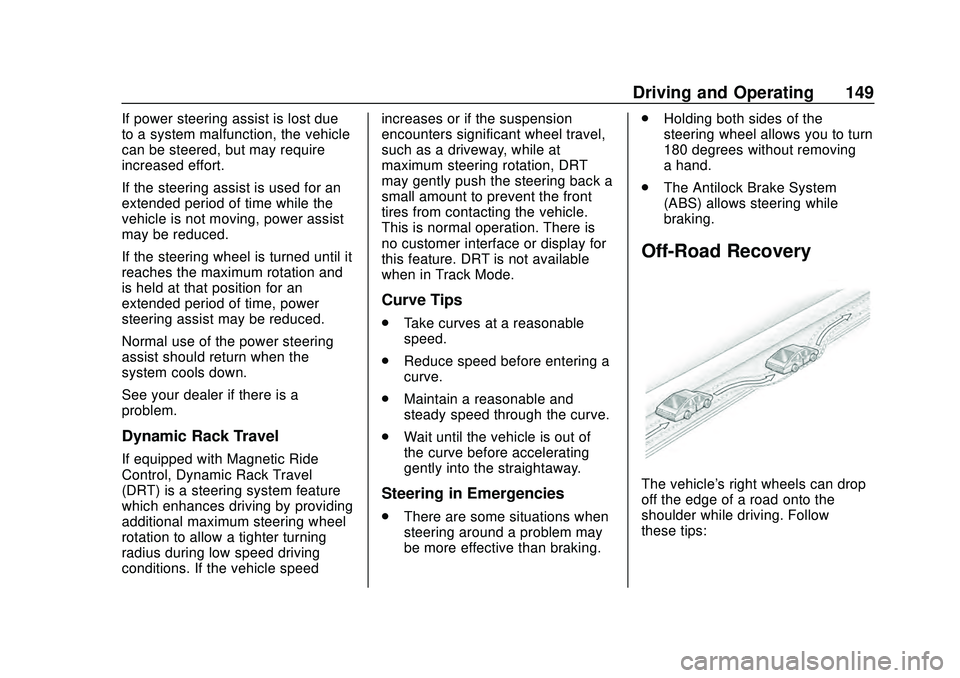
The vehicle's right wheels can drop
off the edge of a road onto the
shoulder while driving. Follow
these tips:
Page 151 of 336
Chevrolet Corvette Owner Manual (GMNA-Localizing-U.S./Canada/Mexico-
12470550) - 2020 - CRC - 4/23/20
150 Driving and Operating
1. Ease off the accelerator andthen, if there is nothing in the
way, steer the vehicle so that it
straddles the edge of the
pavement.
2. Turn the steering wheel about one-eighth of a turn, until the
right front tire contacts the
pavement edge.
3. Turn the steering wheel to go straight down the roadway.
Loss of Control
Skidding
There are three types of skids that
correspond to the vehicle's three
control systems:
.Braking Skid —wheels are not
rolling.
. Steering or Cornering Skid —
too much speed or steering in a
curve causes tires to slip and
lose cornering force.
. Acceleration Skid —too much
throttle causes the driving
wheels to spin. Defensive drivers avoid most skids
by taking reasonable care suited to
existing conditions, and by not
overdriving those conditions. But
skids are always possible.
If the vehicle starts to slide, follow
these suggestions:
.
Ease your foot off the
accelerator pedal and steer the
way you want the vehicle to go.
The vehicle may straighten out.
Be ready for a second skid if it
occurs.
. Slow down and adjust your
driving according to weather
conditions. Stopping distance
can be longer and vehicle
control can be affected when
traction is reduced by water,
snow, ice, gravel, or other
material on the road. Learn to
recognize warning clues —such
as enough water, ice, or packed
snow on the road to make a
mirrored surface —and slow
down when you have any doubt.
. Try to avoid sudden steering,
acceleration, or braking,
including reducing vehicle speed by shifting to a lower gear. Any
sudden changes could cause
the tires to slide.
Remember: Antilock brakes help
avoid only the braking skid.
Track Events and
Competitive Driving
(Z51 Only)
Vehicles without Z51 package
should not be used for track events
and competitive driving.
{Danger
High-performance features are
intended for use only on closed
tracks by experienced and
qualified drivers and should not
be used on public roads.
High-speed driving, aggressive
cornering, hard braking, and other
high-performance driving can be
dangerous. Improper driver inputs
for the conditions may result in (Continued)