lock CHEVROLET CORVETTE 2020 Repair Manual
[x] Cancel search | Manufacturer: CHEVROLET, Model Year: 2020, Model line: CORVETTE, Model: CHEVROLET CORVETTE 2020Pages: 336, PDF Size: 5.21 MB
Page 182 of 336
Chevrolet Corvette Owner Manual (GMNA-Localizing-U.S./Canada/Mexico-
12470550) - 2020 - CRC - 4/23/20
Driving and Operating 181
Automatic EPB Release
The EPB will automatically release if
the vehicle is running, placed into
gear, and an attempt is made to
drive away. Avoid rapid acceleration
when the EPB is applied, to
preserve parking brake lining life.
Brake Assist
Brake Assist detects rapid brake
pedal applications due to
emergency braking situations and
provides additional braking to
activate the Antilock Brake System
(ABS) if the brake pedal is not
pushed hard enough to activate
ABS normally. Minor noise, brake
pedal pulsation, and/or pedal
movement during this time may
occur. Continue to apply the brake
pedal as the driving situation
dictates. Brake Assist disengages
when the brake pedal is released.
Hill Start Assist (HSA)
{Warning
Do not rely on the HSA feature.
HSA does not replace the need to
pay attention and drive safely.
You may not hear or feel alerts or
warnings provided by this system.
Failure to use proper care when
driving may result in injury, death,
or vehicle damage. See
Defensive Driving0147.
When the vehicle is stopped on a
grade, Hill Start Assist (HSA)
prevents the vehicle from rolling in
an unintended direction during the
transition from brake pedal release
to accelerator pedal apply. The
brakes release when the accelerator
pedal is applied. If the accelerator
pedal is not applied within a few
minutes, the Electric Parking Brake
will apply. The brakes may also
release under other conditions. Do
not rely on HSA to hold the vehicle. HSA is available when the vehicle is
facing uphill in a forward gear,
or when facing downhill in
R (Reverse). The vehicle must
come to a complete stop on a grade
for HSA to activate.
Page 200 of 336
Chevrolet Corvette Owner Manual (GMNA-Localizing-U.S./Canada/Mexico-
12470550) - 2020 - CRC - 4/23/20
Driving and Operating 199
Driver Assistance
Systems
This vehicle may have features that
work together to help avoid crashes
or reduce crash damage while
driving, backing, and parking. Read
this entire section before using
these systems.
{Warning
Do not rely on the Driver
Assistance Systems. These
systems do not replace the need
for paying attention and driving
safely. You may not hear or see
alerts or warnings provided by
these systems. Failure to use
proper care when driving may
result in injury, death, or vehicle
damage. SeeDefensive Driving
0 147.
Under many conditions, these
systems will not: (Continued)
Warning (Continued)
.Detect children,
pedestrians, bicyclists,
or animals.
. Detect vehicles or objects
outside the area monitored
by the system.
. Work at all driving speeds.
. Warn you or provide you
with enough time to avoid a
crash.
. Work under poor visibility or
bad weather conditions.
. Work if the detection sensor
is not cleaned or is covered
by ice, snow, mud, or dirt.
. Work if the detection sensor
is covered up, such as with
a sticker, magnet, or metal
plate.
. Work if the area surrounding
the detection sensor is
damaged or not properly
repaired.
(Continued)
Warning (Continued)
Complete attention is always
required while driving, and you
should be ready to take action
and apply the brakes and/or steer
the vehicle to avoid crashes.
Audible Alert
Some driver assistance features
alert the driver of obstacles by
beeping. To change the volume of
the warning chime, see “Comfort
and Convenience” underVehicle
Personalization 0116.
Cleaning
Depending on vehicle options, keep
these areas of the vehicle clean to
ensure the best driver assistance
feature performance. Driver
Information Center (DIC) messages
may display when the systems are
unavailable or blocked.
Page 207 of 336
Chevrolet Corvette Owner Manual (GMNA-Localizing-U.S./Canada/Mexico-
12470550) - 2020 - CRC - 4/23/20
206 Driving and Operating
Warning (Continued)
.Keep sparks, flames, and
smoking materials away
from fuel.
. Do not leave the fuel pump
unattended.
. Avoid using electronic
devices while refueling.
. Do not re-enter the vehicle
while pumping fuel.
. Keep children away from
the fuel pump and never let
children pump fuel.
. Before touching the fill
nozzle, touch a metallic
object to discharge static
electricity from your body.
. Fuel can spray out if the fill
nozzle is inserted too
quickly. This spray can
happen if the tank is nearly
full, and is more likely in hot
weather. Insert the fill nozzle
slowly and wait for any hiss
noise to stop before
beginning to flow fuel. The fuel door unlocks when the
vehicle doors are unlocked. See
Remote Keyless Entry (RKE)
System Operation
09.
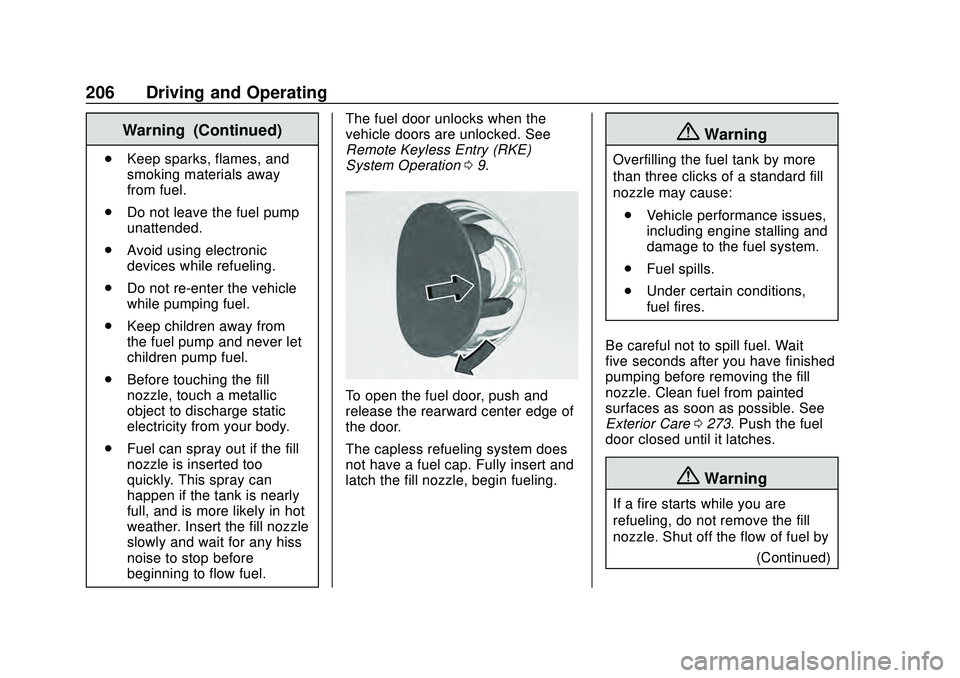
To open the fuel door, push and
release the rearward center edge of
the door.
The capless refueling system does
not have a fuel cap. Fully insert and
latch the fill nozzle, begin fueling.
{Warning
Overfilling the fuel tank by more
than three clicks of a standard fill
nozzle may cause:
. Vehicle performance issues,
including engine stalling and
damage to the fuel system.
. Fuel spills.
. Under certain conditions,
fuel fires.
Be careful not to spill fuel. Wait
five seconds after you have finished
pumping before removing the fill
nozzle. Clean fuel from painted
surfaces as soon as possible. See
Exterior Care 0273. Push the fuel
door closed until it latches.
{Warning
If a fire starts while you are
refueling, do not remove the fill
nozzle. Shut off the flow of fuel by
(Continued)
Page 210 of 336
Chevrolet Corvette Owner Manual (GMNA-Localizing-U.S./Canada/Mexico-
12470550) - 2020 - CRC - 4/23/20
Vehicle Care 209
Vehicle Care
General Information
General Information . . . . . . . . . . 210
California Proposition65 Warning . . . . . . . . . . . . . . . . . 210
California Perchlorate Materials Requirements . . . . . . . . . . . . . . . 211
Accessories and Modifications . . . . . . . . . . . . . . . . 211
Lifting the Vehicle . . . . . . . . . . . . . 211
Vehicle Checks
Doing Your Own Service Work . . . . . . . . . . . . . . . 213
Underhood Compartment Overview . . . . . . . . . . . . . . . . . . . . 214
Engine Compartment Overview . . . . . . . . . . . . . . . . . . . . 215
Engine Oil . . . . . . . . . . . . . . . . . . . . 218
Engine Oil Life System . . . . . . . 221
Dual Clutch Transmission Fluid . . . . . . . . . . . . . . . . . . . . . . . . 222
Dual Clutch Transmission Fluid Life System . . . . . . . . . . . . . . . . . 223
Engine Air Filter Life System . . . . . . . . . . . . . . . . . . . . . . 224
Engine Air Cleaner/Filter . . . . . . 224
Cooling System . . . . . . . . . . . . . . 226 Engine Overheating . . . . . . . . . . 230
Washer Fluid . . . . . . . . . . . . . . . . . 231
Brakes . . . . . . . . . . . . . . . . . . . . . . . 232
Brake Fluid . . . . . . . . . . . . . . . . . . . 233
Battery - North America . . . . . . 234
Park Brake and P (Park)
Mechanism Check . . . . . . . . . . 235
Wiper Blade Replacement . . . . 236
Windshield Replacement . . . . . 236
Gas Strut(s) . . . . . . . . . . . . . . . . . . 237
Headlamp Aiming
Front Headlamp Aiming . . . . . . 238
Bulb Replacement
LED Lighting . . . . . . . . . . . . . . . . . 238
Electrical System
Electrical System Overload . . . 239
Fuses and Circuit Breakers . . . 239
Instrument Panel Fuse Block . . . . . . . . . . . . . . . . . . . . . . . . 239
Rear Compartment Fuse Block . . . . . . . . . . . . . . . . . . . . . . . . 242
Wheels and Tires
Tires . . . . . . . . . . . . . . . . . . . . . . . . . . 245
All-Season Tires . . . . . . . . . . . . . . 246
Winter Tires . . . . . . . . . . . . . . . . . . 247
Run-Flat Tires . . . . . . . . . . . . . . . . 247
Low-Profile Tires . . . . . . . . . . . . . 248
Summer Tires . . . . . . . . . . . . . . . . 248 Tire Sidewall Labeling . . . . . . . . 249
Tire Designations . . . . . . . . . . . . . 250
Tire Terminology and
Definitions . . . . . . . . . . . . . . . . . . 251
Tire Pressure . . . . . . . . . . . . . . . . . 253
Tire Pressure for High-Speed
Operation . . . . . . . . . . . . . . . . . . . 254
Tire Pressure Monitor System . . . . . . . . . . . . . . . . . . . . . . 255
Tire Pressure Monitor Operation . . . . . . . . . . . . . . . . . . . 256
Tire Inspection . . . . . . . . . . . . . . . . 259
Tire Rotation . . . . . . . . . . . . . . . . . 259
When It Is Time for New Tires . . . . . . . . . . . . . . . . . . . . . . . . 260
Buying New Tires . . . . . . . . . . . . . 261
Different Size Tires and Wheels . . . . . . . . . . . . . . . . . . . . . . 262
Uniform Tire Quality Grading . . . . . . . . . . . . . . . . . . . . . 263
Wheel Alignment and Tire Balance . . . . . . . . . . . . . . . . . . . . . 264
Wheel Replacement . . . . . . . . . . 265
Tire Chains . . . . . . . . . . . . . . . . . . . 266
If a Tire Goes Flat . . . . . . . . . . . . 267Jump Starting
Jump Starting - North America . . . . . . . . . . . . . . . . . . . . . 267
Page 212 of 336
Chevrolet Corvette Owner Manual (GMNA-Localizing-U.S./Canada/Mexico-
12470550) - 2020 - CRC - 4/23/20
Vehicle Care 211
California Perchlorate
Materials Requirements
Certain types of automotive
applications, such as airbag
initiators, seat belt pretensioners,
and lithium batteries contained in
electronic keys, may contain
perchlorate materials. Perchlorate
Material–special handling may
apply. See www.dtsc.ca.gov/
hazardouswaste/perchlorate.
Accessories and
Modifications
Adding non-dealer accessories or
making modifications to the vehicle
can affect vehicle performance and
safety, including such things as
airbags, braking, stability, ride and
handling, emissions systems,
aerodynamics, durability, and
electronic systems like antilock
brakes, traction control, and stability
control. These accessories or
modifications could even cause
malfunction or damage not covered
by the vehicle warranty. Damage to suspension components
caused by modifying vehicle height
outside of factory settings will not be
covered by the vehicle warranty.
Damage to vehicle components
resulting from modifications or the
installation or use of non-GM
certified parts, including control
module or software modifications, is
not covered under the terms of the
vehicle warranty and may affect
remaining warranty coverage for
affected parts.
GM Accessories are designed to
complement and function with other
systems on the vehicle. See your
dealer to accessorize the vehicle
using genuine GM Accessories
installed by a dealer technician.
Also, see
Adding Equipment to the
Airbag-Equipped Vehicle 072.
Lifting the Vehicle
{Warning
Lifting a vehicle can cause an
injury. The vehicle can slip off the
jack and roll over you or other
people. You and they could be
badly injured. Find a level place
to lift your vehicle. To help
prevent the vehicle from moving:
1. Set the parking brake firmly.
2. Put the transmission inP (Park).
3. Turn off the engine.
To be even more certain the
vehicle will not move, put blocks
in front of and behind the wheels.
{Warning
Getting under a vehicle when it is
lifted on a jack is dangerous.
If the vehicle slips off the jack, (Continued)
Page 213 of 336
Chevrolet Corvette Owner Manual (GMNA-Localizing-U.S./Canada/Mexico-
12470550) - 2020 - CRC - 4/23/20
212 Vehicle Care
Warning (Continued)
you could be badly injured or
killed. Never get under a vehicle
when it is supported only by
a jack.
{Warning
Raising the vehicle with the jack
improperly positioned can
damage the vehicle or the vehicle
may fall and cause injury to you
or others.
If a jack is used to lift the vehicle,
follow the instructions that came
with the jack, and be sure to use the
correct lifting points to avoid
damaging the vehicle.
Caution
Lifting the vehicle improperly can
damage it and result in costly
repairs not covered by the vehicle
warranty. To lift the vehicle
properly and prevent vehicle
damage: . Be sure to place a block or
pad between the jack and
the vehicle.
. Lift only in the areas shown
in the following illustrations.
For additional information, see
your dealer and the service
manual.
Caution
The front jack pads must not
contact the rocker panels, the
front fenders, or the floor pan.
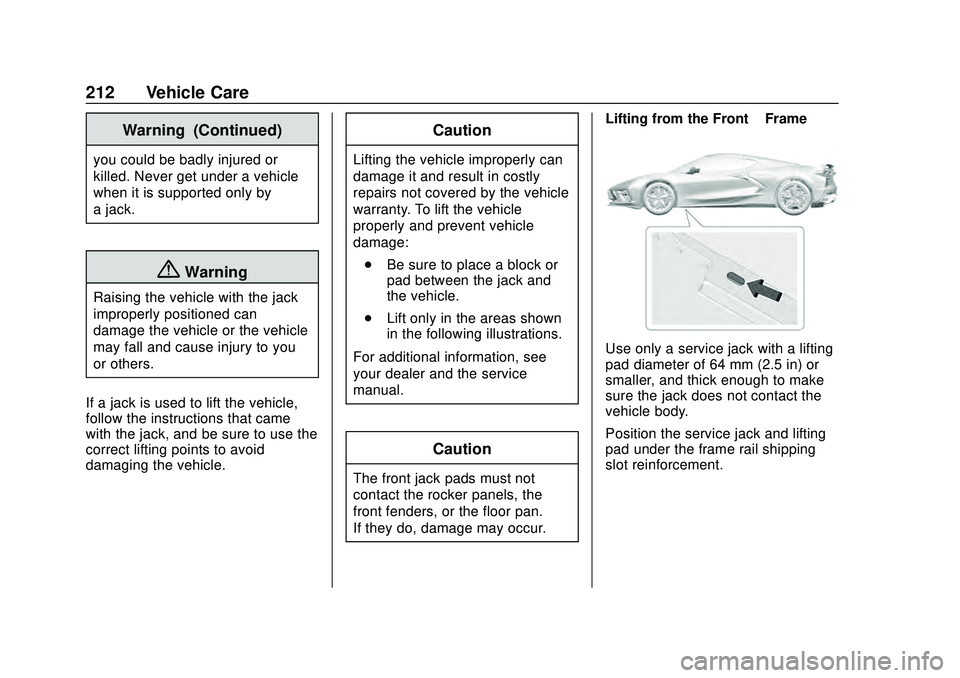
If they do, damage may occur. Lifting from the Front
–Frame
Use only a service jack with a lifting
pad diameter of 64 mm (2.5 in) or
smaller, and thick enough to make
sure the jack does not contact the
vehicle body.
Position the service jack and lifting
pad under the frame rail shipping
slot reinforcement.
Page 230 of 336
Chevrolet Corvette Owner Manual (GMNA-Localizing-U.S./Canada/Mexico-
12470550) - 2020 - CRC - 4/23/20
Vehicle Care 229
How to Add Coolant to the
Coolant Surge Tank
{Warning
Spilling coolant on hot engine
parts can burn you. Coolant
contains ethylene glycol and it will
burn if the engine parts are hot
enough.
{Warning
Steam and scalding liquids from a
hot cooling system are under
pressure. Turning the pressure
cap, even a little, can cause them
to come out at high speed and
you could be burned. Never turn
the cap when the cooling system,
including the pressure cap, is hot.
Wait for the cooling system and
pressure cap to cool.If coolant is needed, be sure the
cooling system is cool, then add the
proper DEX-COOL coolant mixture
directly to the surge tank.
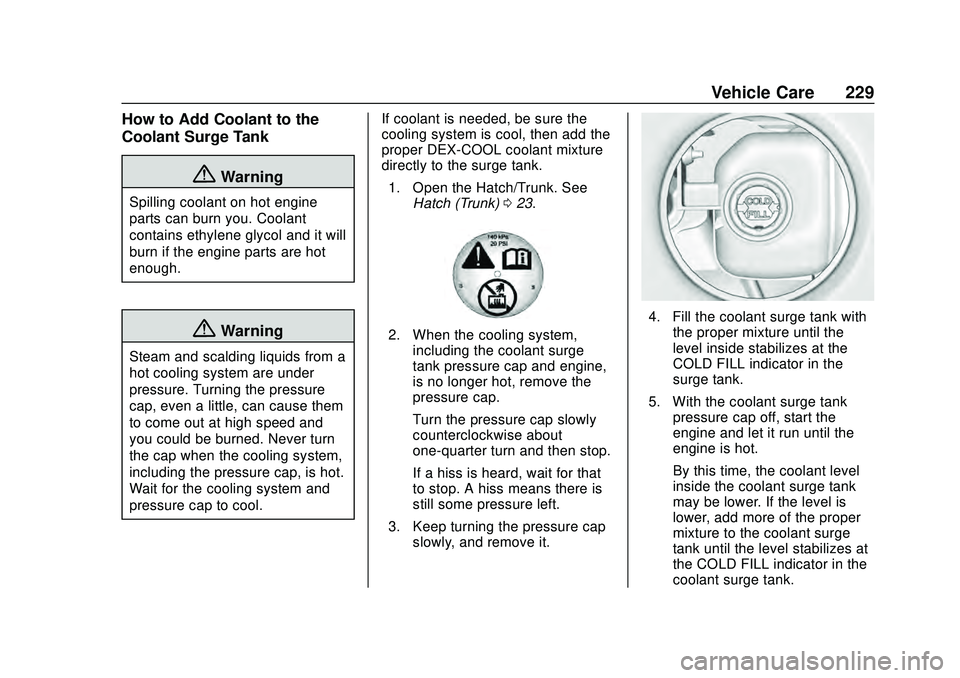
1. Open the Hatch/Trunk. See Hatch (Trunk) 023.
2. When the cooling system,
including the coolant surge
tank pressure cap and engine,
is no longer hot, remove the
pressure cap.
Turn the pressure cap slowly
counterclockwise about
one-quarter turn and then stop.
If a hiss is heard, wait for that
to stop. A hiss means there is
still some pressure left.
3. Keep turning the pressure cap slowly, and remove it.
4. Fill the coolant surge tank withthe proper mixture until the
level inside stabilizes at the
COLD FILL indicator in the
surge tank.
5. With the coolant surge tank pressure cap off, start the
engine and let it run until the
engine is hot.
By this time, the coolant level
inside the coolant surge tank
may be lower. If the level is
lower, add more of the proper
mixture to the coolant surge
tank until the level stabilizes at
the COLD FILL indicator in the
coolant surge tank.
Page 240 of 336
Chevrolet Corvette Owner Manual (GMNA-Localizing-U.S./Canada/Mexico-
12470550) - 2020 - CRC - 4/23/20
Vehicle Care 239
Electrical System
Electrical System
Overload
The vehicle has fuses to protect
against an electrical system
overload.
Fuses protect power devices in the
vehicle.
Replace a bad fuse with a new one
of the identical size and rating.
Headlamp Wiring
An electrical overload may cause
the lamps to go on and off, or in
some cases to remain off. Have the
headlamp wiring checked right away
if the lamps go on and off or
remain off.
Windshield Wipers
If the wiper motor overheats due to
heavy snow or ice, the windshield
wipers will stop until the motor cools
and will then restart.Although the circuit is protected
from electrical overload, overload
due to heavy snow or ice may
cause wiper linkage damage.
Always clear ice and heavy snow
from the windshield before using the
windshield wipers.
If the overload is caused by an
electrical problem and not snow or
ice, be sure to get it fixed.
Fuses and Circuit
Breakers
The wiring circuits in the vehicle are
protected from short circuits by
fuses. This greatly reduces the
chance of damage caused by
electrical problems.
{Danger
Fuses and circuit breakers are
marked with their ampere rating.
Do not exceed the
specified amperage rating when
replacing fuses and circuit
breakers. Use of an oversized
(Continued)
Danger (Continued)
fuse or circuit breaker can result
in a vehicle fire. You and others
could be seriously injured or
killed.
To check a fuse, look at the
silver-colored band inside the fuse.
If the band is broken or melted,
replace the fuse. Be sure to replace
a bad fuse with a new one of the
identical size and rating.
Fuses of the same amperage can
be temporarily borrowed from
another fuse location, if a fuse goes
out. Replace the fuse as soon as
possible.
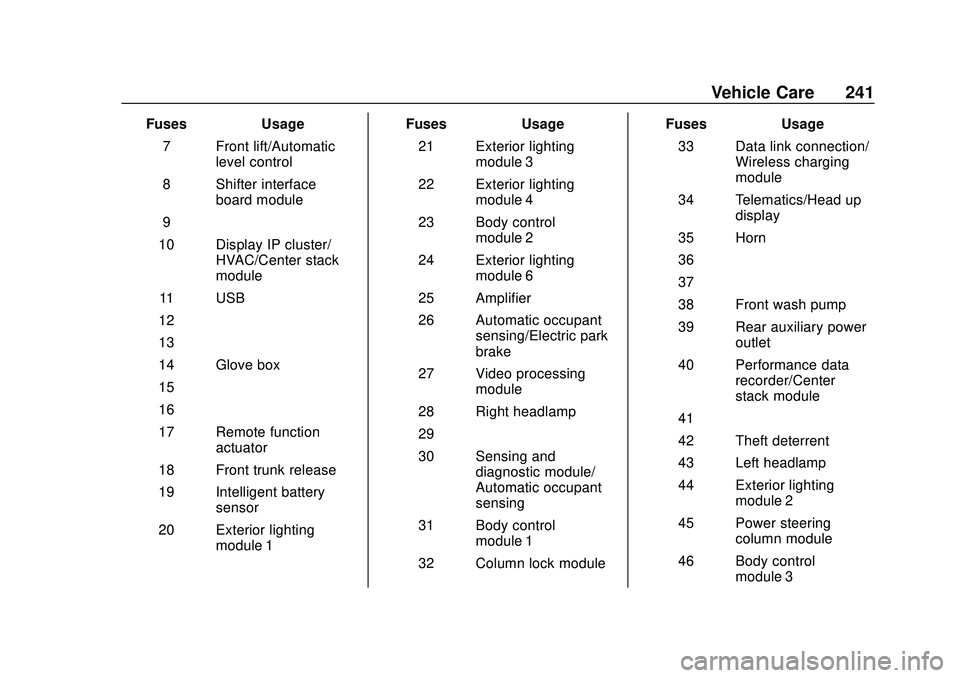
Instrument Panel Fuse
Block
The instrument panel fuse block is
behind the glove box. The glove box
can be accessed by unlatching the
door damper and squeezing the
pivot to release the damper ring.
Pull the glove box bin side walls in
Page 242 of 336
Chevrolet Corvette Owner Manual (GMNA-Localizing-U.S./Canada/Mexico-
12470550) - 2020 - CRC - 4/23/20
Vehicle Care 241
FusesUsage
7 Front lift/Automatic level control
8 Shifter interface board module
9 –
10 Display IP cluster/ HVAC/Center stack
module
11 USB
12 –
13 –
14 Glove box
15 –
16 –
17 Remote function actuator
18 Front trunk release
19 Intelligent battery sensor
20 Exterior lighting module 1 Fuses
Usage
21 Exterior lighting module 3
22 Exterior lighting module 4
23 Body control module 2
24 Exterior lighting module 6
25 Amplifier
26 Automatic occupant sensing/Electric park
brake
27 Video processing module
28 Right headlamp
29 –
30 Sensing and diagnostic module/
Automatic occupant
sensing
31 Body control module 1
32 Column lock module Fuses
Usage
33 Data link connection/ Wireless charging
module
34 Telematics/Head up display
35 Horn
36 –
37 –
38 Front wash pump
39 Rear auxiliary power outlet
40 Performance data recorder/Center
stack module
41 –
42 Theft deterrent
43 Left headlamp
44 Exterior lighting module 2
45 Power steering column module
46 Body control module 3
Page 243 of 336
Chevrolet Corvette Owner Manual (GMNA-Localizing-U.S./Canada/Mexico-
12470550) - 2020 - CRC - 4/23/20
242 Vehicle Care
FusesUsage
47 Exterior lighting module 5
48 Exterior lighting module 7
49 Body control module 4
50 Front auxiliary power outlet
51 –
52 Steering wheel control switch
53 Heated steering wheel
54 –
Relays Usage
1 –
2 Glove box relay
3 Horn relay
4 Front wash relay
5 Retained accessory power/Accessory
relay Relays
Usage
6 Front trunk release relay 1
7 –
8 –
9 Front trunk release relay 2
10 Wiper relay
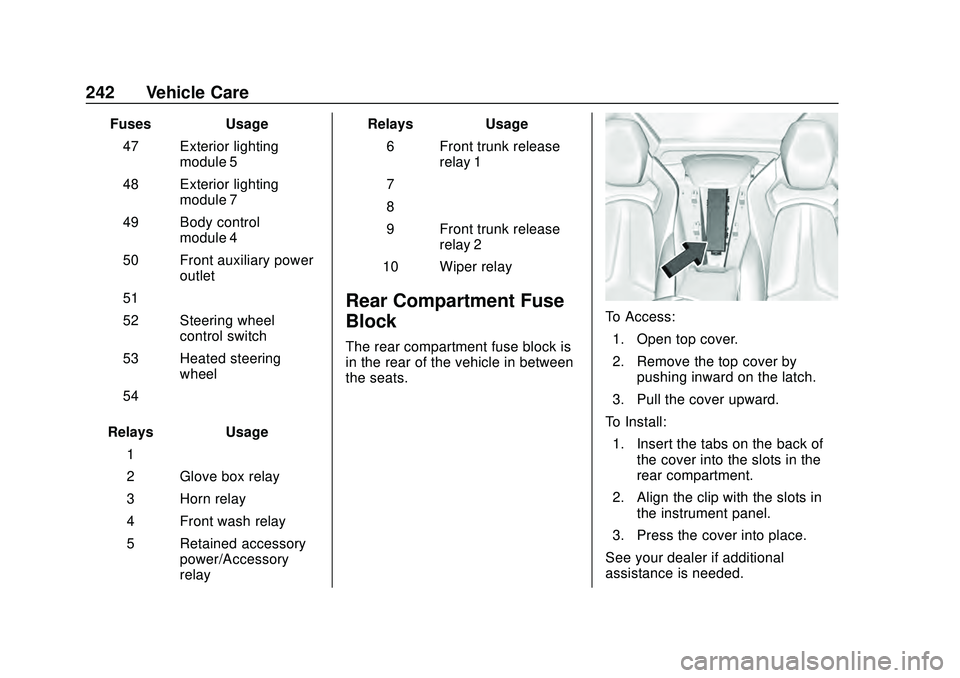
Rear Compartment Fuse
Block
The rear compartment fuse block is
in the rear of the vehicle in between
the seats.
To Access: 1. Open top cover.
2. Remove the top cover by pushing inward on the latch.
3. Pull the cover upward.
To Install: 1. Insert the tabs on the back of the cover into the slots in the
rear compartment.
2. Align the clip with the slots in the instrument panel.
3. Press the cover into place.
See your dealer if additional
assistance is needed.