wheel CHEVROLET CORVETTE 2020 Service Manual
[x] Cancel search | Manufacturer: CHEVROLET, Model Year: 2020, Model line: CORVETTE, Model: CHEVROLET CORVETTE 2020Pages: 336, PDF Size: 5.21 MB
Page 178 of 336
Chevrolet Corvette Owner Manual (GMNA-Localizing-U.S./Canada/Mexico-
12470550) - 2020 - CRC - 4/23/20
Driving and Operating 177
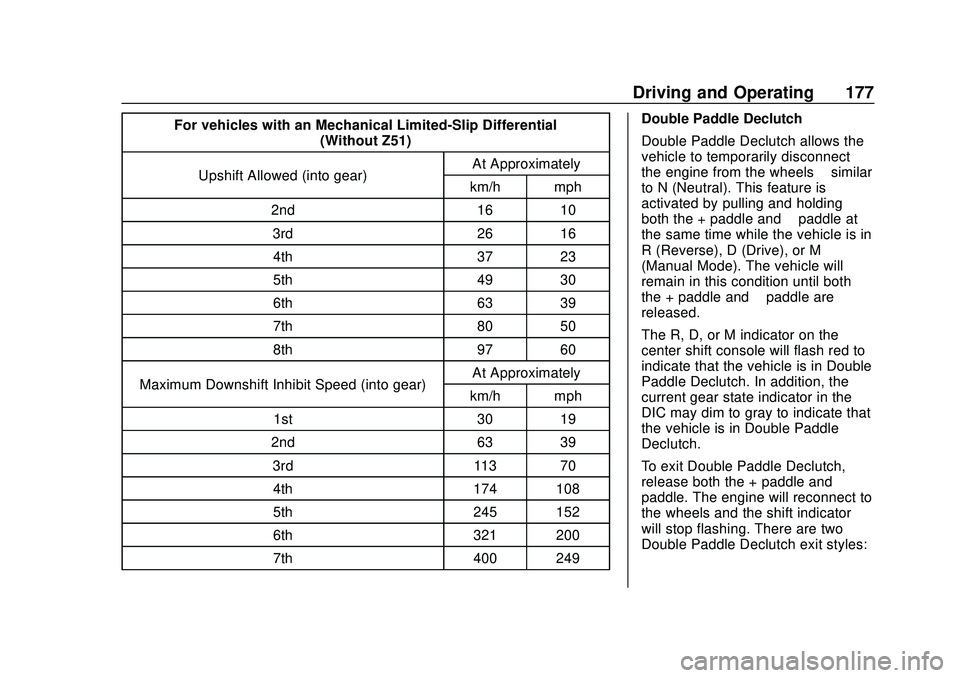
For vehicles with an Mechanical Limited-Slip Differential(Without Z51)
Upshift Allowed (into gear) At Approximately
km/h mph
2nd 16 10 3rd 26 164th 37 23
5th 49 30
6th 63 39
7th 80 50
8th 97 60
Maximum Downshift Inhibit Speed (into gear) At Approximately
km/h mph
1st 30 19
2nd 63 39 3rd 113 704th 174 108
5th 245 152
6th 321 200
7th 400 249 Double Paddle Declutch
Double Paddle Declutch allows the
vehicle to temporarily disconnect
the engine from the wheels
–similar
to N (Neutral). This feature is
activated by pulling and holding
both the + paddle and −paddle at
the same time while the vehicle is in
R (Reverse), D (Drive), or M
(Manual Mode). The vehicle will
remain in this condition until both
the + paddle and −paddle are
released.
The R, D, or M indicator on the
center shift console will flash red to
indicate that the vehicle is in Double
Paddle Declutch. In addition, the
current gear state indicator in the
DIC may dim to gray to indicate that
the vehicle is in Double Paddle
Declutch.
To exit Double Paddle Declutch,
release both the + paddle and −
paddle. The engine will reconnect to
the wheels and the shift indicator
will stop flashing. There are two
Double Paddle Declutch exit styles:
Page 179 of 336
Chevrolet Corvette Owner Manual (GMNA-Localizing-U.S./Canada/Mexico-
12470550) - 2020 - CRC - 4/23/20
178 Driving and Operating
Rapid Exit :This is intended for
use at a closed course race track
and not on public roads. Engine
power is reapplied to the wheels
quickly to support spirited driving.
The rate of launch is dependent on
how much the accelerator pedal is
pressed when the paddles are
released: The further the accelerator
pedal is pressed, the greater the
rate of launch. Tire spin may occur
with the accelerator pedal pressed
and the Traction Control System
(TCS) turned off.
This launch occurs when both of
these conditions are met:
. Vehicle speed is below
10 km/h (6 mph).
. Both the + paddle and −paddle
are released at the same time.
With the accelerator fully pressed
and the engine at the rev limiter,
peak performance only occurs if the
paddles are released within a short
period of time after reaching the rev
limit (i.e., a few seconds). Standard Exit :
Engine power is
reapplied to the wheels gently to
support normal vehicle operation on
public roads.
This occurs when paddles are
released under any of the these
conditions:
. Vehicle speed is above
10 km/h (6 mph).
. The vehicle is in R (Reverse).
. The + paddle and −paddle are
not released at the same time.
If the vehicle was in Temporary
Manual Paddle Shift mode before
entering Double Paddle Declutch,
the vehicle will return to D (Drive)
with automatic shifting upon exiting
Double Paddle Declutch.
{Warning
When exiting Double Paddle
Declutch, the vehicle may move
rapidly. You could lose control
and cause a crash with nearby
people or objects. Be ready to (Continued)
Warning (Continued)
release the accelerator pedal or
apply the brakes immediately if
the vehicle moves too quickly. Do
not use the Double Paddle
Declutch when people or objects
are near.
Page 181 of 336
Chevrolet Corvette Owner Manual (GMNA-Localizing-U.S./Canada/Mexico-
12470550) - 2020 - CRC - 4/23/20
180 Driving and Operating
The system has aYElectric
Parking Brake light, and a
8Service
Parking Brake light. See Electric
Parking Brake Light 0104 and
Service Electric Parking Brake Light
0 105.
Before leaving the vehicle, check for
the
Ylight to ensure that the
parking brake is applied.
EPB Apply
To apply the EPB:
1. Be sure the vehicle is at a complete stop.
2. Press the EPB switch momentarily.
The
Ylight will flash and then stay
on once the EPB is fully applied.
If the
Ylight flashes continuously,
then the EPB is only partially
applied or there is a problem with
the EPB. A DIC message will
display. Release the EPB and try to
apply it again. If the light does not
come on, or keeps flashing, have the vehicle serviced. Do not drive
the vehicle if the
Ylight is flashing.
See your dealer.
If the
8light is on, press the EPB
switch and hold it. Continue to hold
the switch until the
Ylight remains
on. If the
8light remains on, see
your dealer.
If the EPB is applied while the
vehicle is moving, the vehicle will
decelerate as long as the switch is
pressed. If the switch is pressed
until the vehicle comes to a stop,
the EPB will remain applied.
The vehicle may automatically apply
the EPB in some situations when
the vehicle is not moving. This is
normal, and is done to periodically
check the correct operation of the
EPB system.
If the EPB fails to apply, block the
rear wheels to prevent vehicle
movement.
EPB Release
To release the EPB: 1. Turn the ignition on or to ACC/
ACCESSORY.
2. Apply and hold the brake pedal.
3. Press the EPB switch momentarily.
The EPB is released when the
Y
light is off.
If the
8light is on, release the EPB
by pressing and holding the EPB
switch. Continue to hold the switch
until the
Ylight is off. If either light
stays on after release is attempted,
see your dealer.
Caution
Driving with the parking brake on
can overheat the brake system
and cause premature wear or
damage to brake system parts.
Make sure that the parking brake
is fully released and the brake
warning light is off before driving.
Page 183 of 336

Chevrolet Corvette Owner Manual (GMNA-Localizing-U.S./Canada/Mexico-
12470550) - 2020 - CRC - 4/23/20
182 Driving and Operating
Ride Control Systems
Traction Control/
Electronic Stability
Control
The vehicle has a Traction Control
System (TCS) and a StabiliTrak/
Electronic Stability Control (ESC)
system. These systems help limit
wheel spin and assist the driver in
maintaining control, especially on
slippery road conditions.
TCS activates if it senses that the
rear wheels are spinning too much
or are beginning to lose traction.
When this happens, TCS applies
the brakes to the spinning wheel
and reduces engine power (by
closing the throttle and managing
engine spark) to limit wheel spin.
StabiliTrak/ESC activates when the
vehicle senses a difference between
the intended path and the direction
the vehicle is actually traveling.
StabiliTrak/ESC selectively applies
braking pressure to any one of thevehicle wheel brakes to assist the
driver in keeping the vehicle on the
intended path.
If cruise control is being used when
TCS begins to limit wheel spin, the
cruise control will automatically
disengage. Cruise control may be
reengaged when road conditions
allow. See
Cruise Control 0196.
If the driver disables TCS, cruise
control will disengage. Cruise
control will also be disabled if
Performance Traction Management
(PTM) is selected, or if StabiliTrak is
turned off.
Both systems come on
automatically when the vehicle is
started and begins to move. The
systems may be heard or felt while
they are operating or while
performing diagnostic checks. This
is normal and does not mean there
is a problem with the vehicle.
It is recommended to leave both
systems on for normal driving
conditions, but it may be necessary
to turn TCS off if the vehicle gets
stuck in sand, mud, ice, or snow. See
If the Vehicle Is Stuck 0159
and “Turning the Systems Off and
On” later in this section.
The indicator light for both systems
is in the instrument cluster. This
light will:
.
Flash when TCS is limiting
wheel spin
. Flash when StabiliTrak/ESC is
activated
. Flash when ABS is active
. Turn on and stay on when either
system is not working
If either system fails to turn on or to
activate, a message displays in the
Driver Information Center (DIC), and
dcomes on and stays on to
indicate that the system is inactive
and is not assisting the driver in
Page 184 of 336
Chevrolet Corvette Owner Manual (GMNA-Localizing-U.S./Canada/Mexico-
12470550) - 2020 - CRC - 4/23/20
Driving and Operating 183
maintaining control. The vehicle is
safe to drive, but driving should be
adjusted accordingly.
If
dcomes on and stays on:
1. Stop the vehicle.
2. Turn the engine off and wait 15 seconds.
3. Start the engine.
Drive the vehicle. If
dcomes on and
stays on, the vehicle may need
more time to diagnose the problem.
If the condition persists, see your
dealer.
Turning the Systems Off
and On
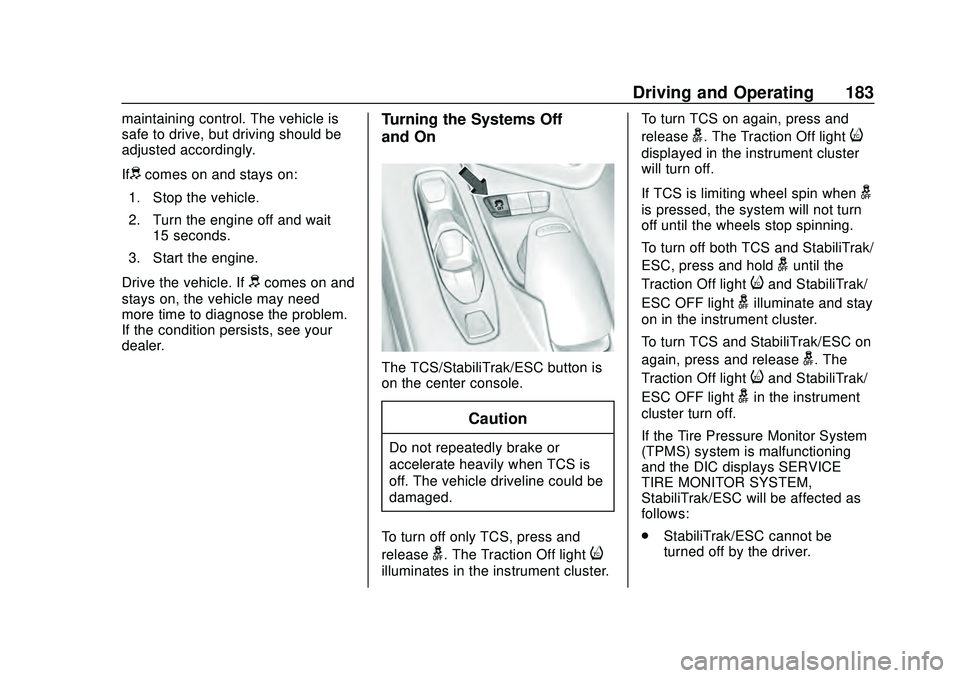
The TCS/StabiliTrak/ESC button is
on the center console.
Caution
Do not repeatedly brake or
accelerate heavily when TCS is
off. The vehicle driveline could be
damaged.
To turn off only TCS, press and
release
g. The Traction Off lighti
illuminates in the instrument cluster. To turn TCS on again, press and
release
g. The Traction Off lighti
displayed in the instrument cluster
will turn off.
If TCS is limiting wheel spin when
g
is pressed, the system will not turn
off until the wheels stop spinning.
To turn off both TCS and StabiliTrak/
ESC, press and hold
guntil the
Traction Off light
iand StabiliTrak/
ESC OFF light
gilluminate and stay
on in the instrument cluster.
To turn TCS and StabiliTrak/ESC on
again, press and release
g. The
Traction Off light
iand StabiliTrak/
ESC OFF light
gin the instrument
cluster turn off.
If the Tire Pressure Monitor System
(TPMS) system is malfunctioning
and the DIC displays SERVICE
TIRE MONITOR SYSTEM,
StabiliTrak/ESC will be affected as
follows:
. StabiliTrak/ESC cannot be
turned off by the driver.
Page 186 of 336
Chevrolet Corvette Owner Manual (GMNA-Localizing-U.S./Canada/Mexico-
12470550) - 2020 - CRC - 4/23/20
Driving and Operating 185
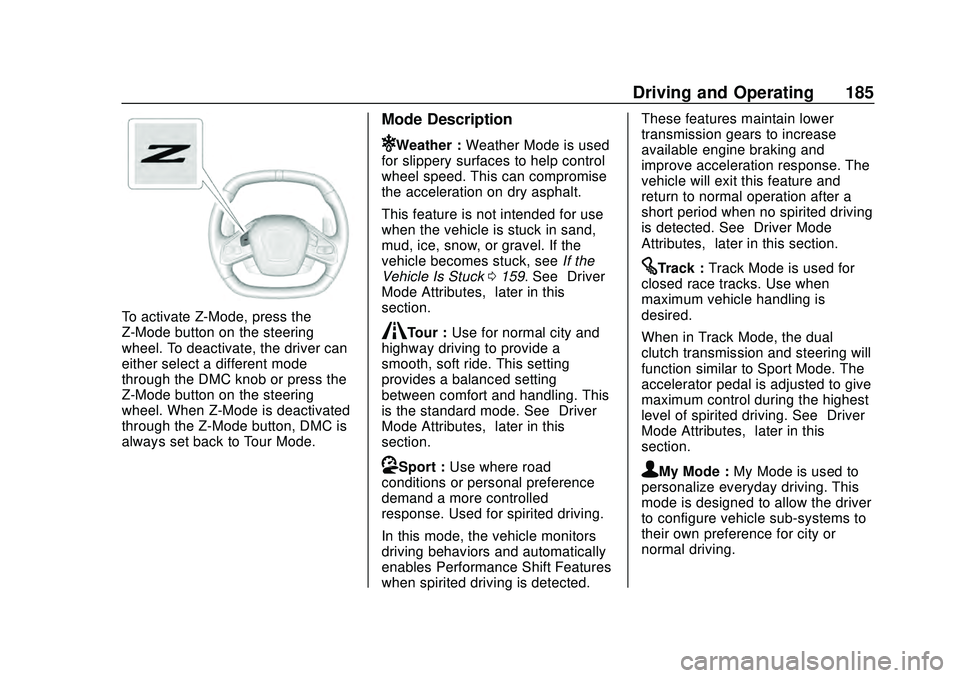
To activate Z-Mode, press the
Z-Mode button on the steering
wheel. To deactivate, the driver can
either select a different mode
through the DMC knob or press the
Z-Mode button on the steering
wheel. When Z-Mode is deactivated
through the Z-Mode button, DMC is
always set back to Tour Mode.
Mode Description
uWeather :Weather Mode is used
for slippery surfaces to help control
wheel speed. This can compromise
the acceleration on dry asphalt.
This feature is not intended for use
when the vehicle is stuck in sand,
mud, ice, snow, or gravel. If the
vehicle becomes stuck, see If the
Vehicle Is Stuck 0159. See “Driver
Mode Attributes,” later in this
section.
sTour : Use for normal city and
highway driving to provide a
smooth, soft ride. This setting
provides a balanced setting
between comfort and handling. This
is the standard mode. See “Driver
Mode Attributes,” later in this
section.
rSport : Use where road
conditions or personal preference
demand a more controlled
response. Used for spirited driving.
In this mode, the vehicle monitors
driving behaviors and automatically
enables Performance Shift Features
when spirited driving is detected. These features maintain lower
transmission gears to increase
available engine braking and
improve acceleration response. The
vehicle will exit this feature and
return to normal operation after a
short period when no spirited driving
is detected. See
“Driver Mode
Attributes,” later in this section.
tTrack :Track Mode is used for
closed race tracks. Use when
maximum vehicle handling is
desired.
When in Track Mode, the dual
clutch transmission and steering will
function similar to Sport Mode. The
accelerator pedal is adjusted to give
maximum control during the highest
level of spirited driving. See “Driver
Mode Attributes,” later in this
section.
qMy Mode : My Mode is used to
personalize everyday driving. This
mode is designed to allow the driver
to configure vehicle sub-systems to
their own preference for city or
normal driving.
Page 191 of 336
Chevrolet Corvette Owner Manual (GMNA-Localizing-U.S./Canada/Mexico-
12470550) - 2020 - CRC - 4/23/20
190 Driving and Operating
‐Not upshifting when the
accelerator is released to
avoid unnecessary shifts if the
accelerator is re-applied
‐ Recognizing sporty driving and
anticipate upcoming corners
with the appropriate gear
selection entering and exiting
. Driver Modes
‐Driver influenced changes are
effective in all driving modes,
however the aggressiveness
of the transmission response
will increase between Tour,
Sport, and Track Modes
respectively.
Active Fuel Management (engine
cylinder shuts off)
. Normal with Dual Clutch
Transmission: The engine uses
8-cylinder mode when
accelerating, but changes to
4-cylinder mode when coasting.
Active Fuel Management is a preset
of Powertrain and cannot be
modified or changed independently. Engine Sound
Changes when the variable exhaust
valves open.
Steering (Assist Effort)
Adjusts from a lighter steering feel
to reduced assist for more
steering feel.
Magnetic Ride Control (if
equipped)
Adjusts the shock dampening
firmness based on driving
conditions to improve comfort and
performance.
Driver Mode Customization
The vehicle is equipped to modify
the following vehicle settings base
on vehicle content. Through the
center stack, under Vehicle
Settings, select Drive Mode to
customize and personalize My
Mode and/or Z-Mode.
Engine Sound:
Engine Sound adjusts the volume of
engine noise. Setting range from
quietest to loudest volume as you
move from Stealth through Track..
Stealth, Tour, Sport, Track
Steering:
This setting adjusts the effort
required to turn the steering wheel.
The steering wheel offers better
feedback but requires more effort as
you move from Tour to Track.
. Tour, Sport, Track
Suspension:
This setting adjusts the firmness of
the suspension in the vehicle.
Suspension adjust stiffness of the
shocks and / or springs. The ride is
more comfortable at lower settings
and is stiffer at higher settings for
better control.
. Tour, Sport, Track
Powertrain:
This setting adjusts the throttle
response, gear shifting and engine
performance. An increased throttle
response enhances the acceleration
feel as you move toward Track, but
with a comfort trade-off due to more
aggressive gear shifting.
. Normal, Tour, Sport, Track
Page 192 of 336
Chevrolet Corvette Owner Manual (GMNA-Localizing-U.S./Canada/Mexico-
12470550) - 2020 - CRC - 4/23/20
Driving and Operating 191
Brake Response:
This setting adjusts the brake pedal
response. Settings range from a
slower response for more
comfortable driving to the quickest
response for quicker deceleration.
Brake pedal travel decreases and
caliper pressure increases as you
move from Tour to Sport. Track
allows for improved pedal precision
at higher decelerations for high
performance driving.
.Tour, Sport, Track
Display:
This setting adjusts the cluster
display theme (this setting is only
configured through the cluster using
the steering wheel controls).
. Tour, Sport, Track, Weather (and
any informational tiles set-up).
Front Lift System
A two-position lift actuator (one per
damper) with 35 mm (1.5 in) of
stroke will hydraulically raise the
front of the vehicle to provide
approximately 50 mm (2 in) of increased clearance in
approximately three seconds (height
and time will vary by vehicle). The
Front Lift System will allow you to lift
the front of the vehicle to enter a
driveway, driving over curbs, speed
bumps or onto ramps or a trailer.
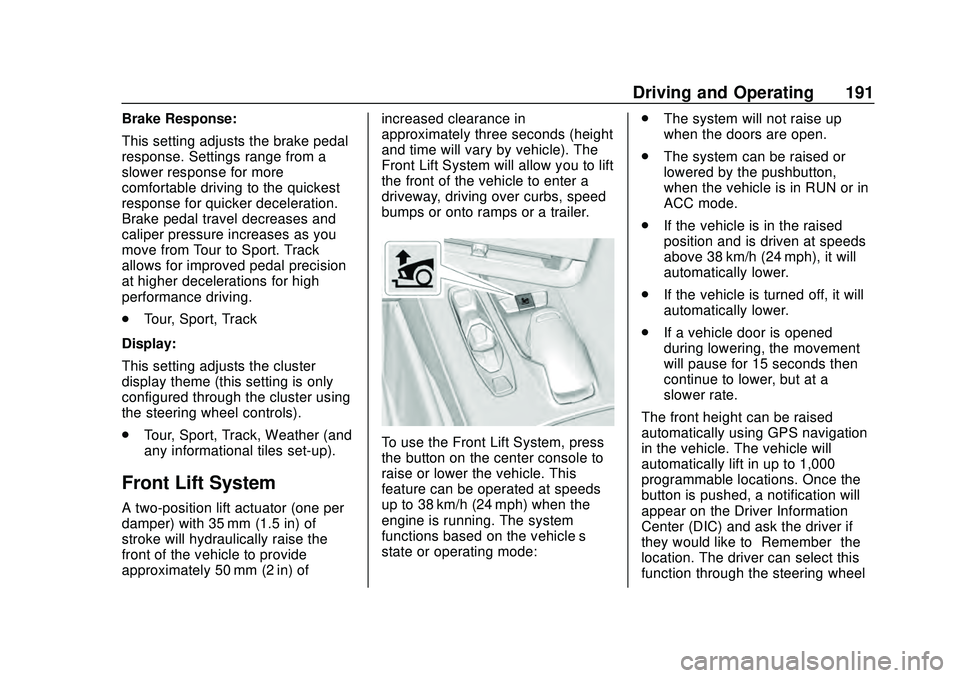
To use the Front Lift System, press
the button on the center console to
raise or lower the vehicle. This
feature can be operated at speeds
up to 38 km/h (24 mph) when the
engine is running. The system
functions based on the vehicle’
s
state or operating mode: .
The system will not raise up
when the doors are open.
. The system can be raised or
lowered by the pushbutton,
when the vehicle is in RUN or in
ACC mode.
. If the vehicle is in the raised
position and is driven at speeds
above 38 km/h (24 mph), it will
automatically lower.
. If the vehicle is turned off, it will
automatically lower.
. If a vehicle door is opened
during lowering, the movement
will pause for 15 seconds then
continue to lower, but at a
slower rate.
The front height can be raised
automatically using GPS navigation
in the vehicle. The vehicle will
automatically lift in up to 1,000
programmable locations. Once the
button is pushed, a notification will
appear on the Driver Information
Center (DIC) and ask the driver if
they would like to “Remember”the
location. The driver can select this
function through the steering wheel
Page 193 of 336
Chevrolet Corvette Owner Manual (GMNA-Localizing-U.S./Canada/Mexico-
12470550) - 2020 - CRC - 4/23/20
192 Driving and Operating
controls, seeSteering Wheel
Controls 087. The driver can also
delete stored locations for the
automatic lift. If the vehicle is raised
automatically using GPS, it will
automatically lower once the vehicle
is located about 60 meters (197 feet)
from the programmed location.
Drivers can disable this function by
turning off GPS location through
their vehicle Front Lift System will
still operate, but only by using the
pushbutton command, and the “Auto
Lift Location Remembered”
confirmation message will not
display.
The Front Lift System can also be
used in accessory mode. Put the
vehicle in ACC/ACCESSORY mode,
then press and hold the button on
the center console for 10
consecutive seconds to
automatically raise the vehicle.
The DIC may display the message
“Lift System Unavailable” if the
following occur:
. Any doors are ajar.
. The hood is open. .
The vehicle is moving over
38 km/h (24 mph).
. Too many lift requests within a
short period.
The Front Lift System should not be
used to service the vehicle. Do not
place anything or body parts under
the vehicle while lifted. See
Recommended Fluids and
Lubricants 0295.
Competitive Driving Mode
If equipped, Competitive Driving
Mode, PTM, and Launch Control are
systems designed to allow
increased performance while
accelerating and/or cornering. This
is accomplished by regulating and
optimizing the engine, brakes, and
suspension performance. These
modes are for use at a closed
course race track and are not
intended for use on public roads.
They will not compensate for driver
inexperience or lack of familiarity
with the race track. Drivers who
prefer to allow the system to have
more control of the engine, brakes, and suspension are advised to turn
the normal traction control and
StabiliTrak/ESC systems on.
Competitive Driving Mode
Competitive Driving Mode allows full
engine power while StabiliTrak/ESC
helps maintain directional control of
the vehicle by selective brake
application. In this mode, the TCS is
off and Launch Control is available.
Adjust your driving style to account
for the available engine power. See
“Launch Control”
later in this
section.
Page 195 of 336
Chevrolet Corvette Owner Manual (GMNA-Localizing-U.S./Canada/Mexico-
12470550) - 2020 - CRC - 4/23/20
194 Driving and Operating
.Requires more driving skill than
mode 2.
. StabiliTrak/ESC is on and more
engine power is available than in
mode 2.
PTM Mode 4 –Sport 2
. For use by drivers who are
familiar with the track.
. Dry conditions only.
. Requires more driving skill than
modes 2 or 3.
. StabiliTrak/ESC is off and
available engine power is the
same as mode 3.
PTM Mode 5 –Race
. For use by experienced drivers
who are familiar with the track.
. Dry conditions only.
. Requires more driving skill than
in other modes.
. StabiliTrak/ESC is off and
engine power is available for
maximum cornering speed. Press and releasegto turn off PTM
and return to the TCS and
StabiliTrak/ESC systems. The
traction off light
iand StabiliTrak
Off light
gwill go out.
Launch Control (Sport and
Track Mode Only)
A Launch Control feature is
available, within Competitive Driving
Mode or PTM, on all vehicles to
allow the driver to achieve high
levels of vehicle acceleration in a
straight line. Launch Control is a
form of TCS that manages tire spin,
and transmissions clutch, while
launching the vehicle. This feature
is intended for use during closed
course race events where
consistent zero to 60 and quarter
mile times are desirable.
Launch Control is only available
when the following criteria are met:
. Competitive Driving Mode or any
of the PTM Modes are selected
(if equipped).
. The vehicle is not moving. .
The wheels and steering wheel
are pointing straight.
Launching the Vehicle
. Ensure the vehicle is in
Competitive Driving Mode or any
of the PTM modes.
. The brake pedal must be firmly
pressed to the floor, equivalent
to a panic brake event.
. While maintaining the brake
pedal, the accelerator pedal is
rapidly applied to wide open
throttle. (If the vehicle rolls due
to wide open throttle, release the
throttle, press the brake pedal
more firmly, and re-apply the
accelerator to wide open
throttle.)
The Launch Control feature will
initially limit engine speed as the
driver rapidly applies the accelerator
pedal to wide open throttle. Allow
the engine rpm’ s to stabilize.
A smooth, quick release of the
brake pedal, while maintaining the
fully pressed accelerator pedal, will
manage tire slip and transmissions