wheel CHEVROLET CORVETTE 2020 Workshop Manual
[x] Cancel search | Manufacturer: CHEVROLET, Model Year: 2020, Model line: CORVETTE, Model: CHEVROLET CORVETTE 2020Pages: 336, PDF Size: 5.21 MB
Page 196 of 336
Chevrolet Corvette Owner Manual (GMNA-Localizing-U.S./Canada/Mexico-
12470550) - 2020 - CRC - 4/23/20
Driving and Operating 195
clutch. After the vehicle is launched,
the system continues in Competitive
Driving Mode or PTM.
Competitive Driving Mode, PTM,
and Launch Control are systems
designed for a closed course race
track and not intended for use on
public roads. The systems are not
intended to compensate for lack of
driver experience or familiarity with
the race track.
Caution
The new vehicle break-in period
should be completed before using
the launch control feature,
otherwise performance will be
limited and damage may occur to
the powertrain/engine. SeeNew
Vehicle Break-In 0163.
Limited-Slip Differential
(without Z51)
The mechanical limited-slip
differential can give more traction on
snow, mud, ice, sand, or gravel.
It works like a standard axle most of the time, but when traction is low,
this feature allows the drive wheel
with the most traction to move the
vehicle. See
Competitive Driving
Mode 0192 and
Maintenance Schedule 0286.
Limited-Slip Differential
(with Z51)
The Electronic Limited-Slip
Differential (eLSD) is a hydraulically
actuated clutch system inside the
transaxle. It can infinitely vary the
clutch engagement between 0 and
2250 N*m (1659 lb-ft) of breakaway
torque between the rear wheels.
When necessary it responds from
open to full engagement in fractions
of a second. Smaller clutch
adjustments happen even faster.
The eLSD:
.
Uses the vehicle sensors and
driver inputs to determine the
optimum amount of clutch
engagement for the conditions. .
Improves traction while
cornering by changing the
engagement to achieve a
balance between directional
control and acceleration.
. Provides optimal engagement
for high-speed control and
stability without affecting precise
steering and turn-in.
. Improves vehicle stability during
spirited driving and evasive
maneuvers. It is fully integrated
with the Active Handling and
Performance Traction
Management (PTM) systems (if
equipped).
There are unique calibrations based
on the Traction Control System
(TCS) setting. eLSD modes change
automatically when the traction
control button is pressed. No unique
input from the driver is required.
. Mode 1 is the standard mode
when the vehicle is started.
It provides a touring calibration
with an emphasis on vehicle
stability. Mode 1 is also used in
PTM Wet mode.
Page 197 of 336
Chevrolet Corvette Owner Manual (GMNA-Localizing-U.S./Canada/Mexico-
12470550) - 2020 - CRC - 4/23/20
196 Driving and Operating
.Mode 2 is engaged when both
TCS and StabiliTrak are turned
off. This calibration provides
more nimble corner turn-in, and
is biased for better traction out of
corners.
. Mode 3 is engaged when PTM is
engaged in Dry, Sport 1 & 2, and
Race modes. This is a nimble
calibration with similar
functionality as eLSD Mode 2,
however, it is integrated to work
with PTM.
. Mode 4 is engaged when TCS is
selected off, but StabiliTrak
remains on. Vehicle stability is
still the priority, while allowing for
optimized traction out of corners.Cruise Control
With cruise control, a speed of
about 40 km/h (25 mph) or more
can be maintained without keeping
your foot on the accelerator. Cruise
control does not work at speeds
below about 40 km/h (25 mph).
{Warning
Cruise control can be dangerous
where you cannot drive safely at
a steady speed. Do not use
cruise control on winding roads or
in heavy traffic.
Cruise control can be dangerous
on slippery roads. On such roads,
fast changes in tire traction can
cause excessive wheel slip, and
you could lose control. Do not use
cruise control on slippery roads.
If the Traction Control System (TCS)
begins to limit wheel spin while you
are using cruise control, the cruise
control automatically disengages.
See Traction Control/Electronic
Stability Control 0182. When road conditions allow for using safely
again, cruise control can be turned
back on.
If the brakes are applied, cruise
control disengages.
Cruise control will disengage if
either TCS or StabiliTrak/Electronic
Stability Control (ESC) is turned off.
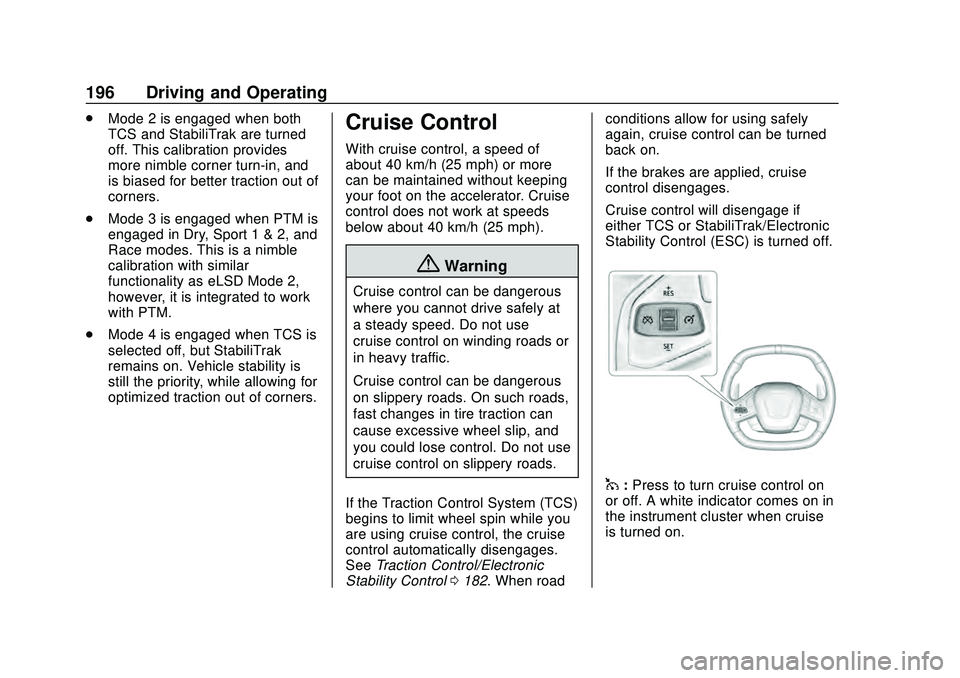
1:
Press to turn cruise control on
or off. A white indicator comes on in
the instrument cluster when cruise
is turned on.
Page 198 of 336
Chevrolet Corvette Owner Manual (GMNA-Localizing-U.S./Canada/Mexico-
12470550) - 2020 - CRC - 4/23/20
Driving and Operating 197
+RES :If there is a set speed in
memory, press briefly to resume to
that speed or press and hold to
accelerate. If cruise control is
already engaged, use to increase
vehicle speed.
SET– :Press briefly to set the
speed and activate cruise control.
If cruise control is already engaged,
use to decrease vehicle speed.
*: Press to disengage cruise
control without erasing the set
speed from memory.
The speedometer reading can be
displayed in either English or metric
units. See Instrument Cluster 094.
The increment value used depends
on the units displayed.
Setting Cruise Control
If
1is on when not in use, SET– or
+RES could get pressed and go into
cruise when not desired. Keep
1off
when cruise is not being used.
1. Press
1to turn the cruise
system on.
2. Get up to the desired speed. 3. Press and release SET–
on the
steering wheel.
4. Remove foot from the accelerator.
The cruise control indicator on the
instrument cluster turns green after
cruise control has been set to the
desired speed. See Instrument
Cluster 094.
Resuming a Set Speed
If the cruise control is set at a
desired speed and then the brakes
are applied or
*is pressed, the
cruise control is disengaged without
erasing the set speed from memory.
Once the vehicle reaches about
40 km/h (25 mph) or more, briefly
press +RES. The vehicle returns to
the previous set speed.
Increasing Speed While Using
Cruise Control
Do one of the following:
. Press and hold +RES until the
desired speed is reached, then
release it. .
To increase vehicle speed in
small increments, briefly press
+RES. For each press, the
vehicle goes about 1 km/h
(1 mph) faster.
Reducing Speed While Using
Cruise Control
Do one of the following:
. Press and hold SET– until the
desired lower speed is reached,
then release it.
. To decrease the vehicle speed in
small increments, briefly press
SET–. For each press, the
vehicle goes about 1 km/h
(1 mph) slower.
Passing Another Vehicle While
Using Cruise Control
Use the accelerator pedal to
increase the vehicle speed. When
you take your foot off the pedal, the
vehicle will slow down to the
previously set cruise speed.
Page 210 of 336
Chevrolet Corvette Owner Manual (GMNA-Localizing-U.S./Canada/Mexico-
12470550) - 2020 - CRC - 4/23/20
Vehicle Care 209
Vehicle Care
General Information
General Information . . . . . . . . . . 210
California Proposition65 Warning . . . . . . . . . . . . . . . . . 210
California Perchlorate Materials Requirements . . . . . . . . . . . . . . . 211
Accessories and Modifications . . . . . . . . . . . . . . . . 211
Lifting the Vehicle . . . . . . . . . . . . . 211
Vehicle Checks
Doing Your Own Service Work . . . . . . . . . . . . . . . 213
Underhood Compartment Overview . . . . . . . . . . . . . . . . . . . . 214
Engine Compartment Overview . . . . . . . . . . . . . . . . . . . . 215
Engine Oil . . . . . . . . . . . . . . . . . . . . 218
Engine Oil Life System . . . . . . . 221
Dual Clutch Transmission Fluid . . . . . . . . . . . . . . . . . . . . . . . . 222
Dual Clutch Transmission Fluid Life System . . . . . . . . . . . . . . . . . 223
Engine Air Filter Life System . . . . . . . . . . . . . . . . . . . . . . 224
Engine Air Cleaner/Filter . . . . . . 224
Cooling System . . . . . . . . . . . . . . 226 Engine Overheating . . . . . . . . . . 230
Washer Fluid . . . . . . . . . . . . . . . . . 231
Brakes . . . . . . . . . . . . . . . . . . . . . . . 232
Brake Fluid . . . . . . . . . . . . . . . . . . . 233
Battery - North America . . . . . . 234
Park Brake and P (Park)
Mechanism Check . . . . . . . . . . 235
Wiper Blade Replacement . . . . 236
Windshield Replacement . . . . . 236
Gas Strut(s) . . . . . . . . . . . . . . . . . . 237
Headlamp Aiming
Front Headlamp Aiming . . . . . . 238
Bulb Replacement
LED Lighting . . . . . . . . . . . . . . . . . 238
Electrical System
Electrical System Overload . . . 239
Fuses and Circuit Breakers . . . 239
Instrument Panel Fuse Block . . . . . . . . . . . . . . . . . . . . . . . . 239
Rear Compartment Fuse Block . . . . . . . . . . . . . . . . . . . . . . . . 242
Wheels and Tires
Tires . . . . . . . . . . . . . . . . . . . . . . . . . . 245
All-Season Tires . . . . . . . . . . . . . . 246
Winter Tires . . . . . . . . . . . . . . . . . . 247
Run-Flat Tires . . . . . . . . . . . . . . . . 247
Low-Profile Tires . . . . . . . . . . . . . 248
Summer Tires . . . . . . . . . . . . . . . . 248 Tire Sidewall Labeling . . . . . . . . 249
Tire Designations . . . . . . . . . . . . . 250
Tire Terminology and
Definitions . . . . . . . . . . . . . . . . . . 251
Tire Pressure . . . . . . . . . . . . . . . . . 253
Tire Pressure for High-Speed
Operation . . . . . . . . . . . . . . . . . . . 254
Tire Pressure Monitor System . . . . . . . . . . . . . . . . . . . . . . 255
Tire Pressure Monitor Operation . . . . . . . . . . . . . . . . . . . 256
Tire Inspection . . . . . . . . . . . . . . . . 259
Tire Rotation . . . . . . . . . . . . . . . . . 259
When It Is Time for New Tires . . . . . . . . . . . . . . . . . . . . . . . . 260
Buying New Tires . . . . . . . . . . . . . 261
Different Size Tires and Wheels . . . . . . . . . . . . . . . . . . . . . . 262
Uniform Tire Quality Grading . . . . . . . . . . . . . . . . . . . . . 263
Wheel Alignment and Tire Balance . . . . . . . . . . . . . . . . . . . . . 264
Wheel Replacement . . . . . . . . . . 265
Tire Chains . . . . . . . . . . . . . . . . . . . 266
If a Tire Goes Flat . . . . . . . . . . . . 267Jump Starting
Jump Starting - North America . . . . . . . . . . . . . . . . . . . . . 267
Page 212 of 336
Chevrolet Corvette Owner Manual (GMNA-Localizing-U.S./Canada/Mexico-
12470550) - 2020 - CRC - 4/23/20
Vehicle Care 211
California Perchlorate
Materials Requirements
Certain types of automotive
applications, such as airbag
initiators, seat belt pretensioners,
and lithium batteries contained in
electronic keys, may contain
perchlorate materials. Perchlorate
Material–special handling may
apply. See www.dtsc.ca.gov/
hazardouswaste/perchlorate.
Accessories and
Modifications
Adding non-dealer accessories or
making modifications to the vehicle
can affect vehicle performance and
safety, including such things as
airbags, braking, stability, ride and
handling, emissions systems,
aerodynamics, durability, and
electronic systems like antilock
brakes, traction control, and stability
control. These accessories or
modifications could even cause
malfunction or damage not covered
by the vehicle warranty. Damage to suspension components
caused by modifying vehicle height
outside of factory settings will not be
covered by the vehicle warranty.
Damage to vehicle components
resulting from modifications or the
installation or use of non-GM
certified parts, including control
module or software modifications, is
not covered under the terms of the
vehicle warranty and may affect
remaining warranty coverage for
affected parts.
GM Accessories are designed to
complement and function with other
systems on the vehicle. See your
dealer to accessorize the vehicle
using genuine GM Accessories
installed by a dealer technician.
Also, see
Adding Equipment to the
Airbag-Equipped Vehicle 072.
Lifting the Vehicle
{Warning
Lifting a vehicle can cause an
injury. The vehicle can slip off the
jack and roll over you or other
people. You and they could be
badly injured. Find a level place
to lift your vehicle. To help
prevent the vehicle from moving:
1. Set the parking brake firmly.
2. Put the transmission inP (Park).
3. Turn off the engine.
To be even more certain the
vehicle will not move, put blocks
in front of and behind the wheels.
{Warning
Getting under a vehicle when it is
lifted on a jack is dangerous.
If the vehicle slips off the jack, (Continued)
Page 224 of 336
Chevrolet Corvette Owner Manual (GMNA-Localizing-U.S./Canada/Mexico-
12470550) - 2020 - CRC - 4/23/20
Vehicle Care 223
Caution
Use of the incorrect transmission
fluid may damage the vehicle,
and the damage may not be
covered by the vehicle warranty.
Always use the correct
transmission fluid. See
Recommended Fluids and
Lubricants0295.
Change the fluid and filter at the
proper intervals. See Maintenance
Schedule 0286. Be sure to use the
correct fluid. See Recommended
Fluids and Lubricants 0295.
Dual Clutch Transmission
Fluid Life System
When to Change the Dual
Clutch Transmission Fluid
This vehicle has a computer that
indicates when to change the
transmission fluid. This is based on
a combination of factors which
include temperature and miles
driven. Based on driving conditions, the mileage at which a fluid change
is indicated can vary considerably.
For the fluid life system to work
properly, the system must be reset
every time the fluid is changed.
When the system has calculated
that fluid life has been diminished, it
indicates that a fluid change is
necessary. A CHANGE
TRANSMISSION FLUID SOON
message comes on. Change the
fluid as soon as possible within the
next 1 000 km (600 mi). Failure to
change transmission fluid at
required intervals could lead to
suboptimal transmission
performance. Your dealer has
trained service technicians who will
change the fluid and reset the
system. If the system is ever reset
accidentally, the fluid must be
changed at 72 000 km (45,000 mi)
since the last fluid change.
How to Reset the Dual Clutch
Transmission Fluid Life
System
Reset the system whenever the
transmission fluid is replaced so that
the system can calculate the next
transmission fluid change.
To reset:
1. Place the vehicle in P (Park).
2. Select the Oil & Fluid Life page under the Maintenance DIC
menu. See Driver Information
Center (DIC) 0108.
3. Press the thumbwheel under the Oil & Fluid Life page to
move to the Reset/Disable
display area. Select Reset
Transmission Fluid with the
thumbwheel scroll then press
the thumbwheel. Then press
Yes to confirm the reset.
4. When the Transmission Fluid Life System is successfully
reset, 100% Transmission Fluid
Life will be displayed.
Page 225 of 336
Chevrolet Corvette Owner Manual (GMNA-Localizing-U.S./Canada/Mexico-
12470550) - 2020 - CRC - 4/23/20
224 Vehicle Care
Engine Air Filter Life
System
When to Change Engine Air
Filter
If equipped, this feature provides an
indication of when to change the
engine air filter. It is based on
driving conditions, which can cause
when to change to vary greatly. It is
possible an air filter change may not
be indicated for up to four years.
When the "Replace at Next Oil
Change" message displays, the
engine air filter should be replaced
at the time of the next engine oil
change. When the "Replace Engine
Air Filter Now" message displays,
the engine air filter should be
replaced as soon as possible. Reset
the engine air filter life system after
the engine air filter is replaced. See
your dealer for service and to reset
the system.
How to Reset Engine Air Filter
Life System
Reset the system whenever the
engine air filter is replaced so that
the system can calculate the next
engine air filter change.
To reset:1. Place the vehicle in P (Park).
2. Select Air Filter Life under the Maintenance DIC menu. See
Driver Information Center (DIC)
0108.
3. Press the thumbwheel under the Air Filter Life page to move
to the Reset/Disable area.
Select Reset Air Filter Life with
the thumbwheel scroll and then
press the thumbwheel. Then
press Yes to confirm the reset.
4. When the Engine Air Filter Life System is successfully reset,
100% Air Filter Life will be
displayed.
Engine Air Cleaner/Filter
See Engine Compartment Overview
0 215 for the location of the engine
air cleaner/filter.
Caution
If water is sprayed and enters the
engine air cleaner/filter intake and
housing, the engine could be
damaged. The repairs would not
be covered by the vehicle
warranty.
When to Inspect the Engine Air
Cleaner/Filter
For intervals on changing and
inspecting the engine air cleaner/
filter, see Maintenance Schedule
0 286.
How to Inspect/Replace the
Engine Air Cleaner/Filter
Do not start the engine or have the
engine running with the engine air
cleaner/filter housing open. Before
removing the engine air cleaner/
filter, make sure that the engine air
Page 243 of 336
Chevrolet Corvette Owner Manual (GMNA-Localizing-U.S./Canada/Mexico-
12470550) - 2020 - CRC - 4/23/20
242 Vehicle Care
FusesUsage
47 Exterior lighting module 5
48 Exterior lighting module 7
49 Body control module 4
50 Front auxiliary power outlet
51 –
52 Steering wheel control switch
53 Heated steering wheel
54 –
Relays Usage
1 –
2 Glove box relay
3 Horn relay
4 Front wash relay
5 Retained accessory power/Accessory
relay Relays
Usage
6 Front trunk release relay 1
7 –
8 –
9 Front trunk release relay 2
10 Wiper relay
Rear Compartment Fuse
Block
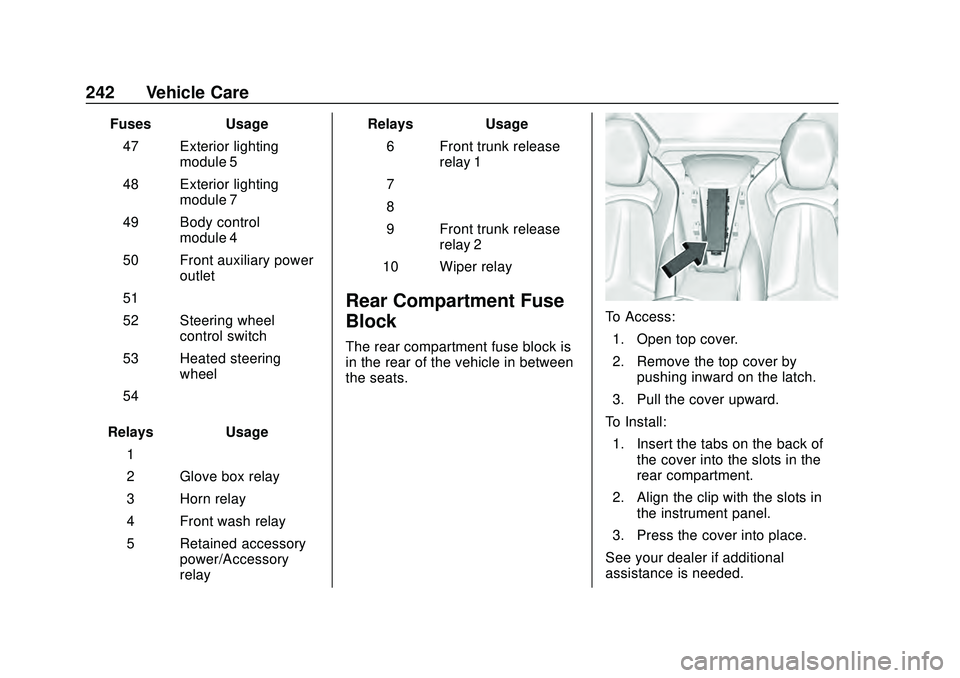
The rear compartment fuse block is
in the rear of the vehicle in between
the seats.
To Access: 1. Open top cover.
2. Remove the top cover by pushing inward on the latch.
3. Pull the cover upward.
To Install: 1. Insert the tabs on the back of the cover into the slots in the
rear compartment.
2. Align the clip with the slots in the instrument panel.
3. Press the cover into place.
See your dealer if additional
assistance is needed.
Page 246 of 336
Chevrolet Corvette Owner Manual (GMNA-Localizing-U.S./Canada/Mexico-
12470550) - 2020 - CRC - 4/23/20
Vehicle Care 245
FusesUsage
59 Left/right window
60 Passenger power seat
61 Driver power seat
Relays Usage
1 –
2 Powertrain relay
3 Run/crank relay
4 Rear defogger relay
5 Air conditioning clutch relay
6 –
7 –
8 –
9 –
10 –
11 –
12 –
13 – Relays
Usage
14 Starter solenoid relay
15 –Wheels and Tires
Tires
Every new GM vehicle has
high-quality tires made by a
leading tire manufacturer. See
the warranty manual for
information regarding the tire
warranty and where to get
service. For additional
information refer to the tire
manufacturer.
{Warning
.Poorly maintained and
improperly used tires are
dangerous.
.Overloading the tires can
cause overheating as a
result of too much
flexing. There could be a
blowout and a serious
crash. See Vehicle Load
Limits 0160.
(Continued)
Page 248 of 336
Chevrolet Corvette Owner Manual (GMNA-Localizing-U.S./Canada/Mexico-
12470550) - 2020 - CRC - 4/23/20
Vehicle Care 247
Winter Tires
This vehicle was not originally
equipped with winter tires. Winter
tires are designed for increased
traction on snow and ice-covered
roads. Consider installing winter
tires on the vehicle if frequent
driving on ice or snow covered
roads is expected. See your dealer
for details regarding winter tire
availability and proper tire selection.
Also, seeBuying New Tires 0261.
With winter tires, there may be
decreased dry road traction,
increased road noise, and shorter
tread life. After changing to winter
tires, be alert for changes in vehicle
handling and braking.
If using winter tires:
. Use tires of the same brand and
tread type on all four wheel
positions.
. Use only radial ply tires of the
same size, load range, and
speed rating as the original
equipment tires. Winter tires with the same speed
rating as the original equipment tires
may not be available for H, V, W, Y,
and ZR speed rated tires. If winter
tires with a lower speed rating are
chosen, never exceed the tire's
maximum speed capability.
Run-Flat Tires
This vehicle, when new, had run-flat
tires. There is no spare tire, no tire
changing equipment, and no place
to store a tire in the vehicle.
The vehicle also has a Tire
Pressure Monitor System (TPMS)
that indicates a loss of tire pressure
in any of the tires.
{Warning
If the low tire warning light
displays on the instrument cluster,
the handling capabilities will be
reduced during severe
maneuvers. Driving too fast could
cause loss of control and you or
others could be injured. Do not
(Continued)
Warning (Continued)
drive over 80 km/h (50 mph) when
the low tire warning light is
displayed. Drive cautiously and
check the tire pressures as soon
as possible.
Run-flat tires can be driven on with
no air pressure. There is no need to
stop on the side of the road to
change the tire. Continue driving;
however, do not drive too far or too
fast. Driving on the tire may not be
possible if there is permanent
damage. To prevent permanent
damage, the tire can be driven with
no air pressure for up to 80 km
(50 mi) at speeds slower than
80 km/h (50 mph) when carrying a
load of driver plus one passenger.
When carrying a heavier load, total
distance driven without air should
be reduced. As soon as possible,
contact the nearest authorized GM
or run-flat servicing facility for
inspection and repair or
replacement.