ECU CHEVROLET DYNASTY 1993 Owner's Manual
[x] Cancel search | Manufacturer: CHEVROLET, Model Year: 1993, Model line: DYNASTY, Model: CHEVROLET DYNASTY 1993Pages: 2438, PDF Size: 74.98 MB
Page 404 of 2438
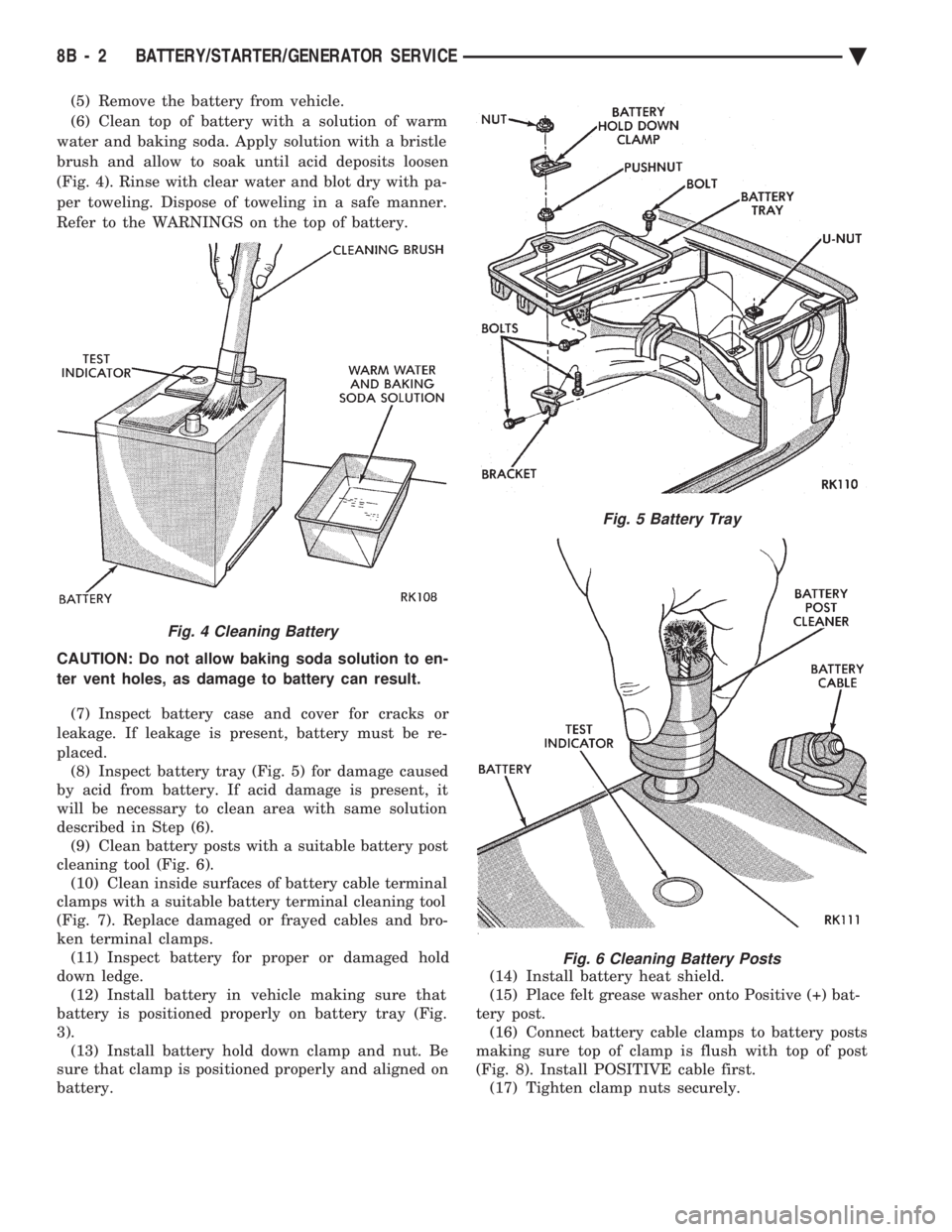
(5) Remove the battery from vehicle.
(6) Clean top of battery with a solution of warm
water and baking soda. Apply solution with a bristle
brush and allow to soak until acid deposits loosen
(Fig. 4). Rinse with clear water and blot dry with pa-
per toweling. Dispose of toweling in a safe manner.
Refer to the WARNINGS on the top of battery.
CAUTION: Do not allow baking soda solution to en-
ter vent holes, as damage to battery can result.
(7) Inspect battery case and cover for cracks or
leakage. If leakage is present, battery must be re-
placed. (8) Inspect battery tray (Fig. 5) for damage caused
by acid from battery. If acid damage is present, it
will be necessary to clean area with same solution
described in Step (6). (9) Clean battery posts with a suitable battery post
cleaning tool (Fig. 6). (10) Clean inside surfaces of battery cable terminal
clamps with a suitable battery terminal cleaning tool
(Fig. 7). Replace damaged or frayed cables and bro-
ken terminal clamps. (11) Inspect battery for proper or damaged hold
down ledge. (12) Install battery in vehicle making sure that
battery is positioned properly on battery tray (Fig.
3). (13) Install battery hold down clamp and nut. Be
sure that clamp is positioned properly and aligned on
battery. (14) Install battery heat shield.
(15) Place felt grease washer onto Positive (+) bat-
tery post. (16) Connect battery cable clamps to battery posts
making sure top of clamp is flush with top of post
(Fig. 8). Install POSITIVE cable first. (17) Tighten clamp nuts securely.
Fig. 4 Cleaning Battery
Fig. 5 Battery Tray
Fig. 6 Cleaning Battery Posts
8B - 2 BATTERY/STARTER/GENERATOR SERVICE Ä
Page 409 of 2438
BOSCH STARTER GEAR AND CLUTCH REPLACEMENT
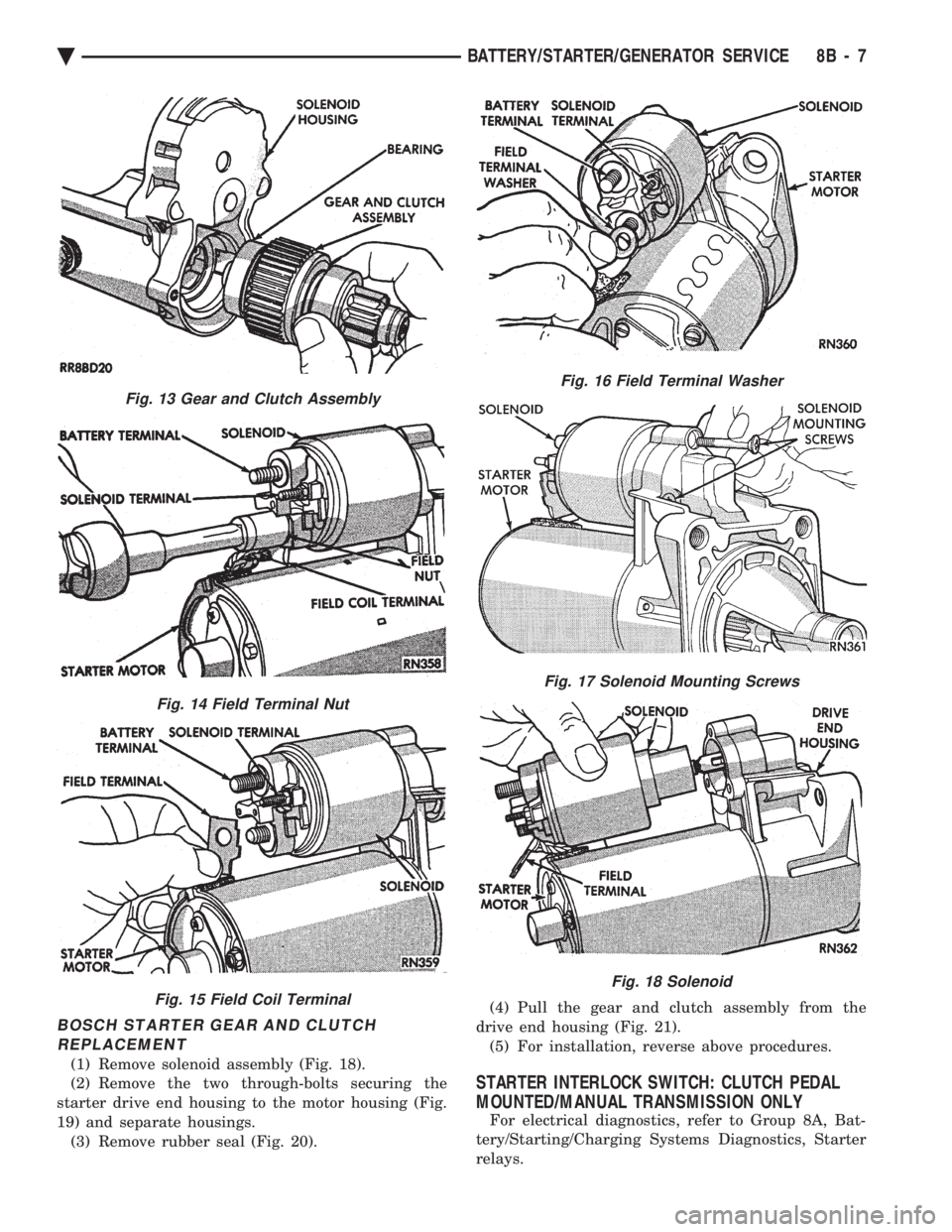
(1) Remove solenoid assembly (Fig. 18).
(2) Remove the two through-bolts securing the
starter drive end housing to the motor housing (Fig.
19) and separate housings. (3) Remove rubber seal (Fig. 20). (4) Pull the gear and clutch assembly from the
drive end housing (Fig. 21). (5) For installation, reverse above procedures.
STARTER INTERLOCK SWITCH: CLUTCH PEDAL
MOUNTED/MANUAL TRANSMISSION ONLY
For electrical diagnostics, refer to Group 8A, Bat-
tery/Starting/Charging Systems Diagnostics, Starter
relays.
Fig. 13 Gear and Clutch Assembly
Fig. 14 Field Terminal Nut
Fig. 15 Field Coil Terminal
Fig. 16 Field Terminal Washer
Fig. 17 Solenoid Mounting Screws
Fig. 18 Solenoid
Ä BATTERY/STARTER/GENERATOR SERVICE 8B - 7
Page 426 of 2438
BUS ACCESSED DIAGNOSTICS
The following diagnostic test may be used to check
the integrity of the EVIC's internal connections and
operations. Refer to the Body Chassis Diagnostic Test
Procedure Manual for test procedures. MODULE RESET TEST, when the EVIC receives
this request from the DRB II, the EVIC will immedi-
ately enter into reset. DISPLAY TEST: The EVIC receives a request from
the DBR II, the EVIC will enter into a visual display
mode. Also checks the integrity of the display driver
to anode connections. The test shall consist of walk-
ing through the vertical and horizontal rows of an-
odes in the dot matrix display. SWITCH STATUS TEST, when the EVIC receives
this request from the DRB II, the EVIC will report
the open/closed status of each individual switch. FAULT BYTE TEST, when the EVIC receives this
request from the DRB II, the EVIC will report fault
status. Messages reported are:
² NO FAULT
² DISPLAY DRIVER FAULT
² EVIC MISSING MESSAGES
² POWER SUPPLY FAILURE
² FAULT IN RAM
² FAULT IN ROM
EVIC missing message implies that there may be a
system failure and/or the body controller is not pro-
viding EVIC with sufficient information. DISPLAY DRIVER FAULT, power supply failure
and fault in RAM/ROM implies that the EVIC is de-
fective.
CONSOLE REMOVAL
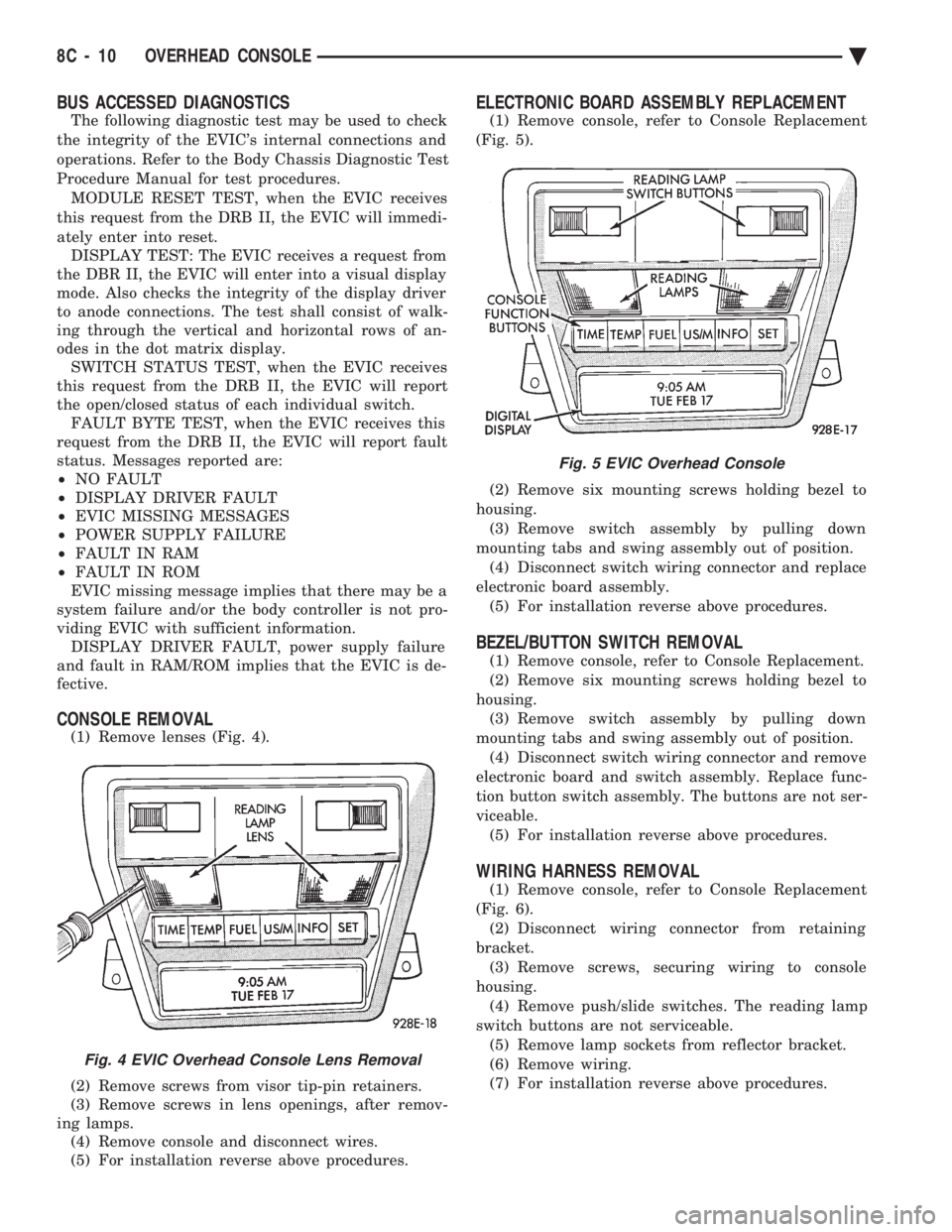
(1) Remove lenses (Fig. 4).
(2) Remove screws from visor tip-pin retainers.
(3) Remove screws in lens openings, after remov-
ing lamps. (4) Remove console and disconnect wires.
(5) For installation reverse above procedures.
ELECTRONIC BOARD ASSEMBLY REPLACEMENT
(1) Remove console, refer to Console Replacement
(Fig. 5).
(2) Remove six mounting screws holding bezel to
housing. (3) Remove switch assembly by pulling down
mounting tabs and swing assembly out of position. (4) Disconnect switch wiring connector and replace
electronic board assembly. (5) For installation reverse above procedures.
BEZEL/BUTTON SWITCH REMOVAL
(1) Remove console, refer to Console Replacement.
(2) Remove six mounting screws holding bezel to
housing. (3) Remove switch assembly by pulling down
mounting tabs and swing assembly out of position. (4) Disconnect switch wiring connector and remove
electronic board and switch assembly. Replace func-
tion button switch assembly. The buttons are not ser-
viceable. (5) For installation reverse above procedures.
WIRING HARNESS REMOVAL
(1) Remove console, refer to Console Replacement
(Fig. 6). (2) Disconnect wiring connector from retaining
bracket. (3) Remove screws, securing wiring to console
housing. (4) Remove push/slide switches. The reading lamp
switch buttons are not serviceable. (5) Remove lamp sockets from reflector bracket.
(6) Remove wiring.
(7) For installation reverse above procedures.
Fig. 4 EVIC Overhead Console Lens Removal
Fig. 5 EVIC Overhead Console
8C - 10 OVERHEAD CONSOLE Ä
Page 448 of 2438
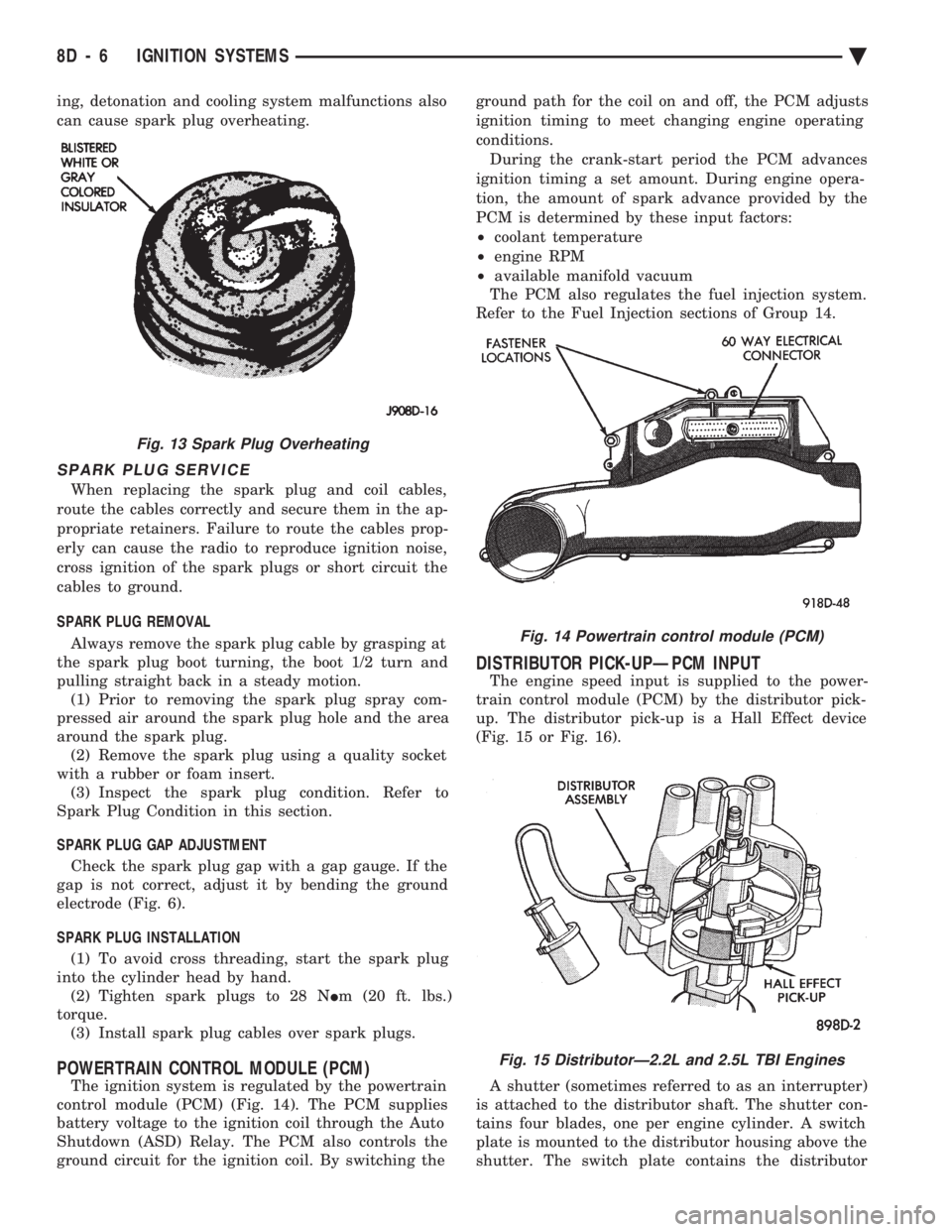
ing, detonation and cooling system malfunctions also
can cause spark plug overheating.
SPARK PLUG SERVICE
When replacing the spark plug and coil cables,
route the cables correctly and secure them in the ap-
propriate retainers. Failure to route the cables prop-
erly can cause the radio to reproduce ignition noise,
cross ignition of the spark plugs or short circuit the
cables to ground.
SPARK PLUG REMOVAL
Always remove the spark plug cable by grasping at
the spark plug boot turning, the boot 1/2 turn and
pulling straight back in a steady motion. (1) Prior to removing the spark plug spray com-
pressed air around the spark plug hole and the area
around the spark plug. (2) Remove the spark plug using a quality socket
with a rubber or foam insert. (3) Inspect the spark plug condition. Refer to
Spark Plug Condition in this section.
SPARK PLUG GAP ADJUSTMENT Check the spark plug gap with a gap gauge. If the
gap is not correct, adjust it by bending the ground
electrode (Fig. 6).
SPARK PLUG INSTALLATION (1) To avoid cross threading, start the spark plug
into the cylinder head by hand. (2) Tighten spark plugs to 28 N Im (20 ft. lbs.)
torque. (3) Install spark plug cables over spark plugs.
POWERTRAIN CONTROL MODULE (PCM)
The ignition system is regulated by the powertrain
control module (PCM) (Fig. 14). The PCM supplies
battery voltage to the ignition coil through the Auto
Shutdown (ASD) Relay. The PCM also controls the
ground circuit for the ignition coil. By switching the ground path for the coil on and off, the PCM adjusts
ignition timing to meet changing engine operating
conditions.
During the crank-start period the PCM advances
ignition timing a set amount. During engine opera-
tion, the amount of spark advance provided by the
PCM is determined by these input factors:
² coolant temperature
² engine RPM
² available manifold vacuum
The PCM also regulates the fuel injection system.
Refer to the Fuel Injection sections of Group 14.
DISTRIBUTOR PICK-UPÐPCM INPUT
The engine speed input is supplied to the power-
train control module (PCM) by the distributor pick-
up. The distributor pick-up is a Hall Effect device
(Fig. 15 or Fig. 16).
A shutter (sometimes referred to as an interrupter)
is attached to the distributor shaft. The shutter con-
tains four blades, one per engine cylinder. A switch
plate is mounted to the distributor housing above the
shutter. The switch plate contains the distributor
Fig. 14 Powertrain control module (PCM)
Fig. 15 DistributorÐ2.2L and 2.5L TBI Engines
Fig. 13 Spark Plug Overheating
8D - 6 IGNITION SYSTEMS Ä
Page 457 of 2438
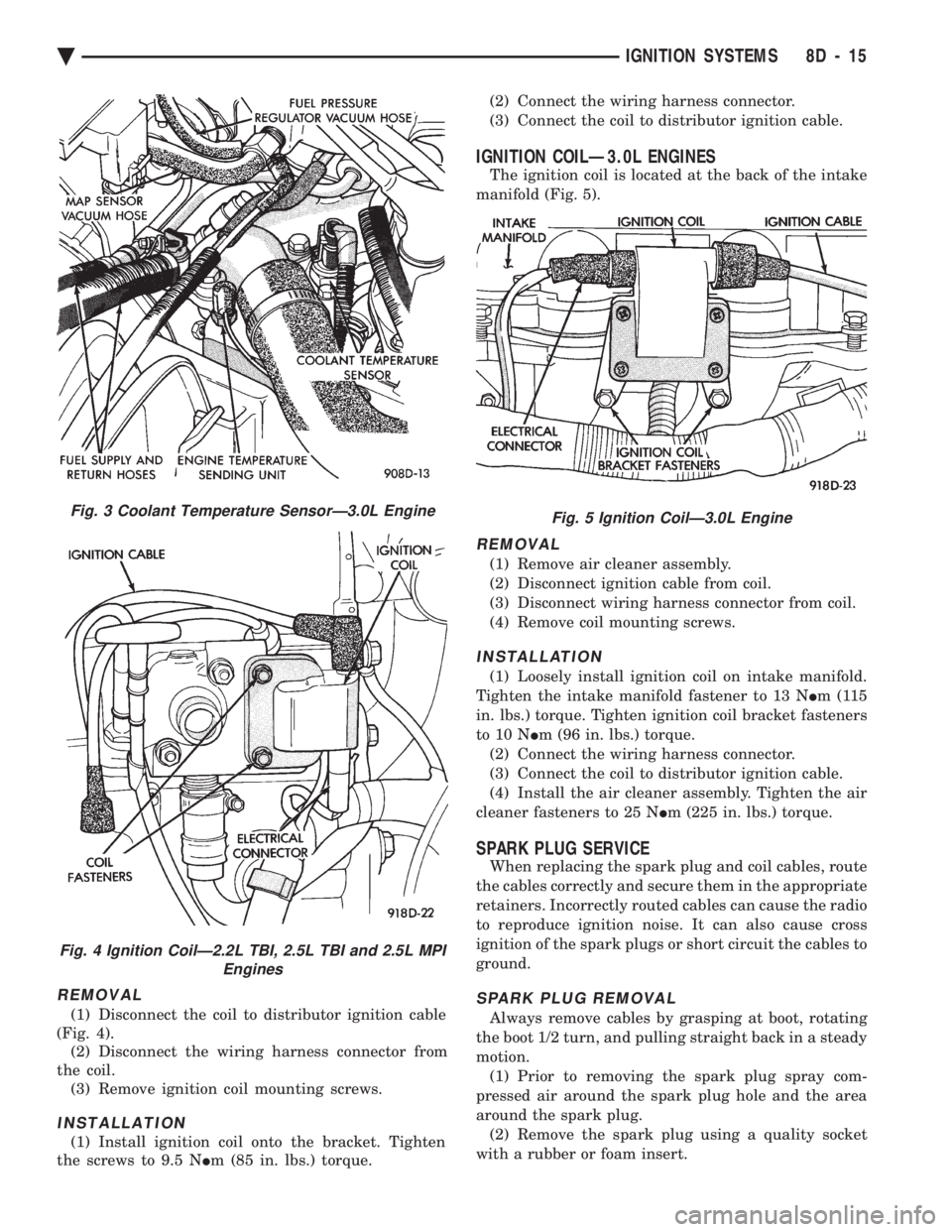
REMOVAL
(1) Disconnect the coil to distributor ignition cable
(Fig. 4). (2) Disconnect the wiring harness connector from
the coil. (3) Remove ignition coil mounting screws.
INSTALLATION
(1) Install ignition coil onto the bracket. Tighten
the screws to 9.5 N Im (85 in. lbs.) torque. (2) Connect the wiring harness connector.
(3) Connect the coil to distributor ignition cable.
IGNITION COILÐ3.0L ENGINES
The ignition coil is located at the back of the intake
manifold (Fig. 5).
REMOVAL
(1) Remove air cleaner assembly.
(2) Disconnect ignition cable from coil.
(3) Disconnect wiring harness connector from coil.
(4) Remove coil mounting screws.
INSTALLATION
(1) Loosely install ignition coil on intake manifold.
Tighten the intake manifold fastener to 13 N Im(115
in. lbs.) torque. Tighten ignition coil bracket fasteners
to 10 N Im (96 in. lbs.) torque.
(2) Connect the wiring harness connector.
(3) Connect the coil to distributor ignition cable.
(4) Install the air cleaner assembly. Tighten the air
cleaner fasteners to 25 N Im (225 in. lbs.) torque.
SPARK PLUG SERVICE
When replacing the spark plug and coil cables, route
the cables correctly and secure them in the appropriate
retainers. Incorrectly routed cables can cause the radio
to reproduce ignition noise. It can also cause cross
ignition of the spark plugs or short circuit the cables to
ground.
SPARK PLUG REMOVAL
Always remove cables by grasping at boot, rotating
the boot 1/2 turn, and pulling straight back in a steady
motion. (1) Prior to removing the spark plug spray com-
pressed air around the spark plug hole and the area
around the spark plug. (2) Remove the spark plug using a quality socket
with a rubber or foam insert.
Fig. 3 Coolant Temperature SensorÐ3.0L Engine
Fig. 4 Ignition CoilÐ2.2L TBI, 2.5L TBI and 2.5L MPI Engines
Fig. 5 Ignition CoilÐ3.0L Engine
Ä IGNITION SYSTEMS 8D - 15
Page 483 of 2438
(2) With engine running, move test probe along
entire length of all cables (approximately 0 to 1/8
inch gap). If punctures or cracks are present there
will be a noticeable spark jump from the faulty area
to the probe. Cracked, leaking or faulty cables should
be replaced. Use the following procedure when removing the
high tension cable from the spark plug. First, remove
the cable from the retaining bracket. Then grasp the
terminal as close as possible to the spark plug. Ro-
tate the cover (boot) slightly and pull straight back.
Do not use pliers and do not pull the cable at an
angle. Doing so will damage the insulation, cable
terminal or the spark plug insulator. Wipe spark
plug insulator clean before reinstalling cable
and cover. Resistance cables are identified by the words Elec-
tronic Suppression .
Use an ohmmeter to check cables for opens, loose
terminals or high resistance. (a) Remove cable from spark plug.
(b) Remove cable from the coil tower.
(c) Connect the ohmmeter between spark plug
end terminal and the coil end terminal. Resistance
should be within tolerance shown in the cable re-
sistance chart. If resistance is not within tolerance,
replace cable assembly. Test all spark plug cables
in same manner.
SPARK PLUG SERVICE
When replacing the spark plug cables, route the ca-
bles correctly and secure them in the appropriate re-
tainers. Incorrectly routed cables can cause the radio
to reproduce ignition noise. It can also cause cross ig-
nition of the spark plugs or short circuit the cables to
ground.
SPARK PLUG REMOVAL
Always remove cables by grasping at boot, rotating
the boot 1/2 turn, and pulling straight back in a
steady motion. (1) Prior to removing the spark plug spray com-
pressed air around the spark plug hole and the area
around the spark plug. (2) Remove the spark plug using a quality socket
with a rubber or foam insert. (3) Inspect the spark plug condition. Refer to
Spark Plug Condition in this section.
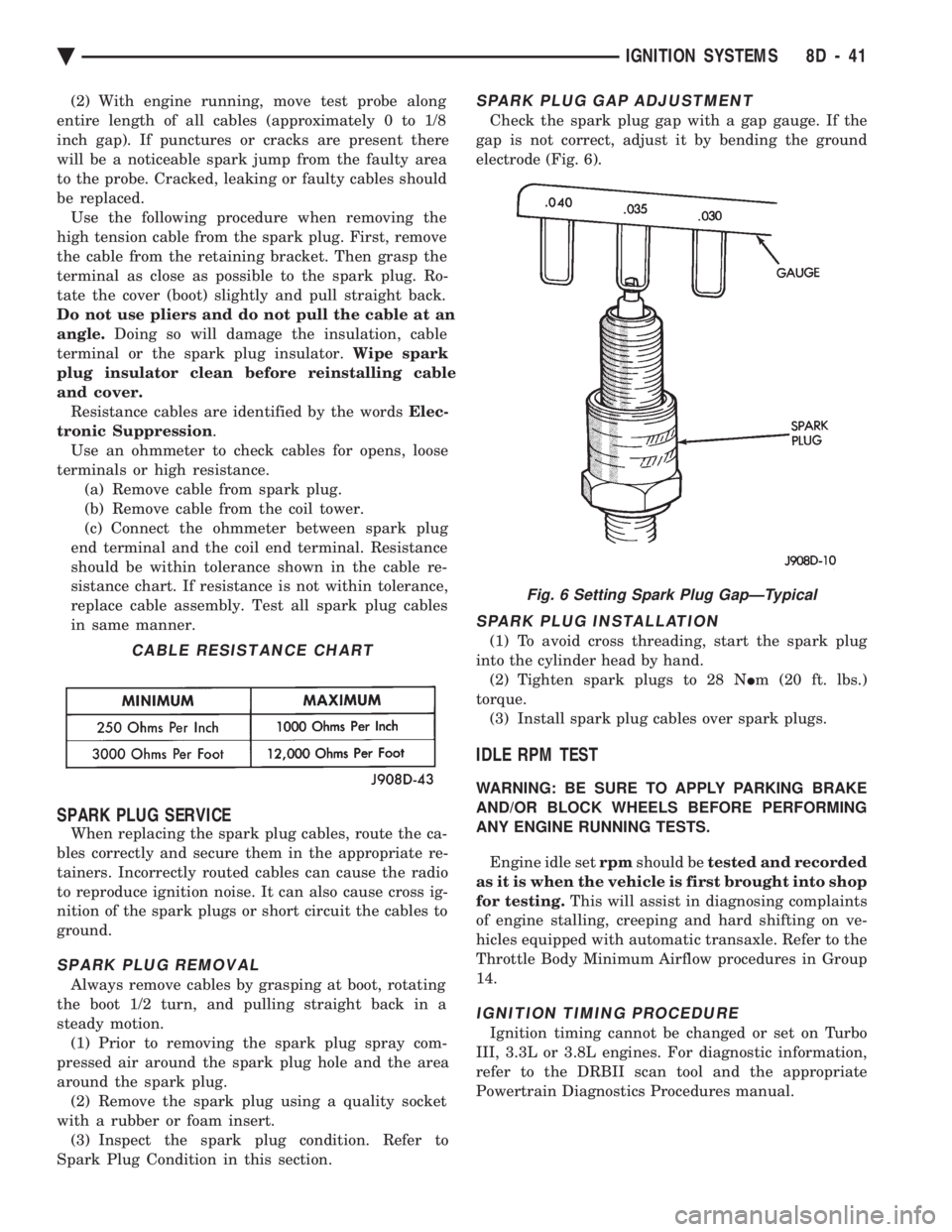
SPARK PLUG GAP ADJUSTMENT
Check the spark plug gap with a gap gauge. If the
gap is not correct, adjust it by bending the ground
electrode (Fig. 6).
SPARK PLUG INSTALLATION
(1) To avoid cross threading, start the spark plug
into the cylinder head by hand. (2) Tighten spark plugs to 28 N Im (20 ft. lbs.)
torque. (3) Install spark plug cables over spark plugs.
IDLE RPM TEST
WARNING: BE SURE TO APPLY PARKING BRAKE
AND/OR BLOCK WHEELS BEFORE PERFORMING
ANY ENGINE RUNNING TESTS.
Engine idle set rpmshould be tested and recorded
as it is when the vehicle is first brought into shop
for testing. This will assist in diagnosing complaints
of engine stalling, creeping and hard shifting on ve-
hicles equipped with automatic transaxle. Refer to the
Throttle Body Minimum Airflow procedures in Group
14.
IGNITION TIMING PROCEDURE
Ignition timing cannot be changed or set on Turbo
III, 3.3L or 3.8L engines. For diagnostic information,
refer to the DRBII scan tool and the appropriate
Powertrain Diagnostics Procedures manual.
CABLE RESISTANCE CHART
Fig. 6 Setting Spark Plug GapÐTypical
Ä IGNITION SYSTEMS 8D - 41
Page 498 of 2438
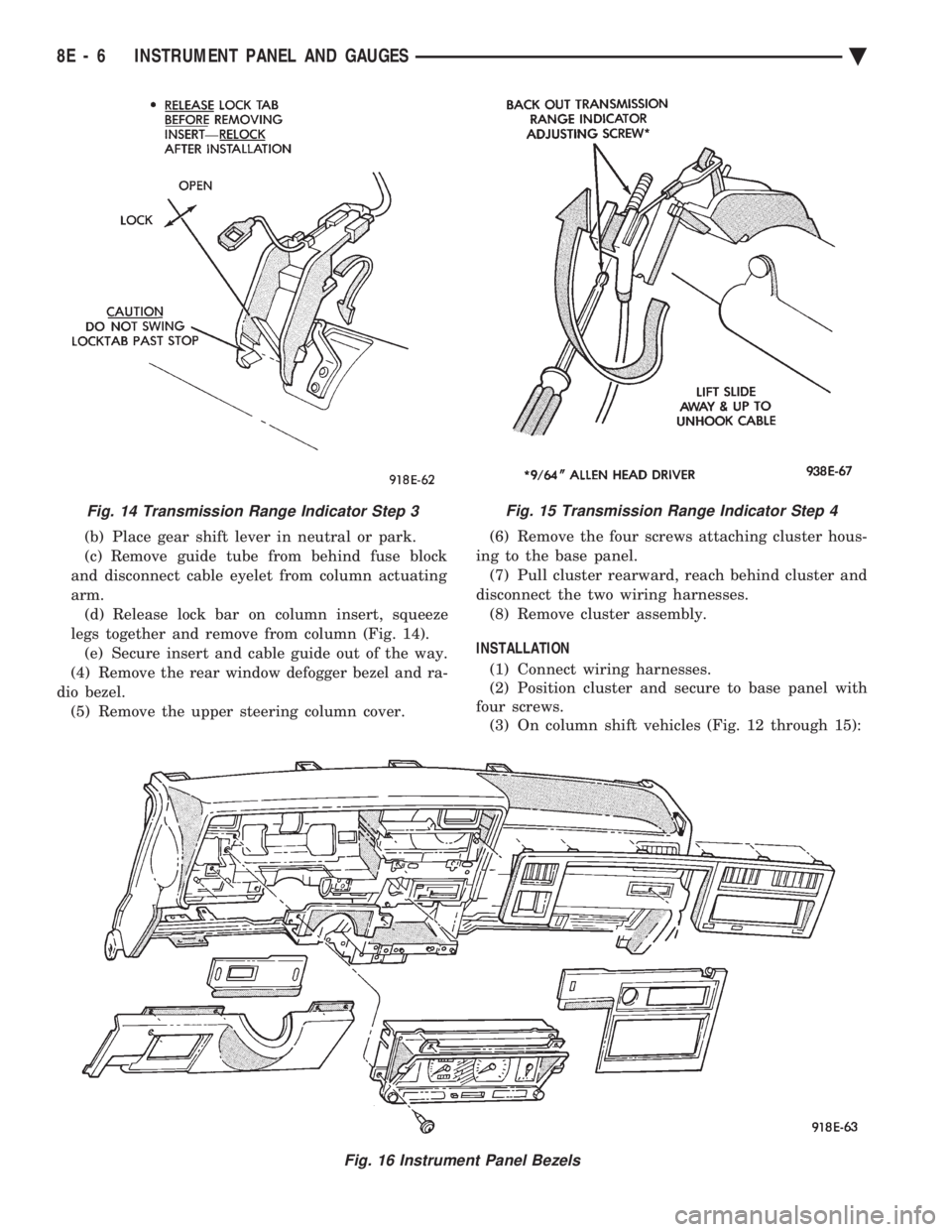
(b) Place gear shift lever in neutral or park.
(c) Remove guide tube from behind fuse block
and disconnect cable eyelet from column actuating
arm. (d) Release lock bar on column insert, squeeze
legs together and remove from column (Fig. 14). (e) Secure insert and cable guide out of the way.
(4) Remove the rear window defogger bezel and ra-
dio bezel. (5) Remove the upper steering column cover. (6) Remove the four screws attaching cluster hous-
ing to the base panel. (7) Pull cluster rearward, reach behind cluster and
disconnect the two wiring harnesses. (8) Remove cluster assembly.
INSTALLATION (1) Connect wiring harnesses.
(2) Position cluster and secure to base panel with
four screws. (3) On column shift vehicles (Fig. 12 through 15):
Fig. 15 Transmission Range Indicator Step 4
Fig. 16 Instrument Panel Bezels
Fig. 14 Transmission Range Indicator Step 3
8E - 6 INSTRUMENT PANEL AND GAUGES Ä
Page 499 of 2438
(a) Route transmission range indicator guide as-
sembly under left steering column wing and down
left side of column (Fig. 12). (b) Insert flange of column insert into column,
squeeze legs together with tabs under column
jacket and engage lock bar to secure insert (Fig.
14). (c) Hook cable eyelet to steering column actuator
check pointer, should indicate neutral. Do not kink
or bind transmission range indicator guide tube
and position guide tube in original location. (d) Adjust with tool if necessary to center pointer
on N (Neutral) and check in other gears (Fig. 15).
(4) Install upper and lower steering column cover.
(5) Install the rear window defogger bezel and ra-
dio bezel. (6) Install cluster bezel.
(7) Reconnect battery.
REMOVALÐCLUSTER WITHOUT TRANSMISSION RANGE
INDICATOR FROM STEERING COLUMN (1) Remove cluster bezel (Fig. 10).
(2) Remove four screws attaching cluster to base
panel. (3) Pull cluster rearward carefully, reach behind
and disconnect the two harness connectors. (4) Carefully rotate cluster and remove the two
transmission range indicator screws. (5) Remove cluster assembly.
(6) For installation reverse above procedures. (a) Do not kink guide tube when installing clus-
ter. (b) Replace guide tube behind fuse block.
GAUGES
It is not necessary to remove instrument clus-
ter assembly from vehicle for gauge replace-
ment. When removing gauge assemblies from cluster,
gauge must be pulled straight out, not twisted, or
damage to gauge pin may result.
MULTIPLE GAUGE MALFUNCTION
If the fuel, voltage and tachometer gauges appear
to be malfunctioning, remove the cluster assembly.
Check for good pin contact between the wire harness
and printed circuit board. If there is good contact,
check for ignition voltage at ignition cavity C of the
black connector. If there is ignition voltage, check for
continuity between the wire harness ground cavity H
of the black connector and ground. If there is conti-
nuity, replace printed circuit board. If the temperature, oil pressure and speedometer
gauges appear to be malfunctioning remove the clus-
ter assembly. Check for a good contact between the
wire harness and the printed circuit board. If there is
good contact, check for ignition voltage at cavity J of
the red connector. If there is voltage, check for con- tinuity at cavity H of the black connector. If there is
continuity, replace the printed circuit board.
If the temperature, fuel, voltage and speedometer
gauges appear to be malfunctioning, remove the clus-
ter assembly. Check for good pin contact between the
wire harness and the printed circuit board. If there is
good contact, check ignition voltage at cavity J of the
red connector. If there is voltage, check for continuity
at cavity H of the black connector. If there is conti-
nuity, replace the printed circuit board.
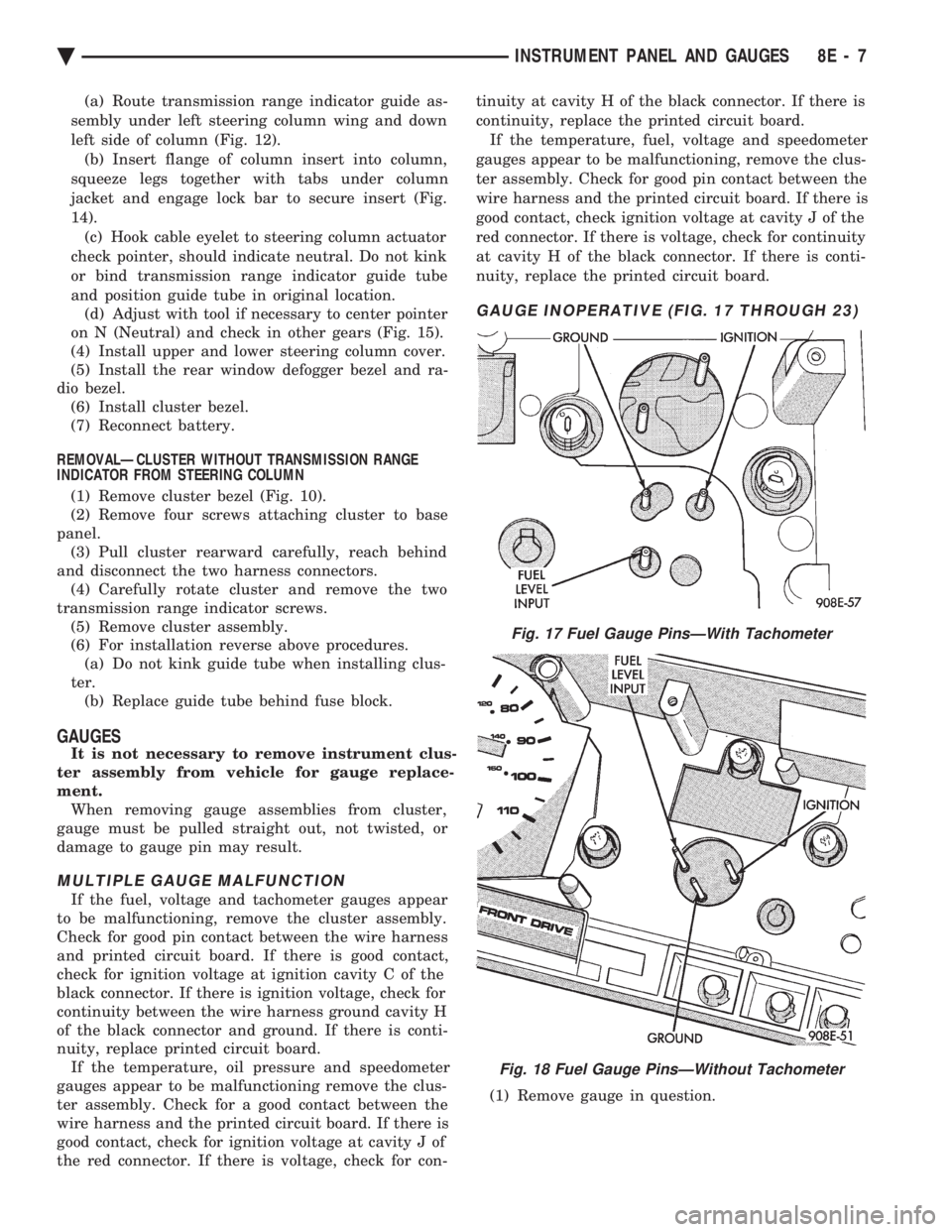
GAUGE INOPERATIVE (FIG. 17 THROUGH 23)
(1) Remove gauge in question.
Fig. 17 Fuel Gauge PinsÐWith Tachometer
Fig. 18 Fuel Gauge PinsÐWithout Tachometer
Ä INSTRUMENT PANEL AND GAUGES 8E - 7
Page 505 of 2438
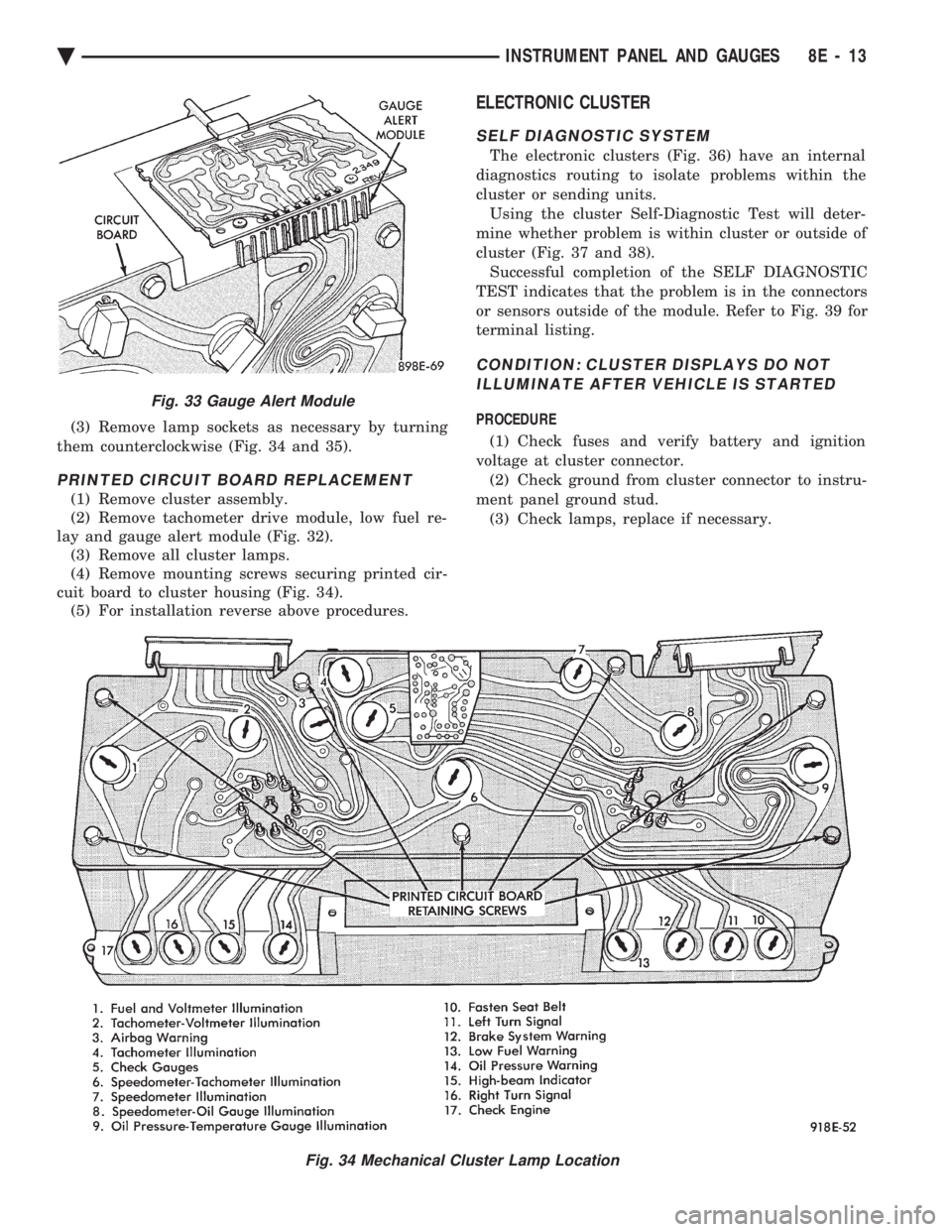
(3) Remove lamp sockets as necessary by turning
them counterclockwise (Fig. 34 and 35).
PRINTED CIRCUIT BOARD REPLACEMENT
(1) Remove cluster assembly.
(2) Remove tachometer drive module, low fuel re-
lay and gauge alert module (Fig. 32). (3) Remove all cluster lamps.
(4) Remove mounting screws securing printed cir-
cuit board to cluster housing (Fig. 34). (5) For installation reverse above procedures.
ELECTRONIC CLUSTER
SELF DIAGNOSTIC SYSTEM
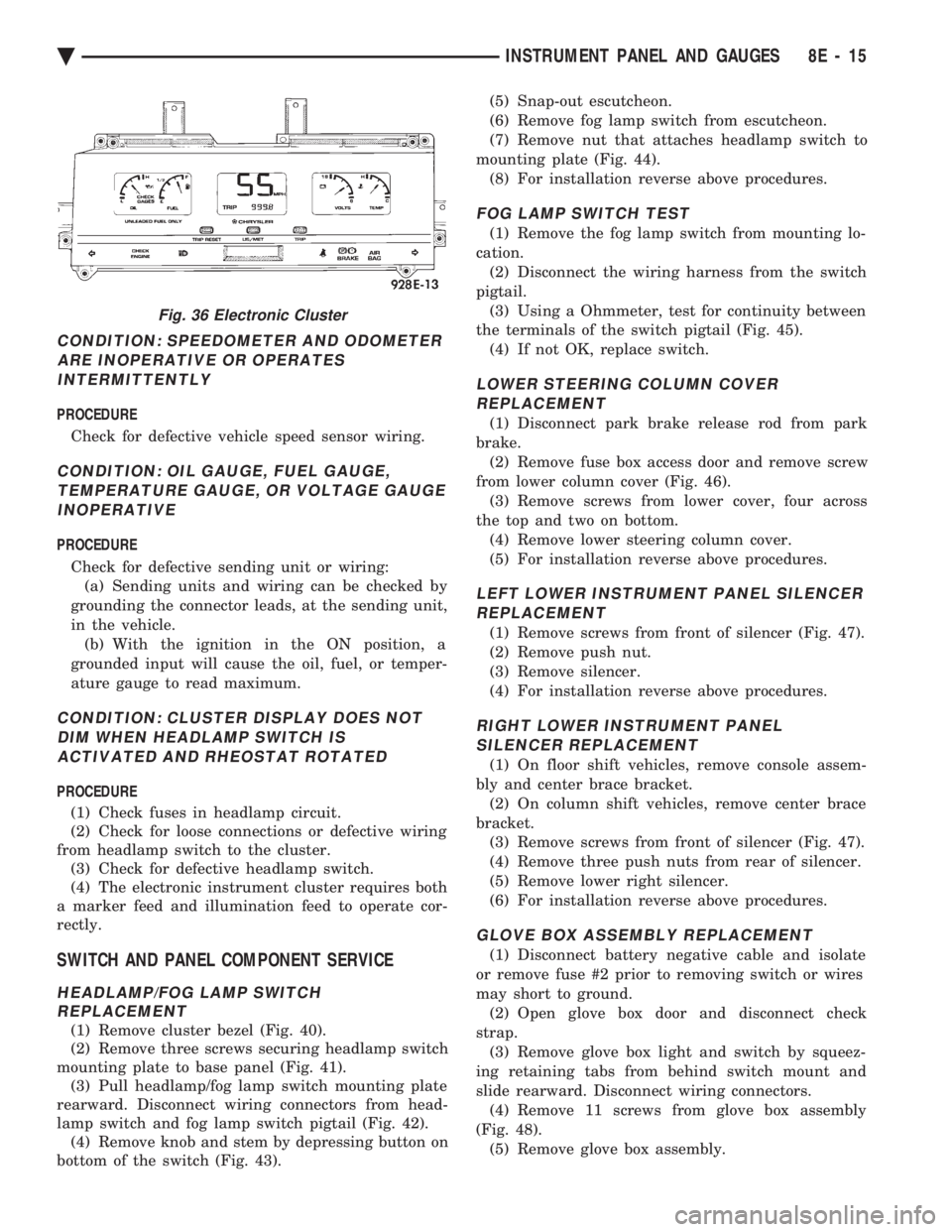
The electronic clusters (Fig. 36) have an internal
diagnostics routing to isolate problems within the
cluster or sending units. Using the cluster Self-Diagnostic Test will deter-
mine whether problem is within cluster or outside of
cluster (Fig. 37 and 38). Successful completion of the SELF DIAGNOSTIC
TEST indicates that the problem is in the connectors
or sensors outside of the module. Refer to Fig. 39 for
terminal listing.
CONDITION: CLUSTER DISPLAYS DO NOT ILLUMINATE AFTER VEHICLE IS STARTED
PROCEDURE
(1) Check fuses and verify battery and ignition
voltage at cluster connector. (2) Check ground from cluster connector to instru-
ment panel ground stud. (3) Check lamps, replace if necessary.
Fig. 34 Mechanical Cluster Lamp Location
Fig. 33 Gauge Alert Module
Ä INSTRUMENT PANEL AND GAUGES 8E - 13
Page 507 of 2438
CONDITION: SPEEDOMETER AND ODOMETER ARE INOPERATIVE OR OPERATESINTERMITTENTLY
PROCEDURE
Check for defective vehicle speed sensor wiring.
CONDITION: OIL GAUGE, FUEL GAUGE, TEMPERATURE GAUGE, OR VOLTAGE GAUGEINOPERATIVE
PROCEDURE
Check for defective sending unit or wiring: (a) Sending units and wiring can be checked by
grounding the connector leads, at the sending unit,
in the vehicle. (b) With the ignition in the ON position, a
grounded input will cause the oil, fuel, or temper-
ature gauge to read maximum.
CONDITION: CLUSTER DISPLAY DOES NOT DIM WHEN HEADLAMP SWITCH ISACTIVATED AND RHEOSTAT ROTATED
PROCEDURE
(1) Check fuses in headlamp circuit.
(2) Check for loose connections or defective wiring
from headlamp switch to the cluster. (3) Check for defective headlamp switch.
(4) The electronic instrument cluster requires both
a marker feed and illumination feed to operate cor-
rectly.
SWITCH AND PANEL COMPONENT SERVICE
HEADLAMP/FOG LAMP SWITCH REPLACEMENT
(1) Remove cluster bezel (Fig. 40).
(2) Remove three screws securing headlamp switch
mounting plate to base panel (Fig. 41). (3) Pull headlamp/fog lamp switch mounting plate
rearward. Disconnect wiring connectors from head-
lamp switch and fog lamp switch pigtail (Fig. 42). (4) Remove knob and stem by depressing button on
bottom of the switch (Fig. 43). (5) Snap-out escutcheon.
(6) Remove fog lamp switch from escutcheon.
(7) Remove nut that attaches headlamp switch to
mounting plate (Fig. 44). (8) For installation reverse above procedures.
FOG LAMP SWITCH TEST
(1) Remove the fog lamp switch from mounting lo-
cation. (2) Disconnect the wiring harness from the switch
pigtail. (3) Using a Ohmmeter, test for continuity between
the terminals of the switch pigtail (Fig. 45). (4) If not OK, replace switch.
LOWER STEERING COLUMN COVERREPLACEMENT
(1) Disconnect park brake release rod from park
brake. (2) Remove fuse box access door and remove screw
from lower column cover (Fig. 46). (3) Remove screws from lower cover, four across
the top and two on bottom. (4) Remove lower steering column cover.
(5) For installation reverse above procedures.
LEFT LOWER INSTRUMENT PANEL SILENCER REPLACEMENT
(1) Remove screws from front of silencer (Fig. 47).
(2) Remove push nut.
(3) Remove silencer.
(4) For installation reverse above procedures.
RIGHT LOWER INSTRUMENT PANEL SILENCER REPLACEMENT
(1) On floor shift vehicles, remove console assem-
bly and center brace bracket. (2) On column shift vehicles, remove center brace
bracket. (3) Remove screws from front of silencer (Fig. 47).
(4) Remove three push nuts from rear of silencer.
(5) Remove lower right silencer.
(6) For installation reverse above procedures.
GLOVE BOX ASSEMBLY REPLACEMENT
(1) Disconnect battery negative cable and isolate
or remove fuse #2 prior to removing switch or wires
may short to ground. (2) Open glove box door and disconnect check
strap. (3) Remove glove box light and switch by squeez-
ing retaining tabs from behind switch mount and
slide rearward. Disconnect wiring connectors. (4) Remove 11 screws from glove box assembly
(Fig. 48). (5) Remove glove box assembly.
Fig. 36 Electronic Cluster
Ä INSTRUMENT PANEL AND GAUGES 8E - 15