ECU CHEVROLET DYNASTY 1993 Manual Online
[x] Cancel search | Manufacturer: CHEVROLET, Model Year: 1993, Model line: DYNASTY, Model: CHEVROLET DYNASTY 1993Pages: 2438, PDF Size: 74.98 MB
Page 1809 of 2438
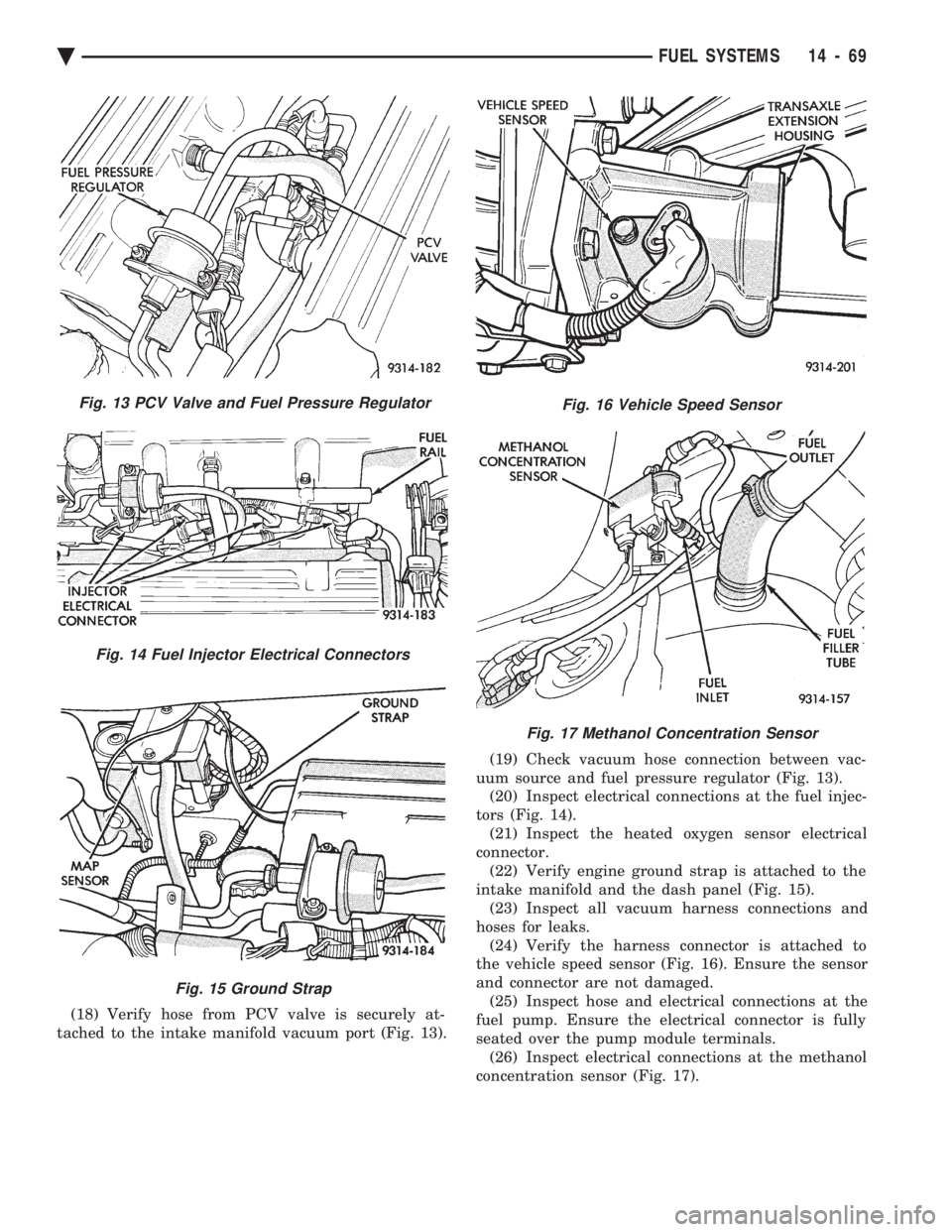
(18) Verify hose from PCV valve is securely at-
tached to the intake manifold vacuum port (Fig. 13). (19) Check vacuum hose connection between vac-
uum source and fuel pressure regulator (Fig. 13). (20) Inspect electrical connections at the fuel injec-
tors (Fig. 14). (21) Inspect the heated oxygen sensor electrical
connector. (22) Verify engine ground strap is attached to the
intake manifold and the dash panel (Fig. 15). (23) Inspect all vacuum harness connections and
hoses for leaks. (24) Verify the harness connector is attached to
the vehicle speed sensor (Fig. 16). Ensure the sensor
and connector are not damaged. (25) Inspect hose and electrical connections at the
fuel pump. Ensure the electrical connector is fully
seated over the pump module terminals. (26) Inspect electrical connections at the methanol
concentration sensor (Fig. 17).
Fig. 13 PCV Valve and Fuel Pressure Regulator
Fig. 14 Fuel Injector Electrical Connectors
Fig. 15 Ground Strap
Fig. 16 Vehicle Speed Sensor
Fig. 17 Methanol Concentration Sensor
Ä FUEL SYSTEMS 14 - 69
Page 1836 of 2438
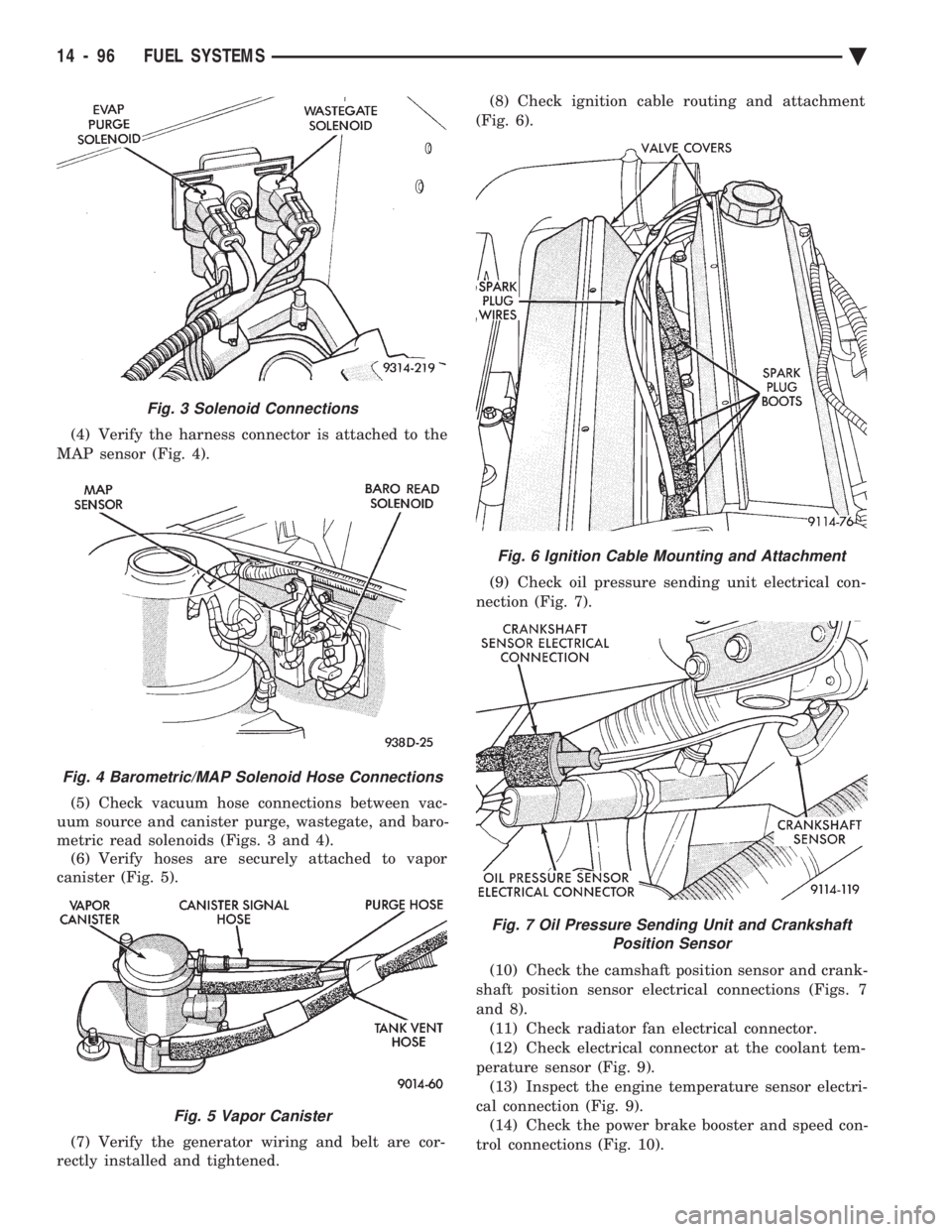
(4) Verify the harness connector is attached to the
MAP sensor (Fig. 4).
(5) Check vacuum hose connections between vac-
uum source and canister purge, wastegate, and baro-
metric read solenoids (Figs. 3 and 4). (6) Verify hoses are securely attached to vapor
canister (Fig. 5).
(7) Verify the generator wiring and belt are cor-
rectly installed and tightened. (8) Check ignition cable routing and attachment
(Fig. 6).
(9) Check oil pressure sending unit electrical con-
nection (Fig. 7).
(10) Check the camshaft position sensor and crank-
shaft position sensor electrical connections (Figs. 7
and 8). (11) Check radiator fan electrical connector.
(12) Check electrical connector at the coolant tem-
perature sensor (Fig. 9). (13) Inspect the engine temperature sensor electri-
cal connection (Fig. 9). (14) Check the power brake booster and speed con-
trol connections (Fig. 10).
Fig. 6 Ignition Cable Mounting and Attachment
Fig. 7 Oil Pressure Sending Unit and Crankshaft Position Sensor
Fig. 3 Solenoid Connections
Fig. 4 Barometric/MAP Solenoid Hose Connections
Fig. 5 Vapor Canister
14 - 96 FUEL SYSTEMS Ä
Page 1837 of 2438
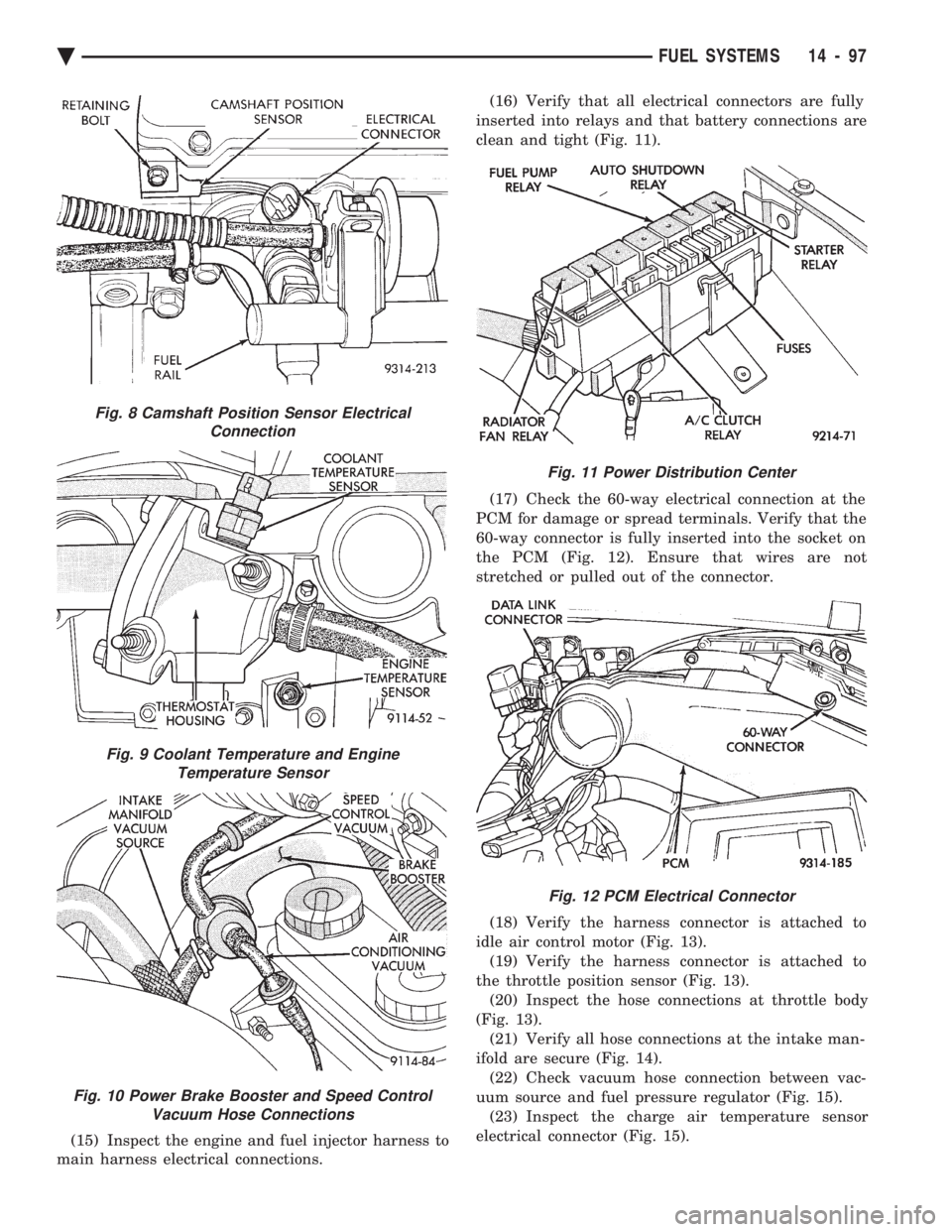
(15) Inspect the engine and fuel injector harness to
main harness electrical connections. (16) Verify that all electrical connectors are fully
inserted into relays and that battery connections are
clean and tight (Fig. 11).
(17) Check the 60-way electrical connection at the
PCM for damage or spread terminals. Verify that the
60-way connector is fully inserted into the socket on
the PCM (Fig. 12). Ensure that wires are not
stretched or pulled out of the connector.
(18) Verify the harness connector is attached to
idle air control motor (Fig. 13). (19) Verify the harness connector is attached to
the throttle position sensor (Fig. 13). (20) Inspect the hose connections at throttle body
(Fig. 13). (21) Verify all hose connections at the intake man-
ifold are secure (Fig. 14). (22) Check vacuum hose connection between vac-
uum source and fuel pressure regulator (Fig. 15). (23) Inspect the charge air temperature sensor
electrical connector (Fig. 15).
Fig. 8 Camshaft Position Sensor Electrical Connection
Fig. 9 Coolant Temperature and EngineTemperature Sensor
Fig. 10 Power Brake Booster and Speed Control Vacuum Hose Connections
Fig. 11 Power Distribution Center
Fig. 12 PCM Electrical Connector
Ä FUEL SYSTEMS 14 - 97
Page 1838 of 2438
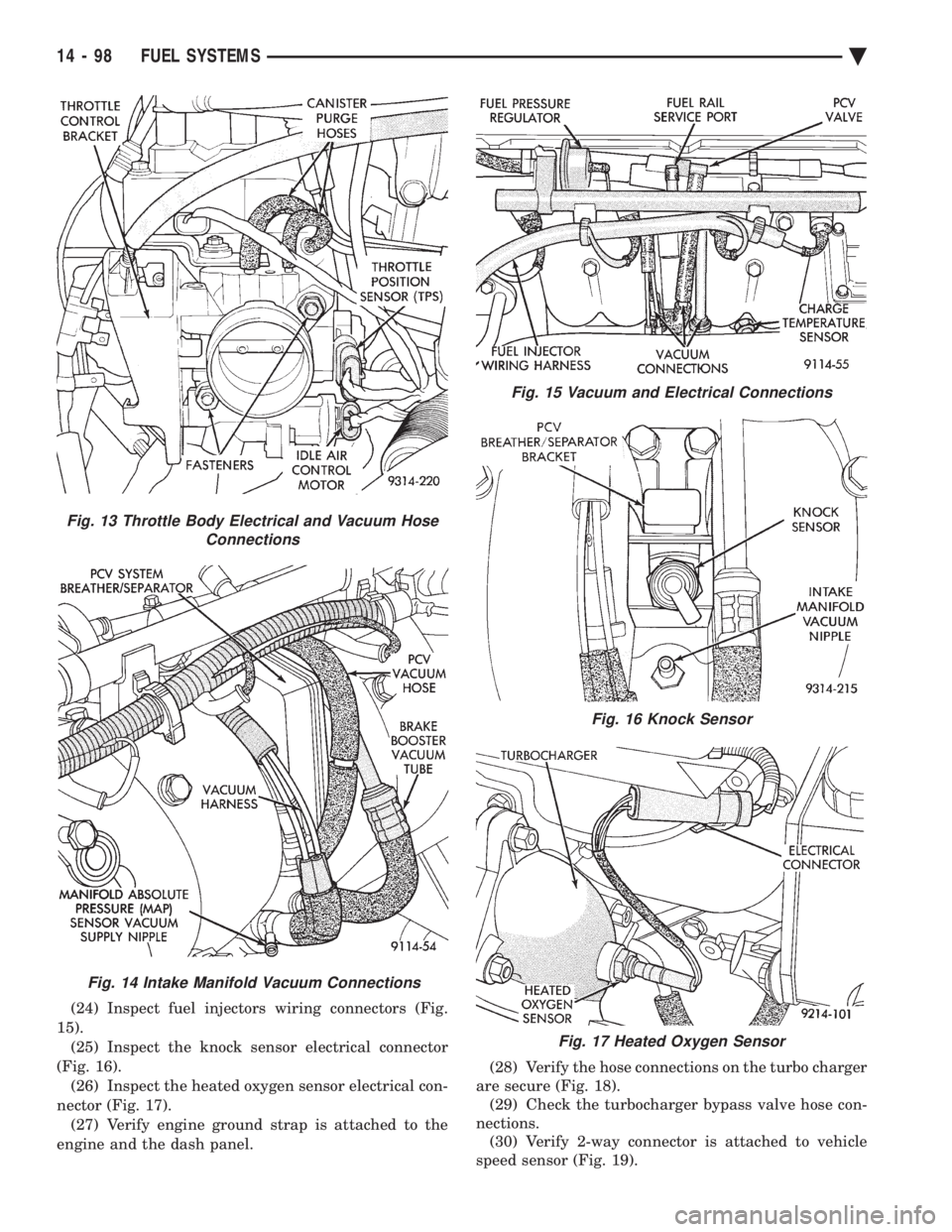
(24) Inspect fuel injectors wiring connectors (Fig.
15). (25) Inspect the knock sensor electrical connector
(Fig. 16). (26) Inspect the heated oxygen sensor electrical con-
nector (Fig. 17). (27) Verify engine ground strap is attached to the
engine and the dash panel. (28) Verify the hose connections on the turbo charger
are secure (Fig. 18). (29) Check the turbocharger bypass valve hose con-
nections. (30) Verify 2-way connector is attached to vehicle
speed sensor (Fig. 19).
Fig. 13 Throttle Body Electrical and Vacuum Hose Connections
Fig. 14 Intake Manifold Vacuum Connections
Fig. 15 Vacuum and Electrical Connections
Fig. 16 Knock Sensor
Fig. 17 Heated Oxygen Sensor
14 - 98 FUEL SYSTEMS Ä
Page 1866 of 2438
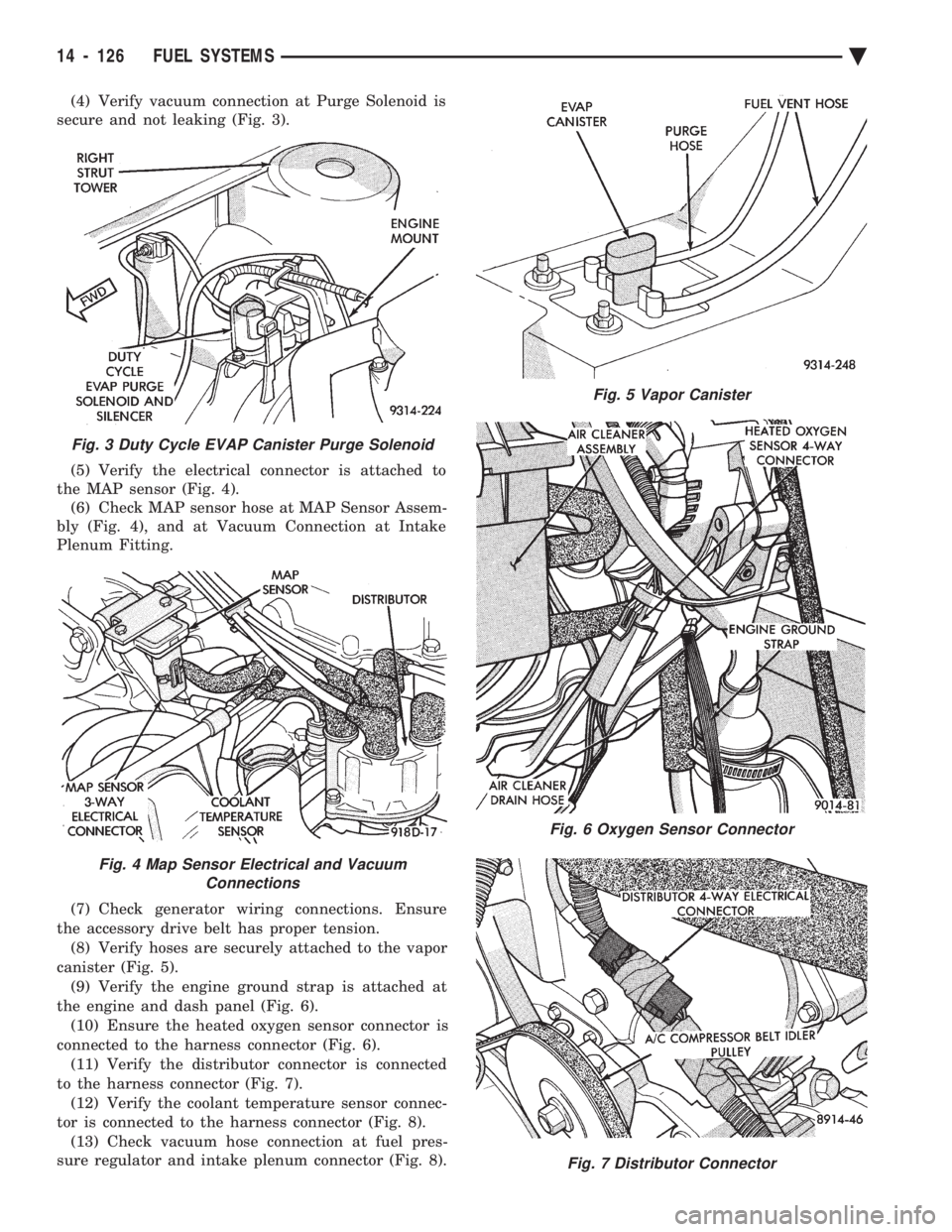
(4) Verify vacuum connection at Purge Solenoid is
secure and not leaking (Fig. 3).
(5) Verify the electrical connector is attached to
the MAP sensor (Fig. 4). (6) Check MAP sensor hose at MAP Sensor Assem-
bly (Fig. 4), and at Vacuum Connection at Intake
Plenum Fitting.
(7) Check generator wiring connections. Ensure
the accessory drive belt has proper tension. (8) Verify hoses are securely attached to the vapor
canister (Fig. 5). (9) Verify the engine ground strap is attached at
the engine and dash panel (Fig. 6). (10) Ensure the heated oxygen sensor connector is
connected to the harness connector (Fig. 6). (11) Verify the distributor connector is connected
to the harness connector (Fig. 7). (12) Verify the coolant temperature sensor connec-
tor is connected to the harness connector (Fig. 8). (13) Check vacuum hose connection at fuel pres-
sure regulator and intake plenum connector (Fig. 8).
Fig. 3 Duty Cycle EVAP Canister Purge Solenoid
Fig. 4 Map Sensor Electrical and Vacuum Connections
Fig. 5 Vapor Canister
Fig. 6 Oxygen Sensor Connector
Fig. 7 Distributor Connector
14 - 126 FUEL SYSTEMS Ä
Page 1867 of 2438
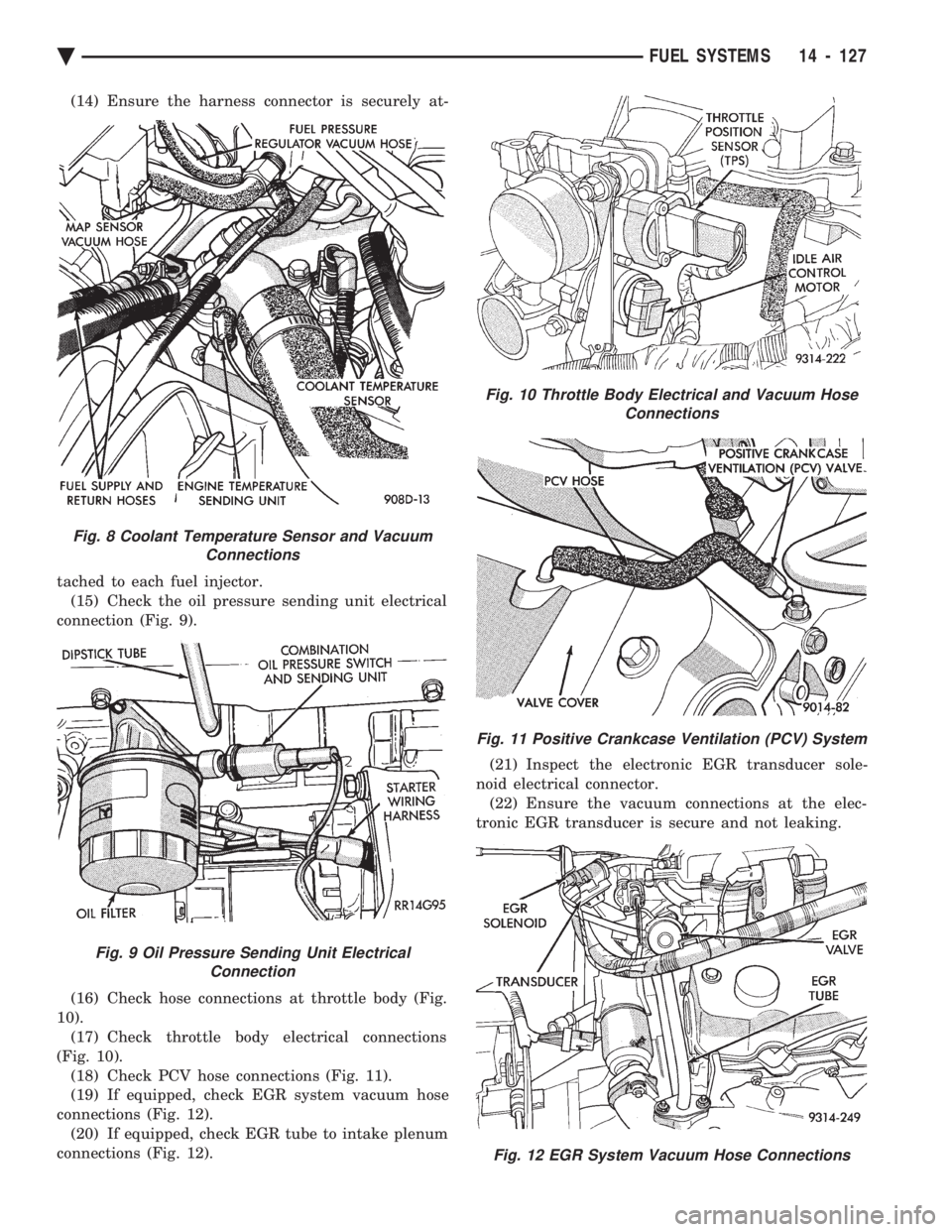
(14) Ensure the harness connector is securely at-
tached to each fuel injector. (15) Check the oil pressure sending unit electrical
connection (Fig. 9).
(16) Check hose connections at throttle body (Fig.
10). (17) Check throttle body electrical connections
(Fig. 10). (18) Check PCV hose connections (Fig. 11).
(19) If equipped, check EGR system vacuum hose
connections (Fig. 12). (20) If equipped, check EGR tube to intake plenum
connections (Fig. 12). (21) Inspect the electronic EGR transducer sole-
noid electrical connector. (22) Ensure the vacuum connections at the elec-
tronic EGR transducer is secure and not leaking.
Fig. 8 Coolant Temperature Sensor and Vacuum Connections
Fig. 9 Oil Pressure Sending Unit ElectricalConnection
Fig. 10 Throttle Body Electrical and Vacuum Hose Connections
Fig. 11 Positive Crankcase Ventilation (PCV) System
Fig. 12 EGR System Vacuum Hose Connections
Ä FUEL SYSTEMS 14 - 127
Page 1897 of 2438
3.3L AND 3.8L MULTI-PORT FUEL INJECTIONÐGENERAL DIAGNOSIS INDEX
page page
Fuel System Diagram .................... 157 Visual Inspection........................ 157
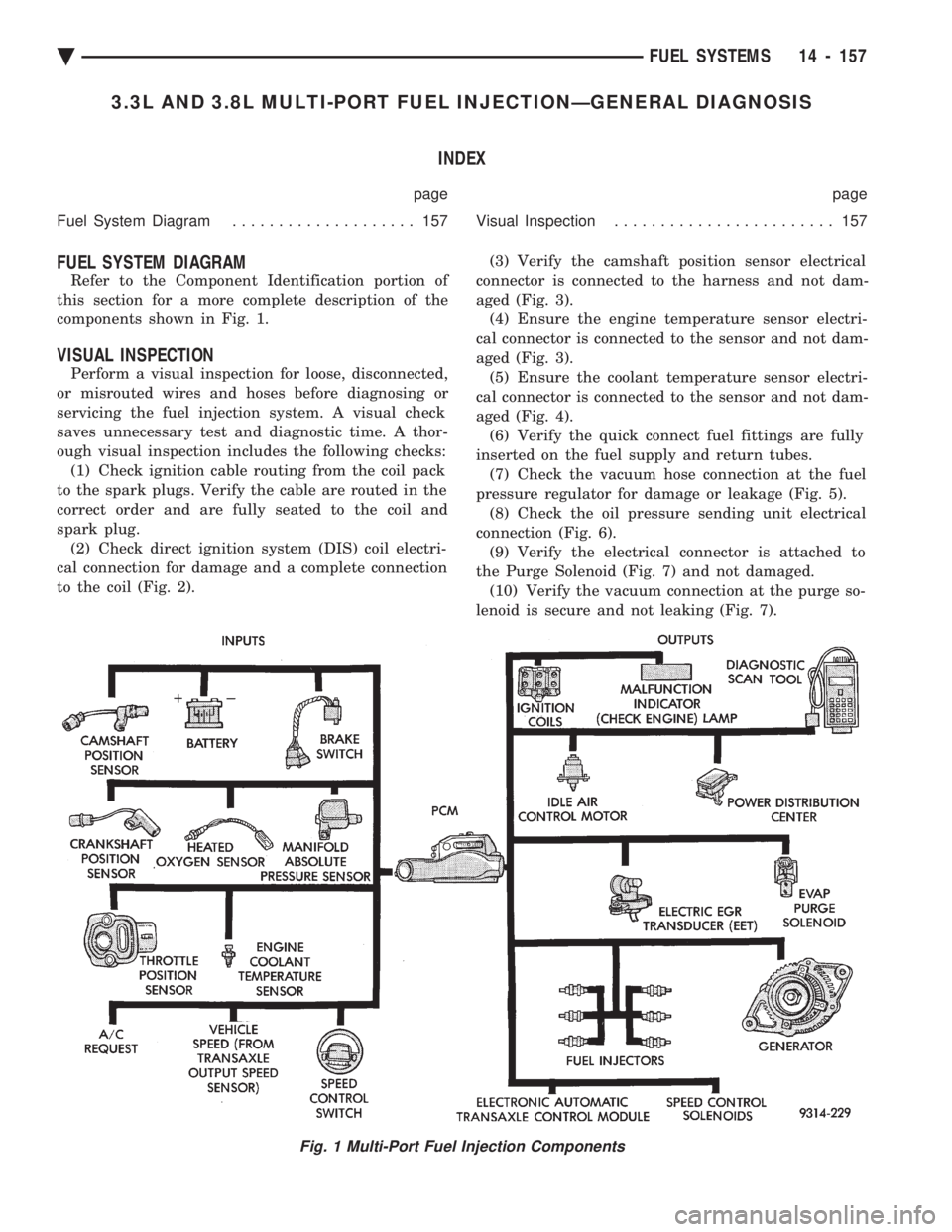
FUEL SYSTEM DIAGRAM
Refer to the Component Identification portion of
this section for a more complete description of the
components shown in Fig. 1.
VISUAL INSPECTION
Perform a visual inspection for loose, disconnected,
or misrouted wires and hoses before diagnosing or
servicing the fuel injection system. A visual check
saves unnecessary test and diagnostic time. A thor-
ough visual inspection includes the following checks: (1) Check ignition cable routing from the coil pack
to the spark plugs. Verify the cable are routed in the
correct order and are fully seated to the coil and
spark plug. (2) Check direct ignition system (DIS) coil electri-
cal connection for damage and a complete connection
to the coil (Fig. 2). (3) Verify the camshaft position sensor electrical
connector is connected to the harness and not dam-
aged (Fig. 3). (4) Ensure the engine temperature sensor electri-
cal connector is connected to the sensor and not dam-
aged (Fig. 3). (5) Ensure the coolant temperature sensor electri-
cal connector is connected to the sensor and not dam-
aged (Fig. 4). (6) Verify the quick connect fuel fittings are fully
inserted on the fuel supply and return tubes. (7) Check the vacuum hose connection at the fuel
pressure regulator for damage or leakage (Fig. 5). (8) Check the oil pressure sending unit electrical
connection (Fig. 6). (9) Verify the electrical connector is attached to
the Purge Solenoid (Fig. 7) and not damaged. (10) Verify the vacuum connection at the purge so-
lenoid is secure and not leaking (Fig. 7).
Fig. 1 Multi-Port Fuel Injection Components
Ä FUEL SYSTEMS 14 - 157
Page 1898 of 2438
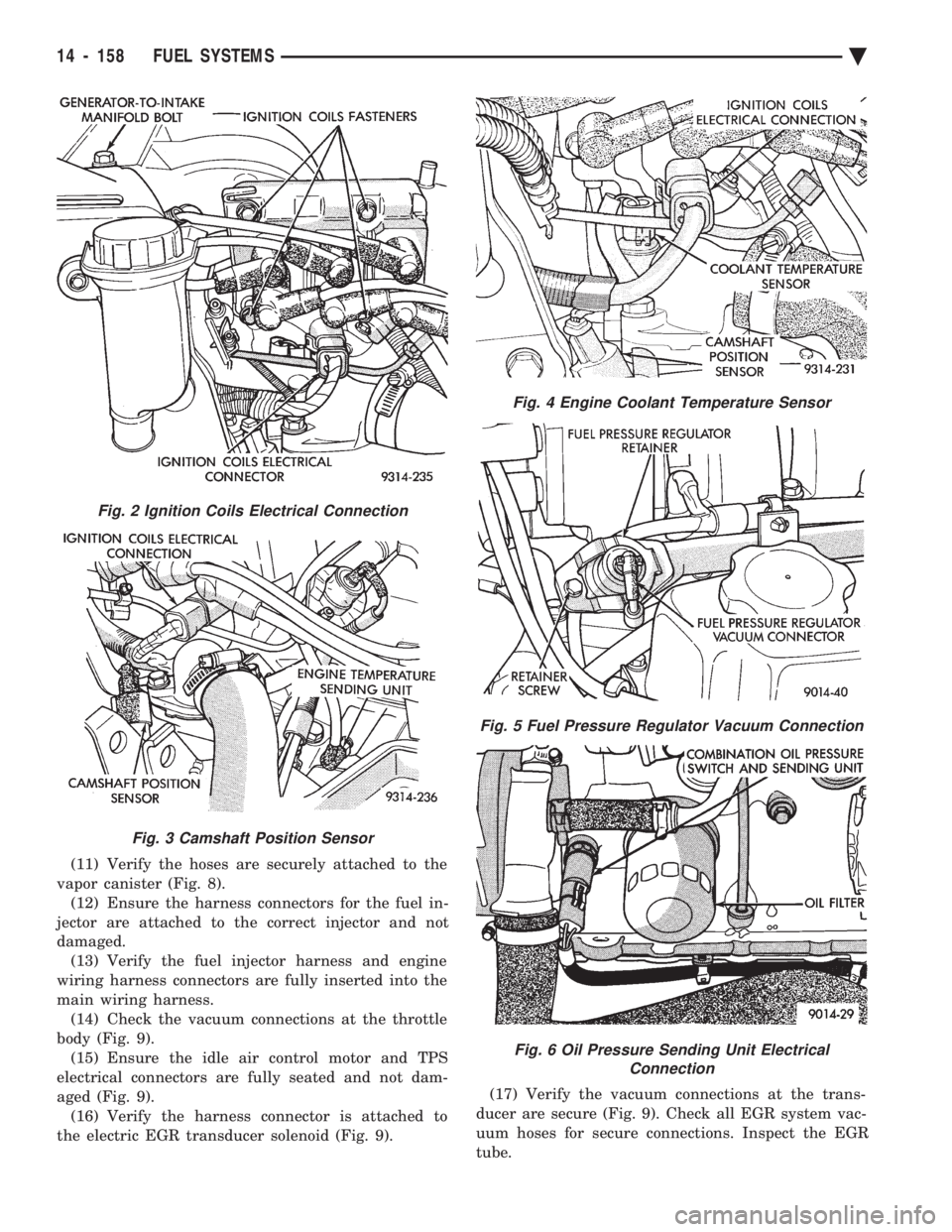
(11) Verify the hoses are securely attached to the
vapor canister (Fig. 8). (12) Ensure the harness connectors for the fuel in-
jector are attached to the correct injector and not
damaged. (13) Verify the fuel injector harness and engine
wiring harness connectors are fully inserted into the
main wiring harness. (14) Check the vacuum connections at the throttle
body (Fig. 9). (15) Ensure the idle air control motor and TPS
electrical connectors are fully seated and not dam-
aged (Fig. 9). (16) Verify the harness connector is attached to
the electric EGR transducer solenoid (Fig. 9). (17) Verify the vacuum connections at the trans-
ducer are secure (Fig. 9). Check all EGR system vac-
uum hoses for secure connections. Inspect the EGR
tube.
Fig. 2 Ignition Coils Electrical Connection
Fig. 3 Camshaft Position Sensor
Fig. 4 Engine Coolant Temperature Sensor
Fig. 5 Fuel Pressure Regulator Vacuum Connection
Fig. 6 Oil Pressure Sending Unit Electrical Connection
14 - 158 FUEL SYSTEMS Ä
Page 1949 of 2438
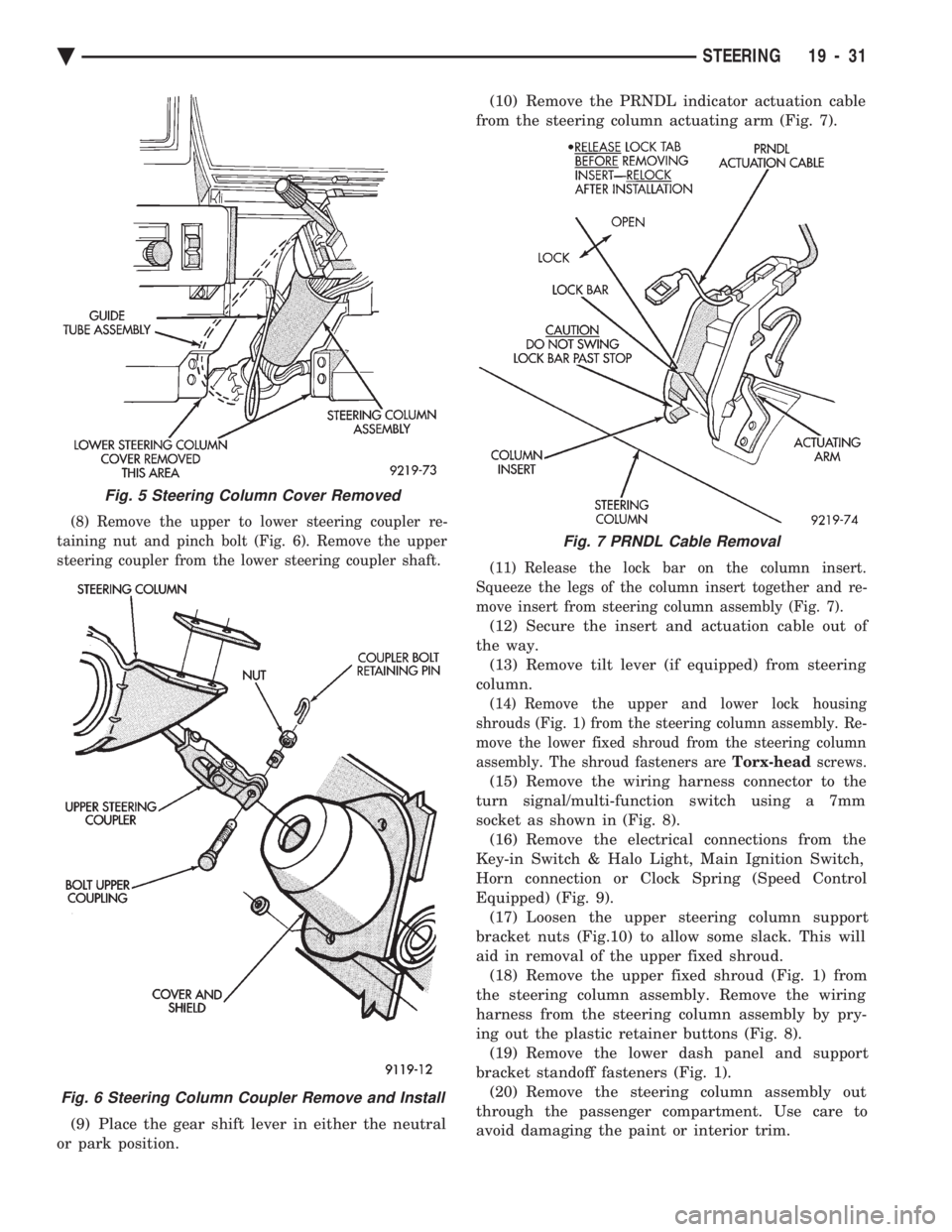
(8) Remove the upper to lower steering coupler re-
taining nut and pinch bolt (Fig. 6). Remove the upper
steering coupler from the lower steering coupler shaft.
(9) Place the gear shift lever in either the neutral
or park position. (10) Remove the PRNDL indicator actuation cable
from the steering column actuating arm (Fig. 7).
(11) Release the lock bar on the column insert.
Squeeze the legs of the column insert together and re-
move insert from steering column assembly (Fig. 7).
(12) Secure the insert and actuation cable out of
the way. (13) Remove tilt lever (if equipped) from steering
column.
(14) Remove the upper and lower lock housing
shrouds (Fig. 1) from the steering column assembly. Re-
move the lower fixed shroud from the steering column
assembly. The shroud fasteners are Torx-headscrews.
(15) Remove the wiring harness connector to the
turn signal/multi-function switch using a 7mm
socket as shown in (Fig. 8). (16) Remove the electrical connections from the
Key-in Switch & Halo Light, Main Ignition Switch,
Horn connection or Clock Spring (Speed Control
Equipped) (Fig. 9). (17) Loosen the upper steering column support
bracket nuts (Fig.10) to allow some slack. This will
aid in removal of the upper fixed shroud. (18) Remove the upper fixed shroud (Fig. 1) from
the steering column assembly. Remove the wiring
harness from the steering column assembly by pry-
ing out the plastic retainer buttons (Fig. 8). (19) Remove the lower dash panel and support
bracket standoff fasteners (Fig. 1). (20) Remove the steering column assembly out
through the passenger compartment. Use care to
avoid damaging the paint or interior trim.
Fig. 5 Steering Column Cover Removed
Fig. 6 Steering Column Coupler Remove and Install
Fig. 7 PRNDL Cable Removal
Ä STEERING 19 - 31
Page 1951 of 2438
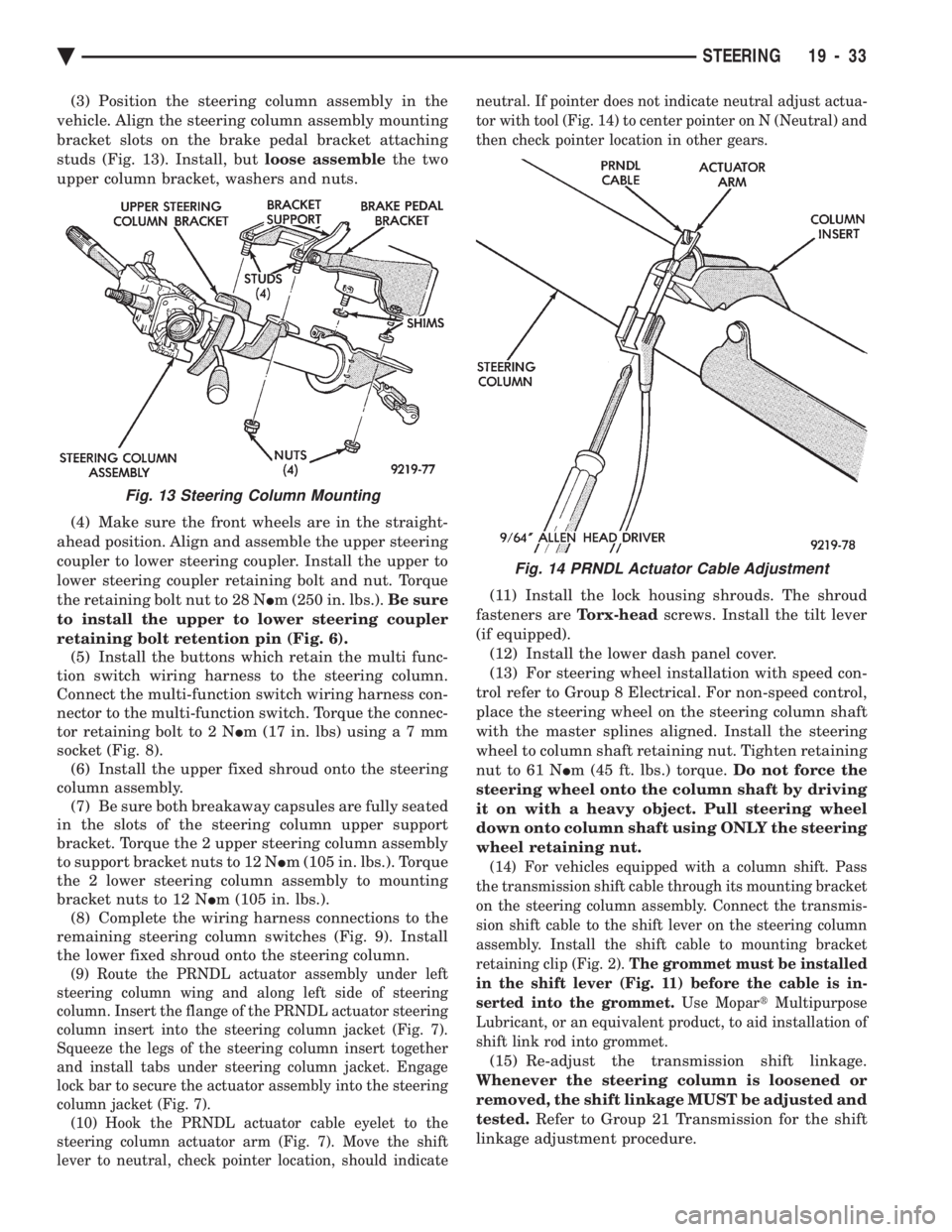
(3) Position the steering column assembly in the
vehicle. Align the steering column assembly mounting
bracket slots on the brake pedal bracket attaching
studs (Fig. 13). Install, but loose assemblethe two
upper column bracket, washers and nuts.
(4) Make sure the front wheels are in the straight-
ahead position. Align and assemble the upper steering
coupler to lower steering coupler. Install the upper to
lower steering coupler retaining bolt and nut. Torque
the retaining bolt nut to 28 N Im (250 in. lbs.). Be sure
to install the upper to lower steering coupler
retaining bolt retention pin (Fig. 6). (5) Install the buttons which retain the multi func-
tion switch wiring harness to the steering column.
Connect the multi-function switch wiring harness con-
nector to the multi-function switch. Torque the connec-
tor retaining bolt to 2 N Im (17 in. lbs) usin ga7mm
socket (Fig. 8). (6) Install the upper fixed shroud onto the steering
column assembly. (7) Be sure both breakaway capsules are fully seated
in the slots of the steering column upper support
bracket. Torque the 2 upper steering column assembly
to support bracket nuts to 12 N Im (105 in. lbs.). Torque
the 2 lower steering column assembly to mounting
bracket nuts to 12 N Im (105 in. lbs.).
(8) Complete the wiring harness connections to the
remaining steering column switches (Fig. 9). Install
the lower fixed shroud onto the steering column.
(9) Route the PRNDL actuator assembly under left
steering column wing and along left side of steering
column. Insert the flange of the PRNDL actuator steering
column insert into the steering column jacket (Fig. 7).
Squeeze the legs of the steering column insert together
and install tabs under steering column jacket. Engage
lock bar to secure the actuator assembly into the steering
column jacket (Fig. 7). (10) Hook the PRNDL actuator cable eyelet to the
steering column actuator arm (Fig. 7). Move the shift
lever to neutral, check pointer location, should indicate neutral. If pointer does not indicate neutral adjust actua-
tor with tool (Fig. 14) to center pointer on N (Neutral) and
then check pointer location in other gears.
(11) Install the lock housing shrouds. The shroud
fasteners are Torx-headscrews. Install the tilt lever
(if equipped). (12) Install the lower dash panel cover.
(13) For steering wheel installation with speed con-
trol refer to Group 8 Electrical. For non-speed control,
place the steering wheel on the steering column shaft
with the master splines aligned. Install the steering
wheel to column shaft retaining nut. Tighten retaining
nut to 61 N Im (45 ft. lbs.) torque. Do not force the
steering wheel onto the column shaft by driving
it on with a heavy object. Pull steering wheel
down onto column shaft using ONLY the steering
wheel retaining nut.
(14) For vehicles equipped with a column shift. Pass
the transmission shift cable through its mounting bracket
on the steering column assembly. Connect the transmis-
sion shift cable to the shift lever on the steering column
assembly. Install the shift cable to mounting bracket
retaining clip (Fig. 2). The grommet must be installed
in the shift lever (Fig. 11) before the cable is in-
serted into the grommet. Use MopartMultipurpose
Lubricant, or an equivalent product, to aid installation of
shift link rod into grommet.
(15) Re-adjust the transmission shift linkage.
Whenever the steering column is loosened or
removed, the shift linkage MUST be adjusted and
tested. Refer to Group 21 Transmission for the shift
linkage adjustment procedure.
Fig. 13 Steering Column Mounting
Fig. 14 PRNDL Actuator Cable Adjustment
Ä STEERING 19 - 33