ANC CHEVROLET EQUINOX 2018 Owner's Manual
[x] Cancel search | Manufacturer: CHEVROLET, Model Year: 2018, Model line: EQUINOX, Model: CHEVROLET EQUINOX 2018Pages: 428, PDF Size: 6.05 MB
Page 2 of 428

Chevrolet Equinox Owner Manual (GMNA-Localizing-U.S./Canada/Mexico-
10446639) - 2018 - CRC - 8/18/17
ContentsIntroduction . . . . . . . . . . . . . . . . . . . . . . 2
In Brief . . . . . . . . . . . . . . . . . . . . . . . . . . . 5
Keys, Doors, and Windows . . . . . 31
Seats and Restraints . . . . . . . . . . . 58
Storage . . . . . . . . . . . . . . . . . . . . . . . 108
Instruments and Controls . . . . . . 112
Lighting . . . . . . . . . . . . . . . . . . . . . . . 157
Infotainment System . . . . . . . . . . 165
Climate Controls . . . . . . . . . . . . . . 190
Driving and Operating . . . . . . . . . 198
Vehicle Care . . . . . . . . . . . . . . . . . . 278
Service and Maintenance . . . . . 371
Technical Data . . . . . . . . . . . . . . . . 385
Customer Information . . . . . . . . . 389
Reporting Safety Defects . . . . . . 400
OnStar . . . . . . . . . . . . . . . . . . . . . . . . 403
Index . . . . . . . . . . . . . . . . . . . . 415
Page 3 of 428
Chevrolet Equinox Owner Manual (GMNA-Localizing-U.S./Canada/Mexico-
10446639) - 2018 - CRC - 8/18/17
2 Introduction
Introduction
The names, logos, emblems,
slogans, vehicle model names, and
vehicle body designs appearing in
this manual including, but not limited
to, GM, the GM logo, CHEVROLET,
the CHEVROLET Emblem, and
EQUINOX are trademarks and/or
service marks of General Motors
LLC, its subsidiaries, affiliates,
or licensors.For vehicles first sold in Canada,
substitute the name
“General
Motors of Canada Company” for
Chevrolet Motor Division wherever it
appears in this manual.
This manual describes features that
may or may not be on the vehicle
because of optional equipment that
was not purchased on the vehicle,
model variants, country
specifications, features/applications
that may not be available in your
region, or changes subsequent to
the printing of this owner ’s manual.
Refer to the purchase
documentation relating to your
specific vehicle to confirm the
features.
Keep this manual in the vehicle for
quick reference.
Canadian Vehicle Owners
A French language manual can be
obtained from your dealer, at
www.helminc.com, or from:
Propriétaires Canadiens
On peut obtenir un exemplaire de
ce guide en français auprès du
concessionnaire ou à l'adresse
suivante:
Helm, Incorporated
Attention: Customer Service
47911 Halyard Drive
Plymouth, MI 48170
USA
Using this Manual
To quickly locate information about
the vehicle, use the Index in the
back of the manual. It is an
alphabetical list of what is in the
manual and the page number where
it can be found.
Litho in U.S.A.
Part No. 23143657 D Fourth Printing©2017 General Motors LLC. All Rights Reserved.
Page 6 of 428
Chevrolet Equinox Owner Manual (GMNA-Localizing-U.S./Canada/Mexico-
10446639) - 2018 - CRC - 8/18/17
In Brief 5
In Brief
Instrument Panel
Instrument Panel . . . . . . . . . . . . . . . . 6
Initial Drive Information
Initial Drive Information . . . . . . . . . . 8
Stop/Start System . . . . . . . . . . . . . . . 8
Remote Keyless Entry (RKE)System . . . . . . . . . . . . . . . . . . . . . . . . 8
Remote Vehicle Start . . . . . . . . . . . 8
Door Locks . . . . . . . . . . . . . . . . . . . . . 9
Liftgate . . . . . . . . . . . . . . . . . . . . . . . . 10
Windows . . . . . . . . . . . . . . . . . . . . . . . 10
Seat Adjustment . . . . . . . . . . . . . . . 11
Memory Features . . . . . . . . . . . . . . 13
Heated and Ventilated Seats . . . 13
Head Restraint Adjustment . . . . 14
Seat Belts . . . . . . . . . . . . . . . . . . . . . 14
Passenger Sensing System . . . 14
Mirror Adjustment . . . . . . . . . . . . . . 15
Steering Wheel Adjustment . . . . 15
Interior Lighting . . . . . . . . . . . . . . . . 16
Exterior Lighting . . . . . . . . . . . . . . . 17
Windshield Wiper/Washer . . . . . . 17
Climate Controls . . . . . . . . . . . . . . . 18
Transmission . . . . . . . . . . . . . . . . . . 19
Vehicle Features
Infotainment System . . . . . . . . . . . 20
Radio(s) . . . . . . . . . . . . . . . . . . . . . . . 20
Satellite Radio . . . . . . . . . . . . . . . . . 21
Portable Audio Devices . . . . . . . . 21
Bluetooth
®. . . . . . . . . . . . . . . . . . . . . 21
Steering Wheel Controls . . . . . . . 21
Cruise Control . . . . . . . . . . . . . . . . . 22
Driver Information Center (DIC) . . . . . . . . . . . . . . . . . 23
Forward Collision Alert (FCA) System . . . . . . . . . . . . . . . . . . . . . . . 23
Forward Automatic Braking (FAB) . . . . . . . . . . . . . . . . 23
Lane Keep Assist (LKA) . . . . . . . 23
Lane Change Alert (LCA) . . . . . . 24
Surround Vision . . . . . . . . . . . . . . . 24
Rear Vision Camera (RVC) . . . . 24
Rear Cross Traffic Alert (RCTA) System . . . . . . . . . . . . . . . . . . . . . . . 24
Parking Assist . . . . . . . . . . . . . . . . . 24
Power Outlets . . . . . . . . . . . . . . . . . 25
Universal Remote System . . . . . 25
Sunroof . . . . . . . . . . . . . . . . . . . . . . . . 25
Performance and Maintenance
Traction Control/Electronic Stability Control . . . . . . . . . . . . . . 26
Tire Pressure Monitor . . . . . . . . . . 27 Fuel (LYX - 1.5L L4 Turbo
Engine) . . . . . . . . . . . . . . . . . . . . . . . 27
Fuel (LTG - 2.0L L4 Turbo Engine) . . . . . . . . . . . . . . . . . . . . . . . 28
Fuel (Diesel) . . . . . . . . . . . . . . . . . . . 28
E85 or FlexFuel . . . . . . . . . . . . . . . . 28
Engine Oil Life System . . . . . . . . 28
Driving for Better Fuel
Economy . . . . . . . . . . . . . . . . . . . . . 29
Diesel Particulate Filter . . . . . . . . 29
Diesel Exhaust Fluid . . . . . . . . . . . 30
Roadside Assistance Program . . . . . . . . . . . . . . . . . . . . . . 30
Page 9 of 428
Chevrolet Equinox Owner Manual (GMNA-Localizing-U.S./Canada/Mexico-
10446639) - 2018 - CRC - 8/18/17
8 In Brief
Initial Drive
Information
This section provides a brief
overview about some of the
important features that may or may
not be on your specific vehicle.
For more detailed information, refer
to each of the features which can be
found later in this owner’s manual.
Stop/Start System
The vehicle may have a fuel saving
Stop/Start system to shut off the
engine and help conserve fuel.
When the brakes are applied and
the vehicle is at a complete stop,
the engine may turn off. When the
brake pedal is released or the
accelerator pedal is pushed, the
engine will restart. The engine may
restart even while the brake is
applied. SeeStarting the Engine
0 217.
Remote Keyless Entry
(RKE) System
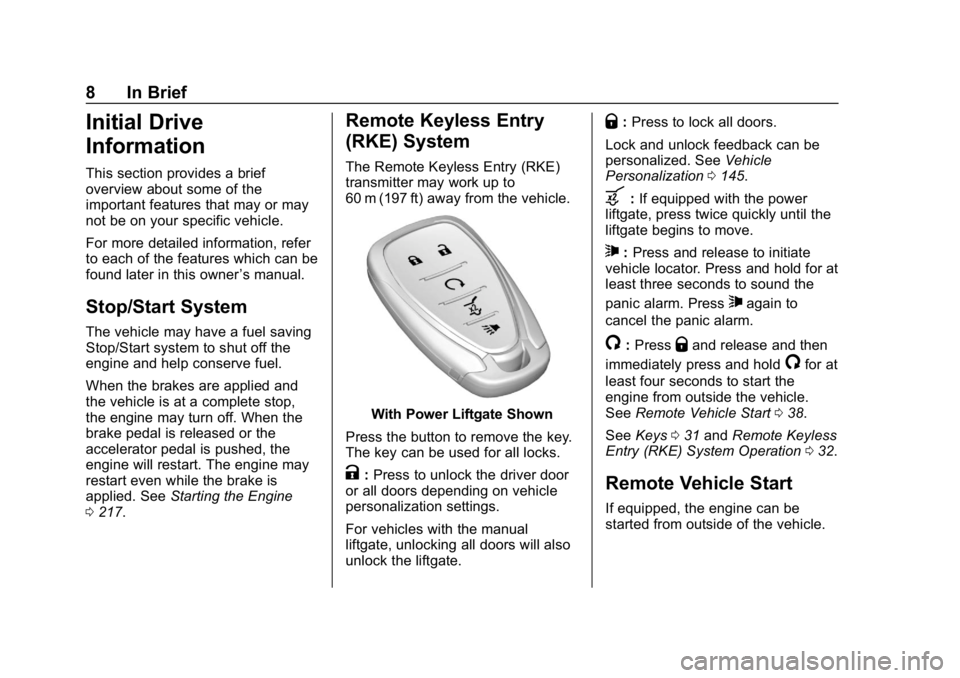
The Remote Keyless Entry (RKE)
transmitter may work up to
60 m (197 ft) away from the vehicle.
With Power Liftgate Shown
Press the button to remove the key.
The key can be used for all locks.
K: Press to unlock the driver door
or all doors depending on vehicle
personalization settings.
For vehicles with the manual
liftgate, unlocking all doors will also
unlock the liftgate.
Q: Press to lock all doors.
Lock and unlock feedback can be
personalized. See Vehicle
Personalization 0145.
b:If equipped with the power
liftgate, press twice quickly until the
liftgate begins to move.
7: Press and release to initiate
vehicle locator. Press and hold for at
least three seconds to sound the
panic alarm. Press
7again to
cancel the panic alarm.
/: PressQand release and then
immediately press and hold
/for at
least four seconds to start the
engine from outside the vehicle.
See Remote Vehicle Start 038.
See Keys 031 and Remote Keyless
Entry (RKE) System Operation 032.
Remote Vehicle Start
If equipped, the engine can be
started from outside of the vehicle.
Page 10 of 428
Chevrolet Equinox Owner Manual (GMNA-Localizing-U.S./Canada/Mexico-
10446639) - 2018 - CRC - 8/18/17
In Brief 9
Starting the Vehicle
1. Press and releaseQon the
RKE transmitter.
2. Immediately press and hold
/
for at least four seconds or until
the turn signal lamps flash.
Start the vehicle normally after
entering.
When the vehicle starts, the parking
lamps will turn on.
Remote start can be extended.
Canceling a Remote Start
To cancel a remote start, do one of
the following:
. Press and hold
/until the
parking lamps turn off.
. Turn on the hazard warning
flashers.
. Turn the vehicle on and then off.
See Remote Vehicle Start 038.
Door Locks
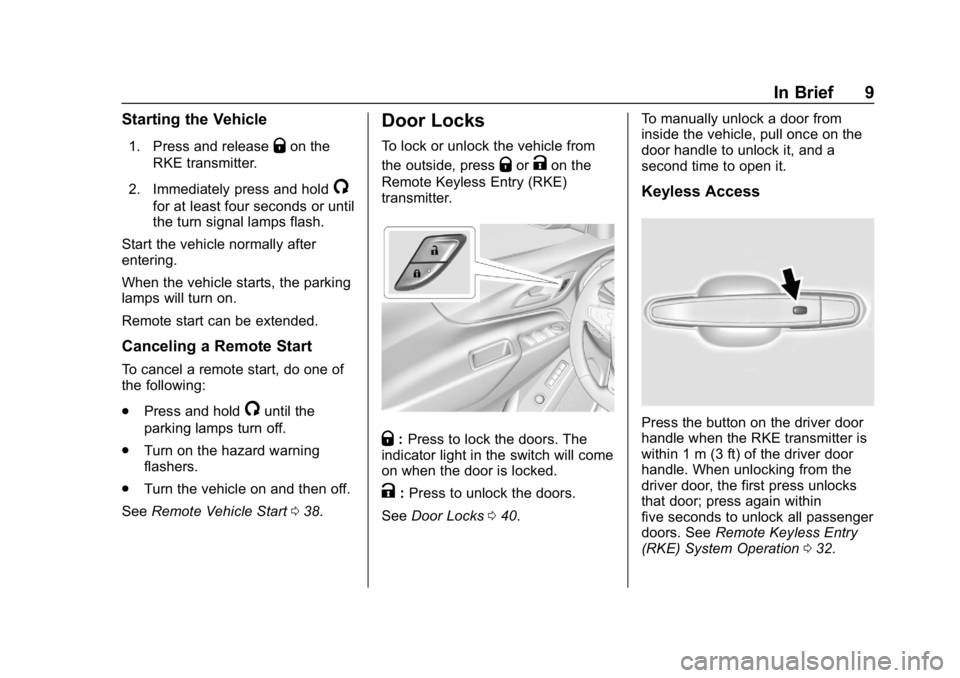
To lock or unlock the vehicle from
the outside, press
QorKon the
Remote Keyless Entry (RKE)
transmitter.
Q: Press to lock the doors. The
indicator light in the switch will come
on when the door is locked.
K: Press to unlock the doors.
See Door Locks 040. To manually unlock a door from
inside the vehicle, pull once on the
door handle to unlock it, and a
second time to open it.
Keyless Access
Press the button on the driver door
handle when the RKE transmitter is
within 1 m (3 ft) of the driver door
handle. When unlocking from the
driver door, the first press unlocks
that door; press again within
five seconds to unlock all passenger
doors. See
Remote Keyless Entry
(RKE) System Operation 032.
Page 15 of 428
Chevrolet Equinox Owner Manual (GMNA-Localizing-U.S./Canada/Mexico-
10446639) - 2018 - CRC - 8/18/17
14 In Brief
Press the heated or ventilated
button once for the highest setting.
With each press of the button, the
heated or ventilated seat will
change to the next lower setting,
and then to the off setting. The
lights indicate three for the highest
setting and one for the lowest.
SeeHeated and Ventilated Front
Seats 066.
Head Restraint
Adjustment
Do not drive until the head restraints
for all occupants are installed and
adjusted properly.
To achieve a comfortable seating
position, change the seatback
recline angle as little as necessary
while keeping the seat and the head
restraint height in the proper
position.
See Head Restraints 059 and Seat
Adjustment 061.
Seat Belts
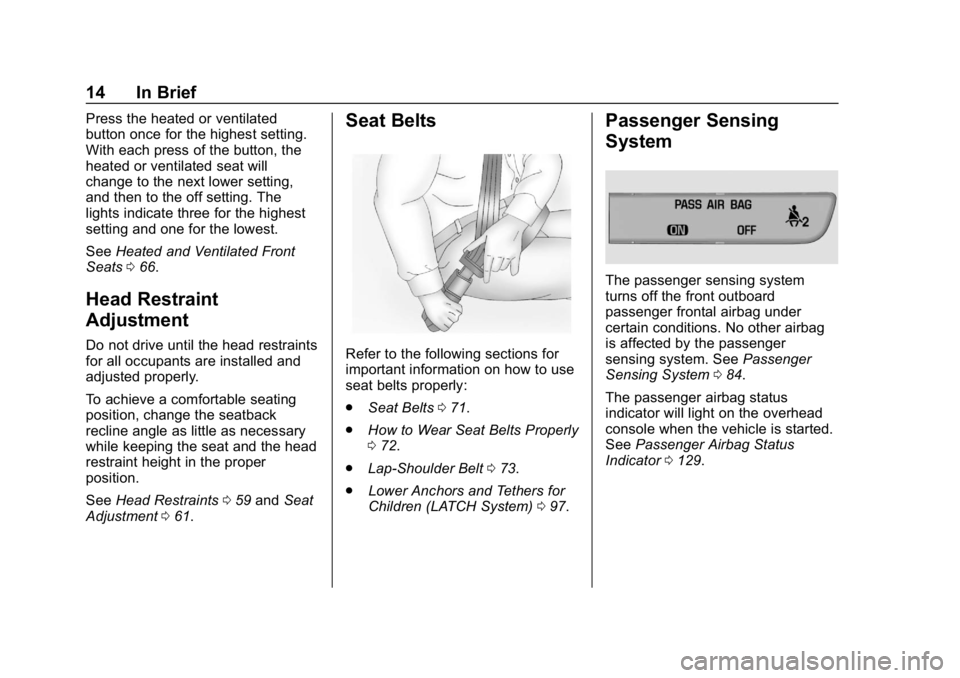
Refer to the following sections for
important information on how to use
seat belts properly:
.
Seat Belts 071.
. How to Wear Seat Belts Properly
072.
. Lap-Shoulder Belt 073.
. Lower Anchors and Tethers for
Children (LATCH System) 097.
Passenger Sensing
System
The passenger sensing system
turns off the front outboard
passenger frontal airbag under
certain conditions. No other airbag
is affected by the passenger
sensing system. See Passenger
Sensing System 084.
The passenger airbag status
indicator will light on the overhead
console when the vehicle is started.
See Passenger Airbag Status
Indicator 0129.
Page 21 of 428
Chevrolet Equinox Owner Manual (GMNA-Localizing-U.S./Canada/Mexico-
10446639) - 2018 - CRC - 8/18/17
20 In Brief
Vehicle Features
Infotainment System
Base radio information is included in
this manual. See the infotainment
manual for information on other
available infotainment systems.
Read the following pages to
become familiar with the features.
{Warning
Taking your eyes off the road for
too long or too often while using
any infotainment feature can
cause a crash. You or others
could be injured or killed. Do not
give extended attention to
infotainment tasks while driving.
Limit your glances at the vehicle
displays and focus your attention
on driving. Use voice commands
whenever possible.
The infotainment system has built-in
features intended to help avoid
distraction by disabling some functions when driving. These
functions may gray out when they
are unavailable. Many infotainment
features are also available through
the instrument cluster and steering
wheel controls.
Before driving:
.
Become familiar with the
operation, center stack controls,
and infotainment display
controls.
. Set up the audio by presetting
favorite stations, setting the
tone, and adjusting the
speakers.
. Set up phone numbers in
advance so they can be called
easily by pressing a single
control or by using a single voice
command if equipped with
Bluetooth phone capability.
See Defensive Driving 0200.
To play the infotainment system with
the ignition off, see Retained
Accessory Power (RAP) 0221.
Radio(s)
O
:
. Press to turn the power on.
. Press and hold to turn the
power off.
. Press to mute/unmute the
system when on.
. Turn to decrease or increase the
volume.
g:
. Radio: Press and release to fast
seek the strongest previous
station or channel.
. USB/Music/Pictures: Press to go
to the previous content. Press
and hold to fast rewind.
d:
. Radio: Press and release to fast
seek the next strongest station
or channel.
. USB/Music/Pictures: Press to go
to the next content. Press and
hold to fast forward.
Page 25 of 428
Chevrolet Equinox Owner Manual (GMNA-Localizing-U.S./Canada/Mexico-
10446639) - 2018 - CRC - 8/18/17
24 In Brief
it detects that you are actively
steering. Override LKA by turning
the steering wheel. LKA uses a
camera to detect lane markings
between 60 km/h (37 mph) and
180 km/h (112 mph).
SeeLane Departure Warning (LDW)
0 254 andLane Keep Assist (LKA)
0 254.
Lane Change Alert (LCA)
If equipped, the LCA system is a
lane-changing aid that assists
drivers with avoiding lane change
crashes that occur with moving
vehicles in the side blind zone (or
spot) areas or with vehicles rapidly
approaching these areas from
behind. The LCA warning display
will light up in the corresponding
outside mirror and will flash if the
turn signal is on. The Side Blind
Zone Alert (SBZA) system is
included as part of the LCA system.
See Side Blind Zone Alert (SBZA)
0 252 andLane Change Alert (LCA)
0 252.
Surround Vision
If equipped, views around the
vehicle appear in the infotainment
display to aid with parking and
low-speed maneuvers.
See “Surround Vision” under
Assistance Systems for Parking or
Backing 0245.
Front Vision Camera
If equipped, a view of the area in
front of the vehicle appears on the
infotainment display to aid with
parking and low-speed maneuvers.
See “Front Vision Camera” under
Assistance Systems for Parking or
Backing 0245.
Rear Vision
Camera (RVC)
The RVC displays a view of the
area behind the vehicle on the
infotainment display when the
vehicle is shifted into R (Reverse) to
aid with parking and low-speed
backing maneuvers. See
Assistance Systems for Parking
or Backing 0245.
Rear Cross Traffic Alert
(RCTA) System
If equipped, the RCTA system
shows a triangle with an arrow on
the infotainment display to warn of
traffic behind your vehicle that may
cross your vehicle's path while in
R (Reverse). In addition, beeps will
sound, or the driver seat will pulse.
See Assistance Systems for Parking
or Backing 0245.
Parking Assist
If equipped, Rear Parking
Assist (RPA) uses sensors on the
rear bumper to assist with parking
and avoiding objects while in
R (Reverse). It operates at speeds
less than 8 km/h (5 mph). RPA may
display a warning triangle on the
infotainment display and a graphic
on the instrument cluster to provide
the object distance. In addition,
multiple beeps or seat pulses may
occur if very close to an object.
Page 26 of 428
Chevrolet Equinox Owner Manual (GMNA-Localizing-U.S./Canada/Mexico-
10446639) - 2018 - CRC - 8/18/17
In Brief 25
SeeAssistance Systems for Parking
or Backing 0245.
Power Outlets
The vehicle has three 12-volt
accessory power outlets, which can
be used to plug in electrical
equipment, such as a cell phone or
MP3 player.
There are power outlets:
.
On the center stack below the
climate control system.
. On the rear of the center floor
console.
. In the rear cargo area.
To use the outlet, remove the cover.
See Power Outlets 0118.
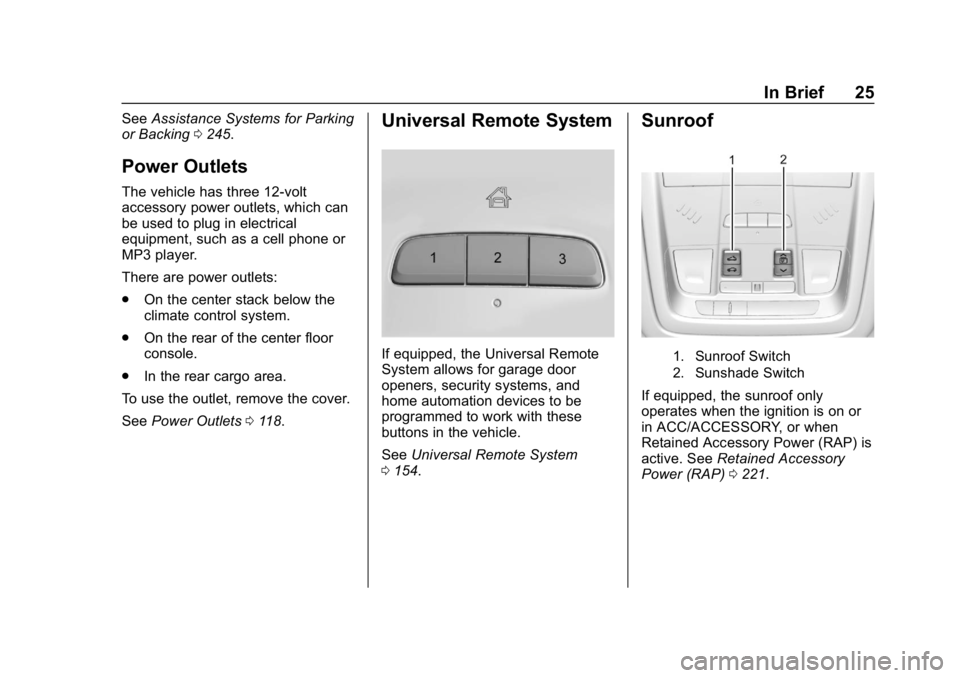
Universal Remote System
If equipped, the Universal Remote
System allows for garage door
openers, security systems, and
home automation devices to be
programmed to work with these
buttons in the vehicle.
See Universal Remote System
0 154.
Sunroof
1. Sunroof Switch
2. Sunshade Switch
If equipped, the sunroof only
operates when the ignition is on or
in ACC/ACCESSORY, or when
Retained Accessory Power (RAP) is
active. See Retained Accessory
Power (RAP) 0221.
Page 27 of 428
Chevrolet Equinox Owner Manual (GMNA-Localizing-U.S./Canada/Mexico-
10446639) - 2018 - CRC - 8/18/17
26 In Brief
Sunroof Switch
Express-Open/Express-Close :To
express-open the sunroof, fully
press and release
e(1). Press
the switch again to stop it. To
express-close the sunroof, fully
press and release
g(1). Press
the switch again to stop it.
Open/Close (Manual Mode) : To
open the sunroof, press and hold
e(1) until the sunroof reaches
the desired position. Press and hold
g(1) to close it.
Comfort Stop : The sunroof has a
comfort stop feature that stops the
sunroof from opening fully. Press
and release the rear of
gto open
the sunroof to the comfort open
position. Pressing the rear of
g
again will open the sunroof fully.
If the sunshade is not fully open
when the comfort stop feature is
pressed the second time, the
sunshade will open fully. Vent :
From the closed position,
press
e(1) to vent the sunroof.
Sunshade Switch
Express-open/Express-close : To
express-open the sunshade, fully
press and release
r(2). To
express-close the sunshade, fully
press and release
s(2) . Press
the switch again to stop it.
Open/Close : To open the
sunshade, press and hold
r(2)
until the sunshade reaches the
desired position.
When the sunroof is opened, an air
deflector will automatically raise.
The air deflector will retract when
the sunroof is closed.
Performance and
Maintenance
Traction Control/
Electronic Stability
Control
The Traction Control System (TCS)
limits wheel slip. The system is on
when the vehicle is started.
The StabiliTrak system assists with
directional control of the vehicle in
difficult driving conditions. The
system is on when the vehicle is
started.
TCS and StabiliTrak can be turned
off or on using the Driver
Information Center (DIC) controls.
See Traction Control/Electronic
Stability Control 0238.