Sim CHEVROLET EQUINOX 2020 Owner's Guide
[x] Cancel search | Manufacturer: CHEVROLET, Model Year: 2020, Model line: EQUINOX, Model: CHEVROLET EQUINOX 2020Pages: 415, PDF Size: 6.46 MB
Page 337 of 415
Chevrolet Equinox Owner Manual (GMNA-Localizing-U.S./Canada/Mexico-
13555863) - 2020 - CRC - 8/2/19
336 Vehicle Care
2. Fold the rear part of the loadfloor to the front, pull it
rearward to disengage the
clips, then pull upward to
remove it.
3. Pull the spare tire cover forward and upward to
remove it.
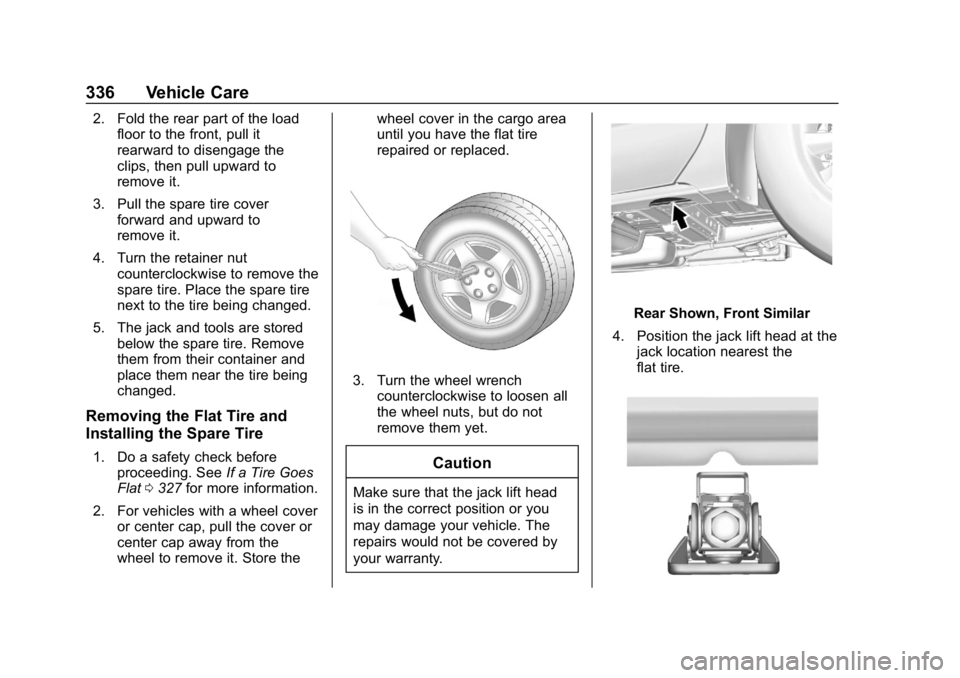
4. Turn the retainer nut counterclockwise to remove the
spare tire. Place the spare tire
next to the tire being changed.
5. The jack and tools are stored below the spare tire. Remove
them from their container and
place them near the tire being
changed.
Removing the Flat Tire and
Installing the Spare Tire
1. Do a safety check beforeproceeding. See If a Tire Goes
Flat 0327 for more information.
2. For vehicles with a wheel cover or center cap, pull the cover or
center cap away from the
wheel to remove it. Store the wheel cover in the cargo area
until you have the flat tire
repaired or replaced.
3. Turn the wheel wrench
counterclockwise to loosen all
the wheel nuts, but do not
remove them yet.
Caution
Make sure that the jack lift head
is in the correct position or you
may damage your vehicle. The
repairs would not be covered by
your warranty.
Rear Shown, Front Similar
4. Position the jack lift head at the jack location nearest the
flat tire.
Page 351 of 415
Chevrolet Equinox Owner Manual (GMNA-Localizing-U.S./Canada/Mexico-
13555863) - 2020 - CRC - 8/2/19
350 Vehicle Care
have the damage assessed and
repaired. Foreign materials such as
calcium chloride and other salts, ice
melting agents, road oil and tar, tree
sap, bird droppings, chemicals from
industrial chimneys, etc., can
damage the vehicle's finish if they
remain on painted surfaces. Wash
the vehicle as soon as possible.
If necessary, use non-abrasive
cleaners that are marked safe for
painted surfaces to remove foreign
matter.
Occasional hand waxing or mild
polishing should be done to remove
residue from the paint finish. See
your dealer for approved cleaning
products.
Do not apply waxes or polishes to
uncoated plastic, vinyl, rubber,
decals, simulated wood, or flat paint
as damage can occur.Caution
Machine compounding or
aggressive polishing on a
basecoat/clearcoat paint finish
may damage it. Use only
non-abrasive waxes and polishes
that are made for a basecoat/
clearcoat paint finish on the
vehicle.
To keep the paint finish looking new,
keep the vehicle garaged or
covered whenever possible.
Protecting Exterior Bright Metal
Moldings
Caution
Failure to clean and protect the
bright metal moldings can result
in a hazy white finish or pitting.
This damage would not be
covered by the vehicle warranty. The bright metal moldings on the
vehicle are aluminum, chrome,
or stainless steel. To prevent
damage always follow these
cleaning instructions:
.
Be sure the molding is cool to
the touch before applying any
cleaning solution.
. Use only approved cleaning
solutions for aluminum, chrome,
or stainless steel. Some
cleaners are highly acidic or
contain alkaline substances and
can damage the moldings.
. Always dilute a concentrated
cleaner according to the
manufacturer ’s instructions.
. Do not use cleaners that are not
intended for automotive use.
. Use a nonabrasive wax on the
vehicle after washing to protect
and extend the molding finish.
Page 381 of 415
Chevrolet Equinox Owner Manual (GMNA-Localizing-U.S./Canada/Mexico-
13555863) - 2020 - CRC - 8/2/19
380 Customer Information
Canada
General Motors of Canada
Company
Customer Care Centre, Mail Code:
CA1-163-005
1908 Colonel Sam Drive
Oshawa, Ontario L1H 8P7
www.gm.ca
1-800-263-3777 (English)
1-800-263-7854 (French)
1-800-263-3830 (For Text
Telephone devices (TTYs))
Roadside Assistance:
1-800-268-6800
Overseas
Please contact the local General
Motors Business Unit.
Customer Assistance for
Text Telephone (TTY)
Users
To assist customers who are deaf,
hard of hearing, or speech-impaired
and who use Text Telephones
(TTYs), Chevrolet has TTY
equipment available at its Customer
Assistance Center. Any TTY user inthe U.S. can communicate with
Chevrolet by dialing:
1-800-833-2438. TTY users in
Canada can dial 1-800-263-3830.
Online Owner Center
Online Owner Experience
(U.S.) my.chevrolet.com
The Chevrolet online owner
experience allows access to videos,
articles, and vehicle health specific
to your Chevrolet as well as your
OnStar Account information all in
one place.
Membership Benefits
E:
Download owner ’s manuals
and view vehicle-specific how-to
videos.
G: View maintenance schedules,
alerts, and Vehicle Diagnostic
Information. Schedule service
appointments.
I: View and print dealer-recorded
service records and self-recorded
service records.
D: Select a preferred dealer and
view locations, maps, phone
numbers, and hours.
r: Track your vehicle’s warranty
information.
J: View active recalls by Vehicle
Identification Number (VIN). See
Vehicle Identification Number (VIN)
0 373.
H:Compare and shop for
Chevrolet and OnStar plans and
Services. View GM Card and
SiriusXM information (if equipped).
F: Chat with online help
representatives.
See my.chevrolet.com to register
your vehicle.
Chevrolet Owner Centre
(Canada) mychevrolet.ca
Visit the Chevrolet Owner Centre at
mychevrolet.ca (English) or
my.chevrolet.ca (French) to access
similar benefits to the U.S. site.
Page 388 of 415
Chevrolet Equinox Owner Manual (GMNA-Localizing-U.S./Canada/Mexico-
13555863) - 2020 - CRC - 8/2/19
Customer Information 387
Current and Past Models
Service manuals and customer
literature are available for many
current and past model year GM
vehicles.
To order, call 1-800-551-4123
Monday–Friday, 8:00 a.m.–6:00 p.m.
eastern time
For credit card orders only (VISA,
MasterCard, or Discover), see
Helm, Inc. at: www.helminc.com.
To order by mail, write to:
Helm, Incorporated
Attention: Customer Service
47911 Halyard Drive
Plymouth, MI 48170
Make checks payable in U.S. funds.
Radio Frequency
Statement
This vehicle has systems that
operate on a radio frequency that
complies with Part 15/Part 18 of the
Federal Communications
Commission (FCC) rules and withInnovation, Science and Economic
Development (ISED) Canada's
RSP-100 / ICES-GEN.
Operation is subject to the following
two conditions:
1. The device may not cause harmful interference.
2. The device must accept any interference received, including
interference that may cause
undesired operation of the
device.
Changes or modifications to any of
these systems by other than an
authorized service facility could void
authorization to use this equipment.
Reporting Safety
Defects
Reporting Safety Defects
to the United States
Government
If you believe that your vehicle
has a defect which could cause
a crash or could cause injury or
death, you should immediately
inform the National Highway
Traffic Safety Administration
(NHTSA) in addition to notifying
General Motors.
If NHTSA receives similar
complaints, it may open an
investigation, and if it finds that
a safety defect exists in a group
of vehicles, it may order a recall
and remedy campaign.
However, NHTSA cannot
become involved in individual
problems between you, your
dealer, or General Motors.
Page 390 of 415
Chevrolet Equinox Owner Manual (GMNA-Localizing-U.S./Canada/Mexico-
13555863) - 2020 - CRC - 8/2/19
Customer Information 389
Vehicle Data
Recording and
Privacy
The vehicle has a number of
computers that record information
about the vehicle’s performance and
how it is driven or used. For
example, the vehicle uses computer
modules to monitor and control
engine and transmission
performance, to monitor the
conditions for airbag deployment
and deploy them in a crash, and,
if equipped, to provide antilock
braking to help the driver control the
vehicle. These modules may store
data to help the dealer technician
service the vehicle or to help GM
improve safety or features. Some
modules may also store data about
how the vehicle is operated, such as
rate of fuel consumption or average
speed. These modules may retain
personal preferences, such as radio
presets, seat positions, and
temperature settings.
Cybersecurity
GM collects information about the
use of your vehicle including
operational and safety related
information. We collect this
information to provide, evaluate,
improve, and troubleshoot our
products and services and to
develop new products and services.
The protection of vehicle electronics
systems and customer data from
unauthorized outside electronic
access or control is important to
GM. GM maintains appropriate
security standards, practices,
guidelines and controls aimed at
defending the vehicle and the
vehicle service ecosystem against
unauthorized electronic access,
detecting possible malicious activity
in related networks, and responding
to suspected cybersecurity incidents
in a timely, coordinated and effective
manner. Security incidents could
impact your safety or compromise
your private data. To minimize
security risks, please do not connect
your vehicle electronic systems to
unauthorized devices or connectyour vehicle to any unknown or
untrusted networks (such as
Bluetooth, WIFI or similar
technology). In the event you
suspect any security incident
impacting your data or the safe
operation of your vehicle, please
stop operating your vehicle and
contact your dealer.
Event Data Recorders
This vehicle is equipped with an
event data recorder (EDR). The
main purpose of an EDR is to
record, in certain crash or near
crash-like situations, such as an air
bag deployment or hitting a road
obstacle, data that will assist in
understanding how a vehicle’s
systems performed. The EDR is
designed to record data related to
vehicle dynamics and safety
systems for a short period of time,
typically 30 seconds or less. The
EDR in this vehicle is designed to
record such data as:
.
How various systems in your
vehicle were operating;
Page 391 of 415
Chevrolet Equinox Owner Manual (GMNA-Localizing-U.S./Canada/Mexico-
13555863) - 2020 - CRC - 8/2/19
390 Customer Information
.Whether or not the driver and
passenger safety belts were
buckled/fastened;
. How far (if at all) the driver was
depressing the accelerator and/
or brake pedal; and,
. How fast the vehicle was
traveling.
These data can help provide a
better understanding of the
circumstances in which crashes and
injuries occur.
Note
EDR data are recorded by your
vehicle only if a non-trivial crash
situation occurs; no data are
recorded by the EDR under normal
driving conditions and no personal
data (e.g., name, gender, age, and
crash location) are recorded.
However, other parties, such as law
enforcement, could combine the
EDR data with the type of
personally identifying data routinely
acquired during a crash
investigation. To read data recorded by an EDR,
special equipment is required, and
access to the vehicle or the EDR is
needed. In addition to the vehicle
manufacturer, other parties, such as
law enforcement, that have the
special equipment, can read the
information if they have access to
the vehicle or the EDR.
GM will not access these data or
share it with others except: with the
consent of the vehicle owner or,
if the vehicle is leased, with the
consent of the lessee; in response
to an official request by police or
similar government office; as part of
GM's defense of litigation through
the discovery process; or, as
required by law. Data that GM
collects or receives may also be
used for GM research needs or may
be made available to others for
research purposes, where a need is
shown and the data is not tied to a
specific vehicle or vehicle owner.OnStar
If the vehicle is equipped with
OnStar and has an active service
plan, additional data may be
collected and transmitted through
the OnStar system. This includes
information about the vehicle’s
operation; collisions involving the
vehicle; the use of the vehicle and
its features, including infotainment;
and the location and approximate
GPS speed of the vehicle. Refer to
the OnStar Terms and Conditions
and Privacy Statement on the
OnStar website.
See
OnStar Additional Information
0 393.
Infotainment System
If the vehicle is equipped with a
navigation system as part of the
infotainment system, use of the
system may result in the storage of
destinations, addresses, telephone
numbers, and other trip information.
See the infotainment manual for
information on stored data and for
deletion instructions.