light CHEVROLET EXPRESS 2017 User Guide
[x] Cancel search | Manufacturer: CHEVROLET, Model Year: 2017, Model line: EXPRESS, Model: CHEVROLET EXPRESS 2017Pages: 289, PDF Size: 11.46 MB
Page 38 of 289
Chevrolet Express Owner Manual (GMNA-Localizing-U.S./Canada/Mexico-
15555951) - 2022 - CRC - 1/27/22
Seats and Restraints 37
New parts and repairs may be necessary
even if the seat belt system was not being
used at the time of the crash.
Have the seat belt pretensioners checked if
the vehicle has been in a crash, or if the
airbag readiness light stays on after you
start the vehicle or while you are driving.
SeeAirbag Readiness Light 075.
Airbag System
The vehicle has the following airbag:
.A frontal airbag for the driver
The vehicle may have the following airbags:
.A frontal airbag for the front outboard
passenger
.A seat-mounted side impact airbag for the
driver
.A seat-mounted side impact airbag for the
front outboard passenger
Seat-mounted side impact airbags are
only available on vehicles equipped with
roof-rail airbags.
.A roof-rail airbag for the driver on vans
with single row seating
.A roof-rail airbag for the front outboard
passenger on vans with single row
seating
.A roof-rail airbag for the driver and the
passenger seated directly behind the
driver on vans with two row seating
.A roof-rail airbag for the front outboard
passenger and the passenger seated
directly behind the front outboard
passenger on vans with two row seating
If the van is equipped with a sliding door,
the roof-rail airbag for the front outboard
passenger is separate from the roof-rail
airbag for the passenger seated directly
behind the front outboard passenger.
If the van is equipped with a 60/40
swing-out door, a single roof-rail airbag
covers both seating positions.
.A roof-rail airbag for the driver and the
second and third row passengers seated
directly behind the driver on vans with
three or more seating rows
.A roof-rail airbag for the front outboard
passenger and the second and third row
passengers seated directly behind the
front outboard passenger on vans with
three or more seating rows
If the van is equipped with a sliding door,
the roof-rail airbag for the front outboard
passenger is separate from the roof-rail
airbag for the second and third row
passengers seated directly behind the front outboard passenger. If the van is
equipped with a 60/40 swing-out door, a
single roof-rail airbag covers all three
seating positions.
Additionally:
.Vehicles that have a raised or modified
roof —such as school buses, ambulances,
vehicles with adaptive equipment for
mobility, and recreational vehicles —may
or may not be equipped with roof-rail
airbags.
.Vehicles with a GVWR above 4 536 kg
(10,000 lb) may be equipped with
roof-rail airbags.
All vehicle airbags have the word AIRBAG on
the trim or on an attached label near the
deployment opening.
For frontal airbags, the word AIRBAG is on
the center of the steering wheel for the
driver and on the instrument panel for the
front outboard passenger.
For seat-mounted side impact airbags, the
word AIRBAG is on the side of the seatback
or side of the seat closest to the door.
For roof-rail airbags, the word AIRBAG is on
the ceiling or trim.
Page 39 of 289
Chevrolet Express Owner Manual (GMNA-Localizing-U.S./Canada/Mexico-
15555951) - 2022 - CRC - 1/27/22
38 Seats and Restraints
Airbags are designed to supplement the
protection provided by seat belts. Even
though today’s airbags are also designed to
help reduce the risk of injury from the force
of an inflating airbag, all airbags must
inflate very quickly to do their job.
Here are the most important things to know
about the airbag system:
{Warning
You can be severely injured or killed in a
crash if you are not wearing your seat
belt, even with airbags. Airbags are
designed to work with seat belts, not
replace them. Also, airbags are not
designed to inflate in every crash. In
some crashes seat belts are the only
restraint. SeeWhen Should an Airbag
Inflate? 040.
Wearing your seat belt during a crash
helps reduce your chance of hitting
things inside the vehicle or being ejected
from it. Airbags are “supplemental
restraints” to the seat belts. Everyone in
the vehicle should wear a seat belt
properly, whether or not there is an
airbag for that person.
{Warning
Because airbags inflate with great force
and faster than the blink of an eye,
anyone who is up against, or very close
to, any airbag when it inflates can be
seriously injured or killed. Do not sit
unnecessarily close to any airbag, as you
would be if sitting on the edge of the
seat or leaning forward. Seat belts help
keep you in position before and during a
crash. Always wear a seat belt, even with
airbags. The driver should sit as far back
as possible while still maintaining control
of the vehicle. The seat belts and the
front outboard passenger airbags are
most effective when you are sitting well
back and upright in the seat with both
feet on the floor.
Occupants should not lean on or sleep
against the door or side windows in
seating positions with seat-mounted side
impact airbags and/or roof-rail airbags.
{Warning
Children who are up against, or very
close to, any airbag when it inflates can
be seriously injured or killed. Always
secure children properly in the vehicle. To
read how, see Older Children 046 or
Infants and Young Children 047.
There is an airbag readiness light on the
instrument panel, which shows the airbag
symbol.
The system checks the airbag electrical
system for malfunctions. The light tells you
if there is an electrical problem. See Airbag
Readiness Light 075.
Page 45 of 289
Chevrolet Express Owner Manual (GMNA-Localizing-U.S./Canada/Mexico-
15555951) - 2022 - CRC - 1/27/22
44 Seats and Restraints
United States
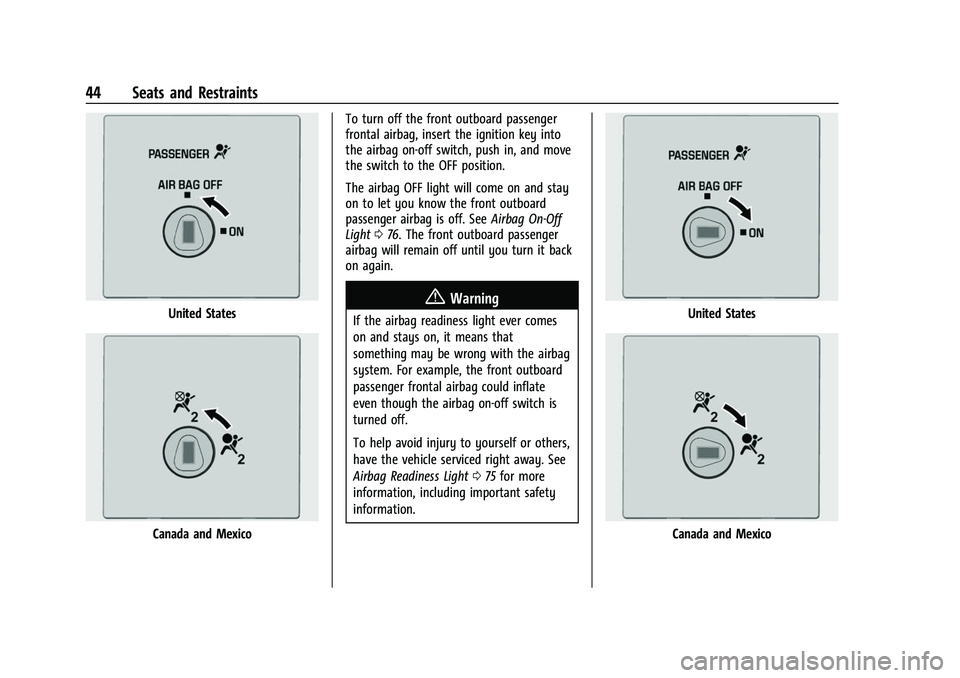
Canada and MexicoTo turn off the front outboard passenger
frontal airbag, insert the ignition key into
the airbag on-off switch, push in, and move
the switch to the OFF position.
The airbag OFF light will come on and stay
on to let you know the front outboard
passenger airbag is off. See
Airbag On-Off
Light 076. The front outboard passenger
airbag will remain off until you turn it back
on again.
{Warning
If the airbag readiness light ever comes
on and stays on, it means that
something may be wrong with the airbag
system. For example, the front outboard
passenger frontal airbag could inflate
even though the airbag on-off switch is
turned off.
To help avoid injury to yourself or others,
have the vehicle serviced right away. See
Airbag Readiness Light 075 for more
information, including important safety
information.United States
Canada and Mexico
Page 46 of 289
Chevrolet Express Owner Manual (GMNA-Localizing-U.S./Canada/Mexico-
15555951) - 2022 - CRC - 1/27/22
Seats and Restraints 45
To turn the front outboard passenger airbag
on again, insert the ignition key into the
airbag on-off switch, push in, and move the
switch to the ON position.
The front outboard passenger frontal airbag
is now enabled, and may inflate. SeeAirbag
On-Off Light 076.
Servicing the Airbag-Equipped
Vehicle
Airbags affect how the vehicle should be
serviced. There are parts of the airbag
system in several places around the vehicle.
Your dealer and the service manual have
information about servicing the vehicle and
the airbag system. To purchase a service
manual, see Publication Ordering
Information 0266.
{Warning
For up to 10 seconds after the vehicle is
turned off and the battery is
disconnected, an airbag can still inflate
during improper service. You can be
injured if you are close to an airbag
when it inflates. Avoid yellow connectors.
They are probably part of the airbag
(Continued)
Warning (Continued)
system. Be sure to follow proper service
procedures, and make sure the person
performing work for you is qualified to
do so.
Adding Equipment to the
Airbag-Equipped Vehicle
Adding accessories that change the vehicle's
frame, bumper system, height, front end,
or side sheet metal may keep the airbag
system from working properly.
The operation of the airbag system can also
be affected by changing, including
improperly repairing or replacing, any parts
of the following:
.Airbag system, including airbag modules,
front or side impact sensors, sensing and
diagnostic module, or airbag wiring
.Front seats, including stitching, seams or
zippers
.Seat belts
.Steering wheel, instrument panel, ceiling
trim, or pillar garnish trim
.Inner door seals, including speakers Your dealer and the service manual have
information about the location of the airbag
modules and sensors, sensing and diagnostic
module, and airbag wiring along with the
proper replacement procedures.
If the vehicle has rollover roof-rail airbags,
see
Different Size Tires and Wheels 0218 for
additional important information.
If the vehicle must be modified because you
have a disability and have questions about
whether the modifications will affect the
vehicle's airbag system, or if you have
questions about whether the airbag system
will be affected if the vehicle is modified for
any other reason, call Customer Assistance.
See Customer Assistance Offices 0260.
Airbag System Check
The airbag system does not need regularly
scheduled maintenance or replacement.
Make sure the airbag readiness light is
working. See Airbag Readiness Light 075.
Caution
If an airbag covering is damaged, opened,
or broken, the airbag may not work
properly. Do not open or break the airbag
coverings. If there are any opened or
(Continued)
Page 47 of 289
Chevrolet Express Owner Manual (GMNA-Localizing-U.S./Canada/Mexico-
15555951) - 2022 - CRC - 1/27/22
46 Seats and Restraints
Caution (Continued)
broken airbag coverings, have the airbag
covering and/or airbag module replaced.
For the location of the airbags, seeWhere
Are the Airbags? 039. See your dealer
for service.
Replacing Airbag System Parts
after a Crash
{Warning
A crash can damage the airbag systems
in the vehicle. A damaged airbag system
may not properly protect you and your
passenger(s) in a crash, resulting in
serious injury or even death. To help
make sure the airbag systems are
working properly after a crash, have
them inspected and any necessary
replacements made as soon as possible.
If an airbag inflates, you will need to
replace airbag system parts. See your dealer
for service. If the airbag readiness light stays on after
the vehicle is started or comes on when you
are driving, the airbag system may not work
properly. Have the vehicle serviced right
away. See
Airbag Readiness Light 075.
Child Restraints
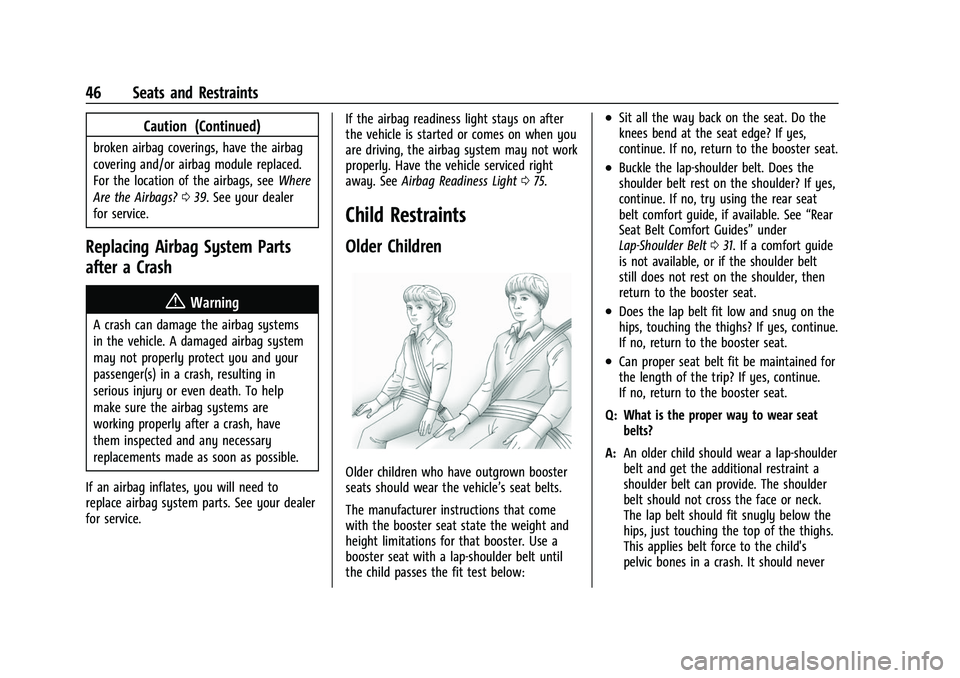
Older Children
Older children who have outgrown booster
seats should wear the vehicle’s seat belts.
The manufacturer instructions that come
with the booster seat state the weight and
height limitations for that booster. Use a
booster seat with a lap-shoulder belt until
the child passes the fit test below:
.Sit all the way back on the seat. Do the
knees bend at the seat edge? If yes,
continue. If no, return to the booster seat.
.Buckle the lap-shoulder belt. Does the
shoulder belt rest on the shoulder? If yes,
continue. If no, try using the rear seat
belt comfort guide, if available. See “Rear
Seat Belt Comfort Guides” under
Lap-Shoulder Belt 031. If a comfort guide
is not available, or if the shoulder belt
still does not rest on the shoulder, then
return to the booster seat.
.Does the lap belt fit low and snug on the
hips, touching the thighs? If yes, continue.
If no, return to the booster seat.
.Can proper seat belt fit be maintained for
the length of the trip? If yes, continue.
If no, return to the booster seat.
Q: What is the proper way to wear seat belts?
A: An older child should wear a lap-shoulder
belt and get the additional restraint a
shoulder belt can provide. The shoulder
belt should not cross the face or neck.
The lap belt should fit snugly below the
hips, just touching the top of the thighs.
This applies belt force to the child's
pelvic bones in a crash. It should never
Page 62 of 289
Chevrolet Express Owner Manual (GMNA-Localizing-U.S./Canada/Mexico-
15555951) - 2022 - CRC - 1/27/22
Seats and Restraints 61
6. If the child restraint has a top tether,follow the child restraint manufacturer's
instructions regarding the use of the top
tether. See Lower Anchors and Tethers
for Children (LATCH System) 053.
7. Before placing a child in the child restraint, make sure it is securely held in
place. To check, grasp the child restraint
at the seat belt path and attempt to
move it side to side and back and forth.
When the child restraint is properly
installed, there should be no more than
2.5 cm (1 in) of movement.
To remove the child restraint, unbuckle the
vehicle seat belt and let it return to the
stowed position. If the top tether is attached
to a top tether anchor, disconnect it.
Securing Child Restraints (With
the Seat Belt in the Front Seat)
This vehicle has airbags. A rear seat is a
safer place to secure a forward-facing child
restraint. See Where to Put the Restraint
0 51. There may be a switch on the instrument
panel that you can use to turn off the front
outboard passenger frontal airbag. See
Airbag On-Off Switch
042 for more
information, including important safety
information.
Never put a rear-facing child restraint in the
front. This is because the risk to the
rear-facing child is so great if the airbag
deploys.
{Warning
A child in a rear-facing child restraint can
be seriously injured or killed if the front
outboard passenger airbag inflates. This is
because the back of the rear-facing child
restraint would be very close to the
inflating airbag. A child in a
forward-facing child restraint can be
seriously injured or killed if the front
outboard passenger airbag inflates and
the passenger seat is in a forward
position.
Even if the airbag switch has turned off
the front outboard passenger frontal
airbag, no system is fail-safe. No one can
(Continued)
Warning (Continued)
guarantee that an airbag will not deploy
under some unusual circumstance, even
though it is turned off.
Secure rear-facing child restraints in a
rear seat, even if the airbag is off. If you
secure a forward-facing child restraint in
the front outboard passenger seat,
always move the seat as far back as it
will go. It is better to secure the child
restraint in a rear seat.
{Warning
If the airbag readiness light ever comes
on and stays on, it means that
something may be wrong with the airbag
system. For example, the front outboard
passenger frontal airbag could inflate
even though the airbag on-off switch is
turned off.
To help avoid injury to yourself or others,
have the vehicle serviced right away. See
Airbag Readiness Light075 for more
information, including important safety
information.
Page 63 of 289
Chevrolet Express Owner Manual (GMNA-Localizing-U.S./Canada/Mexico-
15555951) - 2022 - CRC - 1/27/22
62 Seats and Restraints
If the vehicle does not have a rear seat that
will accommodate a rear-facing child
restraint, a rear-facing child restraint should
not be installed in the vehicle, even if the
airbag is off.
If the child restraint uses a top tether, see
Lower Anchors and Tethers for Children
(LATCH System)053 for top tether anchor
locations.
Do not secure a child restraint in a position
without a top tether anchor if a national or
local law requires that the top tether be
anchored, or if the instructions that come
with the child restraint say that the top
tether must be anchored.
In Canada, the law requires that
forward-facing child restraints have a top
tether, and that the tether be attached.
When using the lap-shoulder belt to secure
the child restraint in this position, follow the
instructions that came with the child
restraint and the following instructions:
1. Move the seat as far back as it will go before securing the forward-facing child
restraint. Move the seat upward or the
seatback to an upright position,
if needed, to get a tight installation of
the child restraint. The push button used to release the
latch plate must be visible and not
obscured by the child restraint. There
must not be direct contact of the child
restraint to the push button.
When the airbag off switch has turned
off the front outboard passenger frontal
airbag, the off indicator in the airbag off
light should light and stay lit when you
start the vehicle. See
Airbag On-Off Light
0 76.
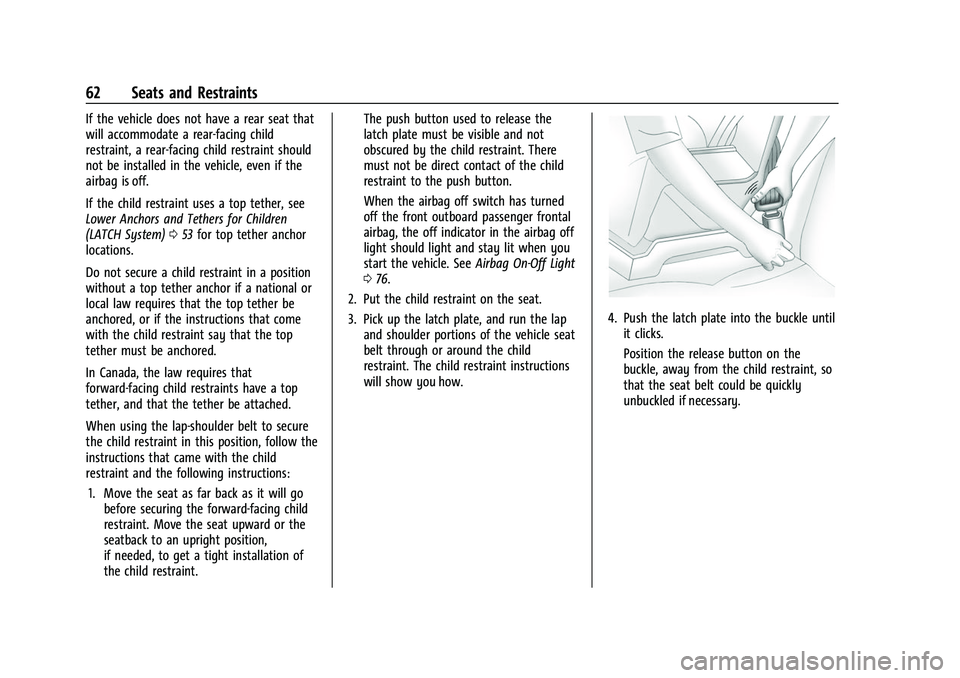
2. Put the child restraint on the seat.
3. Pick up the latch plate, and run the lap and shoulder portions of the vehicle seat
belt through or around the child
restraint. The child restraint instructions
will show you how.
4. Push the latch plate into the buckle untilit clicks.
Position the release button on the
buckle, away from the child restraint, so
that the seat belt could be quickly
unbuckled if necessary.
Page 67 of 289

Chevrolet Express Owner Manual (GMNA-Localizing-U.S./Canada/Mexico-
15555951) - 2022 - CRC - 1/27/22
66 Instruments and Controls
Instruments and Controls
Controls
Steering Wheel Adjustment . . . . . . . . . . . . 66
Steering Wheel Controls . . . . . . . . . . . . . . . . 67
Horn . . . . . . . . . . . . . . . . . . . . . . . . . . . . . . . . . . . 68
Windshield Wiper/Washer . . . . . . . . . . . . . 68
Compass . . . . . . . . . . . . . . . . . . . . . . . . . . . . . . . 68
Clock . . . . . . . . . . . . . . . . . . . . . . . . . . . . . . . . . . . 70
Power Outlets . . . . . . . . . . . . . . . . . . . . . . . . . . 70
Cigarette Lighter . . . . . . . . . . . . . . . . . . . . . . . . 71
Ashtrays . . . . . . . . . . . . . . . . . . . . . . . . . . . . . . . . 71
Warning Lights, Gauges, and Indicators
Warning Lights, Gauges, andIndicators . . . . . . . . . . . . . . . . . . . . . . . . . . . . . 71
Instrument Cluster . . . . . . . . . . . . . . . . . . . . . . 72
Speedometer . . . . . . . . . . . . . . . . . . . . . . . . . . . 72
Odometer . . . . . . . . . . . . . . . . . . . . . . . . . . . . . . 72
Trip Odometer . . . . . . . . . . . . . . . . . . . . . . . . . . 72
Fuel Gauge . . . . . . . . . . . . . . . . . . . . . . . . . . . . . 72
Engine Oil Pressure Gauge . . . . . . . . . . . . . . 73
Engine Coolant Temperature Gauge . . . . 74
Voltmeter Gauge . . . . . . . . . . . . . . . . . . . . . . . 74
Seat Belt Reminders . . . . . . . . . . . . . . . . . . . . 75
Airbag Readiness Light . . . . . . . . . . . . . . . . . . 75
Airbag On-Off Light . . . . . . . . . . . . . . . . . . . . . 76
Charging System Light . . . . . . . . . . . . . . . . . . 77
Malfunction Indicator Lamp (Check Engine Light) . . . . . . . . . . . . . . . . . . . . . . . . . . 77 Brake System Warning Light . . . . . . . . . . . 78
Antilock Brake System (ABS) Warning
Light . . . . . . . . . . . . . . . . . . . . . . . . . . . . . . . . . . 79
Tow/Haul Mode Light . . . . . . . . . . . . . . . . . . 79
Lane Departure Warning (LDW) Light . . . 79
Vehicle Ahead Indicator . . . . . . . . . . . . . . . . 80
StabiliTrak OFF Light . . . . . . . . . . . . . . . . . . . 80
Traction Control System (TCS)/StabiliTrak Light . . . . . . . . . . . . . . . . . . . . . . . . . . . . . . . . . 80
Tire Pressure Light . . . . . . . . . . . . . . . . . . . . . 80
Engine Oil Pressure Light . . . . . . . . . . . . . . . 81
Low Fuel Warning Light . . . . . . . . . . . . . . . . 81
Security Light . . . . . . . . . . . . . . . . . . . . . . . . . . 82
High-Beam On Light . . . . . . . . . . . . . . . . . . . . 82
Cruise Control Light . . . . . . . . . . . . . . . . . . . . 82
Information Displays
Driver Information Center (DIC) . . . . . . . . . 82
Vehicle Messages
Vehicle Messages . . . . . . . . . . . . . . . . . . . . . . 86
Engine Power Messages . . . . . . . . . . . . . . . . 86
Vehicle Speed Messages . . . . . . . . . . . . . . . . 87
Vehicle Personalization
Vehicle Personalization . . . . . . . . . . . . . . . . . 87
Controls
Steering Wheel Adjustment
For vehicles with a tilt steering wheel, the
lever is located on the left side of the
steering column.
To adjust the steering wheel:
1. Pull the lever to move the steering wheel up or down into a comfortable
position.
2. Release the lever to lock the steering wheel in place.
Do not adjust the steering wheel while
driving.
Page 68 of 289
Chevrolet Express Owner Manual (GMNA-Localizing-U.S./Canada/Mexico-
15555951) - 2022 - CRC - 1/27/22
Instruments and Controls 67
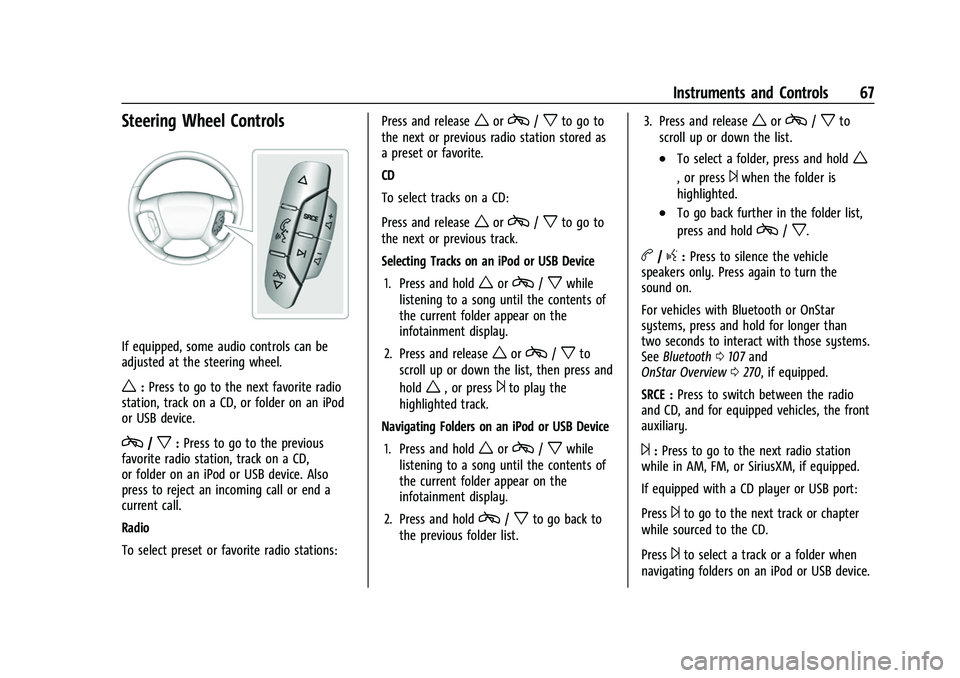
Steering Wheel Controls
If equipped, some audio controls can be
adjusted at the steering wheel.
w:Press to go to the next favorite radio
station, track on a CD, or folder on an iPod
or USB device.
c/x: Press to go to the previous
favorite radio station, track on a CD,
or folder on an iPod or USB device. Also
press to reject an incoming call or end a
current call.
Radio
To select preset or favorite radio stations: Press and release
worc/xto go to
the next or previous radio station stored as
a preset or favorite.
CD
To select tracks on a CD:
Press and release
worc/xto go to
the next or previous track.
Selecting Tracks on an iPod or USB Device
1. Press and hold
worc/xwhile
listening to a song until the contents of
the current folder appear on the
infotainment display.
2. Press and release
worc/xto
scroll up or down the list, then press and
hold
w, or press¨to play the
highlighted track.
Navigating Folders on an iPod or USB Device
1. Press and hold
worc/xwhile
listening to a song until the contents of
the current folder appear on the
infotainment display.
2. Press and hold
c/xto go back to
the previous folder list. 3. Press and release
worc/xto
scroll up or down the list.
.To select a folder, press and holdw
, or press¨when the folder is
highlighted.
.To go back further in the folder list,
press and hold
c/x.
b/g: Press to silence the vehicle
speakers only. Press again to turn the
sound on.
For vehicles with Bluetooth or OnStar
systems, press and hold for longer than
two seconds to interact with those systems.
See Bluetooth 0107 and
OnStar Overview 0270, if equipped.
SRCE : Press to switch between the radio
and CD, and for equipped vehicles, the front
auxiliary.
¨: Press to go to the next radio station
while in AM, FM, or SiriusXM, if equipped.
If equipped with a CD player or USB port:
Press
¨to go to the next track or chapter
while sourced to the CD.
Press
¨to select a track or a folder when
navigating folders on an iPod or USB device.
Page 70 of 289
Chevrolet Express Owner Manual (GMNA-Localizing-U.S./Canada/Mexico-
15555951) - 2022 - CRC - 1/27/22
Instruments and Controls 69
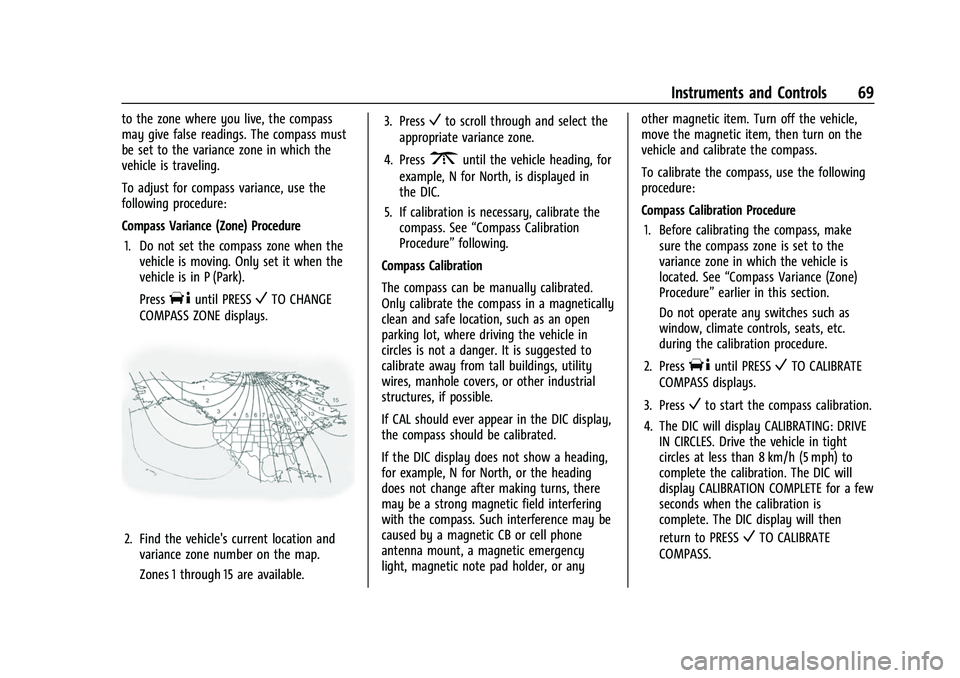
to the zone where you live, the compass
may give false readings. The compass must
be set to the variance zone in which the
vehicle is traveling.
To adjust for compass variance, use the
following procedure:
Compass Variance (Zone) Procedure1. Do not set the compass zone when the vehicle is moving. Only set it when the
vehicle is in P (Park).
Press
Tuntil PRESSVTO CHANGE
COMPASS ZONE displays.
2. Find the vehicle's current location and variance zone number on the map.
Zones 1 through 15 are available. 3. Press
Vto scroll through and select the
appropriate variance zone.
4. Press
3until the vehicle heading, for
example, N for North, is displayed in
the DIC.
5. If calibration is necessary, calibrate the compass. See “Compass Calibration
Procedure” following.
Compass Calibration
The compass can be manually calibrated.
Only calibrate the compass in a magnetically
clean and safe location, such as an open
parking lot, where driving the vehicle in
circles is not a danger. It is suggested to
calibrate away from tall buildings, utility
wires, manhole covers, or other industrial
structures, if possible.
If CAL should ever appear in the DIC display,
the compass should be calibrated.
If the DIC display does not show a heading,
for example, N for North, or the heading
does not change after making turns, there
may be a strong magnetic field interfering
with the compass. Such interference may be
caused by a magnetic CB or cell phone
antenna mount, a magnetic emergency
light, magnetic note pad holder, or any other magnetic item. Turn off the vehicle,
move the magnetic item, then turn on the
vehicle and calibrate the compass.
To calibrate the compass, use the following
procedure:
Compass Calibration Procedure
1. Before calibrating the compass, make sure the compass zone is set to the
variance zone in which the vehicle is
located. See “Compass Variance (Zone)
Procedure” earlier in this section.
Do not operate any switches such as
window, climate controls, seats, etc.
during the calibration procedure.
2. Press
Tuntil PRESSVTO CALIBRATE
COMPASS displays.
3. Press
Vto start the compass calibration.
4. The DIC will display CALIBRATING: DRIVE IN CIRCLES. Drive the vehicle in tight
circles at less than 8 km/h (5 mph) to
complete the calibration. The DIC will
display CALIBRATION COMPLETE for a few
seconds when the calibration is
complete. The DIC display will then
return to PRESS
VTO CALIBRATE
COMPASS.