light CHEVROLET EXPRESS 2017 Owners Manual
[x] Cancel search | Manufacturer: CHEVROLET, Model Year: 2017, Model line: EXPRESS, Model: CHEVROLET EXPRESS 2017Pages: 289, PDF Size: 11.46 MB
Page 2 of 289
Chevrolet Express Owner Manual (GMNA-Localizing-U.S./Canada/Mexico-
15555951) - 2022 - CRC - 1/27/22
Contents
Introduction . . . . . . . . . . . . . . . . . . . . . . . . . . . . . . 1
Keys, Doors, and Windows . . . . . . . . . . . . . . . 6
Seats and Restraints . . . . . . . . . . . . . . . . . . . . . 22
Storage . . . . . . . . . . . . . . . . . . . . . . . . . . . . . . . . . 64
Instruments and Controls . . . . . . . . . . . . . . . 66
Lighting . . . . . . . . . . . . . . . . . . . . . . . . . . . . . . . . . 91
Infotainment System . . . . . . . . . . . . . . . . . . . . 97
Climate Controls . . . . . . . . . . . . . . . . . . . . . . . . 114
Driving and Operating . . . . . . . . . . . . . . . . . . 120
Vehicle Care . . . . . . . . . . . . . . . . . . . . . . . . . . . . 172
Service and Maintenance . . . . . . . . . . . . . . . 244
Technical Data . . . . . . . . . . . . . . . . . . . . . . . . . 254
Customer Information . . . . . . . . . . . . . . . . . . 259
Reporting Safety Defects . . . . . . . . . . . . . . . 267
OnStar . . . . . . . . . . . . . . . . . . . . . . . . . . . . . . . . . 270
Connected Services . . . . . . . . . . . . . . . . . . . . . 275
Index . . . . . . . . . . . . . . . . . . . . . . . . . . 278
Introduction
The names, logos, emblems, slogans, vehicle
model names, and vehicle body designs
appearing in this manual including, but not
limited to, GM, the GM logo, CHEVROLET,
the CHEVROLET Emblem, and EXPRESS are
trademarks and/or service marks of General
Motors LLC, its subsidiaries, affiliates,
or licensors.
For vehicles first sold in Canada, substitute
the name“General Motors of Canada
Company” for Chevrolet Motor Division
wherever it appears in this manual.
This manual describes features that may or
may not be on the vehicle because of
optional equipment that was not purchased
on the vehicle, model variants, country
specifications, features/applications that may
not be available in your region, or changes subsequent to the printing of this owner’s
manual, including changes in standard or
optional content.
If the vehicle has the Duramax Diesel
engine, see the Duramax diesel supplement
for additional and specific information on
this engine.
Refer to the purchase documentation
relating to your specific vehicle to confirm
the features.
Keep this manual in the vehicle for quick
reference.
Canadian Vehicle Owners
A French language manual can be obtained
from your dealer, at www.helminc.com,
or from:
Propriétaires Canadiens
On peut obtenir un exemplaire de ce guide
en français auprès du concessionnaire ou à
l'adresse suivante:
Litho in U.S.A.
Part No. 84785079 B Second Printing©2022 General Motors LLC. All Rights Reserved.
Page 3 of 289
Chevrolet Express Owner Manual (GMNA-Localizing-U.S./Canada/Mexico-
15555951) - 2022 - CRC - 1/27/22
2 Introduction
Helm, Incorporated
Attention: Customer Service
47911 Halyard Drive
Plymouth, MI 48170
USA
Using this Manual
To quickly locate information about the
vehicle, use the Index in the back of the
manual. It is an alphabetical list of what is
in the manual and the page number where
it can be found.
Danger, Warning, and Caution
Warning messages found on vehicle labels
and in this manual describe hazards and
what to do to avoid or reduce them.
{Danger
Danger indicates a hazard with a high
level of risk which will result in serious
injury or death.
{Warning
Warning indicates a hazard that could
result in injury or death.
Caution
Caution indicates a hazard that could
result in property or vehicle damage.
A circle with a slash through it is a safety
symbol which means“Do not,” “Do not do
this,” or“Do not let this happen.”
Symbols
The vehicle has components and labels that
use symbols instead of text. Symbols are
shown along with the text describing the
operation or information relating to a
specific component, control, message, gauge,
or indicator.
M:Shown when the owner’s manual has
additional instructions or information.
*: Shown when the service manual has
additional instructions or information.
0: Shown when there is more information
on another page — “see page.” Vehicle Symbol Chart
Here are some additional symbols that may
be found on the vehicle and what they
mean. See the features in this manual for
information.
u:
Air Conditioning System
G:Air Conditioning Refrigerant Oil
9:Airbag Readiness Light
!:Antilock Brake System (ABS)
$:Brake System Warning Light
9:Dispose of Used Components Properly
P:Do Not Apply High Pressure Water
B:Engine Coolant Temperature
_:Flame/Fire Prohibited
H: Flammable
[:Forward Collision Alert
R:Fuse Block Cover Lock Location
+:Fuses
j:ISOFIX/LATCH System Child Restraints
Page 6 of 289
Chevrolet Express Owner Manual (GMNA-Localizing-U.S./Canada/Mexico-
15555951) - 2022 - CRC - 1/27/22
Introduction 5
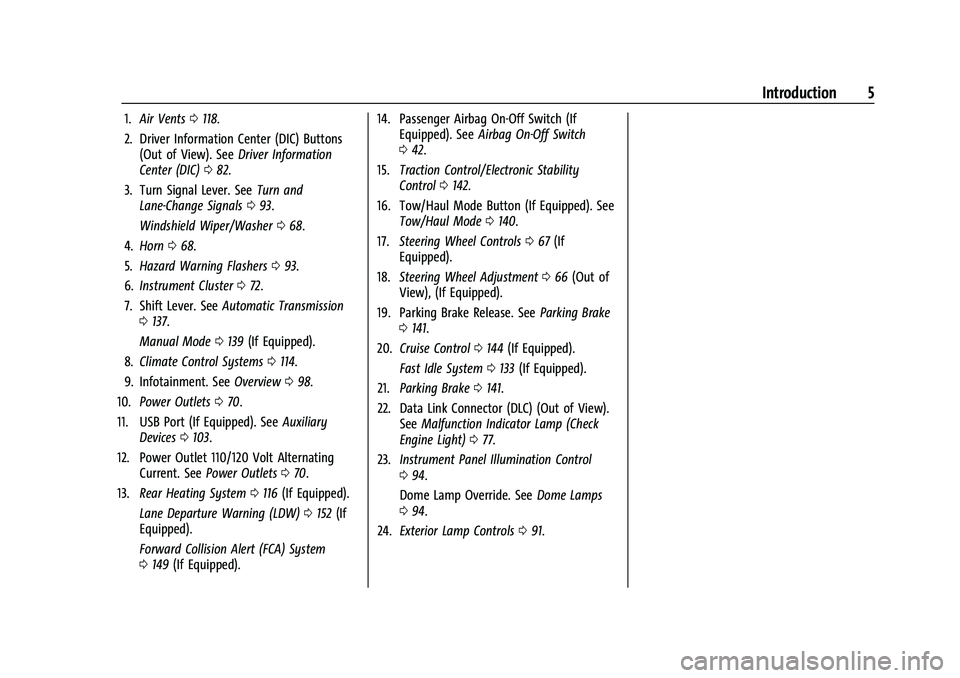
1.Air Vents 0118.
2. Driver Information Center (DIC) Buttons (Out of View). See Driver Information
Center (DIC) 082.
3. Turn Signal Lever. See Turn and
Lane-Change Signals 093.
Windshield Wiper/Washer 068.
4. Horn 068.
5. Hazard Warning Flashers 093.
6. Instrument Cluster 072.
7. Shift Lever. See Automatic Transmission
0 137.
Manual Mode 0139 (If Equipped).
8. Climate Control Systems 0114.
9. Infotainment. See Overview098.
10. Power Outlets 070.
11. USB Port (If Equipped). See Auxiliary
Devices 0103.
12. Power Outlet 110/120 Volt Alternating Current. See Power Outlets 070.
13. Rear Heating System 0116 (If Equipped).
Lane Departure Warning (LDW) 0152 (If
Equipped).
Forward Collision Alert (FCA) System
0 149 (If Equipped). 14. Passenger Airbag On-Off Switch (If
Equipped). See Airbag On-Off Switch
0 42.
15. Traction Control/Electronic Stability
Control 0142.
16. Tow/Haul Mode Button (If Equipped). See Tow/Haul Mode 0140.
17. Steering Wheel Controls 067 (If
Equipped).
18. Steering Wheel Adjustment 066 (Out of
View), (If Equipped).
19. Parking Brake Release. See Parking Brake
0 141.
20. Cruise Control 0144 (If Equipped).
Fast Idle System 0133 (If Equipped).
21. Parking Brake 0141.
22. Data Link Connector (DLC) (Out of View). SeeMalfunction Indicator Lamp (Check
Engine Light) 077.
23. Instrument Panel Illumination Control
094.
Dome Lamp Override. See Dome Lamps
0 94.
24. Exterior Lamp Controls 091.
Page 8 of 289
Chevrolet Express Owner Manual (GMNA-Localizing-U.S./Canada/Mexico-
15555951) - 2022 - CRC - 1/27/22
Keys, Doors, and Windows 7
{Warning
If the key is unintentionally rotated while
the vehicle is running, the ignition could
be moved out of the RUN position. This
could be caused by heavy items hanging
from the key ring, or by large or long
items attached to the key ring that could
be contacted by the driver or steering
wheel. If the ignition moves out of the
RUN position, the engine will shut off,
braking and steering power assist may be
impacted, and airbags may not deploy.
To reduce the risk of unintentional
rotation of the ignition key, do not
change the way the ignition key and
Remote Keyless Entry (RKE) transmitter,
if equipped, are connected to the
provided key rings.
The ignition key and key rings, and RKE
transmitter, if equipped, are designed to
work together as a system to reduce the
risk of unintentionally moving the key out
of the RUN position. The ignition key has a
small hole to allow attachment of the
provided key ring. It is important that any replacement ignition keys have a small hole.
See your dealer if a replacement key is
required.
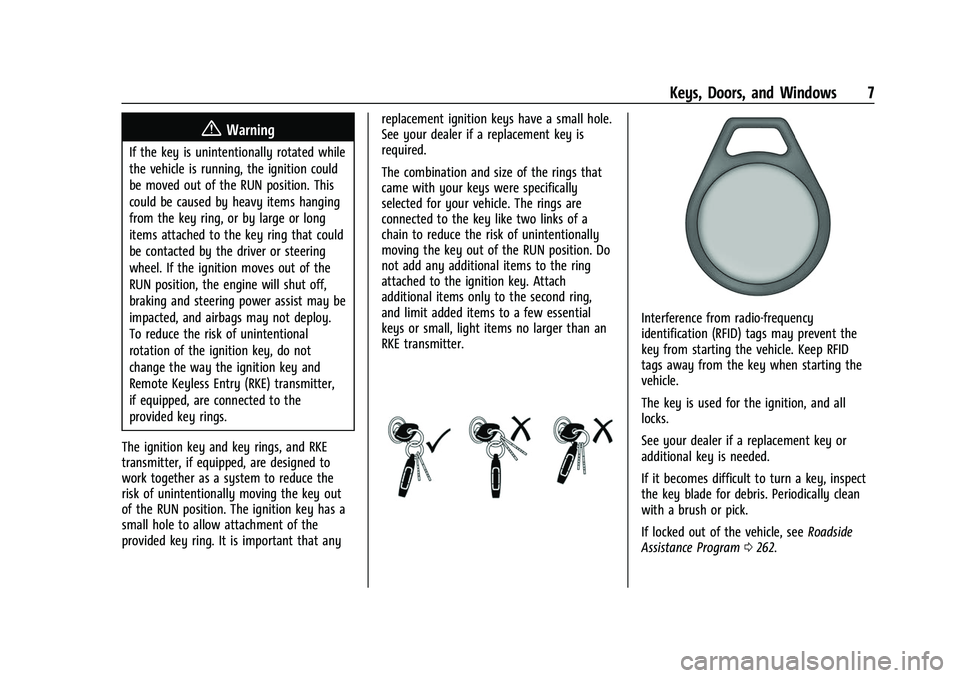
The combination and size of the rings that
came with your keys were specifically
selected for your vehicle. The rings are
connected to the key like two links of a
chain to reduce the risk of unintentionally
moving the key out of the RUN position. Do
not add any additional items to the ring
attached to the ignition key. Attach
additional items only to the second ring,
and limit added items to a few essential
keys or small, light items no larger than an
RKE transmitter.
Interference from radio-frequency
identification (RFID) tags may prevent the
key from starting the vehicle. Keep RFID
tags away from the key when starting the
vehicle.
The key is used for the ignition, and all
locks.
See your dealer if a replacement key or
additional key is needed.
If it becomes difficult to turn a key, inspect
the key blade for debris. Periodically clean
with a brush or pick.
If locked out of the vehicle, see
Roadside
Assistance Program 0262.
Page 12 of 289
Chevrolet Express Owner Manual (GMNA-Localizing-U.S./Canada/Mexico-
15555951) - 2022 - CRC - 1/27/22
Keys, Doors, and Windows 11
To cancel a remote start do any of the
following:
.Press and hold/until the parking lamps
turn off.
.Turn on the hazard warning flashers.
.Turn the ignition on and then off.
The remote vehicle start feature will not
operate if:
.The key is in the ignition.
.The hood is open.
.The hazard warning flashers are on.
.There is an emission control system
malfunction. See Malfunction Indicator
Lamp (Check Engine Light) 077.
.The engine coolant temperature is
too high.
.The oil pressure is low.
.The vehicle is not in park.
.Two remote starts or a start with an
extension have already been provided.
To turn on or off, see Vehicle Personalization
0 87.
Door Locks
{Warning
.Passengers, especially children, can
easily open the doors and fall out of a
moving vehicle. When a door is locked,
the handle will not open it. The
chance of being thrown out of the
vehicle in a crash is increased if the
doors are not locked. So, all
passengers should wear seat belts
properly and the doors should be
locked whenever the vehicle is driven.
.Young children who get into unlocked
vehicles may be unable to get out.
A child can be overcome by extreme
heat and can suffer permanent injuries
or even death from heat stroke.
Always lock the vehicle whenever
leaving it.
.Outsiders can easily enter through an
unlocked door when you slow down
or stop the vehicle. Locking the doors
can help prevent this from happening.
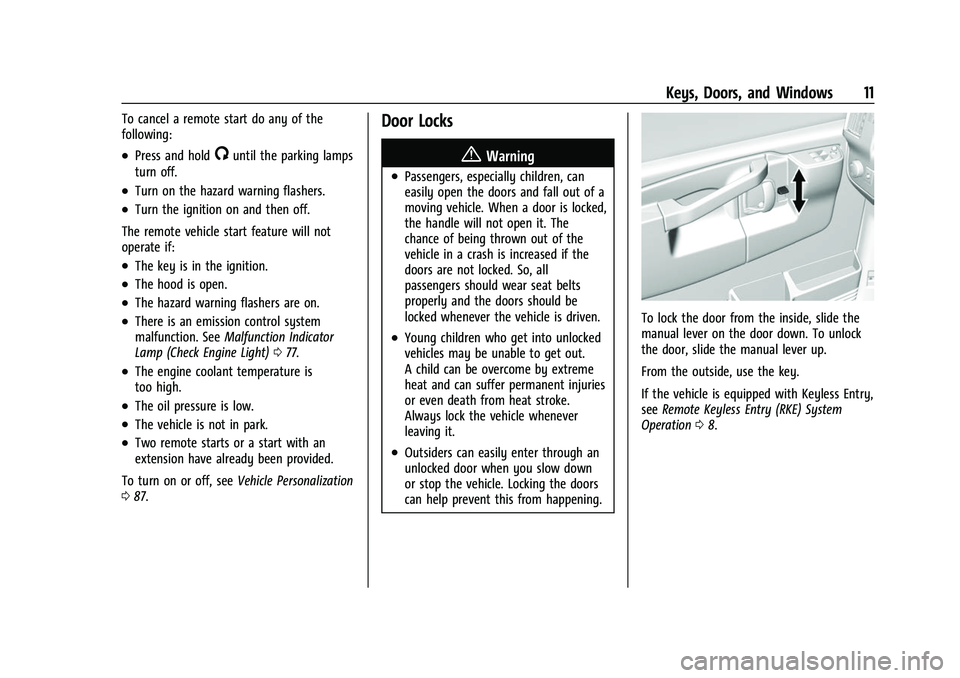
To lock the door from the inside, slide the
manual lever on the door down. To unlock
the door, slide the manual lever up.
From the outside, use the key.
If the vehicle is equipped with Keyless Entry,
see Remote Keyless Entry (RKE) System
Operation 08.
Page 17 of 289

Chevrolet Express Owner Manual (GMNA-Localizing-U.S./Canada/Mexico-
15555951) - 2022 - CRC - 1/27/22
16 Keys, Doors, and Windows
Disarming the Alarm System
To disarm the alarm system or turn off the
alarm if it has been activated:
.PressKon the RKE transmitter.
.Start the vehicle.
To avoid setting off the alarm by accident:
.Lock the vehicle after all occupants have
left the vehicle and all doors are closed.
.Always unlock a door with the RKE
transmitter.
Unlocking the driver door with the key will
not disarm the system or turn off the alarm.
How to Detect a Tamper Condition
IfKis pressed and the horn chirps and the
lights flash three times, the alarm was
activated while the alarm system was
armed.
If the alarm system has been activated, and
allowed to complete an event
(approximately one minute), a message will
appear on the Driver Information Center
(DIC) the next time the vehicle is started.
Theft Alarm Notification
To enable e-mail or text notification, see
“Theft Alarm Notification” in OnStarSecurity
0 271.
Testing the Alarm
To test the alarm:
1. Lower the driver window and open the driver door.
2. Press
Qon the RKE transmitter.
3. Close the door and wait for a few seconds.
4. Reach in through the open window, unlock the door with the manual door
lock, and open the door.
This should set off the alarm.
If the alarm does not sound when it
should but the lamps flash, check to see
if the horn works. The horn fuse may be
blown. To replace the fuse, see Fuses and
Circuit Breakers 0198.
Immobilizer
See Radio Frequency Statement 0267.
Immobilizer Operation
This vehicle is equipped with the
PASS-Key®III+ (Personalized Automotive
Security System) theft-deterrent system.
PASS-Key III+ is a passive theft deterrent
system.
The system is automatically armed when
the key is removed from the ignition.
You do not have to manually arm or disarm
the system.
The security light will come on if there is a
problem with arming or disarming the
theft-deterrent system.
If the engine does not start and the security
light comes on, the key may have a
damaged transponder. Turn the ignition off
and try again.
If the engine still does not start, and the
key appears to be undamaged, try another
ignition key. If the engine still does not
start with the other key, the vehicle needs
service. If the vehicle does start, the first
key may be faulty. See your dealer or a
locksmith who can service the PASS-Key III+
to have a new key made.
Page 19 of 289
Chevrolet Express Owner Manual (GMNA-Localizing-U.S./Canada/Mexico-
15555951) - 2022 - CRC - 1/27/22
18 Keys, Doors, and Windows
Trailer-Tow Mirrors
Vehicles with towing mirrors can be
adjusted manually for a clear view of the
objects behind you.
On the lower portion of each mirror there is
an auxiliary convex mirror that can be
adjusted manually to provide an extended
field of view.
The mirrors can be manually folded
in or out.
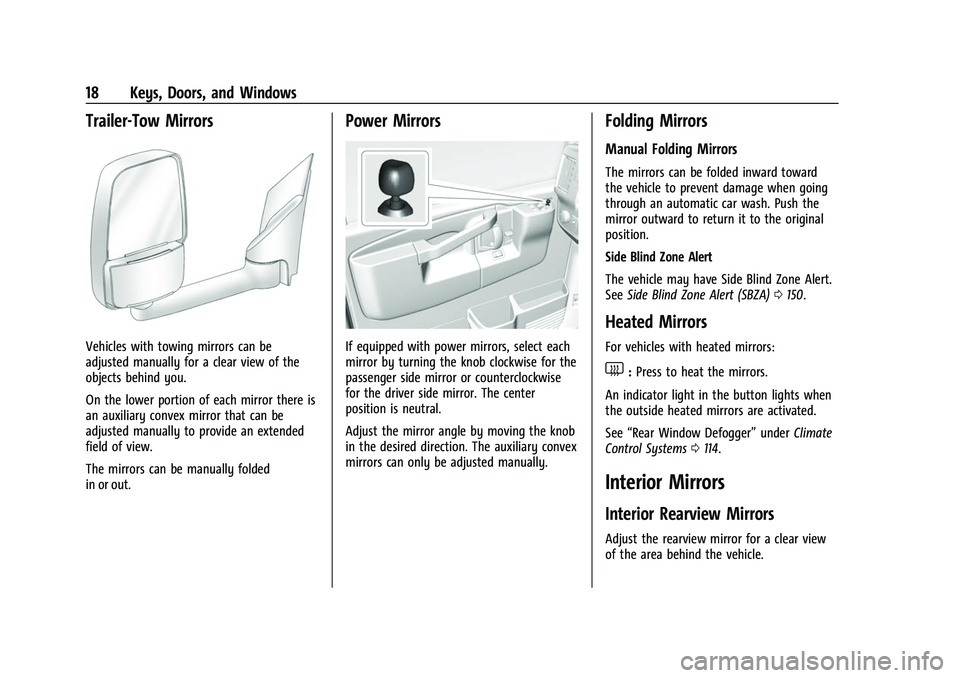
Power Mirrors
If equipped with power mirrors, select each
mirror by turning the knob clockwise for the
passenger side mirror or counterclockwise
for the driver side mirror. The center
position is neutral.
Adjust the mirror angle by moving the knob
in the desired direction. The auxiliary convex
mirrors can only be adjusted manually.
Folding Mirrors
Manual Folding Mirrors
The mirrors can be folded inward toward
the vehicle to prevent damage when going
through an automatic car wash. Push the
mirror outward to return it to the original
position.
Side Blind Zone Alert
The vehicle may have Side Blind Zone Alert.
SeeSide Blind Zone Alert (SBZA) 0150.
Heated Mirrors
For vehicles with heated mirrors:
1:Press to heat the mirrors.
An indicator light in the button lights when
the outside heated mirrors are activated.
See “Rear Window Defogger” underClimate
Control Systems 0114.
Interior Mirrors
Interior Rearview Mirrors
Adjust the rearview mirror for a clear view
of the area behind the vehicle.
Page 21 of 289
Chevrolet Express Owner Manual (GMNA-Localizing-U.S./Canada/Mexico-
15555951) - 2022 - CRC - 1/27/22
20 Keys, Doors, and Windows
The windows may be temporarily disabled if
they are used repeatedly within a
short time.
Express-Down
The driver window switch has an
express-down feature that allows the
window to be lowered without holding the
switch. Press fully and release the switch
marked AUTO to activate the express-down
mode. This mode can be canceled at any
time by pulling up on the switch. To open
the window part way, lightly tap the switch
until the window is at the desired position.
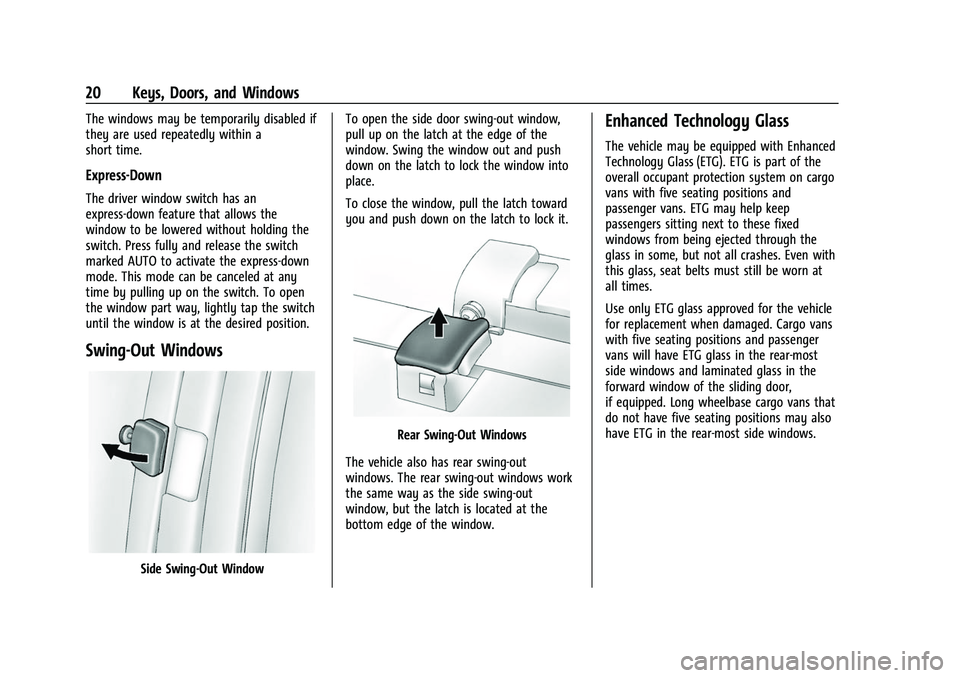
Swing-Out Windows
Side Swing-Out WindowTo open the side door swing-out window,
pull up on the latch at the edge of the
window. Swing the window out and push
down on the latch to lock the window into
place.
To close the window, pull the latch toward
you and push down on the latch to lock it.
Rear Swing‐Out Windows
The vehicle also has rear swing‐out
windows. The rear swing-out windows work
the same way as the side swing‐out
window, but the latch is located at the
bottom edge of the window.
Enhanced Technology Glass
The vehicle may be equipped with Enhanced
Technology Glass (ETG). ETG is part of the
overall occupant protection system on cargo
vans with five seating positions and
passenger vans. ETG may help keep
passengers sitting next to these fixed
windows from being ejected through the
glass in some, but not all crashes. Even with
this glass, seat belts must still be worn at
all times.
Use only ETG glass approved for the vehicle
for replacement when damaged. Cargo vans
with five seating positions and passenger
vans will have ETG glass in the rear-most
side windows and laminated glass in the
forward window of the sliding door,
if equipped. Long wheelbase cargo vans that
do not have five seating positions may also
have ETG in the rear-most side windows.
Page 32 of 289
Chevrolet Express Owner Manual (GMNA-Localizing-U.S./Canada/Mexico-
15555951) - 2022 - CRC - 1/27/22
Seats and Restraints 31
{Warning
You can be seriously injured or killed if
the shoulder belt is worn behind your
back, under your legs, or wrapped around
your neck. The shoulder belt can tighten
but cannot be loosened if it is locked. The
shoulder belt locks when it is pulled all
the way out of the retractor. It unlocks
when the shoulder belt is allowed to go
all the way back into the retractor, but it
cannot do this if it is wrapped around
you. You may have to cut the seat belt if
it is locked and tightened around you.
Lap-Shoulder Belt
All seating positions in the vehicle have a
lap-shoulder belt. If you are using a rear
seating position with a detachable seat belt
and the seat belt is not attached, see
“Reinstalling the Rear Seats”underRear
Seats 024 for instructions on reconnecting
the seat belt to the mini-buckle. The following instructions explain how to
wear a lap-shoulder belt properly.
1. Adjust the seat, if the seat is adjustable, so you can sit up straight. To see how,
see “Seats” in the Index.
2. Pick up the latch plate and pull the belt across you. Do not let it get twisted.
The lap-shoulder belt may lock if you
pull the belt across you very quickly.
If this happens, let the belt go back
slightly to unlock it. Then pull the belt
across you more slowly.
If the shoulder portion of a passenger
belt is pulled out all the way, the child
restraint locking feature may be
engaged. See Child Restraint Systems
0 49. If this occurs, let the belt go back
all the way and start again. If the
locking feature stays engaged after
letting the belt go back to stowed
position on the seat, move the seat
rearward or recline the seat until the
shoulder belt retractor lock releases.
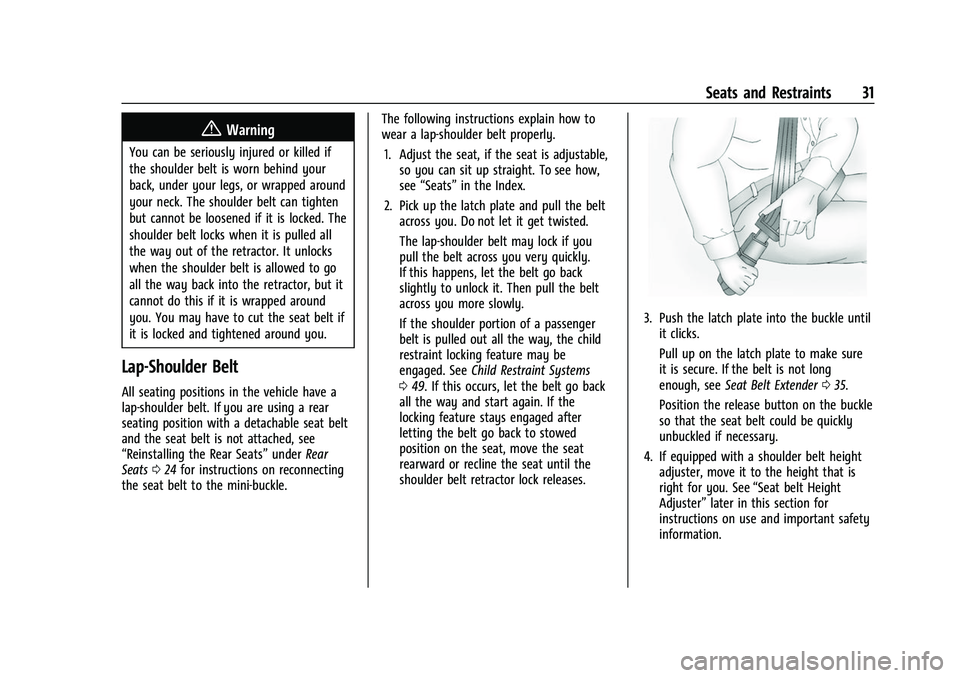
3. Push the latch plate into the buckle until it clicks.
Pull up on the latch plate to make sure
it is secure. If the belt is not long
enough, see Seat Belt Extender 035.
Position the release button on the buckle
so that the seat belt could be quickly
unbuckled if necessary.
4. If equipped with a shoulder belt height adjuster, move it to the height that is
right for you. See “Seat belt Height
Adjuster” later in this section for
instructions on use and important safety
information.
Page 37 of 289
Chevrolet Express Owner Manual (GMNA-Localizing-U.S./Canada/Mexico-
15555951) - 2022 - CRC - 1/27/22
36 Seats and Restraints
But if a seat belt is not long enough, your
dealer will order you an extender. Only a
GM dealer issued extender should be used.
When you go in to order it, take the
heaviest coat you will wear, so the extender
will be long enough for you. To help avoid
personal injury, do not let someone else use
it, and use it only for the seat it is made to
fit. The extender has been designed for
adults. Never use it for securing child
restraints. For more information on the
proper use and fit of seat belt extenders see
the instruction sheet that comes with the
extender.
Safety System Check
Periodically check the seat belt reminder,
seat belts, buckles, latch plates, retractors,
shoulder belt height adjusters (if equipped),
and seat belt anchorages to make sure they
are all in working order. Look for any other
loose or damaged seat belt system parts
that might keep a seat belt system from
performing properly. See your dealer to
have it repaired. Torn, frayed, or twisted
seat belts may not protect you in a crash.
Torn or frayed seat belts can rip apart under
impact forces. If a belt is torn or frayed,
have it replaced immediately. If a belt is
twisted, it may be possible to untwist byreversing the latch plate on the webbing.
If the twist cannot be corrected, ask your
dealer to fix it.
Make sure the seat belt reminder light is
working. See
Seat Belt Reminders 075.
Keep seat belts clean and dry. See Seat Belt
Care 036.
Seat Belt Care
Keep belts clean and dry.
Seat belts should be properly cared for and
maintained.
Seat belt hardware should be kept dry and
free of dust or debris. As necessary, exterior
hard surfaces and seat belt webbing may be
lightly cleaned with mild soap and water.
Ensure there is not excessive dust or debris
in the mechanism. If dust or debris exists in
the system please see the dealer. Parts may
need to be replaced to ensure proper
functionality of the system.
{Warning
Do not bleach or dye seat belt webbing.
It may severely weaken the webbing. In
a crash, they might not be able to
(Continued)
Warning (Continued)
provide adequate protection. Clean and
rinse seat belt webbing only with mild
soap and lukewarm water. Allow the
webbing to dry.
Replacing Seat Belt System Parts
after a Crash
{Warning
A crash can damage the seat belt system
in the vehicle. A damaged seat belt
system may not properly protect the
person using it, resulting in serious injury
or even death in a crash. To help make
sure the seat belt systems are working
properly after a crash, have them
inspected and any necessary
replacements made as soon as possible.
After a minor crash, replacement of seat
belts may not be necessary. But the seat
belt assemblies that were used during any
crash may have been stressed or damaged.
See your dealer to have the seat belt
assemblies inspected or replaced.