change wheel CHEVROLET EXPRESS CARGO 2021 Owner's Manual
[x] Cancel search | Manufacturer: CHEVROLET, Model Year: 2021, Model line: EXPRESS CARGO, Model: CHEVROLET EXPRESS CARGO 2021Pages: 296, PDF Size: 6.68 MB
Page 6 of 296
Chevrolet Express Owner Manual (GMNA-Localizing-U.S./Canada/Mexico-
14583525) - 2021 - CRC - 1/4/21
Introduction 5
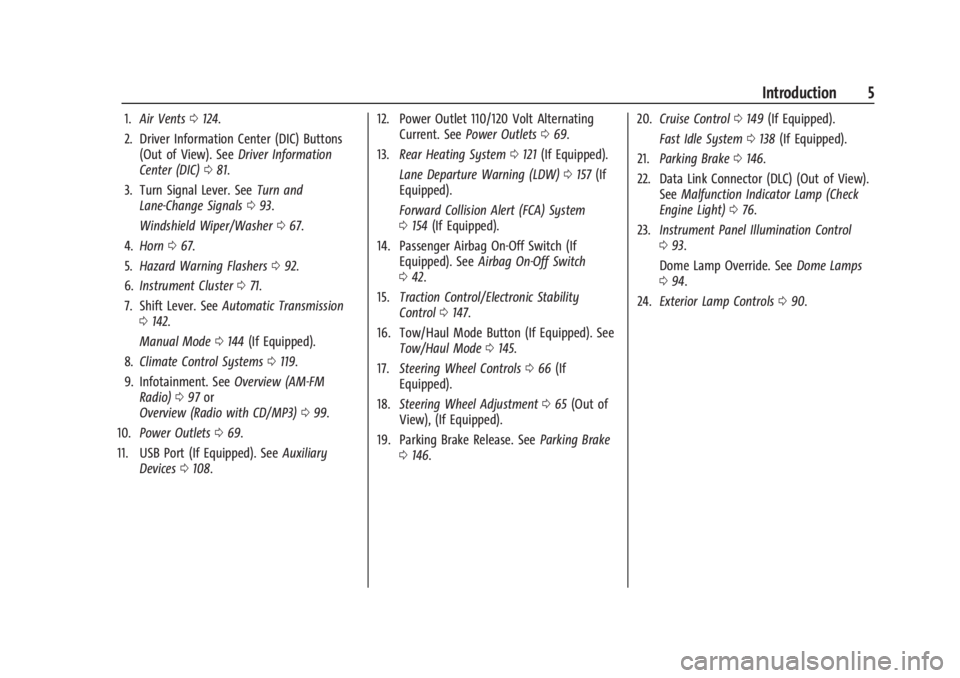
1.Air Vents 0124.
2. Driver Information Center (DIC) Buttons (Out of View). See Driver Information
Center (DIC) 081.
3. Turn Signal Lever. See Turn and
Lane-Change Signals 093.
Windshield Wiper/Washer 067.
4. Horn 067.
5. Hazard Warning Flashers 092.
6. Instrument Cluster 071.
7. Shift Lever. See Automatic Transmission
0 142.
Manual Mode 0144 (If Equipped).
8. Climate Control Systems 0119.
9. Infotainment. See Overview (AM-FM
Radio) 097 or
Overview (Radio with CD/MP3) 099.
10. Power Outlets 069.
11. USB Port (If Equipped). See Auxiliary
Devices 0108. 12. Power Outlet 110/120 Volt Alternating
Current. See Power Outlets 069.
13. Rear Heating System 0121 (If Equipped).
Lane Departure Warning (LDW) 0157 (If
Equipped).
Forward Collision Alert (FCA) System
0 154 (If Equipped).
14. Passenger Airbag On-Off Switch (If Equipped). See Airbag On-Off Switch
0 42.
15. Traction Control/Electronic Stability
Control 0147.
16. Tow/Haul Mode Button (If Equipped). See Tow/Haul Mode 0145.
17. Steering Wheel Controls 066 (If
Equipped).
18. Steering Wheel Adjustment 065 (Out of
View), (If Equipped).
19. Parking Brake Release. See Parking Brake
0 146. 20.
Cruise Control 0149 (If Equipped).
Fast Idle System 0138 (If Equipped).
21. Parking Brake 0146.
22. Data Link Connector (DLC) (Out of View). SeeMalfunction Indicator Lamp (Check
Engine Light) 076.
23. Instrument Panel Illumination Control
093.
Dome Lamp Override. See Dome Lamps
0 94.
24. Exterior Lamp Controls 090.
Page 8 of 296
Chevrolet Express Owner Manual (GMNA-Localizing-U.S./Canada/Mexico-
14583525) - 2021 - CRC - 12/9/20
Keys, Doors, and Windows 7
{Warning
If the key is unintentionally rotated while
the vehicle is running, the ignition could
be moved out of the RUN position. This
could be caused by heavy items hanging
from the key ring, or by large or long
items attached to the key ring that could
be contacted by the driver or steering
wheel. If the ignition moves out of the
RUN position, the engine will shut off,
braking and steering power assist may be
impacted, and airbags may not deploy.
To reduce the risk of unintentional
rotation of the ignition key, do not
change the way the ignition key and
Remote Keyless Entry (RKE) transmitter,
if equipped, are connected to the
provided key rings.
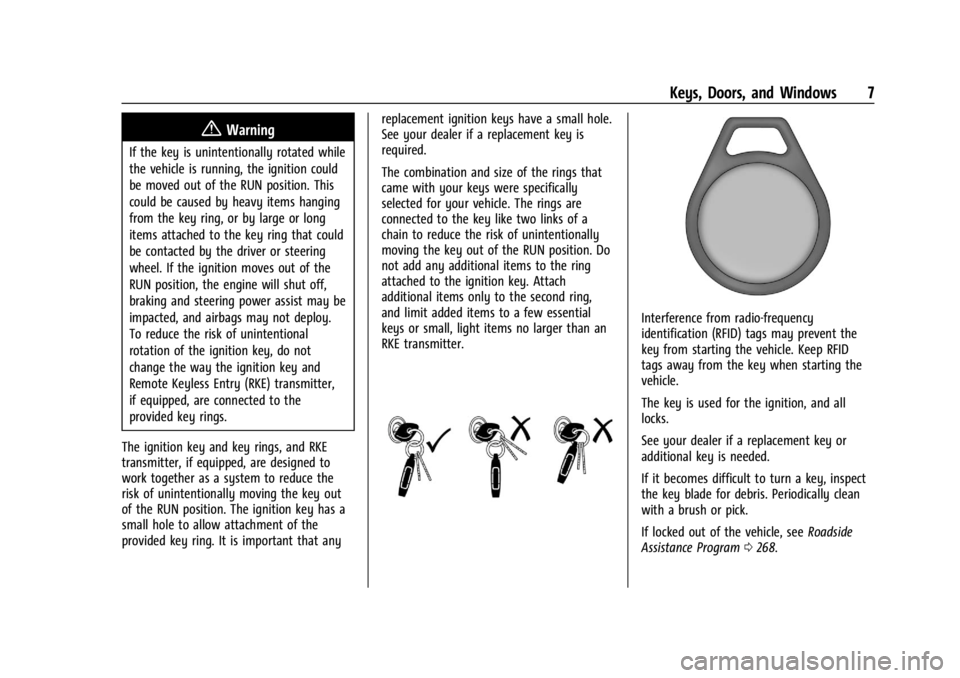
The ignition key and key rings, and RKE
transmitter, if equipped, are designed to
work together as a system to reduce the
risk of unintentionally moving the key out
of the RUN position. The ignition key has a
small hole to allow attachment of the
provided key ring. It is important that any replacement ignition keys have a small hole.
See your dealer if a replacement key is
required.
The combination and size of the rings that
came with your keys were specifically
selected for your vehicle. The rings are
connected to the key like two links of a
chain to reduce the risk of unintentionally
moving the key out of the RUN position. Do
not add any additional items to the ring
attached to the ignition key. Attach
additional items only to the second ring,
and limit added items to a few essential
keys or small, light items no larger than an
RKE transmitter.
Interference from radio-frequency
identification (RFID) tags may prevent the
key from starting the vehicle. Keep RFID
tags away from the key when starting the
vehicle.
The key is used for the ignition, and all
locks.
See your dealer if a replacement key or
additional key is needed.
If it becomes difficult to turn a key, inspect
the key blade for debris. Periodically clean
with a brush or pick.
If locked out of the vehicle, see
Roadside
Assistance Program 0268.
Page 46 of 296

Chevrolet Express Owner Manual (GMNA-Localizing-U.S./Canada/Mexico-
14583525) - 2021 - CRC - 12/9/20
Seats and Restraints 45
Warning (Continued)
system. Be sure to follow proper service
procedures, and make sure the person
performing work for you is qualified to
do so.
Adding Equipment to the
Airbag-Equipped Vehicle
Adding accessories that change the vehicle's
frame, bumper system, height, front end,
or side sheet metal may keep the airbag
system from working properly.
The operation of the airbag system can also
be affected by changing, including
improperly repairing or replacing, any parts
of the following:
.Airbag system, including airbag modules,
front or side impact sensors, sensing and
diagnostic module, or airbag wiring
.Front seats, including stitching, seams or
zippers
.Seat belts
.Steering wheel, instrument panel, ceiling
trim, or pillar garnish trim
.Inner door seals, including speakersYour dealer and the service manual have
information about the location of the airbag
modules and sensors, sensing and diagnostic
module, and airbag wiring along with the
proper replacement procedures.
If the vehicle has rollover roof-rail airbags,
see
Different Size Tires and Wheels 0225 for
additional important information.
If the vehicle must be modified because you
have a disability and have questions about
whether the modifications will affect the
vehicle's airbag system, or if you have
questions about whether the airbag system
will be affected if the vehicle is modified for
any other reason, call Customer Assistance.
See Customer Assistance Offices 0267.
Airbag System Check
The airbag system does not need regularly
scheduled maintenance or replacement.
Make sure the airbag readiness light is
working. See Airbag Readiness Light 074.
Caution
If an airbag covering is damaged, opened,
or broken, the airbag may not work
properly. Do not open or break the airbag
coverings. If there are any opened or
(Continued)
Caution (Continued)
broken airbag coverings, have the airbag
covering and/or airbag module replaced.
For the location of the airbags, see Where
Are the Airbags? 038. See your dealer
for service.
Replacing Airbag System Parts
after a Crash
{Warning
A crash can damage the airbag systems
in the vehicle. A damaged airbag system
may not properly protect you and your
passenger(s) in a crash, resulting in
serious injury or even death. To help
make sure the airbag systems are
working properly after a crash, have
them inspected and any necessary
replacements made as soon as possible.
If an airbag inflates, you will need to
replace airbag system parts. See your dealer
for service.
Page 78 of 296
Chevrolet Express Owner Manual (GMNA-Localizing-U.S./Canada/Mexico-
14583525) - 2021 - CRC - 12/9/20
Instruments and Controls 77
If the light continues to flash, find a safe
place to park. Turn the vehicle off and wait
at least 10 seconds before restarting the
engine. If the light is still flashing, follow
the previous guidelines and see your dealer
for service as soon as possible.
If the light is on steady :A malfunction has
been detected. Diagnosis and service may be
required.
Check the following:
.A loose or missing fuel cap may cause
the light to come on. See Filling the Tank
0 158. A few driving trips with the cap
properly installed may turn the light off.
.Poor fuel quality can cause inefficient
engine operation and poor driveability,
which may go away once the engine is
warmed up. If this occurs, change the fuel
brand. It may require at least one full
tank of the proper fuel to turn the light
off. See Recommended Fuel 0158.
If the light remains on, see your dealer.
Emissions Inspection and Maintenance
Programs
If the vehicle requires an Emissions
Inspection/Maintenance test, the test
equipment will likely connect to the
vehicle's Data Link Connector (DLC).
The DLC is under the instrument panel to
the left of the steering wheel. Connecting
devices that are not used to perform an
Emissions Inspection/Maintenance test or to
service the vehicle may affect vehicle
operation. See Add-On Electrical Equipment
0 176. See your dealer if assistance is
needed.
The vehicle may not pass inspection if:
.The light is on when the engine is
running.
.The light does not come on when the
ignition is on while the engine is off.
.Critical emission control systems have not
been completely diagnosed. If this
happens, the vehicle would not be ready
for inspection and might require
several days of routine driving before the
system is ready for inspection. This can
happen if the 12-volt battery has recently
been replaced or run down, or if the
vehicle has been recently serviced.
See your dealer if the vehicle will not pass
or cannot be made ready for the test.
Brake System Warning Light
The vehicle brake system consists of two
hydraulic circuits. If one circuit is not
working, the remaining circuit can still work
to stop the vehicle. For normal braking
performance, both circuits need to be
working.
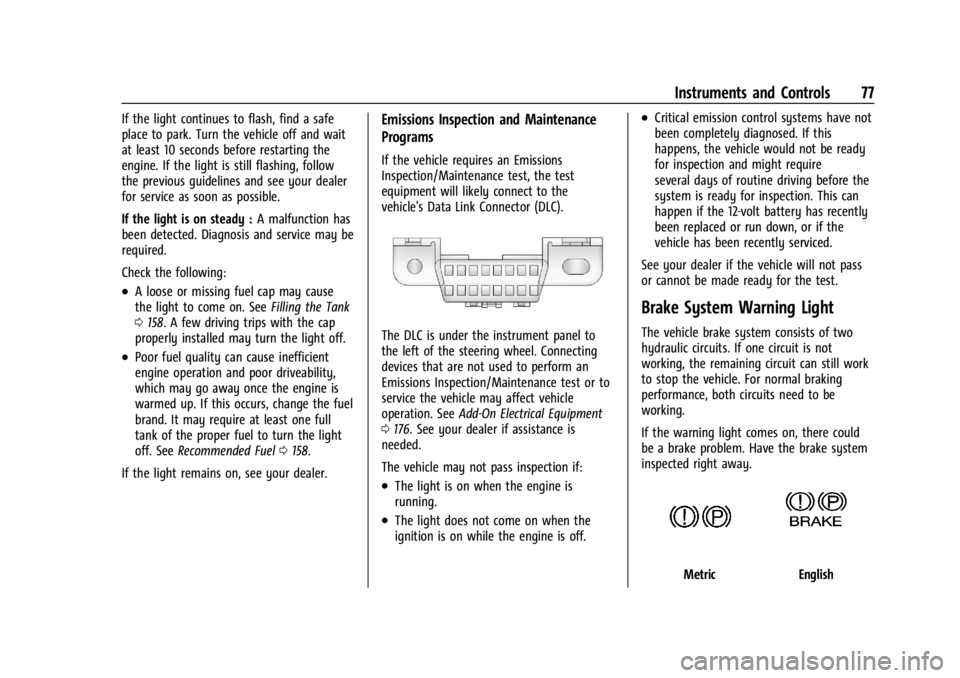
If the warning light comes on, there could
be a brake problem. Have the brake system
inspected right away.
MetricEnglish
Page 91 of 296

Chevrolet Express Owner Manual (GMNA-Localizing-U.S./Canada/Mexico-
14583525) - 2021 - CRC - 12/9/20
90 Lighting
Lighting
Exterior Lighting
Exterior Lamp Controls . . . . . . . . . . . . . . . . . 90
Exterior Lamps Off Reminder . . . . . . . . . . . 90
Headlamp High/Low-Beam Changer . . . . . 91
Flash-to-Pass . . . . . . . . . . . . . . . . . . . . . . . . . . . . 91
Daytime Running Lamps (DRL) . . . . . . . . . . 91
Automatic Headlamp System . . . . . . . . . . . 91
Hazard Warning Flashers . . . . . . . . . . . . . . . 92
Turn and Lane-Change Signals . . . . . . . . . . 93
Interior Lighting
Instrument Panel IlluminationControl . . . . . . . . . . . . . . . . . . . . . . . . . . . . . . . 93
Dome Lamps . . . . . . . . . . . . . . . . . . . . . . . . . . . 94
Reading Lamps . . . . . . . . . . . . . . . . . . . . . . . . . 94
Lighting Features
Entry Lighting . . . . . . . . . . . . . . . . . . . . . . . . . . 94
Exit Lighting . . . . . . . . . . . . . . . . . . . . . . . . . . . . 94
Battery Load Management . . . . . . . . . . . . . 95
Battery Power Protection . . . . . . . . . . . . . . . 95
Exterior Lighting Battery Saver . . . . . . . . . 95
Exterior Lighting
Exterior Lamp Controls
The exterior lamp control is on the
instrument panel to the left of the steering
wheel.
There are four positions:
O: Briefly turn the control to this position
to turn the automatic headlamps and
Daytime Running Lamps (DRL) off or
back on.
For vehicles first sold in Canada, the off
position only works for vehicles that are
shifted into the P (Park) position.
AUTO : Automatically turns the exterior
lamps on and off, depending on outside
lighting.
;: Turns on the parking lamps including
all lamps, except the headlamps.
2: Turns on the headlamps together with
the parking lamps and instrument panel
lights.
If the headlamps are turned on while the
vehicle is on, the headlamps turn off
automatically 10 minutes after the ignition
is turned off. If the headlamps are turned on
while the vehicle is off, the headlamps will
continue to stay on. To prevent the battery
from being drained, turn the control to the
Oposition.
A warning chime sounds if the driver door is
opened while the ignition switch is off and
the headlamps are on.
To change the headlamps from low beam to
high beam, pull the turn signal lever all the
way toward you. Then release it.
Exterior Lamps Off Reminder
If a door is open, a reminder chime sounds
when the headlamps or parking lamps are
manually turned on and the key is out of
the ignition. To turn off the chime, turn the
headlamp switch to
Oor AUTO and then
back on, or close and re-open the door. In
Page 114 of 296

Chevrolet Express Owner Manual (GMNA-Localizing-U.S./Canada/Mexico-
14583525) - 2021 - CRC - 12/9/20
Infotainment System 113
Voice Recognition
The Bluetooth system uses voice recognition
to interpret voice commands to dial phone
numbers and name tags.
For additional information, say“Help”while
you are in a voice recognition menu.
Noise : Keep interior noise levels to a
minimum. The system may not recognize
voice commands if there is too much
background noise.
When to Speak : A short tone sounds after
the system responds indicating when it is
waiting for a voice command. Wait until the
tone and then speak.
How to Speak : Speak clearly in a calm and
natural voice.
Audio System
When using the in-vehicle Bluetooth system,
sound comes through the vehicle's front
audio system speakers and overrides the
audio system. Use the audio system volume
knob, during a call, to change the volume
level. The adjusted volume level remains in
memory for later calls. To prevent missed
calls, a minimum volume level is used if the
volume is turned down too low.
Bluetooth Controls
Use the buttons on the steering wheel to
operate the in-vehicle Bluetooth system. See
Steering Wheel Controls 066.
b/g:Press to answer incoming calls,
confirm system information, and start
speech recognition.
c/x: Press to end a call, reject a call,
or cancel an operation.
Pairing
A Bluetooth-enabled cell phone must be
paired to the Bluetooth system and then
connected to the vehicle before it can be
used. See the cell phone manufacturer's user
guide for Bluetooth functions before pairing
the cell phone.
Pairing Information
.A Bluetooth phone with MP3 capability
cannot be paired to the vehicle as a
phone and an MP3 player at the
same time.
.Up to five cell phones can be paired to
the Bluetooth system.
.The pairing process is disabled when the
vehicle is moving.
.Pairing only needs to be completed once,
unless the pairing information on the cell
phone changes or the cell phone is
deleted from the system.
.Only one paired cell phone can be
connected to the Bluetooth system at
a time.
.If multiple paired cell phones are within
range of the system, the system connects
to the first available paired cell phone in
the order that they were first paired to
the system. To connect to a different
paired phone, see “Connecting to a
Different Phone” later in this section.
Pairing a Phone
1. Press and hold
b/gfor two seconds.
2. Say “Bluetooth.” This command can be
skipped.
3. Say “Pair.”The system responds with
instructions and a four-digit Personal
Identification Number (PIN). The PIN is
used in Step 5.
4. Start the pairing process on the cell phone that you want to pair. For help
with this process, see the cell phone
manufacturer's user guide.
Page 138 of 296
Chevrolet Express Owner Manual (GMNA-Localizing-U.S./Canada/Mexico-
14583525) - 2021 - CRC - 12/9/20
Driving and Operating 137
A warning chime will sound when the driver
door is opened and the key is in the
ignition.
2 (ON/RUN) :This position can be used to
operate the electrical accessories and to
display some instrument cluster warning
and indicator lights. This position can also
be used for service and diagnostics, and to
verify the proper operation of the
malfunction indicator lamp as may be
required for emission inspection purposes.
The switch stays in this position when the
engine is running. The transmission is also
unlocked in this position.
If the key is left in ON/RUN with the engine
off, the battery could drain and the vehicle
may not start.
3 (START) : This is the position that starts
the engine. When the engine starts, release
the key. The ignition returns to ON/RUN for
driving.Starting the Engine
If the vehicle has a diesel engine, see the
Duramax diesel supplement.
To place the transmission in the
proper gear:
Move the shift lever to P (Park) or
N (Neutral). The engine will not start in any
other position. To restart the engine when
the vehicle is already moving, use
N (Neutral) only.
Caution
If you add electrical parts or accessories,
you could change the way the engine
operates. Any resulting damage would
not be covered by the vehicle warranty.
See Add-On Electrical Equipment 0176.
Caution
Do not try to shift to P (Park) if the
vehicle is moving. If you do, you could
damage the transmission. Shift to P (Park)
only when the vehicle is stopped.
Caution
If the steering wheel is turned until it
reaches the end of its travel, and is held
in that position while starting the vehicle,
damage may occur to the hydraulic
power steering system and there may be
loss of power steering assist.
Starting Procedure 1. With your foot off the accelerator pedal, turn the ignition key to START. When
the engine starts, let go of the key. The
idle speed will go down as your engine
gets warm. Do not race the engine
immediately after starting it. Operate
the engine and transmission gently to
allow the oil to warm up and lubricate
all moving parts.
When the low fuel warning light is on
and the FUEL LEVEL LOW message is
displayed in the Driver Information
Center (DIC), the Computer-Controlled
Cranking System is disabled to prevent
possible vehicle component damage.
When this happens, hold the ignition
switch in the START position to continue
engine cranking.
Page 150 of 296
Chevrolet Express Owner Manual (GMNA-Localizing-U.S./Canada/Mexico-
14583525) - 2021 - CRC - 12/9/20
Driving and Operating 149
of the time, but when traction is low, this
feature will allow the rear wheel with the
most traction to move the vehicle.
Cruise Control{
Warning
Cruise control can be dangerous where
you cannot drive safely at a steady
speed. Do not use cruise control on
winding roads or in heavy traffic.
Cruise control can be dangerous on
slippery roads. On such roads, fast
changes in tire traction can cause
excessive wheel slip, and you could lose
control. Do not use cruise control on
slippery roads.
If equipped with cruise control, a speed of
about 40 km/h (25 mph) or more can be
maintained without keeping your foot on
the accelerator. Cruise control does not work
at speeds below about 40 km/h (25 mph).
If the Traction Control System (TCS) or
StabiliTrak/Electronic Stability Control (ESC)
system begins to limit wheel spin while
using cruise control, the cruise control automatically disengages. See
Traction
Control/Electronic Stability Control 0147.
When road conditions allow you to safely
use it again, cruise control can be turned
back on.
If the brakes are applied, cruise control
disengages.
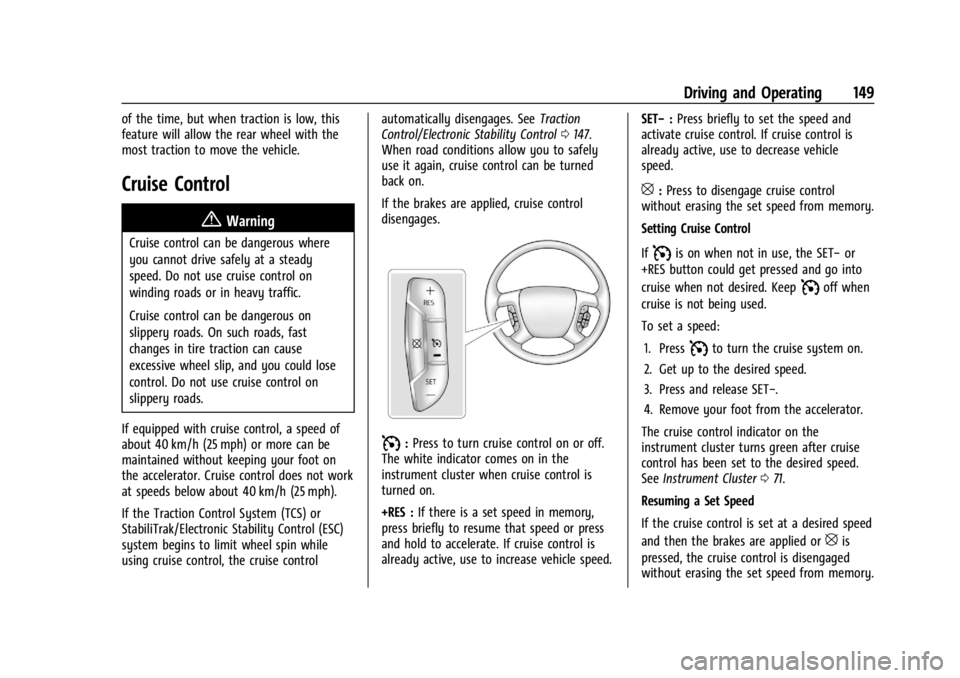
I: Press to turn cruise control on or off.
The white indicator comes on in the
instrument cluster when cruise control is
turned on.
+RES : If there is a set speed in memory,
press briefly to resume that speed or press
and hold to accelerate. If cruise control is
already active, use to increase vehicle speed. SET−
:Press briefly to set the speed and
activate cruise control. If cruise control is
already active, use to decrease vehicle
speed.
[: Press to disengage cruise control
without erasing the set speed from memory.
Setting Cruise Control
If
Iis on when not in use, the SET− or
+RES button could get pressed and go into
cruise when not desired. Keep
Ioff when
cruise is not being used.
To set a speed:
1. Press
Ito turn the cruise system on.
2. Get up to the desired speed.
3. Press and release SET−.
4. Remove your foot from the accelerator.
The cruise control indicator on the
instrument cluster turns green after cruise
control has been set to the desired speed.
See Instrument Cluster 071.
Resuming a Set Speed
If the cruise control is set at a desired speed
and then the brakes are applied or
[is
pressed, the cruise control is disengaged
without erasing the set speed from memory.
Page 198 of 296
Chevrolet Express Owner Manual (GMNA-Localizing-U.S./Canada/Mexico-
14583525) - 2021 - CRC - 12/9/20
Vehicle Care 197
Caution (Continued)
.Do not use engine coolant (antifreeze)
in the windshield washer. It can
damage the windshield washer system
and paint.
.Do not mix water with ready-to-use
washer fluid. Water can cause the
solution to freeze and damage the
washer fluid tank and other parts of
the washer system.
.When using concentrated washer fluid,
follow the manufacturer instructions
for adding water.
.Fill the washer fluid tank only
three-quarters full when it is very cold.
This allows for fluid expansion if
freezing occurs, which could damage
the tank if it is completely full.
Brakes
Disc brake linings have built-in wear
indicators that make a high-pitched warning
sound when the brake linings are worn and
new linings are needed. The sound can come
and go or can be heard all the time when
the vehicle is moving, except when applying
the brake pedal firmly.
{Warning
The brake wear warning sound means
that soon the brakes will not work well.
That could lead to a crash. When the
brake wear warning sound is heard, have
the vehicle serviced.
Caution
Continuing to drive with worn-out brake
linings could result in costly brake
repairs.
Some driving conditions or climates can
cause a brake squeal when the brakes are
first applied, clearing up following several
applications. This does not mean something
is wrong with the brakes.
Properly torqued wheel nuts are necessary
to help prevent brake pulsation. When tires
are rotated, inspect brake linings for wear
and evenly tighten wheel nuts in the proper
sequence to torque specifications. See
Capacities and Specifications 0261.
Brake pads should be replaced as complete
axle sets.
Brake Pedal Travel
See your dealer if the brake pedal does not
return to normal height, or if there is a
rapid increase in pedal travel. This could be
a sign that brake service may be required.
Replacing Brake System Parts
Always replace brake system parts with
new, approved replacement parts. If this is
not done, the brakes may not work
properly. The braking performance can
change in many ways if the wrong brake
parts are installed or if parts are improperly
installed.
Brake Fluid
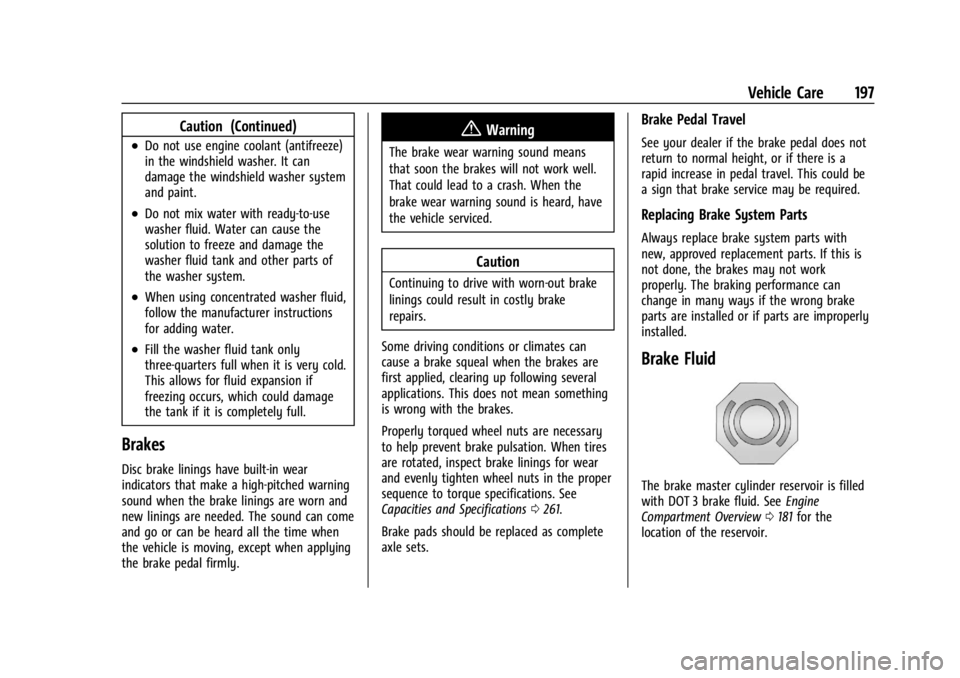
The brake master cylinder reservoir is filled
with DOT 3 brake fluid. See Engine
Compartment Overview 0181 for the
location of the reservoir.
Page 214 of 296
Chevrolet Express Owner Manual (GMNA-Localizing-U.S./Canada/Mexico-
14583525) - 2021 - CRC - 12/9/20
Vehicle Care 213
Winter Tires
This vehicle was not originally equipped
with winter tires. Winter tires are designed
for increased traction on snow and
ice-covered roads. Consider installing winter
tires on the vehicle if frequent driving on ice
or snow covered roads is expected. See your
dealer for details regarding winter tire
availability and proper tire selection. Also,
seeBuying New Tires 0223.
With winter tires, there may be decreased
dry road traction, increased road noise, and
shorter tread life. After changing to winter
tires, be alert for changes in vehicle
handling and braking.
If using winter tires:
.Use tires of the same brand and tread
type on all four wheel positions.
.Use only radial ply tires of the same size,
load range, and speed rating as the
original equipment tires.
Winter tires with the same speed rating as
the original equipment tires may not be
available for H, V, W, Y, and ZR speed rated
tires. If winter tires with a lower speed
rating are chosen, never exceed the tire's
maximum speed capability.
Tire Sidewall Labeling
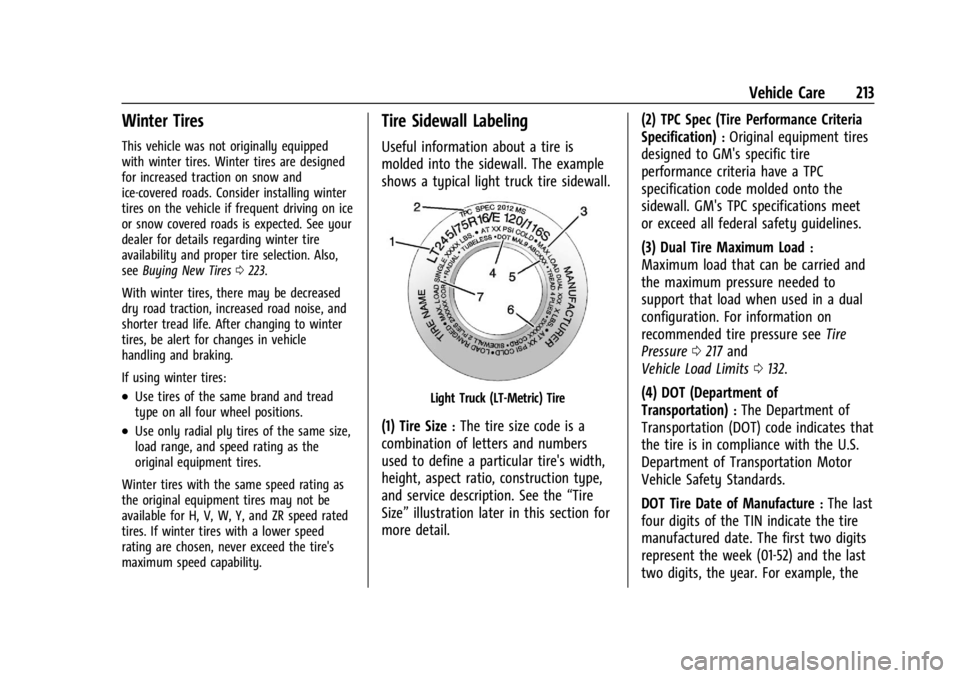
Useful information about a tire is
molded into the sidewall. The example
shows a typical light truck tire sidewall.
Light Truck (LT-Metric) Tire
(1) Tire Size:The tire size code is a
combination of letters and numbers
used to define a particular tire's width,
height, aspect ratio, construction type,
and service description. See the “Tire
Size” illustration later in this section for
more detail. (2) TPC Spec (Tire Performance Criteria
Specification)
:Original equipment tires
designed to GM's specific tire
performance criteria have a TPC
specification code molded onto the
sidewall. GM's TPC specifications meet
or exceed all federal safety guidelines.
(3) Dual Tire Maximum Load
:
Maximum load that can be carried and
the maximum pressure needed to
support that load when used in a dual
configuration. For information on
recommended tire pressure see Tire
Pressure 0217 and
Vehicle Load Limits 0132.
(4) DOT (Department of
Transportation)
:The Department of
Transportation (DOT) code indicates that
the tire is in compliance with the U.S.
Department of Transportation Motor
Vehicle Safety Standards.
DOT Tire Date of Manufacture
:The last
four digits of the TIN indicate the tire
manufactured date. The first two digits
represent the week (01-52) and the last
two digits, the year. For example, the