tow CHEVROLET EXPRESS CARGO VAN 2017 1.G Owner's Manual
[x] Cancel search | Manufacturer: CHEVROLET, Model Year: 2017, Model line: EXPRESS CARGO VAN, Model: CHEVROLET EXPRESS CARGO VAN 2017 1.GPages: 346, PDF Size: 6.54 MB
Page 106 of 346
Chevrolet Express Owner Manual (GMNA-Localizing-U.S./Canada/Mexico-9967827) - 2017 - crc - 5/2/16
Instruments and Controls 105
have antilock brakes and there is aproblem with the regular brakes.SeeBrake System WarningLight0104.
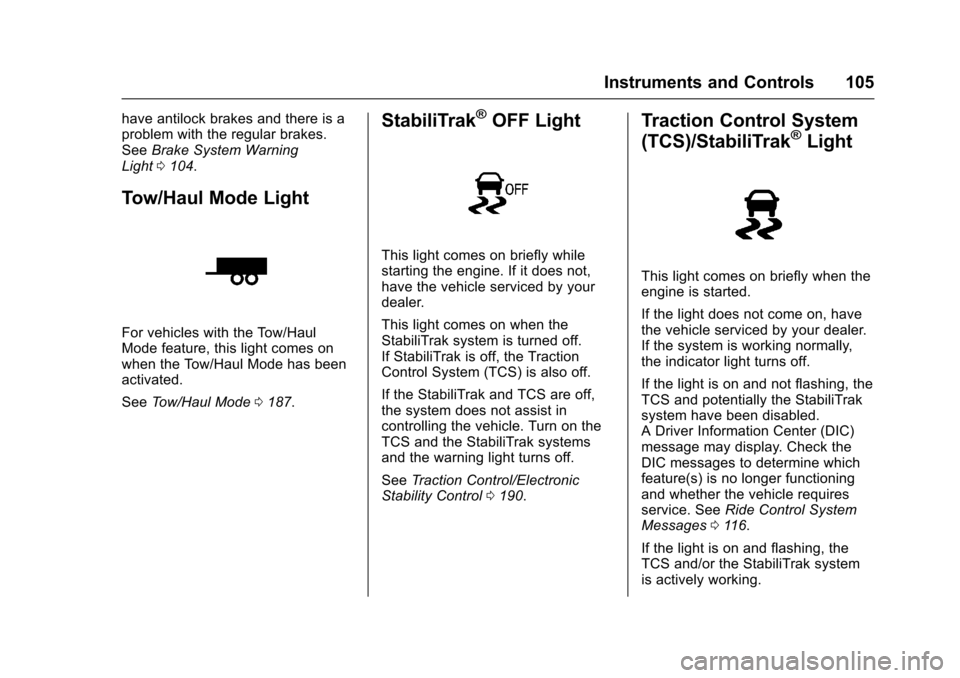
Tow/Haul Mode Light
For vehicles with the Tow/HaulMode feature, this light comes onwhen the Tow/Haul Mode has beenactivated.
SeeTo w / H a u l M o d e0187.
StabiliTrak®OFF Light
This light comes on briefly whilestarting the engine. If it does not,have the vehicle serviced by yourdealer.
This light comes on when theStabiliTrak system is turned off.If StabiliTrak is off, the TractionControl System (TCS) is also off.
If the StabiliTrak and TCS are off,the system does not assist incontrolling the vehicle. Turn on theTCS and the StabiliTrak systemsand the warning light turns off.
SeeTr a c t i o n C o n t r o l / E l e c t r o n i cStability Control0190.
Traction Control System
(TCS)/StabiliTrak®Light
This light comes on briefly when theengine is started.
If the light does not come on, havethe vehicle serviced by your dealer.If the system is working normally,the indicator light turns off.
If the light is on and not flashing, theTCS and potentially the StabiliTraksystem have been disabled.ADriverInformationCenter(DIC)message may display. Check theDIC messages to determine whichfeature(s) is no longer functioningand whether the vehicle requiresservice. SeeRide Control SystemMessages011 6.
If the light is on and flashing, theTCS and/or the StabiliTrak systemis actively working.
Page 119 of 346
Chevrolet Express Owner Manual (GMNA-Localizing-U.S./Canada/Mexico-9967827) - 2017 - crc - 5/2/16
118 Instruments and Controls
Tire Messages
CHECK TIRE PRESSURE or
TIRE LOW ADD AIR TO TIRE
If the vehicle has the Tire PressureMonitor System (TPMS), thismessage displays when thepressure in one or more of the tiresis low. The low tire pressure warninglight will also come on. SeeTirePressure Light0106.Thismessagewill also indicate which tire needs tobe checked. You can receive morethan one tire pressure message at atime. To read the other messagesthat may have been sent at thesame time, press the set/resetbutton. If a tire pressure messageappears on the DIC, stop as soonas you can. Have the tire pressureschecked and set to those shown onthe Tire Loading Information label.SeeTires0252,Vehicle LoadLimits0171,andTire Pressure0260.TheDICalsoshowsthetirepressure values. SeeDriverInformation Center (DIC)0108.
SERVICE TIRE MONITOR
SYSTEM
If the vehicle has the Tire PressureMonitor System (TPMS), thismessage displays if a part on thesystem is not working properly. Thetire pressure light also flashes andthen remains on during the sameignition cycle. SeeTire PressureLight0106.Severalconditionsmaycause this message to appear. SeeTire Pressure Monitor Operation0262for more information. If thewarning comes on and stays on,there may be a problem with theTPMS. See your dealer.
TIRE LEARNING ACTIVE
If the vehicle has the Tire PressureMonitor System (TPMS), thismessage displays when the systemis re-learning the tire positions onthe vehicle. SeeDriver InformationCenter (DIC)0108for moreinformation. The tire positions mustbe re-learned after rotating the tiresor after replacing a tire or sensor.
SeeTire Inspection0265,TireRotation0265,Tire PressureMonitor Operation0262,andTirePressure0260for moreinformation.
Transmission Messages
GRADE BRAKING DISABLED
This message displays when thegrade braking has been disabledwith the Tow/Haul Mode button. SeeTo w / H a u l M o d e0187,AutomaticTr a n s m i s s i o n0183,andCruiseControl0192.
GRADE BRAKING ENABLED
This message displays when thegrade braking has been enabledwith the Tow/Haul Mode button. SeeTo w / H a u l M o d e0187,AutomaticTr a n s m i s s i o n0183,andCruiseControl0192.
Page 123 of 346
Chevrolet Express Owner Manual (GMNA-Localizing-U.S./Canada/Mexico-9967827) - 2017 - crc - 5/2/16
122 Instruments and Controls
transmitter. You will not receivefeedback when unlocking thevehicle with the RKE transmitter ifthe doors are open. SeeRemoteKeyless Entry (RKE) SystemOperation025.
PressUuntil REMOTE DOOR
UNLOCK appears on the DIC
display. PressVonce to access the
settings for this feature. Then
pressUto scroll through the
following settings:
LIGHTS OFF :The exterior lamps
will not flash when you pressKon
the RKE transmitter.
LIGHTS ON (default) :The exterior
lamps will flash when you pressK
on the RKE transmitter.
NO CHANGE :No change will bemade to this feature. The currentsetting will remain.
To s e l e c t a s e t t i n g , p r e s sVwhile
the desired setting is displayed onthe DIC.
DELAY DOOR LOCK
This feature allows you to selectwhether or not the locking of thedoors will be delayed. When lockingthe doors with the power door lockswitch and a door is open, thisfeature will delay locking the doorsuntil five seconds after the last dooris closed. You will hear three chimesto signal that the delayed lockingfeature is in use. The key must beout of the ignition for this feature towork. You can temporarily overridedelayed locking by pressing the
power door lock switch twice orQ
on the RKE transmitter twice. SeeDelayed Locking029.
PressUuntil DELAY DOOR LOCK
appears on the DIC display.
PressVonce to access the settings
for this feature. Then pressUto
scroll through the following settings:
OFF :There will be no delayedlocking of the vehicle's doors.
ON (default) :The doors will notlock until five seconds after the lastdoor is closed.
NO CHANGE :No change will bemade to this feature. The currentsetting will remain.
To s e l e c t a s e t t i n g , p r e s sVwhile
the desired setting is displayed onthe DIC.
EXIT LIGHTING
This feature allows you to select theamount of time you want theexterior lamps to remain on when itis dark enough outside. Thishappens after the key is turned fromON/RUN to LOCK/OFF.
PressUuntil EXIT LIGHTING
appears on the DIC display.
PressVonce to access the settings
for this feature. Then pressUto
scroll through the following settings:
OFF :The exterior lamps will notturn on.
10 SECONDS (default) :Theexterior lamps will stay on for10 seconds.
1MINUTE :The exterior lamps willstay on for one minute.
Page 126 of 346
Chevrolet Express Owner Manual (GMNA-Localizing-U.S./Canada/Mexico-9967827) - 2017 - crc - 5/2/16
Lighting 125
Lighting
Exterior Lighting
Exterior Lamp Controls . . . . . . . 125Exterior Lamps OffReminder . . . . . . . . . . . . . . . . . . . 126Headlamp High/Low-BeamChanger . . . . . . . . . . . . . . . . . . . . 126Flash-to-Pass . . . . . . . . . . . . . . . . 126Daytime RunningLamps (DRL) . . . . . . . . . . . . . . . 126Automatic HeadlampSystem . . . . . . . . . . . . . . . . . . . . . . 127Hazard Warning Flashers . . . . . 128Turn and Lane-ChangeSignals . . . . . . . . . . . . . . . . . . . . . . 128
Interior Lighting
Instrument Panel IlluminationControl . . . . . . . . . . . . . . . . . . . . . . 129Dome Lamps . . . . . . . . . . . . . . . . . 129Reading Lamps . . . . . . . . . . . . . . 130
Lighting Features
Entry/Exit Lighting . . . . . . . . . . . . 130Battery Load Management . . . 130Battery Power Protection . . . . . 131
Exterior Lighting
Exterior Lamp Controls
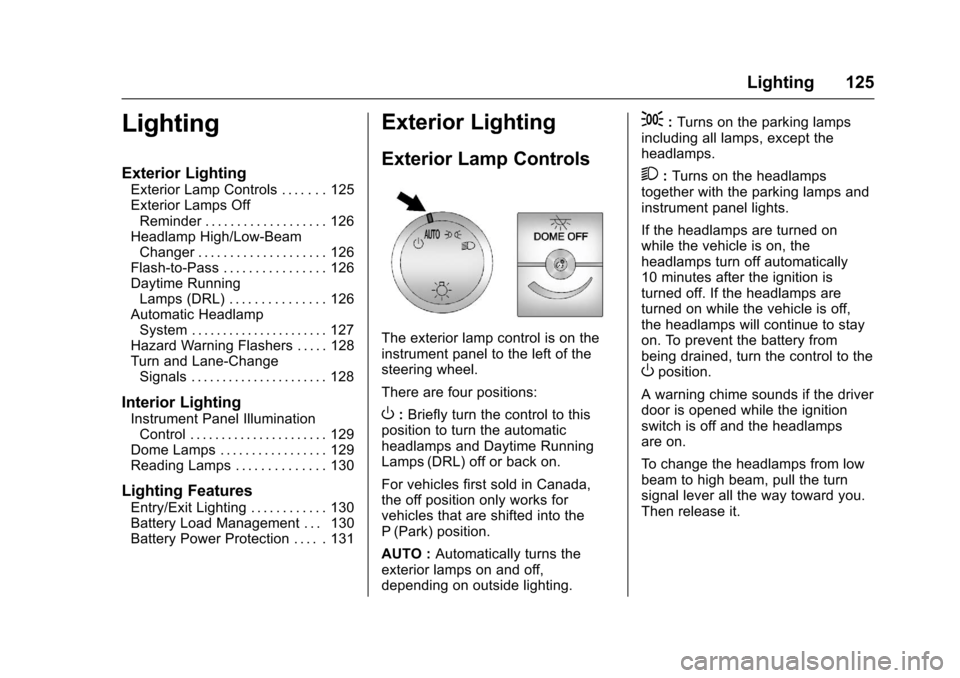
The exterior lamp control is on theinstrument panel to the left of thesteering wheel.
There are four positions:
O:Briefly turn the control to thisposition to turn the automaticheadlamps and Daytime RunningLamps (DRL) off or back on.
For vehicles first sold in Canada,the off position only works forvehicles that are shifted into theP(Park) position.
AUTO :Automatically turns theexterior lamps on and off,depending on outside lighting.
;:Turns on the parking lampsincluding all lamps, except theheadlamps.
2:Turns on the headlampstogether with the parking lamps andinstrument panel lights.
If the headlamps are turned onwhile the vehicle is on, theheadlamps turn off automatically10 minutes after the ignition isturned off. If the headlamps areturned on while the vehicle is off,the headlamps will continue to stayon. To prevent the battery frombeing drained, turn the control to theOposition.
Awarningchimesoundsifthedriverdoor is opened while the ignitionswitch is off and the headlampsare on.
To c h a n g e t h e h e a d l a m p s f r o m l o wbeam to high beam, pull the turnsignal lever all the way toward you.Then release it.
Page 127 of 346
Chevrolet Express Owner Manual (GMNA-Localizing-U.S./Canada/Mexico-9967827) - 2017 - crc - 5/2/16
126 Lighting
Exterior Lamps Off
Reminder
If a door is open, a reminder chimesounds when the headlamps orparking lamps are manually turnedon and the key is out of the ignition.To t u r n o f f t h e c h i m e , t u r n t h e
headlamp switch toOor AUTO and
then back on, or close and re⇣openthe door. In the auto mode, theheadlamps turn off once the ignitionis in LOCK/OFF or may remain onuntil the headlamp delay ends,if enabled in the Driver InformationCenter (DIC). See“Exit Lighting”underVehiclePersonalization011 9.
Headlamp High/
Low-Beam Changer
23(Headlamp High/Low-BeamChanger) :Pull the turn signal leverall the way toward you to changethe headlamps from low to highbeam. Then release it.
This instrument cluster light comeson when the high-beam headlampsare on.
Flash-to-Pass
This feature is used to signal to thevehicle ahead that you wantto pass.
If the headlamps are off or in thelow⇣beam position, pull the turnsignal lever toward you tomomentarily switch to high beams.
Release the lever to turn thehigh-beam headlamps off.
Daytime Running
Lamps (DRL)
DRL can make it easier for others tosee the front of the vehicle duringthe day. Fully functional DRL arerequired on all vehicles first sold inCanada.
The DRL system comes on indaylight when the followingconditions are met:
.The ignition is on.
.The exterior lamp control is inthe AUTO position.
.The shift lever is not in P (Park).
.The light sensor determines it isdaytime.
When the DRL are on, the taillamps,sidemarker, instrument panel lights,and other lamps will not be on.
The automatic headlamp systemautomatically switches from DRL tothe headlamps depending on thedarkness of the surroundings.
To t u r n o f f t h e D R L , t u r n t h e e x t e r i o r
lamp control toOand then release
it. For vehicles first sold in Canada,the transmission must be in theP(Park) position, before the DRLcan be turned off.
Page 129 of 346
Chevrolet Express Owner Manual (GMNA-Localizing-U.S./Canada/Mexico-9967827) - 2017 - crc - 5/2/16
128 Lighting
Hazard Warning Flashers
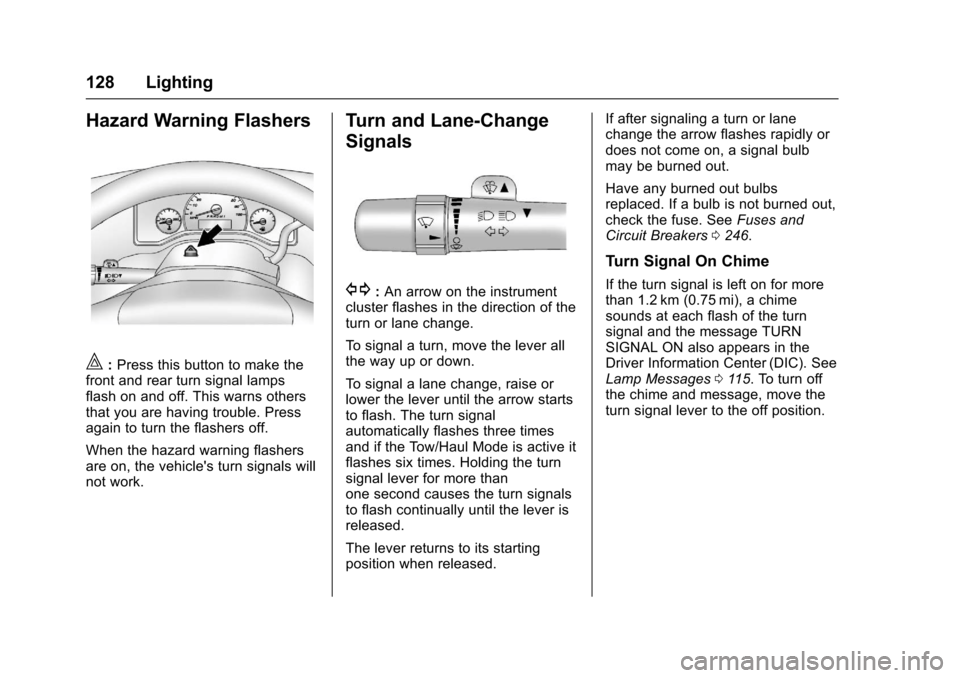
|:Press this button to make thefront and rear turn signal lampsflash on and off. This warns othersthat you are having trouble. Pressagain to turn the flashers off.
When the hazard warning flashersare on, the vehicle's turn signals willnot work.
Turn and Lane-Change
Signals
G:An arrow on the instrumentcluster flashes in the direction of theturn or lane change.
To s i g n a l a t u r n , m o v e t h e l e v e r a l lthe way up or down.
To s i g n a l a l a n e c h a n g e , r a i s e o rlower the lever until the arrow startsto flash. The turn signalautomatically flashes three timesand if the Tow/Haul Mode is active itflashes six times. Holding the turnsignal lever for more thanone second causes the turn signalsto flash continually until the lever isreleased.
The lever returns to its startingposition when released.
If after signaling a turn or lanechange the arrow flashes rapidly ordoes not come on, a signal bulbmay be burned out.
Have any burned out bulbsreplaced. If a bulb is not burned out,check the fuse. SeeFuses andCircuit Breakers0246.
Turn Signal On Chime
If the turn signal is left on for morethan 1.2 km (0.75 mi), a chimesounds at each flash of the turnsignal and the message TURNSIGNAL ON also appears in theDriver Information Center (DIC). SeeLamp Messages011 5.Toturnoffthe chime and message, move theturn signal lever to the off position.
Page 160 of 346
Chevrolet Express Owner Manual (GMNA-Localizing-U.S./Canada/Mexico-9967827) - 2017 - crc - 5/2/16
Climate Controls 159
):Air is divided between theinstrument panel and floor outlets,with some air directed toward thewindshield.
6:Air is directed to the flooroutlets with some air directed to thewindshield and side windows.
-:This mode clears the windowsof fog or moisture. Outside air isdirected to the floor and defrosteroutlets. Adjust the temperature knobfor warmer or cooler air. The airconditioning compressor might turnon in this setting to dehumidifythe air.
1:This mode clears thewindshield of fog or frost morequickly. Air is directed to thewindshield, with some to the flooroutlets and front side windows. Theair conditioning compressor mightturn on in this setting to dehumidifythe air.
Do not drive the vehicle until all thewindows are clear.
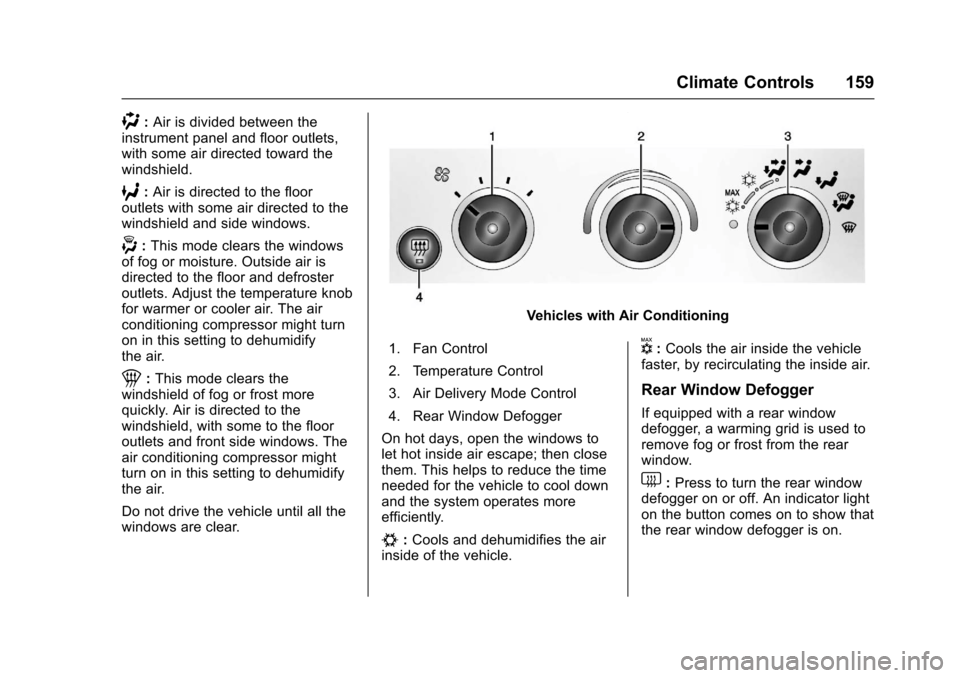
Vehicles with Air Conditioning
1. Fan Control
2. Temperature Control
3. Air Delivery Mode Control
4. Rear Window Defogger
On hot days, open the windows tolet hot inside air escape; then closethem. This helps to reduce the timeneeded for the vehicle to cool downand the system operates moreefficiently.
#:Cools and dehumidifies the airinside of the vehicle.
V:Cools the air inside the vehiclefaster, by recirculating the inside air.
Rear Window Defogger
If equipped with a rear windowdefogger, a warming grid is used toremove fog or frost from the rearwindow.
1:Press to turn the rear windowdefogger on or off. An indicator lighton the button comes on to show thatthe rear window defogger is on.
Page 165 of 346
Chevrolet Express Owner Manual (GMNA-Localizing-U.S./Canada/Mexico-9967827) - 2017 - crc - 5/6/16
164 Driving and Operating
Driving and
Operating
Driving Information
Distracted Driving . . . . . . . . . . . . 165Defensive Driving . . . . . . . . . . . . . 165Drunk Driving . . . . . . . . . . . . . . . . . 166Control of a Vehicle . . . . . . . . . . . 166Braking . . . . . . . . . . . . . . . . . . . . . . . 166Steering . . . . . . . . . . . . . . . . . . . . . . 166Off-Road Recovery . . . . . . . . . . . 167Loss of Control . . . . . . . . . . . . . . . 167Driving on Wet Roads . . . . . . . . 168Hill and Mountain Roads . . . . . 169Winter Driving . . . . . . . . . . . . . . . . 169If the Vehicle Is Stuck . . . . . . . . 171Vehicle Load Limits . . . . . . . . . . . 171
Starting and Operating
New Vehicle Break-In . . . . . . . . . 175Ignition Positions . . . . . . . . . . . . . 176Starting the Engine . . . . . . . . . . . 177Fast Idle System . . . . . . . . . . . . . 178Engine Heater . . . . . . . . . . . . . . . . 179Retained AccessoryPower (RAP) . . . . . . . . . . . . . . . . 180Shifting Into Park . . . . . . . . . . . . . 180Shifting out of Park . . . . . . . . . . . 181
Parking over ThingsThat Burn . . . . . . . . . . . . . . . . . . . 182
Engine Exhaust
Engine Exhaust . . . . . . . . . . . . . . 182Running the Vehicle WhileParked . . . . . . . . . . . . . . . . . . . . . . 183
Automatic Transmission
Automatic Transmission . . . . . . 183Manual Mode . . . . . . . . . . . . . . . . . 186To w / H a u l M o d e . . . . . . . . . . . . . . . 1 8 7
Brakes
Antilock BrakeSystem (ABS) . . . . . . . . . . . . . . . 188Parking Brake . . . . . . . . . . . . . . . . 189
Ride Control Systems
Traction Control/ElectronicStability Control . . . . . . . . . . . . . 190Locking Rear Axle . . . . . . . . . . . . 191
Cruise Control
Cruise Control . . . . . . . . . . . . . . . . 192
Driver Assistance Systems
Rear Vision Camera (RVC) . . . 194Parking Assist . . . . . . . . . . . . . . . . 197
Fuel
Fuel . . . . . . . . . . . . . . . . . . . . . . . . . . 198
California FuelRequirements . . . . . . . . . . . . . . . 199Fuels in Foreign Countries . . . 199Fuel Additives . . . . . . . . . . . . . . . . 199E85 or FlexFuel . . . . . . . . . . . . . . 199Filling the Tank . . . . . . . . . . . . . . . 200Filling a Portable FuelContainer . . . . . . . . . . . . . . . . . . . 202
Trailer Towing
General TowingInformation . . . . . . . . . . . . . . . . . . 202Driving Characteristics andTo w i n g T i p s . . . . . . . . . . . . . . . . . 2 0 2Trailer Towing . . . . . . . . . . . . . . . . 205To w i n g E q u i p m e n t . . . . . . . . . . . . 2 1 0
Conversions and Add-Ons
Add-On ElectricalEquipment . . . . . . . . . . . . . . . . . . 212
Page 172 of 346
Chevrolet Express Owner Manual (GMNA-Localizing-U.S./Canada/Mexico-9967827) - 2017 - crc - 5/6/16
Driving and Operating 171
If the Vehicle Is Stuck
Slowly and cautiously spin thewheels to free the vehicle whenstuck in sand, mud, ice, or snow.
If stuck too severely for the tractionsystem to free the vehicle, turn thetraction system off and use therocking method. SeeTr a c t i o nControl/Electronic StabilityControl0190.
{Warning
If the vehicle's tires spin at high
speed, they can explode, and you
or others could be injured. The
vehicle can overheat, causing an
engine compartment fire or other
damage. Spin the wheels as little
as possible and avoid going
above 56 km/h (35 mph).
Rocking the Vehicle to Get
it Out
Turn the steering wheel left andright to clear the area around thefront wheels. Turn off any tractionsystem. Shift back and forth
between R (Reverse) and a lowforward gear, spinning the wheelsas little as possible. To preventtransmission wear, wait until thewheels stop spinning before shiftinggears. Release the acceleratorpedal while shifting, and presslightly on the accelerator pedalwhen the transmission is in gear.Slowly spinning the wheels in theforward and reverse directionscauses a rocking motion that couldfree the vehicle. If that does not getthe vehicle out after a few tries, itmight need to be towed out. If thevehicle does need to be towed out,seeTo w i n g t h e V e h i c l e0286.
Vehicle Load Limits
It is very important to know how
much weight the vehicle can
carry. This weight is called the
vehicle capacity weight and
includes the weight of all
occupants, cargo, and all
nonfactory-installed options.
Two labels on the vehicle may
show how much weight it was
designed to carry, the Tire and
Loading Information label and
the Certification/Tire label.
{Warning
Do not load the vehicle any
heavier than the Gross
Vehicle Weight Rating
(GVWR), or either the
maximum front or rear Gross
Axle Weight Rating (GAWR).
This can cause systems to
break and change the way the
vehicle handles. This could
cause loss of control and a
crash. Overloading can also
reduce stopping distance,
damage the tires, and shorten
the life of the vehicle.
Page 174 of 346
Chevrolet Express Owner Manual (GMNA-Localizing-U.S./Canada/Mexico-9967827) - 2017 - crc - 5/6/16
Driving and Operating 173
6.If your vehicle will be towing
atrailer,loadfromyour
trailer will be transferred to
your vehicle. Consult this
manual to determine how
this reduces the available
cargo and luggage load
capacity of your vehicle.”
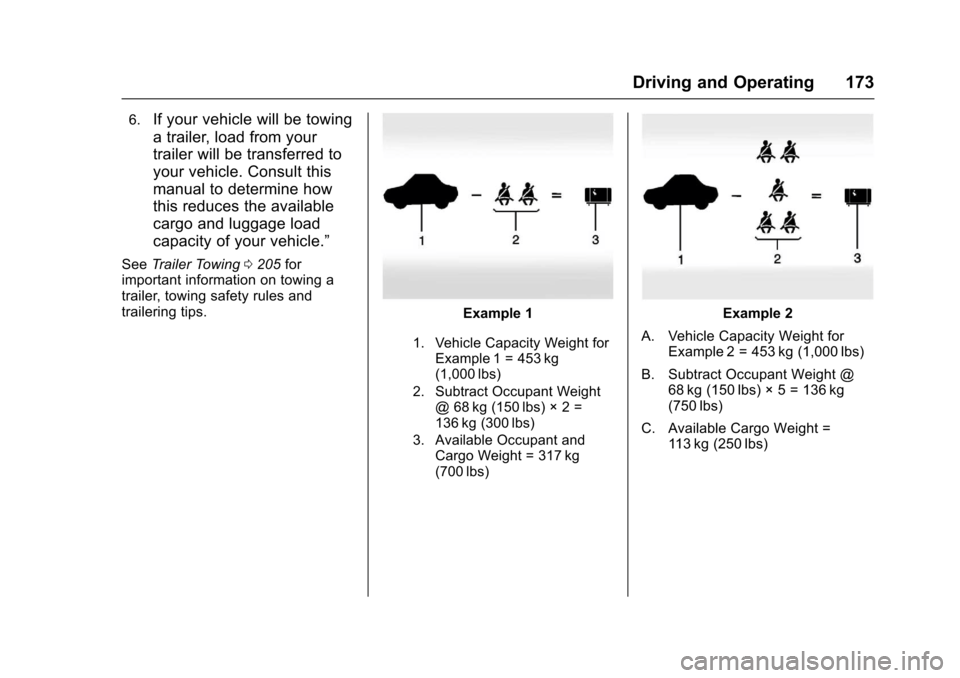
SeeTr a i l e r To w i n g0205forimportant information on towing atrailer, towing safety rules andtrailering tips.Example 1
1. Vehicle Capacity Weight forExample 1 = 453 kg(1,000 lbs)
2. Subtract Occupant Weight@68kg(150lbs)◊2=136 kg (300 lbs)
3. Available Occupant andCargo Weight = 317 kg(700 lbs)
Example 2
A. Vehicle Capacity Weight forExample 2 = 453 kg (1,000 lbs)
B. Subtract Occupant Weight @68 kg (150 lbs)◊5 = 136 kg(750 lbs)
C. Available Cargo Weight =11 3 k g ( 2 5 0 l b s )