ignition CHEVROLET EXPRESS CARGO VAN 2017 1.G Service Manual
[x] Cancel search | Manufacturer: CHEVROLET, Model Year: 2017, Model line: EXPRESS CARGO VAN, Model: CHEVROLET EXPRESS CARGO VAN 2017 1.GPages: 346, PDF Size: 6.54 MB
Page 131 of 346
Chevrolet Express Owner Manual (GMNA-Localizing-U.S./Canada/Mexico-9967827) - 2017 - crc - 5/2/16
130 Lighting
Reading Lamps
If equipped with reading lamps,press the button next to each lampto turn it on or off.
The vehicle may also have readinglamps in other locations. The lampscannot be adjusted.
Lighting Features
Entry/Exit Lighting
The vehicle has an illuminatedentry/exit feature.
The dome lamps come on if theE
DOME OFF button is in theextended position, when a door isopened, or the key is removed fromthe ignition.
Battery Load
Management
The vehicle may have ElectricPower Management (EPM) thatestimates the battery's temperatureand state of charge. It then adjuststhe voltage for best performanceand extended life of the battery.
When the battery's state of chargeis low, the voltage is raised slightlyto quickly bring the charge back up.When the state of charge is high,the voltage is lowered slightly toprevent overcharging. If the vehiclehas a voltmeter gauge or a voltagedisplay on the Driver Information
Center (DIC), you may see thevoltage move up or down. This isnormal. If there is a problem, analert will be displayed.
The battery can be discharged atidle if the electrical loads are veryhigh. This is true for all vehicles.This is because the generator(alternator) may not be spinning fastenough at idle to produce all thepower that is needed for very highelectrical loads.
Ahighelectricalloadoccurswhenseveral of the following are on, suchas: headlamps, high beams, foglamps, rear window defogger,climate control fan at high speed,heated seats, engine cooling fans,trailer loads, and loads plugged intoaccessory power outlets.
EPM works to prevent excessivedischarge of the battery. It does thisby balancing the generator's outputand the vehicle's electrical needs.It can increase engine idle speed togenerate more power, wheneverneeded. It can temporarily reducethe power demands of someaccessories.
Page 132 of 346
Chevrolet Express Owner Manual (GMNA-Localizing-U.S./Canada/Mexico-9967827) - 2017 - crc - 5/2/16
Lighting 131
Normally, these actions occur insteps or levels, without beingnoticeable. In rare cases at thehighest levels of corrective action,this action may be noticeable to thedriver. If so, a Driver InformationCenter (DIC) message might bedisplayed, such as SERVICEBATTERY CHARGING SYSTEM.If this messages displays, it isrecommended that the driver reducethe electrical loads as much aspossible. SeeBattery Voltage andCharging Messages011 2.
Battery Power Protection
This feature shuts off the domelamps if they are left on for morethan 10 minutes when the ignition isin LOCK/OFF. This helps to preventthe battery from running down.
Page 133 of 346
Chevrolet Express Owner Manual (GMNA-Localizing-U.S./Canada/Mexico-9967827) - 2017 - crc - 5/2/16
132 Infotainment System
Infotainment
System
Introduction
Infotainment . . . . . . . . . . . . . . . . . . 132Theft-Deterrent Feature . . . . . . 133Overview (AM-FM Radio) . . . . . 133Overview (Radio withCD/MP3) . . . . . . . . . . . . . . . . . . . . 135Operation . . . . . . . . . . . . . . . . . . . . . 136
Radio
AM-FM Radio . . . . . . . . . . . . . . . . 138Satellite Radio . . . . . . . . . . . . . . . . 139Radio Reception . . . . . . . . . . . . . . 140Multi-Band Antenna . . . . . . . . . . 141
Audio Players
Avoiding Untrusted MediaDevices . . . . . . . . . . . . . . . . . . . . . 141CD Player . . . . . . . . . . . . . . . . . . . . 141Auxiliary Devices . . . . . . . . . . . . . 146
OnStar System
OnStar System . . . . . . . . . . . . . . . 150
Phone
Bluetooth . . . . . . . . . . . . . . . . . . . . . 151
Introduction
Infotainment
Base radio information is included inthis manual. See the infotainmentmanual for information on otheravailable infotainment systems.
Read the following pages tobecome familiar with the BaseRadio features.
{Warning
Ta k i n g y o u r e y e s o f f t h e r o a d f o r
too long or too often while using
any infotainment feature can
cause a crash. You or others
could be injured or killed. Do not
give extended attention to
infotainment tasks while driving.
Limit your glances at the vehicle
displays and focus your attention
on driving. Use voice commands
whenever possible.
The infotainment system has built-infeatures intended to help avoiddistraction by disabling some
functions when driving. Thesefunctions may gray out when theyare unavailable. Many infotainmentfeatures are also available throughthe instrument cluster and steeringwheel controls.
Before driving:
.Become familiar with theoperation, faceplate buttons, andscreen buttons.
.Set up the audio by presettingfavorite stations, setting thetone, and adjusting thespeakers.
.Set up phone numbers inadvance so they can be calledeasily by pressing a singlebutton or by using a single voicecommand if equipped withBluetooth phone capability.
SeeDefensive Driving0165.
To p l a y t h e i n f o t a i n m e n t s y s t e m w i t hthe ignition off, seeRetainedAccessory Power (RAP)0180.
Page 137 of 346
Chevrolet Express Owner Manual (GMNA-Localizing-U.S./Canada/Mexico-9967827) - 2017 - crc - 5/2/16
136 Infotainment System
10. CD/AUX
.Press to scroll throughselecting the CD or anauxiliary device.
11 .\FWD
.Press and hold to fastforward through a track.
12.sREV
.Press and hold to gobackward fast through atrack.
13.P
.Press to turn theinfotainment system onor off.
.Turn to adjust the volume.
14.¨SEEK
.Seeks or scans to the nextstation.
15.©SEEK
.Seeks or scans to theprevious station.
16. BAND
.Press to scroll through theavailable bands FM1, FM2,AM, or SXM if equipped.
17.H
.Press to set the clockand date.
Operation
Using the Radio
O:Press to turn the system onand off.
Turn clockwise or counterclockwiseto increase or decrease the volume.
4:Press to switch the displaybetween the radio station frequencyand the time. While the ignition isoff, press this button to display thetime. Press to display additional textinformation related to the currentFM-RDS station or MP3 song.Achoiceofadditionalinformationsuch as Channel, Song, Artist, andCAT (category) can display.Continue pressing to highlight the
desired tab, or press the softkeyunder any one of the tabs and theinformation about that tab displays.
Speed Compensated Volume(SCV) :SCV automatically adjustthe radio volume to compensate forroad and wind noise as the vehiclespeed changes while driving, so thatthe volume level stays consistent.
To a c t i v a t e S C V :
1. Set the radio volume to thedesired level.
2. Press the MENU button todisplay the radio setup menu.
3. Press the softkey under theAUTO VOLUM (automaticvolume) tab on the radiodisplay.
4. Press the softkey under thedesired SCV setting (OFF, Low,Med, or High) to select thelevel of radio volumecompensation. The displaytimes out after approximately10 seconds. Each highersetting allows for more radiovolume compensation at fastervehicle speeds.
Page 143 of 346
Chevrolet Express Owner Manual (GMNA-Localizing-U.S./Canada/Mexico-9967827) - 2017 - crc - 5/2/16
142 Infotainment System
Caution
If a label is added to a CD, more
than one CD is inserted into the
slot at a time, or an attempt is
made to play scratched or
damaged CDs, the CD player
could be damaged. While using
the CD player, use only CDs in
good condition without any label,
load one CD at a time, and keep
the CD player and the loading slot
free of foreign materials, liquids,
and debris.
If an error displays, see“CD PlayerMessages”later in this section.
Care of CDs
If playing a CD-R, the sound qualitycan be reduced due to CD-R orCD-RW quality, the method ofrecording, the quality of the musicthat has been recorded, and theway the CD-R or CD-RW has beenhandled. Handle them carefully.Store CD-Rs or CD-RWs in theiroriginal cases or other protectivecases and away from direct sunlight
and dust. The CD player scans thebottom surface of the disc. If thesurface of a CD is damaged, suchas cracked, broken, or scratched,the CD does not play properly or notat all. Do not touch the bottom sideof a CD while handling it; this coulddamage the surface. Pick up CDsby the outer edges or the edge ofthe hole and the outer edge.
If the surface of a CD is soiled,clean it with a soft, lint-free cloth ordampen a clean, soft cloth in a mild,neutral detergent solution mixedwith water. Make sure the wipingprocess starts from the center tothe edge.
Inserting a CD
Insert a CD partway into the slot,label side up. The player pulls it inand the CD should begin playing.
Ejecting a CD
ZEJECT :Press and release toeject the disc. Remove the CDwhen Remove Disc displays. If thedisc is not removed, after severalseconds the disc is automaticallypulled back into the player.
Playing a CD
If the ignition or radio is turned offwith a CD in the player, it stays inthe player. When the ignition orradio is turned on, the CD startsplaying where it stopped, if it wasthe last selected audio source.
When a CD is inserted, the CDsymbol displays on the left side ofthe radio display. As each new trackstarts to play, the track numberdisplays.
The CD player can play the smaller8cm (3in) single CDs with anadapter ring. Full-size CDs and thesmaller CDs are loaded in the samemanner.
CD/AUX :Press to cycle betweenCD or Auxiliary when listening to theradio. The CD icon and a messageshowing the disc and/or tracknumber will display when a CD is inthe player. Press again and thesystem automatically searches foran auxiliary input device; seeAuxiliary Devices0146.Ifaportable audio player is notconnected,“No Input Device Found”displays.
Page 157 of 346
Chevrolet Express Owner Manual (GMNA-Localizing-U.S./Canada/Mexico-9967827) - 2017 - crc - 5/2/16
156 Infotainment System
Using the“Re-dial”Command
1. Press and holdb/gfor
two seconds.
2. After the tone, say“Re-dial.”
Once connected, the person calledwill be heard through the audiospeakers.
Receiving a Call
When an incoming call is received,the audio system mutes and a ringtone is heard in the vehicle.
.Pressb/gto answer the call.
.Pressc/xto ignore a call.
Call Waiting
Call waiting must be supported onthe cell phone and enabled by thewireless service carrier.
.Pressb/gto answer an
incoming call when another callis active. The original call isplaced on hold.
.Pressb/gagain to return to
the original call.
.To i g n o r e t h e i n c o m i n g c a l l , n oaction is required.
.Pressc/xto disconnect the
current call and switch to the callon hold.
Three-Way Calling
Three-way calling must besupported on the cell phone andenabled by the wireless servicecarrier.
1. While on a call, pressb/g.
2. Say“Three-way call.”
3. Use the dial or call commandto dial the number of the thirdparty to be called.
4. Once the call is connected,
pressb/gto link all callers
together.
Ending a Call
Pressc/xto end a call.
Muting a Call
During a call, all sounds from insidethe vehicle can be muted so that theperson on the other end of the callcannot hear them.
.To m u t e a c a l l , p r e s sb/g,and
then say“Mute call.”
.To c a n c e l m u t e , p r e s sb/g,
and then say“Un-mute call.”
Transferring a Call
Audio can be transferred betweenthe Bluetooth system and the cellphone.
The cell phone must be paired andconnected with the Bluetoothsystem before a call can betransferred. The connection processcan take up to two minutes after theignition is turned to ON/RUN.
Transferring Audio from theBluetooth System to a Cell Phone
During a call with the audio in thevehicle:
1. Pressb/g.
2. Say“Transfer Call.”
Page 161 of 346
Chevrolet Express Owner Manual (GMNA-Localizing-U.S./Canada/Mexico-9967827) - 2017 - crc - 5/2/16
160 Climate Controls
The defogger only works when theignition is in ON/RUN. The defoggerturns off if the ignition is in the ACC/ACCESSORY or LOCK/OFFposition.
Do not drive the vehicle until all thewindows are clear.
Caution
Do not use a razor blade or sharp
object to clear the inside rear
window. Do not adhere anything
to the defogger grid lines in the
rear glass. These actions may
damage the rear defogger.
Repairs would not be covered by
the vehicle warranty.
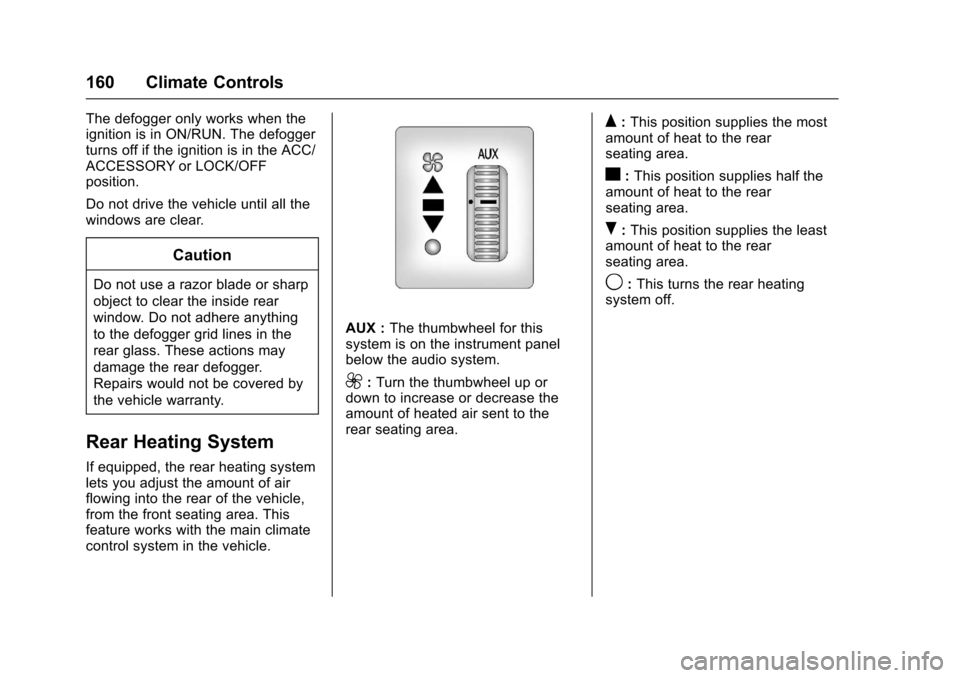
Rear Heating System
If equipped, the rear heating systemlets you adjust the amount of airflowing into the rear of the vehicle,from the front seating area. Thisfeature works with the main climatecontrol system in the vehicle.
AUX :The thumbwheel for thissystem is on the instrument panelbelow the audio system.
9:Turn the thumbwheel up ordown to increase or decrease theamount of heated air sent to therear seating area.
Q:This position supplies the mostamount of heat to the rearseating area.
c:This position supplies half theamount of heat to the rearseating area.
R:This position supplies the leastamount of heat to the rearseating area.
9:This turns the rear heatingsystem off.
Page 165 of 346
Chevrolet Express Owner Manual (GMNA-Localizing-U.S./Canada/Mexico-9967827) - 2017 - crc - 5/6/16
164 Driving and Operating
Driving and
Operating
Driving Information
Distracted Driving . . . . . . . . . . . . 165Defensive Driving . . . . . . . . . . . . . 165Drunk Driving . . . . . . . . . . . . . . . . . 166Control of a Vehicle . . . . . . . . . . . 166Braking . . . . . . . . . . . . . . . . . . . . . . . 166Steering . . . . . . . . . . . . . . . . . . . . . . 166Off-Road Recovery . . . . . . . . . . . 167Loss of Control . . . . . . . . . . . . . . . 167Driving on Wet Roads . . . . . . . . 168Hill and Mountain Roads . . . . . 169Winter Driving . . . . . . . . . . . . . . . . 169If the Vehicle Is Stuck . . . . . . . . 171Vehicle Load Limits . . . . . . . . . . . 171
Starting and Operating
New Vehicle Break-In . . . . . . . . . 175Ignition Positions . . . . . . . . . . . . . 176Starting the Engine . . . . . . . . . . . 177Fast Idle System . . . . . . . . . . . . . 178Engine Heater . . . . . . . . . . . . . . . . 179Retained AccessoryPower (RAP) . . . . . . . . . . . . . . . . 180Shifting Into Park . . . . . . . . . . . . . 180Shifting out of Park . . . . . . . . . . . 181
Parking over ThingsThat Burn . . . . . . . . . . . . . . . . . . . 182
Engine Exhaust
Engine Exhaust . . . . . . . . . . . . . . 182Running the Vehicle WhileParked . . . . . . . . . . . . . . . . . . . . . . 183
Automatic Transmission
Automatic Transmission . . . . . . 183Manual Mode . . . . . . . . . . . . . . . . . 186To w / H a u l M o d e . . . . . . . . . . . . . . . 1 8 7
Brakes
Antilock BrakeSystem (ABS) . . . . . . . . . . . . . . . 188Parking Brake . . . . . . . . . . . . . . . . 189
Ride Control Systems
Traction Control/ElectronicStability Control . . . . . . . . . . . . . 190Locking Rear Axle . . . . . . . . . . . . 191
Cruise Control
Cruise Control . . . . . . . . . . . . . . . . 192
Driver Assistance Systems
Rear Vision Camera (RVC) . . . 194Parking Assist . . . . . . . . . . . . . . . . 197
Fuel
Fuel . . . . . . . . . . . . . . . . . . . . . . . . . . 198
California FuelRequirements . . . . . . . . . . . . . . . 199Fuels in Foreign Countries . . . 199Fuel Additives . . . . . . . . . . . . . . . . 199E85 or FlexFuel . . . . . . . . . . . . . . 199Filling the Tank . . . . . . . . . . . . . . . 200Filling a Portable FuelContainer . . . . . . . . . . . . . . . . . . . 202
Trailer Towing
General TowingInformation . . . . . . . . . . . . . . . . . . 202Driving Characteristics andTo w i n g T i p s . . . . . . . . . . . . . . . . . 2 0 2Trailer Towing . . . . . . . . . . . . . . . . 205To w i n g E q u i p m e n t . . . . . . . . . . . . 2 1 0
Conversions and Add-Ons
Add-On ElectricalEquipment . . . . . . . . . . . . . . . . . . 212
Page 170 of 346
Chevrolet Express Owner Manual (GMNA-Localizing-U.S./Canada/Mexico-9967827) - 2017 - crc - 5/6/16
Driving and Operating 169
.Keep the windshield washer fluidreservoir filled.
.Have good tires with propertread depth. SeeTires0252.
.Turn off cruise control.
Hill and Mountain Roads
Driving on steep hills or throughmountains is different than drivingon flat or rolling terrain. Tips include:
.Keep the vehicle serviced and ingood shape.
.Check all fluid levels and brakes,tires, cooling system, andtransmission.
.Shift to a lower gear when goingdown steep or long hills.
{Warning
Using the brakes to slow the
vehicle on a long downhill slope
can cause brake overheating, can
reduce brake performance, and
could result in a loss of braking.
(Continued)
Warning (Continued)
Shift the transmission to a lower
gear to let the engine assist the
brakes on a steep downhill slope.
{Warning
Coasting downhill in N (Neutral)
or with the ignition off is
dangerous. This can cause
overheating of the brakes and
loss of steering. Always have the
engine running and the vehicle
in gear.
.Drive at speeds that keep thevehicle in its own lane. Do notswing wide or cross thecenter line.
.Be alert on top of hills;something could be in your lane(e.g., stalled car, accident).
.Pay attention to special roadsigns (e.g., falling rocks area,winding roads, long grades,passing or no-passing zones)and take appropriate action.
Winter Driving
Driving on Snow or Ice
Snow or ice between the tires andthe road creates less traction orgrip, so drive carefully. Wet ice canoccur at about 0 °C (32 °F) whenfreezing rain begins to fall. Avoiddriving on wet ice or in freezing rainuntil roads can be treated.
For slippery road driving:
.Accelerate gently. Acceleratingtoo quickly causes the wheels tospin and makes the surfaceunder the tires slick.
.Turn on Traction Control. SeeTr a c t i o n C o n t r o l / E l e c t r o n i cStability Control0190.
.Antilock Brake System (ABS)improves vehicle stability duringhard stops, but the brakesshould be applied sooner than
Page 177 of 346
Chevrolet Express Owner Manual (GMNA-Localizing-U.S./Canada/Mexico-9967827) - 2017 - crc - 5/6/16
176 Driving and Operating
Ignition Positions
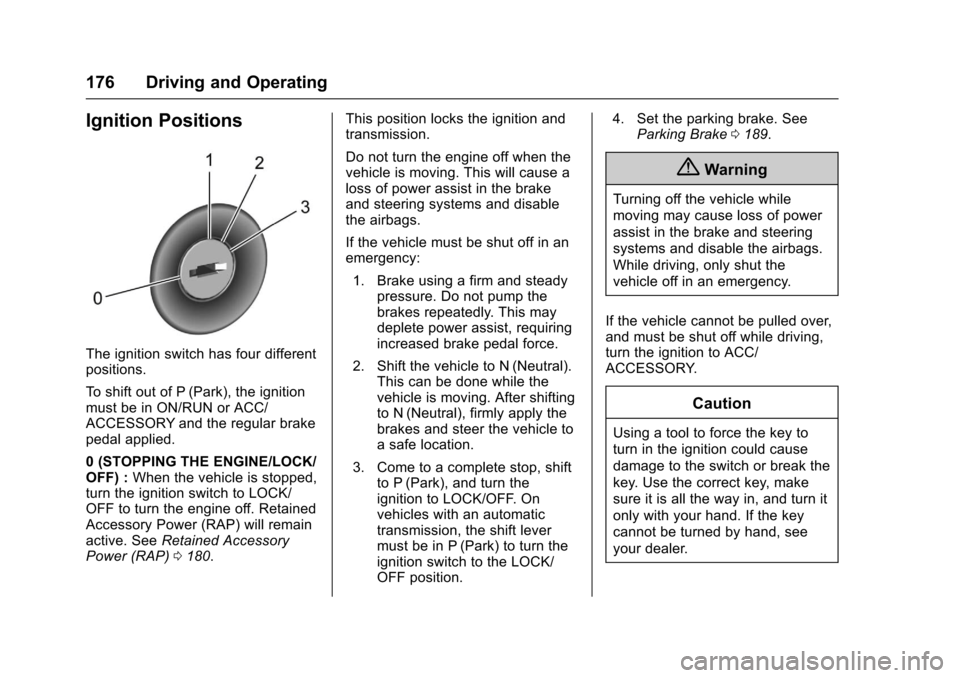
The ignition switch has four differentpositions.
To s h i f t o u t o f P ( P a r k ) , t h e i g n i t i o nmust be in ON/RUN or ACC/ACCESSORY and the regular brakepedal applied.
0(STOPPINGTHEENGINE/LOCK/OFF) :When the vehicle is stopped,turn the ignition switch to LOCK/OFF to turn the engine off. RetainedAccessory Power (RAP) will remainactive. SeeRetained AccessoryPower (RAP)0180.
This position locks the ignition andtransmission.
Do not turn the engine off when thevehicle is moving. This will cause aloss of power assist in the brakeand steering systems and disablethe airbags.
If the vehicle must be shut off in anemergency:
1. Brake using a firm and steadypressure. Do not pump thebrakes repeatedly. This maydeplete power assist, requiringincreased brake pedal force.
2. Shift the vehicle to N (Neutral).This can be done while thevehicle is moving. After shiftingto N (Neutral), firmly apply thebrakes and steer the vehicle toasafelocation.
3. Come to a complete stop, shiftto P (Park), and turn theignition to LOCK/OFF. Onvehicles with an automatictransmission, the shift levermust be in P (Park) to turn theignition switch to the LOCK/OFF position.
4. Set the parking brake. SeeParking Brake0189.
{Warning
Turning off the vehicle while
moving may cause loss of power
assist in the brake and steering
systems and disable the airbags.
While driving, only shut the
vehicle off in an emergency.
If the vehicle cannot be pulled over,and must be shut off while driving,turn the ignition to ACC/ACCESSORY.
Caution
Using a tool to force the key to
turn in the ignition could cause
damage to the switch or break the
key. Use the correct key, make
sure it is all the way in, and turn it
only with your hand. If the key
cannot be turned by hand, see
your dealer.