light CHEVROLET EXPRESS CARGO VAN 2017 1.G Workshop Manual
[x] Cancel search | Manufacturer: CHEVROLET, Model Year: 2017, Model line: EXPRESS CARGO VAN, Model: CHEVROLET EXPRESS CARGO VAN 2017 1.GPages: 346, PDF Size: 6.54 MB
Page 131 of 346
Chevrolet Express Owner Manual (GMNA-Localizing-U.S./Canada/Mexico-9967827) - 2017 - crc - 5/2/16
130 Lighting
Reading Lamps
If equipped with reading lamps,press the button next to each lampto turn it on or off.
The vehicle may also have readinglamps in other locations. The lampscannot be adjusted.
Lighting Features
Entry/Exit Lighting
The vehicle has an illuminatedentry/exit feature.
The dome lamps come on if theE
DOME OFF button is in theextended position, when a door isopened, or the key is removed fromthe ignition.
Battery Load
Management
The vehicle may have ElectricPower Management (EPM) thatestimates the battery's temperatureand state of charge. It then adjuststhe voltage for best performanceand extended life of the battery.
When the battery's state of chargeis low, the voltage is raised slightlyto quickly bring the charge back up.When the state of charge is high,the voltage is lowered slightly toprevent overcharging. If the vehiclehas a voltmeter gauge or a voltagedisplay on the Driver Information
Center (DIC), you may see thevoltage move up or down. This isnormal. If there is a problem, analert will be displayed.
The battery can be discharged atidle if the electrical loads are veryhigh. This is true for all vehicles.This is because the generator(alternator) may not be spinning fastenough at idle to produce all thepower that is needed for very highelectrical loads.
Ahighelectricalloadoccurswhenseveral of the following are on, suchas: headlamps, high beams, foglamps, rear window defogger,climate control fan at high speed,heated seats, engine cooling fans,trailer loads, and loads plugged intoaccessory power outlets.
EPM works to prevent excessivedischarge of the battery. It does thisby balancing the generator's outputand the vehicle's electrical needs.It can increase engine idle speed togenerate more power, wheneverneeded. It can temporarily reducethe power demands of someaccessories.
Page 132 of 346
Chevrolet Express Owner Manual (GMNA-Localizing-U.S./Canada/Mexico-9967827) - 2017 - crc - 5/2/16
Lighting 131
Normally, these actions occur insteps or levels, without beingnoticeable. In rare cases at thehighest levels of corrective action,this action may be noticeable to thedriver. If so, a Driver InformationCenter (DIC) message might bedisplayed, such as SERVICEBATTERY CHARGING SYSTEM.If this messages displays, it isrecommended that the driver reducethe electrical loads as much aspossible. SeeBattery Voltage andCharging Messages011 2.
Battery Power Protection
This feature shuts off the domelamps if they are left on for morethan 10 minutes when the ignition isin LOCK/OFF. This helps to preventthe battery from running down.
Page 137 of 346
Chevrolet Express Owner Manual (GMNA-Localizing-U.S./Canada/Mexico-9967827) - 2017 - crc - 5/2/16
136 Infotainment System
10. CD/AUX
.Press to scroll throughselecting the CD or anauxiliary device.
11 .\FWD
.Press and hold to fastforward through a track.
12.sREV
.Press and hold to gobackward fast through atrack.
13.P
.Press to turn theinfotainment system onor off.
.Turn to adjust the volume.
14.¨SEEK
.Seeks or scans to the nextstation.
15.©SEEK
.Seeks or scans to theprevious station.
16. BAND
.Press to scroll through theavailable bands FM1, FM2,AM, or SXM if equipped.
17.H
.Press to set the clockand date.
Operation
Using the Radio
O:Press to turn the system onand off.
Turn clockwise or counterclockwiseto increase or decrease the volume.
4:Press to switch the displaybetween the radio station frequencyand the time. While the ignition isoff, press this button to display thetime. Press to display additional textinformation related to the currentFM-RDS station or MP3 song.Achoiceofadditionalinformationsuch as Channel, Song, Artist, andCAT (category) can display.Continue pressing to highlight the
desired tab, or press the softkeyunder any one of the tabs and theinformation about that tab displays.
Speed Compensated Volume(SCV) :SCV automatically adjustthe radio volume to compensate forroad and wind noise as the vehiclespeed changes while driving, so thatthe volume level stays consistent.
To a c t i v a t e S C V :
1. Set the radio volume to thedesired level.
2. Press the MENU button todisplay the radio setup menu.
3. Press the softkey under theAUTO VOLUM (automaticvolume) tab on the radiodisplay.
4. Press the softkey under thedesired SCV setting (OFF, Low,Med, or High) to select thelevel of radio volumecompensation. The displaytimes out after approximately10 seconds. Each highersetting allows for more radiovolume compensation at fastervehicle speeds.
Page 138 of 346
Chevrolet Express Owner Manual (GMNA-Localizing-U.S./Canada/Mexico-9967827) - 2017 - crc - 5/2/16
Infotainment System 137
Setting the Tone (Bass/Treble)
To a d j u s t t h e b a s s o r t r e b l e :
1. Press thefknob until Bass or
Treble displays.
2. To adjust the setting, do one ofthe following:
.Turn thefknob.
.Press either¨SEEK,
or©SEEK.
EQ :Press this button to choosebass and treble equalizationsettings designed for different typesof music. Selecting MANUAL,or changing bass or treble, returnsthe EQ to the manual bass andtreble settings.
Unique EQ settings can be savedfor each source.
Adjusting the Speakers
(Balance/Fade)
BAL/FADE :To a d j u s t t h e b a l a n c eor fade:
1. Press thefknob until the
speaker control tabs display.
2. Highlight the desired speakercontrol tab by doing one of thefollowing:
.Press thefknob.
.Press the softkey under thedesired tab.
3. Adjust the setting by doing oneof the following:
.Turn thefknob clockwise
or counterclockwise.
.Press¨SEEK or©SEEK.
.Press\FWD orsREV.
To q u i c k l y a d j u s t a l l s p e a k e r a n dtone controls to the middle position,
press thefknob for more than
two seconds.
If the Rear Seat Audio (RSA) isturned on, the radio disables FADEand mutes the rear speakers.
Radio Messages
Calibration Error :The audiosystem has been calibrated for thevehicle from the factory.If Calibration Error displays, itmeans that the radio has not beenconfigured properly for the vehicleand it must be returned to yourdealer for service.
VIN or NO VIN :One of thesemessages will display when theTheftLock system has locked up theradio. Take the vehicle to yourdealer for service.
If any error occurs repeatedly or ifan error cannot be corrected,contact your dealer.
Page 143 of 346
Chevrolet Express Owner Manual (GMNA-Localizing-U.S./Canada/Mexico-9967827) - 2017 - crc - 5/2/16
142 Infotainment System
Caution
If a label is added to a CD, more
than one CD is inserted into the
slot at a time, or an attempt is
made to play scratched or
damaged CDs, the CD player
could be damaged. While using
the CD player, use only CDs in
good condition without any label,
load one CD at a time, and keep
the CD player and the loading slot
free of foreign materials, liquids,
and debris.
If an error displays, see“CD PlayerMessages”later in this section.
Care of CDs
If playing a CD-R, the sound qualitycan be reduced due to CD-R orCD-RW quality, the method ofrecording, the quality of the musicthat has been recorded, and theway the CD-R or CD-RW has beenhandled. Handle them carefully.Store CD-Rs or CD-RWs in theiroriginal cases or other protectivecases and away from direct sunlight
and dust. The CD player scans thebottom surface of the disc. If thesurface of a CD is damaged, suchas cracked, broken, or scratched,the CD does not play properly or notat all. Do not touch the bottom sideof a CD while handling it; this coulddamage the surface. Pick up CDsby the outer edges or the edge ofthe hole and the outer edge.
If the surface of a CD is soiled,clean it with a soft, lint-free cloth ordampen a clean, soft cloth in a mild,neutral detergent solution mixedwith water. Make sure the wipingprocess starts from the center tothe edge.
Inserting a CD
Insert a CD partway into the slot,label side up. The player pulls it inand the CD should begin playing.
Ejecting a CD
ZEJECT :Press and release toeject the disc. Remove the CDwhen Remove Disc displays. If thedisc is not removed, after severalseconds the disc is automaticallypulled back into the player.
Playing a CD
If the ignition or radio is turned offwith a CD in the player, it stays inthe player. When the ignition orradio is turned on, the CD startsplaying where it stopped, if it wasthe last selected audio source.
When a CD is inserted, the CDsymbol displays on the left side ofthe radio display. As each new trackstarts to play, the track numberdisplays.
The CD player can play the smaller8cm (3in) single CDs with anadapter ring. Full-size CDs and thesmaller CDs are loaded in the samemanner.
CD/AUX :Press to cycle betweenCD or Auxiliary when listening to theradio. The CD icon and a messageshowing the disc and/or tracknumber will display when a CD is inthe player. Press again and thesystem automatically searches foran auxiliary input device; seeAuxiliary Devices0146.Ifaportable audio player is notconnected,“No Input Device Found”displays.
Page 160 of 346
Chevrolet Express Owner Manual (GMNA-Localizing-U.S./Canada/Mexico-9967827) - 2017 - crc - 5/2/16
Climate Controls 159
):Air is divided between theinstrument panel and floor outlets,with some air directed toward thewindshield.
6:Air is directed to the flooroutlets with some air directed to thewindshield and side windows.
-:This mode clears the windowsof fog or moisture. Outside air isdirected to the floor and defrosteroutlets. Adjust the temperature knobfor warmer or cooler air. The airconditioning compressor might turnon in this setting to dehumidifythe air.
1:This mode clears thewindshield of fog or frost morequickly. Air is directed to thewindshield, with some to the flooroutlets and front side windows. Theair conditioning compressor mightturn on in this setting to dehumidifythe air.
Do not drive the vehicle until all thewindows are clear.
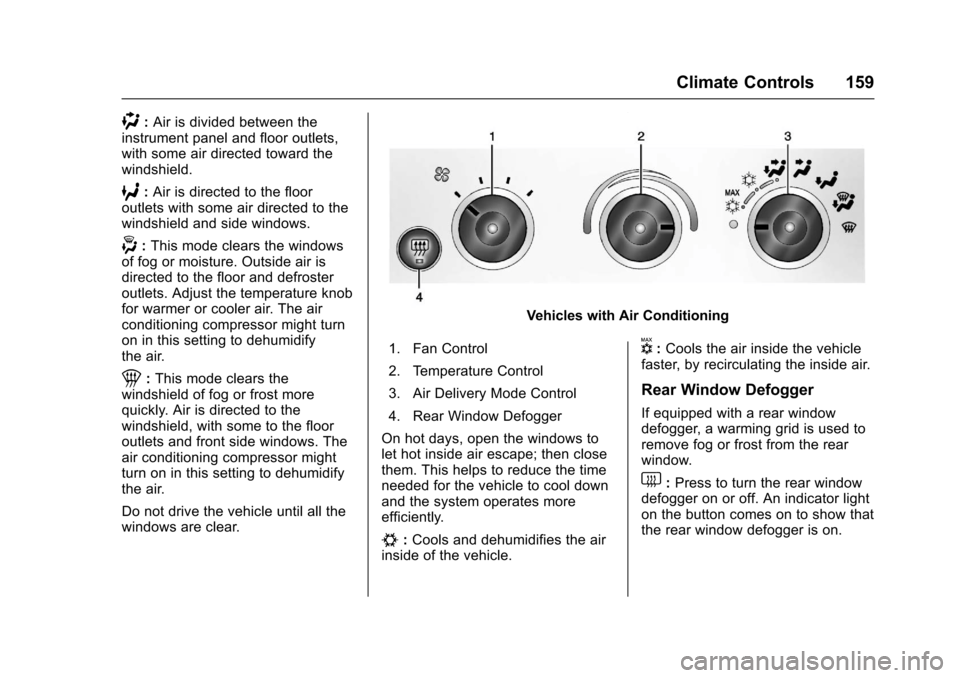
Vehicles with Air Conditioning
1. Fan Control
2. Temperature Control
3. Air Delivery Mode Control
4. Rear Window Defogger
On hot days, open the windows tolet hot inside air escape; then closethem. This helps to reduce the timeneeded for the vehicle to cool downand the system operates moreefficiently.
#:Cools and dehumidifies the airinside of the vehicle.
V:Cools the air inside the vehiclefaster, by recirculating the inside air.
Rear Window Defogger
If equipped with a rear windowdefogger, a warming grid is used toremove fog or frost from the rearwindow.
1:Press to turn the rear windowdefogger on or off. An indicator lighton the button comes on to show thatthe rear window defogger is on.
Page 169 of 346
Chevrolet Express Owner Manual (GMNA-Localizing-U.S./Canada/Mexico-9967827) - 2017 - crc - 5/6/16
168 Driving and Operating
The vehicle may straighten out.Be ready for a second skid if itoccurs.
.Slow down and adjust yourdriving according to weatherconditions. Stopping distancecan be longer and vehiclecontrol can be affected whentraction is reduced by water,snow, ice, gravel, or othermaterial on the road. Learn torecognize warning clues—suchas enough water, ice, or packedsnow on the road to make amirrored surface—and slowdown when you have any doubt.
.Try to avoid sudden steering,acceleration, or braking,including reducing vehicle speedby shifting to a lower gear. Anysudden changes could causethe tires to slide.
Remember: Antilock brakes helpavoid only the braking skid.
Driving on Wet Roads
Rain and wet roads can reducevehicle traction and affect yourability to stop and accelerate.Always drive slower in these typesof driving conditions and avoiddriving through large puddles anddeep-standing or flowing water.
{Warning
Wet brakes can cause crashes.
They might not work as well in a
quick stop and could cause
pulling to one side. You could
lose control of the vehicle.
After driving through a large
puddle of water or a car/vehicle
wash, lightly apply the brake
pedal until the brakes work
normally.
Flowing or rushing water creates
strong forces. Driving through
flowing water could cause the
vehicle to be carried away. If this
happens, you and other vehicle
(Continued)
Warning (Continued)
occupants could drown. Do not
ignore police warnings and be
very cautious about trying to drive
through flowing water.
Hydroplaning
Hydroplaning is dangerous. Watercan build up under the vehicle'stires so they actually ride on thewater. This can happen if the road iswet enough and you are going fastenough. When the vehicle ishydroplaning, it has little or nocontact with the road.
There is no hard and fast rule abouthydroplaning. The best advice is toslow down when the road is wet.
Other Rainy Weather Tips
Besides slowing down, other wetweather driving tips include:
.Allow extra following distance.
.Pass with caution.
.Keep windshield wipingequipment in good shape.
Page 171 of 346
Chevrolet Express Owner Manual (GMNA-Localizing-U.S./Canada/Mexico-9967827) - 2017 - crc - 5/6/16
170 Driving and Operating
when on dry pavement. SeeAntilock Brake System(ABS)0188.
.Allow greater following distanceand watch for slippery spots. Icypatches can occur on otherwiseclear roads in shaded areas.The surface of a curve or anoverpass can remain icy whenthe surrounding roads are clear.Avoid sudden steeringmaneuvers and braking whileon ice.
.Turn off cruise control.
Blizzard Conditions
Stop the vehicle in a safe place andsignal for help. Stay with the vehicleunless there is help nearby.If possible, use RoadsideAssistance. SeeRoadsideAssistance Program0316.Togethelp and keep everyone in thevehicle safe:
.Turn on the hazard warningflashers.
.Tie a red cloth to an outsidemirror.
{Warning
Snow can trap engine exhaust
under the vehicle. This may
cause exhaust gases to get
inside. Engine exhaust contains
carbon monoxide (CO), which
cannot be seen or smelled. It can
cause unconsciousness and even
death.
If the vehicle is stuck in snow:
.Clear snow from the base ofthe vehicle, especially anyblocking the exhaust pipe.
.Open a window about 5 cm(2 in) on the vehicle sidethat is away from the wind,to bring in fresh air.
.Fully open the air outlets onor under the instrumentpanel.
.Adjust the climate controlsystem to circulate the airinside the vehicle and set
(Continued)
Warning (Continued)
the fan speed to the highestsetting. See“ClimateControl Systems.”
For more information about CO,
seeEngine Exhaust0182.
To s a v e f u e l , r u n t h e e n g i n e f o rshort periods to warm the vehicleand then shut the engine off andpartially close the window. Movingabout to keep warm also helps.
If it takes time for help to arrive,when running the engine, push theaccelerator pedal slightly so theengine runs faster than the idlespeed. This keeps the batterycharged to restart the vehicle and tosignal for help with the headlamps.Do this as little as possible, tosave fuel.
Page 172 of 346
Chevrolet Express Owner Manual (GMNA-Localizing-U.S./Canada/Mexico-9967827) - 2017 - crc - 5/6/16
Driving and Operating 171
If the Vehicle Is Stuck
Slowly and cautiously spin thewheels to free the vehicle whenstuck in sand, mud, ice, or snow.
If stuck too severely for the tractionsystem to free the vehicle, turn thetraction system off and use therocking method. SeeTr a c t i o nControl/Electronic StabilityControl0190.
{Warning
If the vehicle's tires spin at high
speed, they can explode, and you
or others could be injured. The
vehicle can overheat, causing an
engine compartment fire or other
damage. Spin the wheels as little
as possible and avoid going
above 56 km/h (35 mph).
Rocking the Vehicle to Get
it Out
Turn the steering wheel left andright to clear the area around thefront wheels. Turn off any tractionsystem. Shift back and forth
between R (Reverse) and a lowforward gear, spinning the wheelsas little as possible. To preventtransmission wear, wait until thewheels stop spinning before shiftinggears. Release the acceleratorpedal while shifting, and presslightly on the accelerator pedalwhen the transmission is in gear.Slowly spinning the wheels in theforward and reverse directionscauses a rocking motion that couldfree the vehicle. If that does not getthe vehicle out after a few tries, itmight need to be towed out. If thevehicle does need to be towed out,seeTo w i n g t h e V e h i c l e0286.
Vehicle Load Limits
It is very important to know how
much weight the vehicle can
carry. This weight is called the
vehicle capacity weight and
includes the weight of all
occupants, cargo, and all
nonfactory-installed options.
Two labels on the vehicle may
show how much weight it was
designed to carry, the Tire and
Loading Information label and
the Certification/Tire label.
{Warning
Do not load the vehicle any
heavier than the Gross
Vehicle Weight Rating
(GVWR), or either the
maximum front or rear Gross
Axle Weight Rating (GAWR).
This can cause systems to
break and change the way the
vehicle handles. This could
cause loss of control and a
crash. Overloading can also
reduce stopping distance,
damage the tires, and shorten
the life of the vehicle.
Page 178 of 346
Chevrolet Express Owner Manual (GMNA-Localizing-U.S./Canada/Mexico-9967827) - 2017 - crc - 5/6/16
Driving and Operating 177
1(ACC/ACCESSORY):This is theposition in which you can operatethings like the radio and thewindshield wipers when the engineis off.
2(ON/RUN):This position can beused to operate the electricalaccessories and to display someinstrument cluster warning andindicator lights. This position canalso be used for service anddiagnostics, and to verify the properoperation of the malfunctionindicator lamp as may be requiredfor emission inspection purposes.The switch stays in this positionwhen the engine is running.
If you leave the key in the ACC/ACCESSORY or ON/RUN positionwith the engine off, the battery couldbe drained. You may not be able tostart the vehicle if the battery isallowed to drain for an extendedperiod of time.
3(START):This is the position thatstarts the engine. When the enginestarts, release the key. The ignitionswitch returns to ON/RUN fordriving.
Awarningtonewillsoundwhenthedriver door is opened, the ignition isin ACC/ACCESSORY or LOCK/OFFand the key is in the ignition.
Starting the Engine
If the vehicle has a diesel engine,see the Duramax dieselsupplement.
To p l a c e t h e t r a n s m i s s i o n i n t h eproper gear:
Move the shift lever to P (Park) orN(Neutral). The engine will not startin any other position. To restart theengine when the vehicle is alreadymoving, use N (Neutral) only.
Caution
If you add electrical parts or
accessories, you could change
the way the engine operates. Any
resulting damage would not be
covered by the vehicle warranty.
SeeAdd-On Electrical
Equipment0212.
Caution
Do not try to shift to P (Park) if the
vehicle is moving. If you do, you
could damage the transmission.
Shift to P (Park) only when the
vehicle is stopped.
Caution
If the steering wheel is turned
until it reaches the end of its
travel, and is held in that position
while starting the vehicle, damage
may occur to the hydraulic power
steering system and there may be
loss of power steering assist.
Starting Procedure
1. With your foot off theaccelerator pedal, turn theignition key to START. Whenthe engine starts, let go of thekey. The idle speed will godown as your engine getswarm. Do not race the engineimmediately after starting it.