display CHEVROLET EXPRESS CARGO VAN 2017 1.G Repair Manual
[x] Cancel search | Manufacturer: CHEVROLET, Model Year: 2017, Model line: EXPRESS CARGO VAN, Model: CHEVROLET EXPRESS CARGO VAN 2017 1.GPages: 346, PDF Size: 6.54 MB
Page 195 of 346
Chevrolet Express Owner Manual (GMNA-Localizing-U.S./Canada/Mexico-9967827) - 2017 - crc - 5/6/16
194 Driving and Operating
.Vehicles with a 6-speedautomatic transmission haveCruise Grade Braking to helpmaintain driver selected speed.
Cruise Grade Braking is enabledwhen the vehicle is started andcruise control is active. It is notenabled in Range Selection Mode.It assists in maintaining driverselected speed when driving ondownhill grades by using the engineand transmission to slow thevehicle.
To d i s a b l e a n d e n a b l e C r u i s e G r a d eBraking for the current ignition keycycle, press and hold the Tow/Haulbutton for three seconds. A DICmessage displays. SeeTr a n s m i s s i o n M e s s a g e s011 8.
When the brakes are applied thecruise control is disengaged.
Ending Cruise Control
There are four ways to end cruisecontrol:
.Step lightly on the brake pedal.
.Press[.
.Shift the transmission toN(Neutral).
.To t u r n o f f c r u i s e c o n t r o l ,
pressI.
Erasing Speed Memory
The cruise control set speed is
erased from memory ifIis
pressed or if the vehicle isturned off.
Driver Assistance
Systems
Rear Vision
Camera (RVC)
If equipped, the RVC system isdesigned to help the driver whenbacking up by displaying a view ofthe area behind the vehicle.
{Warning
The camera(s) do not display
children, pedestrians, bicyclists,
crossing traffic, animals, or any
other object outside of the
cameras’field of view, below the
bumper, or under the vehicle.
Shown distances may be different
from actual distances. Do not
drive or park the vehicle using
only these camera(s). Always
check behind and around the
vehicle before driving. Failure to
use proper care may result in
injury, death, or vehicle damage.
Page 196 of 346
Chevrolet Express Owner Manual (GMNA-Localizing-U.S./Canada/Mexico-9967827) - 2017 - crc - 5/6/16
Driving and Operating 195
Vehicles without Navigation
System
When the vehicle is on and shiftedinto R (Reverse), the video imageappears on the inside rearviewmirror. The video image disappearsafter the vehicle is shifted out ofR(Reverse).
Vehicles with Navigation
System
When the vehicle is shifted intoR(Reverse), the video imageappears on the navigation screen.After a delay, the navigation screendisplays the previous screen afterthe vehicle is shifted out ofR(Reverse).
The delay that is received aftershifting out of R (Reverse) isapproximately 10 seconds. Return tothe previous screen sooner byperforming one of the following:
.Press a hard key on thenavigation system.
.Shift into P (Park).
.Reach a vehicle speed of8km/h (5mph).
Symbols and Guidelines
The navigation system may have afeature that allows for viewingparking assist symbols and/orguidelines on the navigation screenwhile using the RVC. The RearParking Assist (RPA) system mustnot be disabled to use the cautionsymbols. If RPA has been disabledand the symbols have been turnedon, the Rear Parking AssistSymbols Unavailable error messagemay display. SeeParkingAssist0197.
The symbols appear near objectsdetected by the RPA system. Thesymbol may cover the object whenviewing the navigation screen. Theguideline overlay can help the driveralign the vehicle when backing intoaparkingspot.
To t u r n t h e s y m b o l s o r g u i d e l i n e s o nor off:
1. Shift into P (Park).
2. Press MENU to enter theconfigure menu options. Turnthe Multifunction knob until theDisplay feature is highlighted
and press the Multifunctionknob; or press the Displayscreen button.
3. Select the Rear CameraOptions screen button. TheRear Camera Options screendisplays.
4. Touch the Symbols orGuidelines screen button. Thescreen button will behighlighted when the featureis on.
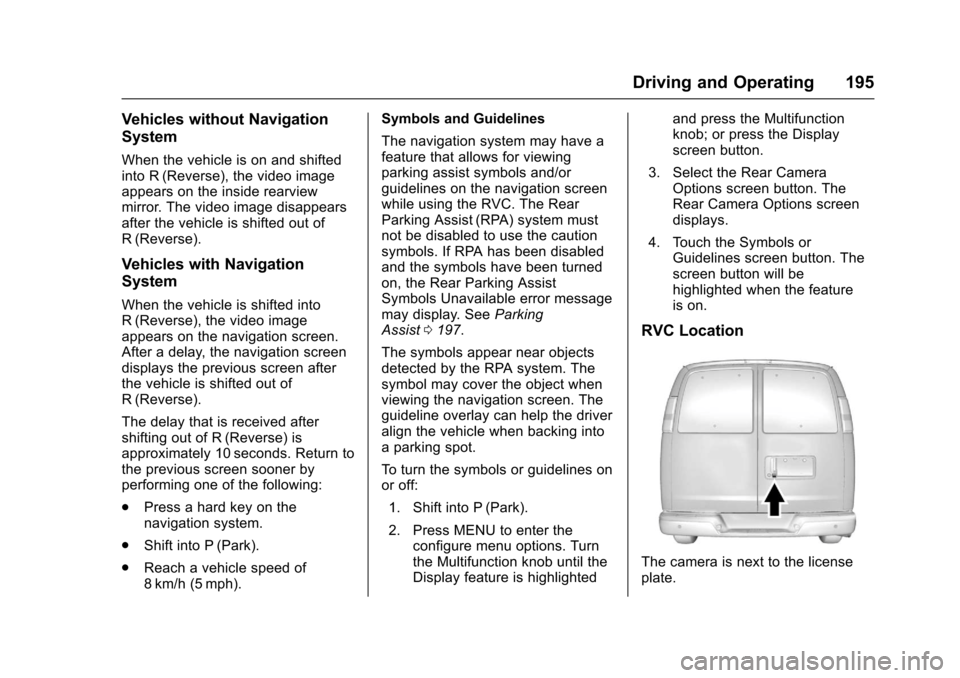
RVC Location
The camera is next to the licenseplate.
Page 197 of 346
Chevrolet Express Owner Manual (GMNA-Localizing-U.S./Canada/Mexico-9967827) - 2017 - crc - 5/6/16
196 Driving and Operating
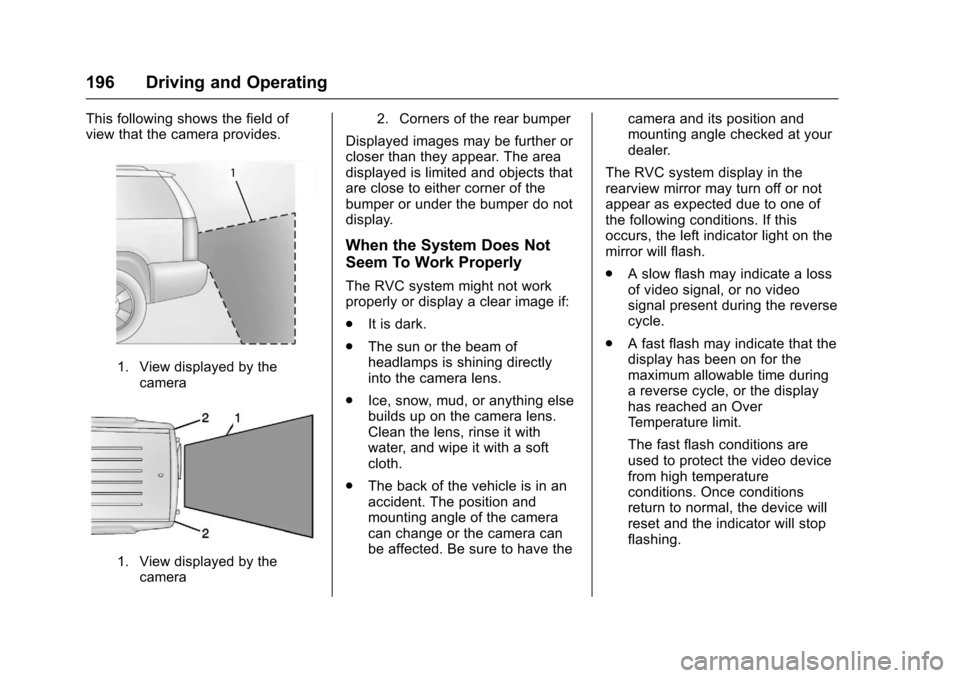
This following shows the field ofview that the camera provides.
1. View displayed by thecamera
1. View displayed by thecamera
2. Corners of the rear bumper
Displayed images may be further orcloser than they appear. The areadisplayed is limited and objects thatare close to either corner of thebumper or under the bumper do notdisplay.
When the System Does Not
Seem To Work Properly
The RVC system might not workproperly or display a clear image if:
.It is dark.
.The sun or the beam ofheadlamps is shining directlyinto the camera lens.
.Ice, snow, mud, or anything elsebuilds up on the camera lens.Clean the lens, rinse it withwater, and wipe it with a softcloth.
.The back of the vehicle is in anaccident. The position andmounting angle of the cameracan change or the camera canbe affected. Be sure to have the
camera and its position andmounting angle checked at yourdealer.
The RVC system display in therearview mirror may turn off or notappear as expected due to one ofthe following conditions. If thisoccurs, the left indicator light on themirror will flash.
.Aslowflashmayindicatealossof video signal, or no videosignal present during the reversecycle.
.Afastflashmayindicatethatthedisplay has been on for themaximum allowable time duringareversecycle,orthedisplayhas reached an OverTe m p e r a t u r e l i m i t .
The fast flash conditions areused to protect the video devicefrom high temperatureconditions. Once conditionsreturn to normal, the device willreset and the indicator will stopflashing.
Page 198 of 346
Chevrolet Express Owner Manual (GMNA-Localizing-U.S./Canada/Mexico-9967827) - 2017 - crc - 5/6/16
Driving and Operating 197
During any of these fault conditions,the display will be blank and theindicator will flash while the vehicleis in R (Reverse) or until theconditions return to normal.
Parking Assist
If equipped, the Rear Parking Assist(RPA) system uses sensors on therear bumper to assist with parkingand avoiding objects while inR(Reverse).
{Warning
The parking assist system does
not detect children, pedestrians,
bicyclists, animals, or objects
below the bumper or that are too
close or too far from the vehicle.
It is not available at speeds
greater than 8 km/h (5 mph). To
prevent injury, death, or vehicle
damage, even with parking assist,
always check the area around the
vehicle and check all mirrors
before backing.
How the System Works
RPA comes on automatically whenthe shift lever is moved intoR(Reverse). A single beep soundsto indicate the system is working.
RPA operates only at speeds lessthan 8 km/h (5 mph).
An obstacle detection is indicatedby beeps. The time between beepsgets shorter as the vehicleapproaches the obstacle. Repeatedbeeps are heard when the distanceis less than 30 cm (12 in).
To b e d e t e c t e d , o b j e c t s m u s t b e a tleast 25 cm (10 in) off the groundand below rear door level. Objectsmust also be within 2.5 m (8 ft) fromthe rear bumper. This distance maybe less during warmer or humidweather.
Turning the System On and Off
The system can be disabled throughthe Driver Information Center (DIC).See“Park Assist”underDriverInformation Center (DIC)0108.
RPA defaults to the on setting eachtime the vehicle is started.
Turn RPA off when towing a trailer.
When the System Does Not
Seem to Work Properly
The following messages may bedisplayed on the DIC:
SERVICE PARK ASSIST :If thismessage occurs, take the vehicle toyour dealer for repair.
PA R K A S S I S T O F F :This messageoccurs if the driver disables thesystem or if the vehicle is drivenabove 8 km/h (5 mph) inR(Reverse).
PA R K A S S T B L O C K E D S E EOWNERS MANUAL :Thismessage can occur under thefollowing conditions:
.The sensors are not clean. Keepthe rear bumper free of mud,dirt, snow, ice, slush, and frost.The message may not clear untilfrost or ice has melted all aroundand inside the sensor.
Page 220 of 346
Chevrolet Express Owner Manual (GMNA-Localizing-U.S./Canada/Mexico-9967827) - 2017 - crc - 5/2/16
Vehicle Care 219
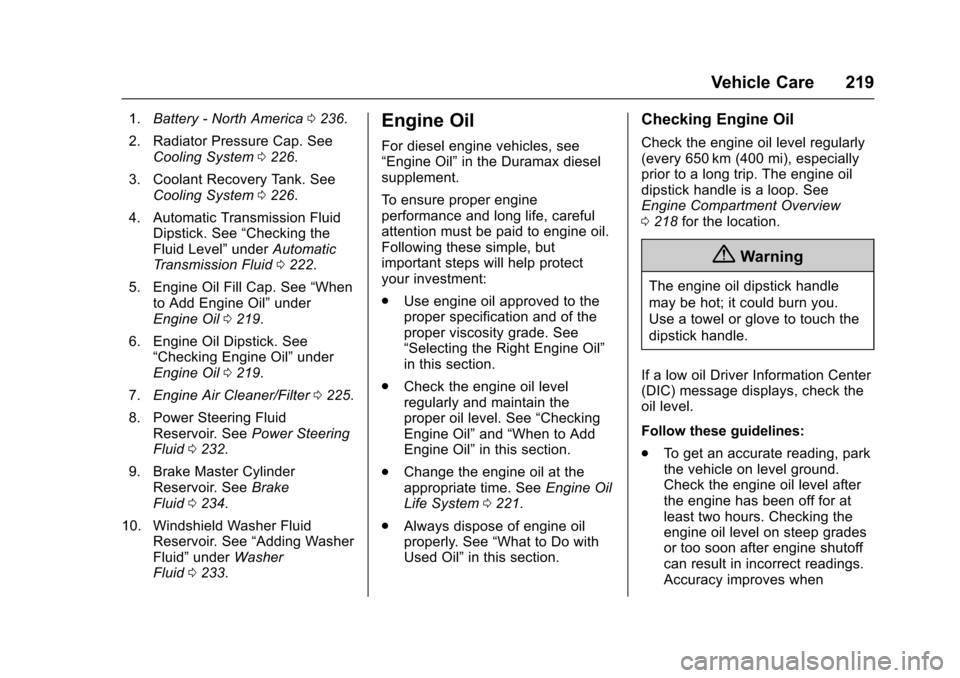
1.Battery - North America0236.
2. Radiator Pressure Cap. SeeCooling System0226.
3. Coolant Recovery Tank. SeeCooling System0226.
4. Automatic Transmission FluidDipstick. See“Checking theFluid Level”underAutomaticTr a n s m i s s i o n F l u i d0222.
5. Engine Oil Fill Cap. See“Whento Add Engine Oil”underEngine Oil0219.
6. Engine Oil Dipstick. See“Checking Engine Oil”underEngine Oil0219.
7.Engine Air Cleaner/Filter0225.
8. Power Steering FluidReservoir. SeePower SteeringFluid0232.
9. Brake Master CylinderReservoir. SeeBrakeFluid0234.
10. Windshield Washer FluidReservoir. See“Adding WasherFluid”underWasherFluid0233.
Engine Oil
For diesel engine vehicles, see“Engine Oil”in the Duramax dieselsupplement.
To e n s u r e p r o p e r e n g i n eperformance and long life, carefulattention must be paid to engine oil.Following these simple, butimportant steps will help protectyour investment:
.Use engine oil approved to theproper specification and of theproper viscosity grade. See“Selecting the Right Engine Oil”in this section.
.Check the engine oil levelregularly and maintain theproper oil level. See“CheckingEngine Oil”and“When to AddEngine Oil”in this section.
.Change the engine oil at theappropriate time. SeeEngine OilLife System0221.
.Always dispose of engine oilproperly. See“What to Do withUsed Oil”in this section.
Checking Engine Oil
Check the engine oil level regularly(every 650 km (400 mi), especiallyprior to a long trip. The engine oildipstick handle is a loop. SeeEngine Compartment Overview0218for the location.
{Warning
The engine oil dipstick handle
may be hot; it could burn you.
Use a towel or glove to touch the
dipstick handle.
If a low oil Driver Information Center(DIC) message displays, check theoil level.
Follow these guidelines:
.To g e t a n a c c u r a t e r e a d i n g , p a r kthe vehicle on level ground.Check the engine oil level afterthe engine has been off for atleast two hours. Checking theengine oil level on steep gradesor too soon after engine shutoffcan result in incorrect readings.Accuracy improves when
Page 232 of 346
Chevrolet Express Owner Manual (GMNA-Localizing-U.S./Canada/Mexico-9967827) - 2017 - crc - 5/2/16
Vehicle Care 231
If Steam is Coming from the
Engine Compartment
{Warning
Steam from an overheated engine
can burn you badly, even if you
just open the hood. Stay away
from the engine if you see or hear
steam coming from it. Just turn it
off and get everyone away from
the vehicle until it cools down.
Wait until there is no sign of
steam or coolant before you open
the hood.
If you keep driving when the
engine is overheated, the liquids
in it can catch fire. You or others
could be badly burned. Stop the
engine if it overheats, and get out
of the vehicle until the engine
is cool.
If No Steam is Coming from
the Engine Compartment
If an engine overheat warning isdisplayed but no steam can be seenor heard, the problem may not be
too serious. Sometimes the enginecan get a little too hot when thevehicle:
.Climbs a long hill on a hot day.
.Stops after high-speed driving.
.Idles for long periods in traffic.
.To w s a t r a i l e r . S e e“Driving onGrades”underTr a i l e rTo w i n g0205.
If the overheat warning is displayedwith no sign of steam:
1. Turn the air off.
2. Turn the heater on to thehighest temperature and to thehighest fan speed. Open thewindows as necessary.
3. When it is safe to do so, pull offthe road, shift to P (Park) orN(Neutral) and let theengine idle.
If the engine coolant temperaturegauge is no longer in the overheatzone or an overheat warning nolonger displays, the vehicle can bedriven. Continue to drive the vehicleslowly for about 10 minutes. Keep asafe vehicle distance from the
vehicle in front. If the warning doesnot come back on, continue to drivenormally and have the coolingsystem checked for proper fill andfunction.
If the warning continues, pull over,stop, and park the vehicleright away.
If there is still no sign of steam,push down the accelerator until theengine speed is about twice as fastas normal idle speed for at leastthree minutes while parked. If thewarning is still on, turn off theengine until it cools down.
If the decision is made not to lift thehood, get service help right away.
Engine Fan
The vehicle has a clutched enginecooling fan. When the clutch isengaged, the fan spins faster toprovide more air to cool the engine.In most everyday driving conditions,the fan is spinning slower and theclutch is not fully engaged. Thisimproves fuel economy and reducesfan noise. Under heavy vehicleloading, trailer towing, and/or high
Page 263 of 346
Chevrolet Express Owner Manual (GMNA-Localizing-U.S./Canada/Mexico-9967827) - 2017 - crc - 5/2/16
262 Vehicle Care
lead to tire failure. Under-inflationalso reduces fuel efficiency and tiretread life, and may affect thevehicle's handling and stoppingability.
Please note that the TPMS is not asubstitute for proper tiremaintenance, and it is the driver'sresponsibility to maintain correct tirepressure, even if under-inflation hasnot reached the level to triggerillumination of the TPMS low tirepressure telltale.
Yo u r v e h i c l e h a s a l s o b e e nequipped with a TPMS malfunctionindicator to indicate when thesystem is not operating properly.The TPMS malfunction indicator iscombined with the low tire pressuretelltale. When the system detects amalfunction, the telltale will flash forapproximately one minute and thenremain continuously illuminated.This sequence will continue uponsubsequent vehicle start-ups aslong as the malfunction exists.
When the malfunction indicator isilluminated, the system may not beable to detect or signal low tire
pressure as intended. TPMSmalfunctions may occur for a varietyof reasons, including the installationof replacement or alternate tires orwheels on the vehicle that preventthe TPMS from functioning properly.Always check the TPMS malfunctiontelltale after replacing one or moretires or wheels on your vehicle toensure that the replacement oralternate tires and wheels allow theTPMS to continue to functionproperly.
SeeTire Pressure MonitorOperation0262.
SeeRadio FrequencyStatement0322.
Tire Pressure Monitor
Operation
This vehicle may have a TirePressure Monitor System (TPMS).The TPMS is designed to warn thedriver when a low tire pressurecondition exists. TPMS sensors aremounted onto each tire and wheelassembly, excluding the spare tireand wheel assembly. The TPMSsensors monitor the air pressure in
the tires and transmit the tirepressure readings to a receiverlocated in the vehicle.
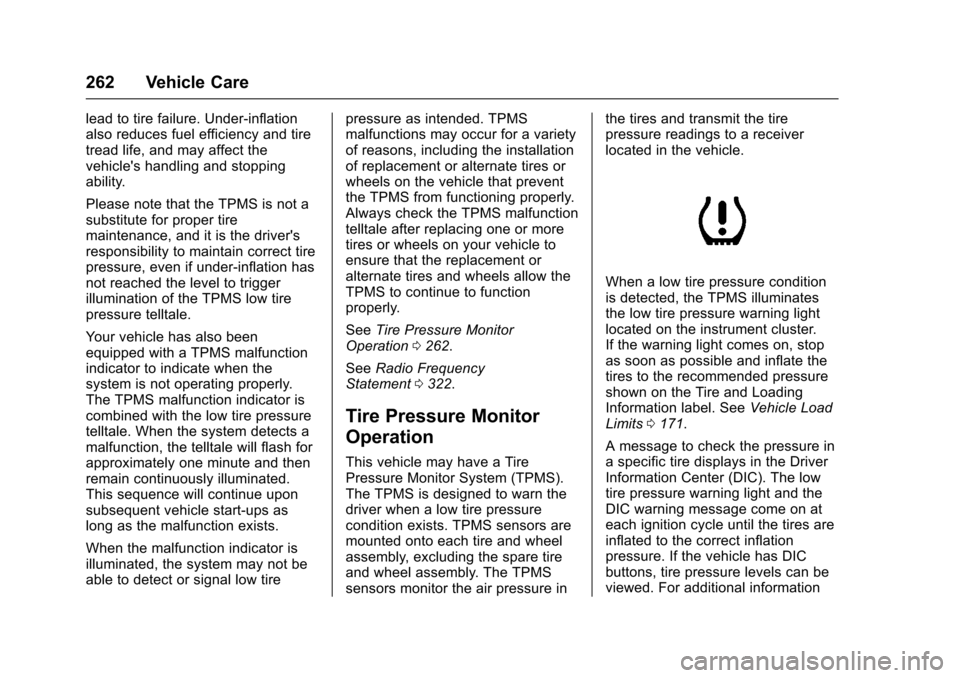
When a low tire pressure conditionis detected, the TPMS illuminatesthe low tire pressure warning lightlocated on the instrument cluster.If the warning light comes on, stopas soon as possible and inflate thetires to the recommended pressureshown on the Tire and LoadingInformation label. SeeVehicle LoadLimits0171.
AmessagetocheckthepressureinaspecifictiredisplaysintheDriverInformation Center (DIC). The lowtire pressure warning light and theDIC warning message come on ateach ignition cycle until the tires areinflated to the correct inflationpressure. If the vehicle has DICbuttons, tire pressure levels can beviewed. For additional information
Page 264 of 346
Chevrolet Express Owner Manual (GMNA-Localizing-U.S./Canada/Mexico-9967827) - 2017 - crc - 5/2/16
Vehicle Care 263
and details about the DIC operationand displays, seeDriver InformationCenter (DIC)0108andTireMessages011 8.
The low tire pressure warning lightmay come on in cool weather whenthe vehicle is first started, and thenturn off as the vehicle is driven. Thiscould be an early indicator that theair pressure is getting low andneeds to be inflated to the properpressure.
ATire and Loading Information labelshows the size of the originalequipment tires and the correctinflation pressure for the tires whenthey are cold. SeeVehicle LoadLimits0171,foranexampleoftheTire and Loading Information labeland its location. Also seeTirePressure0260.
The TPMS can warn about a lowtire pressure condition but it doesnot replace normal tiremaintenance. SeeTire Inspection0265,Tire Rotation0265andTires0252.
Caution
Tire sealant materials are not all
the same. A non-approved tire
sealant could damage the TPMS
sensors. TPMS sensor damage
caused by using an incorrect tire
sealant is not covered by the
vehicle warranty. Always use only
the GM approved tire sealant
available through your dealer or
included in the vehicle.
TPMS Malfunction Light and
Message
The TPMS will not function properlyif one or more of the TPMS sensorsare missing or inoperable. When thesystem detects a malfunction, thelow tire pressure warning lightflashes for about one minute andthen stays on for the remainder ofthe ignition cycle. A DIC warningmessage also displays. Themalfunction light and DIC warningmessage come on at each ignition
cycle until the problem is corrected.Some of the conditions that cancause these to come on are:
.One of the road tires has beenreplaced with the spare tire. Thespare tire does not have aTPMS sensor. The malfunctionlight and the DIC messageshould go off after the road tireis replaced and the sensormatching process is performedsuccessfully. See "TPMS SensorMatching Process" later in thissection.
.The TPMS sensor matchingprocess was not done or notcompleted successfully afterrotating the tires. Themalfunction light and the DICmessage should go off aftersuccessfully completing thesensor matching process. See"TPMS Sensor MatchingProcess" later in this section.
.One or more TPMS sensors aremissing or damaged. Themalfunction light and the DICmessage should go off when theTPMS sensors are installed and
Page 265 of 346
Chevrolet Express Owner Manual (GMNA-Localizing-U.S./Canada/Mexico-9967827) - 2017 - crc - 5/2/16
264 Vehicle Care
the sensor matching process isperformed successfully. Seeyour dealer for service.
.Replacement tires or wheels donot match the original equipmenttires or wheels. Tires and wheelsother than those recommendedcould prevent the TPMS fromfunctioning properly. SeeBuyingNew Tires0268.
.Operating electronic devices orbeing near facilities using radiowave frequencies similar to theTPMS could cause the TPMSsensors to malfunction.
If the TPMS is not functioningproperly, it cannot detect or signal alow tire condition. See your dealerfor service if the TPMS malfunctionlight and DIC message come onand stay on.
TPMS Sensor Matching
Process
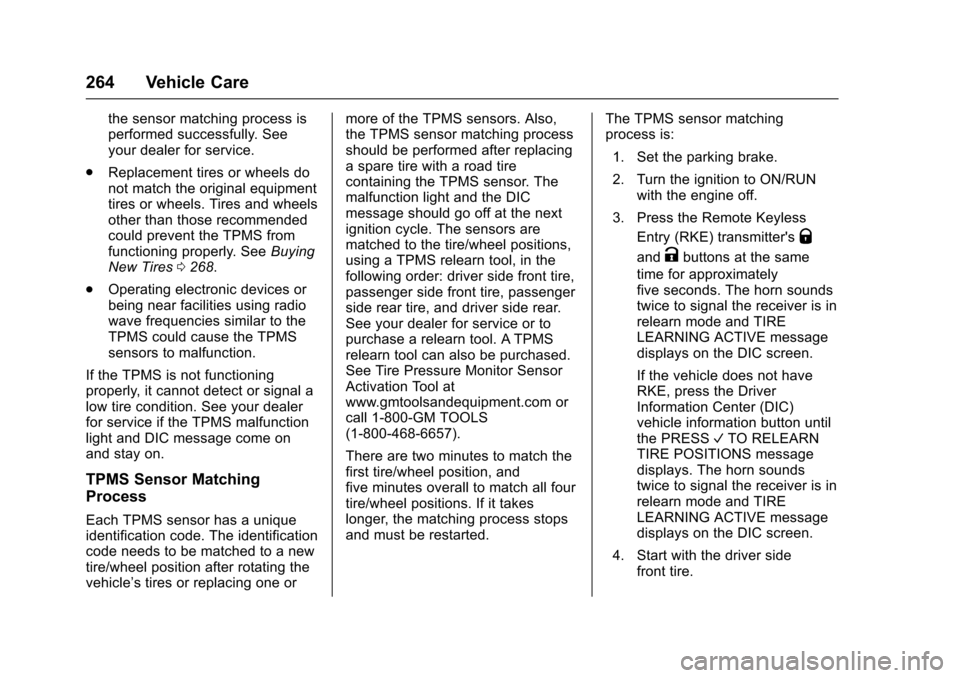
Each TPMS sensor has a uniqueidentification code. The identificationcode needs to be matched to a newtire/wheel position after rotating thevehicle’stiresorreplacingoneor
more of the TPMS sensors. Also,the TPMS sensor matching processshould be performed after replacingasparetirewitharoadtirecontaining the TPMS sensor. Themalfunction light and the DICmessage should go off at the nextignition cycle. The sensors arematched to the tire/wheel positions,using a TPMS relearn tool, in thefollowing order: driver side front tire,passenger side front tire, passengerside rear tire, and driver side rear.See your dealer for service or topurchase a relearn tool. A TPMSrelearn tool can also be purchased.See Tire Pressure Monitor SensorActivation Tool atwww.gmtoolsandequipment.com orcall 1-800-GM TOOLS(1-800-468-6657).
There are two minutes to match thefirst tire/wheel position, andfive minutes overall to match all fourtire/wheel positions. If it takeslonger, the matching process stopsand must be restarted.
The TPMS sensor matchingprocess is:
1. Set the parking brake.
2. Turn the ignition to ON/RUNwith the engine off.
3. Press the Remote Keyless
Entry (RKE) transmitter'sQ
andKbuttons at the same
time for approximatelyfive seconds. The horn soundstwice to signal the receiver is inrelearn mode and TIRELEARNING ACTIVE messagedisplays on the DIC screen.
If the vehicle does not haveRKE, press the DriverInformation Center (DIC)vehicle information button untilthe PRESSVTO RELEARNTIRE POSITIONS messagedisplays. The horn soundstwice to signal the receiver is inrelearn mode and TIRELEARNING ACTIVE messagedisplays on the DIC screen.
4. Start with the driver sidefront tire.
Page 266 of 346
Chevrolet Express Owner Manual (GMNA-Localizing-U.S./Canada/Mexico-9967827) - 2017 - crc - 5/2/16
Vehicle Care 265
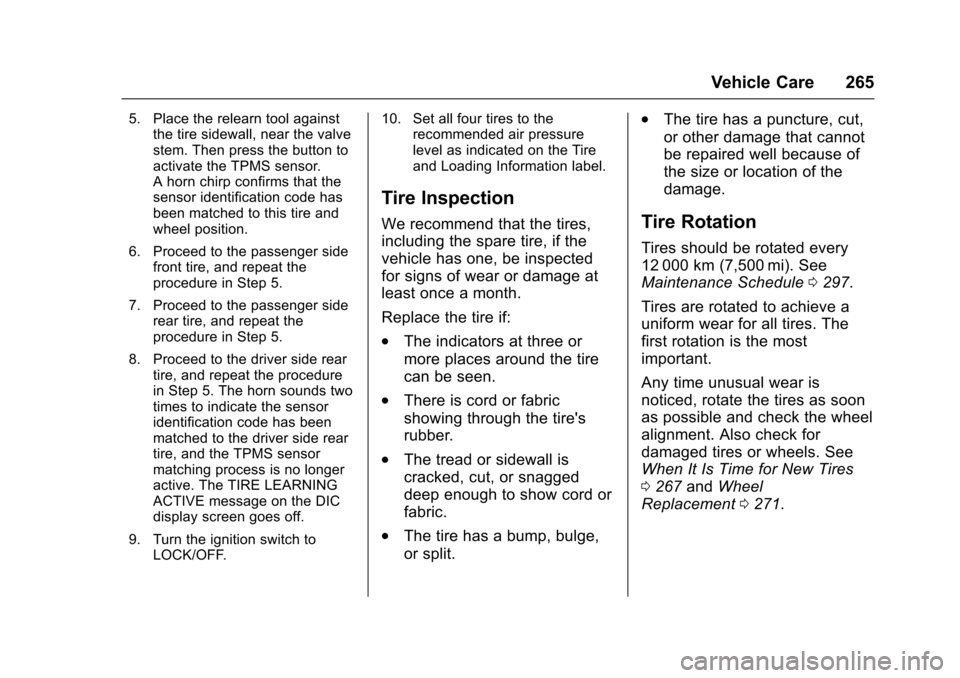
5. Place the relearn tool againstthe tire sidewall, near the valvestem. Then press the button toactivate the TPMS sensor.Ahornchirpconfirmsthatthesensor identification code hasbeen matched to this tire andwheel position.
6. Proceed to the passenger sidefront tire, and repeat theprocedure in Step 5.
7. Proceed to the passenger siderear tire, and repeat theprocedure in Step 5.
8. Proceed to the driver side reartire, and repeat the procedurein Step 5. The horn sounds twotimes to indicate the sensoridentification code has beenmatched to the driver side reartire, and the TPMS sensormatching process is no longeractive. The TIRE LEARNINGACTIVE message on the DICdisplay screen goes off.
9. Turn the ignition switch toLOCK/OFF.
10. Set all four tires to therecommended air pressurelevel as indicated on the Tireand Loading Information label.
Tire Inspection
We recommend that the tires,
including the spare tire, if the
vehicle has one, be inspected
for signs of wear or damage at
least once a month.
Replace the tire if:
.The indicators at three or
more places around the tire
can be seen.
.There is cord or fabric
showing through the tire's
rubber.
.The tread or sidewall is
cracked, cut, or snagged
deep enough to show cord or
fabric.
.The tire has a bump, bulge,
or split.
.The tire has a puncture, cut,
or other damage that cannot
be repaired well because of
the size or location of the
damage.
Tire Rotation
Tires should be rotated every
12 000 km (7,500 mi). See
Maintenance Schedule0297.
Tires are rotated to achieve a
uniform wear for all tires. The
first rotation is the most
important.
Any time unusual wear is
noticed, rotate the tires as soon
as possible and check the wheel
alignment. Also check for
damaged tires or wheels. See
When It Is Time for New Tires
0267andWheel
Replacement0271.