key battery CHEVROLET EXPRESS CARGO VAN 2017 1.G Owners Manual
[x] Cancel search | Manufacturer: CHEVROLET, Model Year: 2017, Model line: EXPRESS CARGO VAN, Model: CHEVROLET EXPRESS CARGO VAN 2017 1.GPages: 346, PDF Size: 6.54 MB
Page 26 of 346
Chevrolet Express Owner Manual (GMNA-Localizing-U.S./Canada/Mexico-9967827) - 2017 - crc - 5/2/16
Keys, Doors, and Windows 25
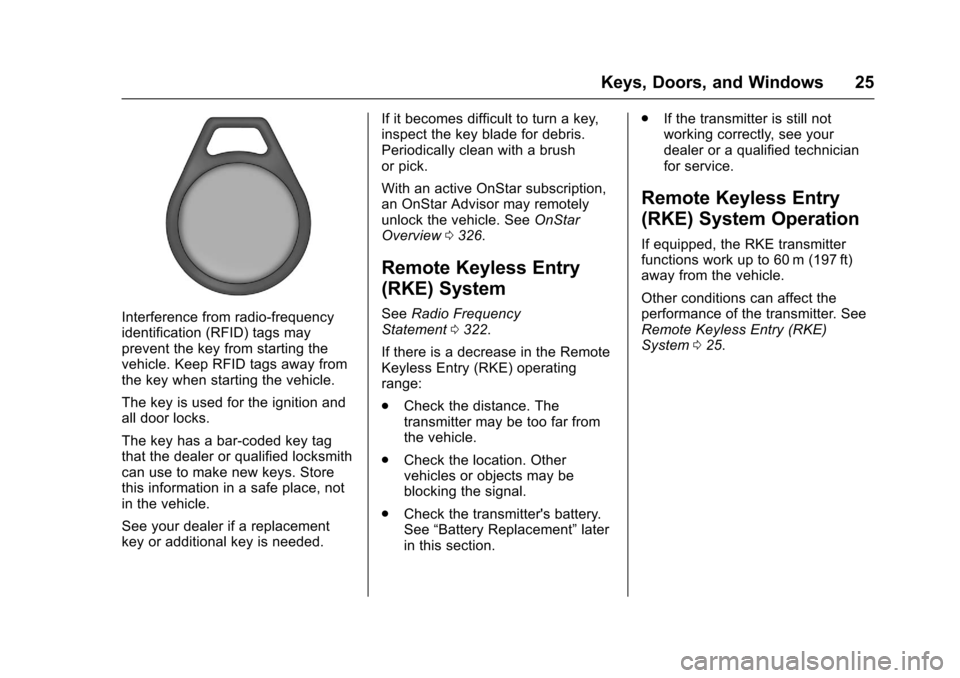
Interference from radio-frequencyidentification (RFID) tags mayprevent the key from starting thevehicle. Keep RFID tags away fromthe key when starting the vehicle.
The key is used for the ignition andall door locks.
The key has a bar-coded key tagthat the dealer or qualified locksmithcan use to make new keys. Storethis information in a safe place, notin the vehicle.
See your dealer if a replacementkey or additional key is needed.
If it becomes difficult to turn a key,inspect the key blade for debris.Periodically clean with a brushor pick.
With an active OnStar subscription,an OnStar Advisor may remotelyunlock the vehicle. SeeOnStarOverview0326.
Remote Keyless Entry
(RKE) System
SeeRadio FrequencyStatement0322.
If there is a decrease in the RemoteKeyless Entry (RKE) operatingrange:
.Check the distance. Thetransmitter may be too far fromthe vehicle.
.Check the location. Othervehicles or objects may beblocking the signal.
.Check the transmitter's battery.See“Battery Replacement”laterin this section.
.If the transmitter is still notworking correctly, see yourdealer or a qualified technicianfor service.
Remote Keyless Entry
(RKE) System Operation
If equipped, the RKE transmitterfunctions work up to 60 m (197 ft)away from the vehicle.
Other conditions can affect theperformance of the transmitter. SeeRemote Keyless Entry (RKE)System025.
Page 27 of 346
Chevrolet Express Owner Manual (GMNA-Localizing-U.S./Canada/Mexico-9967827) - 2017 - crc - 5/2/16
26 Keys, Doors, and Windows
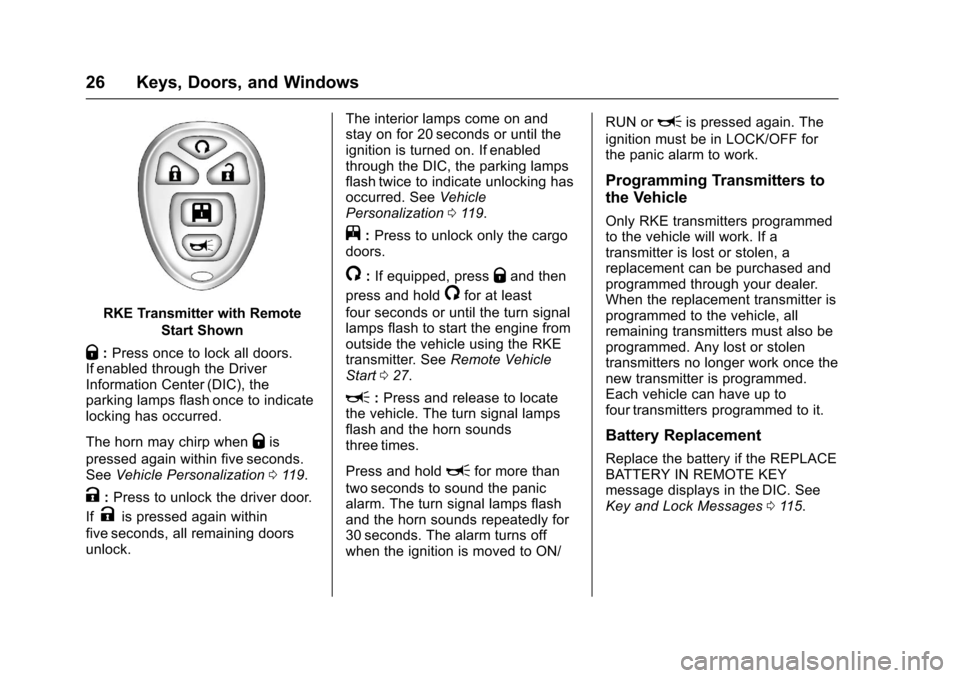
RKE Transmitter with Remote
Start Shown
Q:Press once to lock all doors.If enabled through the DriverInformation Center (DIC), theparking lamps flash once to indicatelocking has occurred.
The horn may chirp whenQis
pressed again within five seconds.SeeVehicle Personalization011 9.
K:Press to unlock the driver door.
IfKis pressed again within
five seconds, all remaining doorsunlock.
The interior lamps come on andstay on for 20 seconds or until theignition is turned on. If enabledthrough the DIC, the parking lampsflash twice to indicate unlocking hasoccurred. SeeVehiclePersonalization011 9.
j:Press to unlock only the cargodoors.
/:If equipped, pressQand then
press and hold/for at least
four seconds or until the turn signallamps flash to start the engine fromoutside the vehicle using the RKEtransmitter. SeeRemote VehicleStart027.
L:Press and release to locatethe vehicle. The turn signal lampsflash and the horn soundsthree times.
Press and holdLfor more than
two seconds to sound the panicalarm. The turn signal lamps flashand the horn sounds repeatedly for30 seconds. The alarm turns offwhen the ignition is moved to ON/
RUN orLis pressed again. The
ignition must be in LOCK/OFF forthe panic alarm to work.
Programming Transmitters to
the Vehicle
Only RKE transmitters programmedto the vehicle will work. If atransmitter is lost or stolen, areplacement can be purchased andprogrammed through your dealer.When the replacement transmitter isprogrammed to the vehicle, allremaining transmitters must also beprogrammed. Any lost or stolentransmitters no longer work once thenew transmitter is programmed.Each vehicle can have up tofour transmitters programmed to it.
Battery Replacement
Replace the battery if the REPLACEBATTERY IN REMOTE KEYmessage displays in the DIC. SeeKey and Lock Messages011 5.
Page 28 of 346
Chevrolet Express Owner Manual (GMNA-Localizing-U.S./Canada/Mexico-9967827) - 2017 - crc - 5/2/16
Keys, Doors, and Windows 27
Caution
When replacing the battery, do
not touch any of the circuitry on
the transmitter. Static from your
body could damage the
transmitter.
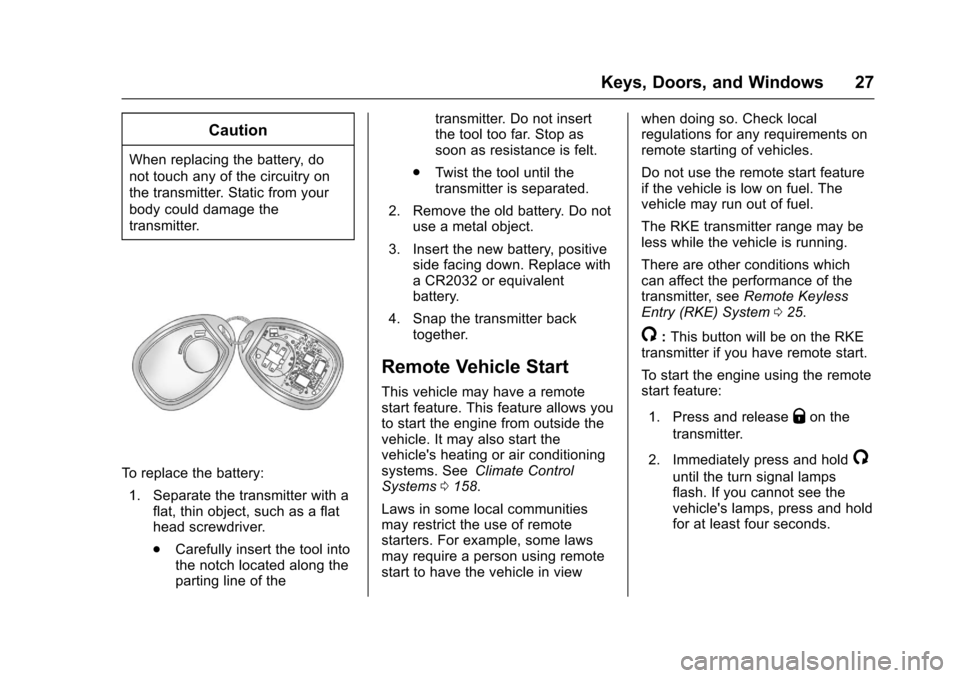
To r e p l a c e t h e b a t t e r y :
1. Separate the transmitter with aflat, thin object, such as a flathead screwdriver.
.Carefully insert the tool intothe notch located along theparting line of the
transmitter. Do not insertthe tool too far. Stop assoon as resistance is felt.
.Tw i s t t h e t o o l u n t i l t h etransmitter is separated.
2. Remove the old battery. Do notuse a metal object.
3. Insert the new battery, positiveside facing down. Replace withaCR2032orequivalentbattery.
4. Snap the transmitter backtogether.
Remote Vehicle Start
This vehicle may have a remotestart feature. This feature allows youto start the engine from outside thevehicle. It may also start thevehicle's heating or air conditioningsystems. SeeClimate ControlSystems0158.
Laws in some local communitiesmay restrict the use of remotestarters. For example, some lawsmay require a person using remotestart to have the vehicle in view
when doing so. Check localregulations for any requirements onremote starting of vehicles.
Do not use the remote start featureif the vehicle is low on fuel. Thevehicle may run out of fuel.
The RKE transmitter range may beless while the vehicle is running.
There are other conditions whichcan affect the performance of thetransmitter, seeRemote KeylessEntry (RKE) System025.
/:This button will be on the RKEtransmitter if you have remote start.
To s t a r t t h e e n g i n e u s i n g t h e r e m o t estart feature:
1. Press and releaseQon the
transmitter.
2. Immediately press and hold/
until the turn signal lampsflash. If you cannot see thevehicle's lamps, press and holdfor at least four seconds.
Page 88 of 346
Chevrolet Express Owner Manual (GMNA-Localizing-U.S./Canada/Mexico-9967827) - 2017 - crc - 5/2/16
Instruments and Controls 87
Instruments and
Controls
Controls
Steering Wheel Adjustment . . . . 88Steering Wheel Controls . . . . . . . 88Horn . . . . . . . . . . . . . . . . . . . . . . . . . . . 89Windshield Wiper/Washer . . . . . . 89Compass . . . . . . . . . . . . . . . . . . . . . . 90Clock . . . . . . . . . . . . . . . . . . . . . . . . . . 92Power Outlets . . . . . . . . . . . . . . . . . 93Cigarette Lighter . . . . . . . . . . . . . . . 94Ashtrays . . . . . . . . . . . . . . . . . . . . . . . 94
Warning Lights, Gauges, and
Indicators
Warning Lights, Gauges, andIndicators . . . . . . . . . . . . . . . . . . . . 94Instrument Cluster . . . . . . . . . . . . . 95Speedometer . . . . . . . . . . . . . . . . . . 96Odometer . . . . . . . . . . . . . . . . . . . . . . 96Trip Odometer . . . . . . . . . . . . . . . . . 96Fuel Gauge . . . . . . . . . . . . . . . . . . . . 96Engine Oil Pressure Gauge . . . . 97Engine Coolant TemperatureGauge . . . . . . . . . . . . . . . . . . . . . . . . 98Voltmeter Gauge . . . . . . . . . . . . . . . 99Safety Belt Reminders . . . . . . . . . 99Airbag Readiness Light . . . . . . . . 99
Airbag On-Off Light . . . . . . . . . . . 100Charging System Light . . . . . . . 101Malfunction Indicator Lamp(Check Engine Light) . . . . . . . . 102Brake System WarningLight . . . . . . . . . . . . . . . . . . . . . . . . 104Antilock Brake System (ABS)Warning Light . . . . . . . . . . . . . . . 104To w / H a u l M o d e L i g h t . . . . . . . . . 1 0 5StabiliTrak®OFF Light . . . . . . . . 105Traction Control System (TCS)/StabiliTrak®Light . . . . . . . . . . . 105Tire Pressure Light . . . . . . . . . . . 106Engine Oil Pressure Light . . . . 106Low Fuel Warning Light . . . . . . 107Security Light . . . . . . . . . . . . . . . . . 107High-Beam On Light . . . . . . . . . . 107Cruise Control Light . . . . . . . . . . 107
Information Displays
Driver InformationCenter (DIC) . . . . . . . . . . . . . . . . 108
Vehicle Messages
Vehicle Messages . . . . . . . . . . . . 112Battery Voltage and ChargingMessages . . . . . . . . . . . . . . . . . . . 112Brake System Messages . . . . . 112Compass Messages . . . . . . . . . . 113Door Ajar Messages . . . . . . . . . . 113
Engine Cooling SystemMessages . . . . . . . . . . . . . . . . . . . 113Engine Oil Messages . . . . . . . . . 114Engine Power Messages . . . . . 114Fuel System Messages . . . . . . . 115Key and Lock Messages . . . . . . 115Lamp Messages . . . . . . . . . . . . . . 115Object Detection SystemMessages . . . . . . . . . . . . . . . . . . . 115Ride Control SystemMessages . . . . . . . . . . . . . . . . . . . 116Airbag System Messages . . . . . 117Security Messages . . . . . . . . . . . 117Service Vehicle Messages . . . . 117Tire Messages . . . . . . . . . . . . . . . . 118Transmission Messages . . . . . . 118Vehicle ReminderMessages . . . . . . . . . . . . . . . . . . . 119
Vehicle Personalization
Vehicle Personalization . . . . . . . 119
Page 116 of 346
Chevrolet Express Owner Manual (GMNA-Localizing-U.S./Canada/Mexico-9967827) - 2017 - crc - 5/2/16
Instruments and Controls 115
stays on, the vehicle should betaken to your dealer for service assoon as possible.
Fuel System Messages
FUEL LEVEL LOW
This message displays and a chimesounds if the fuel level is low. Refuelas soon as possible. SeeFuelGauge096andFuel0198formore information.
TIGHTEN GAS CAP
This message may display alongwith the check engine light on theinstrument cluster if the fuel cap isnot tightened properly. SeeMalfunction Indicator Lamp (CheckEngine Light)0102.Reinstallthefuel cap fully. SeeFilling the Tank0200.Thediagnosticsystemcandetermine if the fuel cap has beenleft off or improperly installed.Alooseormissingfuelcapallowsfuel to evaporate into theatmosphere. A few driving trips withthe cap properly installed shouldturn this light and message off.
Key and Lock Messages
REPLACE BATTERY IN
REMOTE KEY
This message displays if a RemoteKeyless Entry (RKE) transmitterbattery is low. The battery needs tobe replaced in the transmitter. See“Battery Replacement”underRemote Keyless Entry (RKE)System Operation025.
Lamp Messages
AUTOMATIC LIGHT
CONTROL OFF
This message displays when theautomatic headlamps are turned off.SeeExterior Lamp Controls0125.
AUTOMATIC LIGHT
CONTROL ON
This message displays when theautomatic headlamps are turned on.SeeExterior Lamp Controls0125.
TURN SIGNAL ON
This message displays and a chimesounds if a turn signal is left on for1.2 km (0.75 mi). Move the turnsignal lever to the off position.
Object Detection System
Messages
PARK ASST BLOCKED SEE
OWNERS MANUAL
This message displays if there issomething interfering with the RearParking Assist (RPA) system. SeeParking Assist0197.
PARK ASSIST OFF
After the vehicle has been started,this message displays to remind thedriver that the Rear Parking Assist(RPA) system has been turned off.Press the set/reset button or the tripodometer reset stem toacknowledge this message andclear it from the DIC display. To turnthe RPA system back on, seeParking Assist0197.
Page 131 of 346
Chevrolet Express Owner Manual (GMNA-Localizing-U.S./Canada/Mexico-9967827) - 2017 - crc - 5/2/16
130 Lighting
Reading Lamps
If equipped with reading lamps,press the button next to each lampto turn it on or off.
The vehicle may also have readinglamps in other locations. The lampscannot be adjusted.
Lighting Features
Entry/Exit Lighting
The vehicle has an illuminatedentry/exit feature.
The dome lamps come on if theE
DOME OFF button is in theextended position, when a door isopened, or the key is removed fromthe ignition.
Battery Load
Management
The vehicle may have ElectricPower Management (EPM) thatestimates the battery's temperatureand state of charge. It then adjuststhe voltage for best performanceand extended life of the battery.
When the battery's state of chargeis low, the voltage is raised slightlyto quickly bring the charge back up.When the state of charge is high,the voltage is lowered slightly toprevent overcharging. If the vehiclehas a voltmeter gauge or a voltagedisplay on the Driver Information
Center (DIC), you may see thevoltage move up or down. This isnormal. If there is a problem, analert will be displayed.
The battery can be discharged atidle if the electrical loads are veryhigh. This is true for all vehicles.This is because the generator(alternator) may not be spinning fastenough at idle to produce all thepower that is needed for very highelectrical loads.
Ahighelectricalloadoccurswhenseveral of the following are on, suchas: headlamps, high beams, foglamps, rear window defogger,climate control fan at high speed,heated seats, engine cooling fans,trailer loads, and loads plugged intoaccessory power outlets.
EPM works to prevent excessivedischarge of the battery. It does thisby balancing the generator's outputand the vehicle's electrical needs.It can increase engine idle speed togenerate more power, wheneverneeded. It can temporarily reducethe power demands of someaccessories.
Page 147 of 346
Chevrolet Express Owner Manual (GMNA-Localizing-U.S./Canada/Mexico-9967827) - 2017 - crc - 5/2/16
146 Infotainment System
To e x i t m u s i c n a v i g a t o r m o d e , p r e s sthe softkey below the Back tab toreturn to normal MP3 playback.
CD Player Messages
CHECK DISC :If this messagedisplays and/or the CD ejects, itcould be for one of the followingreasons:
.It is very hot. When thetemperature returns to normal,the CD should play.
.The road is very rough. Whenthe road becomes smoother, theCD should play.
.The CD is dirty, scratched, wet,or upside down.
.The air is very humid. If so, waitabout an hour and try again.
.There was a problem whileburning the CD.
.The label is caught in the CDplayer.
If the CD is not playing correctly, forany other reason, try a knowngood CD.
If any error occurs repeatedly or ifan error cannot be corrected,contact your dealer. If the radiodisplays an error message, write itdown and provide it to your dealerwhen reporting the problem.
Auxiliary Devices
Using the Auxiliary Input Jack
Radios with an auxiliary input jackon the lower right side of thefaceplate can connect to an externalaudio device such as an iPod®,MP3 player, or CD player, for use asanother source for audio listening.This input jack is not an audiooutput; do not plug headphones intothe front auxiliary input jack.
Drivers are encouraged to set upany auxiliary device while thevehicle is in P (Park). SeeDefensive Driving0165for moreinformation on driver distraction.
To u s e a p o r t a b l e a u d i o p l a y e r ,connect a 3.5 mm (1/8 in) cable tothe radio's front auxiliary input jack.When a device is connected, press
the radio CD/AUX button to beginplaying audio from the device overthe vehicle speakers.
For optimal sound quality, increasethe portable audio device's volumeto the loudest level.
It is always best to power theportable audio device through itsown battery while playing.
O:Turn clockwise orcounterclockwise to increase ordecrease the volume of the portableplayer. Additional volumeadjustments might have to be madefrom the portable device if thevolume is not loud or soft enough.
BAND :If equipped, press to listento the radio when a portable audiodevice is playing. The portableaudio device continues playing.
CD/AUX :If equipped, press to playaCDwhenaportableaudiodeviceis playing. Press again and thesystem begins playing audio fromthe connected portable audio player.If a portable audio player is notconnected,“No Input Device Found”displays.
Page 149 of 346
Chevrolet Express Owner Manual (GMNA-Localizing-U.S./Canada/Mexico-9967827) - 2017 - crc - 5/2/16
148 Infotainment System
.FAT 3 2 .
Connecting a USB Storage
Device or iPod
The USB port can be used tocontrol an iPod or a USB storagedevice.
To c o n n e c t a U S B s t o r a g e d e v i c e ,connect the device to the USB porton the instrument panel.
To c o n n e c t a n i P o d , c o n n e c t o n eend of the USB cable that camewith the iPod to the iPod’sdockconnector and connect the otherend to the USB port on theinstrument panel. If the vehicle is onand the USB connection works,“OKto disconnect”and a GM logo mayappear on the iPod, and iPodappears on the radio display. TheiPod music appears on the radiodisplay and begins playing.
The iPod charges while it isconnected to the vehicle if thevehicle is in the ACC/ACCESSORYor ON/RUN position. When thevehicle is turned off, the iPod
automatically powers off and will notcharge or draw power from thevehicle's battery.
If you have an older iPod model thatis not supported, it can still be usedby connecting it to the auxiliaryinput jack using a standard 3.5 mm(1/8 in) stereo cable. See“Using theAuxiliary Input Jack”previously inthis section.
Using the Radio to Control a
USB Storage Device or iPod
The radio can control a USBstorage device or an iPod using theradio buttons and knobs, anddisplay song information on theradio display.
f:Turn to select files.
©SEEK :Press to go to the start ofthe track, if more than 10 secondshave played. Press and hold orpress multiple times to continuemoving backward through tracks.
¨SEEK :Press to go to the nexttrack. Press and hold or pressmultiple times to continue movingforward through tracks.
sREV :Press and hold to reverseplayback quickly. Sound is heard at
areducedvolume.ReleasesREV
to resume playing. The elapsed timeof the file displays.
\FWD :Press and hold toadvance playback quickly. Sound isheard at a reduced volume. Release\FWD to resume playing. Theelapsed time of the file displays.
4:Press to display additionalinformation about the selected track.
Using Softkeys to Control a
USB Storage Device or iPod
The five softkeys below the radiodisplay are used to control thefunctions listed below.
To u s e t h e s o f t k e y s :
1. Press the first or fifth softkeybelow the radio display todisplay the functions listedbelow, or press the softkeybelow the function if it iscurrently displayed.
2. Press the softkey below the tabwith the function on it to usethat function.
Page 178 of 346
Chevrolet Express Owner Manual (GMNA-Localizing-U.S./Canada/Mexico-9967827) - 2017 - crc - 5/6/16
Driving and Operating 177
1(ACC/ACCESSORY):This is theposition in which you can operatethings like the radio and thewindshield wipers when the engineis off.
2(ON/RUN):This position can beused to operate the electricalaccessories and to display someinstrument cluster warning andindicator lights. This position canalso be used for service anddiagnostics, and to verify the properoperation of the malfunctionindicator lamp as may be requiredfor emission inspection purposes.The switch stays in this positionwhen the engine is running.
If you leave the key in the ACC/ACCESSORY or ON/RUN positionwith the engine off, the battery couldbe drained. You may not be able tostart the vehicle if the battery isallowed to drain for an extendedperiod of time.
3(START):This is the position thatstarts the engine. When the enginestarts, release the key. The ignitionswitch returns to ON/RUN fordriving.
Awarningtonewillsoundwhenthedriver door is opened, the ignition isin ACC/ACCESSORY or LOCK/OFFand the key is in the ignition.
Starting the Engine
If the vehicle has a diesel engine,see the Duramax dieselsupplement.
To p l a c e t h e t r a n s m i s s i o n i n t h eproper gear:
Move the shift lever to P (Park) orN(Neutral). The engine will not startin any other position. To restart theengine when the vehicle is alreadymoving, use N (Neutral) only.
Caution
If you add electrical parts or
accessories, you could change
the way the engine operates. Any
resulting damage would not be
covered by the vehicle warranty.
SeeAdd-On Electrical
Equipment0212.
Caution
Do not try to shift to P (Park) if the
vehicle is moving. If you do, you
could damage the transmission.
Shift to P (Park) only when the
vehicle is stopped.
Caution
If the steering wheel is turned
until it reaches the end of its
travel, and is held in that position
while starting the vehicle, damage
may occur to the hydraulic power
steering system and there may be
loss of power steering assist.
Starting Procedure
1. With your foot off theaccelerator pedal, turn theignition key to START. Whenthe engine starts, let go of thekey. The idle speed will godown as your engine getswarm. Do not race the engineimmediately after starting it.
Page 179 of 346
Chevrolet Express Owner Manual (GMNA-Localizing-U.S./Canada/Mexico-9967827) - 2017 - crc - 5/6/16
178 Driving and Operating
Operate the engine andtransmission gently to allow theoil to warm up and lubricate allmoving parts.
When the Low Fuel warninglamp is on and the FUELLEVEL LOW message isdisplayed in the DriverInformation Center (DIC), theComputer-Controlled CrankingSystem is disabled to preventpossible vehicle componentdamage. When this happens,hold the ignition switch in theSTART position to continueengine cranking.
Caution
Cranking the engine for long
periods of time, by returning the
ignition to the START position
immediately after cranking has
ended, can overheat and damage
the cranking motor, and drain the
battery. Wait at least 15 seconds
between each try, to let the
cranking motor cool down.
2. If the engine does not startafter 5-10 seconds, especiallyin very cold weather (below✓18 °C or 0 °F), it could beflooded with too muchgasoline. Try pushing theaccelerator pedal all the way tothe floor and holding it there asyou hold the key in START forup to 15 seconds. Wait at least15 seconds between each try,to allow the cranking motor tocool down. When the enginestarts, let go of the key andaccelerator. If the vehicle startsbriefly but then stops again, dothe same thing. This clears theextra gasoline from the engine.Do not race the engineimmediately after starting it.Operate the engine andtransmission gently until the oilwarms up and lubricates allmoving parts.
Fast Idle System
If equipped, this feature is availableonly with cruise control. The manualfast idle switch is operated using thecruise control buttons on the leftside of the steering wheel.
This system can be used toincrease engine idle speedwhenever the following conditionsare met:
.The parking brake is set.
.The brake pedal is not pressed.
.The vehicle must not be movingand the accelerator must not bepressed.
To c o n t r o l t h e f a s t i d l e :
.To e n a b l e t h e F a s t I d l e S y s t e m ,press and release the cruisecontrol on/off button and ensurethat the switch indicator lightis lit.
.Press and release the cruisecontrol SET- button. Enginespeed will be held atapproximately 1200 rpm.