climate control CHEVROLET HHR 2008 1.G User Guide
[x] Cancel search | Manufacturer: CHEVROLET, Model Year: 2008, Model line: HHR, Model: CHEVROLET HHR 2008 1.GPages: 430, PDF Size: 5.63 MB
Page 155 of 430
Climate Controls
Climate Control System
The heating, cooling, and ventilation for your vehicle
can be controlled with this system.
For vehicles with remote start, the climate control
system comes on and uses the prior temperature
settings selected before you exited the vehicle.
Operation
To change the current mode, select one of the following:
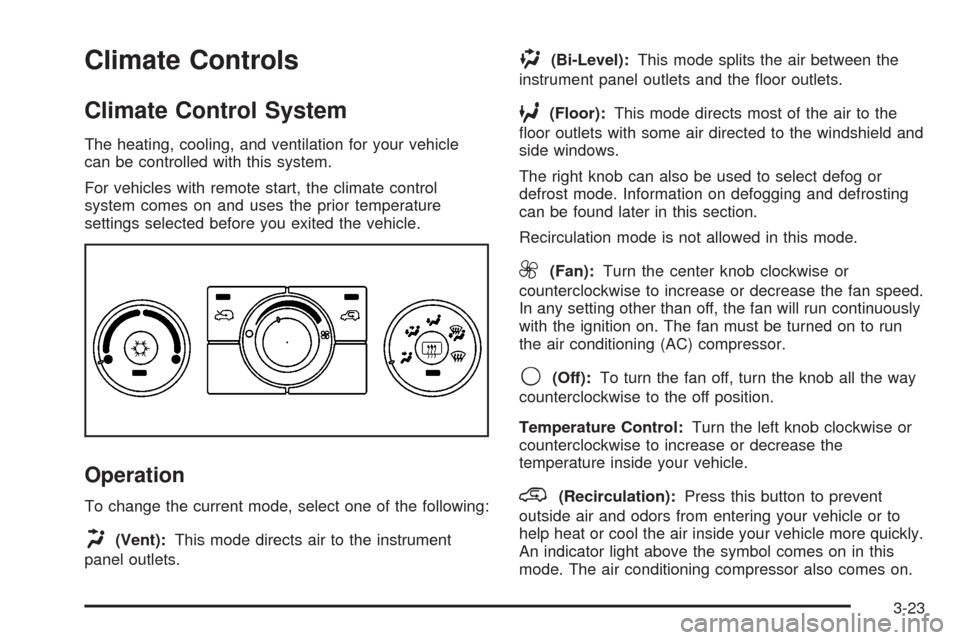
H(Vent):This mode directs air to the instrument
panel outlets.
)(Bi-Level):This mode splits the air between the
instrument panel outlets and the oor outlets.
6(Floor):This mode directs most of the air to the
oor outlets with some air directed to the windshield and
side windows.
The right knob can also be used to select defog or
defrost mode. Information on defogging and defrosting
can be found later in this section.
Recirculation mode is not allowed in this mode.
9(Fan):Turn the center knob clockwise or
counterclockwise to increase or decrease the fan speed.
In any setting other than off, the fan will run continuously
with the ignition on. The fan must be turned on to run
the air conditioning (AC) compressor.
9(Off):To turn the fan off, turn the knob all the way
counterclockwise to the off position.
Temperature Control:Turn the left knob clockwise or
counterclockwise to increase or decrease the
temperature inside your vehicle.
@(Recirculation):Press this button to prevent
outside air and odors from entering your vehicle or to
help heat or cool the air inside your vehicle more quickly.
An indicator light above the symbol comes on in this
mode. The air conditioning compressor also comes on.
3-23
Page 157 of 430
Defogging and Defrosting
Fog on the inside of windows is a result of high humidity
(moisture) condensing on the cool window glass. This
can be minimized if the climate control system is
used properly. There are two modes to clear fog or frost
from your windshield and side windows. Use the
defog mode to clear the windows of fog or moisture and
warm the passengers. Use the defrost mode to
remove fog or frost from the windshield more quickly.
For best results, clear all snow and ice from the
windshield before defrosting.
Turn the right knob to select the defog or defrost mode.
-(Defog):This mode directs approximately half of the
air to the windshield and the side window outlets and half
to the oor outlets. When this mode is selected the
system runs the air conditioning compressor. To defog
the windows faster, turn the temperature control knob
clockwise to the warmest setting.
Recirculation mode is not available in defog mode.
0(Defrost):This mode directs most of the air to the
windshield, with some air directed to the side window
outlets and the oor outlets. When this mode is selected
the system runs the air conditioning compressor. To
defrost the windows faster, turn the temperature control
knob clockwise to the warmest setting.
Recirculation mode is not available in defog mode.
Rear Window Defogger
The rear window defogger uses a warming grid to
remove fog from the rear window.
The rear window defogger will only work when the
ignition is in ON/RUN.
<(Rear):Press the button to turn the rear window
defogger on or off. Be sure to clear as much snow from
the rear window as possible. An indicator light below
the symbol comes on to show that the rear window
defogger is activated.
The rear window defogger turns off approximately
15 minutes after the button is pressed. If turned on
again, the defogger only runs for approximately seven
minutes before turning off. If turned on again, the
defogger will only run for approximately seven minutes
before turning off.
If the vehicle speed is greater than 50 mph (80 km/h)
and the rear defogger is active, it remains on as long as
the speed is greater than 50 mph (80 km/h). The
defogger can also be turned off by pressing the button
again or by turning off the engine.
3-25
Page 326 of 430
Treadwear
The treadwear grade is a comparative rating
based on the wear rate of the tire when tested
under controlled conditions on a specied
government test course. For example, a tire
graded 150 would wear one and a half (1.5) times
as well on the government course as a tire
graded 100. The relative performance of tires
depends upon the actual conditions of their use,
however, and may depart signicantly from the
norm due to variations in driving habits, service
practices, and differences in road characteristics
and climate.
Traction – AA, A, B, C
The traction grades, from highest to lowest, are
AA, A, B, and C. Those grades represent the tire’s
ability to stop on wet pavement as measured under
controlled conditions on specied government test
surfaces of asphalt and concrete. A tire marked C
may have poor traction performance.
Warning
:The traction grade assigned to this
tire is based on straight-ahead braking traction
tests, and does not include acceleration,
cornering, hydroplaning, or peak traction
characteristics.
Temperature – A, B, C
The temperature grades are A (the highest), B,
and C, representing the tire’s resistance to
the generation of heat and its ability to dissipate
heat when tested under controlled conditions on a
specied indoor laboratory test wheel. Sustained
high temperature can cause the material of the tire
to degenerate and reduce tire life, and excessive
temperature can lead to sudden tire failure.
The grade C corresponds to a level of performance
which all passenger car tires must meet under
the Federal Motor Vehicle Safety Standard
No. 109. Grades B and A represent higher levels
of performance on the laboratory test wheel
than the minimum required by law.
Warning
:The temperature grade for this
tire is established for a tire that is properly
inated and not overloaded. Excessive speed,
underination, or excessive loading, either
separately or in combination, can cause heat
buildup and possible tire failure.
5-72
Page 333 of 430
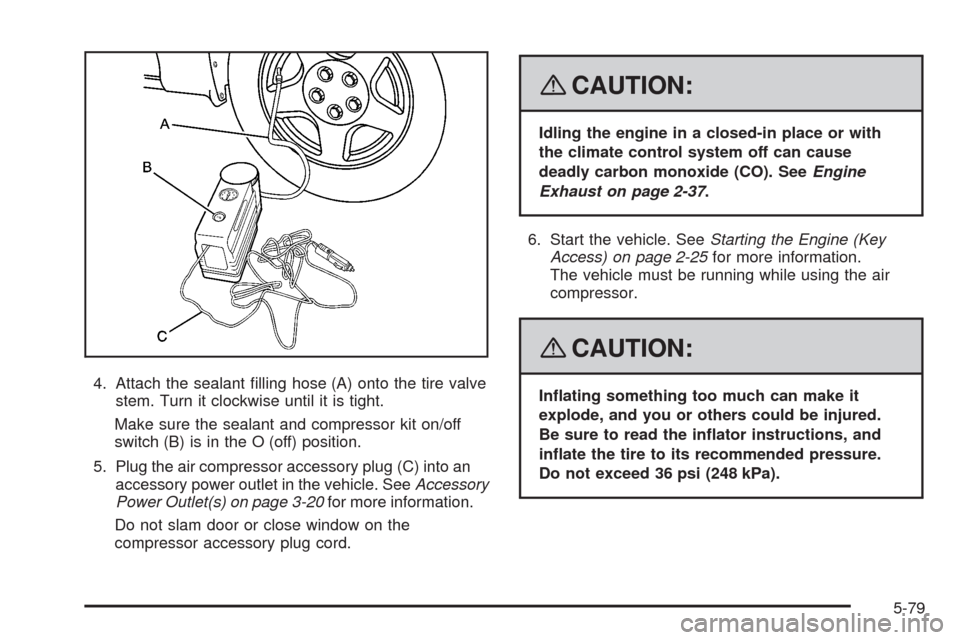
4. Attach the sealant lling hose (A) onto the tire valve
stem. Turn it clockwise until it is tight.
Make sure the sealant and compressor kit on/off
switch (B) is in the O (off) position.
5. Plug the air compressor accessory plug (C) into an
accessory power outlet in the vehicle. SeeAccessory
Power Outlet(s) on page 3-20for more information.
Do not slam door or close window on the
compressor accessory plug cord.
{CAUTION:
Idling the engine in a closed-in place or with
the climate control system off can cause
deadly carbon monoxide (CO). SeeEngine
Exhaust on page 2-37.
6. Start the vehicle. SeeStarting the Engine (Key
Access) on page 2-25for more information.
The vehicle must be running while using the air
compressor.
{CAUTION:
Inating something too much can make it
explode, and you or others could be injured.
Be sure to read the inator instructions, and
inate the tire to its recommended pressure.
Do not exceed 36 psi (248 kPa).
5-79
Page 337 of 430
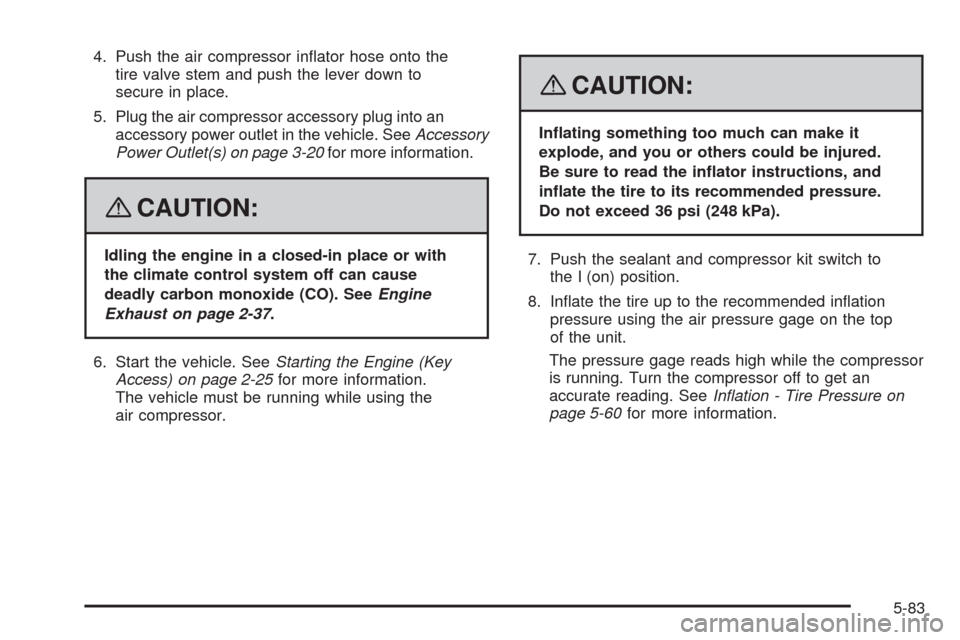
4. Push the air compressor inator hose onto the
tire valve stem and push the lever down to
secure in place.
5. Plug the air compressor accessory plug into an
accessory power outlet in the vehicle. SeeAccessory
Power Outlet(s) on page 3-20for more information.
{CAUTION:
Idling the engine in a closed-in place or with
the climate control system off can cause
deadly carbon monoxide (CO). SeeEngine
Exhaust on page 2-37.
6. Start the vehicle. SeeStarting the Engine (Key
Access) on page 2-25for more information.
The vehicle must be running while using the
air compressor.
{CAUTION:
Inating something too much can make it
explode, and you or others could be injured.
Be sure to read the inator instructions, and
inate the tire to its recommended pressure.
Do not exceed 36 psi (248 kPa).
7. Push the sealant and compressor kit switch to
the I (on) position.
8. Inate the tire up to the recommended ination
pressure using the air pressure gage on the top
of the unit.
The pressure gage reads high while the compressor
is running. Turn the compressor off to get an
accurate reading. SeeInflation - Tire Pressure on
page 5-60for more information.
5-83
Page 375 of 430
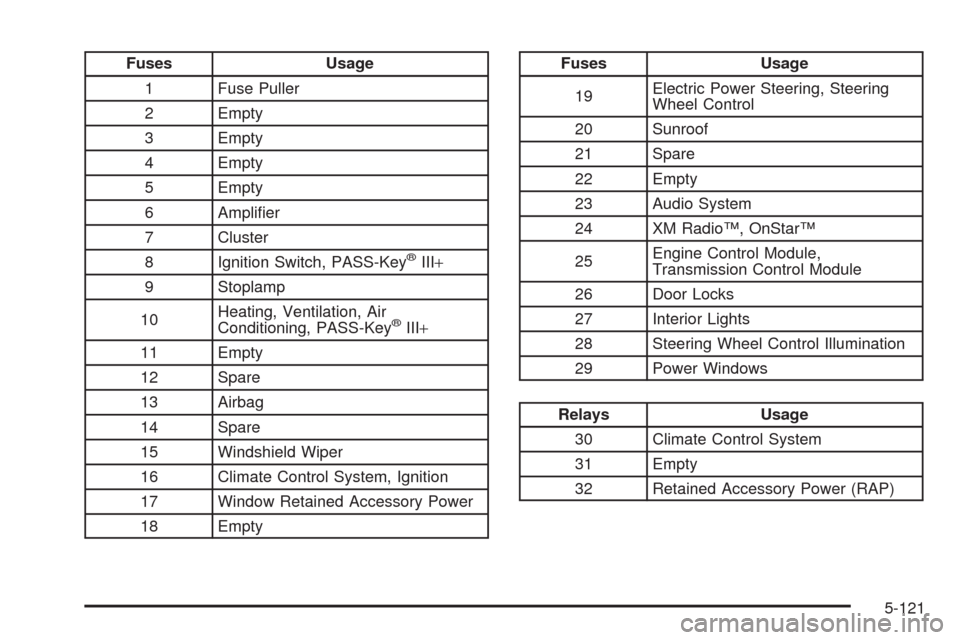
Fuses Usage
1 Fuse Puller
2 Empty
3 Empty
4 Empty
5 Empty
6 Amplier
7 Cluster
8 Ignition Switch, PASS-Key
®III+
9 Stoplamp
10Heating, Ventilation, Air
Conditioning, PASS-Key
®III+
11 Empty
12 Spare
13 Airbag
14 Spare
15 Windshield Wiper
16 Climate Control System, Ignition
17 Window Retained Accessory Power
18 Empty
Fuses Usage
19Electric Power Steering, Steering
Wheel Control
20 Sunroof
21 Spare
22 Empty
23 Audio System
24 XM Radio™, OnStar™
25Engine Control Module,
Transmission Control Module
26 Door Locks
27 Interior Lights
28 Steering Wheel Control Illumination
29 Power Windows
Relays Usage
30 Climate Control System
31 Empty
32 Retained Accessory Power (RAP)
5-121
Page 419 of 430
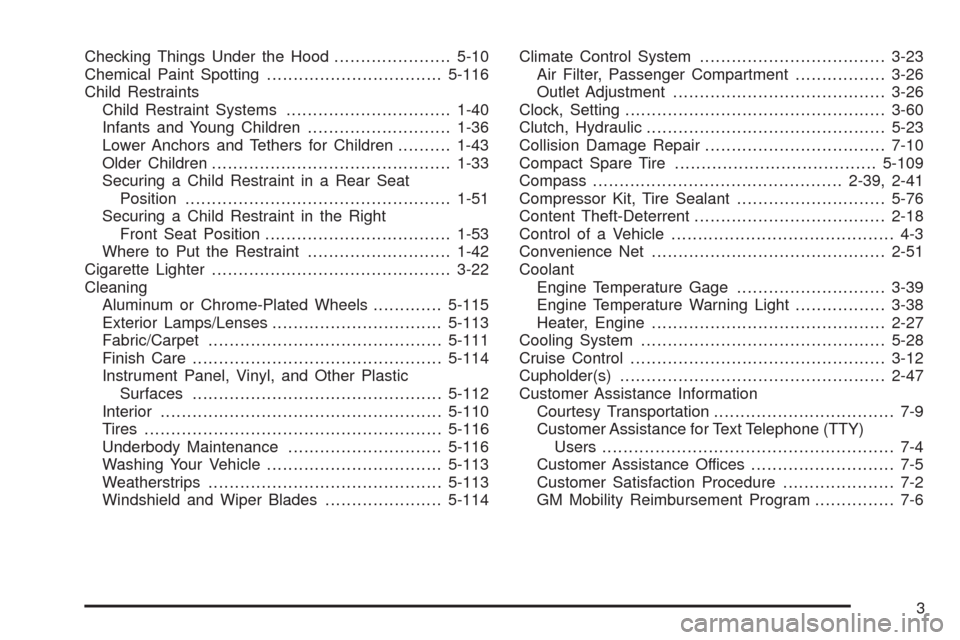
Checking Things Under the Hood......................5-10
Chemical Paint Spotting.................................5-116
Child Restraints
Child Restraint Systems...............................1-40
Infants and Young Children...........................1-36
Lower Anchors and Tethers for Children..........1-43
Older Children.............................................1-33
Securing a Child Restraint in a Rear Seat
Position..................................................1-51
Securing a Child Restraint in the Right
Front Seat Position...................................1-53
Where to Put the Restraint...........................1-42
Cigarette Lighter.............................................3-22
Cleaning
Aluminum or Chrome-Plated Wheels.............5-115
Exterior Lamps/Lenses................................5-113
Fabric/Carpet............................................5-111
Finish Care...............................................5-114
Instrument Panel, Vinyl, and Other Plastic
Surfaces...............................................5-112
Interior.....................................................5-110
Tires........................................................5-116
Underbody Maintenance.............................5-116
Washing Your Vehicle.................................5-113
Weatherstrips............................................5-113
Windshield and Wiper Blades......................5-114Climate Control System...................................3-23
Air Filter, Passenger Compartment.................3-26
Outlet Adjustment........................................3-26
Clock, Setting.................................................3-60
Clutch, Hydraulic.............................................5-23
Collision Damage Repair..................................7-10
Compact Spare Tire......................................5-109
Compass...............................................2-39, 2-41
Compressor Kit, Tire Sealant............................5-76
Content Theft-Deterrent....................................2-18
Control of a Vehicle.......................................... 4-3
Convenience Net
............................................2-51
Coolant
Engine Temperature Gage............................3-39
Engine Temperature Warning Light.................3-38
Heater, Engine............................................2-27
Cooling System..............................................5-28
Cruise Control................................................3-12
Cupholder(s)..................................................2-47
Customer Assistance Information
Courtesy Transportation.................................. 7-9
Customer Assistance for Text Telephone (TTY)
Users....................................................... 7-4
Customer Assistance Offices........................... 7-5
Customer Satisfaction Procedure..................... 7-2
GM Mobility Reimbursement Program............... 7-6
3