ECU CHEVROLET HHR 2010 1.G Service Manual
[x] Cancel search | Manufacturer: CHEVROLET, Model Year: 2010, Model line: HHR, Model: CHEVROLET HHR 2010 1.GPages: 480, PDF Size: 5.25 MB
Page 247 of 480

Loading XM:The audio system is acquiring and
processing audio and text data. No action is needed.
This message should disappear shortly.
Channel Off Air: This channel is not currently in
service. Tune in to another channel.
Channel Unauth: This channel is blocked or cannot be
received with your XM Subscription package.
Channel Unavail: This previously assigned channel is
no longer assigned. Tune to another station. If this
station was one of the presets, choose another station
for that preset button.
No Artist Info: No artist information is available at this
time on this channel. The system is working properly.
No Title Info: No song title information is available at
this time on this channel. The system is working
properly.
No CAT Info: No category information is available at
this time on this channel. The system is working
properly.
No Information: No text or informational messages are
available at this time on this channel. The system is
working properly. CAT Not Found:
There are no channels available for
the selected category. The system is working properly.
XM Theftlocked: The XM receiver in the vehicle could
have previously been in another vehicle. For security
purposes, XM receivers cannot be swapped between
vehicles. If this message is received after having the
vehicle serviced, check with your dealer/retailer.
XM Radio ID: If tuned to channel 0, this message
alternates with the XM™ Radio 8 digit radio ID label.
This label is needed to activate the service.
Unknown: If this message is received when tuned to
channel 0, there could be a receiver fault. Consult with
your dealer/retailer.
Check Antenna: If this message does not clear within
a short period of time, the receiver or antenna could
have a fault. Consult with your dealer/retailer.
Check XM Receivr: If this message does not clear
within a short period of time, the receiver could have a
fault. Consult with your dealer/retailer.
XM Not Available: If this message does not clear
within a short period of time, the receiver could have a
fault. Consult with your dealer/retailer.
4-81
Page 261 of 480
Cellular Phone Usage
Cellular phone usage may cause interference with the
vehicle's radio. This interference may occur when
making or receiving phone calls, charging the phone's
battery, or simply having the phone on. This
interference causes an increased level of static while
listening to the radio. If static is received while listening
to the radio, unplug the cellular phone and turn it off.
Fixed Mast Antenna
The fixed mast antenna can withstand most car washes
without being damaged as long as it is securely
attached to the base. If the mast becomes slightly bent,
straighten it out by hand. If the mast is badly bent,
replace it.
Occasionally check to make sure the antenna is
tightened to its base. If tightening is required, tighten by
hand until fully seated plus one quarter turn.
XM™Satellite Radio Antenna
System
The XM Satellite Radio antenna is located on the roof of
the vehicle. Keep the antenna clear of obstructions for
clear radio reception.
If the vehicle has a sunroof, the performance of the XM
system may be affected if the sunroof is open.
Chime Level Adjustment
The radio may be used to adjust the vehicle's chime
level. If the radio can be used to change the volume
level of the chime, press and hold the sixth numbered
pushbutton or the sixth FAV pushbutton with the ignition
on and the radio power off. The volume level changes
between Normal and Loud. The selected volume level
appears on the radio display.
Removing the radio and not replacing it with a factory
radio or chime module will disable vehicle chimes.
4-95
Page 291 of 480
Notice :Overloading the vehicle may cause
damage. Repairs would not be covered by the
vehicle warranty. Do not overload the vehicle.
If you put things inside your vehicle —like
suitcases, tools, packages, or anything
else —they will go as fast as the vehicle goes.
If you have to stop or turn quickly, or if there
is a crash, they will keep going.
{WARNING:
Things you put inside your vehicle can strike
and injure people in a sudden stop or turn,
or in a crash.
.Put things in the cargo area of your
vehicle. Try to spread the weight evenly.
.Never stack heavier things, like
suitcases, inside the vehicle so that some
of them are above the tops of the seats.
(Continued)
WARNING: (Continued)
.Do not leave an unsecured child restraint
in your vehicle.
.When you carry something inside the
vehicle, secure it whenever you can.
.Do not leave a seat folded down unless
you need to.
Towing
Towing Your Vehicle
To avoid damage, the disabled vehicle should be towed
with all four wheels off the ground. Consult your dealer/
retailer or a professional towing service if the disabled
vehicle must be towed. See Roadside Assistance
Program on page 8‑6.
To tow the vehicle behind another vehicle for
recreational purposes, such as behind a motorhome,
see “Recreational Vehicle Towing” following.
5-29
Page 293 of 480
To prevent the battery from draining while the vehicle is
being towed, remove the following fuse from the floor
console fuse block: 8 (Ignition Switch, PASS‐Key
®III+).
See Floor Console Fuse Blockon page 6‑120for more
information.
Remember to reinstall the fuse once the destination has
been reached.
Notice: If 105 km/h (65 mph) is exceeded while
towing the vehicle, it could be damaged. Never
exceed 105 km/h (65 mph) while towing the vehicle.
Notice: Towing the vehicle from the rear could
damage it. Also, repairs would not be covered by
the vehicle warranty. Never have the vehicle towed
from the rear.
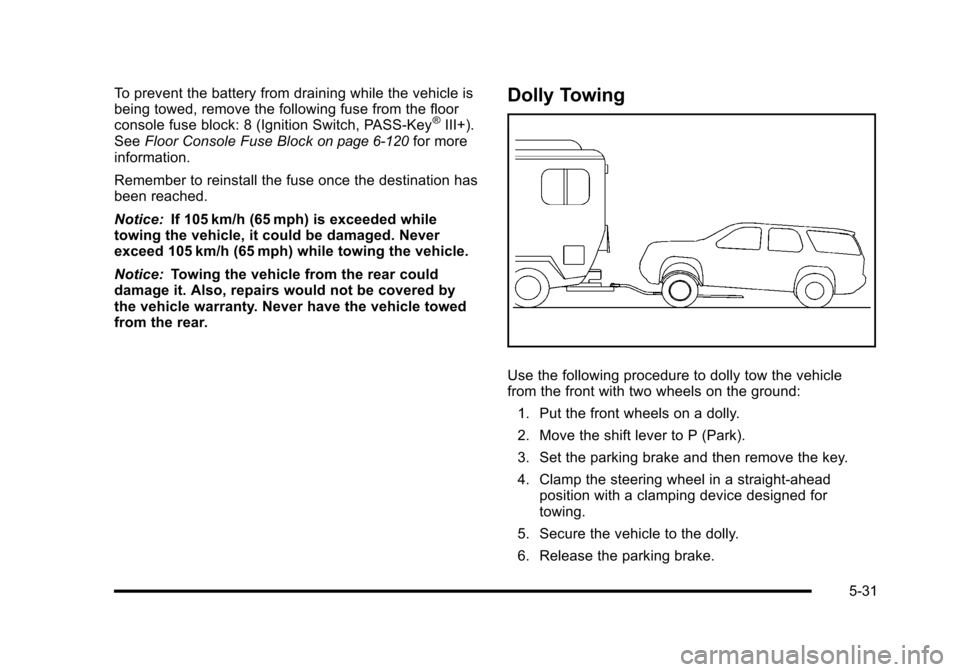
Dolly Towing
Use the following procedure to dolly tow the vehicle
from the front with two wheels on the ground:
1. Put the front wheels on a dolly.
2. Move the shift lever to P (Park).
3. Set the parking brake and then remove the key.
4. Clamp the steering wheel in a straight-ahead position with a clamping device designed for
towing.
5. Secure the vehicle to the dolly.
6. Release the parking brake.
5-31
Page 299 of 480
Safety Chains
Always attach chains between the vehicle and the
trailer. Cross the safety chains under the tongue of the
trailer to help prevent the tongue from contacting the
road if it becomes separated from the hitch. Always
leave just enough slack so the rig can turn. Never allow
safety chains to drag on the ground.
Trailer Brakes
A loaded trailer that weighs more than 1,500 lbs
(680 kg) needs to have its own brake system that is
adequate for the weight of the trailer. Be sure to read
and follow the instructions for the trailer brakes so they
are installed, adjusted and maintained properly.
Driving with a Trailer
Towing a trailer requires a certain amount of
experience. Get to know the rig before setting out
for the open road. Get acquainted with the feel of
handling and braking with the added weight of the
trailer. And always keep in mind that the vehicle you
are driving is now longer and not as responsive as the
vehicle is by itself.Before starting, check all trailer hitch parts and
attachments, safety chains, electrical connectors,
lamps, tires and mirror adjustments. If the trailer has
electric brakes, start the vehicle and trailer moving and
then apply the trailer brake controller by hand to be sure
the brakes are working. This checks the electrical
connection at the same time.
During the trip, check occasionally to be sure that the
load is secure, and that the lamps and any trailer
brakes are still working.
Following Distance
Stay at least twice as far behind the vehicle ahead as
you would when driving the vehicle without a trailer.
This can help to avoid situations that require heavy
braking and sudden turns.
Passing
More passing distance is needed when towing a trailer.
Because the rig is longer, it is necessary to go much
farther beyond the passed vehicle before returning to
the lane.
5-37
Page 314 of 480
When replacing the fuel cap, turn it clockwise until
it clicks. Make sure the cap is fully installed. The
diagnostic system can determine if the fuel cap has
been left off or improperly installed. This would allow
fuel to evaporate into the atmosphere. SeeMalfunction
Indicator Lamp on page 4‑35.
The CHECK GAS CAP message displays on the Driver
Information Center (DIC) if the fuel cap is not properly
installed. See DIC Warnings and Messages
on
page 4‑48for more information.
To close the fuel door securely, push the door to the
closed position.
{WARNING:
If a fire starts while you are refueling, do not
remove the nozzle. Shut off the flow of fuel by
shutting off the pump or by notifying the station
attendant. Leave the area immediately.
Notice: If you need a new fuel cap, be sure to get
the right type. Your dealer/retailer can get one
for you. If you get the wrong type, it may not fit
properly. This may cause the malfunction indicator
lamp to light and may damage the fuel tank and
emissions system. See Malfunction Indicator Lamp
on page 4‑35.
6-12
Page 408 of 480
Storing a Flat or Spare Tire and
Tools
{WARNING:
Storing a jack, a tire, or other equipment in the
passenger compartment of the vehicle could
cause injury. In a sudden stop or collision, loose
equipment could strike someone. Store all these
in the proper place.
Storing the Flat Tire and Tools
To store the flat tire:1. Open the liftgate. See Liftgate
on page 3‑13for
more information.
2. Put back all tools as they were stored in the rear storage compartment and put the compartment
cover back on. For more information, see “Storing
the Compact Spare Tire and Tools” next in this
section.
3. Install the cargo cover. For more information, see Rear Compartment Storage Panel/Cover
on
page 3‑48.
4. Place the tire, lying flat, in the rear storage compartment.
If there is a loop on the end of the strap used to
secure the flat tire, go to Step 5. If there is not a
loop, go to Step 8.
6-106
Page 411 of 480
Storing the Compact Spare Tire and
Tools
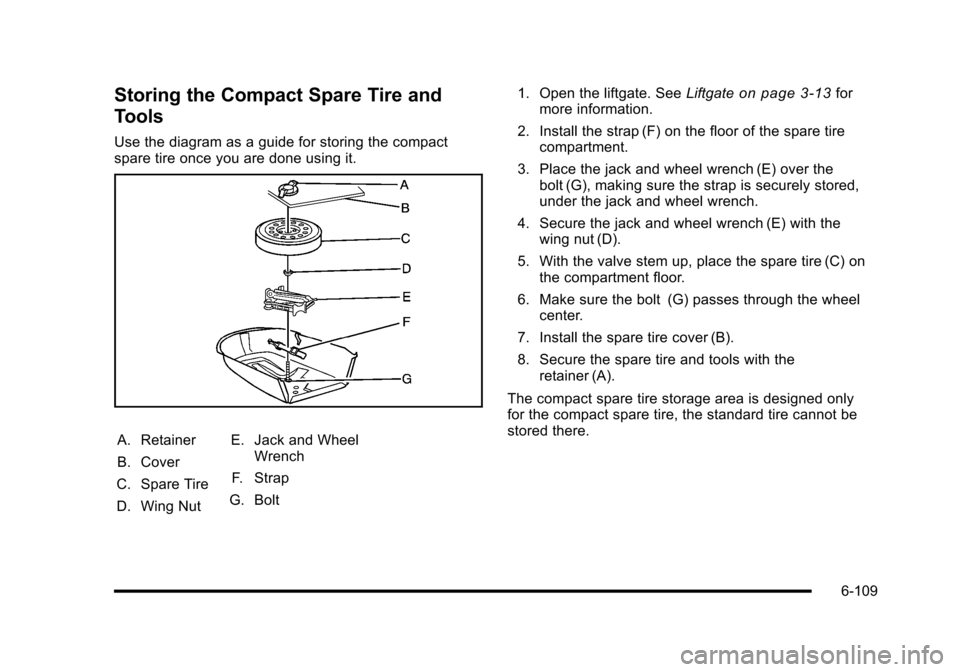
Use the diagram as a guide for storing the compact
spare tire once you are done using it.
A. Retainer
B. Cover
C. Spare Tire
D. Wing Nut E. Jack and Wheel
Wrench
F. Strap
G. Bolt 1. Open the liftgate. See
Liftgate
on page 3‑13for
more information.
2. Install the strap (F) on the floor of the spare tire compartment.
3. Place the jack and wheel wrench (E) over the bolt (G), making sure the strap is securely stored,
under the jack and wheel wrench.
4. Secure the jack and wheel wrench (E) with the wing nut (D).
5. With the valve stem up, place the spare tire (C) on the compartment floor.
6. Make sure the bolt (G) passes through the wheel center.
7. Install the spare tire cover (B).
8. Secure the spare tire and tools with the retainer (A).
The compact spare tire storage area is designed only
for the compact spare tire, the standard tire cannot be
stored there.
6-109
Page 451 of 480
.Model, year, color, and license plate number of the
vehicle
.Odometer reading, Vehicle Identification Number
(VIN), and delivery date of the vehicle
.Description of the problem
Coverage
Services are provided up to 5 years/100,000 miles
(160 000 km), whichever comes first.
In the U.S., anyone driving the vehicle is covered.
In Canada, a person driving the vehicle without
permission from the owner is not covered.
Roadside Assistance is not a part of the New Vehicle
Limited Warranty. Chevrolet and General Motors of
Canada Limited reserve the right to make any changes
or discontinue the Roadside Assistance program at any
time without notification.
Chevrolet and General Motors of Canada Limited
reserve the right to limit services or payment to an
owner or driver if they decide the claims are made too
often, or the same type of claim is made many times.
Services Provided
.Emergency Fuel Delivery:Delivery of enough
fuel for the vehicle to get to the nearest service
station.
.Lock‐Out Service: Service is provided to unlock
the vehicle if you are locked out. A remote unlock
may be available if you have OnStar
®. For security
reasons, the driver must present identification
before this service is given.
.Emergency Tow From a Public Road or
Highway: Tow to the nearest Chevrolet dealer for
warranty service, or if the vehicle was in a crash
and cannot be driven. Assistance is also given
when the vehicle is stuck in the sand, mud,
or snow.
.Flat Tire Change: Service is provided to change
a flat tire with the spare tire. The spare tire,
if equipped, must be in good condition and
properly inflated. It is the owner's responsibility for
the repair or replacement of the tire if it is not
covered by the warranty.
.Battery Jump Start: Service is provided to jump
start a dead battery.
8-7
Page 461 of 480
Navigation System
If your vehicle has a navigation system, use of the
system may result in the storage of destinations,
addresses, telephone numbers, and other trip
information. Refer to the navigation system operating
manual for information on stored data and for deletion
instructions.
Radio Frequency
Identification (RFID)
RFID technology is used in some vehicles for functions
such as tire pressure monitoring and ignition system
security, as well as in connection with conveniences
such as key fobs for remote door locking/unlocking and
starting, and in-vehicle transmitters for garage door
openers. RFID technology in GM vehicles does not
use or record personal information or link with any other
GM system containing personal information.
Radio Frequency Statement
This vehicle has systems that operate on a radio
frequency that comply with Part 15 of the Federal
Communications Commission (FCC) Rules and with
RSS-210/211 of Industry Canada.
Operation is subject to the following two conditions:1. The device may not cause interference.
2. The device must accept any interference received, including interference that may cause undesired
operation of the device.
Changes or modifications to any of these systems by
other than an authorized service facility could void
authorization to use this equipment.
8-17