display CHEVROLET HHR 2011 1.G Workshop Manual
[x] Cancel search | Manufacturer: CHEVROLET, Model Year: 2011, Model line: HHR, Model: CHEVROLET HHR 2011 1.GPages: 430, PDF Size: 4.57 MB
Page 237 of 430
Black plate (81,1)Chevrolet HHR Owner Manual - 2011
Cellular Phone Usage
Cellular phone usage may cause interference with the
vehicle's radio. This interference may occur when
making or receiving phone calls, charging the phone's
battery, or simply having the phone on. This
interference causes an increased level of static while
listening to the radio. If static is received while listening
to the radio, unplug the cellular phone and turn it off.
Fixed Mast Antenna
The fixed mast antenna can withstand most car washes
without being damaged as long as it is securely
attached to the base. If the mast becomes slightly bent,
straighten it out by hand. If the mast is badly bent,
replace it.
Occasionally check to make sure the antenna is
tightened to its base. If tightening is required, tighten by
hand until fully seated plus one quarter turn.
XM™Satellite Radio Antenna
System
The XM Satellite Radio antenna is located on the roof of
the vehicle. Keep the antenna clear of obstructions for
clear radio reception.
If the vehicle has a sunroof, the performance of the
XM system may be affected if the sunroof is open.
Chime Level Adjustment
The radio may be used to adjust the vehicle's chime
level. If the radio can be used to change the volume
level of the chime, press and hold the sixth numbered
pushbutton or the sixth FAV pushbutton with the ignition
on and the radio power off. The volume level changes
between Normal and Loud. The selected volume level
appears on the radio display.
Removing the radio and not replacing it with a factory
radio or chime module will disable vehicle chimes.
4-81
Page 242 of 430
Black plate (4,1)Chevrolet HHR Owner Manual - 2011
allowing realistic following distances eliminates a lot of
unnecessary braking. That means better braking and
longer brake life.
If the engine ever stops while the vehicle is being
driven, brake normally but do not pump the brakes.
If the brakes are pumped, the pedal could get harder to
push down. If the engine stops, there will still be some
power brake assist but it will be used when the brake is
applied. Once the power assist is used up, it can take
longer to stop and the brake pedal will be harder
to push.
If the vehicle has Electronic Stability Control (ESC) and
the 2.0L turbocharged engine, it also has a hydraulic
brake boost feature which supplements the power brake
system to maintain consistent brake performance under
conditions of low brake booster vacuum. Low brake
booster vacuum conditions can include initial start up
after the vehicle has been parked for several hours,
very frequent brake stops, or high altitude driving. When
hydraulic brake boost is active, minor brake pulsation or
movement might be felt but this is normal. If brake pedal
feel changes or the brake pedal feels hard to push, the
system might not be receiving the intended brake boost
and the SVC BRAKE SYSTEM DIC message may be
displayed.
Adding non‐dealer accessories can affect vehicle
performance. SeeAccessories and Modifications
on
page 6‑3.
Antilock Brake System (ABS)
The vehicle might have the Antilock Brake
System (ABS), an advanced electronic braking
system that helps prevent a braking skid.
If the vehicle has ABS,
this warning light on the
instrument panel comes
on briefly when the
vehicle is started.
When the engine is started, or when the vehicle begins
to drive away, ABS checks itself. A momentary motor or
clicking noise might be heard while this test is going on,
and it might even be noticed that the brake pedal
moves or pulses a little. This is normal.
Let us say the road is wet and you are driving safely.
Suddenly, an animal jumps out in front of you. You slam
on the brakes and continue braking. Here is what
happens with ABS:
A computer senses that the wheels are slowing down.
If one of the wheels is about to stop rolling, the
computer will separately work the brakes at each wheel.
5-4
Page 244 of 430
Black plate (6,1)Chevrolet HHR Owner Manual - 2011
until the ABS activates. Minor brake pedal pulsations or
pedal movement during this time is normal and the
driver should continue to apply the brake pedal as the
driving situation dictates The Brake Assist feature will
automatically disengage when the brake pedal is
released or brake pedal pressure is quickly decreased.
Electronic Stability Control (ESC)
The vehicle has an Electronic Stability Control (ESC)
system which combines antilock brake, and traction and
stability control systems that help the driver maintain
directional control of the vehicle in most driving
conditions.
When the vehicle is started and begins to move, the
system performs several diagnostic checks to ensure
there are no problems. The system may be heard or felt
while it is working. This is normal and does not mean
there is a problem with the vehicle. The system should
initialize before the vehicle reaches 20 mph (32 km/h).
If the system fails to turn on or activate, the ESC/TCS
light comes on, and the ESC OFF and/or SERVICE
ESC message displays.
For more information, seeDriver Information Center
(DIC)
on page 4‑38and Electronic Stability Control
(ESC)/Traction Control System (TCS) Indicator/Warning
Light on page 4‑31.
This light flashes on the
instrument panel cluster
when the ESC system is
on and activated.
ESC activates when the computer senses a
discrepancy between the intended path and the
direction the vehicle is actually traveling. ESC
selectively applies braking pressure at any one of the
vehicle's brakes to help steer the vehicle in the intended
direction.
When the system activates, an ESC ACTIVE message
displays on the Driver Information Center. See DIC
Warnings and Messages
on page 4‑40. This light also
flashes on the instrument panel cluster when the ESC
system is on and activated. Noise or vibration may be
felt in the brake pedal. This is normal. Continue to steer
the vehicle in the desired direction.
When the light is on solid and the message(s),
SERVICE ESC, ESC OFF, or both display, the system
will not assist the driver in maintaining directional
control of the vehicle. Adjust your driving accordingly.
See DIC Warnings and Messages on page 4‑40.
5-6
Page 246 of 430
Black plate (8,1)Chevrolet HHR Owner Manual - 2011
Traction Control System (TCS)
The vehicle has a Traction Control System (TCS) that
limits wheel spin. This is especially useful in slippery
road conditions. The system operates only if it senses
that the front wheels are spinning too much or are
beginning to lose traction. When this happens, the
system works the front brakes and reduces engine
power by closing the throttle and managing engine
spark to limit wheel spin.
This light flashes while
the traction control system
is limiting wheel spin.
The system may be heard or felt while it is working.
This is normal and does not mean there is a problem
with the vehicle.
See Electronic Stability Control (ESC)/Traction Control
System (TCS) Indicator/Warning Light
on page 4‑31for
more information. If the vehicle is in cruise control while TCS begins to
limit wheel spin, the cruise control will automatically
disengage. The cruise control can be re-engaged when
road conditions allow. See
Turn Signal/Multifunction
Lever on page 4‑4.
When this light is on and
either the SERVICE
TRACTION or TRACTION
OFF message is
displayed, the system will
not limit wheel spin.
Adjust your driving accordingly. See DIC Warnings and
Messages
on page 4‑40for more information.
The Traction Control System comes on automatically
whenever the vehicle is started. It is recommended to
leave the system on for normal driving conditions, but it
may be necessary to turn the system off if the vehicle is
stuck in sand, mud, ice or snow, and you want to “rock”
your vehicle to attempt to free it. It may also be
necessary to turn off the system when driving in off-road
conditions where high wheel spin is required. See If
Your Vehicle is Stuck in Sand, Mud, Ice, or Snow
on
page 5‑21.
5-8
Page 247 of 430
Black plate (9,1)Chevrolet HHR Owner Manual - 2011
To turn the system off or
on, press and release the
ESC/TCS button located
on the instrument panel.
The DIC displays the appropriate message as
described previously when the button is pressed.
Traction Control Operation
Traction control limits wheel spin by reducing engine
power to the wheels (engine speed management) and
by applying brakes to each individual wheel
(brake-traction control) as necessary.
The traction control system is enabled automatically
when the vehicle is started, and it will activate and flash
the ESC/TCS light and display the LOW TRACTION
message if it senses that either of the front wheels are
spinning or beginning to lose traction while driving. For
more information on the LOW TRACTION message,
see Driver Information Center (DIC) on page 4‑38.
Notice: If the wheel(s) of one axle are allowed to
spin excessively while the ESC/TCS, ABS and Brake
warning lights and the SERVICE ESC and/or
SERVICE TRACTION messages are displayed, the
differential could be damaged. The repairs would not be covered by the vehicle warranty. Reduce
engine power and do not spin the wheel(s)
excessively while these lights and this message are
displayed.
Notice:
When traction control is turned off,
or Competitive Driving Mode is active, it is possible
to lose traction. If you attempt to shift with the drive
wheels spinning with a loss of traction, it is
possible to cause damage to the transmission. Do
not attempt to shift when the drive wheels do not
have traction. Damage caused by misuse of the
vehicle is not covered. See the warranty book for
additional information.
The traction control system may activate on dry or
rough roads or under conditions such as heavy
acceleration while turning or abrupt upshifts/downshifts
of the transmission. When this happens, a reduction in
acceleration may be noticed or a noise or vibration may
be heard. This is normal.
If the vehicle is in cruise control while the system
activates, the ESC/TCS light flashes and the cruise
control automatically disengages. The cruise control
can be re-engaged when road conditions allow. See
Cruise Control on page 4‑8.
Adding non‐dealer/non‐retailer accessories can affect
the vehicle's performance. See Accessories and
Modifications
on page 6‑3for more information.
5-9
Page 248 of 430
Black plate (10,1)Chevrolet HHR Owner Manual - 2011
Enhanced Traction System (ETS)
The vehicle may have an Enhanced Traction System
(ETS) that limits wheel spin. This is especially useful in
slippery road conditions. The system operates only if it
senses that one or both of the front wheels are spinning
or beginning to lose traction. When this happens, the
system reduces engine power and may also upshift the
transmission to limit wheel spin.
If the vehicle has ETS, there is not an ESC/TCS button
on the instrument panel. To turn the system off, shift to
L (Low) or R (Reverse). There is more information about
how to turn the system off later in this section.
The ETS indicator/warning light flashes and LOW
TRACTION appears on the Driver Information Center
(DIC) when the traction control system is actively
limiting wheel spin. The system may be heard or felt
while it is working, but this is normal. Slippery road
conditions may exist if this message is displayed, so
adjust your driving accordingly.
If the vehicle is in cruise control when the ETS begins
to limit wheel spin, the cruise control will automatically
disengage. The cruise control can be re-engaged when
road conditions allow. SeeCruise Control on page 4‑8.
The ETS indicator/warning light may come on for the
following reasons:
.The indicator/warning light flashes while the
traction control system is limiting wheel spin.
.If the system is turned off by moving the shift lever
to L (Low), the indicator/warning light comes on
and stays on. To turn the system back on, move
the shift lever back to a position other than L (Low).
The indicator/warning light should go off.
.The indicator/warning light will come on when the
parking brake is set with the engine running, and it
will stay on if the parking brake does not release
fully. If the transmission shift lever is in any position
other than L (Low) and the indicator/warning light
stays on after the parking brake is fully released,
there is a problem with the system.
.If the traction control system is affected by an
engine related problem, the system will turn off and
the indicator/warning light will come on.
5-10
Page 249 of 430
Black plate (11,1)Chevrolet HHR Owner Manual - 2011
If the ETS indicator/warning light comes on and
stays on for an extended period of time when the
transmission shift lever is in any position other than
L (Low), the vehicle may need service.
When this light is on solid, the system will not limit
wheel spin. Adjust your driving accordingly.
Check the DIC messaging to determine whether it is
because of the driver turning off the system, or that the
system may not be working properly and the vehicle
requires service. When this light is turned on, either the
SERVICE TRACTION or TRACTION OFF message will
be displayed.
SeeDIC Warnings and Messages
on page 4‑40for
more information on the messages associated with this
light.
To limit wheel spin, especially in slippery road
conditions, ETS should always be left on. But the
system can be turned off if needed.
To turn the system off, shift to L (Low) or R (Reverse).
When the system is turned off, the ETS indicator/
warning light will come on and stay on and the
TRACTION OFF message will be displayed when the
gear shift is in L (Low). The indicator/warning light and
message will not come on when the gear shift is in R (Reverse). If the ETS is limiting wheel spin when the
transmission is shifted to L (Low) or R (Reverse) to turn
the system off, the indicator/warning light and
TRACTION OFF will come on in L (Low). But the
system will not turn off right away. It will wait until there
is no longer a current need to limit wheel spin. See
DIC
Warnings and Messages
on page 4‑40for more
information on the messages associated with this light.
The system can be turned back on at any time by
shifting to D (Automatic Overdive) or I (Intermediate).
The ETS indicator/warning light should go off.
Adding non‐dealer/non‐retailer accessories can affect
the vehicle's performance. See Accessories and
Modifications
on page 6‑3for more information.
Limited-Slip Differential
Vehicles with a limited-slip differential can give more
traction on snow, mud, ice, sand or gravel. It works like
a standard axle most of the time, but when traction is
low, this feature allows the drive wheel with the most
traction to move the vehicle. The limited slip design has
minimal impact to the steering feel, but boosts the
traction performance under all conditions.
5-11
Page 287 of 430
Black plate (11,1)Chevrolet HHR Owner Manual - 2011
When replacing the fuel cap, turn it clockwise until it
clicks. Make sure the cap is fully installed. The
diagnostic system can determine if the fuel cap has
been left off or improperly installed. This would allow
fuel to evaporate into the atmosphere. SeeMalfunction
Indicator Lamp on page 4‑33.
The CHECK GAS CAP message displays on the Driver
Information Center (DIC) if the fuel cap is not properly
installed. See DIC Warnings and Messages
on
page 4‑40for more information.
To close the fuel door securely, push the door to the
closed position.
{WARNING:
If a fire starts while you are refueling, do not
remove the nozzle. Shut off the flow of fuel by
shutting off the pump or by notifying the station
attendant. Leave the area immediately.
Notice: If you need a new fuel cap, be sure to get
the right type. Your dealer can get one for you.
If you get the wrong type, it may not fit properly.
This may cause the malfunction indicator lamp to
light and may damage the fuel tank and emissions
system. See Malfunction Indicator Lamp
on
page 4‑33.
6-11
Page 293 of 430
Black plate (17,1)Chevrolet HHR Owner Manual - 2011
Selecting the Right Engine Oil
Selecting the right engine oil depends on both the
proper oil specification and viscosity grade:
Specification
Use and ask for engine oils with the dexos™
certification mark. Oils meeting the requirements of your
vehicle should have the dexos™certification mark on
the container. This certification mark indicates that the
oil has been approved to the dexos™ specification.
Your vehicle was filled at the factory with dexos™
approved engine oil. Notice:
Use only engine oil that is approved to the
dexos™ specification or an equivalent engine oil of
the appropriate viscosity grade. Engine oils
approved to the dexos™ specification will show the
dexos™ symbol on the container. Failure to use the
recommended engine oil or equivalent can result in
engine damage not covered by the vehicle warranty.
If you are unsure whether your oil is approved to
the dexos™ specification, ask your service provider.
Use of Substitute Engine Oils if dexos™ is unavailable:
In the event that dexos™ approved engine oil is not
available at an oil change or for maintaining proper oil
level, you may use substitute engine oil displaying the
API Starburst symbol and of SAE 5W-30 viscosity
grade. Use of oils that do not meet the dexos™
specification, however, may result in reduced
performance under certain circumstances.
6-17
Page 294 of 430
Black plate (18,1)Chevrolet HHR Owner Manual - 2011
Viscosity Grade
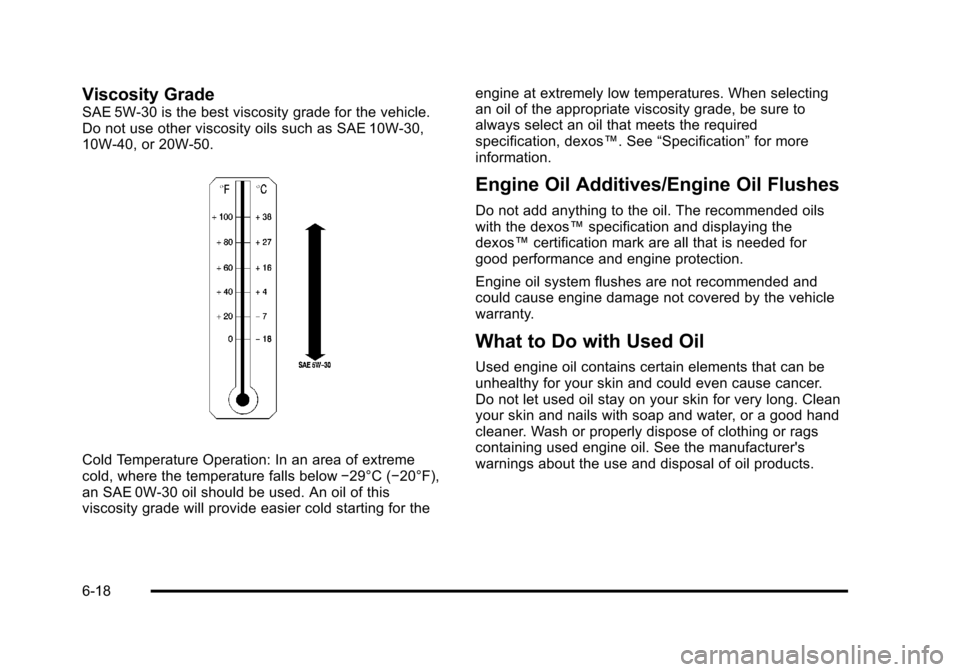
SAE 5W-30 is the best viscosity grade for the vehicle.
Do not use other viscosity oils such as SAE 10W‐30,
10W‐40, or 20W-50.
Cold Temperature Operation: In an area of extreme
cold, where the temperature falls below−29°C (−20°F),
an SAE 0W-30 oil should be used. An oil of this
viscosity grade will provide easier cold starting for the engine at extremely low temperatures. When selecting
an oil of the appropriate viscosity grade, be sure to
always select an oil that meets the required
specification, dexos™. See
“Specification”for more
information.
Engine Oil Additives/Engine Oil Flushes
Do not add anything to the oil. The recommended oils
with the dexos™ specification and displaying the
dexos™ certification mark are all that is needed for
good performance and engine protection.
Engine oil system flushes are not recommended and
could cause engine damage not covered by the vehicle
warranty.
What to Do with Used Oil
Used engine oil contains certain elements that can be
unhealthy for your skin and could even cause cancer.
Do not let used oil stay on your skin for very long. Clean
your skin and nails with soap and water, or a good hand
cleaner. Wash or properly dispose of clothing or rags
containing used engine oil. See the manufacturer's
warnings about the use and disposal of oil products.
6-18