lock CHEVROLET IMPALA 2010 9.G Owners Manual
[x] Cancel search | Manufacturer: CHEVROLET, Model Year: 2010, Model line: IMPALA, Model: CHEVROLET IMPALA 2010 9.GPages: 432, PDF Size: 1.89 MB
Page 319 of 432
License Plate LampTo replace one of these bulbs:
1. Turn the lamp assembly counterclockwise and pull
the lamp assembly out of the connector.
2. Pull the old bulb from the lamp assembly, keeping
the bulb straight as you pull it out.
3. Install the new bulb.
4. Reverse Steps 1 through 3 to reinstall the license
plate lamp.Replacement Bulbs
Exterior Lamp Bulb Number
Back-Up 921
Front Parking/Turn Signal 3157NAK
License Plate Lamp 194
Headlamps
High-Beam H9
Low-Beam H11
Sidemarker 194
Stoplamp, Taillamp, and Turn
Signal3057
For replacement bulbs not listed here, contact your
dealer/retailer.
Windshield Wiper Blade
ReplacementWindshield wiper blades should be inspected for wear
or cracking. SeeScheduled Maintenance on page 7-3
for more information on wiper blade inspection.
Replacement blades come in different types and are
removed in different ways. Here’s how to remove
the wiper blade:
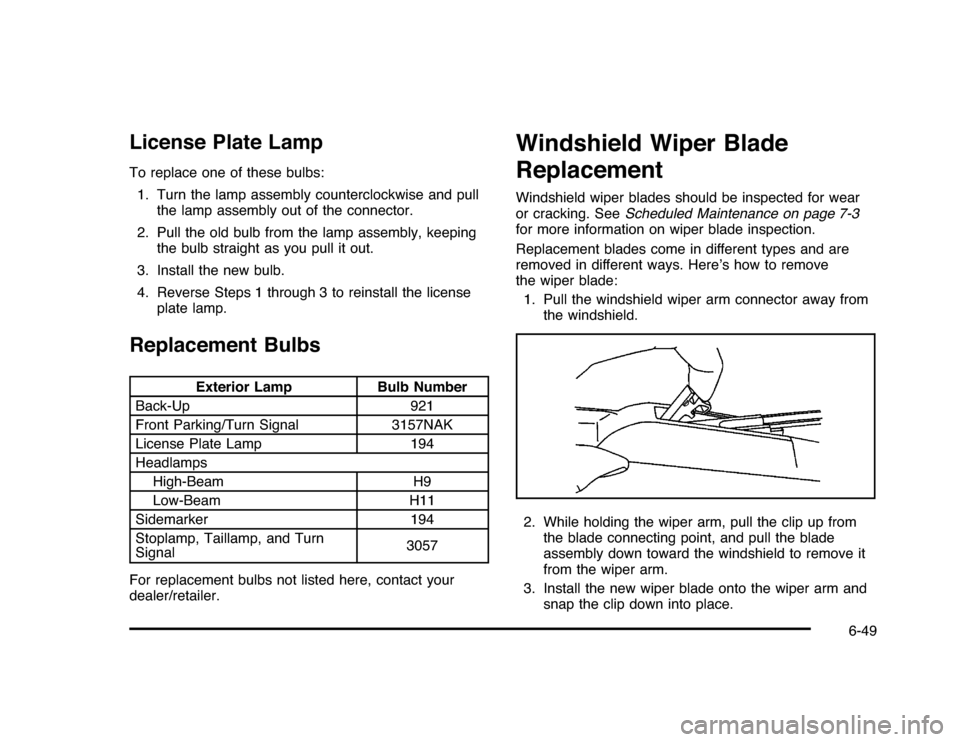
1. Pull the windshield wiper arm connector away from
the windshield.
2. While holding the wiper arm, pull the clip up from
the blade connecting point, and pull the blade
assembly down toward the windshield to remove it
from the wiper arm.
3. Install the new wiper blade onto the wiper arm and
snap the clip down into place.
6-49
Page 334 of 432

TPMS Sensor Matching ProcessEach TPMS sensor has a unique identification code.
Any time you rotate your vehicle’s tires or replace one or
more of the TPMS sensors, the identification codes
will need to be matched to the new tire/wheel position.
The sensors are matched to the tire/wheel positions
in the following order: driver side front tire, passenger
side front tire, passenger side rear tire, and driver
side rear tire using a TPMS diagnostic tool. See your
dealer/retailer for service.
The TPMS sensors can also be matched to each
tire/wheel position by increasing or decreasing the tire’s
air pressure. If increasing the tire’s air pressure, do
not exceed the maximum inflation pressure indicated on
the tire’s sidewall.
To decrease air-pressure out of a tire you can use the
pointed end of the valve cap, a pencil-style air pressure
gage, or a key.
You have two minutes to match the first tire/wheel
position, and five minutes overall to match all four
tire/wheel positions. If it takes longer than two minutes, to
match the first tire and wheel, or more than five minutes
to match all four tire and wheel positions the matching
process stops and you need to start over.The TPMS sensor matching process is outlined below:
1. Set the parking brake.
2. Turn the ignition switch to ON/RUN with the
engine off.
3. Press the Remote Keyless Entry (RKE) transmitter’s
lock and unlock buttons at the same time for
approximately five seconds. The horn sounds twice
to signal the receiver is in relearn mode and TIRE
LEARNING ACTIVE message displays on the DIC
screen.
4. Start with the driver side front tire.
5. Remove the valve cap from the valve cap stem.
Activate the TPMS sensor by increasing or
decreasing the tire’s air pressure for five seconds,
or until a horn chirp sounds. The horn chirp,
which may take up to 30 seconds to sound,
confirms that the sensor identification code has
been matched to this tire and wheel position.
6. Proceed to the passenger side front tire, and repeat
the procedure in Step 5.
7. Proceed to the passenger side rear tire, and repeat
the procedure in Step 5.
6-64
Page 335 of 432

8. Proceed to the driver side rear tire, and repeat the
procedure in Step 5. The horn sounds two times to
indicate the sensor identification code has been
matched to the driver side rear tire, and the TPMS
sensor matching process is no longer active.
The TIRE LEARNING ACTIVE message on the
DIC display screen goes off.
9. Turn the ignition switch to LOCK/OFF.
10. Set all four tires to the recommended air pressure
level as indicated on the Tire and Loading
Information label.
11. Put the valve caps back on the valve stems.
Tire Inspection and RotationWe recommend that you regularly inspect your
vehicle’s tires, including the spare tire, for signs of
wear or damage. SeeWhen It Is Time for New
Tires on page 6-67for more information.
Tires should be rotated every 5,000 to 8,000 miles
(8 000 to 13 000 km). SeeScheduled Maintenance
on page 7-3.
The purpose of a regular tire rotation is to
achieve a uniform wear for all tires on the vehicle.
This will ensure that your vehicle continues to
perform most like it did when the tires were new.
Any time you notice unusual wear, rotate the
tires as soon as possible and check wheel
alignment. Also check for damaged tires or wheels.
SeeWhen It Is Time for New Tires on page 6-67
andWheel Replacement on page 6-71.
6-65
Page 339 of 432
{
WARNING:
If you use bias-ply tires on the vehicle, the
wheel rim flanges could develop cracks after
many miles of driving. A tire and/or wheel
could fail suddenly, causing a crash. Use only
radial-ply tires with the wheels on the vehicle.
If you must replace your vehicle’s tires with those
that do not have a TPC Spec number, make
sure they are the same size, load range, speed
rating, and construction type (radial and
bias-belted tires) as your vehicle’s original tires.
Vehicles that have a tire pressure monitoring
system could give an inaccurate low-pressure
warning if non-TPC Spec rated tires are installed
on your vehicle. Non-TPC Spec rated tires
may give a low-pressure warning that is higher or
lower than the proper warning level you would
get with TPC Spec rated tires. SeeTire Pressure
Monitor System on page 6-60.
Your vehicle’s original equipment tires are listed
on the Tire and Loading Information Label.
SeeLoading the Vehicle on page 5-20, for more
information about the Tire and Loading Information
Label and its location on your vehicle.
Different Size Tires and WheelsIf you add wheels or tires that are a different size than
your original equipment wheels and tires, this may
affect the way your vehicle performs, including its
braking, ride and handling characteristics, stability,
and resistance to rollover. Additionally, if your vehicle
has electronic systems such as, antilock brakes, traction
control, and electronic stability control, the performance
of these systems can be affected.
{
WARNING:
If you add different sized wheels, your vehicle may
not provide an acceptable level of performance and
safety if tires not recommended for those wheels
are selected. You may increase the chance that you
will crash and suffer serious injury. Only use GM
specific wheel and tire systems developed for your
vehicle, and have them properly installed by a GM
certified technician.
SeeBuying New Tires on page 6-68andAccessories
and Modifications on page 6-3for additional information.
6-69
Page 345 of 432
Changing a Flat TireIf a tire goes flat, avoid further tire and wheel damage
by driving slowly to a level place. Turn on the hazard
warning flashers. SeeHazard Warning Flashers
on page 4-3.
{
WARNING:
Changing a tire can be dangerous. The vehicle
can slip off the jack and roll over or fall on you or
other people. You and they could be badly injured
or even killed. Find a level place to change your
tire. To help prevent the vehicle from moving:
1. Set the parking brake firmly.
2. Put the shift lever in P (Park).
3. Turn off the engine and do not restart while
the vehicle is raised.
4. Do not allow passengers to remain in the
vehicle.
WARNING: (Continued)
WARNING: (Continued)To be even more certain the vehicle will not move,
you should put blocks at the front and rear of the
tire farthest away from the one being changed.
That would be the tire, on the other side, at the
opposite end of the vehicle.
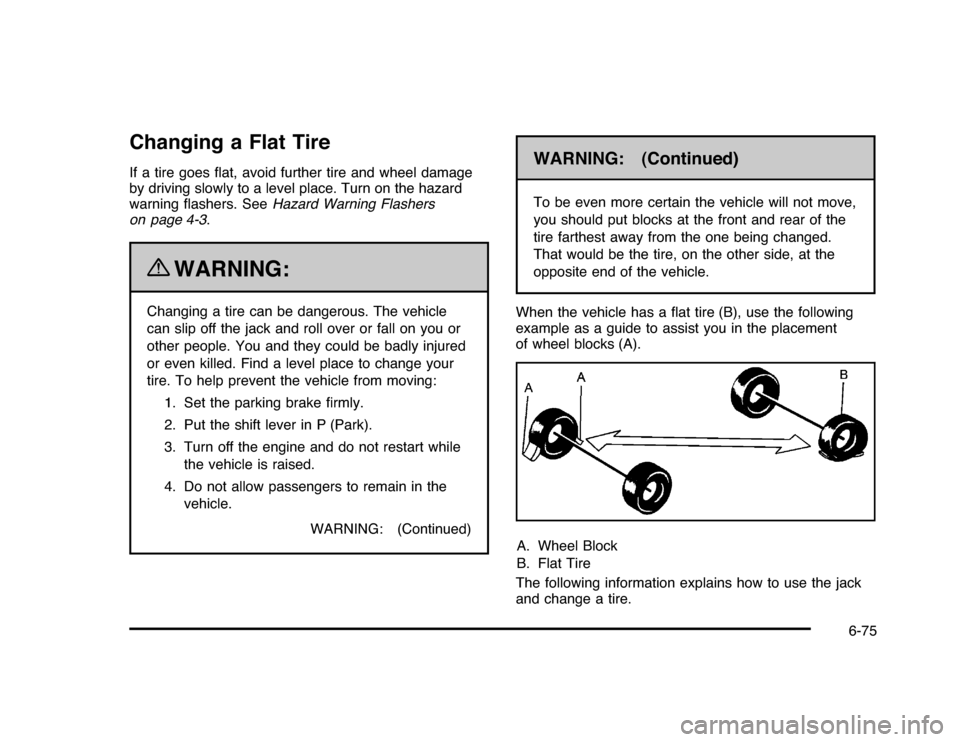
When the vehicle has a flat tire (B), use the following
example as a guide to assist you in the placement
of wheel blocks (A).
A. Wheel Block
B. Flat Tire
The following information explains how to use the jack
and change a tire.
6-75
Page 346 of 432

Removing the Spare Tire and ToolsThe equipment you will need is located in the trunk.
1. Open the trunk. SeeTrunk on page 3-12.
2. Remove the convenience net if the vehicle has one.
3. Remove the spare tire cover.
4. Turn the wing nut counterclockwise and remove it.
5. Remove the compact spare tire.6. Turn the nut holding the jack counterclockwise and
remove it. Then remove the jack and wrench.6-76
Page 347 of 432

The tools you will need to change a tire include the
jack (A), extension and protection guide (B), and wheel
wrench (C).
Removing the Flat Tire and
Installing the Spare TireThis vehicle may have aluminum wheels with exposed
wheel nuts. Use the wheel wrench to loosen all the
wheel nuts. Do not remove them yet.
Or, this vehicle may have steel wheels with plastic
covers.
To remove the plastic covers and wheel nut caps,
loosen the plastic nut caps with the wheel wrench in a
counterclockwise direction. If needed, finish loosening
them with your fingers. The plastic nut caps will not
come off.
6-77
Page 348 of 432

If needed, use the flat end of the wheel wrench and pry
along the edge of the cover until it comes off. The edge of
the wheel cover could be sharp, so do not try to remove it
with your bare hands. Do not drop the cover or lay it face
down, as it could become scratched or damaged. Store
the wheel cover in the trunk until the flat tire is repaired or
replaced.
Once you have removed the wheel cover, use the
following procedure to remove the flat tire and install the
spare tire.
1. Do a safety check before proceeding. SeeChanging
a Flat Tire on page 6-75
2. Turn the wheel wrench counterclockwise once on
each wheel nut to loosen them. Do not remove
them yet.6-78
Page 350 of 432

{
WARNING:
Lifting a vehicle and getting under it to do
maintenance or repairs is dangerous without the
appropriate safety equipment and training. If a jack
is provided with the vehicle, it is designed only for
changing a flat tire. If it is used for anything else,
you or others could be badly injured or killed if the
vehicle slips off the jack. If a jack is provided with
the vehicle, only use it for changing a flat tire.
5. Raise the vehicle by turning the jack handle
clockwise. Raise the vehicle far enough off the
ground to install the compact spare tire.
6. Remove all wheel nuts and the flat tire.
6-80
Page 351 of 432
{
WARNING:
Rust or dirt on a wheel, or on the parts to which it is
fastened, can make wheel nuts become loose after
time. The wheel could come off and cause an
accident. When changing a wheel, remove any rust
or dirt from places where the wheel attaches to the
vehicle. In an emergency, use a cloth or a paper
towel to do this; but be sure to use a scraper or wire
brush later, if needed, to get all the rust or dirt off.
SeeChanging a Flat Tire on page 6-75.
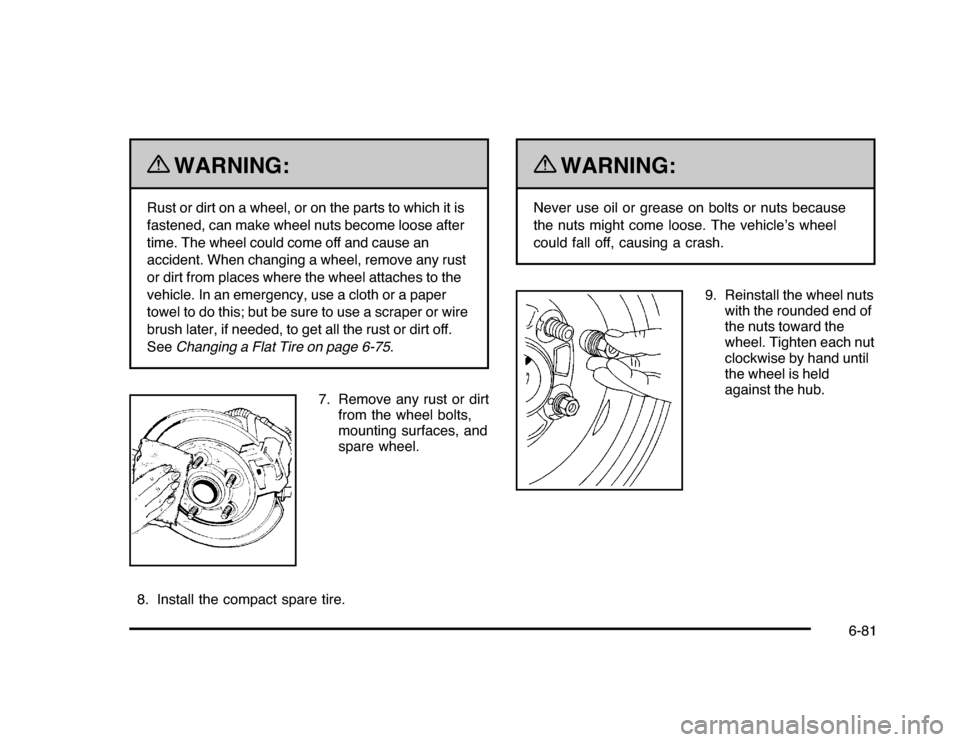
7. Remove any rust or dirt
from the wheel bolts,
mounting surfaces, and
spare wheel.
8. Install the compact spare tire.
{
WARNING:
Never use oil or grease on bolts or nuts because
the nuts might come loose. The vehicle’s wheel
could fall off, causing a crash.
9. Reinstall the wheel nuts
with the rounded end of
the nuts toward the
wheel. Tighten each nut
clockwise by hand until
the wheel is held
against the hub.
6-81