lock CHEVROLET IMPALA 2011 9.G Owners Manual
[x] Cancel search | Manufacturer: CHEVROLET, Model Year: 2011, Model line: IMPALA, Model: CHEVROLET IMPALA 2011 9.GPages: 376, PDF Size: 5.71 MB
Page 1 of 376

Black plate (1,1)Chevrolet Impala Owner Manual - 2011
2011 Chevrolet Impala Owner ManualM
In Brief. . . . . . . . . . . . . . . . . . . . . . . . 1-1
Instrument Panel . . . . . . . . . . . . . . 1-2
Initial Drive Information . . . . . . . . 1-4
Vehicle Features . . . . . . . . . . . . . 1-14
Performance and Maintenance . . . . . . . . . . . . . . . . 1-17
Keys, Doors and Windows . . . 2-1
Keys and Locks . . . . . . . . . . . . . . . 2-2
Doors . . . . . . . . . . . . . . . . . . . . . . . . 2-10
Vehicle Security . . . . . . . . . . . . . . 2-12
Exterior Mirrors . . . . . . . . . . . . . . . 2-14
Interior Mirrors . . . . . . . . . . . . . . . . 2-15
Windows . . . . . . . . . . . . . . . . . . . . . 2-16
Roof . . . . . . . . . . . . . . . . . . . . . . . . . . 2-19
Seats and Restraints . . . . . . . . . 3-1
Head Restraints . . . . . . . . . . . . . . . 3-2
Front Seats . . . . . . . . . . . . . . . . . . . . 3-3
Rear Seats . . . . . . . . . . . . . . . . . . . . 3-8
Safety Belts . . . . . . . . . . . . . . . . . . 3-10
Airbag System . . . . . . . . . . . . . . . . 3-26
Child Restraints . . . . . . . . . . . . . . 3-41 Storage
. . . . . . . . . . . . . . . . . . . . . . . 4-1
Storage Compartments . . . . . . . . 4-1
Additional Storage Features . . . 4-2
Instruments and Controls . . . . 5-1
Controls . . . . . . . . . . . . . . . . . . . . . . . 5-2
Warning Lights, Gauges, and
Indicators . . . . . . . . . . . . . . . . . . . 5-10
Information Displays . . . . . . . . . . 5-24
Vehicle Messages . . . . . . . . . . . . 5-28
Vehicle Personalization . . . . . . . 5-36
Universal Remote System . . . . 5-42
Lighting . . . . . . . . . . . . . . . . . . . . . . . 6-1
Exterior Lighting . . . . . . . . . . . . . . . 6-2
Interior Lighting . . . . . . . . . . . . . . . . 6-6
Lighting Features . . . . . . . . . . . . . . 6-6
Infotainment System . . . . . . . . . 7-1
Introduction . . . . . . . . . . . . . . . . . . . . 7-1
Radio . . . . . . . . . . . . . . . . . . . . . . . . . . 7-6
Audio Players . . . . . . . . . . . . . . . . 7-14
Phone . . . . . . . . . . . . . . . . . . . . . . . . 7-20 Climate Controls
. . . . . . . . . . . . . 8-1
Climate Control Systems . . . . . . 8-1
Air Vents . . . . . . . . . . . . . . . . . . . . . . . 8-5
Maintenance . . . . . . . . . . . . . . . . . . . 8-6
Driving and Operating . . . . . . . . 9-1
Driving Information . . . . . . . . . . . . . 9-2
Starting and Operating . . . . . . . 9-16
Engine Exhaust . . . . . . . . . . . . . . 9-24
Automatic Transmission . . . . . . 9-25
Brakes . . . . . . . . . . . . . . . . . . . . . . . 9-27
Ride Control Systems . . . . . . . . 9-29
Cruise Control . . . . . . . . . . . . . . . . 9-32
Fuel . . . . . . . . . . . . . . . . . . . . . . . . . . 9-35
Towing . . . . . . . . . . . . . . . . . . . . . . . 9-41
Conversions and Add-Ons . . . 9-47
Vehicle Care . . . . . . . . . . . . . . . . . 10-1
General Information . . . . . . . . . . 10-2
Vehicle Checks . . . . . . . . . . . . . . . 10-4
Headlamp Aiming . . . . . . . . . . . 10-29
Bulb Replacement . . . . . . . . . . 10-29
Electrical System . . . . . . . . . . . . 10-33
Page 5 of 376

Black plate (5,1)Chevrolet Impala Owner Manual - 2011
Introduction v
Vehicle Symbol Chart
Here are some additional symbols
that may be found on the vehicle
and what they mean. For more
information on the symbol, refer to
the Index.
9:Airbag Readiness Light
#:Air Conditioning
!:Antilock Brake System (ABS)
g:Audio Steering Wheel Controls
or OnStar®
$: Brake System Warning Light
":Charging System
I:Cruise Control
B: Engine Coolant Temperature
O:Exterior Lamps
#:Fog Lamps
.: Fuel Gauge
+:Fuses
3: Headlamp High/Low-Beam
Changer
j: LATCH System Child
Restraints
*: Malfunction Indicator Lamp
::Oil Pressure
}:Power
/:Remote Vehicle Start
>:Safety Belt Reminders
7:Tire Pressure Monitor
F:Traction Control
M:Windshield Washer Fluid
Page 7 of 376
Black plate (1,1)Chevrolet Impala Owner Manual - 2011
In Brief 1-1
In Brief
Instrument Panel
Instrument Panel . . . . . . . . . . . . . . 1-2
Initial Drive Information
Initial Drive Information . . . . . . . . 1-4
Remote KeylessEntry (RKE) System . . . . . . . . 1-4
Remote Vehicle Start . . . . . . . . . 1-5
Door Locks . . . . . . . . . . . . . . . . . . . 1-5
Trunk Release . . . . . . . . . . . . . . . . 1-5
Windows . . . . . . . . . . . . . . . . . . . . . . 1-6
Seat Adjustment . . . . . . . . . . . . . . 1-6
Second Row Seats . . . . . . . . . . . 1-7
Head Restraint Adjustment . . . . 1-7
Safety Belt . . . . . . . . . . . . . . . . . . . . 1-8 Sensing System for
Passenger Airbag . . . . . . . . . . . 1-8
Mirror Adjustment . . . . . . . . . . . . . 1-9
Steering Wheel Adjustment . . . 1-9
Interior Lighting . . . . . . . . . . . . . . 1-10
Exterior Lighting . . . . . . . . . . . . . 1-10
Windshield Wiper/Washer . . . . 1-11
Climate Controls . . . . . . . . . . . . . 1-12
Vehicle Features
Radio(s) . . . . . . . . . . . . . . . . . . . . . 1-14
Satellite Radio . . . . . . . . . . . . . . . 1-15
Portable Audio Devices . . . . . . 1-15
Bluetooth
®. . . . . . . . . . . . . . . . . . . 1-15
Steering Wheel Controls . . . . . 1-16
Cruise Control . . . . . . . . . . . . . . . 1-16
Power Outlets . . . . . . . . . . . . . . . 1-17
Performance and Maintenance
Traction Control System (TCS) . . . . . . . . . . . . . . 1-17
Electronic Stability Control (ESC) . . . . . . . . . . . . . . 1-18
Tire Pressure Monitor . . . . . . . . 1-18
Engine Oil Life System . . . . . . 1-19
Fuel E85 (85% Ethanol) . . . . . 1-19
Driving for Better Fuel
Economy . . . . . . . . . . . . . . . . . . . 1-19
Roadside Assistance Program . . . . . . . . . . . . . . . . . . . . 1-19
OnStar
®. . . . . . . . . . . . . . . . . . . . . 1-20
Page 10 of 376
Black plate (4,1)Chevrolet Impala Owner Manual - 2011
1-4 In Brief
Initial Drive
Information
This section provides a brief
overview about some of the
important features that may or may
not be on your specific vehicle.
For more detailed information, refer
to each of the features which can be
found later in this owner manual.
Remote Keyless
Entry (RKE) System
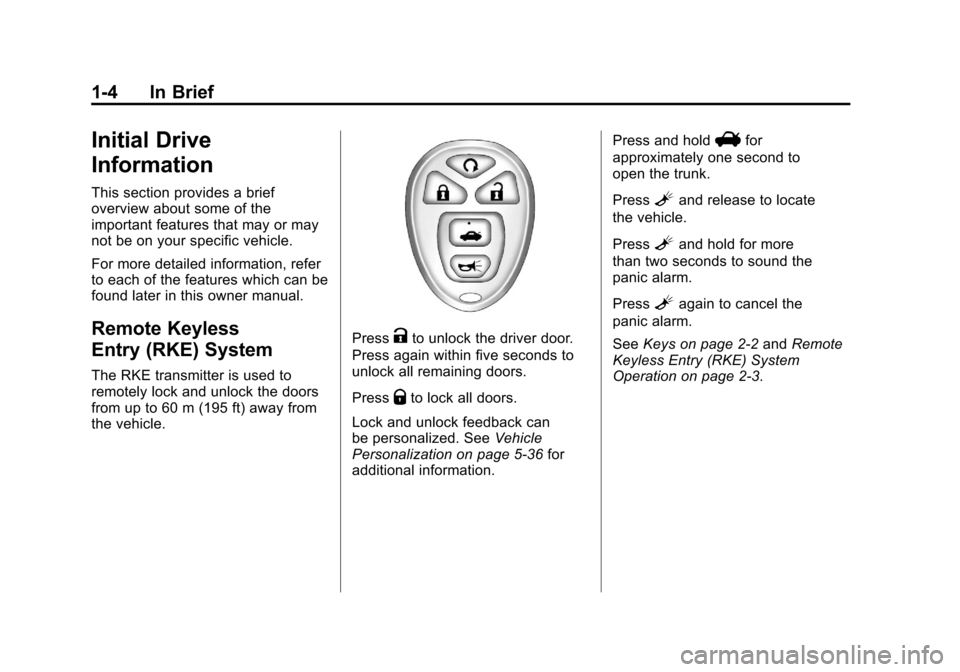
The RKE transmitter is used to
remotely lock and unlock the doors
from up to 60 m (195 ft) away from
the vehicle.
PressKto unlock the driver door.
Press again within five seconds to
unlock all remaining doors.
Press
Qto lock all doors.
Lock and unlock feedback can
be personalized. See Vehicle
Personalization on page 5‑36 for
additional information. Press and hold
Vfor
approximately one second to
open the trunk.
Press
Land release to locate
the vehicle.
Press
Land hold for more
than two seconds to sound the
panic alarm.
Press
Lagain to cancel the
panic alarm.
See Keys on page 2‑2 andRemote
Keyless Entry (RKE) System
Operation on page 2‑3.
Page 11 of 376
Black plate (5,1)Chevrolet Impala Owner Manual - 2011
In Brief 1-5
Remote Vehicle Start
With this feature the engine can be
started from outside of the vehicle.
Starting the Vehicle
1. Aim the RKE transmitter at thevehicle.
2. Press
Q.
3. Immediately after completing Step 2, press and hold
/until
the turn signal lamps flash.
When the vehicle starts, the parking
lamps will turn on and remain on as
long as the engine is running. The
doors will be locked and the climate
control system may come on.
The engine will continue to run for
10 minutes. Repeat the steps for a
10-minute time extension. Remote
start can be extended only once.
Canceling a Remote Start
To cancel a remote start:
.Aim the RKE transmitter at the
vehicle and press and hold
/
until the parking lamps turn off.
.Turn on the hazard warning
flashers.
.Turn the ignition on and then
back off.
See Remote Vehicle Start on
page 2‑5.
Door Locks
Manual Locks
From outside the vehicle, use the
key in the door or the Remote
Keyless Entry (RKE) transmitter to
lock or unlock the vehicle. From the
inside, pull up or push down on the
manual door lock knobs.
See Door Locks on page 2‑6.
Power Door Locks
Power door lock switches are
located on the front doors near the
handle.
Q:Press the bottom of the switch
to lock all doors.
K: Press the top of the switch to
unlock all doors.
For more information, see:
.Power Door Locks on page 2‑7.
.Delayed Locking on page 2‑8.
Trunk Release
In addition to the trunk release
button on the RKE transmitter, there
is a remote release
Vbutton
located on the left side of the
instrument panel.
For more information, see Trunk on
page 2‑10.
Page 12 of 376
Black plate (6,1)Chevrolet Impala Owner Manual - 2011
1-6 In Brief
Windows
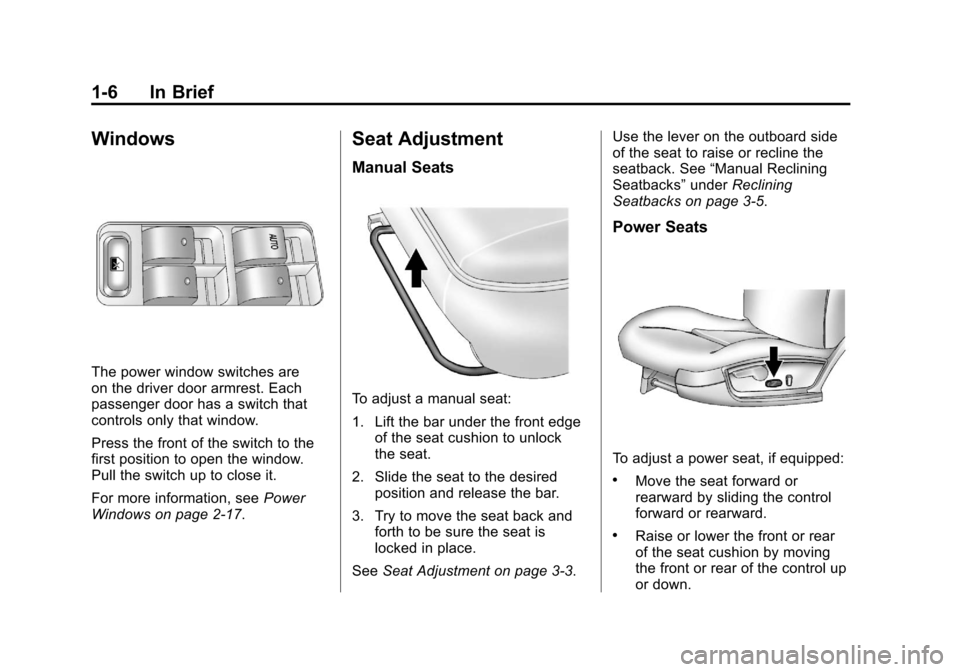
The power window switches are
on the driver door armrest. Each
passenger door has a switch that
controls only that window.
Press the front of the switch to the
first position to open the window.
Pull the switch up to close it.
For more information, seePower
Windows on page 2‑17.
Seat Adjustment
Manual Seats
To adjust a manual seat:
1. Lift the bar under the front edge of the seat cushion to unlock
the seat.
2. Slide the seat to the desired position and release the bar.
3. Try to move the seat back and forth to be sure the seat is
locked in place.
See Seat Adjustment on page 3‑3. Use the lever on the outboard side
of the seat to raise or recline the
seatback. See
“Manual Reclining
Seatbacks” underReclining
Seatbacks on page 3‑5.
Power Seats
To adjust a power seat, if equipped:
.Move the seat forward or
rearward by sliding the control
forward or rearward.
.Raise or lower the front or rear
of the seat cushion by moving
the front or rear of the control up
or down.
Page 15 of 376
Black plate (9,1)Chevrolet Impala Owner Manual - 2011
In Brief 1-9
Mirror Adjustment
Exterior Mirrors
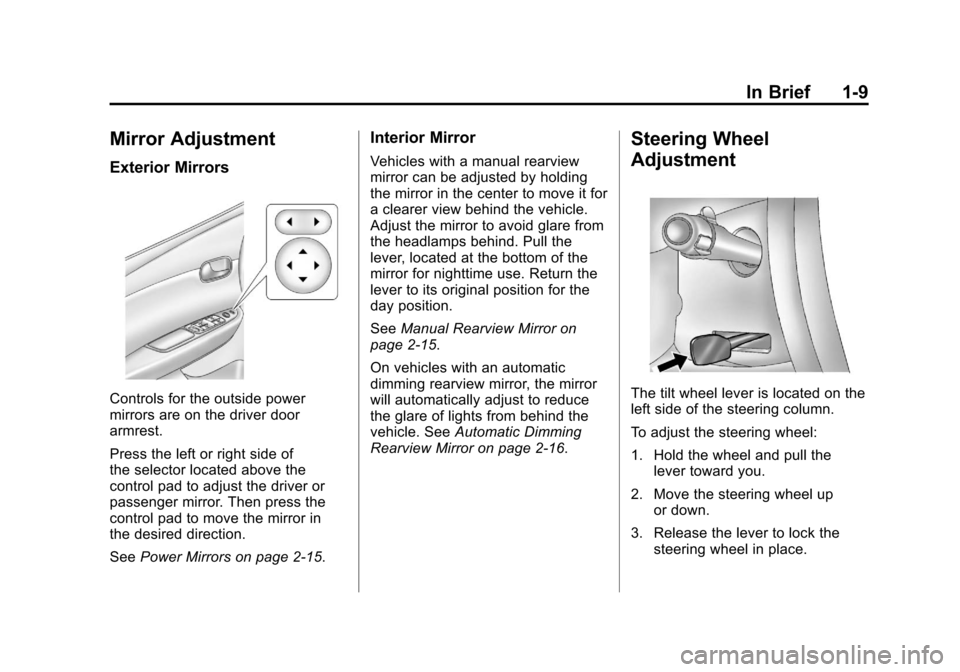
Controls for the outside power
mirrors are on the driver door
armrest.
Press the left or right side of
the selector located above the
control pad to adjust the driver or
passenger mirror. Then press the
control pad to move the mirror in
the desired direction.
SeePower Mirrors on page 2‑15.
Interior Mirror
Vehicles with a manual rearview
mirror can be adjusted by holding
the mirror in the center to move it for
a clearer view behind the vehicle.
Adjust the mirror to avoid glare from
the headlamps behind. Pull the
lever, located at the bottom of the
mirror for nighttime use. Return the
lever to its original position for the
day position.
SeeManual Rearview Mirror on
page 2‑15.
On vehicles with an automatic
dimming rearview mirror, the mirror
will automatically adjust to reduce
the glare of lights from behind the
vehicle. See Automatic Dimming
Rearview Mirror on page 2‑16.
Steering Wheel
Adjustment
The tilt wheel lever is located on the
left side of the steering column.
To adjust the steering wheel:
1. Hold the wheel and pull the lever toward you.
2. Move the steering wheel up or down.
3. Release the lever to lock the steering wheel in place.
Page 16 of 376
Black plate (10,1)Chevrolet Impala Owner Manual - 2011
1-10 In Brief
Do not adjust the steering wheel
while driving.
Interior Lighting
Dome Lamp
The center mounted dome lamp
overhead comes on when a door is
opened. This lamp can also be
turned on by turning the instrument
panel brightness control clockwise.
Reading Lamps
The vehicle has reading lamps that
also act as the dome lamp. Press
the button near each lamp to turn
them on and off.Map Lamps
The vehicle has map lamps on the
rearview mirror. Push the button
near each lamp to turn the map
lamps on and off.
For more information on interior
lighting, see:
.Exterior Lighting on page 1‑10.
.Courtesy Lamps on page 6‑6.
.Delayed Entry Lighting on
page 6‑7.
.Delayed Exit Lighting on
page 6‑7.
.Parade Dimming on page 6‑7.
Exterior Lighting
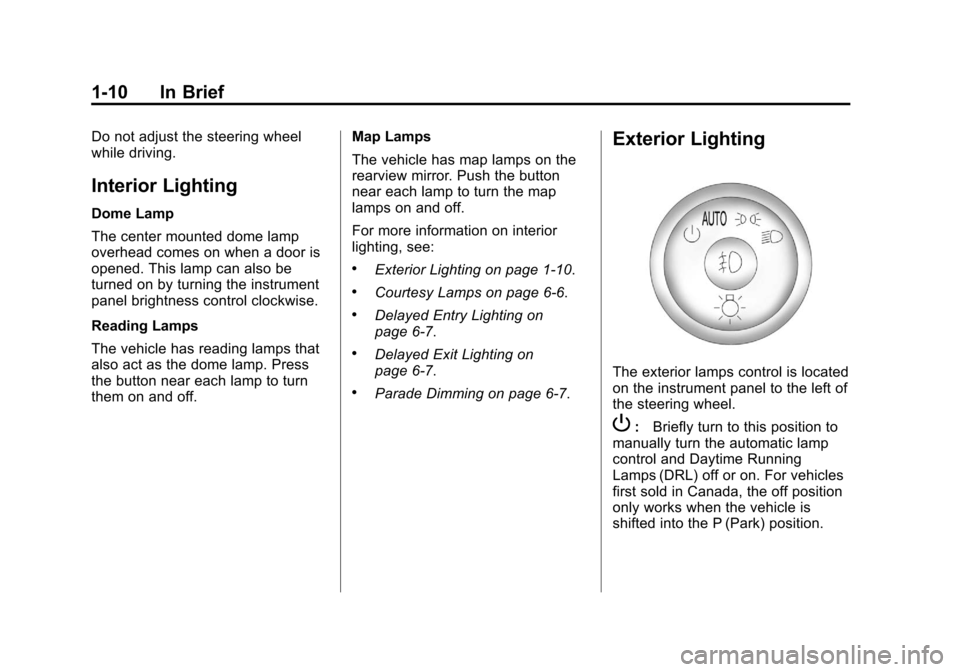
The exterior lamps control is located
on the instrument panel to the left of
the steering wheel.
P:
Briefly turn to this position to
manually turn the automatic lamp
control and Daytime Running
Lamps (DRL) off or on. For vehicles
first sold in Canada, the off position
only works when the vehicle is
shifted into the P (Park) position.
Page 21 of 376
Black plate (15,1)Chevrolet Impala Owner Manual - 2011
In Brief 1-15
For radios without a FAV button, up
to 18 stations (6 FM1, 6 FM2, and
6 AM), can be programmed on the
6 numbered buttons.
SeeOperation on page 7‑2.
Setting the Clock
To set the time and date for the
Radio with CD (MP3):
1. Turn the radio on.
2. Press
Hand the HR, MIN, MM,
DD, and YYYY (hour, minute,
month, day, and year) display.
3. Press the pushbutton located below any one of the tabs that
you want to change.
4. Increase or decrease the time or date by turning
fclockwise or
counterclockwise.
For detailed instructions on setting
the clock for your specific audio
system, see Clock on page 5‑7.
Satellite Radio
XM is a satellite radio service
that is based in the 48 contiguous
United States and 10 Canadian
provinces. XM satellite radio has a
wide variety of programming and
commercial-free music, coast to
coast, and in digital-quality sound.
A fee is required to receive the
XM service.
For more information, refer to:
.www.xmradio.com or call
1-800-929-2100 (U.S.)
.www.xmradio.ca or call
1-877-438-9677 (Canada)
See “XM Satellite Radio Service”
under Satellite Radio on page 7‑8.
Portable Audio Devices
This vehicle may have an auxiliary
input jack, located on the audio
faceplate. External devices such as iPod
®, MP3 players, etc. can be
connected to the auxiliary input jack
using a 3.5 mm (1/8 in) input jack
cable.
See “Using the Auxiliary Input Jack”
under Auxiliary Devices on
page 7‑19.
Bluetooth®
For vehicles with a Bluetooth
system, it allows users with a
Bluetooth‐enabled cell phone to
make and receive hands-free calls
using the vehicle’ s audio system
and controls.
The Bluetooth‐enabled cell phone
must be paired with the Bluetooth
system before it can be used in the
vehicle. Not all phones will support
all functions. For more information,
visit www.gm.com/bluetooth.
For more information, see Bluetooth
on page 7‑20.
Page 26 of 376
Black plate (20,1)Chevrolet Impala Owner Manual - 2011
1-20 In Brief
Roadside Assistance and OnStar
If you have a current OnStar
subscription, press the
Qbutton
and the current GPS location will be
sent to an OnStar advisor who will
assess your problem, contact
Roadside Assistance, and relay
your exact location to get the help
you need.
Online Owner Center
The Online Owner Center is a
complimentary service that includes
online service reminders, vehicle
maintenance tips, online owner
manual, special privileges,
and more.
Sign up today at:
www.chevyownercenter.com
(U.S.) or www.gm.ca (Canada).
OnStar®
OnStar®uses several innovative
technologies and live advisors to
provide a wide range of safety,
security, navigation, diagnostics,
and calling services.
Automatic Crash Response
In a crash, built in sensors can
automatically alert an OnStar
advisor who is immediately
connected to the vehicle to see
if you need help.
How OnStar Service Works
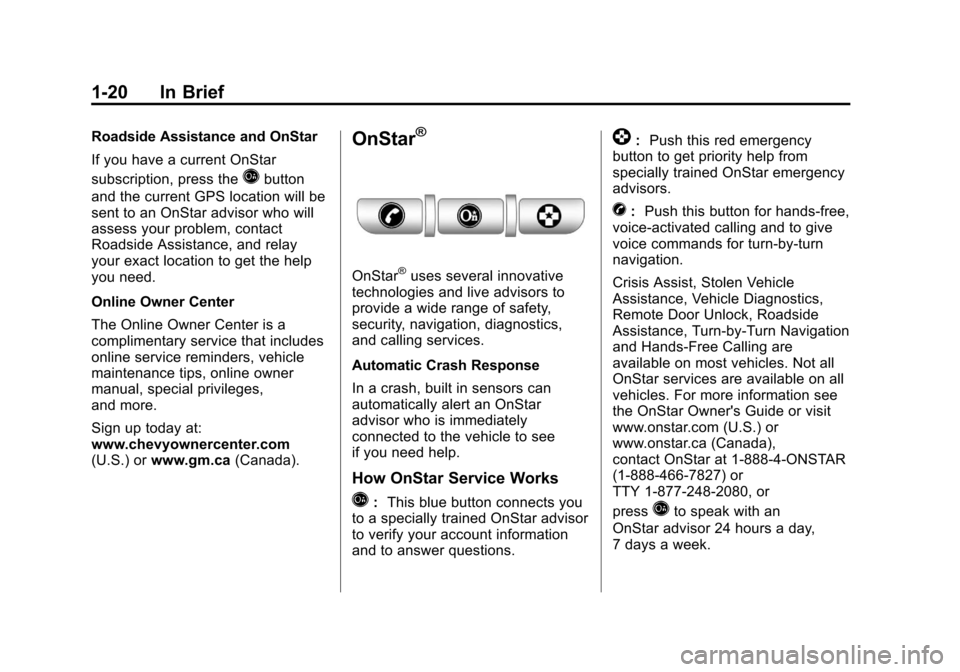
Q: This blue button connects you
to a specially trained OnStar advisor
to verify your account information
and to answer questions.
]: Push this red emergency
button to get priority help from
specially trained OnStar emergency
advisors.
X: Push this button for hands‐free,
voice‐activated calling and to give
voice commands for turn‐by‐turn
navigation.
Crisis Assist, Stolen Vehicle
Assistance, Vehicle Diagnostics,
Remote Door Unlock, Roadside
Assistance, Turn‐by‐Turn Navigation
and Hands‐Free Calling are
available on most vehicles. Not all
OnStar services are available on all
vehicles. For more information see
the OnStar Owner's Guide or visit
www.onstar.com (U.S.) or
www.onstar.ca (Canada),
contact OnStar at 1-888-4-ONSTAR
(1‐888‐466‐7827) or
TTY 1‐877‐248‐2080, or
press
Qto speak with an
OnStar advisor 24 hours a day,
7 days a week.