lock CHEVROLET KODIAK 2006 Owner's Manual
[x] Cancel search | Manufacturer: CHEVROLET, Model Year: 2006, Model line: KODIAK, Model: CHEVROLET KODIAK 2006Pages: 398, PDF Size: 5.72 MB
Page 76 of 398
Resynchronization
Resynchronization may be necessary due to the
security method used by this system. The transmitter
does not send the same signal twice to the receiver.
The receiver will not respond to a signal it has been sent
previously. This prevents anyone from recording and
playing back the signal from the transmitter.
To resynchronize your transmitter, stand close to your
vehicle and simultaneously press and hold the LOCK
and UNLOCK buttons on the transmitter for at least
five seconds. The door locks should cycle to confirm
resynchronization. If the locks do not cycle, see
your dealer for service.
Doors and Locks
Door Locks
{CAUTION:
Unlocked doors can be dangerous.
Passengers, especially children, can easily
open the doors and fall out of a moving
vehicle. When a door is locked, the handle
will not open it. You increase the chance
of being thrown out of the vehicle in a
crash if the doors are not locked. So, wear
safety belts properly and lock the doors
whenever you drive.
Young children who get into unlocked
vehicles may be unable to get out. A child
can be overcome by extreme heat and can
suffer permanent injuries or even death
from heat stroke. Always lock your vehicle
whenever you leave it.
Outsiders can easily enter through an
unlocked door when you slow down or
stop your vehicle. Locking your doors can
help prevent this from happening.
2-6
Page 77 of 398
There are several ways to lock and unlock your vehicle.
If your vehicle is equipped with keyless entry, you
can use your transmitter to lock or unlock your vehicle.
SeeRemote Keyless Entry System Operation on
page 2-4.
To lock or unlock your door from the outside, use
your key.
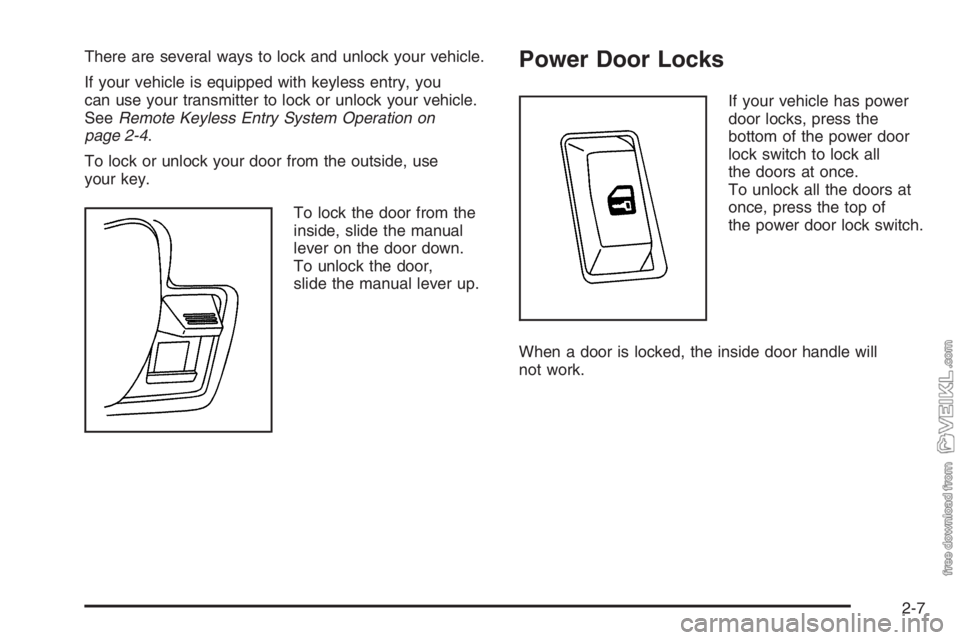
To lock the door from the
inside, slide the manual
lever on the door down.
To unlock the door,
slide the manual lever up.Power Door Locks
If your vehicle has power
door locks, press the
bottom of the power door
lock switch to lock all
the doors at once.
To unlock all the doors at
once, press the top of
the power door lock switch.
When a door is locked, the inside door handle will
not work.
2-7
Page 80 of 398
Express-Down
The driver’s window has an express-down feature.
This allows the window to be lowered fully without
continuously holding the switch. Press the switch down
fully to initiate the express-down feature. Press the
top of the switch to stop the window from lowering.
Window Lockout (Crew Cab)
o
(Window Lockout):The driver’s window switches
include a lockout feature. This prevents the passenger’s
from operating their windows. The driver can still
operate all windows with the lockout on. Press the
button to turn the lockout feature on and off.
Sliding Rear Window
To open the sliding rear window, pull the latch toward
the driver’s side of the vehicle.
To close the window, slide the window toward the
passenger’s side of the vehicle. The latch will
automatically lock into place. Try to open the window
without releasing the latch to be sure the window
is in the locked position.
Sun Visors
To block out glare, you can swing down the visors. You
can also swing them out to block glare from the side.
2-10
Page 82 of 398
Ignition Positions
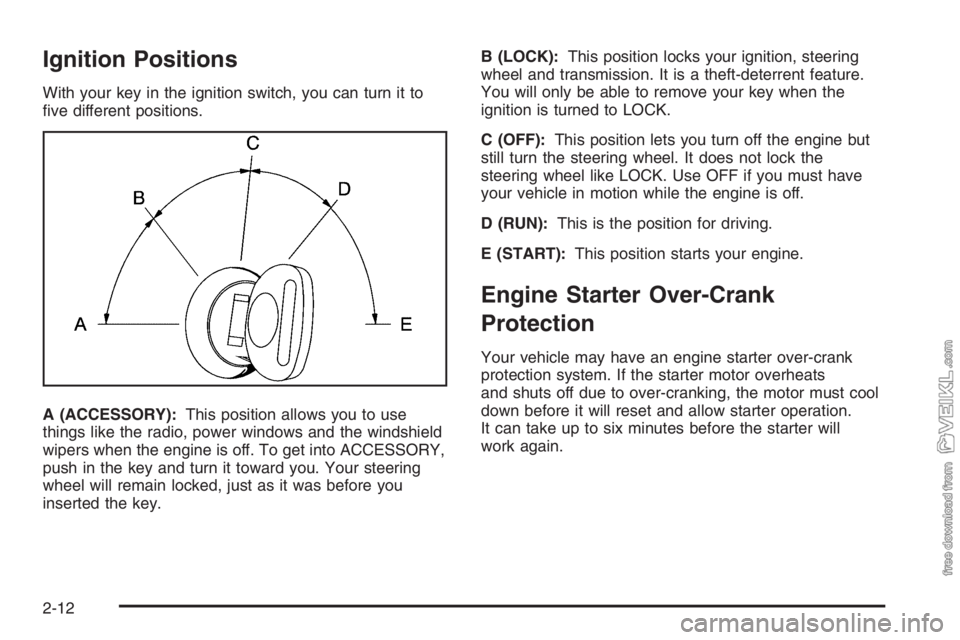
With your key in the ignition switch, you can turn it to
five different positions.
A (ACCESSORY):This position allows you to use
things like the radio, power windows and the windshield
wipers when the engine is off. To get into ACCESSORY,
push in the key and turn it toward you. Your steering
wheel will remain locked, just as it was before you
inserted the key.B (LOCK):This position locks your ignition, steering
wheel and transmission. It is a theft-deterrent feature.
You will only be able to remove your key when the
ignition is turned to LOCK.
C (OFF):This position lets you turn off the engine but
still turn the steering wheel. It does not lock the
steering wheel like LOCK. Use OFF if you must have
your vehicle in motion while the engine is off.
D (RUN):This is the position for driving.
E (START):This position starts your engine.
Engine Starter Over-Crank
Protection
Your vehicle may have an engine starter over-crank
protection system. If the starter motor overheats
and shuts off due to over-cranking, the motor must cool
down before it will reset and allow starter operation.
It can take up to six minutes before the starter will
work again.
2-12
Page 87 of 398
Cold Weather Starting
If your vehicle has the DURAMAX®Diesel Engine, the
following notice applies:
Notice:Your diesel engine has an electric air
intake heater system which reduces white smoke
and helps start the engine in cold weather. Do
not spray starting uid into the air intake where it
can contact the heater elements.
If you do not have the GM Automatic Ether Injection
System, do not use starting uid or you could
damage your engine. If you have the GM system,
use only GM approved starting uid that has
been tested to establish compatibility with the air
inlet heater system.The following tips will help you get good starting in cold
weather.•Use the recommended engine oil when the outside
temperature drops below freezing. SeeEngine Oil
(Caterpillar
®Diesel Engine) on page 5-24or
Engine Oil (DURAMAX®Diesel) on page 5-24or
Engine Oil (Gasoline Engine) on page 5-28.
When the outside temperature drops below
0°F (−18°C), use of the optional engine coolant
block heater is recommended.
•If you experience longer cranking times, notice
an unusual amount of exhaust smoke or are at
higher altitudes (over 7,000 ft. or 2 135 m), you may
use your optional engine coolant block heater.
SeeEngine Coolant Heater on page 2-26.
•SeeWhat Fuel to Use on page 5-8for information
on what fuel to use in cold weather.
2-17
Page 97 of 398
Diesel Engine Exhaust Brake
If your vehicle has a DURAMAX®7800 or Caterpillar®
diesel engine, it may have an exhaust brake, which
is located in the exhaust system.
If your vehicle has a 6.6L DURAMAX
®6600 diesel
engine, it may have an exhaust brake, which is
controlled through the turbocharger.
The exhaust brake for both engines operates the same.
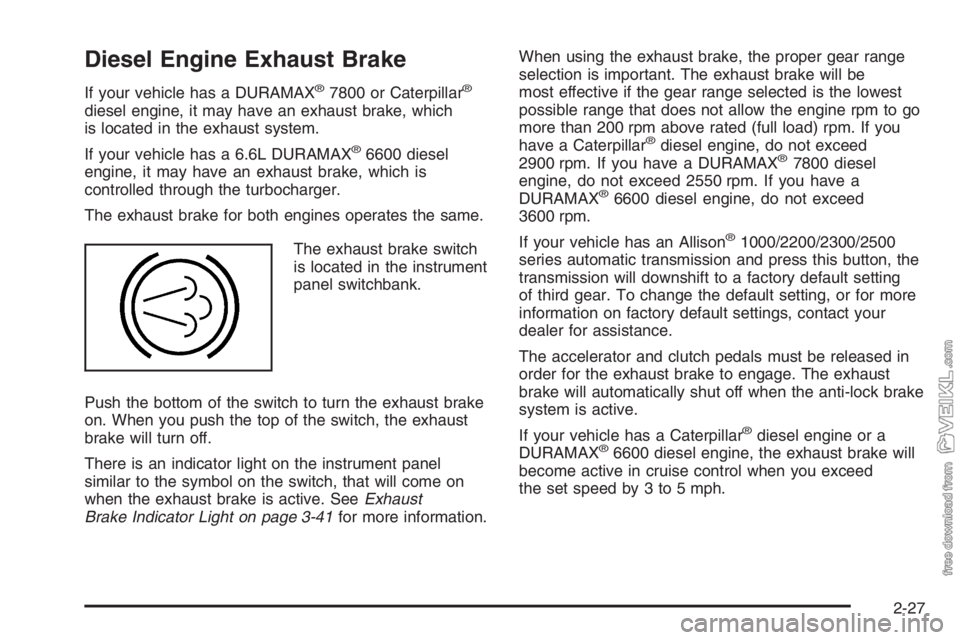
The exhaust brake switch
is located in the instrument
panel switchbank.
Push the bottom of the switch to turn the exhaust brake
on. When you push the top of the switch, the exhaust
brake will turn off.
There is an indicator light on the instrument panel
similar to the symbol on the switch, that will come on
when the exhaust brake is active. SeeExhaust
Brake Indicator Light on page 3-41for more information.When using the exhaust brake, the proper gear range
selection is important. The exhaust brake will be
most effective if the gear range selected is the lowest
possible range that does not allow the engine rpm to go
more than 200 rpm above rated (full load) rpm. If you
have a Caterpillar®diesel engine, do not exceed
2900 rpm. If you have a DURAMAX®7800 diesel
engine, do not exceed 2550 rpm. If you have a
DURAMAX
®6600 diesel engine, do not exceed
3600 rpm.
If your vehicle has an Allison
®1000/2200/2300/2500
series automatic transmission and press this button, the
transmission will downshift to a factory default setting
of third gear. To change the default setting, or for more
information on factory default settings, contact your
dealer for assistance.
The accelerator and clutch pedals must be released in
order for the exhaust brake to engage. The exhaust
brake will automatically shut off when the anti-lock brake
system is active.
If your vehicle has a Caterpillar
®diesel engine or a
DURAMAX®6600 diesel engine, the exhaust brake will
become active in cruise control when you exceed
the set speed by 3 to 5 mph.
2-27
Page 106 of 398
Locking Hubs
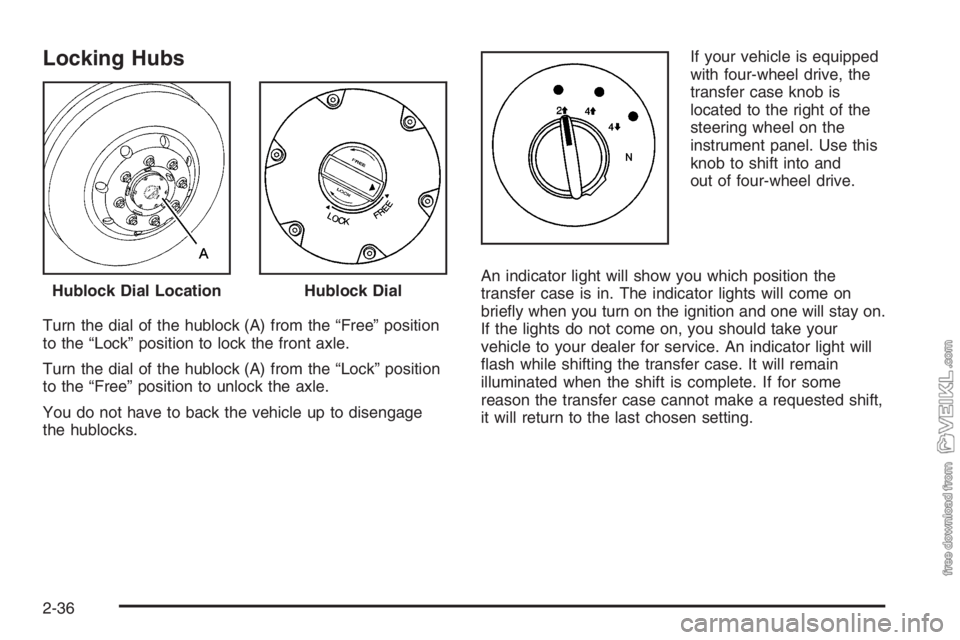
Turn the dial of the hublock (A) from the “Free” position
to the “Lock” position to lock the front axle.
Turn the dial of the hublock (A) from the “Lock” position
to the “Free” position to unlock the axle.
You do not have to back the vehicle up to disengage
the hublocks.If your vehicle is equipped
with four-wheel drive, the
transfer case knob is
located to the right of the
steering wheel on the
instrument panel. Use this
knob to shift into and
out of four-wheel drive.
An indicator light will show you which position the
transfer case is in. The indicator lights will come on
briefly when you turn on the ignition and one will stay on.
If the lights do not come on, you should take your
vehicle to your dealer for service. An indicator light will
flash while shifting the transfer case. It will remain
illuminated when the shift is complete. If for some
reason the transfer case cannot make a requested shift,
it will return to the last chosen setting. Hublock Dial Location
Hublock Dial
2-36
Page 107 of 398
Recommended Transfer Case Settings
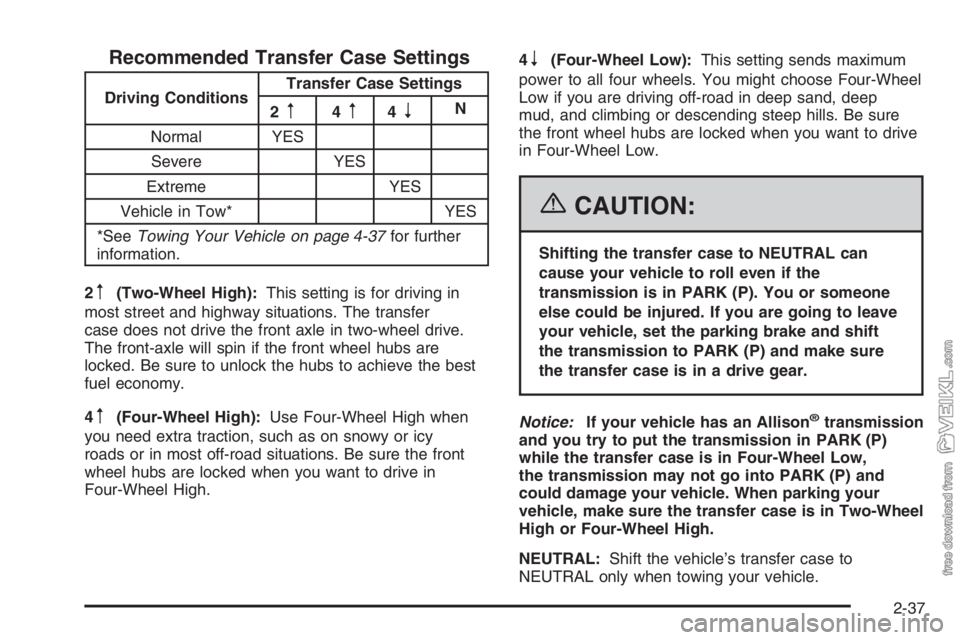
Driving ConditionsTransfer Case Settings
2m4m4nN
Normal YES
Severe YES
Extreme YES
Vehicle in Tow* YES
*SeeTowing Your Vehicle on page 4-37for further
information.
2
m(Two-Wheel High):This setting is for driving in
most street and highway situations. The transfer
case does not drive the front axle in two-wheel drive.
The front-axle will spin if the front wheel hubs are
locked. Be sure to unlock the hubs to achieve the best
fuel economy.
4
m(Four-Wheel High):Use Four-Wheel High when
you need extra traction, such as on snowy or icy
roads or in most off-road situations. Be sure the front
wheel hubs are locked when you want to drive in
Four-Wheel High.4
n(Four-Wheel Low):This setting sends maximum
power to all four wheels. You might choose Four-Wheel
Low if you are driving off-road in deep sand, deep
mud, and climbing or descending steep hills. Be sure
the front wheel hubs are locked when you want to drive
in Four-Wheel Low.
{CAUTION:
Shifting the transfer case to NEUTRAL can
cause your vehicle to roll even if the
transmission is in PARK (P). You or someone
else could be injured. If you are going to leave
your vehicle, set the parking brake and shift
the transmission to PARK (P) and make sure
the transfer case is in a drive gear.
Notice:If your vehicle has an Allison
®transmission
and you try to put the transmission in PARK (P)
while the transfer case is in Four-Wheel Low,
the transmission may not go into PARK (P) and
could damage your vehicle. When parking your
vehicle, make sure the transfer case is in Two-Wheel
High or Four-Wheel High.
NEUTRAL:Shift the vehicle’s transfer case to
NEUTRAL only when towing your vehicle.
2-37
Page 109 of 398
If the knob is turned to Four-Wheel High or Two-Wheel
High when your vehicle is in gear and/or moving, the
Four-Wheel High or Two-Wheel high indicator light
will flash for 30 seconds. It will not complete the shift
unless your vehicle is moving less than 3 mph (5 km/h)
with the transmission in NEUTRAL (N).
Shifting Into NEUTRAL
Before shifting the transfer case to NEUTRAL, first
make sure the vehicle is parked so that it will not roll.
1. Set the parking brake.
2. Start the vehicle.
3. Put the transmission in NEUTRAL (N).
4. Shift the transfer case to Two-Wheel High.
5. Turn the transfer case knob all of the way past
Four-Wheel Low and hold it there for a minimum
of 10 seconds. The neutral indicator light will
come on.
6. Shift the transmission to REVERSE (R) for
one second, then shift the transmission to
DRIVE (D) for one second.
7. Turn the ignition to OFF.
8. Place the transmission shift lever in PARK. (P).
9. Turn the ignition to LOCK.
Shifting Out of NEUTRAL
To shift the transfer case out of NEUTRAL, do the
following:
1. Set the parking brake and apply the regular brake
pedal.
2. Turn the ignition to RUN with the engine off.
3. Put the transmission in NEUTRAL (N).
4. Turn the transfer case knob to the desired shift
position (Two-Wheel High, Four-Wheel High,
Four-Wheel Low).
5. After the transfer case has shifted out of NEUTRAL,
the indicator light will go out.
Notice:Driving with the parking brake on can
overheat the brake system and cause premature
wear or damage to brake system parts. Verify that
the parking brake is fully released and the brake
warning light is off before driving.
6. Release the parking brake.
7. Start the engine and shift the transmission lever to
the desired position.
Excessively shifting the transfer case into or out of the
different modes may cause the transfer case to enter the
shift protection mode. This will protect the transfer case
from possible damage and will only allow the transfer
case to respond to one shift per 10 seconds. The transfer
case may stay in this mode for up to three minutes.
2-39
Page 117 of 398
Mirrors
Manual Rearview Mirror
If your vehicle has this feature, pull the tab under the
mirror toward you to reduce glare from headlamps
behind you after dark. Push the tab away from you to
restore the mirror to the daytime position.
Outside Manual Mirrors
Adjust the outside rearview mirrors so you can see a
little of the side of your vehicle, and the area beside your
vehicle from a comfortable driving position. All mirrors
can be folded in to enter narrow passageways.
Outside Power Mirrors
If you have outside power mirrors, they can be adjusted
from the inside of the vehicle.
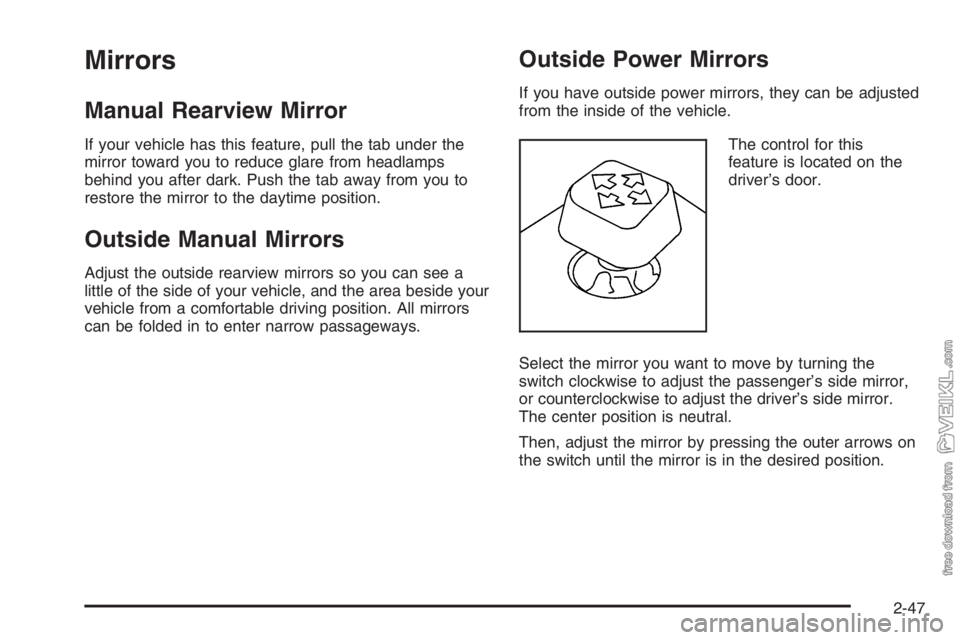
The control for this
feature is located on the
driver’s door.
Select the mirror you want to move by turning the
switch clockwise to adjust the passenger’s side mirror,
or counterclockwise to adjust the driver’s side mirror.
The center position is neutral.
Then, adjust the mirror by pressing the outer arrows on
the switch until the mirror is in the desired position.
2-47