ECO mode CHEVROLET KODIAK 2007 User Guide
[x] Cancel search | Manufacturer: CHEVROLET, Model Year: 2007, Model line: KODIAK, Model: CHEVROLET KODIAK 2007Pages: 430, PDF Size: 6.06 MB
Page 196 of 430
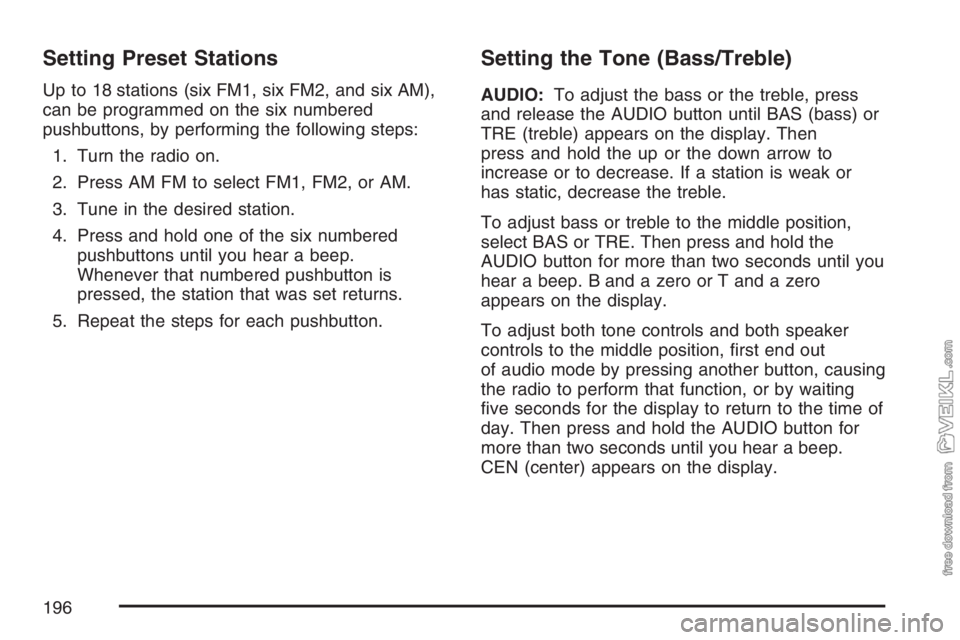
Setting Preset Stations
Up to 18 stations (six FM1, six FM2, and six AM),
can be programmed on the six numbered
pushbuttons, by performing the following steps:
1. Turn the radio on.
2. Press AM FM to select FM1, FM2, or AM.
3. Tune in the desired station.
4. Press and hold one of the six numbered
pushbuttons until you hear a beep.
Whenever that numbered pushbutton is
pressed, the station that was set returns.
5. Repeat the steps for each pushbutton.
Setting the Tone (Bass/Treble)
AUDIO:To adjust the bass or the treble, press
and release the AUDIO button until BAS (bass) or
TRE (treble) appears on the display. Then
press and hold the up or the down arrow to
increase or to decrease. If a station is weak or
has static, decrease the treble.
To adjust bass or treble to the middle position,
select BAS or TRE. Then press and hold the
AUDIO button for more than two seconds until you
hear a beep. B and a zero or T and a zero
appears on the display.
To adjust both tone controls and both speaker
controls to the middle position, first end out
of audio mode by pressing another button, causing
the radio to perform that function, or by waiting
five seconds for the display to return to the time of
day. Then press and hold the AUDIO button for
more than two seconds until you hear a beep.
CEN (center) appears on the display.
196
Page 197 of 430
Adjusting the Speakers (Balance/Fade)
AUDIO:To adjust the balance between the
right and the left speakers, press and release the
AUDIO button until BAL (balance) appears on
the display. Then press and hold the up or
the down arrow to move the sound toward the
right or the left speakers.
To adjust the fade between the front and the rear
speakers, press and release the AUDIO button
until FAD (fade) appears on the display. Then
press and hold the up or the down arrow to move
the sound toward the front or the rear speakers.
To adjust balance or fade to the middle position,
select BAL or FAD. Then press and hold
AUDIO for more than two seconds until you hear
a beep. L (balance) and a zero or F and a
zero appears on the display.To adjust both tone controls and both speaker
controls to the middle position, first end out
of audio mode by pressing another button, causing
the radio to perform that function, or by waiting
five seconds for the display to return to the time of
day. Then press and hold the AUDIO button for
more than two seconds until you hear a beep.
CEN appears on the display.
Fade may not be available if the vehicle is a
regular cab model.
Radio Messages
CAL (Calibration):The audio system has been
calibrated for your vehicle from the factory. If
CAL appears on the display it means that the radio
has not been configured properly for your vehicle
and must be returned to your dealer for service.
LOC (Locked):This message is displayed when
the THEFTLOCK
®system has locked up. Take
the vehicle to your dealer for service.
If any error occurs repeatedly or cannot be
corrected, contact your dealer.
197
Page 265 of 430
{CAUTION:
If you get fuel on yourself and then
something ignites it, you could be badly
burned. Fuel can spray out on you if you
open the fuel cap too quickly. This spray
can happen if your tank is nearly full, and is
more likely in hot weather. Open the fuel
cap slowly and wait for any “hiss” noise to
stop. Then unscrew the cap all the way.
When you put the cap back on, turn it clockwise
until it is tight.
Notice:If you need a new fuel cap, be sure to
get the right type. Your dealer can get one
for you. If you get the wrong type, it may not
t properly. This may cause your malfunction
indicator lamp to light and may damage
your fuel tank and emissions system. See
Malfunction Indicator Lamp on page 174.If you have dual tanks, fill the driver’s side tank, or
forward tank, first. The fuel gage will give better
readings this way. Your gage will show the
total fuel left in both tanks.
If your vehicle is a C4/C5 model and you have
dual tanks, the engine must be off when refueling
or the fuel transfer system may become
inoperable.
If you have a single tank with dual fillers, where
there is a filler on each side of the vehicle, do not
attempt to fill the tank through both fillers at the
same time. Also, do not fill the tank with both caps
removed, as this may result in over-filling the
tank and fuel spillage.
265
Page 304 of 430
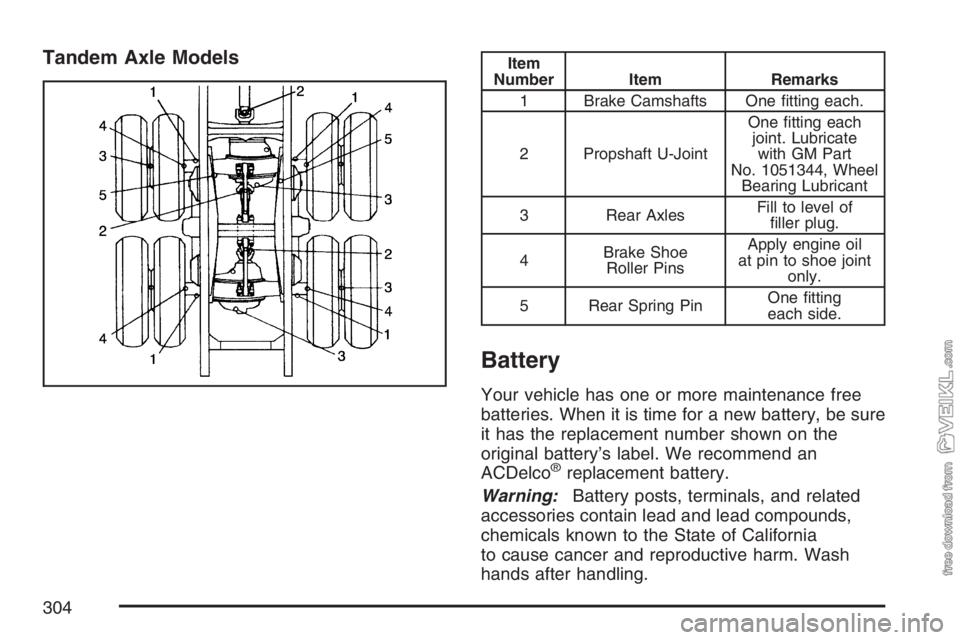
Tandem Axle ModelsItem
Number Item Remarks
1 Brake Camshafts One fitting each.
2 Propshaft U-JointOne fitting each
joint. Lubricate
with GM Part
No. 1051344, Wheel
Bearing Lubricant
3 Rear AxlesFill to level of
filler plug.
4Brake Shoe
Roller PinsApply engine oil
at pin to shoe joint
only.
5 Rear Spring PinOne fitting
each side.
Battery
Your vehicle has one or more maintenance free
batteries. When it is time for a new battery, be sure
it has the replacement number shown on the
original battery’s label. We recommend an
ACDelco
®replacement battery.
Warning:Battery posts, terminals, and related
accessories contain lead and lead compounds,
chemicals known to the State of California
to cause cancer and reproductive harm. Wash
hands after handling.
304
Page 347 of 430
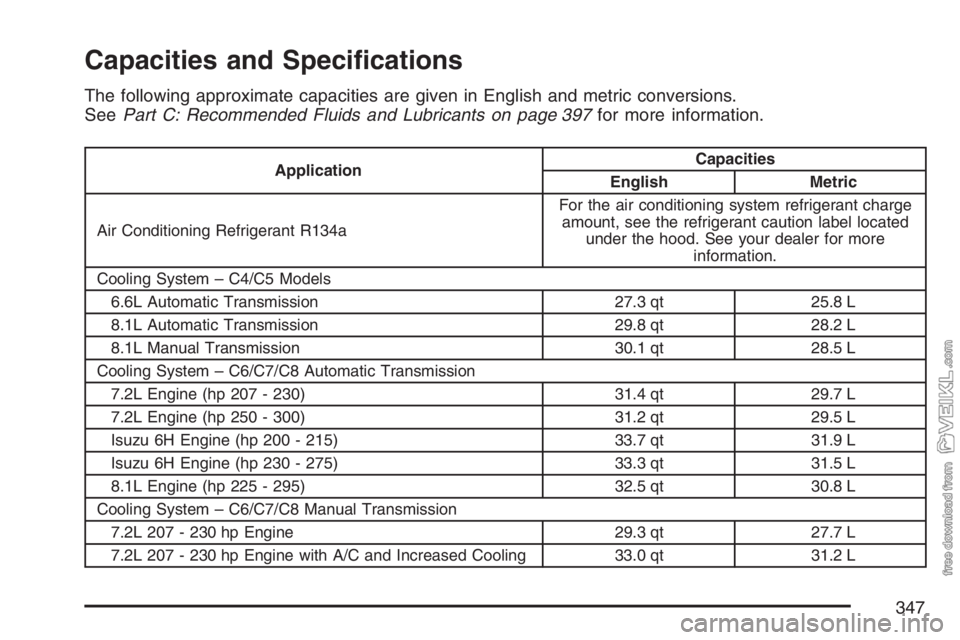
Capacities and Specications
The following approximate capacities are given in English and metric conversions.
SeePart C: Recommended Fluids and Lubricants on page 397for more information.
ApplicationCapacities
English Metric
Air Conditioning Refrigerant R134aFor the air conditioning system refrigerant charge
amount, see the refrigerant caution label located
under the hood. See your dealer for more
information.
Cooling System – C4/C5 Models
6.6L Automatic Transmission 27.3 qt 25.8 L
8.1L Automatic Transmission 29.8 qt 28.2 L
8.1L Manual Transmission 30.1 qt 28.5 L
Cooling System – C6/C7/C8 Automatic Transmission
7.2L Engine (hp 207 - 230) 31.4 qt 29.7 L
7.2L Engine (hp 250 - 300) 31.2 qt 29.5 L
Isuzu 6H Engine (hp 200 - 215) 33.7 qt 31.9 L
Isuzu 6H Engine (hp 230 - 275) 33.3 qt 31.5 L
8.1L Engine (hp 225 - 295) 32.5 qt 30.8 L
Cooling System – C6/C7/C8 Manual Transmission
7.2L 207 - 230 hp Engine 29.3 qt 27.7 L
7.2L 207 - 230 hp Engine with A/C and Increased Cooling 33.0 qt 31.2 L
347
Page 409 of 430
Vehicle Data Collection and
Event Data Recorders
Your vehicle, like other modern motor vehicles, has
a number of sophisticated computer systems that
monitor and control several aspects of the vehicle’s
performance. Your vehicle uses on-board vehicle
computers to monitor emission control components
to optimize fuel economy, to monitor conditions for
airbag deployment and, if so equipped, to provide
anti-lock braking and to help the driver control
the vehicle in difficult driving situations. Some
information may be stored during regular operations
to facilitate repair of detected malfunctions; other
information is stored only in a crash event by
computer systems, such as those commonly
called event data recorders (EDR).
In a crash event, computer systems, such as the
Airbag Sensing and Diagnostic Module (SDM)
in your vehicle may record information about the
condition of the vehicle and how it was operated,
such as data related to engine speed, brake
application, throttle position, vehicle speed,safety belt usage, airbag readiness, airbag
performance, and the severity of a collision.
This information has been used to improve vehicle
crash performance and may be used to improve
crash performance of future vehicles and
driving safety. Unlike the data recorders on many
airplanes, these on-board systems do not
record sounds, such as conversation of vehicle
occupants.
To read this information, special equipment is
needed and access to the vehicle or the device
that stores the data is required. GM will not access
information about a crash event or share it with
others other than:
•with the consent of the vehicle owner or,
if the vehicle is leased, with the consent of
the lessee,
•in response to an official request of police or
similar government office,
•as part of GM’s defense of litigation through
the discovery process, or
•as required by law.
409