lock CHEVROLET LOW CAB FORWARD 2017 Workshop Manual
[x] Cancel search | Manufacturer: CHEVROLET, Model Year: 2017, Model line: LOW CAB FORWARD, Model: CHEVROLET LOW CAB FORWARD 2017Pages: 414, PDF Size: 7.97 MB
Page 113 of 414
Chevrolet Low Cab Forward Owner Manual (GMNA-Localizing-U.S.-
10716700) - 2017 - crc - 12/6/16
112 Infotainment System
As an example, "CH1" is
displayed.
The radio stations in memory are
erased when the power supply is
interrupted to replace the battery or
fuses.
Programming Preset Channels 1. Display the channel number you wish to program.
2. Press the "CH" button for 2 seconds or longer.
The frequency display will
blink.
3. Press the "TUNE" button ("
y
z
") to select the frequency
you wish to program.
4. Press the "CH" button for 2 seconds or longer.
Once it has been set as a
preset channel, the frequency
display will stop blinking.
Radio Reception
Usually, a problem with radio
reception does not mean there is a
problem with your radio - it is just the normal result of conditions
outside the vehicle. For example,
nearby buildings and terrain can
interfere with FM reception. Power
lines or telephone wires can
interfere with AM signals.
And of course, radio signals have a
limited range. The farther you are
from a station, the weaker its signal
will be. In addition, reception
conditions change constantly as
your vehicle moves.
Here are some common reception
problems that probably do not
indicate a problem with your radio.
FM Transmissions
Fading and drifting stations -
Generally, the effective range of FM
is about 40 km (25 miles). Once
outside this range, you may notice
fading and drifting, which increase
with the distance from the radio
transmitter. They are often
accompanied by distortion.
Multi-path - FM signals are
reflective, making it possible for two
signals to reach your antenna at the
same time. If this happens, the
signals will cancel each other out,
causing a momentary flutter or loss
of reception.
Static and fluttering - These occur
when signals are blocked by
buildings, trees, or other large
objects. Increasing the bass level
may reduce static and fluttering.
Station swapping - If the FM signal
you are listening to is interrupted or
weakened, and there is another
strong station nearby on the FM
band, your radio may tune in the
second station until the original
signal can be picked up again.
AM Transmissions
Fading - AM broadcasts are
reflected by the upper atmosphere -
especially at night. These reflected
signals can interfere with those
received directly from the radio
station, causing the radio station to
sound alternately strong and weak.
Station interference - When a
reflected signal and a signal
received directly from a radio station
are very nearly the same frequency,
Page 122 of 414

Chevrolet Low Cab Forward Owner Manual (GMNA-Localizing-U.S.-
10716700) - 2017 - crc - 12/6/16
Infotainment System 121
USB Port
USB Memory Operations
Playing Music Downloaded in USB
Flash Memory
Insert the USB device that stores
music data into the USB terminal.
After the music data is recognized,
the playback will start.
Connect the USB device in a way
that will not impede your driving.
The improper way of connecting the
device may disturb your driving and
cause a traffic accident.
Do not connect, disconnect,
or operate the USB device while
driving. Stop the vehicle in a safe
location and perform these
operations.When removing the USB flash
memory, turn off ("LOCK") the
engine control switch or select the
other mode (e.g. FM or AM mode).
Selecting the USB Mode
Pressing the "MODE" button and
displaying "USB" when the USB
device is connected allows you to
switch from another audio mode to
the USB mode.
When playback of the music file is
started, the file number in the folder
being played back is shown on the
display.
When switching to another mode
from the USB mode, then returning
to the USB mode, it allows you to
return to the music file that was
played last.
Fast Forwarding/Fast Reversing
Press and hold the "TRACK" button
("
y z") during playback to
advance the file forward or
backward quickly. Fast forward or
fast reverse is stopped and the file
is played back when the "TRACK"
button ("
y z") is released.
y: Fast forward.
z: Fast reverse.
Replaying the Same File
Press the "TRACK" button ("
z") for
less than 1 second to start playback
of the current file from the
beginning.
File Selection
Press the "TRACK" button ("
y z")
for less than 1 second to select the
desired file number.
y: Advance to the next file.
z(press twice or more): Return to
a previous file.
Selecting a Track Inside a Folder
1. Press the "FLD" button for less than 1 second. Folder number
is displayed. As an example,
"F100" for folder number 100.
2. Press the "TRACK" button ("
y z") to select the folder
number.
y: Increase folder number.
Page 128 of 414
Chevrolet Low Cab Forward Owner Manual (GMNA-Localizing-U.S.-
10716700) - 2017 - crc - 12/6/16
Climate Controls 127
O:Use this position to prevent
dusty or otherwise contaminated
outside air from entering the cab,
such as in a tunnel or in congested
traffic.
Extended use of the inside air
recirculation position causes the
windshield and windows to fog up
easily, making visibility poor. For
good ventilation, switch to outside
air as soon as possible.
Temperature Control Knob : Use
this knob to select the preferred cab
interior temperature. Turn the knob
counterclockwise to lower the outlet
air temperature and clockwise to
raise it.
Fan Speed Control Knob : The fan
speed can be adjusted to any of the
four speeds available.
Air Conditioning (A/C) Switch :
Press this switch to use the air
conditioning system. The indicator
light inside the switch will come on
to show that the air conditioning
system is in operation. The air
conditioning system can also be
used for dehumidifying while the heater is being used. To turn off the
air conditioning, push this switch in
again.
When the defrost mode is selected,
the air conditioner compressor will
be on.
Even if the A/C switch is turned on,
the air conditioning system will not
operate when the fan speed control
knob is placed in the stop position.
Make sure that the fan speed
control knob is in a position other
than the stop position.
Even in seasons when the air
conditioning system is not used,
occasionally operate the system for
a few minutes with the engine
running at a low speed in order to
keep the system's components
lubricated.
Ventilation
Outside Air Ventilation :
Press the
A/C switch to the off position. Turn
the outlet selector knob to the
preferred position. Move the air
selector lever to the
Pposition. Set the temperature control knob to
the desired position. Adjust the fan
speed control knob to the preferred
speed.
How to Use the Heater
Normal Heating :
Set the outlet
selector knob to the
6or-
position. Use the-position for
warming your feet while defogging
the windshield.
Set the air selector lever to the
P
position. Adjust the temperature
control knob and the fan speed
control knob to the desired
positions.
To dehumidify the cab interior while
heating, press the A/C switch to the
on position.
As the heater uses the heat from
the engine coolant, its heating effect
is weak when the engine coolant
temperature is low.
Maximum Heating : Turn the outlet
selector knob to the
6position, set
the air selector lever to the
O
Page 132 of 414
Chevrolet Low Cab Forward Owner Manual (GMNA-Localizing-U.S.-
10716700) - 2017 - crc - 12/6/16
Climate Controls 131
The vehicle must not be used with
the filter removed or incorrectly
installed. Failure to observe this
precaution can lead to air
conditioning system damage as a
result of dust, dirt and the like
entering the system.
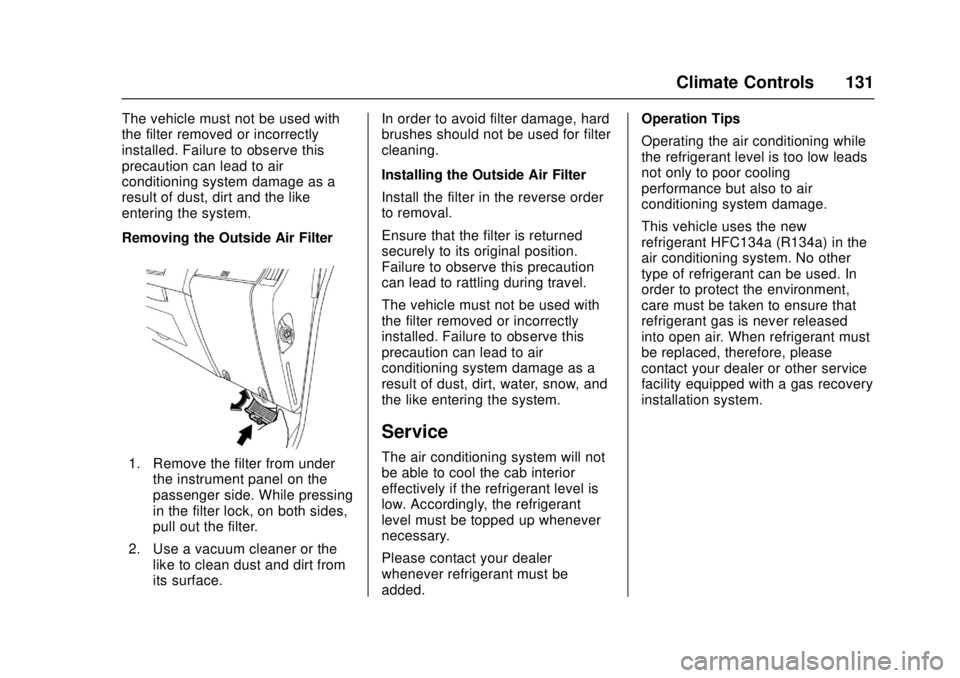
Removing the Outside Air Filter
1. Remove the filter from underthe instrument panel on the
passenger side. While pressing
in the filter lock, on both sides,
pull out the filter.
2. Use a vacuum cleaner or the like to clean dust and dirt from
its surface. In order to avoid filter damage, hard
brushes should not be used for filter
cleaning.
Installing the Outside Air Filter
Install the filter in the reverse order
to removal.
Ensure that the filter is returned
securely to its original position.
Failure to observe this precaution
can lead to rattling during travel.
The vehicle must not be used with
the filter removed or incorrectly
installed. Failure to observe this
precaution can lead to air
conditioning system damage as a
result of dust, dirt, water, snow, and
the like entering the system.
Service
The air conditioning system will not
be able to cool the cab interior
effectively if the refrigerant level is
low. Accordingly, the refrigerant
level must be topped up whenever
necessary.
Please contact your dealer
whenever refrigerant must be
added. Operation Tips
Operating the air conditioning while
the refrigerant level is too low leads
not only to poor cooling
performance but also to air
conditioning system damage.
This vehicle uses the new
refrigerant HFC134a (R134a) in the
air conditioning system. No other
type of refrigerant can be used. In
order to protect the environment,
care must be taken to ensure that
refrigerant gas is never released
into open air. When refrigerant must
be replaced, therefore, please
contact your dealer or other service
facility equipped with a gas recovery
installation system.
Page 133 of 414
Chevrolet Low Cab Forward Owner Manual (GMNA-Localizing-U.S.-
10716700) - 2017 - crc - 12/6/16
132 Driving and Operating
Driving and
Operating
Driving Information
Driver Behavior . . . . . . . . . . . . . . . 133
Distracted Driving . . . . . . . . . . . . 133
Control of a Vehicle . . . . . . . . . . . 133
Braking . . . . . . . . . . . . . . . . . . . . . . . 137
Steering . . . . . . . . . . . . . . . . . . . . . . 143
Driving on Wet Roads . . . . . . . . 143
Hill and Mountain Roads . . . . . 144
Winter Driving . . . . . . . . . . . . . . . . 145
If the Vehicle Is Stuck . . . . . . . . 148
Emergencies(Troubleshooting) . . . . . . . . . . . 148
Emergencies (Disabled Vehicle) . . . . . . . . . . . . . . . . . . . . . 161
Starting and Operating
New Vehicle Break-In . . . . . . . . . 162
Pedals . . . . . . . . . . . . . . . . . . . . . . . . 163
Ignition Positions . . . . . . . . . . . . . 163
Starting and Stopping theVehicle (Gasoline Only) . . . . . 165
Starting and Stopping the Vehicle (Diesel Only) . . . . . . . . 168
Operating Temperature . . . . . . . 172
Winter Cover . . . . . . . . . . . . . . . . . 172
Engine Heater . . . . . . . . . . . . . . . . 173 Engine Alarm and Automatic
Shutdown (Diesel Only) . . . . . 174
Idle Shutdown . . . . . . . . . . . . . . . . 174
High Idle System . . . . . . . . . . . . . 174
Engine Checks Before Operating . . . . . . . . . . . . . . . . . . . 175
Parking over Things That Burn . . . . . . . . . . . . . . . . . . . 176
Engine Exhaust
Engine Exhaust . . . . . . . . . . . . . . 178
Running the Vehicle WhileParked . . . . . . . . . . . . . . . . . . . . . . 179
Diesel Particulate Filter
Diesel Particulate Filter . . . . . . . 180
Diesel Exhaust Fluid
Diesel Exhaust Fluid . . . . . . . . . . 189
Automatic Transmission
Automatic Transmission . . . . . . 204
Selector Lever . . . . . . . . . . . . . . . . 214
Overdrive Off . . . . . . . . . . . . . . . . . 215
Brakes
Antilock BrakeSystem (ABS) . . . . . . . . . . . . . . . 217
Parking Brake . . . . . . . . . . . . . . . . 221
Exhaust Brake (Diesel Only) . . . . . . . . . . . . . . . . 222
Cruise Control
Cruise Control (Diesel) . . . . . . . 224
Cruise Control (Gas) . . . . . . . . . 227
Driver Assistance Systems
Speed Limiter (GasolineVehicle) . . . . . . . . . . . . . . . . . . . . . 231
Fuel
Fuel (Gasoline) . . . . . . . . . . . . . . . 231
Fuels in Foreign Countries . . . 232
Fuel for Diesel Engines . . . . . . . 232
Biodiesel . . . . . . . . . . . . . . . . . . . . . 233
Cold Weather Operation(Diesel) . . . . . . . . . . . . . . . . . . . . . 235
Water in Fuel (Diesel) . . . . . . . . 236
Running Out of Fuel (Diesel) . . . . . . . . . . . . . . . . . . . . . 238
Filling the Tank . . . . . . . . . . . . . . . 240
Conversions and Add-Ons
Add-On Electrical Equipment . . . . . . . . . . . . . . . . . . 241
Power Take-Off (PTO) . . . . . . . . 242
Page 134 of 414

Chevrolet Low Cab Forward Owner Manual (GMNA-Localizing-U.S.-
10716700) - 2017 - crc - 12/6/16
Driving and Operating 133
Driving Information
Driver Behavior
Napping in the Vehicle
{Warning
Before taking a nap in the vehicle,
be sure to shut off the engine and
place the engine control switch in
the "LOCK" position. Otherwise,
any unintended contact with the
accelerator pedal while you are
asleep could cause the vehicle to
move, resulting in an accident.. If you leave the engine
running and unintentionally
keep the accelerator pedal
pressed while asleep, the
engine and exhaust pipe
could become abnormally
hot, resulting in a fire.
. If you leave the engine
running while taking a nap
with the vehicle parked in a
place where exhaust gases
(Continued)
Warning (Continued)
could get into the cab (for
example, a place that is
poorly ventilated), you could
suffer carbon monoxide
poisoning.
. You and others could be
seriously injured.
Distracted Driving
Do Not Use a Mobile Phone
While Driving
{Warning
Drivers should never use mobile
telephones or car phones in any
mode other than Hands Free
while driving. Doing so is
dangerous. Using a mobile
telephone while driving could
result in an accident because you
would not be paying full attention
to your surroundings. If you are
(Continued)
Warning (Continued)
driving and you wish to use a
mobile telephone, first stop the
vehicle in a safe place.
You and others could be seriously
injured.
Control of a Vehicle
Warnings for Driving
{Warning
Concentrate on driving safely,
obeying all legally designated
speed limits, road signs and
traffic signals.
If you notice any abnormal noise,
abnormal smell or abnormal
vibration from any part of the
vehicle, immediately stop the
vehicle in a safe place and
perform checks.(Continued)
Page 136 of 414
Chevrolet Low Cab Forward Owner Manual (GMNA-Localizing-U.S.-
10716700) - 2017 - crc - 12/6/16
Driving and Operating 135
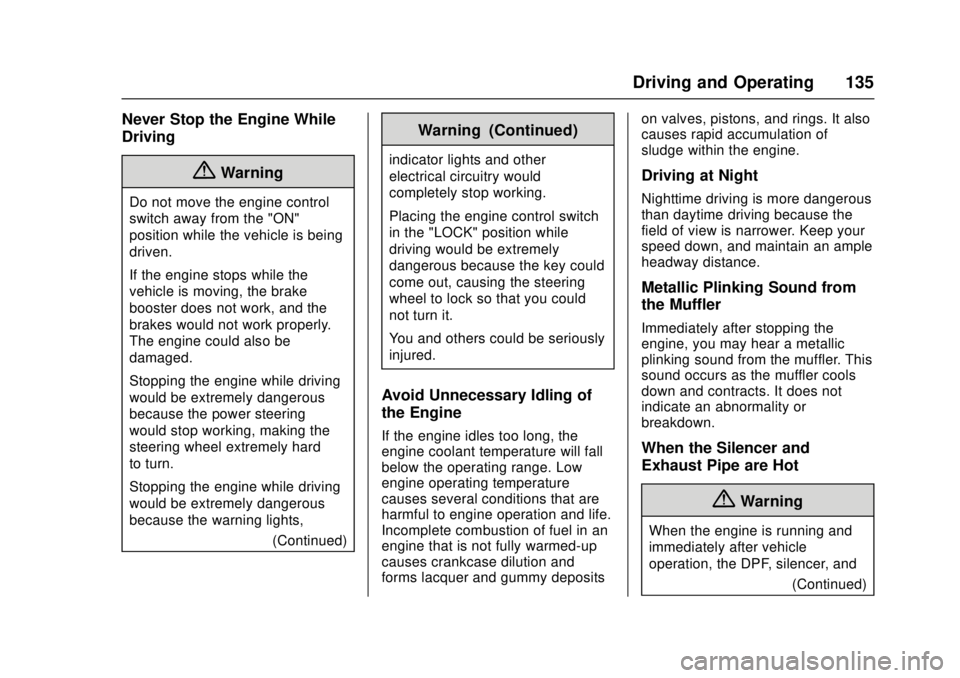
Never Stop the Engine While
Driving
{Warning
Do not move the engine control
switch away from the "ON"
position while the vehicle is being
driven.
If the engine stops while the
vehicle is moving, the brake
booster does not work, and the
brakes would not work properly.
The engine could also be
damaged.
Stopping the engine while driving
would be extremely dangerous
because the power steering
would stop working, making the
steering wheel extremely hard
to turn.
Stopping the engine while driving
would be extremely dangerous
because the warning lights,(Continued)
Warning (Continued)
indicator lights and other
electrical circuitry would
completely stop working.
Placing the engine control switch
in the "LOCK" position while
driving would be extremely
dangerous because the key could
come out, causing the steering
wheel to lock so that you could
not turn it.
You and others could be seriously
injured.
Avoid Unnecessary Idling of
the Engine
If the engine idles too long, the
engine coolant temperature will fall
below the operating range. Low
engine operating temperature
causes several conditions that are
harmful to engine operation and life.
Incomplete combustion of fuel in an
engine that is not fully warmed-up
causes crankcase dilution and
forms lacquer and gummy deposits on valves, pistons, and rings. It also
causes rapid accumulation of
sludge within the engine.
Driving at Night
Nighttime driving is more dangerous
than daytime driving because the
field of view is narrower. Keep your
speed down, and maintain an ample
headway distance.
Metallic Plinking Sound from
the Muffler
Immediately after stopping the
engine, you may hear a metallic
plinking sound from the muffler. This
sound occurs as the muffler cools
down and contracts. It does not
indicate an abnormality or
breakdown.
When the Silencer and
Exhaust Pipe are Hot
{Warning
When the engine is running and
immediately after vehicle
operation, the DPF, silencer, and
(Continued)
Page 141 of 414

Chevrolet Low Cab Forward Owner Manual (GMNA-Localizing-U.S.-
10716700) - 2017 - crc - 12/6/16
140 Driving and Operating
must park your vehicle on a slope,
be sure to set the parking brake
fully. Make sure that the vehicle
does not move, and block the
wheels with chocks for added
safety. Also, leave the vehicle in
gear to further ensure that it will not
move. Leave the steering wheel
turned such that the vehicle will be
stopped by an obstruction (for
example, the curb) in the unlikely
event that it moves.
Stopping and Parking with the
Engine Running
{Warning
When parking with the engine
running, first come to a complete
stop, then firmly apply the parking
brake, then move the selector
lever to the "P" (Park) position.
Unless you take these steps, any
unintended pressure on the
accelerator pedal could cause an
accident.(Continued)
Warning (Continued)
To reduce the chance of personal
injury and/or vehicle damage due
to engine overheating, never
leave the engine idling without an
alert driver present. If the engine
should overheat, as indicated by
the engine coolant temperature
gauge, immediate action is
required to correct the condition.
Continued operation of the
engine, even for a short time, may
result in a fire. Do not engage the
exhaust brake while the engine is
idling as this may cause engine
overheating.
The diesel particulate filter (DPF)
may automatically start
regeneration when the vehicle is
stopped and parked with the
engine running. To prevent a fire,
make sure there is no flammable
material near the muffler, DPF,
and exhaust pipe. Be careful not
to get burned by hot exhaust
gases.(Continued)
Warning (Continued)
You and others could be seriously
injured.
Do Not Forget to Release the
Parking Brake
Pulling away with the parking brake
still applied can damage the brake
system.
Before pulling away, make sure the
parking brake is not set by checking
that the parking brake indicator light
is not on.
Be Sure to Have the Engine
Running When the Vehicle is
Moving
{Warning
When the engine is not running,
the power steering system does
not work so the steering wheel is
hard to turn. Also, the brake
booster does not work so there is
little braking ability. If you coast (Continued)
Page 142 of 414

Chevrolet Low Cab Forward Owner Manual (GMNA-Localizing-U.S.-
10716700) - 2017 - crc - 12/6/16
Driving and Operating 141
Warning (Continued)
down a slope without the engine
running, you would not be able to
properly control the vehicle and
could have an accident.
Parking, or Leaving
Driver’s Seat
{Danger
It can be dangerous to get out of
your vehicle if the selector lever is
not fully in "P" (Park) or the
parking brake is not applied all
the way. Your vehicle can roll or
move suddenly.
To be sure your vehicle will not
move, even when you are parking
on level ground, follow the steps
below. (If you have to park on a
hill, also turn your front wheels so
the vehicle will roll away from
traffic.)
You and others could be seriously
injured or killed. 1. Hold the regular brake pedal
down with your right foot and
apply the parking brake all the
way before shifting the
transmission. Follow the
Parking Brake instructions in
this manual for your vehicle.
2. To move the selector lever to "P" (Park), hold in the button
on the lever and push the lever
all the way toward the front of
your vehicle.
3. Turn the key to "LOCK".
4. Remove the key and take it with you.
5. Before you leave the driver's seat, be sure the vehicle is not
moving, or check that your
vehicle is in Park by trying to
pull the selector lever out of "P"
(Park) by pulling the selector
lever toward you without
pushing the button. If you can
do this, it means that the
selector lever was not fully
locked into "P" (Park). Do Not Touch the Selector Lever
While the Vehicle is Stationary
with the Engine Idling
(Gasoline Only)
(Diesel) Do not touch the selector
lever while the vehicle is stationary
with the engine idling. If you touch
the selector lever at this time, a gear
could be selected and the vehicle
could move even with the parking
brake applied. The risk of knocking
against the selector lever and
causing an accident is particularly
great when you move in or out of
your seat.
Driving Down a Long Slope
When driving down a long slope,
use the exhaust brake (diesel) or
engine brake (gasoline) together
with the foot brakes. Using the
exhaust brake (diesel) or engine
brake (gasoline) and low-gears
reduces the work load on the foot
brakes and yields greater braking
force. Even so, use the foot brakes
appropriately to prevent the engine
over-revving.
Page 143 of 414

Chevrolet Low Cab Forward Owner Manual (GMNA-Localizing-U.S.-
10716700) - 2017 - crc - 12/6/16
142 Driving and Operating
Frequent use of the foot brakes can
cause vapor lock and brake fade,
resulting in reduced brake
effectiveness.
Brake Fade :Frequent use of the
brakes can cause the brakes to
overheat so that the frictional force
of the brake linings decreases and
the brakes become less effective
than normal. This phenomenon is
called brake fade.
Vapor Lock : If the brakes overheat
due to frequent use, the heat can
cause the brake fluid to boil so that
air bubbles are created in the brake
fluid. Pressing the brake pedal
simply compresses the air bubbles;
pressure is not transmitted to the
wheel cylinders, so the brakes'
effectiveness sharply deteriorates.
This phenomenon is called
vapor lock.
Even so, you should be very careful
when using engine braking in a low
gear because the engine is likely to
over-rev.
See Exhaust Brake (Diesel Only)
0 222 andSelector Lever 0214. On diesel vehicles, do not adjust the
exhaust brake valve.
The engine should never be allowed
to exceed the governed speed.
Supplement the exhaust brake with
vehicle service brakes intermittently
and/or shift to higher transmission
gear to prevent engine overspeed.
A rule of thumb for gear selection is
that the vehicle should be driven
down a grade in the same gear that
would be used to climb that grade.
{Warning
To reduce the risk of personal
injury, before going down a steep
or long grade, reduce speed, turn
on the exhaust brake and shift the
transmission to the next lower
gear. This will help control your
speed. Do not hold the brake
pedal down too long or too often
while going down a steep or long
grade. This could cause the
brakes to get hot and not to work
as well. As a result, the truck will
(Continued)
Warning (Continued)
not slow down at the usual rate.
Failure to take these steps could
result in loss of vehicle control.
You and others could be seriously
injured.
Brake Effectiveness When the
Vehicle Has Been Driven on a
Flooded Road or Washed
{Warning
When the vehicle is driven on a
flooded road, parked on a flooded
road or washed, water can get
into the brakes and reduce their
effectiveness. If the brakes do not
work well afterward, drive slowly
and gently press the brake pedal
several times until the brakes dry
out and start working normally.
Always do this after driving
through water or washing the
vehicle to help reduce the risk of(Continued)