key battery CHEVROLET LOW CAB FORWARD 2017 Owner's Manual
[x] Cancel search | Manufacturer: CHEVROLET, Model Year: 2017, Model line: LOW CAB FORWARD, Model: CHEVROLET LOW CAB FORWARD 2017Pages: 414, PDF Size: 7.97 MB
Page 33 of 414
Chevrolet Low Cab Forward Owner Manual (GMNA-Localizing-U.S.-
10716700) - 2017 - crc - 12/6/16
32 Keys, Doors, and Windows
If you resell the vehicle, be sure to
hand over the plate with key code to
the new owner together with the
vehicle.
Remote Keyless Entry
(RKE) System
SeeRadio Frequency Statement
0 404.
If there is a decrease in the Remote
Keyless Entry (RKE) operating
range:
. Check the distance. The
transmitter may be too far from
the vehicle.
. Check the location. Other
vehicles or objects may be
blocking the signal.
. Check the transmitter's battery.
See “Replacing the Battery in
the Remote Control Unit” later in
this section.
. If the transmitter is still not
working correctly, see your
dealer or a qualified technician
for service.
Remote Keyless Entry
(RKE) System Operation
The keyless entry system allows
you to lock/unlock the doors by
simply pressing the remote control
button rather than inserting the key
into the lock.
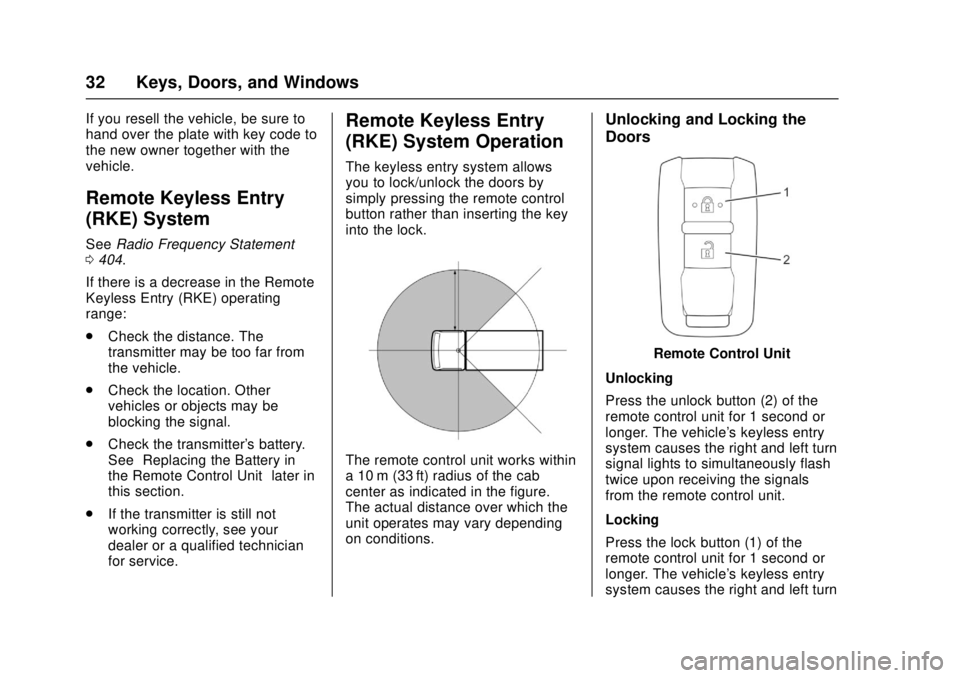
The remote control unit works within
a 10 m (33 ft) radius of the cab
center as indicated in the figure.
The actual distance over which the
unit operates may vary depending
on conditions.
Unlocking and Locking the
Doors
Remote Control Unit
Unlocking
Press the unlock button (2) of the
remote control unit for 1 second or
longer. The vehicle's keyless entry
system causes the right and left turn
signal lights to simultaneously flash
twice upon receiving the signals
from the remote control unit.
Locking
Press the lock button (1) of the
remote control unit for 1 second or
longer. The vehicle's keyless entry
system causes the right and left turn
Page 34 of 414

Chevrolet Low Cab Forward Owner Manual (GMNA-Localizing-U.S.-
10716700) - 2017 - crc - 12/6/16
Keys, Doors, and Windows 33
signal lights to simultaneously flash
once upon receiving the signals
from the remote control unit.
Should you lose the remote control
unit, please contact your dealer.
After locking the doors using the
remote control unit, be sure to
check that they are locked by
pulling the door handles.
Avoid getting water on the remote
control unit, dropping it, hitting it
against another object, or stepping
on it; otherwise, the remote control
unit could malfunction.
Do not leave the remote control unit
on the dashboard or any other
surface where the unit might be
exposed to high temperatures
(exceeding 60°C/140°F). Doing so
may result in shorter battery life or
malfunction of the remote
control unit.
If the keyless entry system fails to
operate normally, lock and unlock
the doors using the key and have
the system inspected by your
dealer.The lock or unlock buttons on the
remote control unit must be fully
pressed for more than 1 second
to work.
If you do not open any doors within
about 30 seconds after pressing the
unlock button to unlock the doors,
the automatic locking function of the
system will lock the doors again to
prevent theft.
In areas near a TV tower, electric
power plant, radio station, etc. or
under any conditions involving
strong electrical disturbances, the
remote control unit operating range
might change or the keyless entry
system might not work.
The keyless entry system does not
operate in the following cases:
.
The engine control switch is in
the "ON" position.
. The key is inserted in the engine
control switch.
. One of the doors is open.Replacing the Battery in the
Remote Control Unit
When the battery runs down,
replace it. Battery life is
approximately two years.
Battery Used Number of
Battery
Lithium battery 1
Model number:
CR 2032
Voltage: DC3V
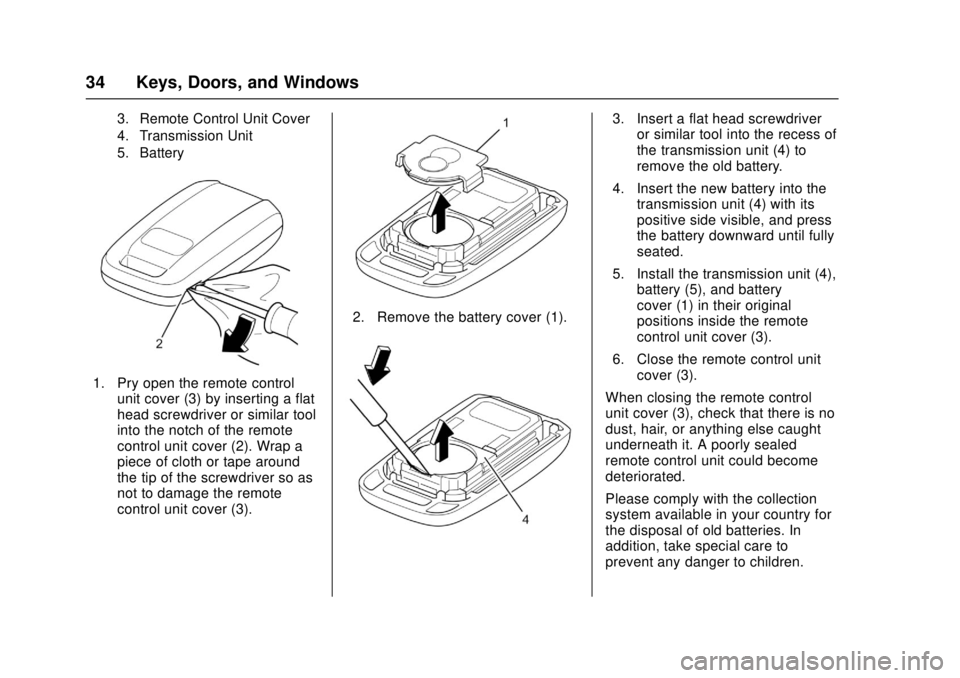
1. Battery Cover
2. Remote Control Cover Notch
Page 35 of 414
Chevrolet Low Cab Forward Owner Manual (GMNA-Localizing-U.S.-
10716700) - 2017 - crc - 12/6/16
34 Keys, Doors, and Windows
3. Remote Control Unit Cover
4. Transmission Unit
5. Battery
1. Pry open the remote controlunit cover (3) by inserting a flat
head screwdriver or similar tool
into the notch of the remote
control unit cover (2). Wrap a
piece of cloth or tape around
the tip of the screwdriver so as
not to damage the remote
control unit cover (3).
2. Remove the battery cover (1).
3. Insert a flat head screwdriveror similar tool into the recess of
the transmission unit (4) to
remove the old battery.
4. Insert the new battery into the transmission unit (4) with its
positive side visible, and press
the battery downward until fully
seated.
5. Install the transmission unit (4), battery (5), and battery
cover (1) in their original
positions inside the remote
control unit cover (3).
6. Close the remote control unit cover (3).
When closing the remote control
unit cover (3), check that there is no
dust, hair, or anything else caught
underneath it. A poorly sealed
remote control unit could become
deteriorated.
Please comply with the collection
system available in your country for
the disposal of old batteries. In
addition, take special care to
prevent any danger to children.
Page 36 of 414
Chevrolet Low Cab Forward Owner Manual (GMNA-Localizing-U.S.-
10716700) - 2017 - crc - 12/6/16
Keys, Doors, and Windows 35
{Warning
When changing the battery, use
only a battery of the same type as
the original battery, or an
equivalent. Otherwise, there is a
risk of explosion.
Do not place the battery in direct
sunlight, or near a fire or other
sources of heat.
Be sure to install the battery with
the "+" and "-" sides correctly
oriented. Incorrect installation will
result in leakage of chemicals
from inside the battery or other
operational problems.
You and others could be seriously
injured.
The battery life varies depending on
how the remote control unit is used.
The battery has reached its end of
life when the remote control unit
works intermittently or does not
work at all. Replace the battery as
soon as this happens.
Getting In and Out of the
Vehicle
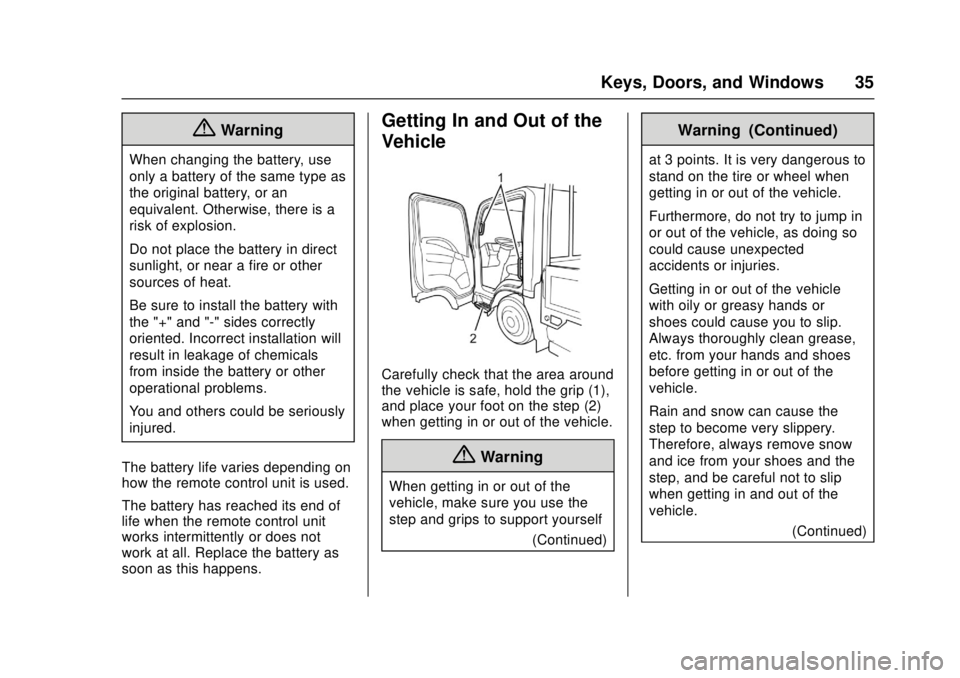
Carefully check that the area around
the vehicle is safe, hold the grip (1),
and place your foot on the step (2)
when getting in or out of the vehicle.
{Warning
When getting in or out of the
vehicle, make sure you use the
step and grips to support yourself (Continued)
Warning (Continued)
at 3 points. It is very dangerous to
stand on the tire or wheel when
getting in or out of the vehicle.
Furthermore, do not try to jump in
or out of the vehicle, as doing so
could cause unexpected
accidents or injuries.
Getting in or out of the vehicle
with oily or greasy hands or
shoes could cause you to slip.
Always thoroughly clean grease,
etc. from your hands and shoes
before getting in or out of the
vehicle.
Rain and snow can cause the
step to become very slippery.
Therefore, always remove snow
and ice from your shoes and the
step, and be careful not to slip
when getting in and out of the
vehicle.(Continued)
Page 41 of 414
Chevrolet Low Cab Forward Owner Manual (GMNA-Localizing-U.S.-
10716700) - 2017 - crc - 12/6/16
40 Keys, Doors, and Windows
{Warning
Before driving, be sure to adjust
the seat and mirrors to positions
that give you a correct driving
posture.
Do not adjust the outside mirrors
while operating the vehicle.
Adjust the mirrors when the
vehicle is stationary, not while the
vehicle is in motion.
When checking the rear of the
vehicle with mirrors, be careful
that this does not distract your
attention from the traffic ahead.
Rearview mirrors may make the
vehicle behind you appear farther
away than it really is. Use these
mirrors very carefully until you are
able to correctly determine
distances from the images.(Continued)
Warning (Continued)
Keep the mirrors in mind when
passing another vehicle on a
narrow road, moving the vehicle
into a garage or driving near
pedestrians.
Do not drive with the mirrors
folded.
You and others could be seriously
injured.
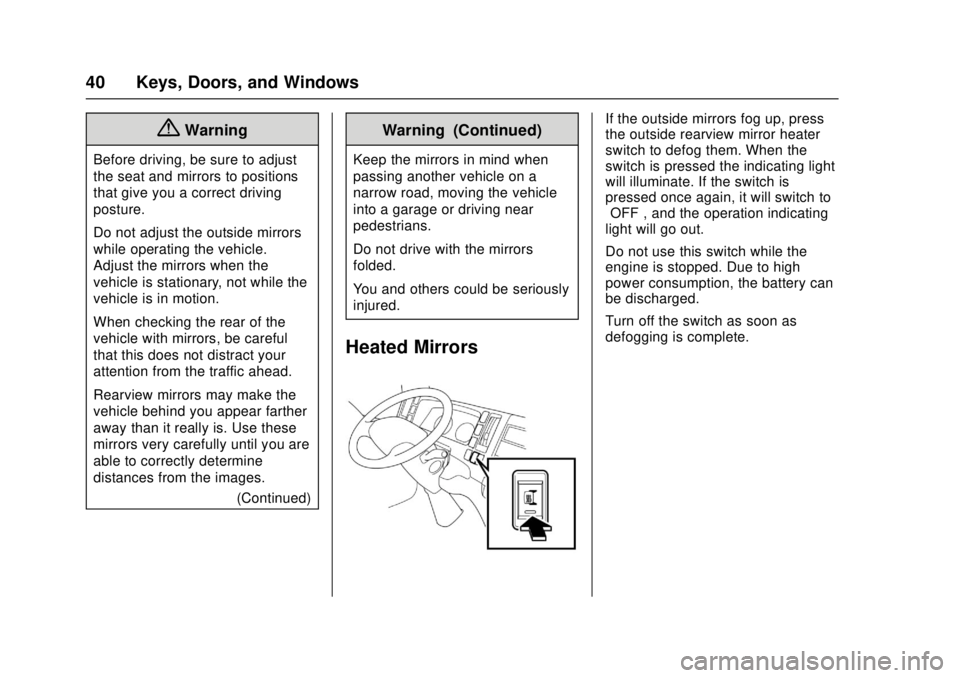
Heated Mirrors
If the outside mirrors fog up, press
the outside rearview mirror heater
switch to defog them. When the
switch is pressed the indicating light
will illuminate. If the switch is
pressed once again, it will switch to
“OFF”, and the operation indicating
light will go out.
Do not use this switch while the
engine is stopped. Due to high
power consumption, the battery can
be discharged.
Turn off the switch as soon as
defogging is complete.
Page 81 of 414

Chevrolet Low Cab Forward Owner Manual (GMNA-Localizing-U.S.-
10716700) - 2017 - crc - 12/6/16
80 Instruments and Controls
Speedometer
The speedometer shows the
vehicle's speed in either kilometers
per hour (km/h) or miles per
hour (mph).
Odometer
The odometer shows how far the
vehicle has been driven, in either
kilometers or miles.
Each time the reset knob is pressed
with the engine control switch in the
ON position, the odometer/trip meter
shows ODO, TRIP A, and TRIP B in
this sequence. With the key
removed, the odometer and trip
meter continue to indicate for about
five minutes.
Odometer Check Switch
Press the Odometer Check switch
to display the odometer and trip
meter mileage after the key is
turned off. The fuel gauge will also
operate when this switch is pressed.
For diesel vehicles, the DIC and
some lights will illuminate on the
instrument panel.
Trip Odometer
The trip odometer shows how far
the vehicle has been driven since
the trip odometer was last reset.
Press the trip odometer reset stem
next to the odometer to switch
between the odometer and trip
odometer.To reset the trip odometer to zero,
press and hold the trip odometer
reset stem while TRIP A or TRIP B
is displayed. The engine control
switch should be in the ON position.
When the battery is disconnected,
TRIP A and TRIP B will be reset to
zero. The per trip fuel economy is
also reset by the TRIP B reset. See
Driver Information Center (DIC)
(Diesel Only)
093.
When you turn the engine control
switch to the ON position, the
odometer/trip odometer shows what
was displayed the last time the
engine control switch was turned to
LOCK or ACC.
To set the odometer to display each
time you turn the engine control
switch to the ON position, turn the
engine control switch to LOCK or
ACC while the odometer is
displayed. With the reset stem
pressed, turn the engine control
switch to the ON position and then
within three seconds, turn the
engine control switch back to the
Page 106 of 414
Chevrolet Low Cab Forward Owner Manual (GMNA-Localizing-U.S.-
10716700) - 2017 - crc - 12/6/16
Lighting 105
Hazard Warning Flashers
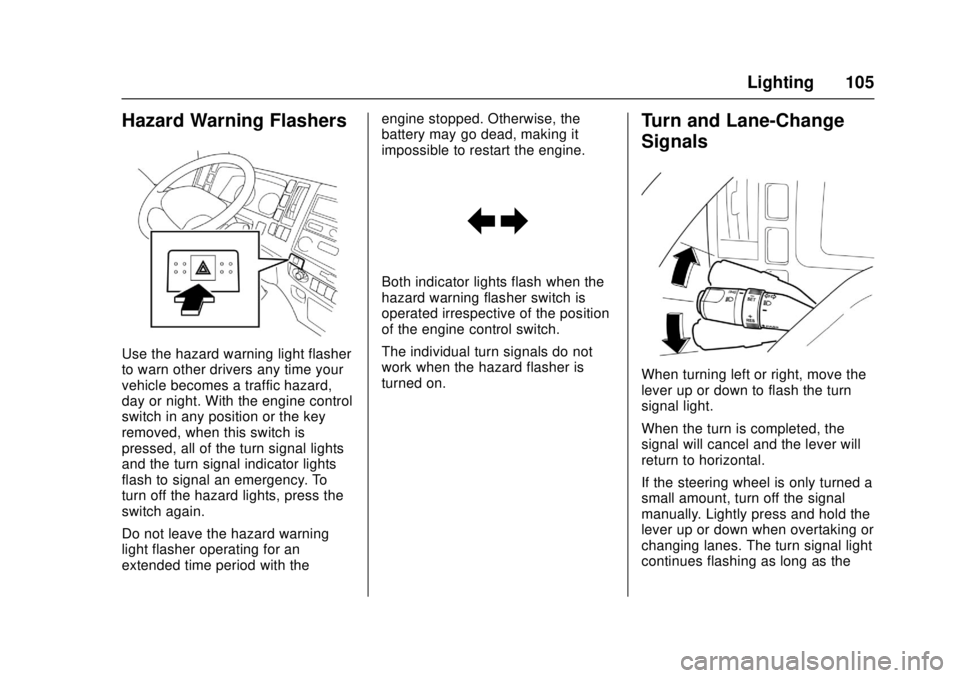
Use the hazard warning light flasher
to warn other drivers any time your
vehicle becomes a traffic hazard,
day or night. With the engine control
switch in any position or the key
removed, when this switch is
pressed, all of the turn signal lights
and the turn signal indicator lights
flash to signal an emergency. To
turn off the hazard lights, press the
switch again.
Do not leave the hazard warning
light flasher operating for an
extended time period with theengine stopped. Otherwise, the
battery may go dead, making it
impossible to restart the engine.
Both indicator lights flash when the
hazard warning flasher switch is
operated irrespective of the position
of the engine control switch.
The individual turn signals do not
work when the hazard flasher is
turned on.
Turn and Lane-Change
Signals
When turning left or right, move the
lever up or down to flash the turn
signal light.
When the turn is completed, the
signal will cancel and the lever will
return to horizontal.
If the steering wheel is only turned a
small amount, turn off the signal
manually. Lightly press and hold the
lever up or down when overtaking or
changing lanes. The turn signal light
continues flashing as long as the
Page 147 of 414
Chevrolet Low Cab Forward Owner Manual (GMNA-Localizing-U.S.-
10716700) - 2017 - crc - 12/6/16
146 Driving and Operating
When Ice Prevents You from
Putting Your Key in the Door
or Opening the Door
If you try to force the key into the
door, you could bend it. And if you
try to pull the door open with undue
force, the rubber seal around the
door could come unstuck or become
damaged. Use warm water to melt
the ice, then quickly wipe it away
and open the door.
If the wipers, electric door mirrors,
or power windows freeze up, also
use warm water to melt the ice and
then operate the system. Otherwise,
you could damage the mechanism
and drain the battery. After that,
wipe the water away.
Before Driving in Cold Regions
Getting In and Out of the Vehicle
The step can get icy in cold regions.
Be careful not to slip when getting in
and out of the vehicle.
Before Sitting in the Driver’s Seat
Remove snow and ice from your
shoes when getting into the vehicle.
If you try to drive with snow on your shoes, your shoes would slip on the
pedals and you would not be able to
press the pedals properly, meaning
that your driving would be
inconsistent. Also, the cabin could
become more humid, causing the
glass to fog up.
Check Fuel Level
Fuel consumption increases when
tire chains are used. Determine how
much fuel you need to reach your
destination and fill up the tank in
advance. Refer to
Fuel for Diesel
Engines 0232 orFuel (Gasoline)
0 231.
Removing Snow from Glass
and Underbody
Do not use a sharp implement to
remove snow. Sharp edges could
damage rubber parts.
To maintain an adequate field of
view, use a plastic scraper to
remove snow and frost from the
glass surfaces. By using a plastic
scraper, you can remove the snow
and frost without scratching the glass. At this time, check whether
the wiper blades are frozen onto the
glass.
Also, look under the vehicle and
remove any lumps of ice that are
stuck to the underbody. Be careful
not to damage components.
Driving on Snowy or Frozen
Roads
On slippery roads, never accelerate
rapidly, brake hard, decelerate
rapidly or make sharp turns of the
steering wheel.
There is a risk of reduced grip
between the tires and road surface
and of increased braking distances.
The danger of icy road surfaces is
particularly great on bridges, in
shady places and where there are
puddles.
Keep your speed down and be sure
to use tire chains or winter tires on
snowy or frozen road surfaces.
For diesel vehicles, use engine
brakes together with the foot brakes
to decelerate. Using the exhaust
brake on a slippery road surface
could cause the tires to slip.
Page 165 of 414

Chevrolet Low Cab Forward Owner Manual (GMNA-Localizing-U.S.-
10716700) - 2017 - crc - 12/6/16
164 Driving and Operating
Caution
After starting the engine, do not
turn the engine control switch to
the START position. Otherwise,
the starter motor may be
damaged.
Using electrical devices such as
the audio system for an extended
time period with the engine
stopped can completely discharge
the battery.
The starting circuit, engine alarm
circuits and accessory circuits are
all controlled by the engine control
switch.
1 LOCK : Lock is in the position
fully counterclockwise. In this
position, the key can be inserted or
removed. To place the engine control switch in the LOCK position,
press and hold the key in the ACC
position and then turn it to the
LOCK position. If you will leave the
vehicle, remove the key and turn the
steering wheel until it locks. The
steering wheel will be locked to help
prevent theft.
2 ACC :
Accessory is in the first
position clockwise. In this position,
the audio and other accessories can
be used with the engine stopped.
3 ON : This ON position is in the
second position clockwise. The key
stays in this position while the
engine is running. Engine control,
warning circuits, gauge circuits, and
accessory circuits are energized.
For diesel engines only, the engine
cylinder heaters or glow plugs are
also turned on when the switch is in
the ON position. The wait-to-start
light will come on and stay on until
the glow plugs are heated enough.
When this light goes off, turn the
switch to the START position.
4 START : On all engines, start is in
the position furthest clockwise. The
engine is started in this position.
Page 247 of 414
Chevrolet Low Cab Forward Owner Manual (GMNA-Localizing-U.S.-
10716700) - 2017 - crc - 12/6/16
246 Vehicle Care
Warning (Continued)
vehicle or its equipment. If you
have any questions about
carrying out some service, have
the work done by a skilled
technician.
To prevent personal injury, keep
hands, tools and clothing clear of
the engine cooling fan when the
engine is running.
The engine, exhaust pipe and
radiator will be hot immediately
after the vehicle is driven. Be
careful around these parts to
prevent burns. Perform all checks
when the engine is cold.
Do not perform work near an
open flame or other heat sources.
Do not let the engine run in poorly
ventilated garages or sheds. This
could cause carbon monoxide
poisoning.(Continued)
Warning (Continued)
Performing maintenance work on
a truck or chassis can be
dangerous. In trying to do some
jobs, you can be seriously injured.
Do your own maintenance work
only if you have the required
know-how and the proper tools
and equipment for the job. If you
have any doubts, contact your
dealer.
You and others could be seriously
injured.
For gasoline vehicles, pull firmly on
the parking brake lever and put the
transmission in neutral. Move the
selector lever to “P”and make sure
the shift indicator displays "P".
For diesel vehicles, pull firmly on the
parking brake lever and move the
selector lever to "P" and make sure
the shift indicator displays "P".
Make sure to turn off the engine and
remove the key from the engine
control switch before performing any
checks. Select a place with a solid and level
surface to perform the checking and
maintenance work. Make sure to
chock the wheels. It would be very
dangerous if the vehicle started
to move.
For gasoline vehicles, when
performing work on the electrical
system, be sure to remove the cable
from the negative terminal on the
battery.
For diesel vehicles, when
performing work on the electrical
system, begin by turning the engine
control switch to the "LOCK"
position, wait at least 3 minutes, and
then disconnect the negative cable
from the negative terminal on
battery. If the negative cable is
disconnected within 3 minutes, the
engine control module may
malfunction.
For gasoline vehicles, when working
on the fuel line or fuel pump,
remove the fuel tank filler cap. The
fuel system is under pressure and
the fuel will overspill unless the
pressure is relieved, possibly
leading to combustion or a fire.