battery CHEVROLET LOW CAB FORWARD 2019 User Guide
[x] Cancel search | Manufacturer: CHEVROLET, Model Year: 2019, Model line: LOW CAB FORWARD, Model: CHEVROLET LOW CAB FORWARD 2019Pages: 382, PDF Size: 5.95 MB
Page 84 of 382
Chevrolet Low Cab Forward 5.2L Diesel Engine 4500/5500 Series (GMNA-
Localizing-U.S.-12407814) - 2019 - crc - 12/13/17
Instruments and Controls 83
2. Automatic transmission shiftindicator
3. Diesel Exhaust Fluid (DEF) gauge
{Warning
Warning or indicator lights
indicated on the DIC can be
temporarily cleared (for
60 seconds) by pressing the DIC
selector once. However, if the
warning light you have cleared is
an engine overheat warning or
other critical circumstance, never
continue driving without taking the
necessary actions. Otherwise,
you will be in danger of vehicle
breakdown or accident. Should
any of the critical warning lights
come on, immediately contact the
nearest dealer.
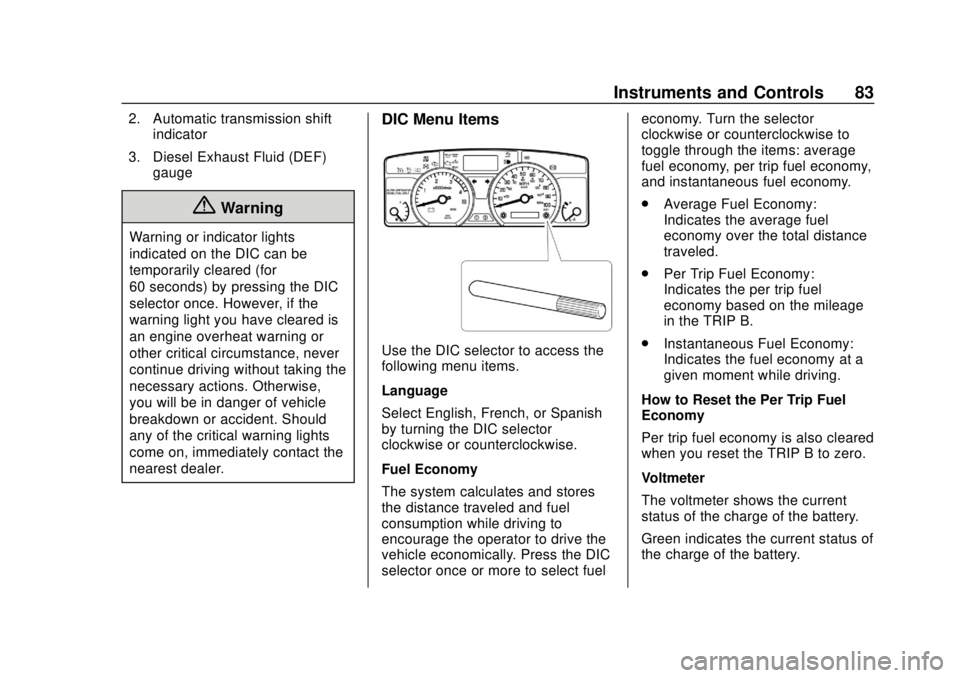
DIC Menu Items
Use the DIC selector to access the
following menu items.
Language
Select English, French, or Spanish
by turning the DIC selector
clockwise or counterclockwise.
Fuel Economy
The system calculates and stores
the distance traveled and fuel
consumption while driving to
encourage the operator to drive the
vehicle economically. Press the DIC
selector once or more to select fuel economy. Turn the selector
clockwise or counterclockwise to
toggle through the items: average
fuel economy, per trip fuel economy,
and instantaneous fuel economy.
.
Average Fuel Economy:
Indicates the average fuel
economy over the total distance
traveled.
. Per Trip Fuel Economy:
Indicates the per trip fuel
economy based on the mileage
in the TRIP B.
. Instantaneous Fuel Economy:
Indicates the fuel economy at a
given moment while driving.
How to Reset the Per Trip Fuel
Economy
Per trip fuel economy is also cleared
when you reset the TRIP B to zero.
Voltmeter
The voltmeter shows the current
status of the charge of the battery.
Green indicates the current status of
the charge of the battery.
Page 85 of 382
Chevrolet Low Cab Forward 5.2L Diesel Engine 4500/5500 Series (GMNA-
Localizing-U.S.-12407814) - 2019 - crc - 12/13/17
84 Instruments and Controls
Red means the battery voltage is
too low or too high. If the voltmeter
sign appears in red, have the
vehicle checked and serviced at
your dealer. During or immediately
after the engine is started, a red
abnormal L voltage may display on
the DIC. If the warning disappears
after the engine has started, there is
no problem with the battery voltage.
Calendar and Clock
{Warning
The calendar and clock can be
set only while the vehicle is
stationary. When setting the
calendar or clock, park your
vehicle in a safe place where
stopping or parking is permitted
and that is well clear of traffic.
Press the DIC selector once or
more to select the calendar. Press
and hold the DIC selector to enter
the clock setting screen. The year
segment will flash. Turn the DIC
selector clockwise or
counterclockwise to increase or decrease the year. While in the year
setting screen, press the DIC
selector once to switch to the month
setting screen. The month segment
will flash. Use the same method to
set the month. While in the month
setting screen, press the DIC
selector again to switch to the day
setting mode. Adjust the day using
the selector.
Press and hold the DIC selector to
complete the calendar setting.
When complete, the normal
calendar display will resume. Use
this same method to set the hour
and minute when in the clock setting
screen.
Dimmer
The brightness of the DIC can be
adjusted while the light control
switch is off. Select this screen and
turn the DIC selector clockwise or
counterclockwise to brighten or dim
the illumination. The brightness is
linked to the adjustment of the
instrument panel light level control
while the light control switch is on.
See
Instrument Panel Illumination
Control 095.
Warning Lights and Messages
.
Engine Overheat Warning Light
. Low Coolant Warning Light
. Water Separator Warning Light
. Air Cleaner Light
. Low Fuel Warning Light
. Regeneration Warning Lights
. Exhaust System Warning Light
. Refill DEF Warning Light
. DIC Errors
. Maintenance Data
. Hour Meter
See Vehicle Messages 086.
Maintenance Data Functions
Display/Not Display the
Maintenance Data Function
Maintenance Light: On the DIC, go
to the Maintenance Indicator Light.
Switch the display by pressing and
holding the DIC selector for more
than two seconds. Turn the DIC
selector clockwise or
counterclockwise to switch the
Page 93 of 382
Chevrolet Low Cab Forward 5.2L Diesel Engine 4500/5500 Series (GMNA-
Localizing-U.S.-12407814) - 2019 - crc - 12/13/17
92 Lighting
Lighting
Exterior Lighting
Exterior Lamp Controls . . . . . . . . 92
Headlamp High/Low-BeamChanger . . . . . . . . . . . . . . . . . . . . . . 93
Flash-to-Pass . . . . . . . . . . . . . . . . . . 93
Hazard Warning Flashers . . . . . . 94
Turn and Lane-Change Signals . . . . . . . . . . . . . . . . . . . . . . . 94
Cornering Lamps . . . . . . . . . . . . . . 95
Interior Lighting
Instrument Panel Illumination Control . . . . . . . . . . . . . . . . . . . . . . . 95
Cargo Lamp . . . . . . . . . . . . . . . . . . . 96
Dome Lamps . . . . . . . . . . . . . . . . . . 96
Exterior Lighting
Exterior Lamp Controls
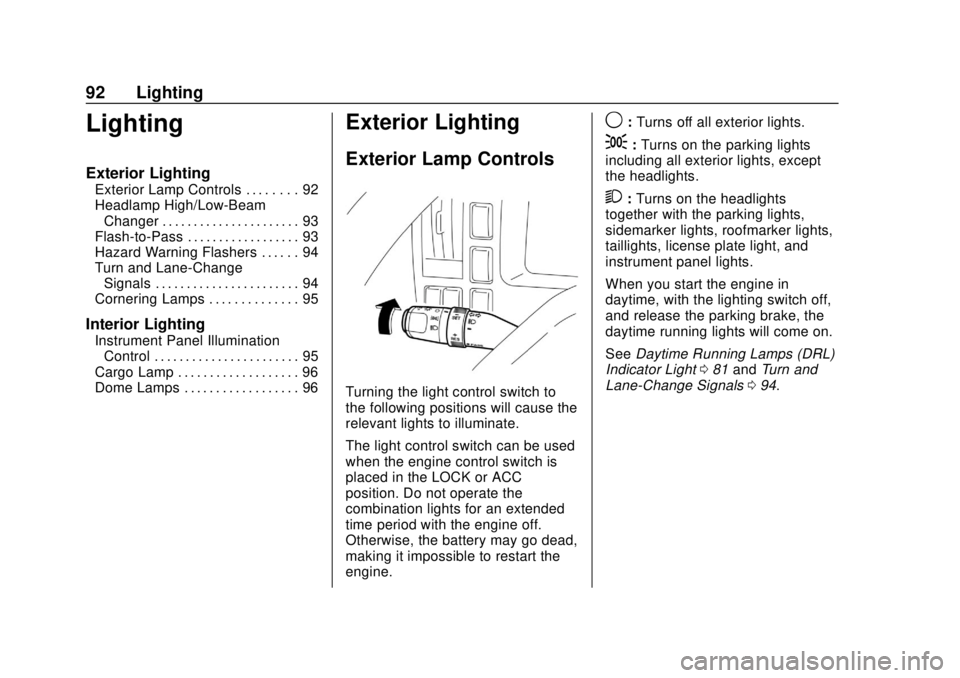
Turning the light control switch to
the following positions will cause the
relevant lights to illuminate.
The light control switch can be used
when the engine control switch is
placed in the LOCK or ACC
position. Do not operate the
combination lights for an extended
time period with the engine off.
Otherwise, the battery may go dead,
making it impossible to restart the
engine.
9: Turns off all exterior lights.
;:Turns on the parking lights
including all exterior lights, except
the headlights.
2: Turns on the headlights
together with the parking lights,
sidemarker lights, roofmarker lights,
taillights, license plate light, and
instrument panel lights.
When you start the engine in
daytime, with the lighting switch off,
and release the parking brake, the
daytime running lights will come on.
See Daytime Running Lamps (DRL)
Indicator Light 081 and Turn and
Lane-Change Signals 094.
Page 95 of 382
Chevrolet Low Cab Forward 5.2L Diesel Engine 4500/5500 Series (GMNA-
Localizing-U.S.-12407814) - 2019 - crc - 12/13/17
94 Lighting
Hazard Warning Flashers
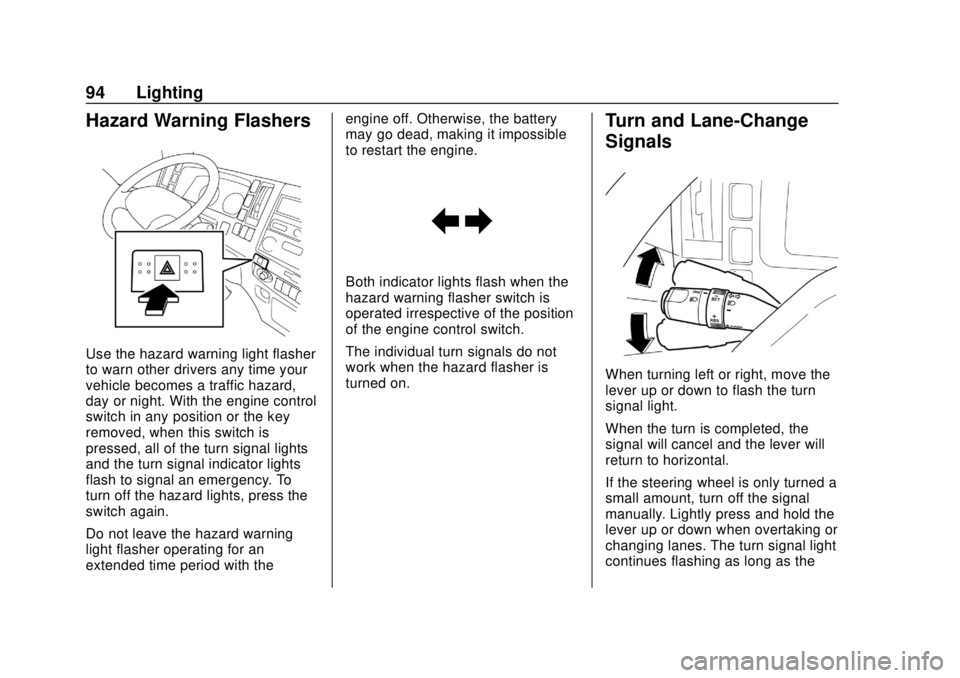
Use the hazard warning light flasher
to warn other drivers any time your
vehicle becomes a traffic hazard,
day or night. With the engine control
switch in any position or the key
removed, when this switch is
pressed, all of the turn signal lights
and the turn signal indicator lights
flash to signal an emergency. To
turn off the hazard lights, press the
switch again.
Do not leave the hazard warning
light flasher operating for an
extended time period with theengine off. Otherwise, the battery
may go dead, making it impossible
to restart the engine.
Both indicator lights flash when the
hazard warning flasher switch is
operated irrespective of the position
of the engine control switch.
The individual turn signals do not
work when the hazard flasher is
turned on.
Turn and Lane-Change
Signals
When turning left or right, move the
lever up or down to flash the turn
signal light.
When the turn is completed, the
signal will cancel and the lever will
return to horizontal.
If the steering wheel is only turned a
small amount, turn off the signal
manually. Lightly press and hold the
lever up or down when overtaking or
changing lanes. The turn signal light
continues flashing as long as the
Page 98 of 382
Chevrolet Low Cab Forward 5.2L Diesel Engine 4500/5500 Series (GMNA-
Localizing-U.S.-12407814) - 2019 - crc - 12/13/17
Infotainment System 97
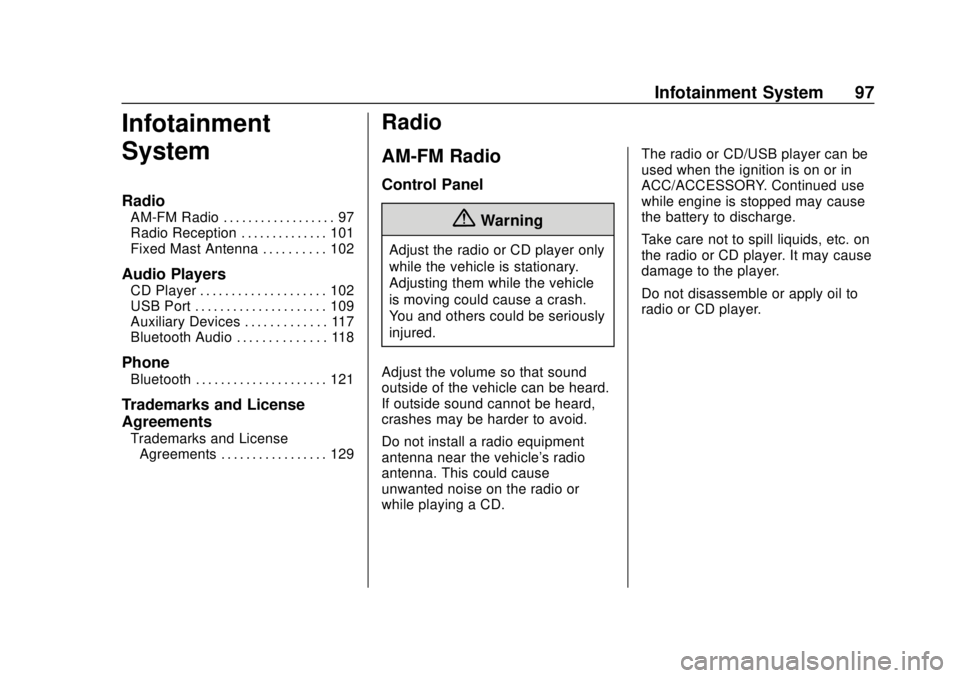
Infotainment
System
Radio
AM-FM Radio . . . . . . . . . . . . . . . . . . 97
Radio Reception . . . . . . . . . . . . . . 101
Fixed Mast Antenna . . . . . . . . . . 102
Audio Players
CD Player . . . . . . . . . . . . . . . . . . . . 102
USB Port . . . . . . . . . . . . . . . . . . . . . 109
Auxiliary Devices . . . . . . . . . . . . . 117
Bluetooth Audio . . . . . . . . . . . . . . 118
Phone
Bluetooth . . . . . . . . . . . . . . . . . . . . . 121
Trademarks and License
Agreements
Trademarks and LicenseAgreements . . . . . . . . . . . . . . . . . 129
Radio
AM-FM Radio
Control Panel
{Warning
Adjust the radio or CD player only
while the vehicle is stationary.
Adjusting them while the vehicle
is moving could cause a crash.
You and others could be seriously
injured.
Adjust the volume so that sound
outside of the vehicle can be heard.
If outside sound cannot be heard,
crashes may be harder to avoid.
Do not install a radio equipment
antenna near the vehicle's radio
antenna. This could cause
unwanted noise on the radio or
while playing a CD. The radio or CD/USB player can be
used when the ignition is on or in
ACC/ACCESSORY. Continued use
while engine is stopped may cause
the battery to discharge.
Take care not to spill liquids, etc. on
the radio or CD player. It may cause
damage to the player.
Do not disassemble or apply oil to
radio or CD player.
Page 119 of 382
Chevrolet Low Cab Forward 5.2L Diesel Engine 4500/5500 Series (GMNA-
Localizing-U.S.-12407814) - 2019 - crc - 12/13/17
118 Infotainment System
{Warning
.Either place the portable
audio device and mini plug
cable somewhere where
they do not interfere with
driving or temporarily secure
them at a location where
they are not in the way.
They could impede driving
and cause a crash.
. Make sure not to touch the
terminals of the mini plug
cable.
. Do not connect, operate or
remove the portable audio
device while driving.
The volume set by adjustment in the
AUX mode is effective in the AUX
mode only.
To power the portable audio device,
use the battery or other power
source supplied with the device.
The AUX device cannot be
controlled from the main unit. Reduce the AUX volume to prevent
speaker damage.Bluetooth Audio
Bluetooth Audio Operation
Connecting a Bluetooth compatible
audio player or mobile phone to this
unit allows you to operate them from
the system and listen to music.
In addition, as the connection
between the unit and the portable
device is wireless, users will not
face problems associated with cable
connections.
This unit supports Bluetooth.
Bluetooth is a wireless data system
which allows users to listen to music
without the need to connect the
portable device with wires.
If the portable device is not
Bluetooth-compatible, this function
is not available.
Do not connect the portable device
while driving.
Do not leave the portable device
inside the vehicle. (The interior of
the vehicle may become too hot
under extreme hot weather.)
Do not set the portable device too
close to this unit. When the device
and the unit are too close to each
other, sound quality may deteriorate
and connection problems may arise.
Playing Music
1. Press MODE/
O/ENTER.
2. Turn MODE/
O/ENTER to
select BT-AUDIO, and then
press ENTER.
The music on the Bluetooth
compatible device that is
connected will start.
When the registered device is
not connected, NO CONNECT
is displayed.
First connect the portable device to
the unit before performing the
following operation. See
“Registering a Bluetooth Device” in
Bluetooth 0121.
Page 124 of 382
Chevrolet Low Cab Forward 5.2L Diesel Engine 4500/5500 Series (GMNA-
Localizing-U.S.-12407814) - 2019 - crc - 12/13/17
Infotainment System 123
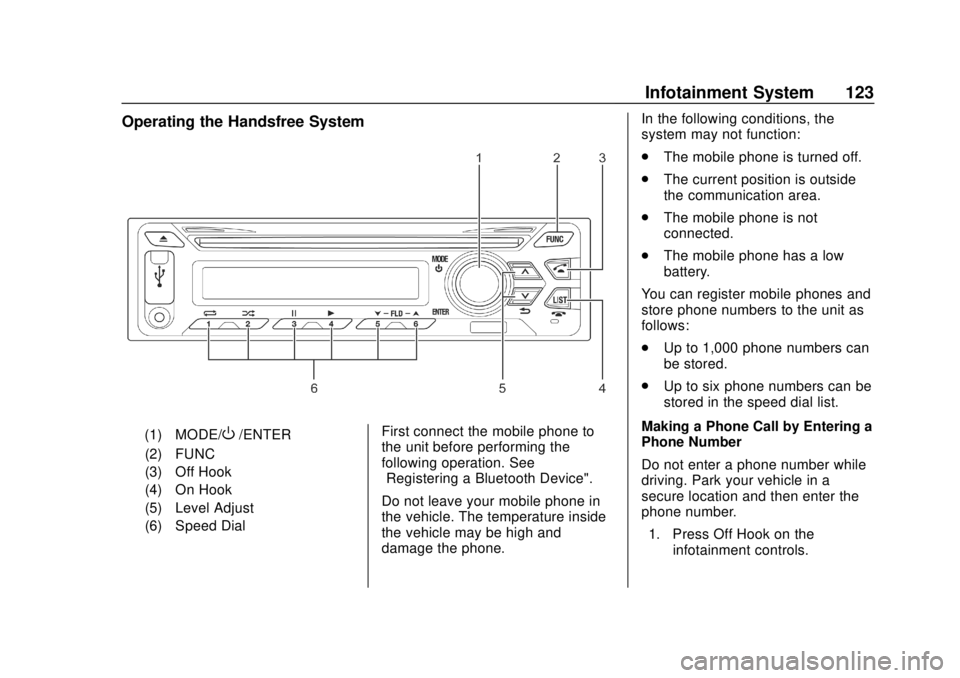
Operating the Handsfree System
(1) MODE/O/ENTER
(2) FUNC
(3) Off Hook
(4) On Hook
(5) Level Adjust
(6) Speed Dial First connect the mobile phone to
the unit before performing the
following operation. See
“Registering a Bluetooth Device".
Do not leave your mobile phone in
the vehicle. The temperature inside
the vehicle may be high and
damage the phone. In the following conditions, the
system may not function:
.
The mobile phone is turned off.
. The current position is outside
the communication area.
. The mobile phone is not
connected.
. The mobile phone has a low
battery.
You can register mobile phones and
store phone numbers to the unit as
follows:
. Up to 1,000 phone numbers can
be stored.
. Up to six phone numbers can be
stored in the speed dial list.
Making a Phone Call by Entering a
Phone Number
Do not enter a phone number while
driving. Park your vehicle in a
secure location and then enter the
phone number. 1. Press Off Hook on the infotainment controls.
Page 152 of 382

Chevrolet Low Cab Forward 5.2L Diesel Engine 4500/5500 Series (GMNA-
Localizing-U.S.-12407814) - 2019 - crc - 12/13/17
Driving and Operating 151
.When going down on a steep
slope, avoid driving the vehicle
backward as much as possible.
Drive it forward slowly on the
down slope.
. Compared with forward
movement, the braking distance
of backward movement is longer,
and the steering response of
that is worse.
. If you must drive the vehicle
backward, drive it very carefully
and gradually by moving and
stopping repeatedly in order to
stop it any time.
Engine Brake : Engine brake is the
braking effect that occurs when you
release the accelerator pedal while
driving. The lower the gear, the
stronger the engine brake.
Exhaust Brake : The exhaust brake
is a system that closes the exhaust
pipe and uses the force of the
exhaust emissions to enhance the
effectiveness of engine brake. Overrunning :
An engine overrun is
an engine-speed increase that
causes the tachometer needle to
enter the red zone. It is dangerous
because it can cause engine failure.
Winter Driving
Recommendations for Driving
in Cold Regions
The following recommendations
apply to snowbound regions and to
mountainous regions, ski resorts
and other areas of extreme cold
and/or snowfall. Please follow them
also for reference in winter in other
regions.
For the sake of your vehicle, make
the winter preparations described in
the links below. Also have these
preparations made before driving to
a cold region.
See Engine Oil 0245.
See Engine Coolant 0253.
See Washer Fluid 0262.
See Battery - North America 0269.
When Ice Prevents You from
Putting Your Key in the Door
or Opening the Door
If you try to force the key into the
door, you could bend it. And if you
try to pull the door open with undue
force, the rubber seal around the
door could come unstuck or become
damaged. Use warm water to melt
the ice, then quickly wipe it away
and open the door.
If the wipers, electric door mirrors,
or power windows freeze up, also
use warm water to melt the ice and
then operate the system. Otherwise,
you could damage the mechanism
and drain the battery. After that,
wipe the water away.
Before Driving in Cold Regions
Getting In and Out of the Vehicle
The step can get icy in cold regions.
Be careful not to slip when getting in
and out of the vehicle.
Page 156 of 382
Chevrolet Low Cab Forward 5.2L Diesel Engine 4500/5500 Series (GMNA-
Localizing-U.S.-12407814) - 2019 - crc - 12/13/17
Driving and Operating 155
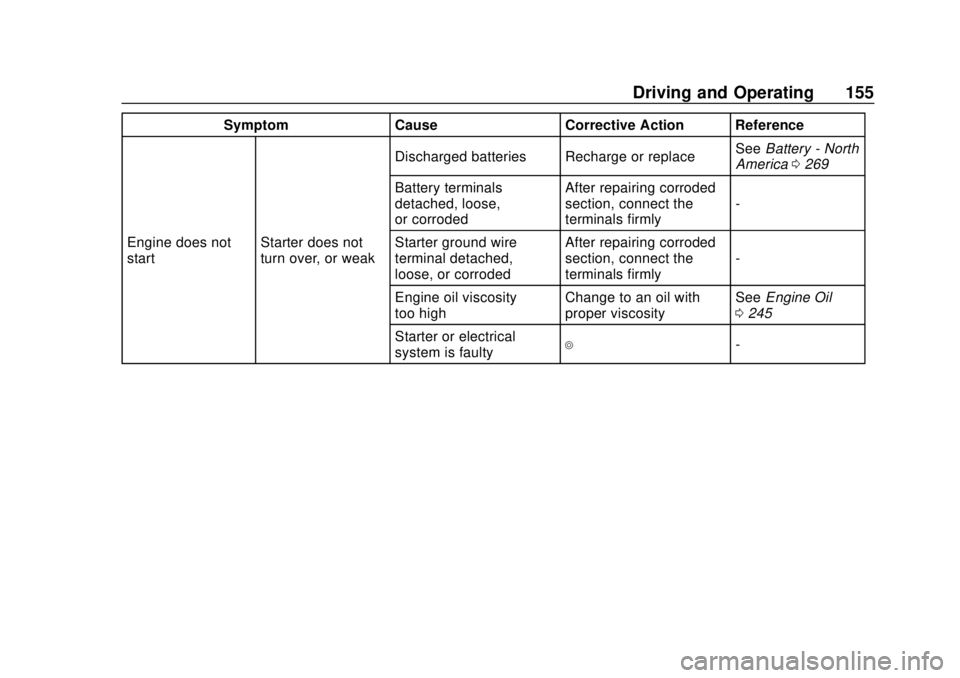
SymptomCauseCorrective Action Reference
Engine does not
start Starter does not
turn over, or weak Discharged batteries Recharge or replace
See
Battery - North
America 0269
Battery terminals
detached, loose,
or corroded After repairing corroded
section, connect the
terminals firmly
-
Starter ground wire
terminal detached,
loose, or corroded After repairing corroded
section, connect the
terminals firmly
-
Engine oil viscosity
too high Change to an oil with
proper viscositySee
Engine Oil
0 245
Starter or electrical
system is faulty
4-
Page 168 of 382

Chevrolet Low Cab Forward 5.2L Diesel Engine 4500/5500 Series (GMNA-
Localizing-U.S.-12407814) - 2019 - crc - 12/13/17
Driving and Operating 167
Caution
After starting the engine, do not
turn the engine control switch to
the START position. Otherwise,
the starter motor may be
damaged.
Using electrical devices such as
the audio system for an extended
time period with the engine
stopped can completely discharge
the battery.
The starting circuit, engine alarm
circuits and accessory circuits are
all controlled by the engine control
switch.
1 LOCK : Lock is in the position
fully counterclockwise. In this
position, the key can be inserted or
removed. To place the engine control switch in the LOCK position,
press and hold the key in the ACC
position and then turn it to the
LOCK position. If you will leave the
vehicle, remove the key and turn the
steering wheel until it locks. The
steering wheel will be locked to help
prevent theft.
2 ACC :
Accessory is in the first
position clockwise. In this position,
the audio and other accessories can
be used with the engine stopped.
3 ON : This ON position is in the
second position clockwise. The key
stays in this position while the
engine is running. Engine control,
warning circuits, gauge circuits, and
accessory circuits are energized.
The engine cylinder heaters or glow
plugs are also turned on when the
switch is in the ON position. The
wait-to-start light will come on and
stay on until the glow plugs are
heated enough. When this light
goes off, turn the switch to the
START position.