audio CHEVROLET MALIBU 2004 5.G Owner's Manual
[x] Cancel search | Manufacturer: CHEVROLET, Model Year: 2004, Model line: MALIBU, Model: CHEVROLET MALIBU 2004 5.GPages: 426, PDF Size: 3.98 MB
Page 198 of 426
CD Messages
CHECK CD:If this message appears on the display or
the CD comes out, it could be for one of the following
reasons:
It is very hot. When the temperature returns to
normal, the CD should play.
You are driving on a very rough road. When the
road becomes smooth, the CD should play.
The CD is dirty, scratched, wet, or upside down.
The air is very humid. If so, wait about an hour
and try again.
There may have been a problem while burning
the CD.
The label may be caught in the CD player.
If the CD is not playing correctly, for any other reason,
try a known good CD.
If any error occurs repeatedly or if an error cannot be
corrected, contact your dealer. If your radio displays
an error message, write it down and provide it to your
dealer when reporting the problem.
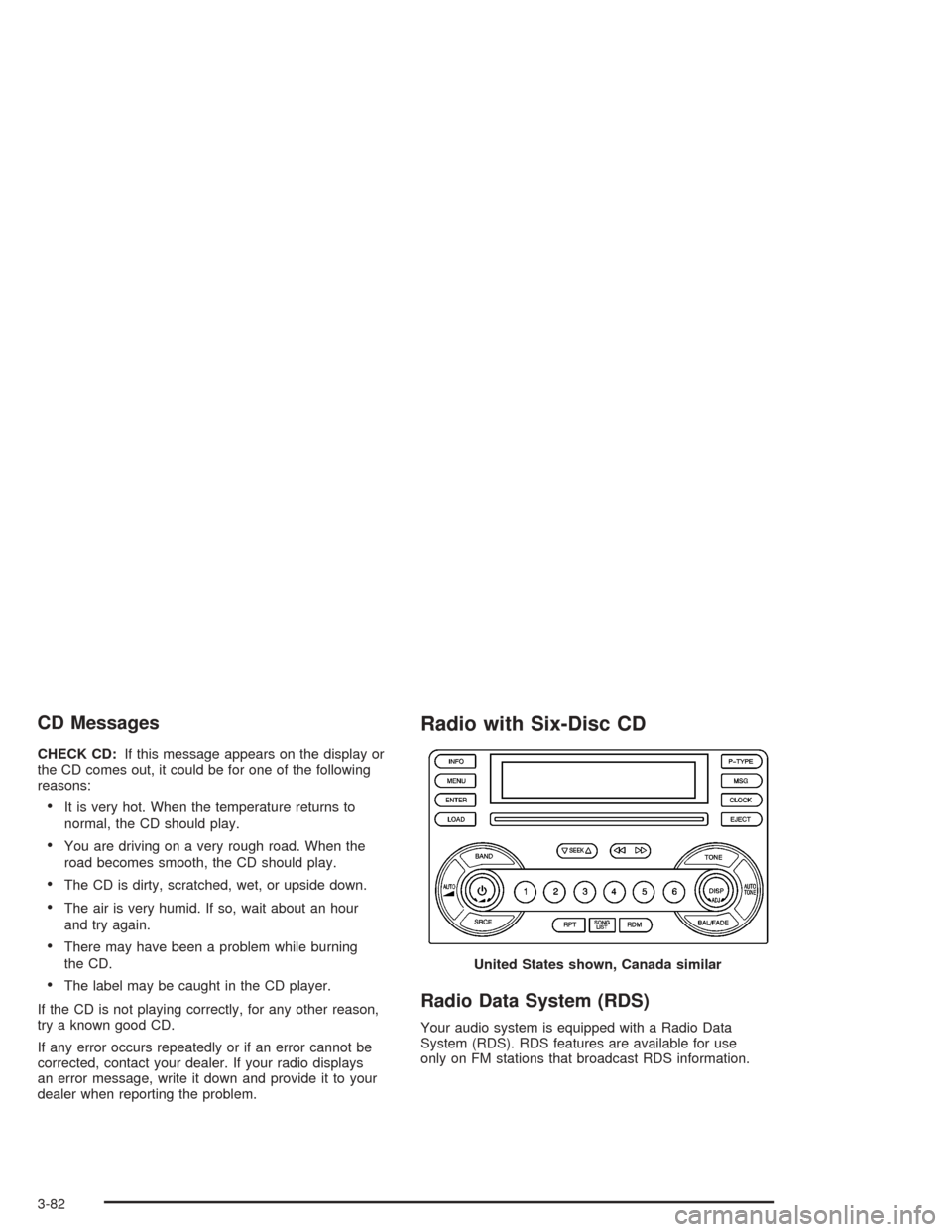
Radio with Six-Disc CD
Radio Data System (RDS)
Your audio system is equipped with a Radio Data
System (RDS). RDS features are available for use
only on FM stations that broadcast RDS information.United States shown, Canada similar
3-82
Page 199 of 426
With RDS, your radio can do the following:
Seek to stations broadcasting the selected type
of programming
Receive announcements concerning local and
national emergencies
Display messages from radio stations
Seek to stations with traffic announcements
This system relies upon receiving specic information
from these stations and will only work when the
information is available. In rare cases, a radio station
may broadcast incorrect information that will cause
the radio features to work improperly. If this happens,
contact the radio station.
While you are tuned to an RDS station, the station name
or the call letters will appear on the display instead of the
frequency. RDS stations may also provide the time of
day, a program type (PTY) for current programming,
and the name of the program being broadcast.
XM™ Satellite Radio Service
(48 Contiguous US States)
XM™ is a continental U.S. based satellite radio service
that offers 100 coast-to-coast channels including
music, news, sports, talk, and children’s programming.
XM™ provides digital quality audio and text information,
including song title and artist name. A service fee is
required in order to receive the XM™ service. For more
information, contact XM™ at www.xmradio.com or
call 1-800-852-XMXM (9696).
Playing the Radio
O
(Power):Press this knob to turn the system
on and off.
u(Volume):Turn this knob to increase or to
decrease volume.
AUTO
u(Automatic Volume):With automatic
volume, your audio system adjusts automatically to
make up for road and wind noise as you drive.
Set the volume at the desired level. Press this button to
select LOW, MEDIUM, or HIGH. AUTO VOL LOW,
AUTO VOL MEDIUM, or AUTO VOL HIGH will appear
on the display. Each higher setting will allow for
more volume compensation at faster vehicle speeds.
3-83
Page 204 of 426
If the whole message is not displayed, parts of the
message will appear every three seconds. To scroll
through the message at your own speed, press the MSG
button repeatedly. A new group of words will appear
on the display with each press. Once the complete
message has been displayed, MSG will disappear from
the display until another new message is received.
The old message can be displayed by pressing the MSG
button. You can view an old message until a new
message is received or a different station is tuned to.
When a message is not available from a station,
NO MESSAGE will appear on the display.
TRAF (Traffic):If TRAFFIC appears on the display,
the tuned station broadcasts traffic announcements and
when a traffic announcement comes on the tuned
radio station you will hear it.
If the current tuned station does not broadcast traffic
announcements, press this button and the radio
will seek to a station that does. When the radio nds a
station that broadcasts traffic announcements, the
radio will stop and TRAF and brackets will be displayed.
When a traffic announcement comes on the tuned
radio station you will hear it. If no station is found,
NO TRAFFIC INFO will appear on the display.If TRAF is on the display you can press the TRAF
button to turn off the traffic announcements.
Your radio will play the traffic announcement even if
the volume is low. Your radio will interrupt the play of
a CD if the last tuned station broadcasts traffic
announcements.
This function does not apply to XM™ Satellite Radio
Service.
Radio Messages
CALIBRATE ERR (Error):Your audio system has been
calibrated for your vehicle from the factory. If CALIBRATE
ERR appears on the display it means that your radio has
not been congured properly for your vehicle and it must
be returned to the dealer for service.
LOCKED:This message is displayed when the
Theftlock
®system has locked up. Your vehicle must
be returned to the dealer for service.
If any error occurs repeatedly or if an error cannot be
corrected, contact your dealer.
3-88
Page 205 of 426
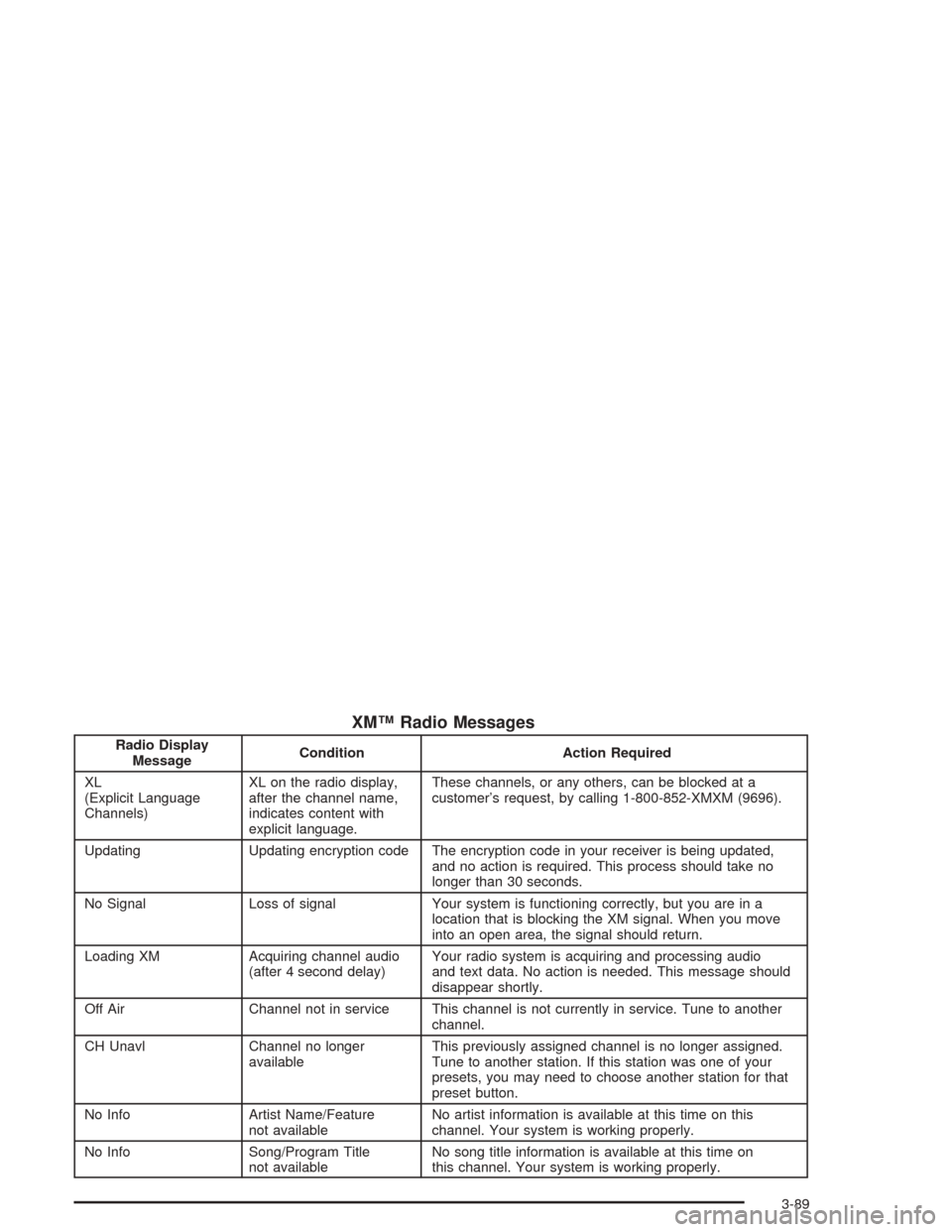
XM™ Radio Messages
Radio Display
MessageCondition Action Required
XL
(Explicit Language
Channels)XL on the radio display,
after the channel name,
indicates content with
explicit language.These channels, or any others, can be blocked at a
customer’s request, by calling 1-800-852-XMXM (9696).
Updating Updating encryption code The encryption code in your receiver is being updated,
and no action is required. This process should take no
longer than 30 seconds.
No Signal Loss of signal Your system is functioning correctly, but you are in a
location that is blocking the XM signal. When you move
into an open area, the signal should return.
Loading XM Acquiring channel audio
(after 4 second delay)Your radio system is acquiring and processing audio
and text data. No action is needed. This message should
disappear shortly.
Off Air Channel not in service This channel is not currently in service. Tune to another
channel.
CH Unavl Channel no longer
availableThis previously assigned channel is no longer assigned.
Tune to another station. If this station was one of your
presets, you may need to choose another station for that
preset button.
No Info Artist Name/Feature
not availableNo artist information is available at this time on this
channel. Your system is working properly.
No Info Song/Program Title
not availableNo song title information is available at this time on
this channel. Your system is working properly.
3-89
Page 212 of 426
CD Messages
CHECK CD:If this message appears on the display or
the CD comes out, it could be for one of the following
reasons:
It is very hot. When the temperature returns to
normal, the CD should play.
You are driving on a very rough road. When the
road becomes smooth, the CD should play.
The CD is dirty, scratched, wet, or upside down.
The air is very humid. If so, wait about an hour
and try again.
There may have been a problem while burning
the CD.
The label may be caught in the CD player.
If the CD is not playing correctly, for any other reason,
try a known good CD.
If any error occurs repeatedly or if an error cannot be
corrected, contact your dealer. If your radio displays
an error message, write it down and provide it to your
dealer when reporting the problem.
Rear Seat Entertainment System
Your vehicle may have a Digital Versatile Disc (DVD)
system. The Rear Seat Entertainment (RSE) includes a
DVD player, a video display screen, two sets of wireless
headphones and a remote control.
This system also functions as a rear seat audio (RSA)
system. SeeRear Seat Audio (RSA) (Without
Entertainment System) on page 3-111orRear Seat
Audio (RSA) (With Entertainment System) on
page 3-113in the Index for more information.
Parental Control
The RSE system may be disabled from the driver’s
seat by pressing the power button on the radio twice.
To resume use of the RSE system press the RSE
power button.
3-96
Page 213 of 426
Before You Drive
The RSE is designed for rear seat passengers only.
The driver cannot safely view the video screen
while driving and should not try to do so.
Your DVD system is designed to be inoperable when
the vehicle is exposed to extremely low or high
temperatures, in order to protect your system from
damage. Operate your DVD system under normal or
comfortable cabin temperature ranges.
Headphones
The entertainment system includes two wireless
headphones.
The wireless headphones have an ON/OFF button,
and a volume control. To use the headphones press the
ON/OFF button. An indicator light on the headphones
will illuminate. If the light does not illuminate, the
batteries may need to be replaced. See “Battery
Replacement” later in this section for more information.
Press the button to turn the headphones OFF when
not in use.If the RSE system is shut off, or if the headphones are
out of range of the transmitters, located at the top of
the DVD player, for more than three minutes, the
headphones will shut off automatically to save the
battery power. If you move too far forward or step out of
the vehicle, the headphones will lose the audio signal.
To adjust the volume on the wireless headphones,
use the volume control.
Make sure that the headphones are worn correctly,
left to right, to ensure the signal is received properly.
Notice:Do not store the headphones in heat or
direct sunlight. This could damage the headphones
and repairs would not be covered by your warranty.
Keep the headphones stored in a cool, dry place.
If there is a decreased audio signal during CD or
DVD play, you may hear a low “hissing” noise through
the speakers and/or headphones. If the hissing sound
in the wireless headphones seems excessive, make
sure that the headphone batteries are fully charged.
Some amount of hissing is normal.
3-97
Page 214 of 426
Battery Replacement
To change the batteries, do the following:
1. Loosen the screw on the battery compartment door
located on the left side of the headphone earpiece.
2. Replace the two AAA batteries in the compartment.
Make sure that they are installed correctly using the
diagram on the inside of the battery compartment.
3. Replace the battery compartment door and tighten
the screw.
If the headphones are to be stored for a long period of
time, remove the batteries, and keep them in a cool,
dry place.
Stereo RCA Jacks
The RCA jacks are located on the DVD faceplate on the
oor console. The RCA jacks allow you to connect audio
and video signals from an auxiliary device such as a
camcorder or a video game unit to your RSE just as you
would to a standard television. The yellow RCA jack is
used for video, the red RCA jack for right audio, and the
white RCA jack for left audio inputs. The system requires
standard RCA cables (not included) to connect your
auxiliary device to the RCA jacks. Refer to the
manufacturer’s instructions for proper usage.To use the auxiliary audio and video inputs on the
entertainment system, connect an external auxiliary
device such as a camcorder to the RCA jacks and turn
on both the auxiliary device power and the power on
the front of the RSE system. Press the play and source
buttons at the same time or the AUX button on the
remote control to switch to the auxiliary device.
See “DVD Player”, and “Remote Control” later in this
section for more information.
Audio Speakers
Audio from the DVD player or auxiliary devices can
be heard through the following possible sources:
Wireless Headphones
Vehicle’s Speakers
Wired Headphones (not included)
Only one audio source can be heard through the
vehicles speakers at a time.
You can listen to the entertainment system or an
auxiliary device through all of the vehicles speakers
when the following occurs:
The RSE system is off
a DVD or auxiliary device is playing
the front audio system is on and the SRCE button
is pressed to enable the rear seat entertainment
system
3-98
Page 215 of 426
The front audio system will display the headphone icon
when the entertainment system is on and the headphone
icon will disappear from the display when it is off.
To turn the vehicles rear speakers on and off, press the
power button on the RSE or on the remote control.
When the rear speakers are off, the audio from the
entertainment system can be heard through both the
wireless headphones and the vehicles front speakers
at the same time.
You can listen to the entertainment system through the
wired headphones (not included) on the RSE system
when the following occurs:
The RSE system is on
a DVD or auxiliary device is playing
The volume on the audio system may vary when
switching between a radio station, CD, DVD, cassette,
or auxiliary device.
If there is a decreased audio signal during CD or
DVD play, you may hear a low “hissing” noise through
the speakers and/or headphones. If the hissing sound
in the wireless headphones seems excessive, make
sure that the headphone batteries are fully charged.
Some amount of hissing is normal.
Video Screen
The video screen is located on the back of the oor
console. Open the video screen by rotating the screen
up and adjust its position as desired.
The video screen may not be able to be rotated up if
the rear seat is too far forward. See “Rear Sliding Seat
(MAXX Only)” underRear Seat Operation on page 1-7
for more information.
When the video screen is not in use, push it down into
its stored position.
The DVD player and display will continue to operate
when the video screen is in either the up or down
positions.
The transmitters from the wireless headphones and the
receiver for the remote control are behind the window
on the RSE system. If the screen is in the closed
position, the signals will not be available for the
operation of the headphones or the remote control.
Notice:Directly touching the video screen may
damage it. Do not touch the screen. SeeCleaning the
Video Screen on page 3-118for more information.
3-99
Page 216 of 426
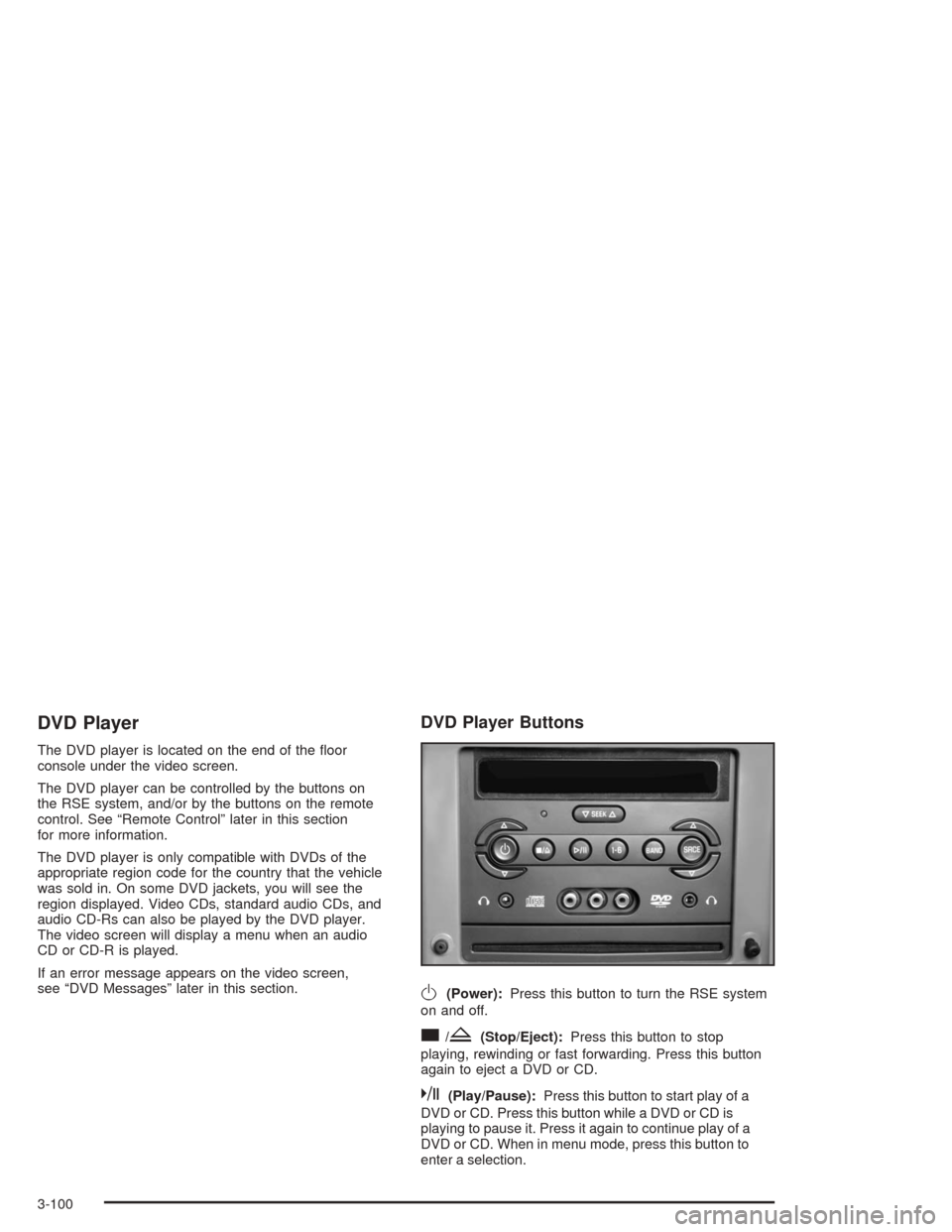
DVD Player
The DVD player is located on the end of the oor
console under the video screen.
The DVD player can be controlled by the buttons on
the RSE system, and/or by the buttons on the remote
control. See “Remote Control” later in this section
for more information.
The DVD player is only compatible with DVDs of the
appropriate region code for the country that the vehicle
was sold in. On some DVD jackets, you will see the
region displayed. Video CDs, standard audio CDs, and
audio CD-Rs can also be played by the DVD player.
The video screen will display a menu when an audio
CD or CD-R is played.
If an error message appears on the video screen,
see “DVD Messages” later in this section.
DVD Player Buttons
O(Power):Press this button to turn the RSE system
on and off.
c/Z(Stop/Eject):Press this button to stop
playing, rewinding or fast forwarding. Press this button
again to eject a DVD or CD.
k(Play/Pause):Press this button to start play of a
DVD or CD. Press this button while a DVD or CD is
playing to pause it. Press it again to continue play of a
DVD or CD. When in menu mode, press this button to
enter a selection.
3-100
Page 220 of 426
z(Set-up Menu):Press this button to adjust the
color, tint, brightness, contrast, and display mode
(normal, full, or zoom). The dynamic range compression
feature can be used to reduce loud audio and increase
low audio produced by some DVDs.
e(Audio):Press this button to display a menu that
will only appear when a DVD is being played. The format
and content of this function is dependent on the disc.
r(Fast Reverse):Press this button to fast reverse
the DVD or CD. To stop fast reversing, press this button
again. This button may not work when the DVD is
playing the copyright information or the previews.
SRCE (Source):Press this button to toggle between
the DVD player and an auxiliary source.
c(Stop):Press this button to stop playing, rewinding,
or fast forwarding a DVD or CD. Press this button
twice to return to the beginning of the DVD.
t(Previous Track/Chapter):Press this button to
return to the start of the current track or chapter. Press
this button again to return to the previous track or
chapter. This button may not work when the DVD is
playing the copyright information or the previews.
1 through 0 (Numeric Keypad):The remote control
numeric keypad provides you with the capability of direct
chapter, title, and track number selection.
\:Press this button, within 3 seconds after inputting
a numeric selection to clear all numeric inputs. Press
this button before inputting the number.
}10:Press the button, to select chapter, title, and
track numbers greater than 9. Press this button before
inputting the number.
P(Illumination):Press this button to turn the remote
control backlight on. The backlight will time out after
about 7 to 10 seconds if no other button is pressed while
the backlight is on.
y(Main DVD Menu):Press this button to access
the DVD menu. The DVD menu is different on every
DVD. Use the up, down, left, and right arrow buttons to
move the cursor around the DVD menu. After making
a selection press the enter button. This button only
operates when using a DVD.
r(Enter):Press this button to select the choices
that are highlighted in any menu.
q(Return):Press this button to exit the current
active menu and return to the previous menu. This
button will operate only when a DVD is being played
and a menu is active.
3-104