light CHEVROLET MALIBU 2017 9.G Owners Manual
[x] Cancel search | Manufacturer: CHEVROLET, Model Year: 2017, Model line: MALIBU, Model: CHEVROLET MALIBU 2017 9.GPages: 419, PDF Size: 7.81 MB
Page 238 of 419
Chevrolet Malibu Owner Manual (GMNA-Localizing-U.S./Canada/Mexico-10122664) - 2017 - crc - 5/23/16
Driving and Operating 237
If driving safely on a wet road and itbecomes necessary to slam on thebrakes and continue braking toavoid a sudden obstacle, acomputer senses the wheels areslowing down. If one of the wheelsis about to stop rolling, the computerwill separately work the brakes ateach wheel.
ABS can change the brake pressureto each wheel, as required, fasterthan any driver could. This can helpyou steer around the obstacle whilebraking hard.
As the brakes are applied, thecomputer keeps receiving updateson wheel speed and controlsbraking pressure accordingly.
Remember: ABS does not changethe time needed to get a foot up tothe brake pedal or always decreasestopping distance. If you get tooclose to the vehicle in front of you,there will not be enough time toapply the brakes if that vehiclesuddenly slows or stops. Alwaysleave enough room up ahead tostop, even with ABS.
Using ABS
Do not pump the brakes. Just holdthe brake pedal down firmly and letABS work. You may hear the ABSpump or motor operating and feelthe brake pedal pulsate. This isnormal.
Braking in Emergencies
ABS allows you to steer and brakeat the same time. In manyemergencies, steering can helpmore than even the very bestbraking.
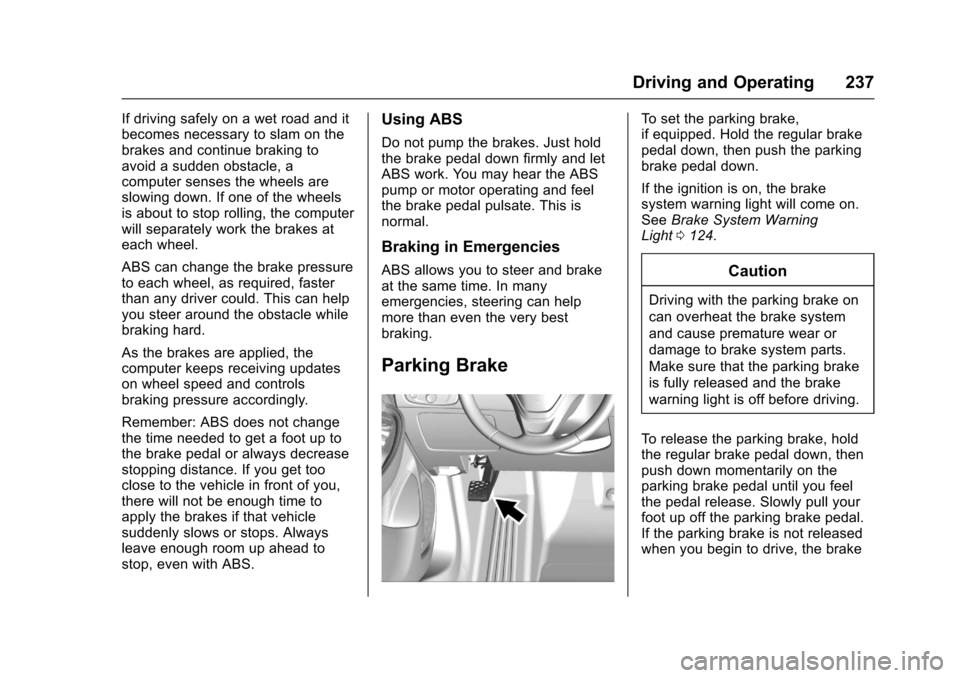
Parking Brake
To s e t t h e p a r k i n g b r a k e ,if equipped. Hold the regular brakepedal down, then push the parkingbrake pedal down.
If the ignition is on, the brakesystem warning light will come on.SeeBrake System WarningLight0124.
Caution
Driving with the parking brake on
can overheat the brake system
and cause premature wear or
damage to brake system parts.
Make sure that the parking brake
is fully released and the brake
warning light is off before driving.
To r e l e a s e t h e p a r k i n g b r a k e , h o l dthe regular brake pedal down, thenpush down momentarily on theparking brake pedal until you feelthe pedal release. Slowly pull yourfoot up off the parking brake pedal.If the parking brake is not releasedwhen you begin to drive, the brake
Page 239 of 419
Chevrolet Malibu Owner Manual (GMNA-Localizing-U.S./Canada/Mexico-10122664) - 2017 - crc - 5/23/16
238 Driving and Operating
system warning light will be on andachimewillsoundwarningyouthatthe parking brake is still on.
If you are towing a trailer and areparking on a hill, seeDrivingCharacteristics and TowingTips0272.
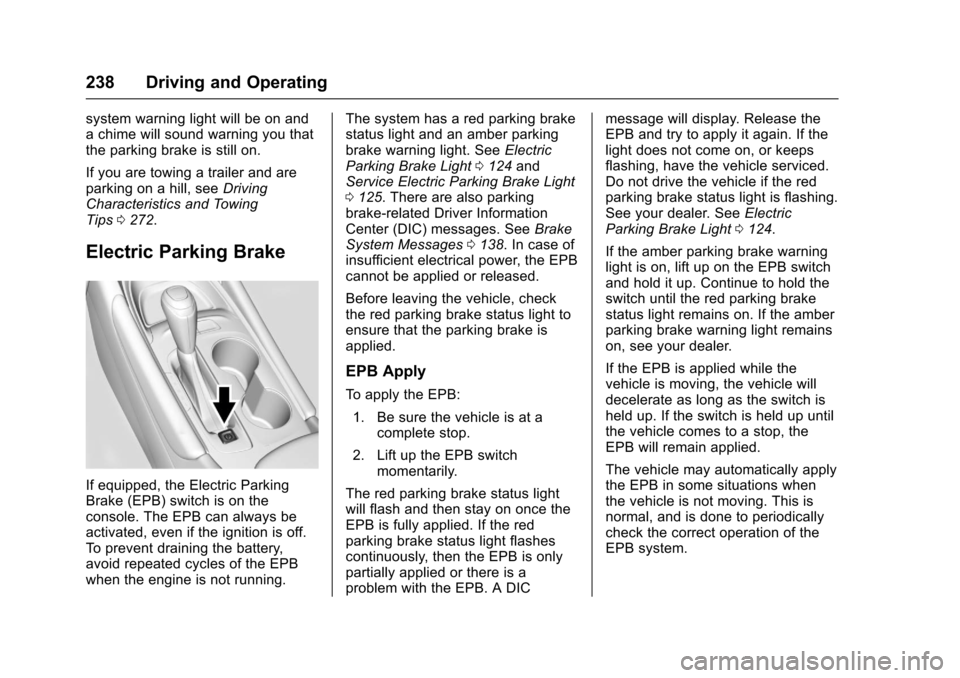
Electric Parking Brake
If equipped, the Electric ParkingBrake (EPB) switch is on theconsole. The EPB can always beactivated, even if the ignition is off.To p r e v e n t d r a i n i n g t h e b a t t e r y,avoid repeated cycles of the EPBwhen the engine is not running.
The system has a red parking brakestatus light and an amber parkingbrake warning light. SeeElectricParking Brake Light0124andService Electric Parking Brake Light0125.Therearealsoparkingbrake-related Driver InformationCenter (DIC) messages. SeeBrakeSystem Messages0138.Incaseofinsufficient electrical power, the EPBcannot be applied or released.
Before leaving the vehicle, checkthe red parking brake status light toensure that the parking brake isapplied.
EPB Apply
To a p p l y t h e E P B :
1. Be sure the vehicle is at acomplete stop.
2. Lift up the EPB switchmomentarily.
The red parking brake status lightwill flash and then stay on once theEPB is fully applied. If the redparking brake status light flashescontinuously, then the EPB is onlypartially applied or there is aproblem with the EPB. A DIC
message will display. Release theEPB and try to apply it again. If thelight does not come on, or keepsflashing, have the vehicle serviced.Do not drive the vehicle if the redparking brake status light is flashing.See your dealer. SeeElectricParking Brake Light0124.
If the amber parking brake warninglight is on, lift up on the EPB switchand hold it up. Continue to hold theswitch until the red parking brakestatus light remains on. If the amberparking brake warning light remainson, see your dealer.
If the EPB is applied while thevehicle is moving, the vehicle willdecelerate as long as the switch isheld up. If the switch is held up untilthe vehicle comes to a stop, theEPB will remain applied.
The vehicle may automatically applythe EPB in some situations whenthe vehicle is not moving. This isnormal, and is done to periodicallycheck the correct operation of theEPB system.
Page 240 of 419
Chevrolet Malibu Owner Manual (GMNA-Localizing-U.S./Canada/Mexico-10122664) - 2017 - crc - 5/23/16
Driving and Operating 239
If the EPB fails to apply, the rearwheels should be blocked toprevent vehicle movement.
EPB Release
To r e l e a s e t h e E P B :
1. Place the ignition in the ACC/ACCESSORY or ON/RUNposition.
2. Apply and hold the brakepedal.
3. Push down momentarily on theEPB switch.
The EPB is released when the redparking brake status light is off.
If the amber parking brake warninglight is on, release the EPB bypushing down on the EPB switchand holding it down. Continue tohold the switch until the red parkingbrake status light is off. If either lightstays on after release is attempted,see your dealer.
Caution
Driving with the parking brake on
can overheat the brake system
and cause premature wear or
damage to brake system parts.
Make sure that the parking brake
is fully released and the brake
warning light is off before driving.
Automatic EPB Release
The EPB will automatically release ifthe vehicle is running, placed intogear, and an attempt is made todrive away. Avoid rapid accelerationwhen the EPB is applied, topreserve parking brake lining life.
If parking on a hill, or if the vehicleis pulling a trailer, seeDrivingCharacteristics and TowingTips0272.
Brake Assist
The Brake Assist feature isdesigned to assist the driver instopping or decreasing vehiclespeed in emergency drivingconditions. This feature uses thestability system hydraulic brakecontrol module to supplement thepower brake system underconditions where the driver hasquickly and forcefully applied thebrake pedal in an attempt to quicklystop or slow down the vehicle. Thestability system hydraulic brakecontrol module increases brakepressure at each corner of thevehicle until the ABS activates.Minor brake pedal pulsation orpedal movement during this time isnormal and the driver shouldcontinue to apply the brake pedal asthe driving situation dictates. TheBrake Assist feature willautomatically disengage when thebrake pedal is released or brakepedal pressure is quicklydecreased.
Page 242 of 419
Chevrolet Malibu Owner Manual (GMNA-Localizing-U.S./Canada/Mexico-10122664) - 2017 - crc - 5/23/16
Driving and Operating 241
SeeWarning Lights, Gauges, andIndicators0111andDriverInformation Center (DIC) (BaseLevel)0131orDriver InformationCenter (DIC) (Uplevel)0134.Intheevent of a controller problem, thebrake pedal may be harder to pushand the stopping distance may belonger.
Ride Control Systems
Traction Control/
Electronic Stability
Control
System Operation
The vehicle has a Traction ControlSystem (TCS) and StabiliTrak®,anelectronic stability control system.These systems help limit wheel slipand assist the driver in maintainingcontrol, especially on slippery roadconditions.
TCS activates if it senses that anyof the drive wheels are spinning orbeginning to lose traction. When thishappens, TCS applies the brakes tothe spinning wheels and reducesengine power to limit wheel spin.
StabiliTrak activates when thevehicle senses a difference betweenthe intended path and the directionthe vehicle is actually traveling.StabiliTrak selectively appliesbraking pressure to any one of the
vehicle wheel brakes to assist thedriver in keeping the vehicle on theintended path.
If cruise control is being used andtraction control or StabiliTrak beginsto limit wheel spin, cruise control willdisengage. Cruise control may beturned back on when roadconditions allow.
Both systems come onautomatically when the vehicle isstarted and begins to move. Thesystems may be heard or felt whilethey are operating or whileperforming diagnostic checks. Thisis normal and does not mean thereis a problem with the vehicle.
It is recommended to leave bothsystems on for normal drivingconditions, but it may be necessaryto turn TCS off if the vehicle getsstuck in sand, mud, ice, or snow.SeeIf the Vehicle Is Stuck0221and“Turning the Systems Off andOn”later in this section.
Page 243 of 419
Chevrolet Malibu Owner Manual (GMNA-Localizing-U.S./Canada/Mexico-10122664) - 2017 - crc - 5/23/16
242 Driving and Operating
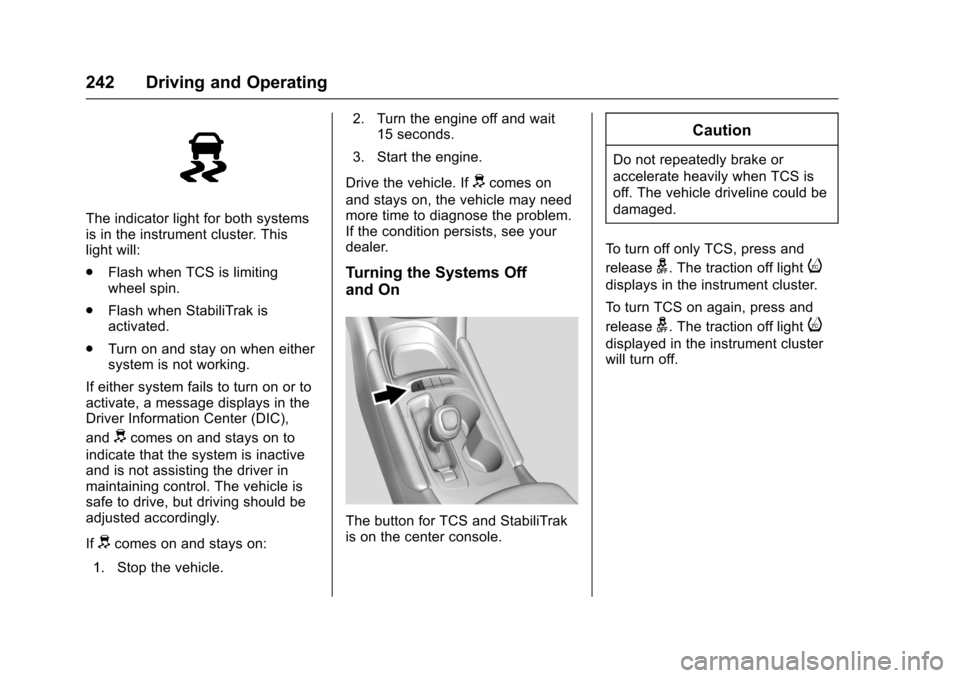
The indicator light for both systemsis in the instrument cluster. Thislight will:
.Flash when TCS is limitingwheel spin.
.Flash when StabiliTrak isactivated.
.Turn on and stay on when eithersystem is not working.
If either system fails to turn on or toactivate, a message displays in theDriver Information Center (DIC),
anddcomes on and stays on to
indicate that the system is inactiveand is not assisting the driver inmaintaining control. The vehicle issafe to drive, but driving should beadjusted accordingly.
Ifdcomes on and stays on:
1. Stop the vehicle.
2. Turn the engine off and wait15 seconds.
3. Start the engine.
Drive the vehicle. Ifdcomes on
and stays on, the vehicle may needmore time to diagnose the problem.If the condition persists, see yourdealer.
Turning the Systems Off
and On
The button for TCS and StabiliTrakis on the center console.
Caution
Do not repeatedly brake or
accelerate heavily when TCS is
off. The vehicle driveline could be
damaged.
To t u r n o f f o n l y T C S , p r e s s a n d
releaseg.Thetractionofflighti
displays in the instrument cluster.
To t u r n T C S o n a g a i n , p r e s s a n d
releaseg.Thetractionofflighti
displayed in the instrument clusterwill turn off.
Page 244 of 419
Chevrolet Malibu Owner Manual (GMNA-Localizing-U.S./Canada/Mexico-10122664) - 2017 - crc - 5/23/16
Driving and Operating 243
To t u r n o f f b o t h T C S a n d S t a b i l i T r a k ,
press and holdguntil the traction
off lightiand StabiliTrak OFF
lightgcome on and stay on in the
instrument cluster.
To t u r n T C S a n d S t a b i l i T r a k o n
again, press and releaseg.The
traction off lightiand StabiliTrak
OFF lightgin the instrument cluster
turn off.
Adding accessories can affect thevehicle performance. SeeAccessories andModifications0280.
Cruise Control
Cruise control lets the vehiclemaintain a speed of about 40 km/h(25 mph) or more without keepingyour foot on the accelerator. Cruisecontrol does not work at speedsbelow 40 km/h (25 mph).
{Warning
Cruise control can be dangerous
where you cannot drive safely at
asteadyspeed.Donotuse
cruise control on winding roads or
in heavy traffic.
Cruise control can be dangerous
on slippery roads. On such roads,
fast changes in tire traction can
cause excessive wheel slip, and
you could lose control. Do not use
cruise control on slippery roads.
With the Traction Control System(TCS) or Electronic Stability Control(ESC), the system may begin tolimit wheel spin while you are usingcruise control. If this happens,cruise control will automatically
disengage. SeeTr a c t i o n C o n t r o l /Electronic Stability Control0241.If a collision alert occurs whencruise control is activated, cruisecontrol is disengaged. SeeForwardCollision Alert (FCA) System0258.When road conditions allow you tosafely use it again, cruise controlcan be turned back on.
If the brakes are applied, cruisecontrol disengages.
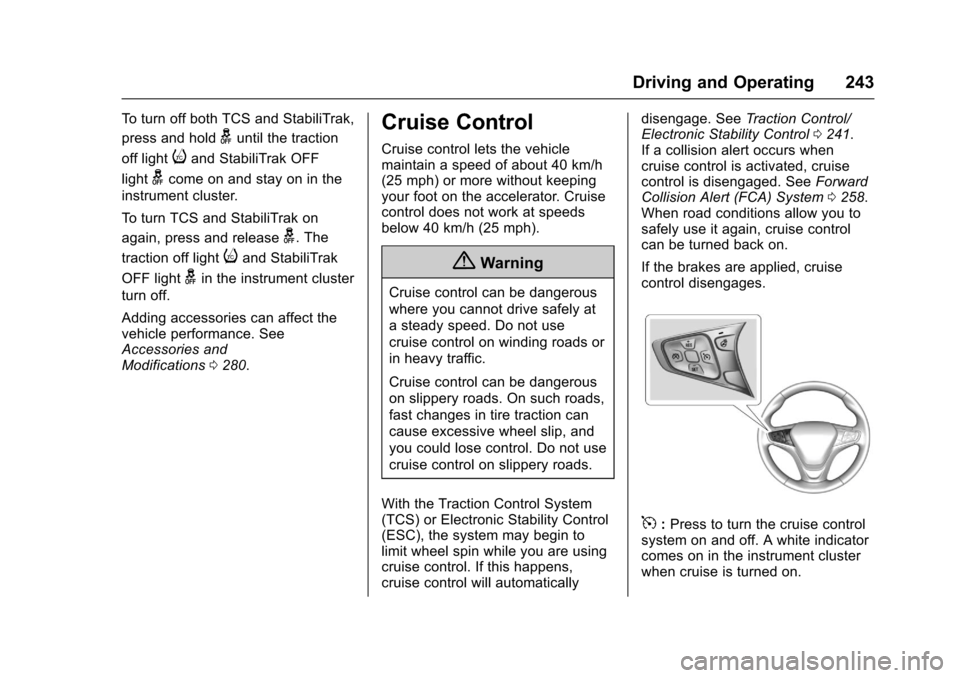
5:Press to turn the cruise controlsystem on and off. A white indicatorcomes on in the instrument clusterwhen cruise is turned on.
Page 246 of 419
Chevrolet Malibu Owner Manual (GMNA-Localizing-U.S./Canada/Mexico-10122664) - 2017 - crc - 5/23/16
Driving and Operating 245
The speedometer reading can bedisplayed in either English or metricunits. SeeDriver Information Center(DIC) (Base Level)0131orDriverInformation Center (DIC) (Uplevel)0134.Theincrementvalueuseddepends on the units displayed.
Passing Another Vehicle WhileUsing Cruise Control
Use the accelerator pedal toincrease the vehicle speed. Whenyou take your foot off the pedal, thevehicle will slow down to theprevious set cruise speed. Whilepressing the accelerator pedal orshortly following the release tooverride cruise control, brieflypressing -SET will result in cruisecontrol set to the current vehiclespeed.
Using Cruise Control on Hills
How well the cruise control workson hills depends upon the vehiclespeed, load, and the steepness ofthe hills. When going up steep hills,you might have to step on theaccelerator pedal to maintain the
vehicle speed. When goingdownhill, you might have to brake orshift to a lower gear to keep yourspeed down. If the brake pedal isapplied, cruise control willdisengage.
Ending Cruise Control
There are four ways to end cruisecontrol:
.Step lightly on the brake pedal.
.Press*.
.Shift the transmission toN(Neutral).
.Press5to turn cruise control
system off completely.
Erasing Speed Memory
The cruise control set speed is
erased from memory if5is pressed
or if the vehicle is turned off.
Adaptive Cruise Control
If equipped with Adaptive CruiseControl (ACC), it allows you toselect the cruise control set speedand following gap. Read this entiresection before using this system.The following gap is the followingtime between your vehicle and avehicle detected directly ahead inyour path moving in the samedirection. If no vehicle is detected inyour path, ACC works like regularcruise control. ACC uses cameraand radar sensors. SeeRadioFrequency Statement0393.
If a vehicle is detected in your path,ACC can apply acceleration orlimited, moderate braking tomaintain the selected following gap.To d i s e n g a g e A C C , a p p l y t h e b r a k e .If ACC is controlling your vehiclespeed when the Traction ControlSystem (TCS) or StabiliTrak systemactivates, the ACC mayautomatically disengage. SeeTr a c t i o n C o n t r o l / E l e c t r o n i c S t a b i l i t yControl0241.Whenroad
Page 251 of 419
Chevrolet Malibu Owner Manual (GMNA-Localizing-U.S./Canada/Mexico-10122664) - 2017 - crc - 5/23/16
250 Driving and Operating
See“Go Notifier”in“Collision/Detection Systems”underVehiclePersonalization0147.
When the vehicle ahead drivesaway, press +RES or theaccelerator pedal to resume ACC.If stopped for more thantwo minutes or if the driver door isopened and the driver safety belt isunbuckled, the ACC automaticallyapplies the Electric Parking Brake(EPB) to hold the vehicle. TheElectric Parking Brake status lightwill turn on. SeeElectric ParkingBrake0238.ToreleasetheEPB,press the accelerator pedal.
ADICwarningmessagemaydisplay indicating to shift to P (Park)before exiting the vehicle. SeeCruise Control Messages0139.
{Warning
If ACC has stopped the vehicle,
and if ACC is disengaged, turned
off, or canceled, the vehicle will
no longer be held at a stop. The
vehicle can move. When ACC is
(Continued)
Warning (Continued)
holding the vehicle at a stop,
always be prepared to manually
apply the brakes.
{Warning
Leaving the vehicle without
placing it in P (Park) can be
dangerous. Do not leave the
vehicle while it is being held at a
stop by ACC. Always place the
vehicle in P (Park) and turn off
the ignition before leaving the
vehicle.
ACC Override
If using the accelerator pedal whileACC is active, a warning messageon the DIC will indicate thatautomatic braking will not occur.SeeCruise Control Messages0139.ACCwillresumeoperationwhen the accelerator pedal is notbeing pressed.
{Warning
The ACC will not automatically
apply the brakes if your foot is
resting on the accelerator pedal.
Yo u c o u l d c r a s h i n t o a v e h i c l e
ahead of you.
Curves in the Road
{Warning
On curves, ACC may not detect a
vehicle ahead in your lane. You
could be startled if the vehicle
accelerates up to the set speed,
especially when following a
vehicle exiting or entering exit
ramps. You could lose control of
the vehicle or crash. Do not use
ACC while driving on an entrance
or exit ramp. Always be ready to
use the brakes if necessary.
Page 253 of 419
Chevrolet Malibu Owner Manual (GMNA-Localizing-U.S./Canada/Mexico-10122664) - 2017 - crc - 5/23/16
252 Driving and Operating
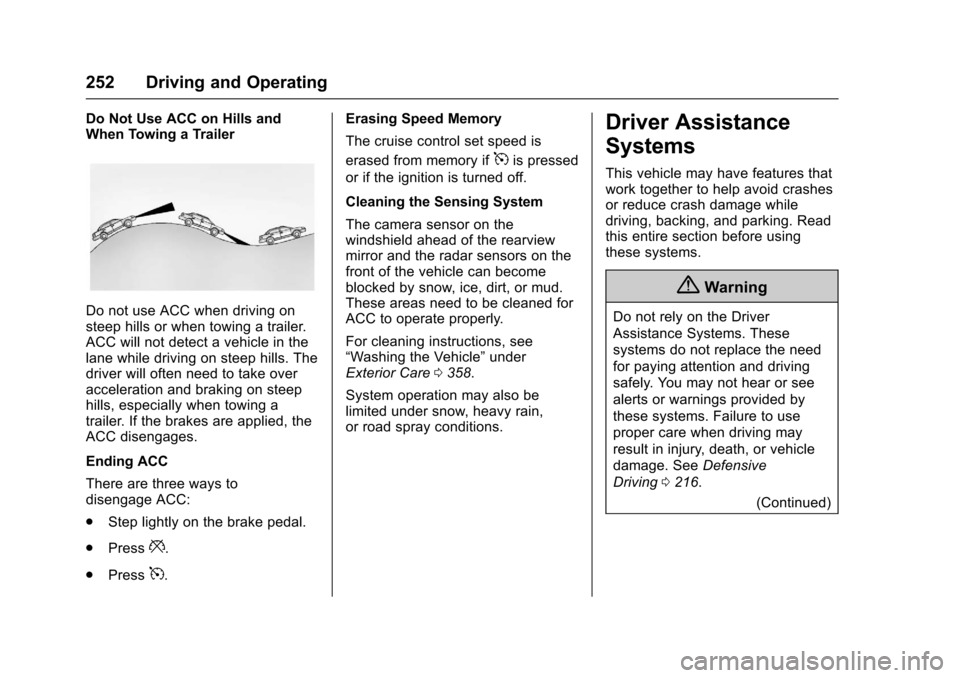
Do Not Use ACC on Hills andWhen Towing a Trailer
Do not use ACC when driving onsteep hills or when towing a trailer.ACC will not detect a vehicle in thelane while driving on steep hills. Thedriver will often need to take overacceleration and braking on steephills, especially when towing atrailer. If the brakes are applied, theACC disengages.
Ending ACC
There are three ways todisengage ACC:
.Step lightly on the brake pedal.
.Press*.
.Press5.
Erasing Speed Memory
The cruise control set speed is
erased from memory if5is pressed
or if the ignition is turned off.
Cleaning the Sensing System
The camera sensor on thewindshield ahead of the rearviewmirror and the radar sensors on thefront of the vehicle can becomeblocked by snow, ice, dirt, or mud.These areas need to be cleaned forACC to operate properly.
For cleaning instructions, see“Washing the Vehicle”underExterior Care0358.
System operation may also belimited under snow, heavy rain,or road spray conditions.
Driver Assistance
Systems
This vehicle may have features thatwork together to help avoid crashesor reduce crash damage whiledriving, backing, and parking. Readthis entire section before usingthese systems.
{Warning
Do not rely on the Driver
Assistance Systems. These
systems do not replace the need
for paying attention and driving
safely. You may not hear or see
alerts or warnings provided by
these systems. Failure to use
proper care when driving may
result in injury, death, or vehicle
damage. SeeDefensive
Driving0216.
(Continued)
Page 256 of 419
Chevrolet Malibu Owner Manual (GMNA-Localizing-U.S./Canada/Mexico-10122664) - 2017 - crc - 5/23/16
Driving and Operating 255
Warning (Continued)
(5 mph). To prevent injury, death,
or vehicle damage, even with
Parking Assist, always check the
area around the vehicle and
check all mirrors before moving
forward or backing.
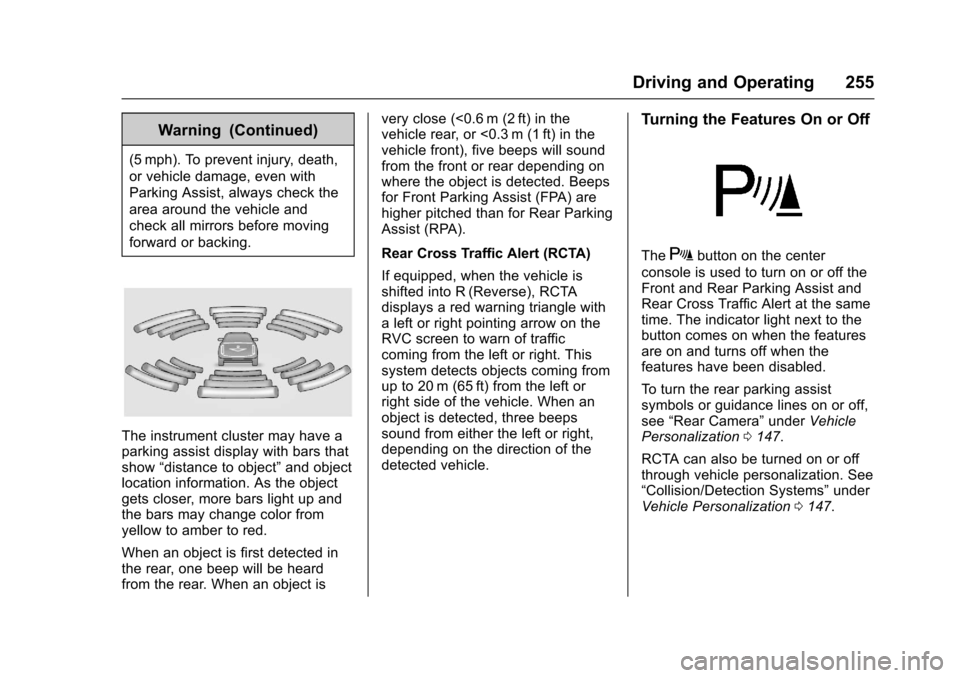
The instrument cluster may have aparking assist display with bars thatshow“distance to object”and objectlocation information. As the objectgets closer, more bars light up andthe bars may change color fromyellow to amber to red.
When an object is first detected inthe rear, one beep will be heardfrom the rear. When an object is
very close (<0.6 m (2 ft) in thevehicle rear, or <0.3 m (1 ft) in thevehicle front), five beeps will soundfrom the front or rear depending onwhere the object is detected. Beepsfor Front Parking Assist (FPA) arehigher pitched than for Rear ParkingAssist (RPA).
Rear Cross Traffic Alert (RCTA)
If equipped, when the vehicle isshifted into R (Reverse), RCTAdisplays a red warning triangle withaleftorrightpointingarrowontheRVC screen to warn of trafficcoming from the left or right. Thissystem detects objects coming fromup to 20 m (65 ft) from the left orright side of the vehicle. When anobject is detected, three beepssound from either the left or right,depending on the direction of thedetected vehicle.
Turning the Features On or Off
TheXbutton on the center
console is used to turn on or off theFront and Rear Parking Assist andRear Cross Traffic Alert at the sametime. The indicator light next to thebutton comes on when the featuresare on and turns off when thefeatures have been disabled.
To t u r n t h e r e a r p a r k i n g a s s i s tsymbols or guidance lines on or off,see“Rear Camera”underVehiclePersonalization0147.
RCTA can also be turned on or offthrough vehicle personalization. See“Collision/Detection Systems”underVehicle Personalization0147.