light CHEVROLET MALIBU 2017 9.G Workshop Manual
[x] Cancel search | Manufacturer: CHEVROLET, Model Year: 2017, Model line: MALIBU, Model: CHEVROLET MALIBU 2017 9.GPages: 419, PDF Size: 7.81 MB
Page 138 of 419
Chevrolet Malibu Owner Manual (GMNA-Localizing-U.S./Canada/Mexico-10122664) - 2017 - crc - 5/23/16
Instruments and Controls 137
Following Distance Indicator :When Adaptive Cruise Control(ACC) is not engaged, the currentfollow time to the vehicle ahead isdisplayed as a time value on thispage. When ACC has beenengaged, the display switches to thegap setting page. This page showsthe current gap setting along withthe vehicle ahead indicator.
Battery Voltage :Displays thecurrent battery voltage, if equipped.Battery voltage changes are normalwhile driving. SeeCharging SystemLight0122.Ifthereisaproblemwith the battery charging system,the DIC will display a message. SeeBattery Voltage and ChargingMessages0138.
Coolant Temperature :Shows theengine coolant temperature in eitherdegrees Celsius (°C) or degreesFahrenheit (°F).
Oil Pressure :Oil pressure isdisplayed in either kilopascal (kPa)or in pounds per square inch (psi).
Oil pressure can vary with enginespeed, outside temperature, and oilviscosity. On some models, the oil
pump will vary engine oil pressureaccording to engine needs. Oilpressure may change quickly as theengine speed or load varies. This isnormal. If the oil pressure warninglight or Driver Information Center(DIC) message indicates oilpressure outside the normaloperating range, check the vehicle'soil as soon as possible. SeeEngineOil Messages0141.
Drive Cycle Info (Hybrid) :Thisscreen displays the distancetraveled and average fuel economyfor the current trip. The screen willalso be shown when the vehicle isturned off displaying the previoustrip’sinformation.
Efficiency Gauge (Hybrid) :Thisgauge is a guide to driving in anefficient manner by keeping theindicator in the center of the gauge.
.Accel: If the indicator moves tothe right of the gauge,acceleration is too aggressive tooptimize efficiency.
.Brake: If the indicator moves tothe left side of the gauge,braking is too aggressive tooptimize efficiency.
To t a l P o w e r D i s p l a y ( H y b r i d ) :Provides a numeric display of thetotal power being used to propel orstop the vehicle. The display showsthe power being provided by thebattery or charging the battery aswell as the power provided by theengine.
EV Operation (Hybrid) :The barmoves from left to right as the driverrequests more power from thepropulsion system. While in EVmode, maintaining the bar in thegreen zone will allow the driver tomaximize EV operation.
Blank Page :Shows noinformation.
Page 143 of 419
Chevrolet Malibu Owner Manual (GMNA-Localizing-U.S./Canada/Mexico-10122664) - 2017 - crc - 5/23/16
142 Instruments and Controls
NO REMOTE DETECTED
This message displays when thetransmitter battery may be weak.See“Starting the Vehicle with a LowTransmitter Battery”underRemoteKeyless Entry (RKE) SystemOperation032.
NO REMOTE DETECTED
PRESS BRAKE TO RESTART
This message displays whenattempting to turn off the vehicleand the RKE transmitter is no longerdetected. Restarting is allowedwithout the RKE transmitter forfive minutes. Press the brake pedaland ENGINE START/STOP torestart the vehicle.
NUMBER OF KEYS
PROGRAMMED
This message displays whenprogramming new keys to thevehicle.
REMOTE LEFT IN VEHICLE
This message displays whenleaving the vehicle with the RKEtransmitter still inside.
REPLACE BATTERY IN
REMOTE KEY
This message displays when thebattery in the RKE transmitter needsto be replaced.
Lamp Messages
AUTOMATIC LIGHT CONTROL
ON/OFF
This message is displayed when theautomatic light control has beenturned on or off. SeeAutomaticHeadlamp System0166.
CHECK XXX TURN
SIGNAL LAMP
When one of the turn signals is out,this message displays to showwhich bulb needs to be replaced.SeeBulb Replacement0305andReplacement Bulbs0309.
TURN SIGNAL ON
This message is displayed if theturn signal has been left on. Turn offthe turn signal.
Object Detection System
Messages
24 GHz RADARS OFF
This message displays when drivingin certain areas where there may beradar interference. Adaptive CruiseControl (ACC), Forward CollisionAlert (FCA), and the ForwardAutomatic Braking (FAB) may notwork or may not work as well. Thevehicle does not need service.
FORWARD COLLISION
SYSTEM OFF
This message displays whenForward Automatic Braking (FAB)has been turned off. SeeForwardAutomatic Braking (FAB)0260.
FORWARD COLLISION
SYSTEM REDUCED
This message displays when theForward Automatic Braking (FAB)has been set to the Alert setting.This setting disables FAB functions.SeeForward Automatic Braking(FAB)0260.
Page 147 of 419
Chevrolet Malibu Owner Manual (GMNA-Localizing-U.S./Canada/Mexico-10122664) - 2017 - crc - 5/23/16
146 Instruments and Controls
STEERING ASSIST IS
REDUCED DRIVE WITH CARE
This message can appear forseveral reasons. Take the vehicle toyour dealer if the problem persists.
Starting the Vehicle
Messages
INITIALIZING—WAIT TO
SHIFT
In extreme cold temperatures thehybrid vehicle can take up to30 seconds to start. Wait to shiftfrom P (Park) while the vehicle isstarting.
PRESS BRAKE TO START
This message displays whenattempting to start the vehiclewithout first pressing the brakepedal.
Tire Messages
SERVICE TIRE MONITOR
SYSTEM
This message displays if there is aproblem with the Tire PressureMonitor System (TPMS). SeeTirePressure Monitor Operation0328.
TIRE LEARNING ACTIVE
This message displays when thesystem is learning new tires. SeeTire Pressure MonitorOperation0328.
TIRE PRESSURE LOW ADD
AIR TO TIRE
On vehicles with the Tire PressureMonitor System (TPMS), thismessage displays when thepressure in one or more of thevehicle's tires is low.
The low tire pressure warning lightwill also come on. SeeTirePressure Light0127.
If a tire pressure message displays,inflate the tires until the tire pressureis equal to the values shown on theTire and Loading Information label.SeeTires0317,Vehicle LoadLimits0325,andTirePressure0325.
More than one tire pressuremessage can be received at a time.The DIC also shows the tirepressure values. SeeDriverInformation Center (DIC) (BaseLevel)0131orDriver InformationCenter (DIC) (Uplevel)0134.
Transmission Messages
SERVICE TRANSMISSION
This message displays if there is aproblem with the transmission. Seeyour dealer.
SHIFT DENIED
This message displays whenattempting to use the automatictransmission manual mode to shiftto too low or too high of a gear. SeeManual Mode0235.
Page 149 of 419
Chevrolet Malibu Owner Manual (GMNA-Localizing-U.S./Canada/Mexico-10122664) - 2017 - crc - 5/23/16
148 Instruments and Controls
Entering the PersonalizationMenus
Select Settings from the home page.
The following menus may beavailable:
.Phone Connection (MTP Only)
.Time and Date
.To n e S e t t i n g s
.Auto Volume Control
.Maximum Startup Volume
.Vehicle Settings
Phone Connection (MTP Only)
Select and the following maydisplay:
.Charging Only
.Scan Music Folder Only
.Scan All Folders
Charging Only
This feature will charge a MediaTransfer Protocol (MTP) devicewhen connected to the USB port.Bluetooth®audio will beunavailable.
Turn MENU to highlight, then pressto select.
Scan Music Folder Only
This feature will scan and indexmusic folders on an MTP devicewhen connected to the USB port.
Turn MENU to highlight, then pressto select.
Scan All Folders
This feature will scan and index allfolders on an MTP device whenconnected to the USB port.
Turn MENU to highlight, then pressto select.
Time and Date
Select Time and Date to adjust theclock. SeeClock0107.
Tone Settings
Select to set the radio tone. See“To n e S e t t i n g s”under“RadioControls without Touchscreen”inOperation0176.
Auto Volume Control
This feature automatically adjuststhe radio volume based on thespeed of the vehicle.
Select the desired value.
Maximum Startup Volume
When the vehicle is started and theradio volume is greater than this setlevel, the volume is adjusted to thislevel.
Select the desired value.
Vehicle Settings
Select and the following maydisplay:
.Climate and Air Quality
.Comfort and Convenience
.Languages
.Lighting
.Power Door Locks
.Remote Lock, Unlock, Start
.Return to Factory Settings
.Software Information
.Va l e t M o d e
Page 151 of 419
Chevrolet Malibu Owner Manual (GMNA-Localizing-U.S./Canada/Mexico-10122664) - 2017 - crc - 5/23/16
150 Instruments and Controls
Extended Hill Start Assist
This allows the duration of the HillStart Assist to be changed. See“Extended Hill Start Assist (EHSA)”inHill Start Assist (HSA)0240.
Select Extended Hold orStandard Hold.
Languages
Select, then select from theavailable language(s).
Lighting
Select the Lighting menu and thefollowing may be displayed:
.Exit Lighting
Exit Lighting
Select to set how long the exteriorlamps stay on when leaving thevehicle and it is dark outside. SeeExit Lighting0169.
Select the desired time.
Power Door Locks
Select and the following maydisplay:
.Unlocked Door Anti Lock Out
.Auto Door Unlock
.Delayed Door Lock
Unlocked Door Anti Lock Out
When on, this feature will keep thedriver door from locking when thedoor is open. If this feature is turnedon, the Delayed Door Lock menuwill not be available.
Select Off or On.
Auto Door Unlock
This allows selection of which of thedoors will automatically unlock whenthe vehicle is shifted into P (Park).
Select Off, All Doors, or Driver Door.
Delayed Door Lock
When on, this feature will delay thelocking of the doors. To override thedelay, press the power door lockswitch on the door.
Select Off or On.
Remote Lock, Unlock, Start
Select and the following maydisplay:
.Remote Unlock Light Feedback
.Remote Lock Feedback
.Remote Door Unlock
.Remote Start Auto Cool Seats
.Remote Start Auto Heat Seats
.Passive Door Unlock
.Passive Door Lock
.Remote Left in Vehicle Reminder
Remote Unlock Light Feedback
When on, the exterior lamps willflash when unlocking the vehiclewith the Remote Keyless Entry(RKE) transmitter. SeeRemoteKeyless Entry (RKE) SystemOperation032.
Select Off or Flash Lights.
Remote Lock Feedback
Select to set which type of feedback
is given when pressingQon the
RKE transmitter. SeeRemoteKeyless Entry (RKE) SystemOperation032.
Select Off, Lights and Horn, LightsOnly, or Horn Only.
Page 154 of 419
Chevrolet Malibu Owner Manual (GMNA-Localizing-U.S./Canada/Mexico-10122664) - 2017 - crc - 5/23/16
Instruments and Controls 153
Radio
Select and the following maydisplay:
.Manage Favorites
.Number of Favorites Shown
.Audible Touch Feedback
.Te x t S c r o l l
.To n e S e t t i n g s
.Auto Volume
.Maximum Startup Volume
.Audio Cue
Manage Favorites
This allows favorites to be edited.See“Manage Favorites”in“RadioSetup”underHome Page (Radiowith Touchscreen)0175or“Manage Favorites”in“Settings”under“Radio”in the infotainmentmanual.
Number of Favorites Shown
Press to set the number of favoritesto display.
Select the desired number or selectAuto and the infotainment systemwill automatically adjust the numberof favorites shown.
Audible Touch Feedback
This allows Audible TouchFeedback to be turned on or off.
Select Off or On.
Text Scroll
Select to see text scroll on thescreen.
Select Off or On.
Tone Settings
Select to adjust the radio tone. SeeOperation0176.
Auto Volume
This feature adjusts the volumebased on vehicle speed andambient noise.
Select Off, Low, Medium-Low,Medium, Medium-High, or High.
Maximum Startup Volume
This feature sets the maximumstartup volume. If the vehicle isstarted and the volume is greaterthan this level, the volume isadjusted to this level. To set themaximum startup volume, press +or✓to increase or decrease.
Audio Cue
If equipped, this feature adjusts thestartup and shutdown sounds. Toadjust the volume, select + or✓toincrease or decrease.
Vehicle
Select and the following maydisplay:
.Climate and Air Quality
.Collision/Detection Systems
.Comfort and Convenience
.Lighting
.Power Door Locks
.Remote Lock, Unlock, Start
Page 156 of 419
Chevrolet Malibu Owner Manual (GMNA-Localizing-U.S./Canada/Mexico-10122664) - 2017 - crc - 5/23/16
Instruments and Controls 155
stopping vehicle, and then thatvehicle drives on. SeeAdaptiveCruise Control0245.
Select Off or On.
Lane Change Alert
This allows the feature to be turnedon or off. SeeLane Change Alert(LCA)0264.
Select Off or On.
Comfort and Convenience
Select and the following maydisplay:
.Auto Memory Recall
.Easy Exit Options
.Chime Volume
.Reverse Tilt Mirror
.Extended Hill Start Assist
Auto Memory Recall
This feature automatically recallsthe current driver’spreviouslystored1or2buttonpositionswhentheignition is changed from off to ON/RUN or ACC/ACCESSORY. SeeMemory Seats059.
Select Off or On.
Easy Exit Options
This feature automatically recallsthe current driver’spreviouslystoredexit button position when exiting thevehicle. SeeMemory Seats059.
Select Off or On.
Chime Volume
Select to set the chime volumelevel.
Select Normal or High.
Reverse Tilt Mirror
When on, both the driver andpassenger outside mirrors will tiltdownward when the vehicle isshifted to R (Reverse) to improvevisibility of the ground near the rearwheels. They will return to theirprevious driving position when thevehicle is shifted out of R (Reverse)or the engine is turned off. SeeReverse Tilt Mirrors049.
Select Off, On - Driver andPassenger, On - Driver, or On -Passenger.
Extended Hill Start Assist
This allows the duration of the HillStart Assist to be changed. See“Extended Hill Start Assist (EHSA)”inHill Start Assist (HSA)0240.
Select Extended Hold orStandard Hold.
Lighting
Select and the following maydisplay:
.Vehicle Locator Lights
.Exit Lighting
Vehicle Locator Lights
This feature will flash the exteriorlamps and allows the headlamps,parking lamps, taillamps, and mostof the interior lamps to turn on
briefly whenKon the Remote
Keyless Entry (RKE) transmitter ispressed to locate the vehicle.
Select Off or On.
Page 157 of 419
Chevrolet Malibu Owner Manual (GMNA-Localizing-U.S./Canada/Mexico-10122664) - 2017 - crc - 5/23/16
156 Instruments and Controls
Exit Lighting
This allows the selection of howlong the exterior lamps stay onwhen leaving the vehicle when it isdark outside.
Select Off, 30 Seconds, 60Seconds, or 120 Seconds.
Power Door Locks
Select and the following maydisplay:
.Unlocked Door Anti Lock Out
.Auto Door Unlock
.Delayed Door Lock
Unlocked Door Anti Lock Out
When on, this feature will keep thedriver door from locking when thedoor is open. If this feature is turnedon, the Delayed Door Lock menuwill not be available.
Select Off or On.
Auto Door Unlock
This allows selection of which of thedoors will automatically unlock whenthe vehicle is shifted into P (Park).
Select Off, All Doors, or Driver Door.
Delayed Door Lock
When on, this feature will delay thelocking of the doors. To override thedelay, press the power door lockswitch on the door.
Select Off or On.
Remote Lock, Unlock, Start
Select and the following maydisplay:
.Remote Unlock Light Feedback
.Remote Lock Feedback
.Remote Door Unlock
.Remote Start Auto Cool Seats
.Remote Start Auto Heat Seats
.Passive Door Unlock
.Passive Door Lock
.Remote Left in Vehicle Alert
Remote Unlock Light Feedback
When on, the exterior lamps willflash when unlocking the vehiclewith the RKE transmitter.
Select Off or Flash Lights.
Remote Lock Feedback
This allows selection of what type offeedback is given when locking thevehicle with the RKE transmitter.
Select Off, Lights and Horn, LightsOnly, or Horn Only.
Remote Door Unlock
This allows selection of which doors
will unlock when pressingKon the
RKE transmitter.
Select All Doors or Driver Door.
Remote Start Auto Cool Seats
If equipped and turned on, thisfeature will turn the ventilated seatson when using remote start onwarm days.
Select Off, On-Driver andPassenger, or On-Driver.
Remote Start Auto Heat Seats
If equipped and turned on, thisfeature will turn the heated seats onwhen using remote start oncold days.
Select Off, On-Driver andPassenger, or On-Driver.
Page 161 of 419
Chevrolet Malibu Owner Manual (GMNA-Localizing-U.S./Canada/Mexico-10122664) - 2017 - crc - 5/23/16
160 Instruments and Controls
instructions refer to a garage dooropener, but can be used for otherdevices.
Do not use the Universal Remotesystem with any garage door openerthat does not have the stop andreverse feature. This includes anygarage door opener modelmanufactured before April 1, 1982.
Read these instructions completelybefore programming the UniversalRemote system. It may help to haveanother person assist with theprogramming process.
Keep the original hand-heldtransmitter for use in other vehiclesas well as for future programming.Erase the programming whenvehicle ownership is terminated.See“Erasing Universal RemoteSystem Buttons”later in thissection.
To p r o g r a m a g a r a g e d o o r o p e n e r ,park outside directly in line with andfacing the garage door openerreceiver. Clear all people andobjects near the garage door.
Make sure the hand-held transmitterhas a new battery for quick andaccurate transmission of theradio-frequency signal.
Programming the Universal
Remote System
For questions or help programmingthe Universal Remote system, call1-800-355-3515 or seewww.homelink.com.
Programming involvestime-sensitive actions, and may timeout causing the procedure to berepeated.
To p r o g r a m u p t o t h r e e d e v i c e s :
1. Hold the end of the hand-heldtransmitter about 3 to 8 cm (1to 3 in) away from theUniversal Remote systembuttons with the indicator lightin view. The hand-heldtransmitter was supplied by themanufacturer of the garagedoor opener receiver.
2. At the same time, press andhold both the hand-heldtransmitter button and one ofthe three Universal Remote
system buttons to be used tooperate the garage door. Donot release either button untilthe indicator light changes fromaslowtoarapidflash.Thenrelease both buttons.
Some garage door openersmay require substitution ofStep 2 with the procedureunder“Radio Signals forCanada and Some GateOperators”later in this section.
3. Press and hold the newlyprogrammed Universal Remotesystem button for five secondswhile watching the indicatorlight and garage dooractivation.
.If the indicator light stays oncontinuously or the garagedoor moves when thebutton is pressed, thenprogramming is complete.There is no need tocomplete Steps 4–6.
.If the indicator light doesnot come on or the garagedoor does not move, asecond button press may
Page 162 of 419
Chevrolet Malibu Owner Manual (GMNA-Localizing-U.S./Canada/Mexico-10122664) - 2017 - crc - 5/23/16
Instruments and Controls 161
be required. For a secondtime, press and hold thenewly programmed buttonfor five seconds. If the lightstays on or the garage doormoves, programming iscomplete.
.If the indicator light blinksrapidly for two seconds,then changes to a solid lightand the garage door doesnot move, continue withprogramming Steps 4–6.
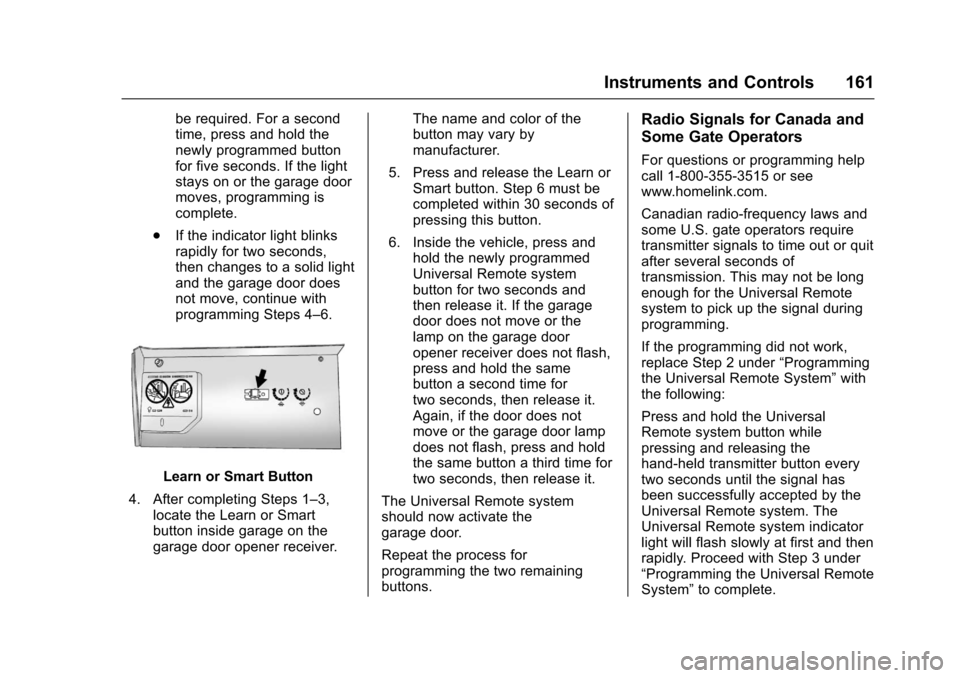
Learn or Smart Button
4. After completing Steps 1–3,locate the Learn or Smartbutton inside garage on thegarage door opener receiver.
The name and color of thebutton may vary bymanufacturer.
5. Press and release the Learn orSmart button. Step 6 must becompleted within 30 seconds ofpressing this button.
6. Inside the vehicle, press andhold the newly programmedUniversal Remote systembutton for two seconds andthen release it. If the garagedoor does not move or thelamp on the garage dooropener receiver does not flash,press and hold the samebutton a second time fortwo seconds, then release it.Again, if the door does notmove or the garage door lampdoes not flash, press and holdthe same button a third time fortwo seconds, then release it.
The Universal Remote systemshould now activate thegarage door.
Repeat the process forprogramming the two remainingbuttons.
Radio Signals for Canada and
Some Gate Operators
For questions or programming helpcall 1-800-355-3515 or seewww.homelink.com.
Canadian radio-frequency laws andsome U.S. gate operators requiretransmitter signals to time out or quitafter several seconds oftransmission. This may not be longenough for the Universal Remotesystem to pick up the signal duringprogramming.
If the programming did not work,replace Step 2 under“Programmingthe Universal Remote System”withthe following:
Press and hold the UniversalRemote system button whilepressing and releasing thehand-held transmitter button everytwo seconds until the signal hasbeen successfully accepted by theUniversal Remote system. TheUniversal Remote system indicatorlight will flash slowly at first and thenrapidly. Proceed with Step 3 under“Programming the Universal RemoteSystem”to complete.