change time CHEVROLET MALIBU 2017 9.G User Guide
[x] Cancel search | Manufacturer: CHEVROLET, Model Year: 2017, Model line: MALIBU, Model: CHEVROLET MALIBU 2017 9.GPages: 419, PDF Size: 7.81 MB
Page 137 of 419
Chevrolet Malibu Owner Manual (GMNA-Localizing-U.S./Canada/Mexico-10122664) - 2017 - crc - 5/23/16
136 Instruments and Controls
The Oil Life display must be resetafter each oil change. It will notreset itself. Do not to reset the OilLife display at any time other thanwhen the oil has just been changed.It cannot be reset accurately untilthe next oil change. To reset theengine oil life system, press and
holdVfor several seconds while
the Oil Life display is active. SeeEngine Oil Life System0291.
Tire Pressure :Shows theapproximate pressures of all fourtires. Tire pressure is displayed ineither kilopascal (kPa) or in poundsper square inch (psi). If the pressureis low, the value for that tire isshown in amber. SeeTire PressureMonitor System0327andTirePressure Monitor Operation0328.
Instantaneous Fuel Economy :Displays the current fuel economy inliters per 100 kilometers (L/100 km)or miles per gallon (mpg). Thisnumber reflects only theapproximate fuel economy that thevehicle has right now and changes
frequently as driving conditionschange. This display cannot bereset.
Average Vehicle Speed :Displaysthe average vehicle speed of thevehicle in kilometers per hour (km/h)or miles per hour (mph). Thisaverage is based on the variousvehicle speeds recorded since thelast reset. Reset the average speed
by pressingVwhen it is displayed.
Fuel Economy :The centerdisplays the approximateinstantaneous fuel economy as anumber and bar graph. Displayedabove the bar graph is a runningaverage of fuel economy for themost recently traveled selecteddistance. Displayed below the bargraph is the best average fueleconomy that has been achieved forthe selected distance. The selecteddistance is displayed at the top ofthe page as“last xxx mi/km.”
Presspto select the distance or
reset best value. Usewandxto
choose the distance and pressV.
Presswandxto select“Reset
Best Score.”PressVto reset the
best average fuel economy. Afterreset, the best value displays“-,-”until the selected distance has beentraveled.
The display provides information onhow current driving behavior affectsthe running average and how wellrecent driving compares to the bestthat has been achieved for theselected distance.
Timer :This display can be used as
atimer.Tostartthetimer,pressV
while this display is active. Thedisplay will show the amount of timethat has passed since the timer was
last reset. To stop the timer, pressV
briefly while this display is activeand the timer is running. To reset
the timer to zero, press and holdV
while this display is active, or
presspand select reset.
Speed Limit :Shows signinformation, which comes from aroadway database in the onboardnavigation, if equipped.
Page 138 of 419
Chevrolet Malibu Owner Manual (GMNA-Localizing-U.S./Canada/Mexico-10122664) - 2017 - crc - 5/23/16
Instruments and Controls 137
Following Distance Indicator :When Adaptive Cruise Control(ACC) is not engaged, the currentfollow time to the vehicle ahead isdisplayed as a time value on thispage. When ACC has beenengaged, the display switches to thegap setting page. This page showsthe current gap setting along withthe vehicle ahead indicator.
Battery Voltage :Displays thecurrent battery voltage, if equipped.Battery voltage changes are normalwhile driving. SeeCharging SystemLight0122.Ifthereisaproblemwith the battery charging system,the DIC will display a message. SeeBattery Voltage and ChargingMessages0138.
Coolant Temperature :Shows theengine coolant temperature in eitherdegrees Celsius (°C) or degreesFahrenheit (°F).
Oil Pressure :Oil pressure isdisplayed in either kilopascal (kPa)or in pounds per square inch (psi).
Oil pressure can vary with enginespeed, outside temperature, and oilviscosity. On some models, the oil
pump will vary engine oil pressureaccording to engine needs. Oilpressure may change quickly as theengine speed or load varies. This isnormal. If the oil pressure warninglight or Driver Information Center(DIC) message indicates oilpressure outside the normaloperating range, check the vehicle'soil as soon as possible. SeeEngineOil Messages0141.
Drive Cycle Info (Hybrid) :Thisscreen displays the distancetraveled and average fuel economyfor the current trip. The screen willalso be shown when the vehicle isturned off displaying the previoustrip’sinformation.
Efficiency Gauge (Hybrid) :Thisgauge is a guide to driving in anefficient manner by keeping theindicator in the center of the gauge.
.Accel: If the indicator moves tothe right of the gauge,acceleration is too aggressive tooptimize efficiency.
.Brake: If the indicator moves tothe left side of the gauge,braking is too aggressive tooptimize efficiency.
To t a l P o w e r D i s p l a y ( H y b r i d ) :Provides a numeric display of thetotal power being used to propel orstop the vehicle. The display showsthe power being provided by thebattery or charging the battery aswell as the power provided by theengine.
EV Operation (Hybrid) :The barmoves from left to right as the driverrequests more power from thepropulsion system. While in EVmode, maintaining the bar in thegreen zone will allow the driver tomaximize EV operation.
Blank Page :Shows noinformation.
Page 142 of 419
Chevrolet Malibu Owner Manual (GMNA-Localizing-U.S./Canada/Mexico-10122664) - 2017 - crc - 5/23/16
Instruments and Controls 141
Engine Oil Messages
CHANGE ENGINE OIL SOON
This message displays when theengine oil needs to be changed.When the engine oil is changed, besure to reset the Oil Life System.SeeEngine Oil Life System0291,Driver Information Center (DIC)(Base Level)0131orDriverInformation Center (DIC) (Uplevel)0134,Engine Oil0288,andMaintenance Schedule0369.
ENGINE OIL HOT, IDLE
ENGINE
This message displays when theengine oil temperature is too hot.Stop and allow the vehicle to idleuntil it cools down.
OIL PRESSURE LOW—STOP
ENGINE
This message displays if low oilpressure levels occur. Stop thevehicle as soon as safely possibleand do not operate it until the causeof the low oil pressure has been
corrected. Check the oil as soon aspossible and have the vehicleserviced by your dealer.
Engine Power Messages
ENGINE POWER IS REDUCED
This message displays when thevehicle's engine power is reduced.Reduced engine power can affectthe vehicle's ability to accelerate.If this message is on, but there is noreduction in performance, proceedto your destination. Theperformance may be reduced thenext time the vehicle is driven. Thevehicle may be driven at a reducedspeed while this message is on, butmaximum acceleration and speedmay be reduced. Anytime thismessage stays on, or displaysrepeatedly, the vehicle should betaken to your dealer for service assoon as possible.
Fuel System Messages
FUEL LEVEL LOW
This message displays when thevehicle is low on fuel. Refuel assoon as possible.
TIGHTEN GAS CAP
This message displays when thefuel cap is not on tight. Tighten thefuel cap.
Key and Lock Messages
NO REMOTE KEY WAS
DETECTED PLACE KEY IN
TRANSMITTER POCKET THEN
START YOUR VEHICLE
This message displays when tryingto start the vehicle if an RKEtransmitter is not detected. Thetransmitter battery may be weak.See“Starting the Vehicle with a LowTransmitter Battery”underRemoteKeyless Entry (RKE) SystemOperation032.
Page 144 of 419
Chevrolet Malibu Owner Manual (GMNA-Localizing-U.S./Canada/Mexico-10122664) - 2017 - crc - 5/23/16
Instruments and Controls 143
FORWARD COLLISION
SYSTEM UNAVAILABLE
This message displays when theForward Automatic Braking (FAB)has been unavailable for some time.The FAB System does not needservice.
This can occur under the followingconditions:
.The front of the vehicle orwindshield is not clean. Keepthese areas clean and free ofmud, dirt, snow, ice, and slush.For cleaning instructions, seeExterior Care0358.
.Heavy rain or snow is interferingwith the object detectionperformance.
This message may also bedisplayed if there is a problem withthe StabiliTrak system. SeeTr a c t i o nControl/Electronic StabilityControl0241
FORWARD COLLISION
ALERT OFF
This message displays when theForward Collision Alert has beenturned off.
FRONT CAMERA BLOCKED
CLEAN WINDSHIELD
This message displays when thecamera is blocked. Cleaning theoutside of the windshield behind therearview mirror may correct theissue. The Front Pedestrian Braking(FPB), Lane Keep Assist (LKA), andLane Departure Warning (LDW) willnot operate. Adaptive Cruise Control(ACC), Forward Collision Alert(FCA), and the Forward AutomaticBraking (FAB) may not work or maynot work as well.
LANE CHANGE ALERT OFF
This message indicates that thedriver has turned the Side BlindZone Alert (SBZA) and LaneChange Alert (LCA) systems off.
LANE KEEPING ASSIST
UNAVAILABLE
This message displays when theLane Keep Assist (LKA) and LaneDeparture Warning (LDW) system istemporarily unavailable. The LKAsystem does not need service.
This message could be due to thecamera being blocked. Cleaning theoutside of the windshield behind therearview mirror may correct theissue.
PARK ASSIST OFF
This message displays when theParking Assist system has beenturned off or when there is atemporary condition causing thesystem to be disabled.
SERVICE FORWARD
COLLISION SYSTEM
If this message displays, take thevehicle to your dealer to repair thesystem.
Page 145 of 419
Chevrolet Malibu Owner Manual (GMNA-Localizing-U.S./Canada/Mexico-10122664) - 2017 - crc - 5/23/16
144 Instruments and Controls
SERVICE DRIVER ASSIST
SYSTEM
If this message displays, take thevehicle to your dealer to repair thesystem.
Adaptive Cruise Control (ACC),Forward Collision Alert (FCA),Active Emergency Braking System,Assistance Systems for Parking orBacking, and/or Lane Keep Assist(LKA) system may not work. Do notuse these systems until the vehiclehas been repaired.
SERVICE FRONT CAMERA
If this message remains on aftercontinued driving, the vehicle needsservice. Take the vehicle to yourdealer. Do not use the FrontPedestrian Braking (FPB), ForwardCollision Alert (FCA), ForwardAutomatic Braking (FAB), LaneKeep Assist (LKA), and LaneDeparture Warning (LDW) features.
SERVICE PARK ASSIST
This message displays if there is aproblem with the Parking Assistsystem. Do not use this system tohelp you park. See your dealer forservice.
SERVICE SIDE DETECTION
SYSTEM
If this message remains on aftercontinued driving, the vehicle needsservice. Side Blind Zone Alert(SBZA), Lane Change Alert (LCA),and Rear Cross Traffic Alert (RCTA)features will not work. Take thevehicle to your dealer.
SIDE DETECTION SYSTEM
UNAVAILABLE
This message indicates that SideBlind Zone Alert (SBZA), LaneChange Alert (LCA), and RearCross Traffic Alert (RCTA) aredisabled either because the sensoris blocked and cannot detectvehicles in the blind zone, or thevehicle is passing through an openarea, such as the desert, wherethere is insufficient data foroperation. This message may also
activate during heavy rain or due toroad spray. The vehicle does notneed service. For cleaning, see"Washing the Vehicle" underExterior Care0358.
TAKE STEERING
If LKA does not detect active driversteering, an alert and chime may beprovided. Move the steering wheelto dismiss. SeeLane Keep Assist(LKA)0266.
Propulsion Power
Messages
PROPULSION POWER IS
REDUCED
This message displays when thepropulsion power is reduced andcan affect the ability to accelerate.If this message is on, but there is noreduction in performance, proceedto your destination. Theperformance may be reduced thenext time the vehicle is driven. Thevehicle may be driven at a reducedspeed while this message is on, butmaximum acceleration and speedmay be reduced. If this message
Page 151 of 419
Chevrolet Malibu Owner Manual (GMNA-Localizing-U.S./Canada/Mexico-10122664) - 2017 - crc - 5/23/16
150 Instruments and Controls
Extended Hill Start Assist
This allows the duration of the HillStart Assist to be changed. See“Extended Hill Start Assist (EHSA)”inHill Start Assist (HSA)0240.
Select Extended Hold orStandard Hold.
Languages
Select, then select from theavailable language(s).
Lighting
Select the Lighting menu and thefollowing may be displayed:
.Exit Lighting
Exit Lighting
Select to set how long the exteriorlamps stay on when leaving thevehicle and it is dark outside. SeeExit Lighting0169.
Select the desired time.
Power Door Locks
Select and the following maydisplay:
.Unlocked Door Anti Lock Out
.Auto Door Unlock
.Delayed Door Lock
Unlocked Door Anti Lock Out
When on, this feature will keep thedriver door from locking when thedoor is open. If this feature is turnedon, the Delayed Door Lock menuwill not be available.
Select Off or On.
Auto Door Unlock
This allows selection of which of thedoors will automatically unlock whenthe vehicle is shifted into P (Park).
Select Off, All Doors, or Driver Door.
Delayed Door Lock
When on, this feature will delay thelocking of the doors. To override thedelay, press the power door lockswitch on the door.
Select Off or On.
Remote Lock, Unlock, Start
Select and the following maydisplay:
.Remote Unlock Light Feedback
.Remote Lock Feedback
.Remote Door Unlock
.Remote Start Auto Cool Seats
.Remote Start Auto Heat Seats
.Passive Door Unlock
.Passive Door Lock
.Remote Left in Vehicle Reminder
Remote Unlock Light Feedback
When on, the exterior lamps willflash when unlocking the vehiclewith the Remote Keyless Entry(RKE) transmitter. SeeRemoteKeyless Entry (RKE) SystemOperation032.
Select Off or Flash Lights.
Remote Lock Feedback
Select to set which type of feedback
is given when pressingQon the
RKE transmitter. SeeRemoteKeyless Entry (RKE) SystemOperation032.
Select Off, Lights and Horn, LightsOnly, or Horn Only.
Page 161 of 419
Chevrolet Malibu Owner Manual (GMNA-Localizing-U.S./Canada/Mexico-10122664) - 2017 - crc - 5/23/16
160 Instruments and Controls
instructions refer to a garage dooropener, but can be used for otherdevices.
Do not use the Universal Remotesystem with any garage door openerthat does not have the stop andreverse feature. This includes anygarage door opener modelmanufactured before April 1, 1982.
Read these instructions completelybefore programming the UniversalRemote system. It may help to haveanother person assist with theprogramming process.
Keep the original hand-heldtransmitter for use in other vehiclesas well as for future programming.Erase the programming whenvehicle ownership is terminated.See“Erasing Universal RemoteSystem Buttons”later in thissection.
To p r o g r a m a g a r a g e d o o r o p e n e r ,park outside directly in line with andfacing the garage door openerreceiver. Clear all people andobjects near the garage door.
Make sure the hand-held transmitterhas a new battery for quick andaccurate transmission of theradio-frequency signal.
Programming the Universal
Remote System
For questions or help programmingthe Universal Remote system, call1-800-355-3515 or seewww.homelink.com.
Programming involvestime-sensitive actions, and may timeout causing the procedure to berepeated.
To p r o g r a m u p t o t h r e e d e v i c e s :
1. Hold the end of the hand-heldtransmitter about 3 to 8 cm (1to 3 in) away from theUniversal Remote systembuttons with the indicator lightin view. The hand-heldtransmitter was supplied by themanufacturer of the garagedoor opener receiver.
2. At the same time, press andhold both the hand-heldtransmitter button and one ofthe three Universal Remote
system buttons to be used tooperate the garage door. Donot release either button untilthe indicator light changes fromaslowtoarapidflash.Thenrelease both buttons.
Some garage door openersmay require substitution ofStep 2 with the procedureunder“Radio Signals forCanada and Some GateOperators”later in this section.
3. Press and hold the newlyprogrammed Universal Remotesystem button for five secondswhile watching the indicatorlight and garage dooractivation.
.If the indicator light stays oncontinuously or the garagedoor moves when thebutton is pressed, thenprogramming is complete.There is no need tocomplete Steps 4–6.
.If the indicator light doesnot come on or the garagedoor does not move, asecond button press may
Page 162 of 419
Chevrolet Malibu Owner Manual (GMNA-Localizing-U.S./Canada/Mexico-10122664) - 2017 - crc - 5/23/16
Instruments and Controls 161
be required. For a secondtime, press and hold thenewly programmed buttonfor five seconds. If the lightstays on or the garage doormoves, programming iscomplete.
.If the indicator light blinksrapidly for two seconds,then changes to a solid lightand the garage door doesnot move, continue withprogramming Steps 4–6.
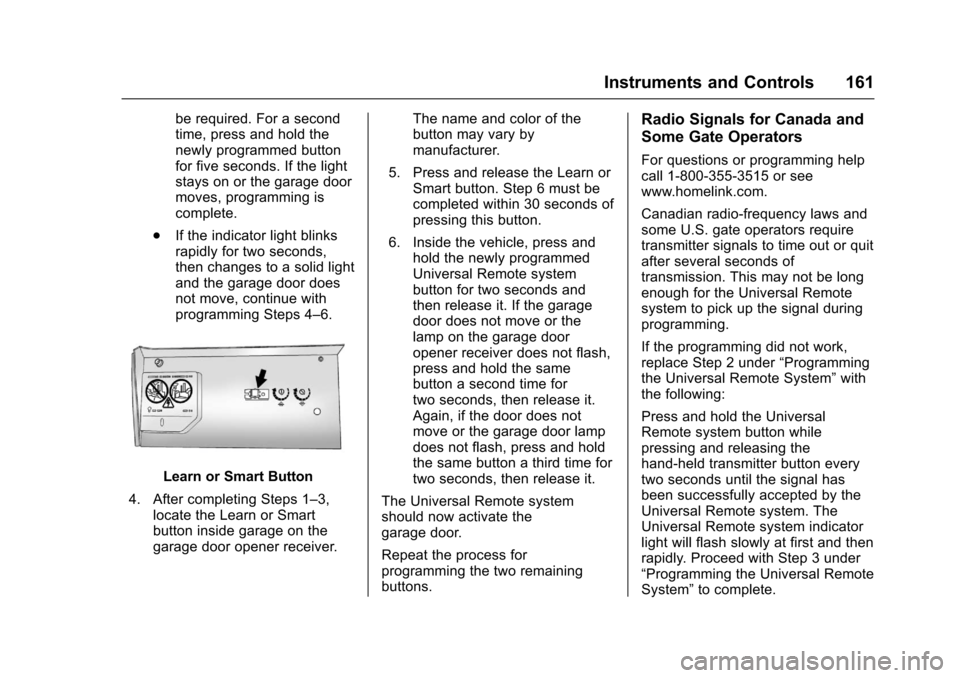
Learn or Smart Button
4. After completing Steps 1–3,locate the Learn or Smartbutton inside garage on thegarage door opener receiver.
The name and color of thebutton may vary bymanufacturer.
5. Press and release the Learn orSmart button. Step 6 must becompleted within 30 seconds ofpressing this button.
6. Inside the vehicle, press andhold the newly programmedUniversal Remote systembutton for two seconds andthen release it. If the garagedoor does not move or thelamp on the garage dooropener receiver does not flash,press and hold the samebutton a second time fortwo seconds, then release it.Again, if the door does notmove or the garage door lampdoes not flash, press and holdthe same button a third time fortwo seconds, then release it.
The Universal Remote systemshould now activate thegarage door.
Repeat the process forprogramming the two remainingbuttons.
Radio Signals for Canada and
Some Gate Operators
For questions or programming helpcall 1-800-355-3515 or seewww.homelink.com.
Canadian radio-frequency laws andsome U.S. gate operators requiretransmitter signals to time out or quitafter several seconds oftransmission. This may not be longenough for the Universal Remotesystem to pick up the signal duringprogramming.
If the programming did not work,replace Step 2 under“Programmingthe Universal Remote System”withthe following:
Press and hold the UniversalRemote system button whilepressing and releasing thehand-held transmitter button everytwo seconds until the signal hasbeen successfully accepted by theUniversal Remote system. TheUniversal Remote system indicatorlight will flash slowly at first and thenrapidly. Proceed with Step 3 under“Programming the Universal RemoteSystem”to complete.
Page 164 of 419
Chevrolet Malibu Owner Manual (GMNA-Localizing-U.S./Canada/Mexico-10122664) - 2017 - crc - 5/23/16
Lighting 163
Lighting
Exterior Lighting
Exterior Lamp Controls . . . . . . . 163Exterior Lamps OffReminder . . . . . . . . . . . . . . . . . . . 165Headlamp High/Low-BeamChanger . . . . . . . . . . . . . . . . . . . . 165Flash-to-Pass . . . . . . . . . . . . . . . . 165Daytime RunningLamps (DRL) . . . . . . . . . . . . . . . 165Automatic HeadlampSystem . . . . . . . . . . . . . . . . . . . . . . 166Hazard Warning Flashers . . . . . 166Turn and Lane-ChangeSignals . . . . . . . . . . . . . . . . . . . . . . 167
Interior Lighting
Instrument Panel IlluminationControl . . . . . . . . . . . . . . . . . . . . . . 167Courtesy Lamps . . . . . . . . . . . . . . 168Dome Lamps . . . . . . . . . . . . . . . . . 168Reading Lamps . . . . . . . . . . . . . . 168
Lighting Features
Entry Lighting . . . . . . . . . . . . . . . . 169Exit Lighting . . . . . . . . . . . . . . . . . . 169Battery Load Management . . . 169Battery Power Protection . . . . . 170Exterior Lighting BatterySaver . . . . . . . . . . . . . . . . . . . . . . . 170
Exterior Lighting
Exterior Lamp Controls
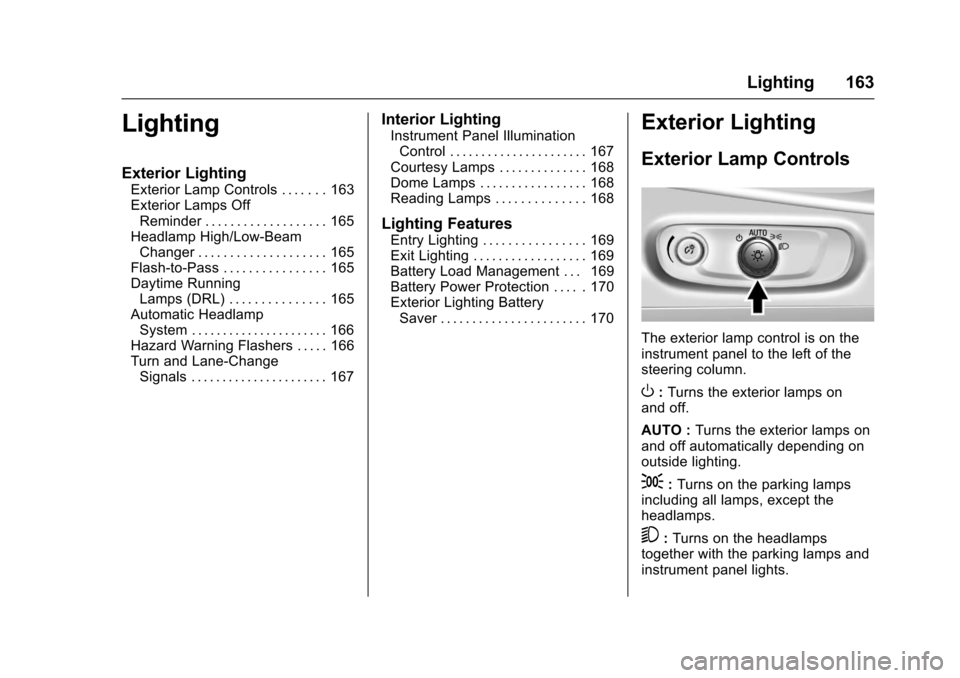
The exterior lamp control is on theinstrument panel to the left of thesteering column.
O:Turns the exterior lamps onand off.
AUTO :Turns the exterior lamps onand off automatically depending onoutside lighting.
;:Turns on the parking lampsincluding all lamps, except theheadlamps.
5:Turns on the headlampstogether with the parking lamps andinstrument panel lights.
Page 166 of 419
Chevrolet Malibu Owner Manual (GMNA-Localizing-U.S./Canada/Mexico-10122664) - 2017 - crc - 5/23/16
Lighting 165
.The other vehicle's lamps cannotbe detected due to denseexhaust, smoke, fog, snow, roadspray, mist, or other airborneobstructions.
.The vehicle's windshield is dirty,cracked, or obstructed bysomething that blocks the viewof the light sensor.
.The vehicle is loaded such thatthe front end points upward,causing the light sensor to aimhigh and not detect headlampsand taillamps.
.Driving on winding or hilly roads.
The IntelliBeam system may need tobe disabled if any of the aboveconditions exist.
Exterior Lamps Off
Reminder
Awarningchimesoundsifthedriverdoor is opened while the ignition isoff and the exterior lamps are on.
Headlamp High/
Low-Beam Changer
3:Push the turn signal lever awayfrom you and release, to turn thehigh beams on. To return to lowbeams, push the lever again or pullit toward you and release.
This indicator light turns on in theinstrument cluster when thehigh-beam headlamps are on.
Flash-to-Pass
To f l a s h t h e h i g h b e a m s , p u l l t h eturn signal lever toward you, andrelease.
Daytime Running
Lamps (DRL)
DRL can make it easier for others tosee the front of your vehicle duringthe day. Fully functional DRL arerequired on all vehicles first sold inCanada.
The DRL system comes on indaylight when the followingconditions are met:
.The ignition is on.
.The exterior lamp control is inAUTO, if equipped.
.The light sensor determines it isdaytime.
.The vehicle is not in P (Park).
When the DRL are on, the taillamps,sidemarker lamps, instrument panellights, and other lamps will notbe on.
The DRL turn off when the
headlamps are turned toOor(,
or when the ignition is off.