light CHEVROLET MALIBU 2017 9.G User Guide
[x] Cancel search | Manufacturer: CHEVROLET, Model Year: 2017, Model line: MALIBU, Model: CHEVROLET MALIBU 2017 9.GPages: 419, PDF Size: 7.81 MB
Page 40 of 419
Chevrolet Malibu Owner Manual (GMNA-Localizing-U.S./Canada/Mexico-10122664) - 2017 - crc - 5/23/16
Keys, Doors, and Windows 39
conditions. The rear defog indicatorlight does not come on during aremote start.
If the vehicle has heated seats, theymay come on during a remote start.SeeHeated and Ventilated FrontSeats060.
Laws in some local communitiesmay restrict the use of remotestarters. For example, some lawsrequire a person using remote startto have the vehicle in view. Checklocal regulations for anyrequirements.
Other conditions can affect theperformance of the transmitter. SeeRemote Keyless Entry (RKE)System032.
Do not use remote start if thevehicle is low on fuel.
Starting the Engine Using RemoteStart
To s t a r t t h e e n g i n e u s i n g t h e r e m o t estart feature:
1. Press and releaseQ.
2. Immediately after completing
Step 1, press and hold/for at
least four seconds or until theturn signal lamps flash. Theturn signal lamps flashingconfirms the request to remotestart the vehicle has beenreceived.
When the engine starts, the parkinglamps will turn on and remain on aslong as the engine is running. Thedoors will be locked and the climatecontrol system may come on.
The engine will continue to run for10 minutes. After 30 seconds,repeat the steps if a 10-minuteextension is desired. Remote startcan be extended only once.
Start the vehicle before driving.
Extending Engine Run Time
The engine run time can beextended by another 10 minutes,if during the first 10 minutesSteps 1 and 2 are repeated whilethe engine is still running. Anextension can be requested30 seconds after starting. When theremote start is extended, the
second 10-minute period is addedon to the first 10 minutes for a totalof 20 minutes.
The remote start can only beextended once.
Amaximumoftworemotestarts,or a single start with an extension,is allowed between ignition cycles.
The vehicle's ignition must beturned on and then back off beforethe remote start procedure can beused again.
Canceling a Remote Start
To c a n c e l a r e m o t e s t a r t , d o o n e o fthe following:
.Aim the RKE transmitter at the
vehicle and press and hold/
until the parking lamps turn off.
.Turn on the hazard warningflashers.
.Turn the vehicle on and then off.
Page 43 of 419
Chevrolet Malibu Owner Manual (GMNA-Localizing-U.S./Canada/Mexico-10122664) - 2017 - crc - 5/23/16
42 Keys, Doors, and Windows
3. Move the cap forward andpress to snap the cap in place.
4. Release the door handle.
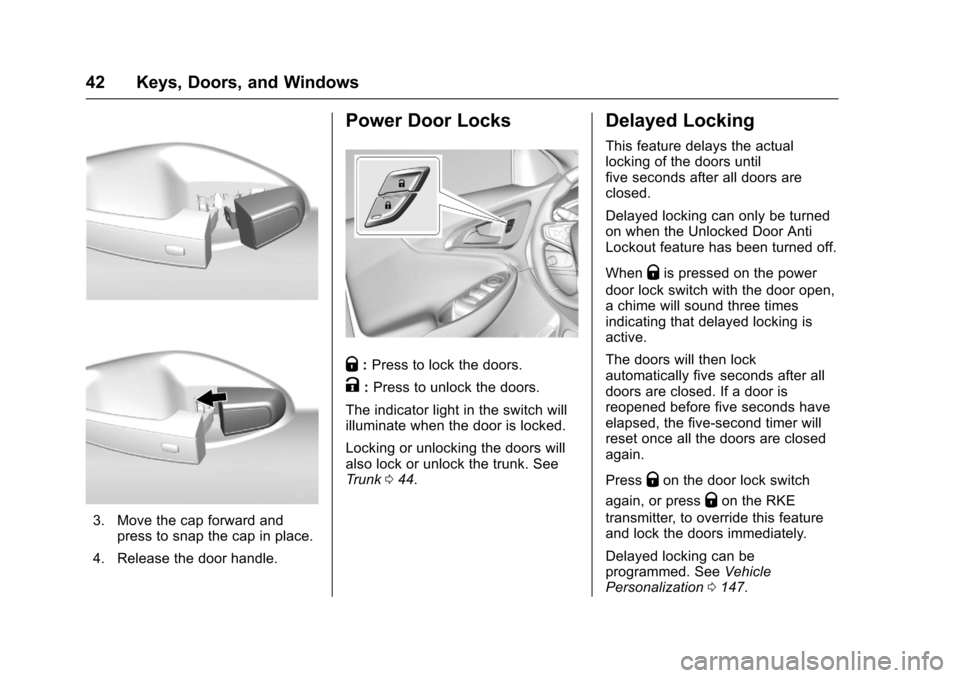
Power Door Locks
Q:Press to lock the doors.
K:Press to unlock the doors.
The indicator light in the switch willilluminate when the door is locked.
Locking or unlocking the doors willalso lock or unlock the trunk. SeeTr u n k044.
Delayed Locking
This feature delays the actuallocking of the doors untilfive seconds after all doors areclosed.
Delayed locking can only be turnedon when the Unlocked Door AntiLockout feature has been turned off.
WhenQis pressed on the power
door lock switch with the door open,achimewillsoundthreetimesindicating that delayed locking isactive.
The doors will then lockautomatically five seconds after alldoors are closed. If a door isreopened before five seconds haveelapsed, the five-second timer willreset once all the doors are closedagain.
PressQon the door lock switch
again, or pressQon the RKE
transmitter, to override this featureand lock the doors immediately.
Delayed locking can beprogrammed. SeeVehiclePersonalization0147.
Page 46 of 419
Chevrolet Malibu Owner Manual (GMNA-Localizing-U.S./Canada/Mexico-10122664) - 2017 - crc - 5/23/16
Keys, Doors, and Windows 45
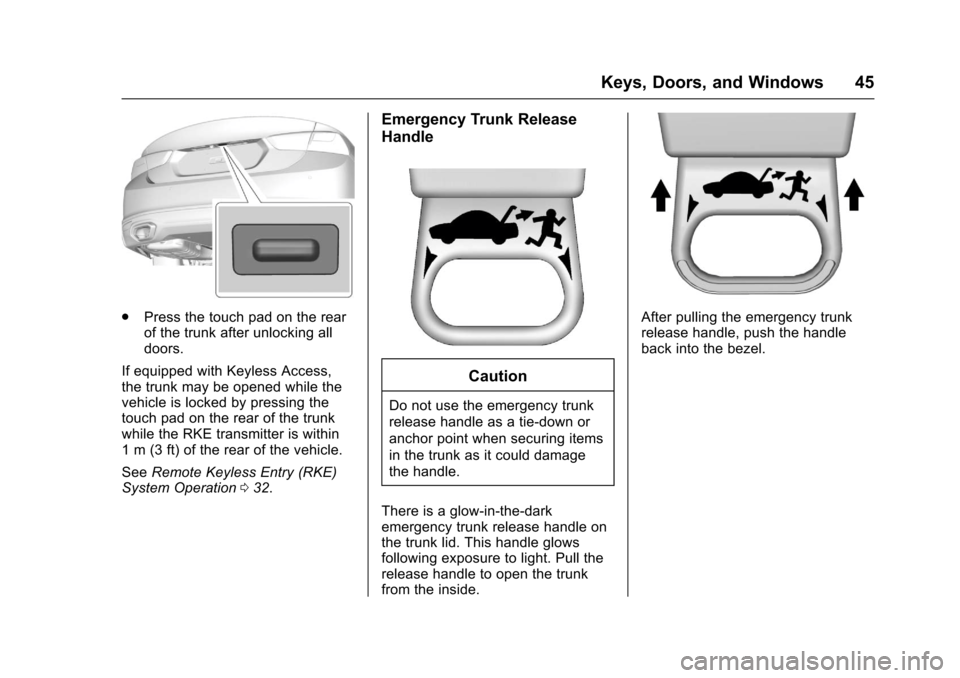
.Press the touch pad on the rearof the trunk after unlocking alldoors.
If equipped with Keyless Access,the trunk may be opened while thevehicle is locked by pressing thetouch pad on the rear of the trunkwhile the RKE transmitter is within1m(3ft)oftherearofthevehicle.
SeeRemote Keyless Entry (RKE)System Operation032.
Emergency Trunk Release
Handle
Caution
Do not use the emergency trunk
release handle as a tie-down or
anchor point when securing items
in the trunk as it could damage
the handle.
There is a glow-in-the-darkemergency trunk release handle onthe trunk lid. This handle glowsfollowing exposure to light. Pull therelease handle to open the trunkfrom the inside.
After pulling the emergency trunkrelease handle, push the handleback into the bezel.
Page 47 of 419
Chevrolet Malibu Owner Manual (GMNA-Localizing-U.S./Canada/Mexico-10122664) - 2017 - crc - 5/23/16
46 Keys, Doors, and Windows
Vehicle Security
This vehicle has theft-deterrentfeatures; however, they do not makethe vehicle impossible to steal.
Vehicle Alarm System
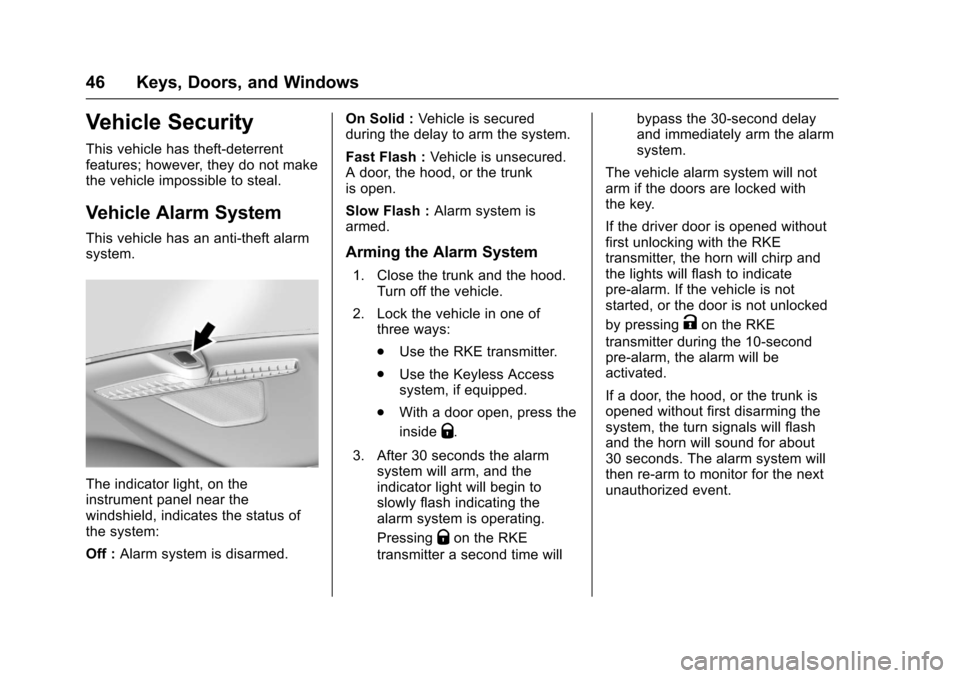
This vehicle has an anti-theft alarmsystem.
The indicator light, on theinstrument panel near thewindshield, indicates the status ofthe system:
Off :Alarm system is disarmed.
On Solid :Ve h i c l e i s s e c u r e dduring the delay to arm the system.
Fast Flash :Vehicle is unsecured.Adoor,thehood,orthetrunkis open.
Slow Flash :Alarm system isarmed.
Arming the Alarm System
1. Close the trunk and the hood.Turn off the vehicle.
2. Lock the vehicle in one ofthree ways:
.Use the RKE transmitter.
.Use the Keyless Accesssystem, if equipped.
.With a door open, press the
insideQ.
3. After 30 seconds the alarmsystem will arm, and theindicator light will begin toslowly flash indicating thealarm system is operating.
PressingQon the RKE
transmitter a second time will
bypass the 30-second delayand immediately arm the alarmsystem.
The vehicle alarm system will notarm if the doors are locked withthe key.
If the driver door is opened withoutfirst unlocking with the RKEtransmitter, the horn will chirp andthe lights will flash to indicatepre-alarm. If the vehicle is notstarted, or the door is not unlocked
by pressingKon the RKE
transmitter during the 10-secondpre-alarm, the alarm will beactivated.
If a door, the hood, or the trunk isopened without first disarming thesystem, the turn signals will flashand the horn will sound for about30 seconds. The alarm system willthen re-arm to monitor for the nextunauthorized event.
Page 48 of 419
Chevrolet Malibu Owner Manual (GMNA-Localizing-U.S./Canada/Mexico-10122664) - 2017 - crc - 5/23/16
Keys, Doors, and Windows 47
Disarming the Alarm System
Do one of the following to disarmthe alarm system or turn off thealarm if it has been activated:
.PressKon the RKE transmitter.
.Unlock the vehicle using theKeyless Access system,if equipped.
.Start the vehicle.
To a v o i d s e t t i n g o f f t h e a l a r m b yaccident:
.Lock the vehicle after alloccupants have left the vehicleand all doors are closed.
.Always unlock a door with theRKE transmitter or use theKeyless Access system,if equipped.
Unlocking the driver door with thekey will not disarm the system orturn off the alarm.
How to Detect a Tamper
Condition
IfKis pressed on the RKE
transmitter and the horn chirps andthe lights flash three times, an alarmoccurred previously while the alarmsystem was armed.
If the alarm has been activated, amessage will appear on the DIC.SeeSecurity Messages0145.
Immobilizer
SeeRadio FrequencyStatement0393.
Immobilizer Operation
This vehicle has a passivetheft-deterrent system.
The system does not have to bemanually armed or disarmed.
The vehicle is automaticallyimmobilized when the transmitterleaves the vehicle.
The immobilization system isdisarmed when the ignition button ispushed in and a valid transmitter isin the vehicle.
The security light on the instrumentcluster comes on when there is aproblem with arming or disarmingthe theft-deterrent system.
The system has one or moretransmitters matched to animmobilizer control unit in thevehicle. Only a correctly matchedtransmitter will start the vehicle.If the transmitter is ever damaged,you may not be able to start yourvehicle.
When trying to start the vehicle, thesecurity light comes on briefly whenthe ignition is turned on.
If the vehicle does not start and thesecurity light stays on, there is aproblem with the system. Turn thevehicle off and try again.
If the RKE transmitter appears to beundamaged, try another transmitter,or place the transmitter in thetransmitter pocket. See“Starting the
Page 52 of 419
Chevrolet Malibu Owner Manual (GMNA-Localizing-U.S./Canada/Mexico-10122664) - 2017 - crc - 5/23/16
Keys, Doors, and Windows 51
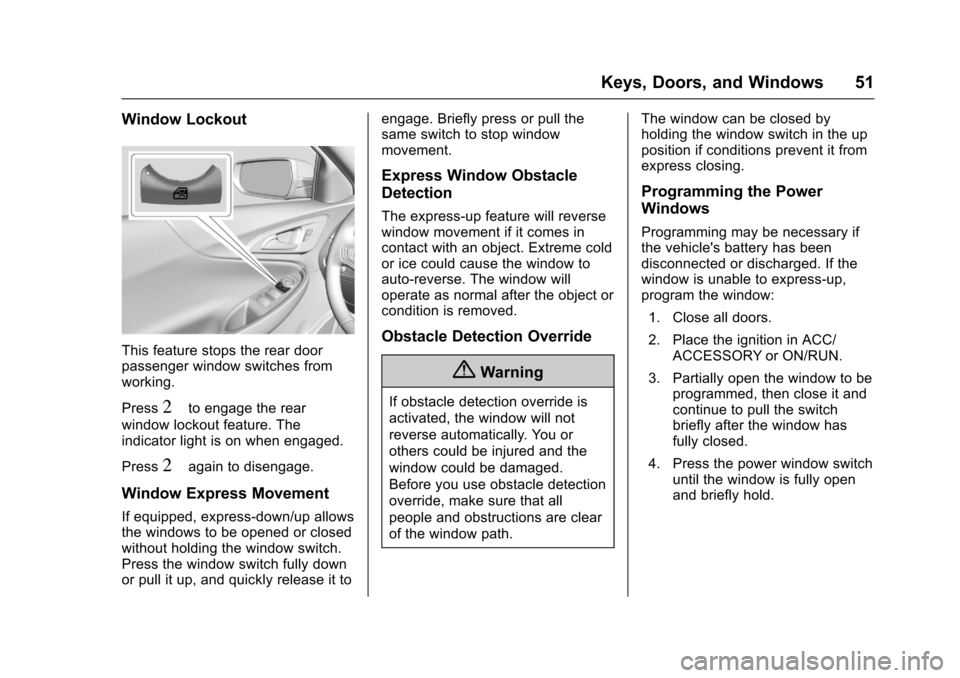
Window Lockout
This feature stops the rear doorpassenger window switches fromworking.
Press2to engage the rear
window lockout feature. Theindicator light is on when engaged.
Press2again to disengage.
Window Express Movement
If equipped, express-down/up allowsthe windows to be opened or closedwithout holding the window switch.Press the window switch fully downor pull it up, and quickly release it to
engage. Briefly press or pull thesame switch to stop windowmovement.
Express Window Obstacle
Detection
The express-up feature will reversewindow movement if it comes incontact with an object. Extreme coldor ice could cause the window toauto-reverse. The window willoperate as normal after the object orcondition is removed.
Obstacle Detection Override
{Warning
If obstacle detection override is
activated, the window will not
reverse automatically. You or
others could be injured and the
window could be damaged.
Before you use obstacle detection
override, make sure that all
people and obstructions are clear
of the window path.
The window can be closed byholding the window switch in the upposition if conditions prevent it fromexpress closing.
Programming the Power
Windows
Programming may be necessary ifthe vehicle's battery has beendisconnected or discharged. If thewindow is unable to express-up,program the window:
1. Close all doors.
2. Place the ignition in ACC/ACCESSORY or ON/RUN.
3. Partially open the window to beprogrammed, then close it andcontinue to pull the switchbriefly after the window hasfully closed.
4. Press the power window switchuntil the window is fully openand briefly hold.
Page 62 of 419
Chevrolet Malibu Owner Manual (GMNA-Localizing-U.S./Canada/Mexico-10122664) - 2017 - crc - 5/23/16
Seats and Restraints 61
If available, the buttons are on theclimate control panel. To operate,the engine must be running.
PressLorMto heat the driver or
passenger seat cushion andseatback. Indicator lights on thebutton show the current setting.
Press the button once for thehighest setting. With each press ofthe button, the heated seat willchange to the next lower setting,and then to the off setting. Thelights indicate three for the highestsetting and one for the lowest.
The passenger seat may takelonger to heat up.
Press{orCto ventilate the driver
or passenger seat. Indicator lightson the button show the currentsetting.
Press the button once for thehighest setting. With each press ofthe button, the ventilated seat willchange to the next lower setting,and then to the off setting. Thelights indicate three for the highestsetting and one for the lowest.
Auto Heated Seats
When the vehicle is on, this featurewill automatically activate theheated seats at the level required bythe vehicle’sinteriortemperature.
The active high, medium, low, or offheated seat level will be indicatedby the manual heated seat buttonson the center stack. Use the manualheated seat buttons on the centerstack to turn auto heated seats off.If the passenger seat is unoccupied,the auto heated seats feature willnot activate that seat. The autoheated seats feature can beprogrammed to always be enabledwhen the vehicle is on.
SeeVehicle Personalization0147.
Remote Start Auto Heated andVentilated Seats
During a remote start, the heated orventilated seats, if equipped, can beturned on automatically. When it iscold outside, the heated seats turnon, and when it is hot outside theventilated seats turn on. The heatedor ventilated seats are canceledwhen the ignition is turned on. Press
the button to use the heated orventilated seats after the vehicle isstarted.
The heated or ventilated seatindicator lights on the button do notturn on during a remote start.
The heated seat temperatureperformance of an unoccupied seatmay be reduced. This is normal.
The heated or ventilated seats willnot turn on during a remote startunless they are enabled in thevehicle personalization menu. SeeRemote Vehicle Start038andVehicle Personalization0147.
Page 68 of 419
Chevrolet Malibu Owner Manual (GMNA-Localizing-U.S./Canada/Mexico-10122664) - 2017 - crc - 5/23/16
Seats and Restraints 67
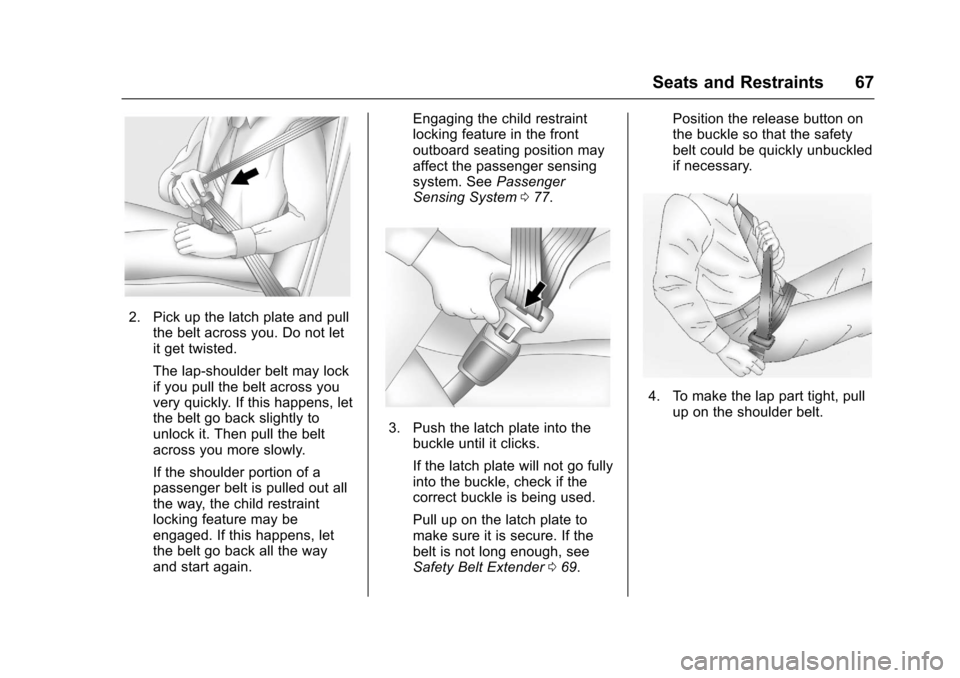
2. Pick up the latch plate and pullthe belt across you. Do not letit get twisted.
The lap-shoulder belt may lockif you pull the belt across youvery quickly. If this happens, letthe belt go back slightly tounlock it. Then pull the beltacross you more slowly.
If the shoulder portion of apassenger belt is pulled out allthe way, the child restraintlocking feature may beengaged. If this happens, letthe belt go back all the wayand start again.
Engaging the child restraintlocking feature in the frontoutboard seating position mayaffect the passenger sensingsystem. SeePassengerSensing System077.
3. Push the latch plate into thebuckle until it clicks.
If the latch plate will not go fullyinto the buckle, check if thecorrect buckle is being used.
Pull up on the latch plate tomake sure it is secure. If thebelt is not long enough, seeSafety Belt Extender069.
Position the release button onthe buckle so that the safetybelt could be quickly unbuckledif necessary.
4. To make the lap part tight, pullup on the shoulder belt.
Page 70 of 419
Chevrolet Malibu Owner Manual (GMNA-Localizing-U.S./Canada/Mexico-10122664) - 2017 - crc - 5/23/16
Seats and Restraints 69
Safety Belt Use During
Pregnancy
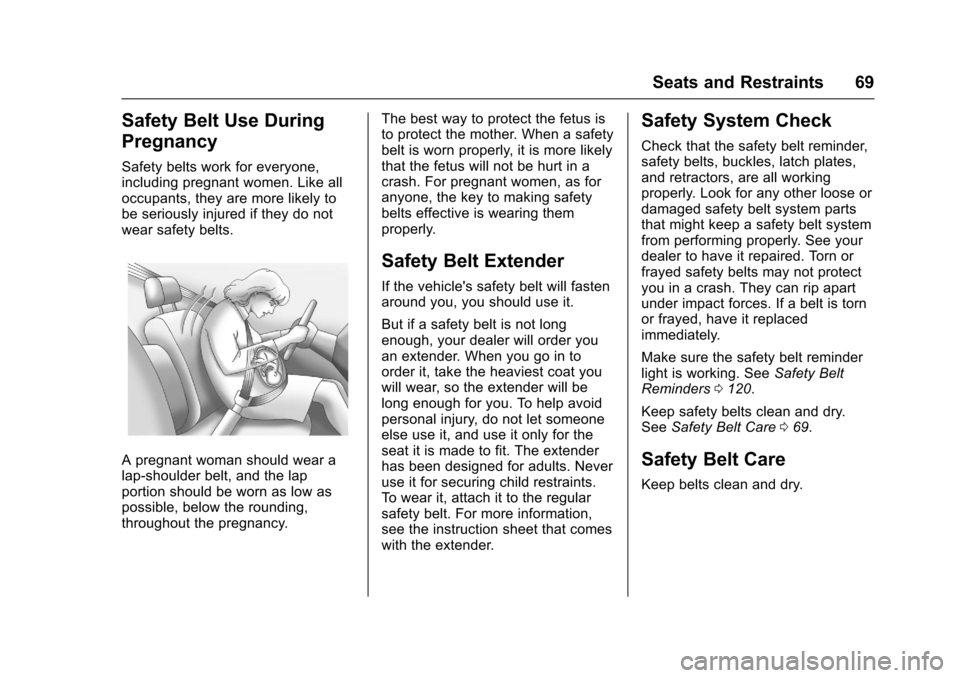
Safety belts work for everyone,including pregnant women. Like alloccupants, they are more likely tobe seriously injured if they do notwear safety belts.
Apregnantwomanshouldwearalap-shoulder belt, and the lapportion should be worn as low aspossible, below the rounding,throughout the pregnancy.
The best way to protect the fetus isto protect the mother. When a safetybelt is worn properly, it is more likelythat the fetus will not be hurt in acrash. For pregnant women, as foranyone, the key to making safetybelts effective is wearing themproperly.
Safety Belt Extender
If the vehicle's safety belt will fastenaround you, you should use it.
But if a safety belt is not longenough, your dealer will order youan extender. When you go in toorder it, take the heaviest coat youwill wear, so the extender will belong enough for you. To help avoidpersonal injury, do not let someoneelse use it, and use it only for theseat it is made to fit. The extenderhas been designed for adults. Neveruse it for securing child restraints.To w e a r i t , a t t a c h i t t o t h e r e g u l a rsafety belt. For more information,see the instruction sheet that comeswith the extender.
Safety System Check
Check that the safety belt reminder,safety belts, buckles, latch plates,and retractors, are all workingproperly. Look for any other loose ordamaged safety belt system partsthat might keep a safety belt systemfrom performing properly. See yourdealer to have it repaired. Torn orfrayed safety belts may not protectyou in a crash. They can rip apartunder impact forces. If a belt is tornor frayed, have it replacedimmediately.
Make sure the safety belt reminderlight is working. SeeSafety BeltReminders0120.
Keep safety belts clean and dry.SeeSafety Belt Care069.
Safety Belt Care
Keep belts clean and dry.
Page 71 of 419
Chevrolet Malibu Owner Manual (GMNA-Localizing-U.S./Canada/Mexico-10122664) - 2017 - crc - 5/23/16
70 Seats and Restraints
{Warning
Do not bleach or dye safety belt
webbing. It may severely weaken
the webbing. In a crash, they
might not be able to provide
adequate protection. Clean and
rinse safety belt webbing only
with mild soap and lukewarm
water. Allow the webbing to dry.
Safety belts should be properlycared for and maintained.
Safety belt hardware should be keptdry and free of dust or debris. Asnecessary exterior hard surfacesand safety belt webbing may belightly cleaned with mild soap andwater. Ensure there is not excessivedust or debris in the mechanism.If dust or debris exists in the systemplease see the dealer. Parts mayneed to be replaced to ensureproper functionality of the system.
Replacing Safety Belt
System Parts after a
Crash
{Warning
Acrashcandamagethesafety
belt system in the vehicle.
Adamagedsafetybeltsystem
may not properly protect the
person using it, resulting in
serious injury or even death in a
crash. To help make sure the
safety belt systems are working
properly after a crash, have them
inspected and any necessary
replacements made as soon as
possible.
After a minor crash, replacement ofsafety belts may not be necessary.But the safety belt assemblies thatwere used during any crash mayhave been stressed or damaged.See your dealer to have the safetybelt assemblies inspected orreplaced.
New parts and repairs may benecessary even if the safety beltsystem was not being used at thetime of the crash.
Have the safety belt pretensionerschecked if the vehicle has been in acrash, or if the airbag readiness lightstays on after you start the vehicleor while you are driving. SeeAirbagReadiness Light0120.