stop start CHEVROLET MALIBU 2017 9.G Owner's Manual
[x] Cancel search | Manufacturer: CHEVROLET, Model Year: 2017, Model line: MALIBU, Model: CHEVROLET MALIBU 2017 9.GPages: 419, PDF Size: 7.81 MB
Page 143 of 419
Chevrolet Malibu Owner Manual (GMNA-Localizing-U.S./Canada/Mexico-10122664) - 2017 - crc - 5/23/16
142 Instruments and Controls
NO REMOTE DETECTED
This message displays when thetransmitter battery may be weak.See“Starting the Vehicle with a LowTransmitter Battery”underRemoteKeyless Entry (RKE) SystemOperation032.
NO REMOTE DETECTED
PRESS BRAKE TO RESTART
This message displays whenattempting to turn off the vehicleand the RKE transmitter is no longerdetected. Restarting is allowedwithout the RKE transmitter forfive minutes. Press the brake pedaland ENGINE START/STOP torestart the vehicle.
NUMBER OF KEYS
PROGRAMMED
This message displays whenprogramming new keys to thevehicle.
REMOTE LEFT IN VEHICLE
This message displays whenleaving the vehicle with the RKEtransmitter still inside.
REPLACE BATTERY IN
REMOTE KEY
This message displays when thebattery in the RKE transmitter needsto be replaced.
Lamp Messages
AUTOMATIC LIGHT CONTROL
ON/OFF
This message is displayed when theautomatic light control has beenturned on or off. SeeAutomaticHeadlamp System0166.
CHECK XXX TURN
SIGNAL LAMP
When one of the turn signals is out,this message displays to showwhich bulb needs to be replaced.SeeBulb Replacement0305andReplacement Bulbs0309.
TURN SIGNAL ON
This message is displayed if theturn signal has been left on. Turn offthe turn signal.
Object Detection System
Messages
24 GHz RADARS OFF
This message displays when drivingin certain areas where there may beradar interference. Adaptive CruiseControl (ACC), Forward CollisionAlert (FCA), and the ForwardAutomatic Braking (FAB) may notwork or may not work as well. Thevehicle does not need service.
FORWARD COLLISION
SYSTEM OFF
This message displays whenForward Automatic Braking (FAB)has been turned off. SeeForwardAutomatic Braking (FAB)0260.
FORWARD COLLISION
SYSTEM REDUCED
This message displays when theForward Automatic Braking (FAB)has been set to the Alert setting.This setting disables FAB functions.SeeForward Automatic Braking(FAB)0260.
Page 146 of 419
Chevrolet Malibu Owner Manual (GMNA-Localizing-U.S./Canada/Mexico-10122664) - 2017 - crc - 5/23/16
Instruments and Controls 145
stays on when the malfunctionindicator lamp is on, the vehicleshould be taken to your dealer forservice as soon as possible.
Ride Control System
Messages
SERVICE TRACTION
CONTROL
This message displays when thereis a problem with the TractionControl System (TCS). When thismessage is displayed, the systemwill not limit wheel spin. Adjust yourdriving accordingly. See your dealerfor service.
SERVICE STABILITRAK
This message displays if there is aproblem with the StabiliTrak system.If this message appears, try to resetthe system. Stop; turn off the enginefor at least 15 seconds; then startthe engine again. If this messagestill comes on, it means there is aproblem. See your dealer forservice. The vehicle is safe to drive;
however, you do not have thebenefit of StabiliTrak, so reduceyour speed and drive accordingly.
Airbag System Messages
SERVICE AIRBAG
This message displays if there is aproblem with the airbag system. Seeyour dealer for service.
Security Messages
THEFT ATTEMPTED
This message displays if the vehicledetects a tamper condition.
Service Vehicle Messages
SERVICE AC SYSTEM
This message displays if there is aproblem with the air conditioningsystem. Take the vehicle to yourdealer for service.
SERVICE KEYLESS START
SYSTEM
This message is displayed if there isaproblemwiththepushbuttonstartsystem. Take the vehicle to yourdealer for service.
SERVICE VEHICLE SOON
This message displays if there is aproblem with the vehicle. Take thevehicle to your dealer for service.
Steering System
Messages
SERVICE POWER STEERING
This message displays and a chimemay sound when there may be aproblem with the power steeringsystem. If this message displaysand a reduction in steeringperformance or loss of powersteering assistance is noticed, seeyour dealer.
Page 148 of 419
Chevrolet Malibu Owner Manual (GMNA-Localizing-U.S./Canada/Mexico-10122664) - 2017 - crc - 5/23/16
Instruments and Controls 147
SHIFT FROM NEUTRAL
(Hybrid)
This message displays when thevehicle should be shifted fromN(Neutral). If the vehicle is notshifted from N (Neutral) after sometime, the vehicle will shut off andrequire a restart. While inN(Neutral),thevehiclewillnotbeable to charge the high voltagebattery.
SHIFT TO PARK
This message displays when thetransmission needs to be shifted toP(Park). This may appear whenturning the ignition off or removingthe key from the vehicle if thevehicle is not in P (Park).
TRANSMISSION HOT—IDLE
ENGINE
This message displays and a chimesounds if the transmission fluid inthe vehicle gets hot. Driving with thetransmission fluid temperature highcan cause damage to the vehicle.Stop the vehicle and let it idle to
allow the transmission to cool. Thismessage clears when the fluidtemperature reaches a safe level.
Vehicle Reminder
Messages
ICE POSSIBLE DRIVE
WITH CARE
This message displays when iceconditions are possible.
Window Messages
OPEN, THEN CLOSE DRIVER
WINDOW
This message is displayed when thewindow needs to be reprogrammed.If the vehicle's battery has beenrecharged or disconnected, you willneed to reprogram the front windowfor the express-up feature to work.SeePower Windows050.
Vehicle
Personalization
Personalization Menu (Radio
without Touchscreen)
The audio system controls are usedto access the personalizationmenus for customizing vehiclefeatures.
The following are all possiblepersonalization features. Dependingon the vehicle, some may not beavailable.
MENU :Turn to scroll through themenus or setup items. Press toenter the menus and select themenu items.
BACK :Press to exit or return tothe previous screen or menu.
To a c c e s s a m e n u :
1. Press MENU.
2. Turn MENU to thedesired menu.
3. Press MENU to select.
Menus and functions may varydepending on vehicle options.
Page 156 of 419
Chevrolet Malibu Owner Manual (GMNA-Localizing-U.S./Canada/Mexico-10122664) - 2017 - crc - 5/23/16
Instruments and Controls 155
stopping vehicle, and then thatvehicle drives on. SeeAdaptiveCruise Control0245.
Select Off or On.
Lane Change Alert
This allows the feature to be turnedon or off. SeeLane Change Alert(LCA)0264.
Select Off or On.
Comfort and Convenience
Select and the following maydisplay:
.Auto Memory Recall
.Easy Exit Options
.Chime Volume
.Reverse Tilt Mirror
.Extended Hill Start Assist
Auto Memory Recall
This feature automatically recallsthe current driver’spreviouslystored1or2buttonpositionswhentheignition is changed from off to ON/RUN or ACC/ACCESSORY. SeeMemory Seats059.
Select Off or On.
Easy Exit Options
This feature automatically recallsthe current driver’spreviouslystoredexit button position when exiting thevehicle. SeeMemory Seats059.
Select Off or On.
Chime Volume
Select to set the chime volumelevel.
Select Normal or High.
Reverse Tilt Mirror
When on, both the driver andpassenger outside mirrors will tiltdownward when the vehicle isshifted to R (Reverse) to improvevisibility of the ground near the rearwheels. They will return to theirprevious driving position when thevehicle is shifted out of R (Reverse)or the engine is turned off. SeeReverse Tilt Mirrors049.
Select Off, On - Driver andPassenger, On - Driver, or On -Passenger.
Extended Hill Start Assist
This allows the duration of the HillStart Assist to be changed. See“Extended Hill Start Assist (EHSA)”inHill Start Assist (HSA)0240.
Select Extended Hold orStandard Hold.
Lighting
Select and the following maydisplay:
.Vehicle Locator Lights
.Exit Lighting
Vehicle Locator Lights
This feature will flash the exteriorlamps and allows the headlamps,parking lamps, taillamps, and mostof the interior lamps to turn on
briefly whenKon the Remote
Keyless Entry (RKE) transmitter ispressed to locate the vehicle.
Select Off or On.
Page 180 of 419
Chevrolet Malibu Owner Manual (GMNA-Localizing-U.S./Canada/Mexico-10122664) - 2017 - crc - 5/23/16
Infotainment System 179
Radio Data System (RDS)
RDS is a service by FM stationsthat makes it easier to find radiostations with fault-free reception.
RDS stations are indicated by theprogram service name withbroadcasting frequency.
Selecting a Band
Press RADIO to choose AM or FM.The last station that was playingstarts playing again.
Selecting an Auxiliary Device
Press MEDIA to select a connectedauxiliary device.
Selecting a Station
Seek Tuning
If the radio station is not known:
Press7or6to automatically
search for available radio stations.
Press and hold7or6to change
the radio stations as desired, thenrelease to stop at the next availablestation.
Favorites List
There are two ways to select astation from the Favorites List:
.Press FAV repeatedly, until thedesired FAV page is displayed,then press the preset button ofthe desired FAV station.
.Press FAV, turn MENU until thedesired FAV station ishighlighted, then press MENU toselect the desired FAV station.
Stations List
1. From AM or FM, turn MENU toselect Stations List, then pressto select.
2. Turn MENU to move to thedesired station from theStations List, then press toreceive the station.
Category List
Most stations that broadcast anRDS program type code specify thetype of programming transmitted.Some stations change the programtype code depending on the
content. The system stores the RDSstations sorted by program type inthe FM category list.
To s e a r c h f o r a p r o g r a m m i n g t y p edetermined by station:
1. From the FM menu, turn MENUto select FM Category List,then press MENU.
2. Turn MENU to move to thedesired station, then pressMENU to receive the selectedbroadcasting channel.
Update Stations List
From AM or FM, press MENU, turnMENU to Update Stations List, thenpress MENU.
During the AM or FM broadcastinglist update, press the preset buttonunder Cancel or BACK to stop theupdates.
Storing a Station as a Favorite
Stations from all bands can bestored in any order in the favoritepages.
Up to four stations can be stored ineach favorite page.
Page 181 of 419
Chevrolet Malibu Owner Manual (GMNA-Localizing-U.S./Canada/Mexico-10122664) - 2017 - crc - 5/23/16
180 Infotainment System
Storing Stations
Press FAV to select the desiredpage of saved favorites.
To s t o r e t h e s t a t i o n t o a p o s i t i o n i nthe list, press and hold thecorresponding preset button 1✓4until a beep is heard.
Playing the Radio with
Touchscreen
Audio Source Menu
{:Press to go to the Home Page.
O:Press to turn on, mute,or unmute the system. Press andhold to turn off the system.
Selecting a Band
1. Press{.
2. Touch AUDIO.
3. Touch Source.
4. Select AM, FM, or SXM,if equipped.
The last station that was playingstarts playing again.
Selecting an Auxiliary Device
Connect the auxiliary device to theAUX input terminal. Play will beginwhen the system has finishedreading the information on thedevice.
If the auxiliary device is alreadyconnected:
1. Press{.
2. Touch AUDIO.
3. Touch Source.
4. Select the device.
Selecting a Station
Seek Tuning
If the radio station is not known:
Pressgordto automatically
search for available radio stations.
Direct Tune
From the AM or FM menu:
1. Touch Tune.
2. Enter the station number.
3. Touch Go.
Favorite
1. TouchSorTto scroll through
the favorite pages.
2. Touch the station to select it.
Station List
1. From the AM or FM menu,touch Menu.
2. Select Station List.
3. TouchQorRto scroll through
the list. Touch the station toselect it.
Update Station List
.From the AM or FM menu, touchMenu, then touch Update StationList. The broadcasting listupdating will begin.
.During the AM or FMbroadcasting list update, touchCancel to stop the updates.
Menu
To u c h t o c h o o s e b e t w e e n a v a i l a b l emenus for the current source.
Page 206 of 419
Chevrolet Malibu Owner Manual (GMNA-Localizing-U.S./Canada/Mexico-10122664) - 2017 - crc - 5/23/16
Climate Controls 205
Climate Controls
Climate Control Systems
Climate Control Systems . . . . . 205Dual Automatic ClimateControl System . . . . . . . . . . . . . 208
Air Vents
Air Vents . . . . . . . . . . . . . . . . . . . . . . 211
Maintenance
Passenger Compartment AirFilter . . . . . . . . . . . . . . . . . . . . . . . . 212Service . . . . . . . . . . . . . . . . . . . . . . . 213
Climate Control Systems
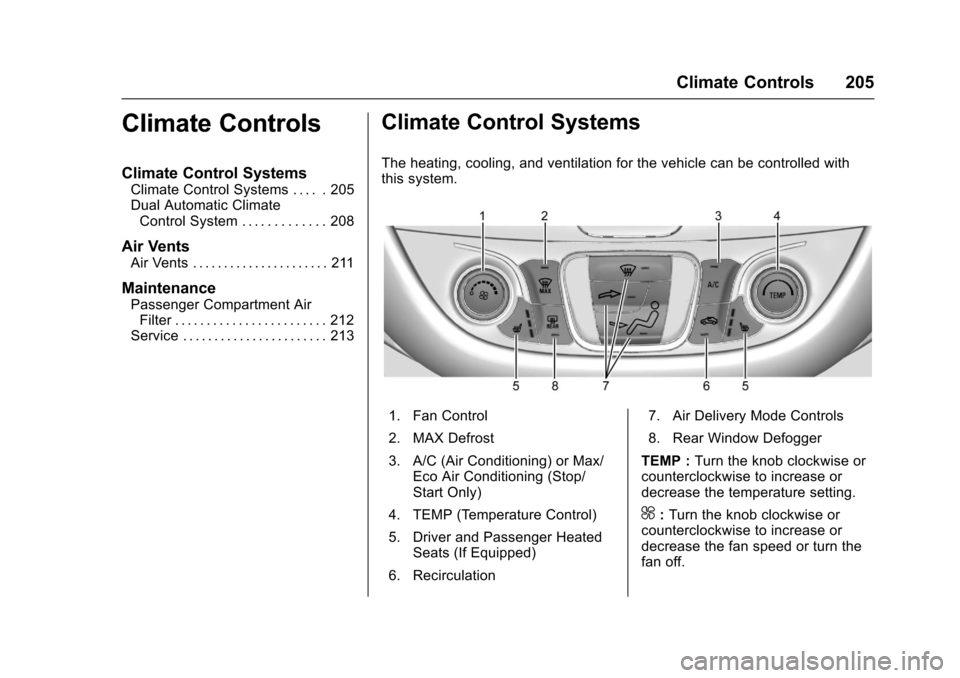
The heating, cooling, and ventilation for the vehicle can be controlled withthis system.
1. Fan Control
2. MAX Defrost
3. A/C (Air Conditioning) or Max/Eco Air Conditioning (Stop/Start Only)
4. TEMP (Temperature Control)
5. Driver and Passenger HeatedSeats (If Equipped)
6. Recirculation
7. Air Delivery Mode Controls
8. Rear Window Defogger
TEMP :Turn the knob clockwise orcounterclockwise to increase ordecrease the temperature setting.
^:Turn the knob clockwise orcounterclockwise to increase ordecrease the fan speed or turn thefan off.
Page 207 of 419
Chevrolet Malibu Owner Manual (GMNA-Localizing-U.S./Canada/Mexico-10122664) - 2017 - crc - 5/23/16
206 Climate Controls
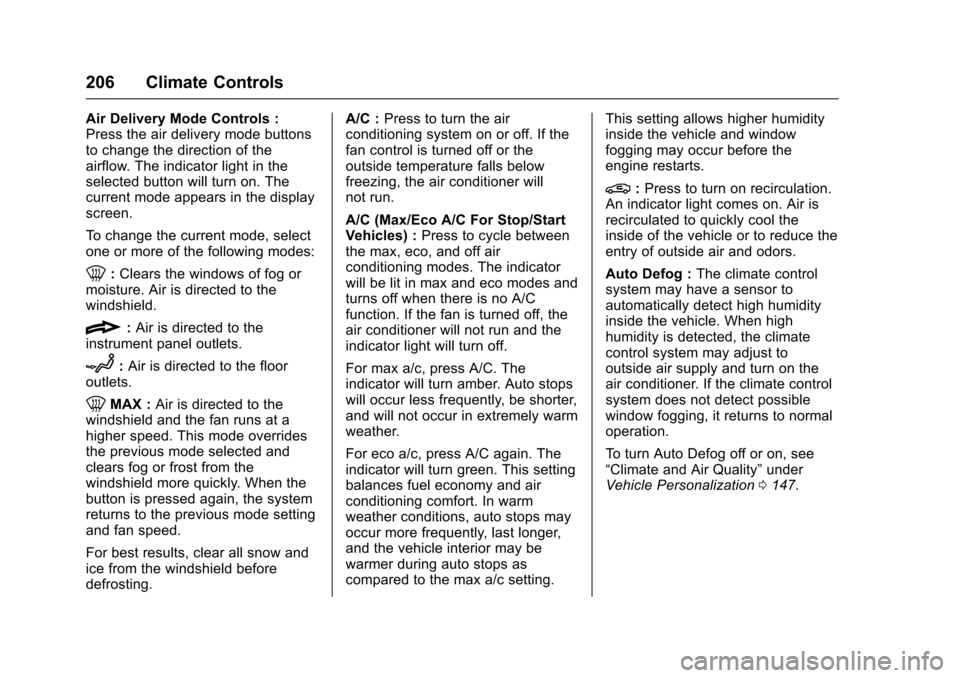
Air Delivery Mode Controls :Press the air delivery mode buttonsto change the direction of theairflow. The indicator light in theselected button will turn on. Thecurrent mode appears in the displayscreen.
To c h a n g e t h e c u r r e n t m o d e , s e l e c tone or more of the following modes:
0:Clears the windows of fog ormoisture. Air is directed to thewindshield.
{:Air is directed to theinstrument panel outlets.
z:Air is directed to the flooroutlets.
0MAX :Air is directed to thewindshield and the fan runs at ahigher speed. This mode overridesthe previous mode selected andclears fog or frost from thewindshield more quickly. When thebutton is pressed again, the systemreturns to the previous mode settingand fan speed.
For best results, clear all snow andice from the windshield beforedefrosting.
A/C :Press to turn the airconditioning system on or off. If thefan control is turned off or theoutside temperature falls belowfreezing, the air conditioner willnot run.
A/C (Max/Eco A/C For Stop/StartVehicles) :Press to cycle betweenthe max, eco, and off airconditioning modes. The indicatorwill be lit in max and eco modes andturns off when there is no A/Cfunction. If the fan is turned off, theair conditioner will not run and theindicator light will turn off.
For max a/c, press A/C. Theindicator will turn amber. Auto stopswill occur less frequently, be shorter,and will not occur in extremely warmweather.
For eco a/c, press A/C again. Theindicator will turn green. This settingbalances fuel economy and airconditioning comfort. In warmweather conditions, auto stops mayoccur more frequently, last longer,and the vehicle interior may bewarmer during auto stops ascompared to the max a/c setting.
This setting allows higher humidityinside the vehicle and windowfogging may occur before theengine restarts.
@:Press to turn on recirculation.An indicator light comes on. Air isrecirculated to quickly cool theinside of the vehicle or to reduce theentry of outside air and odors.
Auto Defog :The climate controlsystem may have a sensor toautomatically detect high humidityinside the vehicle. When highhumidity is detected, the climatecontrol system may adjust tooutside air supply and turn on theair conditioner. If the climate controlsystem does not detect possiblewindow fogging, it returns to normaloperation.
To t u r n A u t o D e f o g o f f o r o n , s e e“Climate and Air Quality”underVehicle Personalization0147.
Page 209 of 419
Chevrolet Malibu Owner Manual (GMNA-Localizing-U.S./Canada/Mexico-10122664) - 2017 - crc - 5/23/16
208 Climate Controls
Dual Automatic Climate Control System
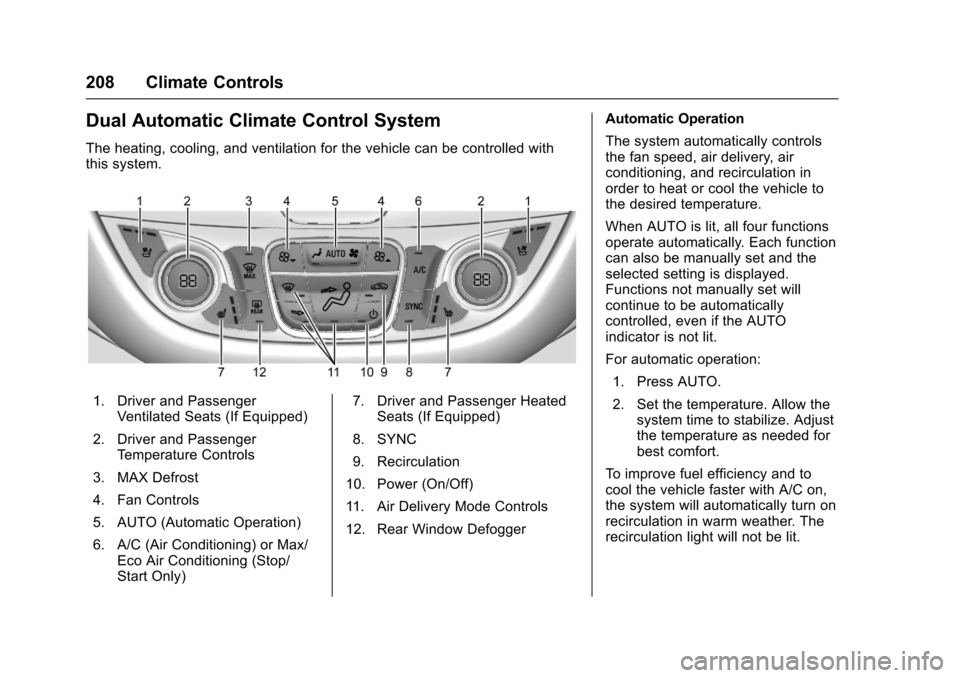
The heating, cooling, and ventilation for the vehicle can be controlled withthis system.
1. Driver and PassengerVentilated Seats (If Equipped)
2. Driver and PassengerTe m p e r a t u r e C o n t r o l s
3. MAX Defrost
4. Fan Controls
5. AUTO (Automatic Operation)
6. A/C (Air Conditioning) or Max/Eco Air Conditioning (Stop/Start Only)
7. Driver and Passenger HeatedSeats (If Equipped)
8. SYNC
9. Recirculation
10. Power (On/Off)
11 . A i r D e l i v e r y M o d e C o n t r o l s
12. Rear Window Defogger
Automatic Operation
The system automatically controlsthe fan speed, air delivery, airconditioning, and recirculation inorder to heat or cool the vehicle tothe desired temperature.
When AUTO is lit, all four functionsoperate automatically. Each functioncan also be manually set and theselected setting is displayed.Functions not manually set willcontinue to be automaticallycontrolled, even if the AUTOindicator is not lit.
For automatic operation:
1. Press AUTO.
2. Set the temperature. Allow thesystem time to stabilize. Adjustthe temperature as needed forbest comfort.
To i m p r o v e f u e l e f f i c i e n c y a n d t ocool the vehicle faster with A/C on,the system will automatically turn onrecirculation in warm weather. Therecirculation light will not be lit.
Page 211 of 419
Chevrolet Malibu Owner Manual (GMNA-Localizing-U.S./Canada/Mexico-10122664) - 2017 - crc - 5/23/16
210 Climate Controls
A/C (Max/Eco A/C For Stop/StartVehicles) :Press to cycle betweenthe max, eco, and off airconditioning modes. The indicatorwill be lit in max and eco modes andturns off when there is no A/Cfunction. If the fan is turned off, theair conditioner will not run and theindicator light will turn off.
Press AUTO to return to automaticoperation and the air conditionerruns automatically as needed. WithStop/Start vehicles, the A/C willreturn to eco a/c operation.
For max a/c, press A/C. Theindicator will turn amber. Auto stopswill occur less frequently, be shorter,and will not occur in extremely warmweather.
For eco a/c, press A/C again. Theindicator will turn green. This settingbalances fuel economy and airconditioning comfort. In warmweather conditions, auto stops mayoccur more frequently, last longer,and the vehicle interior may bewarmer during auto stops ascompared to the max a/c setting.This setting allows higher humidity
inside the vehicle and windowfogging may occur before theengine restarts.
@:Press to turn on recirculation.An indicator light comes on. Air isrecirculated to quickly cool theinside of the vehicle or to reduce theentry of outside air and odors.
If selected during cool or coldweather, the windshield andwindows may fog. Turn offrecirculation to help clear thewindshield and windows.
Auto Defog :The climate controlsystem may have a sensor toautomatically detect high humidityinside the vehicle. When highhumidity is detected, the climatecontrol system may adjust tooutside air supply and turn on theair conditioner. The fan speed mayslightly increase to help preventfogging. If the climate controlsystem does not detect possiblewindow fogging, it returns to normaloperation.
To t u r n A u t o D e f o g o f f o r o n , s e e“Climate and Air Quality”underVehicle Personalization0147.
Rear Window Defogger
K:Press to turn the rear windowdefogger on or off. An indicator lighton the button comes on to show thatthe rear window defogger is on. Therear window defogger only workswhen the ignition is in ON/RUN. Thedefogger turns off when the ignitionis placed in the ACC/ACCESSORYor LOCK/OFF position.
The upper lines on the rear windoware antenna grids and are notintended to defrost the glass.
The rear window defogger can beset to automatic operation. See“Climate and Air Quality”underVehicle Personalization0147.When Auto Rear Defog is selected,the rear window defogger turns onautomatically when the interiortemperature is cold and the outsidetemperature is about 7 °C (44 °F)and below. The auto rear defoggerturns off automatically.
If the vehicle is equipped withheated outside rearview mirrors,they turn on when the rear window