Key CHEVROLET MALIBU 2017 9.G Service Manual
[x] Cancel search | Manufacturer: CHEVROLET, Model Year: 2017, Model line: MALIBU, Model: CHEVROLET MALIBU 2017 9.GPages: 419, PDF Size: 7.81 MB
Page 170 of 419
Chevrolet Malibu Owner Manual (GMNA-Localizing-U.S./Canada/Mexico-10122664) - 2017 - crc - 5/23/16
Lighting 169
Lighting Features
Entry Lighting
Some exterior lamps and most ofthe interior lamps turn on briefly atnight or in areas with limited lightingwhen the Remote Keyless Entry
(RKE) transmitterKbutton is
pressed. SeeRemote Keyless Entry(RKE) System Operation032.Afterabout 30 seconds the exterior lampsturn off, then the dome lamps andremaining interior lamps dim to off.Entry lighting can be disabledmanually by changing the ignitionout of the OFF position, or by
pressing the RKE transmitterQ
button.
This feature can be changed. SeeVehicle Personalization0147.
Exit Lighting
Some exterior lamps and interiorlights come on at night, or in areaswith limited lighting, when the driverdoor is opened after the ignition isturned off. The dome lamp comeson after the ignition is changed to
the OFF position. The exteriorlamps and dome lamp remain on forasetamountoftime,thenautomatically turn off.
The exterior lamps turn offimmediately by turning the exteriorlamp control off.
This feature can be changed. SeeVehicle Personalization0147.
Battery Load
Management
The vehicle has Electric PowerManagement (EPM), whichestimates the battery's temperatureand state of charge. It then adjuststhe voltage for best performanceand extended life of the battery.
When the battery's state of chargeis low, the voltage is raised slightlyto quickly bring the charge back up.When the state of charge is high,the voltage is lowered slightly toprevent overcharging. If the vehiclehas a voltage display on the DriverInformation Center (DIC), you may
see the voltage move up or down.This is normal. If there is a problem,an alert will be displayed.
The battery can be discharged atidle if the electrical loads are veryhigh. This is true for all vehicles.This is because the generator(alternator) may not be spinning fastenough at idle to produce all thepower that is needed for very highelectrical loads.
Ahighelectricalloadoccurswhenseveral of the following are on, suchas: headlamps, high beams, foglamps, rear window defogger,climate control fan at high speed,heated seats, engine cooling fans,trailer loads, and loads plugged intoaccessory power outlets.
EPM works to prevent excessivedischarge of the battery. It does thisby balancing the generator's outputand the vehicle's electrical needs.It can increase engine idle speed togenerate more power, wheneverneeded. It can temporarily reducethe power demands of someaccessories.
Page 202 of 419
Chevrolet Malibu Owner Manual (GMNA-Localizing-U.S./Canada/Mexico-10122664) - 2017 - crc - 5/23/16
Infotainment System 201
Making a Call by Entering a PhoneNumber
.Press5on the faceplate.
.Press{,thentouchPHONEon
the screen.
.Pressgon the steering wheel.
If a wrong number is entered, touch}to delete the number one digit at
atime,ortouchandhold}to
delete all digits of the number.
Switching a Call to the Cell Phone(Private Mode)
To s w i t c h t h e c a l l f r o m t h e c e l lphone to hands-free:
1. Touch0.
2. Touch0again to switch back
to hands-free.
Turning the Microphone Onand Off
To u c h3to turn the microphone on
or off.
Calling by Redial
To c a l l b y u s i n g r e d i a l :
.Pressgon the steering wheel
controls to display the redialguidance screen.
.To u c h5on the phone screen.
Redialing is not possible when thereis no call history.
Taking Calls
When a phone call comes throughthe connected Bluetooth cell phone,the audio system will be muted orpaused and the phone will ring withthe relevant information displayed.
To a c c e p t t h e c a l l , p r e s sgon the
steering wheel controls, touch5on
the screen, or press5on the
faceplate.
To d e c l i n e t h e c a l l , p r e s scon the
steering wheel controls or touchReject on the screen.
Using the Contacts Menu
1. Touch Contacts on the phonescreen.
2. TouchQorRto scroll through
the list.
3. Touch the phone book entryto call.
4. Touch the number to dial.
Searching for Contacts Entries
1. Touch Contacts on the phonescreen.
2. Touch9on the contacts
screen.
3. Use the keypad to input thename to search. See“Searching for a Name”following.
4. Touch the phone book entryto call.
5. If there is more than onenumber associated with thename, touch the numberto dial.
When the Bluetooth device andinfotainment system aresuccessfully paired, the phone bookmay download. Some phones maynot download automatically. If thishappens, connect it again orproceed with the phone bookdownload on the phone.
Page 203 of 419
Chevrolet Malibu Owner Manual (GMNA-Localizing-U.S./Canada/Mexico-10122664) - 2017 - crc - 5/23/16
202 Infotainment System
Searching for a Name
Select characters by using thekeypad on the phone book screen.As characters are selected, thenames that include those characterswill display on the phone bookscreen. As more characters of thename are entered, the list ofpossible names is shortened.
To s e a r c h f o r t h e n a m e A l e x :
1. Touch (abc) to select the firstcharacter.
2. Touch (jkl) three times to selectthe second character.
3. Touch (def) two times to selectthe third character.
4. Touch (wxy) two times to selectthe fourth character.
Making a Call from Call History
1. Touch Call History on thephone screen.
2. Touch one of the following for:
.WAll calls history.
.[Dialed calls.
.YMissed calls.
.XReceived calls.
3. Select the contact entry to call.
Making a Call with Speed DialNumbers
To u c h a n d h o l d t h e s p e e d d i a lnumber using the keypad on thephone screen.
Only speed dial numbers alreadystored on the cell phone can beused for speed dial calls. Up totwo-digit speed dial numbers aresupported.
For two-digit speed dial numbers,touch and hold the second digit tomake a call to the speed dialnumber.
Trademarks and
License Agreements
FCC Information
SeeRadio FrequencyStatement0393.
Bluetooth®
The Bluetooth word mark and logosare owned by the Bluetooth®SIG,Inc. and any use of such marks byGeneral Motors is under license.Other trademarks and trade namesare those of their respective owners.
DivX Certified®to play DivX®video,including premium content.
Covered by one or more of thefollowing U.S. patents: 7,295,673;7,460,668; 7,515,710; 7,519,274.
Page 226 of 419

Chevrolet Malibu Owner Manual (GMNA-Localizing-U.S./Canada/Mexico-10122664) - 2017 - crc - 5/23/16
Driving and Operating 225
{Warning
Things inside the vehicle can
strike and injure people in a
sudden stop or turn, or in a
crash.
.Put things in the cargo
area of the vehicle. In the
cargo area, put them as
far forward as possible.
Try to spread the weight
evenly.
.Never stack heavier
things, like suitcases,
inside the vehicle so that
some of them are above
the tops of the seats.
.Do not leave an
unsecured child restraint
in the vehicle.
.Secure loose items in the
vehicle.
.Do not leave a seat
folded down unless
needed.
Starting and
Operating
New Vehicle Break-In
Caution
The vehicle does not need an
elaborate break-in. But it will
perform better in the long run if
you follow these guidelines:
.Do not drive at any oneconstant speed, fast or slow,for the first 805 km (500 mi).Do not make full-throttlestarts. Avoid downshifting tobrake or slow the vehicle.
.Avoid making hard stops forthe first 322 km (200 mi) orso. During this time the newbrake linings are not yetbroken in. Hard stops withnew linings can meanpremature wear and earlierreplacement. Follow this
(Continued)
Caution (Continued)
breaking-in guideline everytime you get new brakelinings.
Following break-in, engine speed
and load can be gradually
increased.
Ignition Positions
The vehicle has an electronickeyless ignition with pushbuttonstart.
Page 227 of 419
Chevrolet Malibu Owner Manual (GMNA-Localizing-U.S./Canada/Mexico-10122664) - 2017 - crc - 5/23/16
226 Driving and Operating
Pressing the button cycles it throughthree modes: ACC/ACCESSORY,ON/RUN/START, and Stopping theEngine/LOCK/OFF.
The RKE transmitter must be in thevehicle for the system to operate.If the pushbutton start is notworking, the vehicle may be near astrong radio antenna signal causinginterference to the Keyless Accesssystem. SeeRemote Keyless Entry(RKE) System Operation032.
To s h i f t o u t o f P ( P a r k ) , t h e v e h i c l emust be in ACC/ACCESSORY orON/RUN and the brake pedal mustbe applied.
Stopping the Engine/LOCK/OFF (No Indicator Lights) :Whenthe vehicle is stopped, pressENGINE START/STOP once to turnthe engine off.
If the vehicle is in P (Park), theignition will turn off, and RetainedAccessory Power (RAP) will remainactive. SeeRetained AccessoryPower (RAP)0230.
If the vehicle is not in P (Park), theignition will return to ACC/ACCESSORY and display themessage SHIFT TO PARK in theDriver Information Center (DIC).SeeTr a n s m i s s i o n M e s s a g e s0146.When the vehicle is shifted intoP(Park), the ignition system willswitch to OFF.
Do not turn the engine off when thevehicle is moving. This will cause aloss of power assist in the brakeand steering systems and disablethe airbags.
If the vehicle must be shut off in anemergency:
1. Brake using a firm and steadypressure. Do not pump thebrakes repeatedly. This maydeplete power assist, requiringincreased brake pedal force.
2. Shift the vehicle to N (Neutral).This can be done while thevehicle is moving. After shiftingto N (Neutral), firmly apply thebrakes and steer the vehicle toasafelocation.
3. Come to a complete stop, shiftto P (Park), and turn theignition to OFF. On vehicleswith an automatic transmission,the shift lever must be inP(Park) to turn the ignitionswitch to the OFF position.
4. Set the parking brake. SeeParking Brake0237.
{Warning
Turning off the vehicle while
moving may cause loss of power
assist in the brake and steering
systems and disable the airbags.
While driving, only shut the
vehicle off in an emergency.
If the vehicle cannot be pulled overand must be shut off while driving,press and hold ENGINE START/STOP for longer than two seconds,or press twice in five seconds.
ACC/ACCESSORY (AmberIndicator Light) :This mode allowsyou to use some electricalaccessories when the engine is off.
Page 228 of 419
Chevrolet Malibu Owner Manual (GMNA-Localizing-U.S./Canada/Mexico-10122664) - 2017 - crc - 5/23/16
Driving and Operating 227
With the ignition off, pressing thebutton one time without the brakepedal applied will place the ignitionsystem in ACC/ACCESSORY.
The ignition will switch from ACC/ACCESSORY to OFF afterfive minutes to prevent batteryrun down.
ON/RUN/START (Green IndicatorLight) :This mode is for driving andstarting. With the ignition off, andthe brake pedal applied, pressingthe button once will place theignition system in ON/RUN/START.Once engine cranking begins,release the button. Engine crankingwill continue until the engine starts.SeeStarting the Engine0227.Theignition will then remain in ON/RUN.
Service Only Mode
This power mode is available forservice and diagnostics, and toverify the proper operation of themalfunction indicator lamp as maybe required for emission inspectionpurposes. With the vehicle off, andthe brake pedal not applied,pressing and holding the button formore than five seconds will place
the vehicle in Service Only Mode.The instruments and audio systemswill operate as they do in ON/RUN,but the vehicle will not be able to bedriven. The engine will not start inService Only Mode. Press thebutton again to turn the vehicle off.
Starting the Engine
Move the shift lever to P (Park) orN(Neutral). The engine will not startin any other position. To restart theengine when the vehicle is alreadymoving, use N (Neutral) only.
For hybrid vehicles, the engine willonly start if required for cabinwarming or high voltage batterycharging. The vehicle ready light willbe illuminated when the vehicle isready to be driven.
Caution
Do not try to shift to P (Park) if the
vehicle is moving. If you do, you
could damage the transmission.
Shift to P (Park) only when the
vehicle is stopped.
Caution
If you add electrical parts or
accessories, you could change
the way the engine operates. Any
resulting damage would not be
covered by the vehicle warranty.
SeeAdd-On Electrical
Equipment0277.
Starting Procedure
1. With the Keyless Accesssystem, the RKE transmittermust be in the vehicle. PressENGINE START/STOP with thebrake pedal applied. When theengine begins cranking, let goof the button.
The idle speed will go down asthe engine gets warm. Do notrace the engine immediatelyafter starting it.
Page 229 of 419
Chevrolet Malibu Owner Manual (GMNA-Localizing-U.S./Canada/Mexico-10122664) - 2017 - crc - 5/23/16
228 Driving and Operating
If the RKE transmitter is not inthe vehicle, if there isinterference, or the RKEtransmitter battery is low, theDriver Information Center (DIC)will display a message. SeeDriver Information Center (DIC)(Base Level)0131orDriverInformation Center (DIC)(Uplevel)0134andRemoteKeyless Entry (RKE) SystemOperation032.
Caution
Cranking the engine for long
periods of time, by returning the
ignition to the START position
immediately after cranking has
ended, can overheat and damage
the cranking motor, and drain the
battery. Wait at least 15 seconds
between each try, to let the
cranking motor cool down.
2. If the engine does not startafter five to 10 seconds,especially in very cold weather(below✓18 °C or 0 °F), it couldbe flooded with too much
gasoline. Try pushing theaccelerator pedal all the way tothe floor and holding it there asyou hold ENGINE START/STOP, for up to a maximum of15 seconds. Wait at least15 seconds between each try,to allow the cranking motor tocool down. When the enginestarts, let go of the button andthe accelerator. If the vehiclestarts briefly but then stopsagain, do the same thing. Thisclears the extra gasoline fromthe engine. Do not race theengine immediately afterstarting it. Operate the engineand transmission gently untilthe oil warms up and lubricatesall moving parts.
Hybrid Operation
This vehicle combines gasoline andelectric propulsion. The gasolineengine will automatically start toprovide power and then shut off tosave fuel.
The engine may remainrunning when:
.Accelerating aggressively orclimbing hills.
.Vehicle speed is greater than88 km/h (55 mph).
.Charging the high voltagebattery.
.The heater is being used.
The engine and transmission worktogether to provide propulsionpower at the highest efficiency. Thismay result in higher engine speeds.
Stop/Start System
{Warning
Exiting the vehicle without first
shifting into P (Park) may cause
the vehicle to move. You or others
may be injured. Because the
vehicle has the auto engine stop/
start feature, the vehicle's engine
might seem to be shut off;
(Continued)
Page 231 of 419
Chevrolet Malibu Owner Manual (GMNA-Localizing-U.S./Canada/Mexico-10122664) - 2017 - crc - 5/23/16
230 Driving and Operating
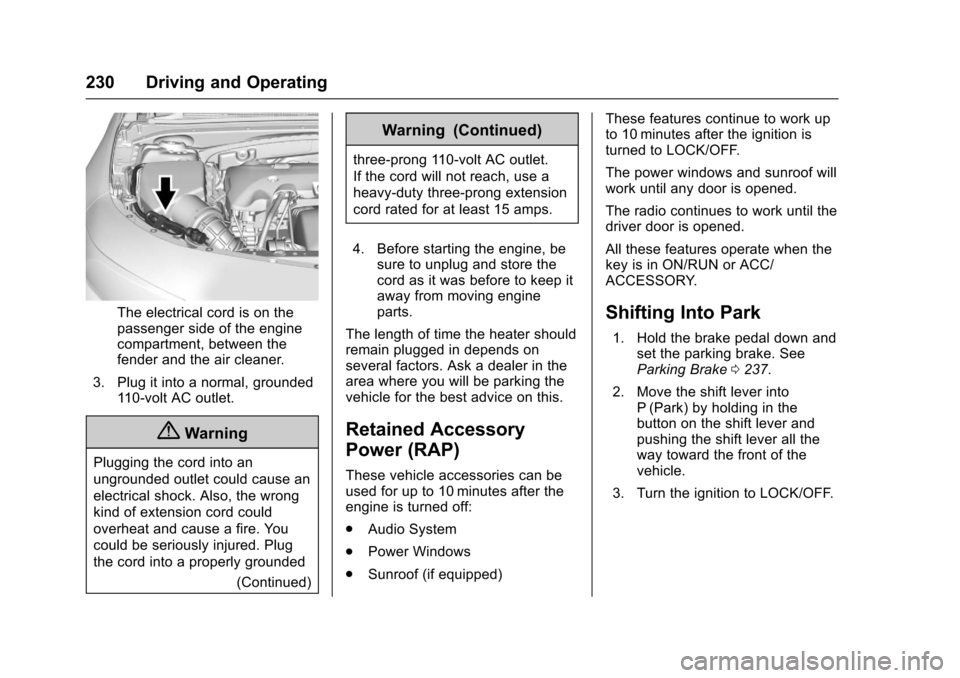
The electrical cord is on thepassenger side of the enginecompartment, between thefender and the air cleaner.
3. Plug it into a normal, grounded11 0 - v o l t A C o u t l e t .
{Warning
Plugging the cord into an
ungrounded outlet could cause an
electrical shock. Also, the wrong
kind of extension cord could
overheat and cause a fire. You
could be seriously injured. Plug
the cord into a properly grounded
(Continued)
Warning (Continued)
three-prong 110-volt AC outlet.
If the cord will not reach, use a
heavy-duty three-prong extension
cord rated for at least 15 amps.
4. Before starting the engine, besure to unplug and store thecord as it was before to keep itaway from moving engineparts.
The length of time the heater shouldremain plugged in depends onseveral factors. Ask a dealer in thearea where you will be parking thevehicle for the best advice on this.
Retained Accessory
Power (RAP)
These vehicle accessories can beused for up to 10 minutes after theengine is turned off:
.Audio System
.Power Windows
.Sunroof (if equipped)
These features continue to work upto 10 minutes after the ignition isturned to LOCK/OFF.
The power windows and sunroof willwork until any door is opened.
The radio continues to work until thedriver door is opened.
All these features operate when thekey is in ON/RUN or ACC/ACCESSORY.
Shifting Into Park
1. Hold the brake pedal down andset the parking brake. SeeParking Brake0237.
2. Move the shift lever intoP(Park) by holding in thebutton on the shift lever andpushing the shift lever all theway toward the front of thevehicle.
3. Turn the ignition to LOCK/OFF.
Page 233 of 419
Chevrolet Malibu Owner Manual (GMNA-Localizing-U.S./Canada/Mexico-10122664) - 2017 - crc - 5/23/16
232 Driving and Operating
4. Move the shift lever to thedesired position.
If still unable to shift out of P (Park):
1. Fully release the shift leverbutton.
2. Hold the brake pedal down andpress the shift lever buttonagain.
3. Move the shift lever to thedesired position.
If you are still having a problemshifting, see your dealer.
Parking over Things
That Burn
{Warning
Things that can burn could touch
hot exhaust parts under the
vehicle and ignite. Do not park
over papers, leaves, dry grass,
or other things that can burn.
Extended Parking
It is better not to park with thevehicle running. If the vehicle is leftwhile running, follow the propersteps to be sure the vehicle will notmove and there is adequateventilation. SeeShifting Into Park0230andEngine Exhaust0232.
If the vehicle is left in P (Park) whilerunning and the Remote KeylessEntry (RKE) transmitter is outsidethe vehicle, the vehicle will turn offafter one hour.
If the vehicle is left in P (Park) whilerunning and the RKE transmitter isinside, the vehicle will run for twohours. At the end of the secondhour, the vehicle will turn off.
The timer will reset if the vehicle istaken out of P (Park) while it isrunning.
Engine Exhaust
{Warning
Engine exhaust contains carbon
monoxide (CO), which cannot be
seen or smelled. Exposure to CO
can cause unconsciousness and
even death.
Exhaust may enter the vehicle if:
.The vehicle idles in areaswith poor ventilation(parking garages, tunnels,deep snow that may blockunderbody airflow or tailpipes).
.The exhaust smells orsounds strange or different.
.The exhaust system leaksdue to corrosion or damage.
.The vehicle exhaust systemhas been modified,damaged, or improperlyrepaired.
(Continued)
Page 280 of 419
Chevrolet Malibu Owner Manual (GMNA-Localizing-U.S./Canada/Mexico-10122664) - 2017 - crc - 5/23/16
Vehicle Care 279
Uniform Tire QualityGrading . . . . . . . . . . . . . . . . . . . . . 335Wheel Alignment and TireBalance . . . . . . . . . . . . . . . . . . . . . 336Wheel Replacement . . . . . . . . . . 336Tire Chains . . . . . . . . . . . . . . . . . . . 337If a Tire Goes Flat . . . . . . . . . . . . 338Tire Sealant andCompressor Kit . . . . . . . . . . . . . 339Storing the Tire Sealant andCompressor Kit . . . . . . . . . . . . . 346Tire Changing . . . . . . . . . . . . . . . . 346Compact Spare Tire . . . . . . . . . . 351
Jump Starting
Jump Starting - NorthAmerica . . . . . . . . . . . . . . . . . . . . . 352
Towing the Vehicle
To w i n g t h e V e h i c l e . . . . . . . . . . . 3 5 5Recreational VehicleTo w i n g . . . . . . . . . . . . . . . . . . . . . . 3 5 6
Appearance Care
Exterior Care . . . . . . . . . . . . . . . . . 358Interior Care . . . . . . . . . . . . . . . . . . 363Floor Mats . . . . . . . . . . . . . . . . . . . . 366
General Information
For service and parts needs, visityour dealer. You will receivegenuine GM parts and GM-trainedand supported service people.
Genuine GM parts have one ofthese marks:
California Proposition
65 Warning
WARNING:Most motor vehicles,including this one, as well as manyof its service parts and fluids,contain and/or emit chemicalsknown to the State of California to
cause cancer and birth defects orother reproductive harm. Engineexhaust, many parts and systems,many fluids, and some componentwear by-products contain and/oremit these chemicals.
SeeBattery - North America0301andJump Starting - NorthAmerica0352.
California Perchlorate
Materials Requirements
Certain types of automotiveapplications, such as airbaginitiators, safety belt pretensioners,and lithium batteries contained inRemote Keyless Entry transmitters,may contain perchlorate materials.Special handling may be necessary.For additional information, seewww.dtsc.ca.gov/hazardouswaste/perchlorate.