check engine CHEVROLET MALIBU 2018 User Guide
[x] Cancel search | Manufacturer: CHEVROLET, Model Year: 2018, Model line: MALIBU, Model: CHEVROLET MALIBU 2018Pages: 413, PDF Size: 5.92 MB
Page 131 of 413
Chevrolet Malibu Owner Manual (GMNA-Localizing-U.S./Canada/Mexico-
11348460) - 2018 - crc - 5/3/17
130 Instruments and Controls
Lamps On Reminder
This light comes on when the
exterior lamps are in use. See
Exterior Lamp Controls0154.
Cruise Control Light
The cruise control light is white
when the cruise control is on and
ready, and turns green when the
cruise control is set and active. See
Cruise Control 0233.
Adaptive Cruise Control Light
This light comes on when Adaptive
Cruise Control (if equipped) is
active. See Adaptive Cruise Control
0 235.
Door Ajar Light (Uplevel)
This light comes on when a door is
open or not securely latched. Before
driving, check that all doors are
properly closed.
Information Displays
Power Flows (Hybrid)
To view the Power Flow screens in
the infotainment display, touch
[
on the Home Page or on the
Application Tray on the top of the
infotainment display. Then touch
FLOW at the bottom of the display.
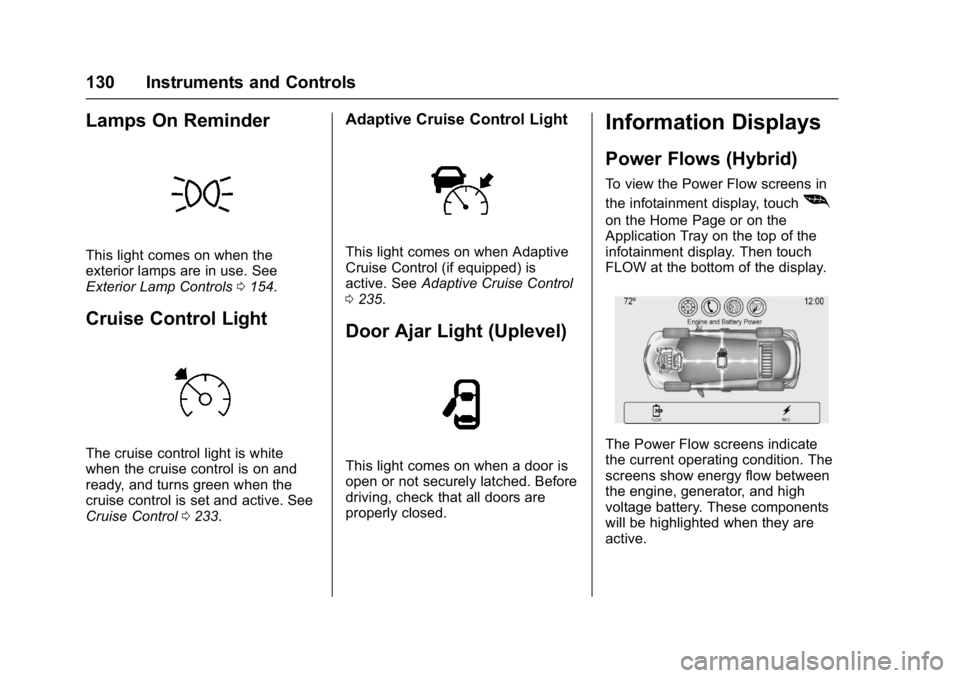
The Power Flow screens indicate
the current operating condition. The
screens show energy flow between
the engine, generator, and high
voltage battery. These components
will be highlighted when they are
active.
Page 134 of 413
Chevrolet Malibu Owner Manual (GMNA-Localizing-U.S./Canada/Mexico-
11348460) - 2018 - crc - 5/3/17
Instruments and Controls 133
Oil pressure can vary with engine
speed, outside temperature, and oil
viscosity. On some models, the oil
pump will vary engine oil pressure
according to engine needs. Oil
pressure may change quickly as the
engine speed or load varies. This is
normal. If the oil pressure warning
light or Driver Information Center
(DIC) message indicates oil
pressure outside the normal
operating range, check the vehicle's
oil as soon as possible.
Tire Pressure :Displays a vehicle
with the approximate pressures of
all four tires. Tire pressure is
displayed in either kilopascal (kPa)
or in pounds per square inch (psi).
See Tire Pressure Monitor System
0 318 andTire Pressure Monitor
Operation 0319.
Battery Voltage : Displays the
current battery voltage, if equipped.
Battery voltage changes are normal
while driving. See Charging System
Light 0122. If there is a problem
with the battery charging system,
the DIC will display a message. Coolant Temperature :
Shows the
engine coolant temperature in either
degrees Celsius (°C) or degrees
Fahrenheit (°F).
Speed Warning : This display is
used to set the vehicle speed at
which the speed warning chime
sounds and the alert is displayed.
The speed can be set by pressing
Vwhile the speed warning display
is showing.
Units : Move
worxto change
between Metric or US when the Unit
display is active. Press
Vto confirm
the setting. This will change the
displays on the DIC to the type of
measurements you select.
ECO Drive Assist Menu (ECO)
Items
Useworxto scroll through the
menu items. Not all items are
available on every vehicle. The
following is a list of all possible
menu items:
Best Average Fuel Economy : The
bottom displays the best average
fuel economy (AFE) that is achieved for a selected distance. The top
displays a running average of fuel
economy for the most recently
traveled selected distance. The
center bar graph displays the
instantaneous fuel economy.
Quickly press
Vto change the
settings for the distance options.
When viewing best AFE, a several
second press and hold of
Vwill
reset the best value. The best value
will show “- - -“until the selected
distance has been traveled.
The display provides feedback on
how current driving behavior in the
bar graph affects the running
average in the top display and how
well recent driving compares to the
best that has been achieved.
Drive Cycle Info (Hybrid) : This
screen displays the distance
traveled and average fuel economy
for the current trip. The screen will
also be shown when the vehicle is
turned off displaying the previous
trip’s information.
Page 138 of 413
Chevrolet Malibu Owner Manual (GMNA-Localizing-U.S./Canada/Mexico-
11348460) - 2018 - crc - 5/3/17
Instruments and Controls 137
(DIC) message indicates oil
pressure outside the normal
operating range, check the vehicle's
oil as soon as possible.
Drive Cycle Info (Hybrid) :This
screen displays the distance
traveled and average fuel economy
for the current trip. The screen will
also be shown when the vehicle is
turned off displaying the previous
trip’s information.
Efficiency Gauge (Hybrid) : This
gauge is a guide to driving in an
efficient manner by keeping the
indicator in the center of the gauge.
. Accel: If the indicator moves to
the right of the gauge,
acceleration is too aggressive to
optimize efficiency.
. Brake: If the indicator moves to
the left side of the gauge,
braking is too aggressive to
optimize efficiency. Total Power Display (Hybrid) :
Provides a numeric display of the
total power being used to propel or
stop the vehicle. The display shows
the power being provided by the
battery or charging the battery as
well as the power provided by the
engine.
EV Operation (Hybrid) :
The bar
moves from left to right as the driver
requests more power from the
propulsion system. While in EV
mode, maintaining the bar in the
green zone will allow the driver to
maximize EV operation.
Blank Page : Shows no
information.Vehicle Messages
Messages displayed on the DIC
indicate the status of the vehicle or
some action that may be needed to
correct a condition. Multiple
messages may appear one after
another.
The messages that do not require
immediate action can be
acknowledged and cleared by
pressing
V. The messages that
require immediate action cannot be
cleared until that action is
performed.
All messages should be taken
seriously; clearing the message
does not correct the problem.
If a SERVICE message appears,
see your dealer.
Follow the instructions given in the
messages. The system displays
messages regarding the following
topics:
. Service Messages
. Fluid Levels
. Vehicle Security
Page 211 of 413
Chevrolet Malibu Owner Manual (GMNA-Localizing-U.S./Canada/Mexico-
11348460) - 2018 - crc - 5/3/17
210 Driving and Operating
Hydroplaning
Hydroplaning is dangerous. Water
can build up under the vehicle's
tires so they actually ride on the
water. This can happen if the road is
wet enough and you are going fast
enough. When the vehicle is
hydroplaning, it has little or no
contact with the road.
There is no hard and fast rule about
hydroplaning. The best advice is to
slow down when the road is wet.
Other Rainy Weather Tips
Besides slowing down, other wet
weather driving tips include:
.Allow extra following distance.
. Pass with caution.
. Keep windshield wiping
equipment in good shape.
. Keep the windshield washer fluid
reservoir filled.
. Have good tires with proper
tread depth. See Tires0308.
. Turn off cruise control.
Hill and Mountain Roads
Driving on steep hills or through
mountains is different than driving
on flat or rolling terrain. Tips include:
.Keep the vehicle serviced and in
good shape.
. Check all fluid levels and brakes,
tires, cooling system, and
transmission.
. Shift to a lower gear when going
down steep or long hills.
{Warning
Using the brakes to slow the
vehicle on a long downhill slope
can cause brake overheating, can
reduce brake performance, and
could result in a loss of braking.
Shift the transmission to a lower
gear to let the engine assist the
brakes on a steep downhill slope.
{Warning
Coasting downhill in N (Neutral)
or with the ignition off is
dangerous. This can cause
overheating of the brakes and
loss of steering. Always have the
engine running and the vehicle
in gear.
. Drive at speeds that keep the
vehicle in its own lane. Do not
swing wide or cross the
center line.
. Be alert on top of hills;
something could be in your lane
(e.g., stalled car, accident).
. Pay attention to special road
signs (e.g., falling rocks area,
winding roads, long grades,
passing or no-passing zones)
and take appropriate action.
Page 229 of 413
Chevrolet Malibu Owner Manual (GMNA-Localizing-U.S./Canada/Mexico-
11348460) - 2018 - crc - 5/3/17
228 Driving and Operating
To set the manual parking brake,
if equipped:
Hold the brake pedal down, then
push the parking brake pedal down.
If the ignition is on, the brake
system warning light will come on.
SeeBrake System Warning Light
0 124.
Caution
Driving with the parking brake on
can overheat the brake system
and cause premature wear or
damage to brake system parts.
Make sure that the parking brake
is fully released and the brake
warning light is off before driving.
To release the parking brake, hold
the regular brake pedal down, then
push down momentarily on the
parking brake pedal until you feel
the pedal release. Slowly pull your
foot up off the parking brake pedal.
If the parking brake is not released
when you begin to drive, the brake system warning light will be on and
a chime will sound warning you that
the parking brake is still on.
If you are towing a trailer and are
parking on a hill, see
Driving
Characteristics and Towing Tips
0 262.
Electric Parking Brake
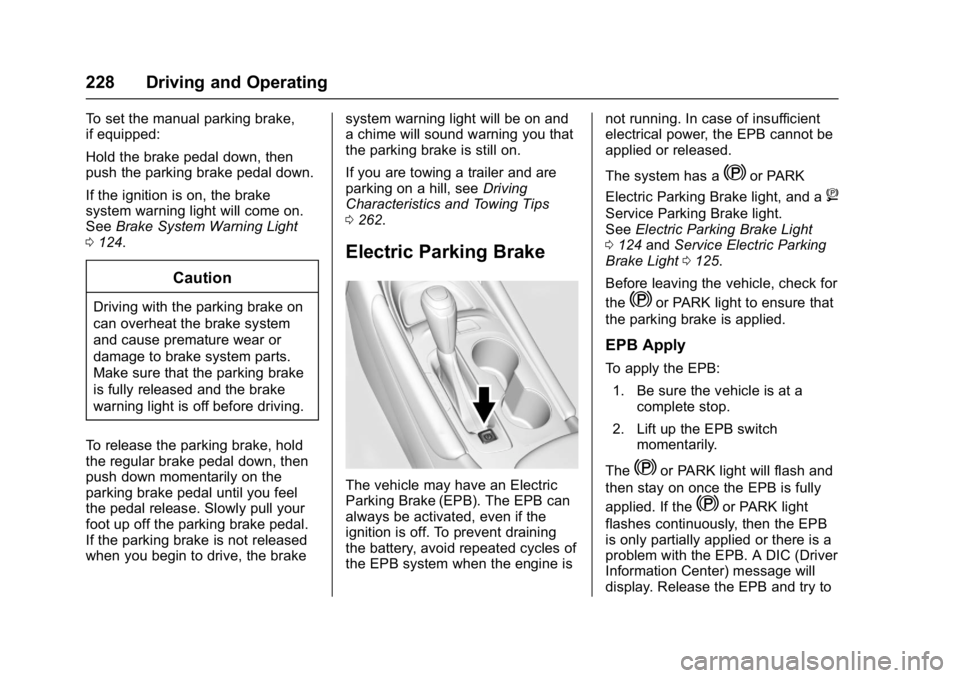
The vehicle may have an Electric
Parking Brake (EPB). The EPB can
always be activated, even if the
ignition is off. To prevent draining
the battery, avoid repeated cycles of
the EPB system when the engine is not running. In case of insufficient
electrical power, the EPB cannot be
applied or released.
The system has a
Yor PARK
Electric Parking Brake light, and a
8
Service Parking Brake light.
See Electric Parking Brake Light
0 124 andService Electric Parking
Brake Light 0125.
Before leaving the vehicle, check for
the
Yor PARK light to ensure that
the parking brake is applied.
EPB Apply
To apply the EPB:
1. Be sure the vehicle is at a complete stop.
2. Lift up the EPB switch momentarily.
The
Yor PARK light will flash and
then stay on once the EPB is fully
applied. If the
Yor PARK light
flashes continuously, then the EPB
is only partially applied or there is a
problem with the EPB. A DIC (Driver
Information Center) message will
display. Release the EPB and try to
Page 232 of 413
Chevrolet Malibu Owner Manual (GMNA-Localizing-U.S./Canada/Mexico-
11348460) - 2018 - crc - 5/3/17
Driving and Operating 231
SeeWarning Lights, Gauges, and
Indicators 0111 and Driver
Information Center (DIC) (Uplevel)
0 134 orDriver Information Center
(DIC) (Base Level) 0131. In the
event of a controller problem, the
brake pedal may be harder to push
and the stopping distance may be
longer.Ride Control Systems
Traction Control/
Electronic Stability
Control
System Operation
The vehicle has a Traction Control
System (TCS) and StabiliTrak, an
electronic stability control system.
These systems help limit wheel slip
and assist the driver in maintaining
control, especially on slippery road
conditions.
TCS activates if it senses that any
of the drive wheels are spinning or
beginning to lose traction. When this
happens, TCS applies the brakes to
the spinning wheels and reduces
engine power to limit wheel spin.
StabiliTrak activates when the
vehicle senses a difference between
the intended path and the direction
the vehicle is actually traveling.
StabiliTrak selectively applies
braking pressure to any one of the vehicle wheel brakes to assist the
driver in keeping the vehicle on the
intended path.
If cruise control is being used and
traction control or StabiliTrak begins
to limit wheel spin, cruise control will
disengage. Cruise control may be
turned back on when road
conditions allow.
Both systems come on
automatically when the vehicle is
started and begins to move. The
systems may be heard or felt while
they are operating or while
performing diagnostic checks. This
is normal and does not mean there
is a problem with the vehicle.
It is recommended to leave both
systems on for normal driving
conditions, but it may be necessary
to turn TCS off if the vehicle gets
stuck in sand, mud, ice, or snow.
See
If the Vehicle Is Stuck 0212
and “Turning the Systems Off and
On” later in this section.
Page 259 of 413
Chevrolet Malibu Owner Manual (GMNA-Localizing-U.S./Canada/Mexico-
11348460) - 2018 - crc - 5/3/17
258 Driving and Operating
octane rating of 87 or higher. Do not
use gasoline with a posted octane
rating of less than 87, as this may
cause engine knock and will lower
fuel economy.
For vehicles with the 2.0L L4
engine, premium unleaded gasoline
meeting ASTM specification D4814
with a posted octane rating of 93 is
highly recommended for best
performance and fuel economy.
Unleaded gasoline with an octane
rated as low as 87 can be used.
Using unleaded gasoline rated
below 93 octane, however, will lead
to reduced acceleration and fuel
economy. If knocking occurs, use a
gasoline rated at 93 octane as soon
as possible, otherwise, the engine
could be damaged. If heavy
knocking is heard when using
gasoline with a 93 octane rating, the
engine needs service.Prohibited Fuels
Caution
Do not use fuels with any of the
following conditions; doing so
may damage the vehicle and void
its warranty:
. For vehicles which are not
FlexFuel, fuel labeled
greater than 15% ethanol by
volume, such as mid-level
ethanol blends (16 –50%
ethanol), E85, or FlexFuel.
. Fuel with any amount of
methanol, methylal, and
aniline. These fuels can
corrode metal fuel system
parts or damage plastic and
rubber parts.
. Fuel containing metals such
as methylcyclopentadienyl
manganese tricarbonyl
(MMT), which can damage
the emissions control
system and spark plugs.
(Continued)
Caution (Continued)
.Fuel with a posted octane
rating of less than the
recommended fuel. Using
this fuel will lower fuel
economy and performance,
and may decrease the life of
the emissions catalyst.
California Fuel
Requirements
If the vehicle is certified to meet
California Emissions Standards, it is
designed to operate on fuels that
meet California specifications. See
the underhood emission control
label. If this fuel is not available in
states adopting California Emissions
Standards, the vehicle will operate
satisfactorily on fuels meeting
federal specifications, but emission
control system performance may be
affected. The malfunction indicator
lamp could turn on and the vehicle
may not pass a smog-check test.
See Malfunction Indicator Lamp
(Check Engine Light) 0122. If this
Page 263 of 413
Chevrolet Malibu Owner Manual (GMNA-Localizing-U.S./Canada/Mexico-
11348460) - 2018 - crc - 5/3/17
262 Driving and Operating
Driving Characteristics
and Towing Tips
Driving with a Trailer
When towing a trailer:
.Become familiar with the state
and local laws that apply
specifically to trailer towing.
. Do not tow a trailer during the
first 800 km (500 mi), to prevent
damage to the engine, axle,
or other parts.
. Then, during the first 800 km
(500 mi) of trailer towing, do not
drive over 80 km/h (50 mph) and
do not make starts at full throttle.
. The vehicle can tow in D (Drive)
but Manual Mode is
recommended. See Manual
Mode 0225. Use a lower gear if
the transmission shifts too often.
. Turn off Parking Assist when
towing.
. Do not use Adaptive Cruise
Control (ACC) when towing. See
Adaptive Cruise Control 0235. .
Turn off Lane Keep Assist (LKA)
when towing. See Lane Keep
Assist (LKA) 0255.
. Turn off Forward Automatic
Braking when towing. See
Forward Automatic Braking
(FAB) 0249.
. The Front Pedestrian Braking
system should be set to Alert or
Off when towing. See Front
Pedestrian Braking (FPB)
System 0251.
{Warning
When towing a trailer, exhaust
gases may collect at the rear of
the vehicle and enter if the
liftgate, trunk/hatch, or rear-most
window is open.
When towing a trailer:
. Do not drive with the
liftgate, trunk/hatch,
or rear-most window open.
(Continued)
Warning (Continued)
.Fully open the air outlets on
or under the instrument
panel.
. Also adjust the climate
control system to a setting
that brings in only outside
air. See “Climate Control
Systems” in the Index.
For information about carbon
monoxide, see Engine Exhaust
0 223.
Towing a trailer requires a certain
amount of experience. The
combination you are driving is
longer and not as responsive as the
vehicle itself. Get acquainted with
the handling and braking of the rig
before setting out for the open road.
Before starting, check all trailer hitch
parts and attachments, safety
chains, electrical connectors, lamps,
tires, and mirrors. If the trailer has
electric brakes, start the
Page 266 of 413

Chevrolet Malibu Owner Manual (GMNA-Localizing-U.S./Canada/Mexico-
11348460) - 2018 - crc - 5/3/17
Driving and Operating 265
Check periodically to see that all
hitch nuts and bolts are tight.
Engine Cooling When Trailer
Towing
The cooling system may temporarily
overheat during severe operating
conditions. SeeEngine Overheating
0 288.
Trailer Towing
Before pulling a trailer, three
important considerations have to do
with weight:
.
Weight of the trailer.
. Weight of the trailer tongue.
. Total weight on your vehicle's
tires.
Weight of the Trailer
How heavy can a trailer safely be?
It should never weigh more than
454 kg (1,000 lb). But even that can
be too heavy.
It depends on how the rig is used.
For example, speed, altitude, road
grades, outside temperature, the dimensions of the front of the trailer,
and how much the vehicle is used
to pull a trailer are all important.
It can depend on any special
equipment on the vehicle, and the
amount of tongue weight the vehicle
can carry. See
“Weight of the Trailer
Tongue” following.
Maximum trailer weight is calculated
assuming only the driver is in the
tow vehicle and it has all the
required trailering equipment. The
weight of additional optional
equipment, passengers, and cargo
in the tow vehicle must be
subtracted from the maximum trailer
weight.
Ask your dealer for trailering
information or advice, or write us at
our Customer Assistance Offices.
See Customer Assistance Offices
0 377.
Weight of the Trailer Tongue
The tongue load (1) of any trailer is
an important weight to measure
because it affects the total gross
weight of the vehicle. The Gross
Vehicle Weight (GVW) includes the
curb weight of the vehicle, any cargo carried in it, and the people
who will be riding in the vehicle as
well as the trailer tongue weight.
Vehicle options, equipment,
passengers, and cargo in the
vehicle reduce the amount of
tongue weight the vehicle can carry,
which will also reduce the trailer
weight the vehicle can tow. See
Vehicle Load Limits
0212.
The trailer tongue (1) should weigh
10–15 % of the total loaded trailer
weight (2).
Page 268 of 413
Chevrolet Malibu Owner Manual (GMNA-Localizing-U.S./Canada/Mexico-
11348460) - 2018 - crc - 5/3/17
Driving and Operating 267
Conversions and
Add-Ons
Add-On Electrical
Equipment
{Warning
The Data Link Connector (DLC) is
used for vehicle service and
Emission Inspection/
Maintenance testing. See
Malfunction Indicator Lamp
(Check Engine Light)0122.
A device connected to the DLC —
such as an aftermarket fleet or
driver-behavior tracking device —
may interfere with vehicle
systems. This could affect vehicle
operation and cause a crash.
Such devices may also access
information stored in the vehicle’s
systems.
Caution
Some electrical equipment can
damage the vehicle or cause
components to not work and
would not be covered by the
vehicle warranty. Always check
with your dealer before adding
electrical equipment.
Add-on equipment can drain the
vehicle's 12-volt battery, even if the
vehicle is not operating.
The vehicle has an airbag system.
Before attempting to add anything
electrical to the vehicle, see
Servicing the Airbag-Equipped
Vehicle 082 and Adding Equipment
to the Airbag-Equipped Vehicle
0 83.