roof CHEVROLET MONTE CARLO 2004 Owners Manual
[x] Cancel search | Manufacturer: CHEVROLET, Model Year: 2004, Model line: MONTE CARLO, Model: CHEVROLET MONTE CARLO 2004Pages: 416, PDF Size: 4.56 MB
Page 1 of 416
Seats and Restraint Systems........................... 1-1
Front Seats
............................................... 1-2
Rear Seats
............................................... 1-8
Safety Belts
.............................................1-10
Child Restraints
.......................................1-29
Air Bag Systems
......................................1-48
Restraint System Check
............................1-57
Features and Controls..................................... 2-1
Keys
........................................................ 2-2
Doors and Locks
....................................... 2-8
Windows
.................................................2-13
Theft-Deterrent Systems
............................2-15
Starting and Operating Your Vehicle
...........2-17
Mirrors
....................................................2-31
OnStar
®System
......................................2-34
HomeLink®Transmitter
.............................2-36
Storage Areas
.........................................2-40
Sunroof
..................................................2-41
Vehicle Personalization
.............................2-42
Instrument Panel............................................. 3-1
Instrument Panel Overview
.......................... 3-4
Climate Controls
......................................3-21
Warning Lights, Gages and Indicators
.........3-28
Message Center
.......................................3-44Driver Information Center (DIC)
..................3-52
Trip Computer
.........................................3-54
Audio System(s)
.......................................3-55
Driving Your Vehicle....................................... 4-1
Your Driving, the Road, and Your Vehicle
..... 4-2
Towing
...................................................4-31
Service and Appearance Care.......................... 5-1
Service
..................................................... 5-3
Fuel
......................................................... 5-4
Checking Things Under
the Hood
.............................................5-10
Headlamp Aiming
.....................................5-60
Bulb Replacement
....................................5-60
Windshield Wiper Blade Replacement
.........5-64
Tires
......................................................5-65
Appearance Care
.....................................5-94
Vehicle Identication
...............................5-102
Electrical System
....................................5-103
Capacities and Specications
...................5-110
Maintenance Schedule..................................... 6-1
Maintenance Schedule
................................ 6-2
Customer Assistance and Information.............. 7-1
Customer Assistance and Information
........... 7-2
Reporting Safety Defects
...........................7-12
Index................................................................ 1
2004 Chevrolet Monte Carlo Owner ManualM
Page 65 of 416
Keys...............................................................2-2
Remote Keyless Entry System.........................2-3
Remote Keyless Entry System Operation...........2-4
Doors and Locks.............................................2-8
Door Locks....................................................2-8
Power Door Locks..........................................2-9
Programmable Automatic
Door Locks................................................2-9
Lockout Protection........................................2-10
Leaving Your Vehicle....................................2-10
Trunk..........................................................2-10
Windows........................................................2-13
Power Windows............................................2-14
Sun Visors...................................................2-14
Theft-Deterrent Systems..................................2-15
Content Theft-Deterrent.................................2-15
Passlock
®....................................................2-16
Starting and Operating Your Vehicle................2-17
New Vehicle Break-In....................................2-17
Ignition Positions..........................................2-17
Starting Your Engine.....................................2-18
Engine Coolant Heater..................................2-20
Automatic Transaxle Operation.......................2-21
Parking Brake..............................................2-25
Shifting Into Park (P).....................................2-26Shifting Out of Park (P).................................2-28
Parking Over Things That Burn.......................2-28
Engine Exhaust............................................2-29
Running Your Engine While You Are Parked. . . .2-30
Mirrors...........................................................2-31
Manual Rearview Mirror.................................2-31
Manual Rearview Mirror with OnStar
®..............2-31
Automatic Dimming Rearview Mirror................2-32
Automatic Dimming Rearview Mirror with
OnStar
®...................................................2-32
Outside Power Mirrors...................................2-33
Outside Convex Mirror...................................2-34
Outside Heated Mirrors..................................2-34
OnStar
®System.............................................2-34
HomeLink®Transmitter...................................2-36
Programming the HomeLink®Transmitter.........2-36
Storage Areas................................................2-40
Glove Box...................................................2-40
Center Console Storage Area.........................2-40
Rear Storage Area........................................2-40
Convenience Net..........................................2-40
Sunroof.........................................................2-41
Vehicle Personalization...................................2-42
Section 2 Features and Controls
2-1
Page 82 of 416

ACC (ACCESSORY):This is the position in which you
can operate your electrical accessories. With the key
in this position, the ignition and automatic transaxle will
unlock.
ON:This is the position to which the switch returns after
you start the engine and release the switch. The switch
stays in ON while the engine is running. But even when
the engine is not running, you can use ON to operate
your electrical accessories and to display some
instrument panel cluster messages and warning lights.
START:This position starts the engine. When the
engine starts, release the key. The ignition switch will
return to ON for normal driving.
While the engine is not running, ACC and ON allow you
to operate your electrical accessories, such as the radio.
A warning chime will sound if you open the driver’s door
while the ignition is in OFF or ACC and the key is in
the ignition.
Retained Accessory Power (RAP)
With Retained Accessory Power (RAP), your power
windows, audio system and sunroof (option) will
continue to work for up to 10 minutes after the ignition is
turned to OFF and none of the doors is opened.
Starting Your Engine
Move your shift lever to PARK (P) or NEUTRAL (N).
Your engine won’t start in any other position — that’s a
safety feature. To restart when you’re already moving,
use NEUTRAL (N) only.
Notice:Shifting into PARK (P) with the vehicle
moving could damage the transaxle. Shift into
PARK (P) only when your vehicle is stopped.
Starting Your 3400 V6 Engine
1. With your foot off the accelerator pedal, turn your
ignition key to START. When the engine starts, let
go of the key. The idle speed will go down as
your engine warms up.
Notice:Holding your key in START for longer than
15 seconds at a time will cause your battery to
be drained much sooner. And the excessive heat
can damage your starter motor. Wait about 15
seconds between each try to help avoid draining
your battery or damaging your starter.
2. If the engine doesn’t start in 10 seconds, push the
accelerator pedal about one-quarter of the way
down while you turn the key to START. Do this until
the engine starts. As soon as it does, let go of
the key.
2-18
Page 105 of 416
Sunroof
Your vehicle may have an express-open sunroof.
It includes a sliding and tilting glass panel and a
sunshade.
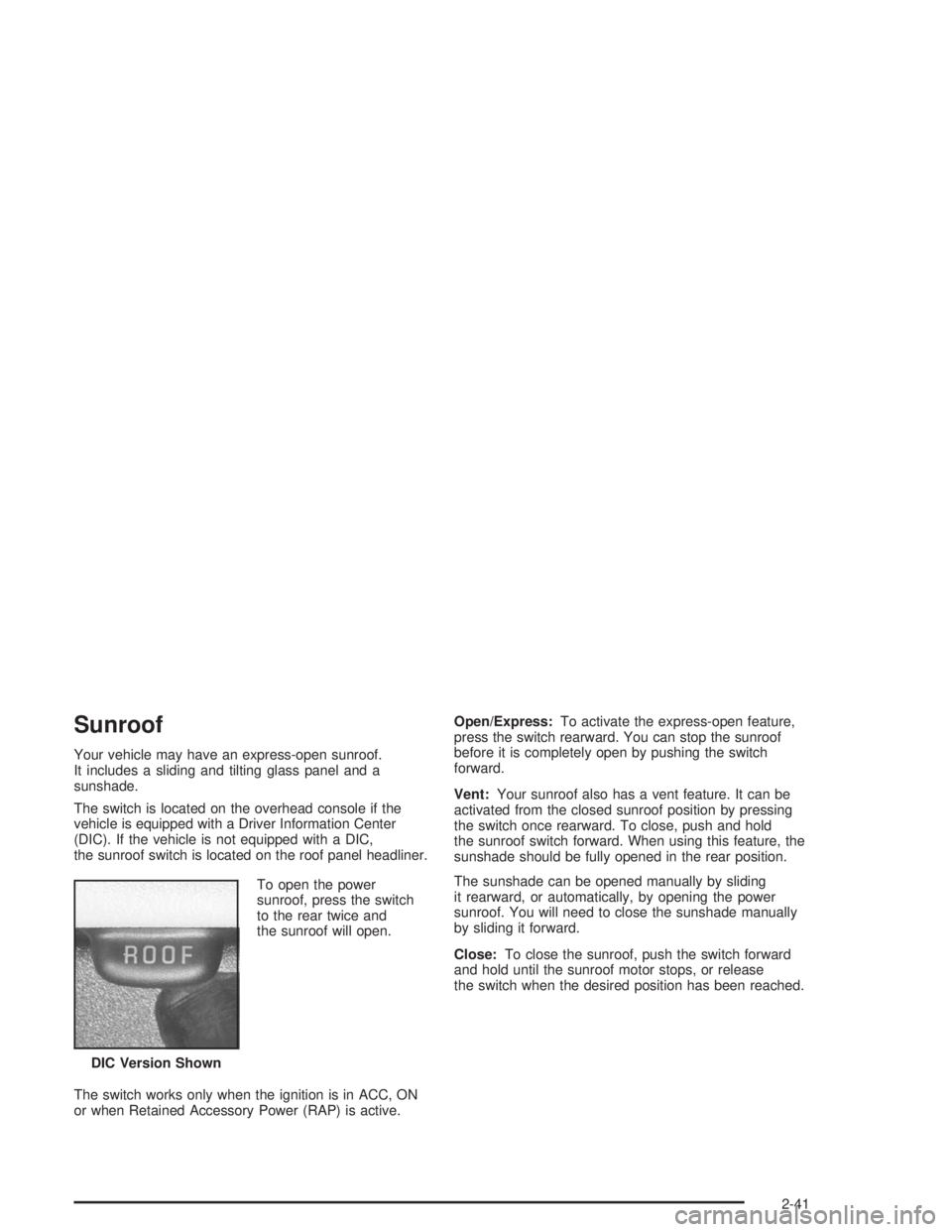
The switch is located on the overhead console if the
vehicle is equipped with a Driver Information Center
(DIC). If the vehicle is not equipped with a DIC,
the sunroof switch is located on the roof panel headliner.
To open the power
sunroof, press the switch
to the rear twice and
the sunroof will open.
The switch works only when the ignition is in ACC, ON
or when Retained Accessory Power (RAP) is active.Open/Express:To activate the express-open feature,
press the switch rearward. You can stop the sunroof
before it is completely open by pushing the switch
forward.
Vent:Your sunroof also has a vent feature. It can be
activated from the closed sunroof position by pressing
the switch once rearward. To close, push and hold
the sunroof switch forward. When using this feature, the
sunshade should be fully opened in the rear position.
The sunshade can be opened manually by sliding
it rearward, or automatically, by opening the power
sunroof. You will need to close the sunshade manually
by sliding it forward.
Close:To close the sunroof, push the switch forward
and hold until the sunroof motor stops, or release
the switch when the desired position has been reached.
DIC Version Shown
2-41
Page 166 of 416
Driver Information Center (DIC)
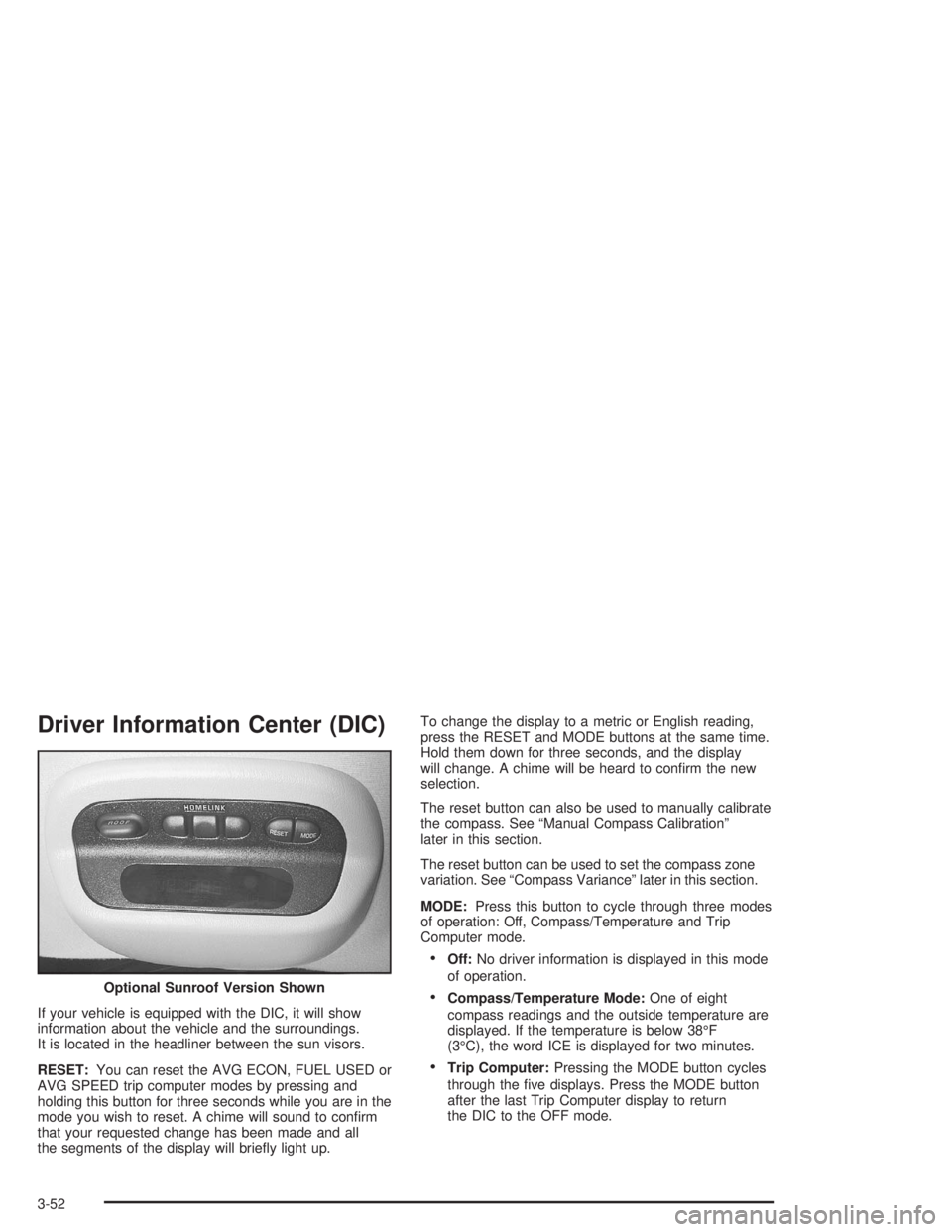
If your vehicle is equipped with the DIC, it will show
information about the vehicle and the surroundings.
It is located in the headliner between the sun visors.
RESET:You can reset the AVG ECON, FUEL USED or
AVG SPEED trip computer modes by pressing and
holding this button for three seconds while you are in the
mode you wish to reset. A chime will sound to conrm
that your requested change has been made and all
the segments of the display will briey light up.To change the display to a metric or English reading,
press the RESET and MODE buttons at the same time.
Hold them down for three seconds, and the display
will change. A chime will be heard to conrm the new
selection.
The reset button can also be used to manually calibrate
the compass. See “Manual Compass Calibration”
later in this section.
The reset button can be used to set the compass zone
variation. See “Compass Variance” later in this section.
MODE:Press this button to cycle through three modes
of operation: Off, Compass/Temperature and Trip
Computer mode.
Off:No driver information is displayed in this mode
of operation.
Compass/Temperature Mode:One of eight
compass readings and the outside temperature are
displayed. If the temperature is below 38°F
(3°C), the word ICE is displayed for two minutes.
Trip Computer:Pressing the MODE button cycles
through the ve displays. Press the MODE button
after the last Trip Computer display to return
the DIC to the OFF mode. Optional Sunroof Version Shown
3-52
Page 210 of 416
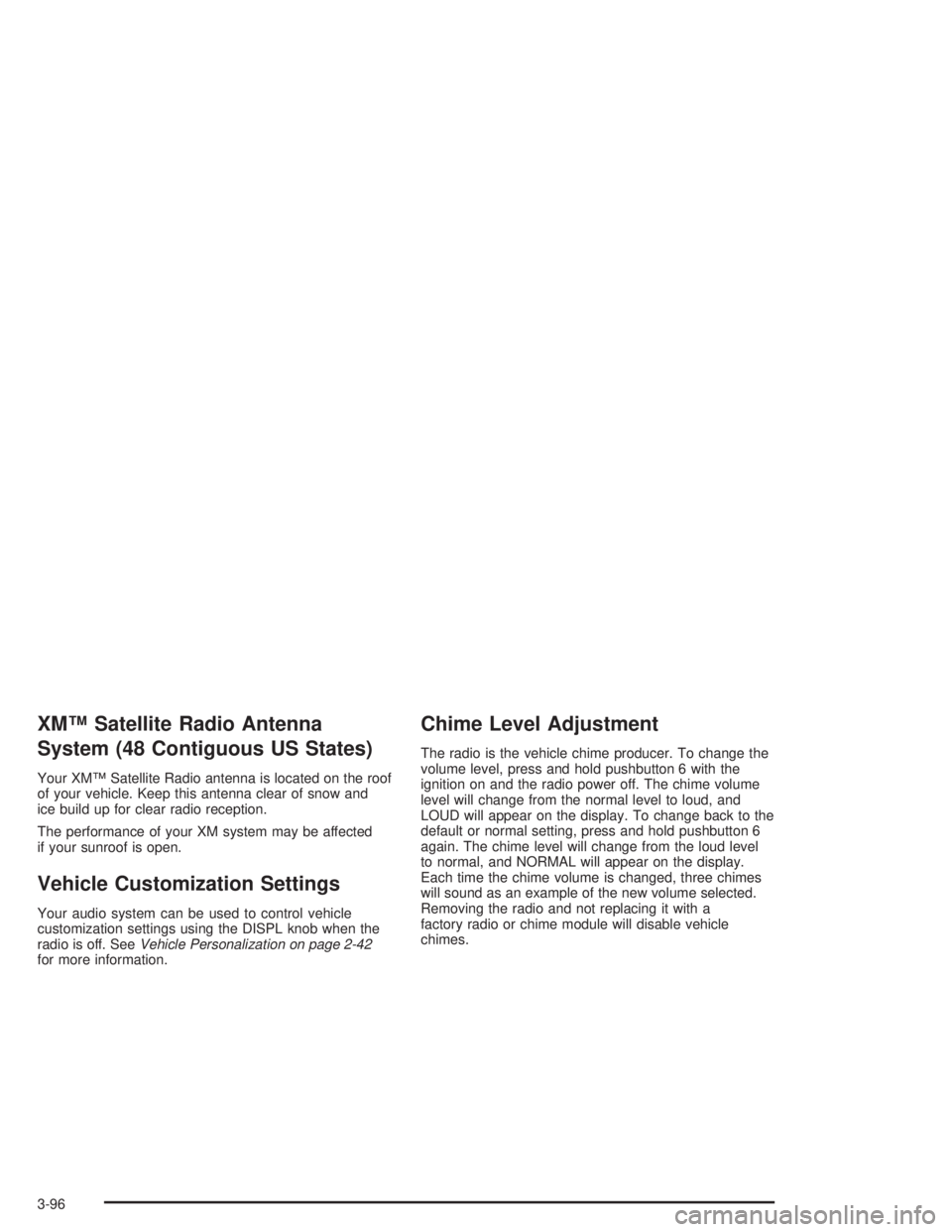
XM™ Satellite Radio Antenna
System (48 Contiguous US States)
Your XM™ Satellite Radio antenna is located on the roof
of your vehicle. Keep this antenna clear of snow and
ice build up for clear radio reception.
The performance of your XM system may be affected
if your sunroof is open.
Vehicle Customization Settings
Your audio system can be used to control vehicle
customization settings using the DISPL knob when the
radio is off. SeeVehicle Personalization on page 2-42
for more information.
Chime Level Adjustment
The radio is the vehicle chime producer. To change the
volume level, press and hold pushbutton 6 with the
ignition on and the radio power off. The chime volume
level will change from the normal level to loud, and
LOUD will appear on the display. To change back to the
default or normal setting, press and hold pushbutton 6
again. The chime level will change from the loud level
to normal, and NORMAL will appear on the display.
Each time the chime volume is changed, three chimes
will sound as an example of the new volume selected.
Removing the radio and not replacing it with a
factory radio or chime module will disable vehicle
chimes.
3-96
Page 361 of 416
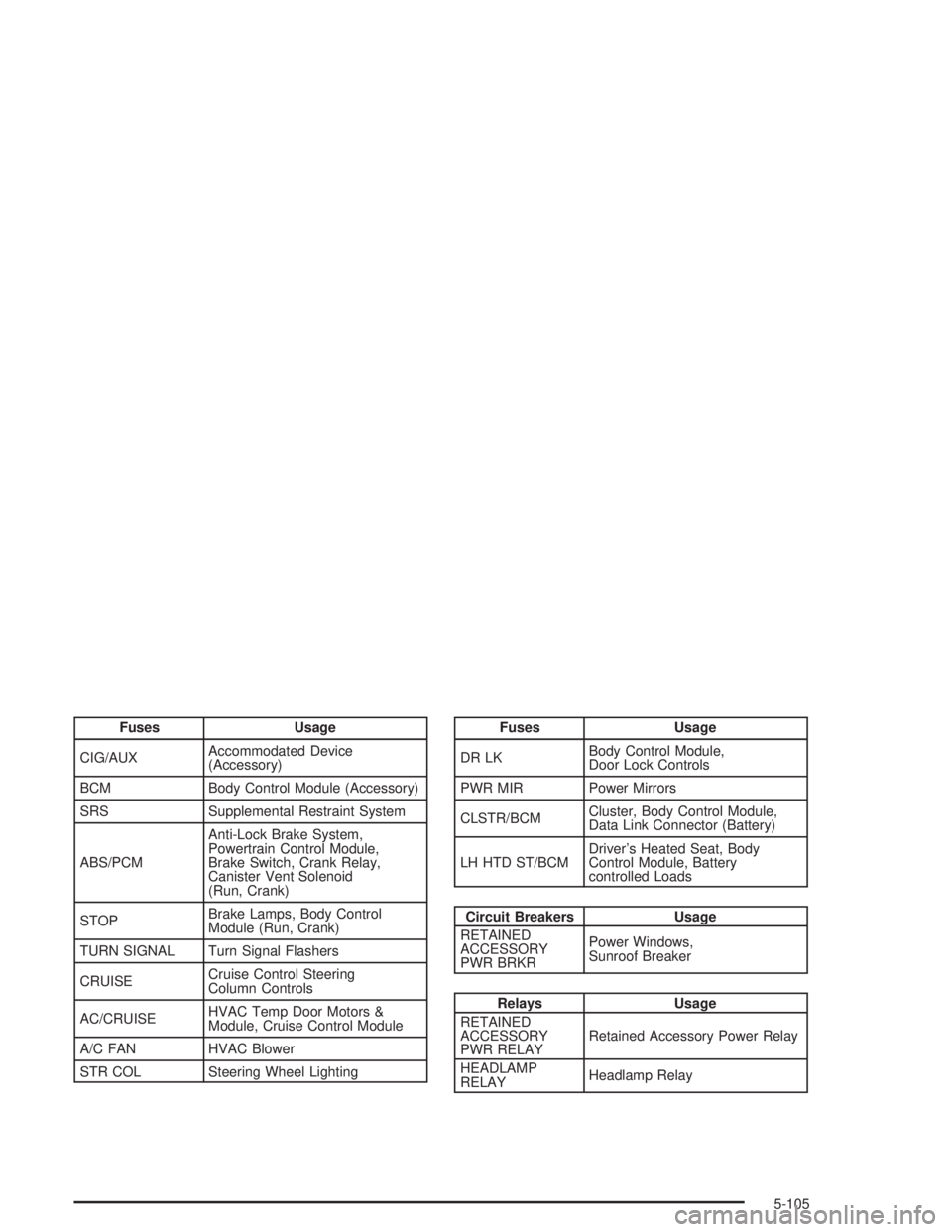
Fuses Usage
CIG/AUXAccommodated Device
(Accessory)
BCM Body Control Module (Accessory)
SRS Supplemental Restraint System
ABS/PCMAnti-Lock Brake System,
Powertrain Control Module,
Brake Switch, Crank Relay,
Canister Vent Solenoid
(Run, Crank)
STOPBrake Lamps, Body Control
Module (Run, Crank)
TURN SIGNAL Turn Signal Flashers
CRUISECruise Control Steering
Column Controls
AC/CRUISEHVAC Temp Door Motors &
Module, Cruise Control Module
A/C FAN HVAC Blower
STR COL Steering Wheel LightingFuses Usage
DR LKBody Control Module,
Door Lock Controls
PWR MIR Power Mirrors
CLSTR/BCMCluster, Body Control Module,
Data Link Connector (Battery)
LH HTD ST/BCMDriver’s Heated Seat, Body
Control Module, Battery
controlled Loads
Circuit Breakers Usage
RETAINED
ACCESSORY
PWR BRKRPower Windows,
Sunroof Breaker
Relays Usage
RETAINED
ACCESSORY
PWR RELAYRetained Accessory Power Relay
HEADLAMP
RELAYHeadlamp Relay
5-105
Page 363 of 416
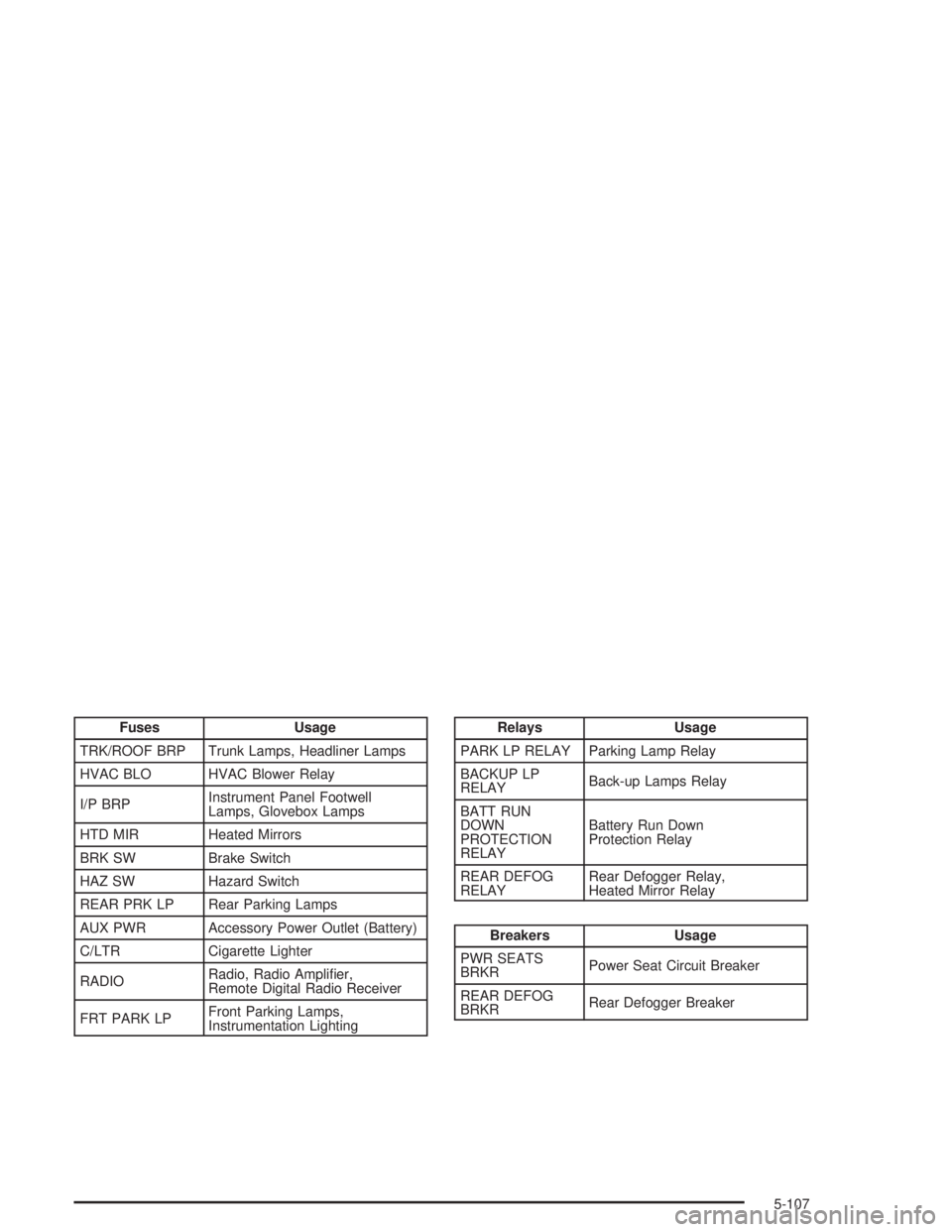
Fuses Usage
TRK/ROOF BRP Trunk Lamps, Headliner Lamps
HVAC BLO HVAC Blower Relay
I/P BRPInstrument Panel Footwell
Lamps, Glovebox Lamps
HTD MIR Heated Mirrors
BRK SW Brake Switch
HAZ SW Hazard Switch
REAR PRK LP Rear Parking Lamps
AUX PWR Accessory Power Outlet (Battery)
C/LTR Cigarette Lighter
RADIORadio, Radio Amplier,
Remote Digital Radio Receiver
FRT PARK LPFront Parking Lamps,
Instrumentation LightingRelays Usage
PARK LP RELAY Parking Lamp Relay
BACKUP LP
RELAYBack-up Lamps Relay
BATT RUN
DOWN
PROTECTION
RELAYBattery Run Down
Protection Relay
REAR DEFOG
RELAYRear Defogger Relay,
Heated Mirror Relay
Breakers Usage
PWR SEATS
BRKRPower Seat Circuit Breaker
REAR DEFOG
BRKRRear Defogger Breaker
5-107
Page 413 of 416
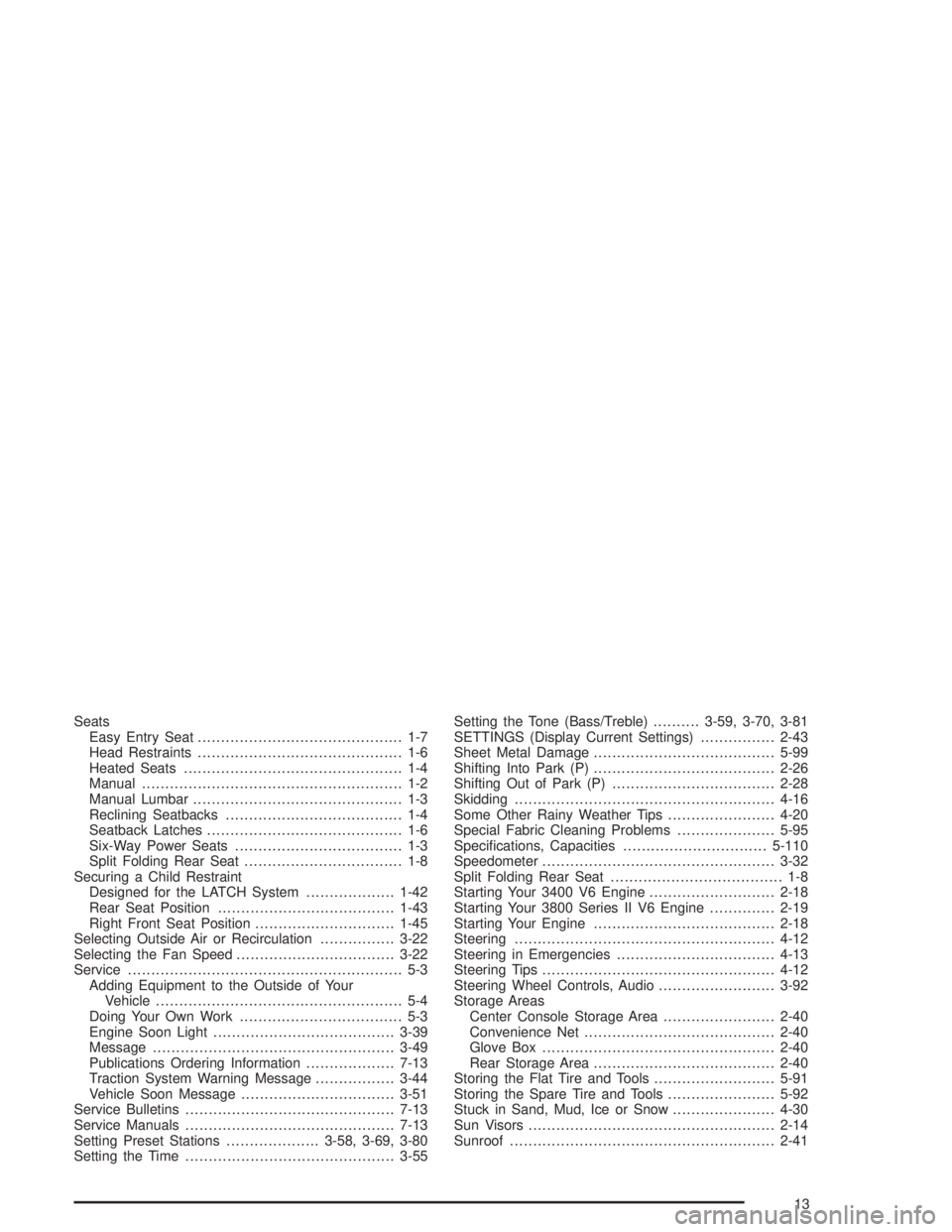
Seats
Easy Entry Seat............................................ 1-7
Head Restraints............................................ 1-6
Heated Seats............................................... 1-4
Manual........................................................ 1-2
Manual Lumbar............................................. 1-3
Reclining Seatbacks...................................... 1-4
Seatback Latches.......................................... 1-6
Six-Way Power Seats.................................... 1-3
Split Folding Rear Seat.................................. 1-8
Securing a Child Restraint
Designed for the LATCH System...................1-42
Rear Seat Position......................................1-43
Right Front Seat Position..............................1-45
Selecting Outside Air or Recirculation................3-22
Selecting the Fan Speed..................................3-22
Service........................................................... 5-3
Adding Equipment to the Outside of Your
Vehicle..................................................... 5-4
Doing Your Own Work................................... 5-3
Engine Soon Light.......................................3-39
Message....................................................3-49
Publications Ordering Information...................7-13
Traction System Warning Message.................3-44
Vehicle Soon Message.................................3-51
Service Bulletins.............................................7-13
Service Manuals.............................................7-13
Setting Preset Stations....................3-58, 3-69, 3-80
Setting the Time.............................................3-55Setting the Tone (Bass/Treble)..........3-59, 3-70, 3-81
SETTINGS (Display Current Settings)................2-43
Sheet Metal Damage.......................................5-99
Shifting Into Park (P).......................................2-26
Shifting Out of Park (P)...................................2-28
Skidding........................................................4-16
Some Other Rainy Weather Tips.......................4-20
Special Fabric Cleaning Problems.....................5-95
Specications, Capacities...............................5-110
Speedometer..................................................3-32
Split Folding Rear Seat..................................... 1-8
Starting Your 3400 V6 Engine...........................2-18
Starting Your 3800 Series II V6 Engine..............2-19
Starting Your Engine.......................................2-18
Steering........................................................4-12
Steering in Emergencies..................................4-13
Steering Tips..................................................4-12
Steering Wheel Controls, Audio.........................3-92
Storage Areas
Center Console Storage Area........................2-40
Convenience Net.........................................2-40
Glove Box..................................................2-40
Rear Storage Area.......................................2-40
Storing the Flat Tire and Tools..........................5-91
Storing the Spare Tire and Tools.......................5-92
Stuck in Sand, Mud, Ice or Snow......................4-30
Sun Visors.....................................................2-14
Sunroof.........................................................2-41
13