Cap CHEVROLET OPTRA 5 2005 1.G Owners Manual
[x] Cancel search | Manufacturer: CHEVROLET, Model Year: 2005, Model line: OPTRA 5, Model: CHEVROLET OPTRA 5 2005 1.GPages: 336, PDF Size: 2.21 MB
Page 1 of 336
Seats and Restraint Systems........................... 1-1
Front Seats
............................................... 1-2
Rear Seats
............................................... 1-7
Safety Belts
.............................................. 1-8
Child Restraints
.......................................1-25
Airbag System
.........................................1-48
Restraint System Check
............................1-63
Features and Controls..................................... 2-1
Keys
........................................................ 2-2
Doors and Locks
....................................... 2-8
Windows
.................................................2-14
Theft-Deterrent Systems
............................2-16
Starting and Operating Your Vehicle
...........2-18
Mirrors
....................................................2-33
Storage Areas
.........................................2-35
Sunroof
..................................................2-38
Instrument Panel............................................. 3-1
Instrument Panel Overview
.......................... 3-4
Climate Controls
......................................3-21
Warning Lights, Gages, and Indicators
........3-26
Audio System(s)
.......................................3-42Driving Your Vehicle....................................... 4-1
Your Driving, the Road, and Your Vehicle
..... 4-2
Towing
...................................................4-33
Service and Appearance Care.......................... 5-1
Service
..................................................... 5-3
Fuel
......................................................... 5-5
Checking Things Under the Hood
...............5-10
Headlamp Aiming
.....................................5-37
Bulb Replacement
....................................5-38
Windshield Wiper Blade Replacement
.........5-44
Tires
......................................................5-45
Appearance Care
.....................................5-66
Vehicle Identification
.................................5-75
Electrical System
......................................5-75
Capacities and Specifications
.....................5-82
Normal Maintenance Replacement Parts
......5-83
Maintenance Schedule..................................... 6-1
Maintenance Schedule
................................ 6-2
Customer Assistance and Information.............. 7-1
Customer Assistance and Information
........... 7-2
Reporting Safety Defects
...........................7-10
Index................................................................ 1
2005 Chevrolet Optra Owner ManualM
Page 107 of 336
Roof Rack (Wagon Only)
{CAUTION:
If you try to carry something on top of your
vehicle that is longer or wider than the roof
rack— like paneling, plywood, a mattress and
so forth — the wind can catch it as you drive
along. This can cause you to lose control.
What you are carrying could be violently torn
off, and this could cause you or other drivers
to have a collision, and of course damage your
vehicle. You may be able to carry something
like this inside. But, never carry something
longer or wider than the roof rack on top of
your vehicle.
A roof rack allows you to load things on top of your
vehicle. The roof rack has side rails attached to the roof.
These let you load some things on top of your vehicle,
as long as they are not wider or longer than the
roof rack.Notice:Loading cargo on the roof rack that weighs
more than 220 lbs (100 kg) or hangs over the rear
or sides of the vehicle may damage your vehicle.
Load cargo so that it rests on the slats as far
forward as possible and against the side rails,
making sure to fasten it securely.
Don’t exceed the maximum vehicle capacity when
loading your vehicle. For more information on vehicle
capacity and loading, seeLoading Your Vehicle on
page 4-28.
To prevent damage or loss of cargo as you’re
driving, check now and then to make sure cargo is still
securely fastened.
Rear Seat Armrest
Your vehicle may have a rear seat armrest that contains
two cupholders. To access the cupholders, pull the
armrest down from the rear seatback.
Convenience Net
The convenience net can help keep small loads from
moving during sharp turns or quick starts and stops.
Hang the four net hooks in the metal rings on each
corner of the floor.
2-37
Page 126 of 336
Map Lamps
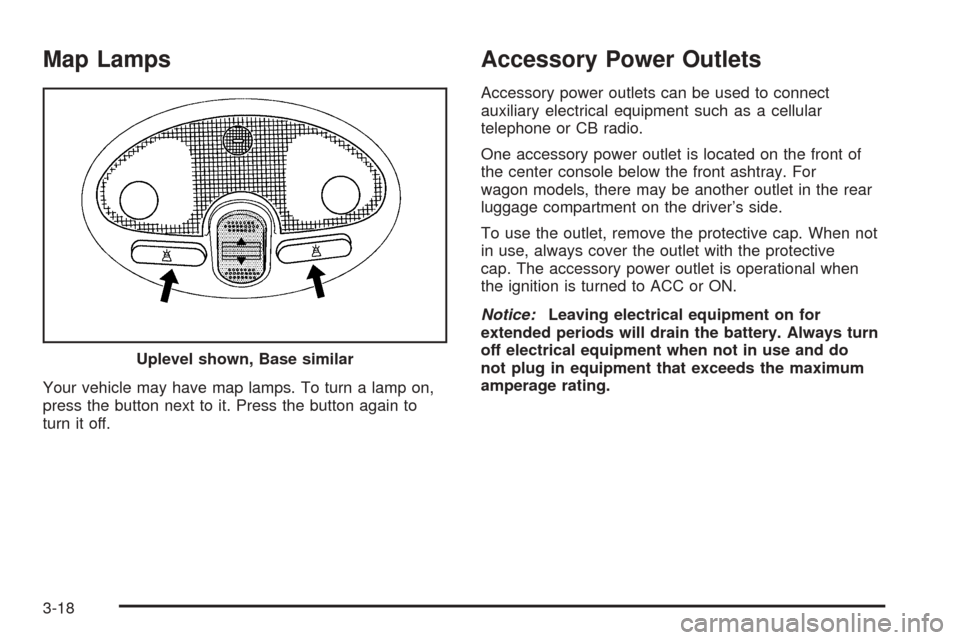
Your vehicle may have map lamps. To turn a lamp on,
press the button next to it. Press the button again to
turn it off.
Accessory Power Outlets
Accessory power outlets can be used to connect
auxiliary electrical equipment such as a cellular
telephone or CB radio.
One accessory power outlet is located on the front of
the center console below the front ashtray. For
wagon models, there may be another outlet in the rear
luggage compartment on the driver’s side.
To use the outlet, remove the protective cap. When not
in use, always cover the outlet with the protective
cap. The accessory power outlet is operational when
the ignition is turned to ACC or ON.
Notice:Leaving electrical equipment on for
extended periods will drain the battery. Always turn
off electrical equipment when not in use and do
not plug in equipment that exceeds the maximum
amperage rating. Uplevel shown, Base similar
3-18
Page 130 of 336
A/C (Air Conditioning):If your vehicle has air
conditioning, follow these steps to use the system. Start
the engine and set the fan control knob to the desired
fan speed. The air conditioning compressor does
not operate when the fan control knob is in the OFF
position. Press the A/C button to turn the air conditioning
system on and off. When A/C is pressed, an indicator
light in the button will come on to let you know that
air conditioning is activated.
On hot days, open the windows to let hot inside air
escape; then close them. This helps to reduce the time
it takes for your vehicle to cool down. It also helps
the system to operate more efficiently.
For quick cool down on hot days, do the following:
1. Select the vent mode.
2. Select the highest fan speed.
3. Press the A/C button.
4. Press the recirculation button.
5. Select the coolest temperature.
Using these settings together for long periods of time
may cause the air inside of your vehicle to become too
dry. To prevent this from happening, after the air in
your vehicle has cooled, turn the recirculation mode off.The air conditioning system removes moisture from the
air, so you may sometimes notice a small amount of
water dripping underneath your vehicle while idling
or after turning off the engine. This is normal.
?(Recirculation):This mode keeps outside air
from coming into the vehicle. It can be used to prevent
outside air and odors from entering your vehicle or
to help heat or cool the air inside your vehicle
more quickly.
Press this button to turn the recirculation mode on.
When the button is pressed, an indicator light in
the button will come on. Press this button again to
return to outside air mode.
Using the recirculation mode for extended periods may
cause your windows to fog. If this happens, select
the defrost mode.
Defogging and Defrosting
Fog on the inside of windows is a result of high humidity
or moisture condensing on the cool window glass.
This can be minimized if the climate control system is
used properly. There are two modes to clear fog or frost
from your windshield. Use the defog mode to clear
the windows of fog or moisture and warm the
passengers. Use the defrost mode to remove fog or
frost from the windshield more quickly.
3-22
Page 145 of 336
If the Light Is Flashing
The following may prevent more serious damage to
your vehicle:
•Reducing vehicle speed
•Avoiding hard accelerations
•Avoiding steep uphill grades
If the light stops flashing and remains on steady, see “If
the Light Is On Steady” following.
If the light continues to flash, when it is safe to do so,
stop the vehicle. Find a safe place to park your vehicle.
Turn the key off, wait at least 10 seconds and restart
the engine. If the light remains on steady, see “If
the Light Is On Steady” following. If the light is still
flashing, follow the previous steps, and see your dealer
for service as soon as possible.
If the Light Is On Steady
You also may be able to correct the emission system
malfunction by considering the following:
Did you recently put fuel into your vehicle?
If so, reinstall the fuel cap, making sure to fully install
the cap. SeeFilling Your Tank on page 5-7. The
diagnostic system can determine if the fuel cap has
been left off or improperly installed. A loose or missingfuel cap will allow fuel to evaporate into the atmosphere.
A few driving trips with the cap properly installed
should turn the light off.
Did you just drive through a deep puddle of water?
If so, your electrical system may be wet. The condition
will usually be corrected when the electrical system
dries out. A few driving trips should turn the light off.
Have you recently changed brands of fuel?
If so, be sure to fuel your vehicle with quality fuel. See
Gasoline Octane on page 5-5. Poor fuel quality will
cause your engine not to run as efficiently as designed.
You may notice this as stalling after start-up, stalling
when you put the vehicle into gear, misfiring, hesitation
on acceleration, or stumbling on acceleration. (These
conditions may go away once the engine is warmed up.)
This will be detected by the system and cause the
light to turn on.
If you experience one or more of these conditions,
change the fuel brand you use. It will require at least
one full tank of the proper fuel to turn the light off.
If none of the above steps have made the light turn off,
your dealer can check the vehicle. Your dealer has
the proper test equipment and diagnostic tools to fix any
mechanical or electrical problems that may have
developed.
3-37
Page 149 of 336
Fuel Gage
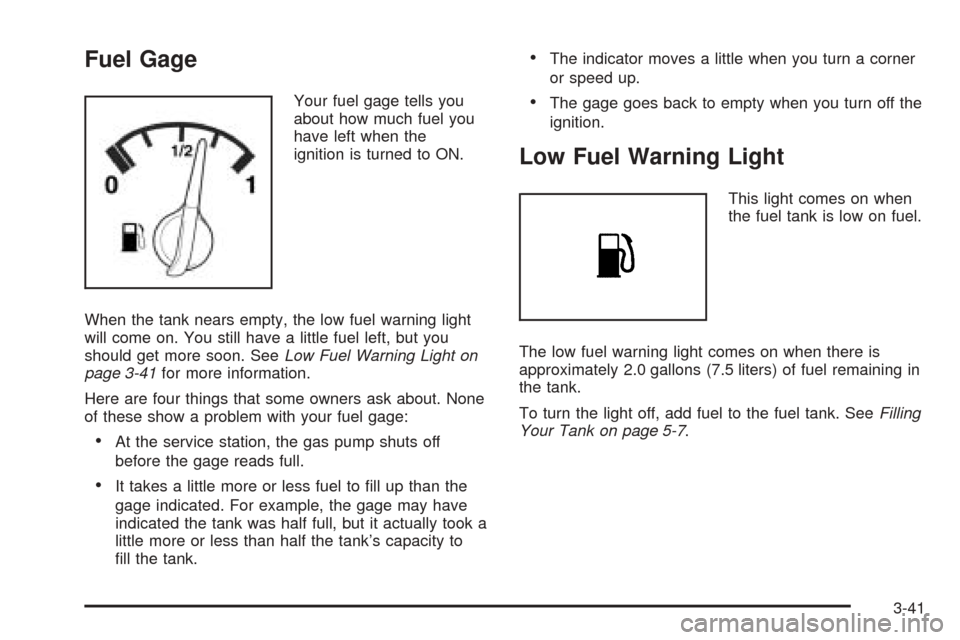
Your fuel gage tells you
about how much fuel you
have left when the
ignition is turned to ON.
When the tank nears empty, the low fuel warning light
will come on. You still have a little fuel left, but you
should get more soon. SeeLow Fuel Warning Light on
page 3-41for more information.
Here are four things that some owners ask about. None
of these show a problem with your fuel gage:
•At the service station, the gas pump shuts off
before the gage reads full.
•It takes a little more or less fuel to fill up than the
gage indicated. For example, the gage may have
indicated the tank was half full, but it actually took a
little more or less than half the tank’s capacity to
fill the tank.
•The indicator moves a little when you turn a corner
or speed up.
•The gage goes back to empty when you turn off the
ignition.
Low Fuel Warning Light
This light comes on when
the fuel tank is low on fuel.
The low fuel warning light comes on when there is
approximately 2.0 gallons (7.5 liters) of fuel remaining in
the tank.
To turn the light off, add fuel to the fuel tank. SeeFilling
Your Tank on page 5-7.
3-41
Page 158 of 336
Order of Play
Tracks will be played in the following order:
•Play will begin from the first track in the first playlist
and will continue sequentially through all tracks in
each playlist. When the last track of the last playlist
has been played, play will continue from the first
track of the first playlist.
•If the CD does not contain any playlists, then play
will begin from the first track under the root
directory. When all tracks from the root directory
have been played, play will continue from files
according to their numerical listing. After playing the
last track from the last folder, play will begin
again at the first track of the first folder or root
directory.
File System and Naming
The song name that will be displayed will be the song
name that is contained in the ID3 tag. If the song name
is not present in the ID3 tag, then the radio will
display the file name without the extension (such as
.mp3) as the track name.
Track names longer than 32 characters or 4 pages will
be shortened. The display will not show parts of
words on the last page of text and the extension of the
filename will not be displayed.
Preprogrammed Playlists
You can access preprogrammed playlists which were
created by WinAmp™, MusicMatch™, or Real
Jukebox™ software, however, you will not have editing
capability. These playlists will be treated as special
folders containing compressed audio song files.
Playing an MP3
With the ignition on, insert a CD partway into the slot,
label side up. The player will pull it in, Loading, then
Filecheck, then MP3 will appear on the display. The CD
should begin playing. You can insert a CD with the
ignition off.
As each new track starts to play, F001, the track
number, and the song name will appear on the display.
If you turn off the ignition or radio with a CD in the
player, it will stay in the player. When you turn on the
ignition or radio, the CD will start playing where it
stopped, if it was the last selected audio source.
The CD player can play the smaller 3 inch (8 cm) single
CDs with an adapter ring. Full-size CDs and the
smaller CDs are loaded in the same manner.
3-50
Page 175 of 336
•Check your mirrors, glance over your shoulder, and
start your left lane change signal before moving out
of the right lane to pass. When you are far
enough ahead of the passed vehicle to see its front
in your inside mirror, activate your right lane
change signal and move back into the right lane.
Remember that your right outside mirror is convex.
The vehicle you just passed may seem to be
farther away from you than it really is.
•Try not to pass more than one vehicle at a time on
two-lane roads. Reconsider before passing the
next vehicle.
•Do not overtake a slowly moving vehicle too rapidly.
Even though the brake lamps are not flashing, it
may be slowing down or starting to turn.
•If you are being passed, make it easy for the
following driver to get ahead of you. Perhaps
you can ease a little to the right.
Loss of Control
Let us review what driving experts say about what
happens when the three control systems — brakes,
steering, and acceleration — do not have enough
friction where the tires meet the road to do what the
driver has asked.
In any emergency, do not give up. Keep trying to
steer and constantly seek an escape route or area of
less danger.
Skidding
In a skid, a driver can lose control of the vehicle.
Defensive drivers avoid most skids by taking reasonable
care suited to existing conditions, and by not overdriving
those conditions. But skids are always possible.
The three types of skids correspond to your vehicle’s
three control systems. In the braking skid, your wheels
are not rolling. In the steering or cornering skid, too much
speed or steering in a curve causes tires to slip and lose
cornering force. And in the acceleration skid, too much
throttle causes the driving wheels to spin.
A cornering skid and an acceleration skid are best
handled by easing your foot off the accelerator pedal.
If your vehicle starts to slide, ease your foot off the
accelerator pedal and quickly steer the way you want
the vehicle to go. If you start steering quickly enough,
your vehicle may straighten out. Always be ready
for a second skid if it occurs.
4-13
Page 191 of 336
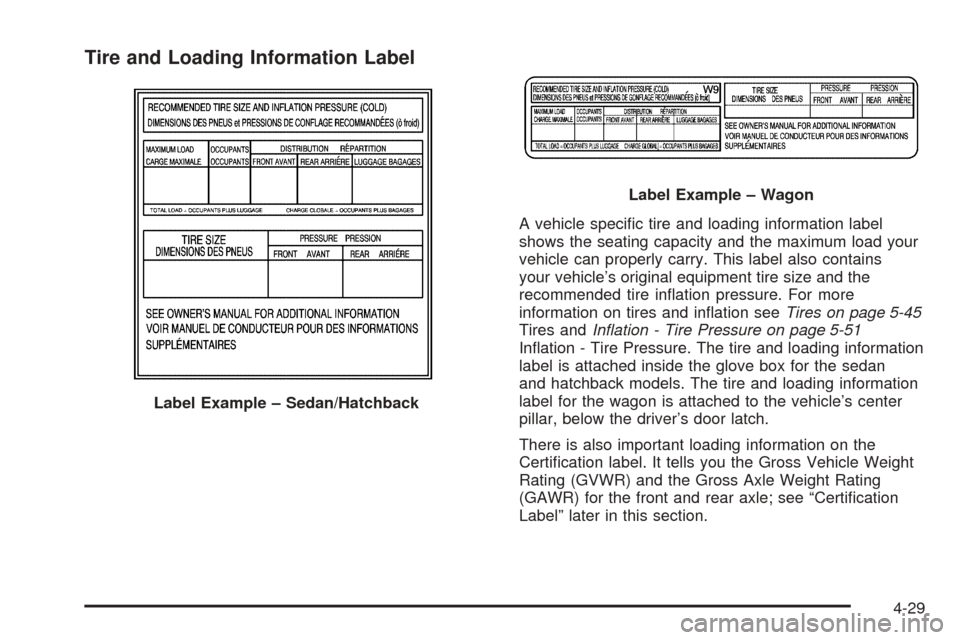
Tire and Loading Information Label
A vehicle specific tire and loading information label
shows the seating capacity and the maximum load your
vehicle can properly carry. This label also contains
your vehicle’s original equipment tire size and the
recommended tire inflation pressure. For more
information on tires and inflation seeTires on page 5-45
Tires andInflation - Tire Pressure on page 5-51
Inflation - Tire Pressure. The tire and loading information
label is attached inside the glove box for the sedan
and hatchback models. The tire and loading information
label for the wagon is attached to the vehicle’s center
pillar, below the driver’s door latch.
There is also important loading information on the
Certification label. It tells you the Gross Vehicle Weight
Rating (GVWR) and the Gross Axle Weight Rating
(GAWR) for the front and rear axle; see “Certification
Label” later in this section. Label Example – Sedan/Hatchback
Label Example – Wagon
4-29
Page 192 of 336
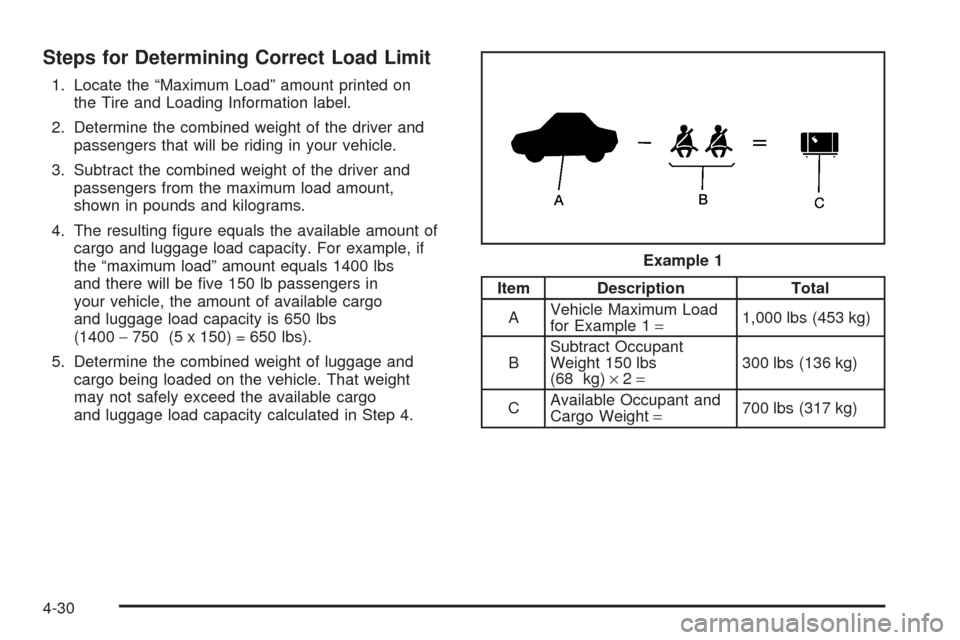
Steps for Determining Correct Load Limit
1. Locate the “Maximum Load” amount printed on
the Tire and Loading Information label.
2. Determine the combined weight of the driver and
passengers that will be riding in your vehicle.
3. Subtract the combined weight of the driver and
passengers from the maximum load amount,
shown in pounds and kilograms.
4. The resulting figure equals the available amount of
cargo and luggage load capacity. For example, if
the “maximum load” amount equals 1400 lbs
and there will be five 150 lb passengers in
your vehicle, the amount of available cargo
and luggage load capacity is 650 lbs
(1400−750 (5 x 150) = 650 lbs).
5. Determine the combined weight of luggage and
cargo being loaded on the vehicle. That weight
may not safely exceed the available cargo
and luggage load capacity calculated in Step 4.
Item Description Total
AVehicle Maximum Load
for Example 1=1,000 lbs (453 kg)
BSubtract Occupant
Weight 150 lbs
(68 kg)×2=300 lbs (136 kg)
CAvailable Occupant and
Cargo Weight=700 lbs (317 kg) Example 1
4-30