service CHEVROLET S10 2003 2.G Owners Manual
[x] Cancel search | Manufacturer: CHEVROLET, Model Year: 2003, Model line: S10, Model: CHEVROLET S10 2003 2.GPages: 432, PDF Size: 2.82 MB
Page 1 of 432

Seats and Restraint Systems........................... 1-1
Front Seats
............................................... 1-3
Rear Seats
............................................... 1-9
Safety Belts
.............................................1-10
Child Restraints
.......................................1-30
Air Bag System
.......................................1-55
Restraint System Check
............................1-65
Features and Controls..................................... 2-1
Keys
........................................................ 2-3
Doors and Locks
....................................... 2-8
Windows
.................................................2-14
Theft-Deterrent Systems
............................2-17
Starting and Operating Your Vehicle
...........2-19
Mirrors
....................................................2-39
Storage Areas
.........................................2-41
Sunroof
..................................................2-51
Vehicle Personalization
.............................2-53
Instrument Panel............................................. 3-1
Instrument Panel Overview
.......................... 3-2
Climate Controls
......................................3-18
Warning Lights, Gages and Indicators
.........3-22
Audio System(s)
.......................................3-40
Driving Your Vehicle....................................... 4-1
Your Driving, the Road, and Your Vehicle
..... 4-2
Towing
...................................................4-44Service and Appearance Care.......................... 5-1
Service
..................................................... 5-3
Fuel
......................................................... 5-4
Checking Things Under
the Hood
.............................................5-10
Rear Axle
...............................................5-51
Four-Wheel Drive
.....................................5-52
Front Axle
...............................................5-53
Bulb Replacement
....................................5-54
Windshield Wiper Blade Replacement
.........5-60
Tires
......................................................5-62
Appearance Care
.....................................5-83
Vehicle Identi®cation
.................................5-92
Electrical System
......................................5-93
Capacities and Speci®cations
.....................5-99
Normal Maintenance Replacement Parts
....5-101
Maintenance Schedule..................................... 6-1
Maintenance Schedule
................................ 6-2
Customer Assistance Information.................... 7-1
Customer Assistance Information
.................. 7-2
Reporting Safety Defects
............................ 7-9
Index................................................................ 1
2003 Chevrolet S10 Pickup Owner ManualM
Page 57 of 432
CAUTION: (Continued)
some unusual circumstance, even though it is
turned off. General Motors therefore
recommends that rear-facing child restraints
be transported in vehicles with a rear seat that
will accommodate a rear-facing child restraint,
whenever possible.
If a forward-facing child restraint is suitable for
your child, always move the passenger seat as
far back as it will go.
Although a rear seat is a safer place, you can secure a
forward-facing child restraint in the right front seat of
a crew cab.
{CAUTION:
If the air bag readiness light ever comes on
when you have turned off the air bag, it means
that something may be wrong with the air bag
system. The right front passenger's air bag
could in¯ate even though the switch is off. If
this ever happens, don't let anyone whom the
national government has identi®ed as a member
of a passenger air bag risk group sit in the right
front passenger's position (for example, don't
secure a rear-facing child restraint in your
vehicle) until you have your vehicle serviced.
See²Air Bag Off Switch²in the Index.
1-51
Page 67 of 432
·Air bags are designed to in¯ate only once. After
they in¯ate, you'll need some new parts for your
air bag system. If you don't get them, the air
bag system won't be there to help protect you in
another crash. A new system will include air
bag modules and possibly other parts. The service
manual for your vehicle covers the need to
replace other parts.
·Your vehicle is equipped with a diagnostic module,
which records information about the air bag
system. The module records information about the
readiness of the system, when the system
commands air bag in¯ation and driver's safety belt
usage at deployment.
·Let only quali®ed technicians work on your air bag
system. Improper service can mean that an air
bag system won't work properly. See your dealer
for service.
Notice:If you damage the covering for the driver's
or the right front passenger's air bag, the bag
may not work properly. You may have to replace the
air bag module in the steering wheel or both the
air bag module and the instrument panel for
the right front passenger's air bag. Do not open or
break the air bag coverings.
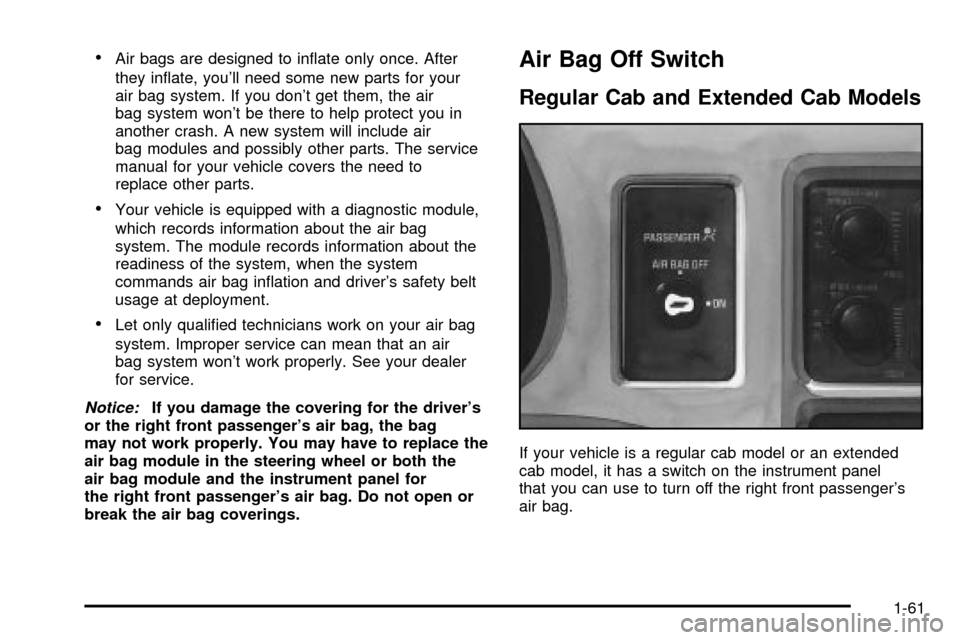
Air Bag Off Switch
Regular Cab and Extended Cab Models
If your vehicle is a regular cab model or an extended
cab model, it has a switch on the instrument panel
that you can use to turn off the right front passenger's
air bag.
1-61
Page 69 of 432
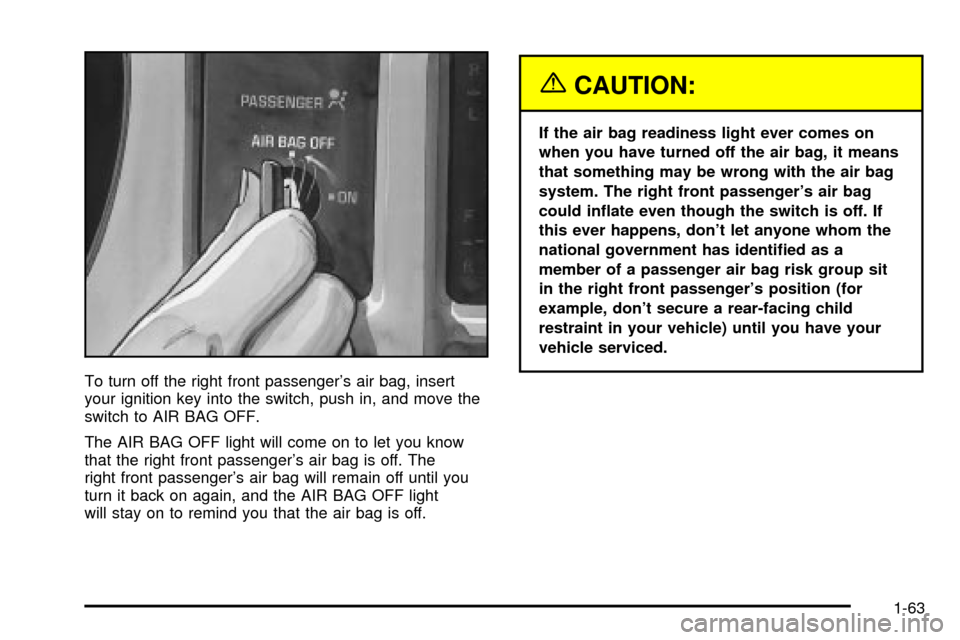
To turn off the right front passenger's air bag, insert
your ignition key into the switch, push in, and move the
switch to AIR BAG OFF.
The AIR BAG OFF light will come on to let you know
that the right front passenger's air bag is off. The
right front passenger's air bag will remain off until you
turn it back on again, and the AIR BAG OFF light
will stay on to remind you that the air bag is off.
{CAUTION:
If the air bag readiness light ever comes on
when you have turned off the air bag, it means
that something may be wrong with the air bag
system. The right front passenger's air bag
could in¯ate even though the switch is off. If
this ever happens, don't let anyone whom the
national government has identi®ed as a
member of a passenger air bag risk group sit
in the right front passenger's position (for
example, don't secure a rear-facing child
restraint in your vehicle) until you have your
vehicle serviced.
1-63
Page 70 of 432
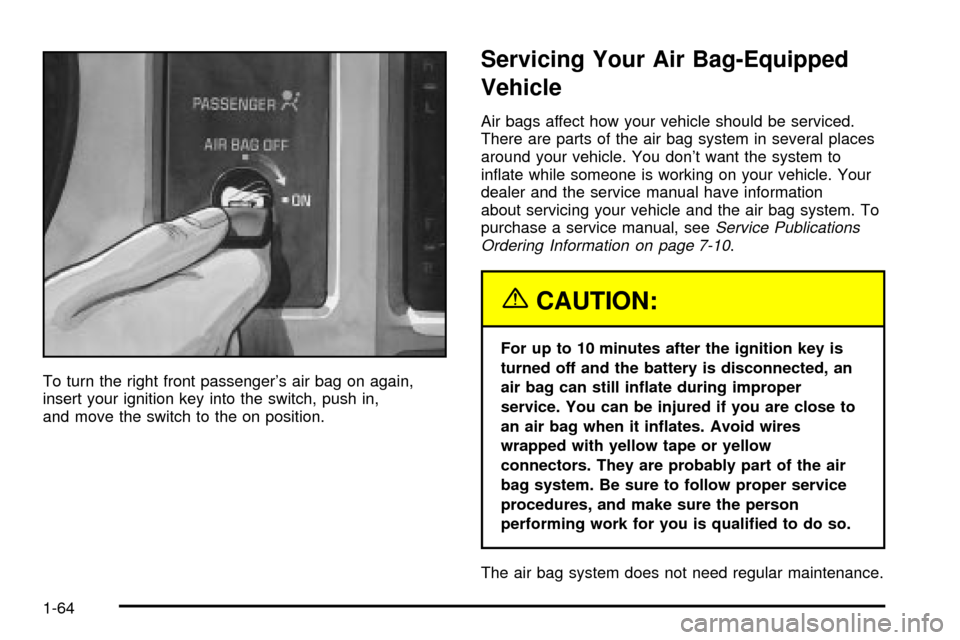
To turn the right front passenger's air bag on again,
insert your ignition key into the switch, push in,
and move the switch to the on position.
Servicing Your Air Bag-Equipped
Vehicle
Air bags affect how your vehicle should be serviced.
There are parts of the air bag system in several places
around your vehicle. You don't want the system to
in¯ate while someone is working on your vehicle. Your
dealer and the service manual have information
about servicing your vehicle and the air bag system. To
purchase a service manual, see
Service Publications
Ordering Information on page 7-10.
{CAUTION:
For up to 10 minutes after the ignition key is
turned off and the battery is disconnected, an
air bag can still in¯ate during improper
service. You can be injured if you are close to
an air bag when it in¯ates. Avoid wires
wrapped with yellow tape or yellow
connectors. They are probably part of the air
bag system. Be sure to follow proper service
procedures, and make sure the person
performing work for you is quali®ed to do so.
The air bag system does not need regular maintenance.
1-64
Page 77 of 432

Remote Keyless Entry System
If equipped, the keyless entry system operates on a
radio frequency subject to Federal Communications
Commission (FCC) Rules and with Industry Canada.
This device complies with Part 15 of the FCC Rules.
Operation is subject to the following two conditions:
1. This device may not cause interference, and
2. This device must accept any interference received,
including interference that may cause undesired
operation of the device.
This device complies with RSS-210 of Industry Canada.
Operation is subject to the following two conditions:
1. This device may not cause interference, and
2. This device must accept any interference received,
including interference that may cause undesired
operation of the device.
Changes or modi®cations to this system by other than
an authorized service facility could void authorization to
use this equipment.At times you may notice a decrease in range. This is
normal for any remote keyless entry system. If the
transmitter does not work or if you have to stand closer
to your vehicle for the transmitter to work, try this:
·Check the distance. You may be too far from your
vehicle. You may need to stand closer during
rainy or snowy weather.
·Check the location. Other vehicles or objects may
be blocking the signal. Take a few steps to the
left or right, hold the transmitter higher, and
try again.
·Check to determine if battery replacement is
necessary. See ªBattery Replacementº under
Remote Keyless Entry System Operation on
page 2-6.
·If you are still having trouble, see your dealer or a
quali®ed technician for service.
2-5
Page 90 of 432

Here's how to avoid setting off the alarm by accident:
·If you don't want to activate the theft-deterrent
system, the vehicle should be locked with the door
key
afterthe doors are closed.
·Always unlock a door with a key, or use the remote
keyless entry transmitter. Unlocking a door any
other way will set off the alarm.
If you set off the alarm by accident, unlock any door
with the key. You can also turn off the alarm by pressing
UNLOCK on the remote keyless entry transmitter.
The alarm won't stop if you try to unlock a door any
other way.
Testing the Alarm
The alarm can be tested by following these steps:
1. From inside the vehicle, lower the driver's window
and open the driver's door.
2. Activate the system by locking the doors with the
power door lock switch while the door is open, or
with the remote keyless entry transmitter.
3. Get out of the vehicle, close the door and wait for
the SECURITY light to go out.
4. Then reach in through the window, unlock the door
with the manual door lock and open the door. This
should set off the alarm.
If the alarm does not sound when it should but the
vehicle's headlamps ¯ash, check to see if the horn
works. The horn fuse may be blown. To replace
the fuse, see
Fuses and Circuit Breakers on page 5-93.
If the alarm does not sound or the vehicle's headlamps
do not ¯ash, the vehicle should be serviced by an
authorized service center.
2-18
Page 91 of 432

Passlockž
Your vehicle is equipped with the
Passlockžtheft-deterrent system.
Passlock
žis a passive theft-deterrent system.
Passlockženables fuel if the ignition lock cylinder is
turned with a valid key. If a correct key is not used or the
ignition lock cylinder is tampered with, fuel is disabled.
During normal operation, the SECURITY light will
go off approximately ®ve seconds after the key is turned
to RUN.
If the engine stalls and the SECURITY light ¯ashes,
wait about 10 minutes until the light stops ¯ashing before
trying to restart the engine. Remember to release the
key from START as soon as the engine starts.
If the engine does not start after three tries, the vehicle
needs service.
If the engine is running and the SECURITY message
comes on, you will be able to restart the engine if
you turn the engine off. However, your
Passlock
žsystem is not working properly and must be
serviced by your dealer. Your vehicle is not protected
by Passlock
žat this time. You may also want to check
the fuse. SeeFuses and Circuit Breakers on page 5-93.
See your dealer for service.
In an emergency, call the GM Roadside Assistance
Center. See
Roadside Assistance Program on page 7-6.
Starting and Operating Your
Vehicle
New Vehicle Break-In
Notice:Your vehicle doesn't need an elaborate
ªbreak-in.º But it will perform better in the long run
if you follow these guidelines:
·Keep your speed at 55 mph (88 km/h) or less for
the ®rst 500 miles (805 km).
·Don't drive at any one speed Ð fast or
slow Ð for the ®rst 500 miles (805 km). Don't
make full-throttle starts.
·Avoid making hard stops for the ®rst 200 miles
(322 km) or so. During this time your new
brake linings aren't yet broken in. Hard stops
with new linings can mean premature wear and
earlier replacement. Follow this breaking-in
guideline every time you get new brake linings.
·Don't tow a trailer during break-in. See ªTowing
a Trailerº in the Index for more information.
2-19
Page 92 of 432

Ignition Positions
With the key in the ignition, you can turn it to ®ve
different positions.
Notice:Don't operate accessories in the
ACCESSORY position for long periods of time.
Prolonged operation of accessories in the
ACCESSORY position could drain your battery and
prevent you from starting your vehicle.A (ACCESSORY):This position lets you use things like
the radio and the windshield wipers when the engine
is off. Push in the key and turn it toward you. Your
steering wheel will remain locked, just as it was before
you inserted the key.
{CAUTION:
On manual transmission vehicles, turning the
key to LOCK will lock the steering column and
result in a loss of ability to steer the vehicle.
This could cause a collision. If you need to
turn the engine off while the vehicle is moving,
turn the key only to OFF. Don't press the key
release button while the vehicle is moving.
Notice:If your key seems stuck in LOCK and you
can't turn it, be sure you are using the correct key; if
so, is it all the way in? If it is, then turn the steering
wheel left and right while you turn the key hard.
Turn the key only with your hand. Using a tool
to force it could break the key or the ignition switch.
If none of this works, then your vehicle needs
service.
2-20
Page 102 of 432
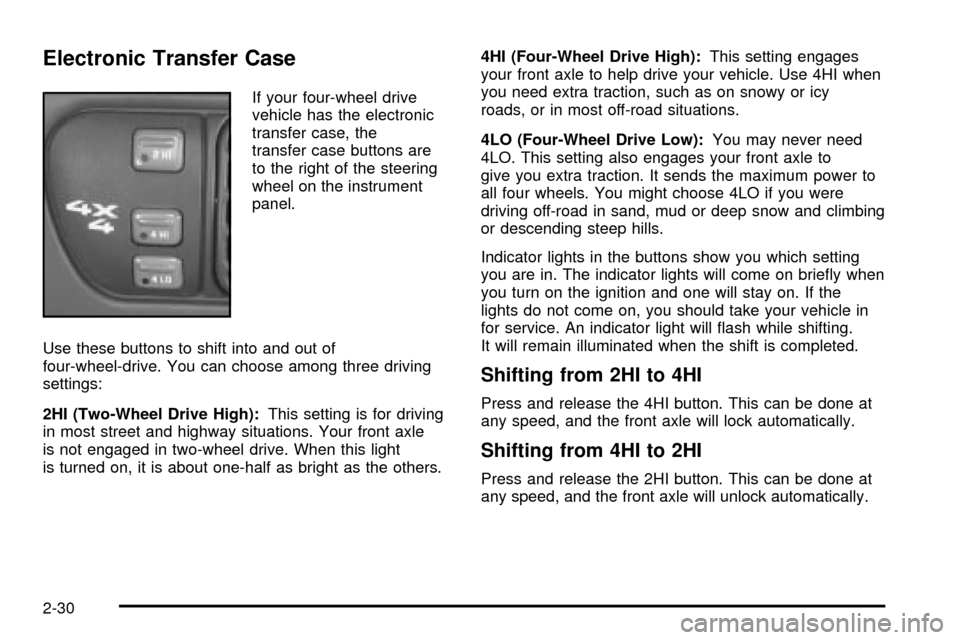
Electronic Transfer Case
If your four-wheel drive
vehicle has the electronic
transfer case, the
transfer case buttons are
to the right of the steering
wheel on the instrument
panel.
Use these buttons to shift into and out of
four-wheel-drive. You can choose among three driving
settings:
2HI (Two-Wheel Drive High):This setting is for driving
in most street and highway situations. Your front axle
is not engaged in two-wheel drive. When this light
is turned on, it is about one-half as bright as the others.4HI (Four-Wheel Drive High):This setting engages
your front axle to help drive your vehicle. Use 4HI when
you need extra traction, such as on snowy or icy
roads, or in most off-road situations.
4LO (Four-Wheel Drive Low):You may never need
4LO. This setting also engages your front axle to
give you extra traction. It sends the maximum power to
all four wheels. You might choose 4LO if you were
driving off-road in sand, mud or deep snow and climbing
or descending steep hills.
Indicator lights in the buttons show you which setting
you are in. The indicator lights will come on brie¯y when
you turn on the ignition and one will stay on. If the
lights do not come on, you should take your vehicle in
for service. An indicator light will ¯ash while shifting.
It will remain illuminated when the shift is completed.
Shifting from 2HI to 4HI
Press and release the 4HI button. This can be done at
any speed, and the front axle will lock automatically.
Shifting from 4HI to 2HI
Press and release the 2HI button. This can be done at
any speed, and the front axle will unlock automatically.
2-30