key battery CHEVROLET SILVERADO 1500 2023 User Guide
[x] Cancel search | Manufacturer: CHEVROLET, Model Year: 2023, Model line: SILVERADO 1500, Model: CHEVROLET SILVERADO 1500 2023Pages: 463, PDF Size: 19.26 MB
Page 212 of 463
Chevrolet Silverado 1500 Owner Manual (GMNA-Localizing-U.S./Canada/
Mexico/Paraguay-16515119) - 2023 - CRC - 6/2/22
Driving and Operating 211
Caution (Continued)
.Do not drive at any one constant
speed, fast or slow, for the first
800 km (500 mi). Do not make
full-throttle starts. Avoid downshifting
to brake or slow the vehicle.
.Avoid making hard stops for the first
300 km (200 mi) or so. During this
time the new brake linings are not yet
broken in. Hard stops with new linings
can mean premature wear and earlier
replacement. Follow this breaking-in
guideline every time you get new
brake linings.
.Do not tow a trailer during break-in.
SeeTrailer Towing 0302 for the
trailer towing capabilities of the
vehicle and more information.
Following break-in, engine speed and load
can be gradually increased.
On new vehicles, the various mechanical and
electrical systems experience a “break-in”
period during the first 6 400 km (4,000 mi)
of routine driving. As the vehicle is driven,
the mechanical systems adjust to provide
optimal fuel economy and transmission shift
performance. Electrical systems will adapt and calibrate
during the break-in period. A one-time
occurrence of clicks and similar vehicle
noises is normal during this process.
Normal driving charges the vehicle’s battery
to achieve the best operation of the vehicle,
including fuel economy and the Stop/Start
System. See
Stop/Start System 0213.
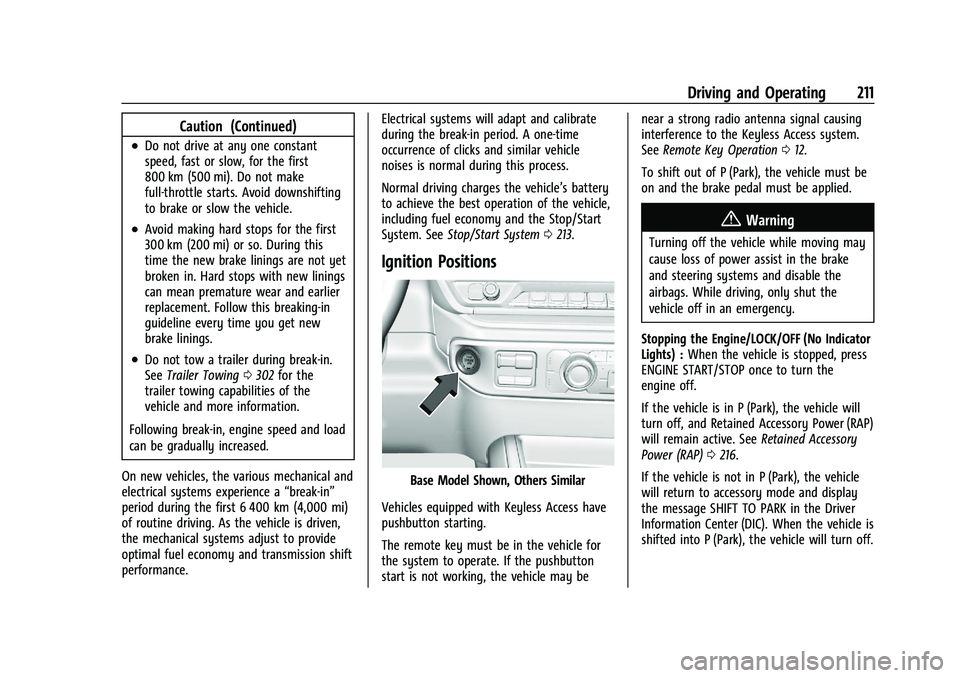
Ignition Positions
Base Model Shown, Others Similar
Vehicles equipped with Keyless Access have
pushbutton starting.
The remote key must be in the vehicle for
the system to operate. If the pushbutton
start is not working, the vehicle may be near a strong radio antenna signal causing
interference to the Keyless Access system.
See
Remote Key Operation 012.
To shift out of P (Park), the vehicle must be
on and the brake pedal must be applied.
{Warning
Turning off the vehicle while moving may
cause loss of power assist in the brake
and steering systems and disable the
airbags. While driving, only shut the
vehicle off in an emergency.
Stopping the Engine/LOCK/OFF (No Indicator
Lights) : When the vehicle is stopped, press
ENGINE START/STOP once to turn the
engine off.
If the vehicle is in P (Park), the vehicle will
turn off, and Retained Accessory Power (RAP)
will remain active. See Retained Accessory
Power (RAP) 0216.
If the vehicle is not in P (Park), the vehicle
will return to accessory mode and display
the message SHIFT TO PARK in the Driver
Information Center (DIC). When the vehicle is
shifted into P (Park), the vehicle will turn off.
Page 214 of 463
Chevrolet Silverado 1500 Owner Manual (GMNA-Localizing-U.S./Canada/
Mexico/Paraguay-16515119) - 2023 - CRC - 6/2/22
Driving and Operating 213
Starting the Engine
If the vehicle has a diesel engine, see the
Duramax diesel supplement.
Caution
If you add electrical parts or accessories,
you could change the way the engine
operates. Any resulting damage would
not be covered by the vehicle warranty.
SeeAdd-On Electrical Equipment 0328.
Move the shift lever to P (Park) or
N (Neutral). To restart the engine when the
vehicle is already moving, use
N (Neutral) only.
Caution
Do not try to shift to P (Park) if the
vehicle is moving. If you do, you could
damage the transmission. Shift to P (Park)
only when the vehicle is stopped.
Starting Procedure
1. The remote key must be in the vehicle. Press ENGINE START/STOP with the brake
pedal applied. When the engine begins
cranking, let go of the button. The driver may observe a minor, and
temporary, brake pedal kickback when
starting the vehicle. This is normal.
The idle speed will go down as the
engine gets warm. Do not race the
engine immediately after starting it.
Operate the engine and transmission
gently to allow the oil to warm up and
lubricate all moving parts.
When the low fuel warning light is on
and the FUEL LEVEL LOW message is
displayed in the Driver Information
Center (DIC), press ENGINE START/STOP
to continue engine cranking.
Caution
Cranking the engine for long periods of
time, by returning the ignition to the
START position immediately after
cranking has ended, can overheat and
damage the cranking motor, and drain
the battery. Wait at least 15 seconds
between each try, to let the cranking
motor cool down.
2. If the engine does not start after five to 10 seconds, especially in very cold
weather (below −18 °C or 0 °F), it could
be flooded with too much gasoline. Try pushing the accelerator pedal all the way
to the floor and holding it there while
pressing ENGINE START/STOP for up to a
maximum of 15 seconds. Wait at least
15 seconds between each try, to allow
the cranking motor to cool down. When
the engine starts, let go of the button
and accelerator. If the vehicle starts
briefly but then stops again, do the
same thing. This clears the extra gasoline
from the engine. Do not race the engine
immediately after starting it. Operate
the engine and transmission gently until
the oil warms up and lubricates all
moving parts.Stop/Start System
If equipped and enabled, the Stop/Start
system will shut off the engine to help
conserve fuel. It has components designed
for the increased number of starts.
{Warning
The automatic engine Stop/Start feature
causes the engine to shut off while the
vehicle is still on. Do not exit the vehicle
before shifting to P (Park). The vehicle
(Continued)
Page 353 of 463
Chevrolet Silverado 1500 Owner Manual (GMNA-Localizing-U.S./Canada/
Mexico/Paraguay-16515119) - 2023 - CRC - 6/2/22
352 Vehicle Care
Vehicle Storage
{Warning
Batteries have acid that can burn you and
gas that can explode. You can be badly
hurt if you are not careful. Always wear
eye protection. SeeJump Starting - North
America 0399 for tips on working
around a battery without getting hurt.
Infrequent Usage: Remove the black,
negative (−) cable from the battery to keep
the battery from running down.
Extended Storage: Remove the black,
negative (−) cable from the battery or use a
battery trickle charger.
Negative Battery Cable Disconnection
{Warning
Before disconnecting the negative battery
cable, turn off all features, turn the
ignition off, and remove the key,
if equipped, from the vehicle. If this is
not done, you or others could be injured,
and the vehicle could be damaged.
Caution
If the battery is disconnected with the
ignition on or the vehicle in Retained
Accessory Power (RAP), the OnStar
back-up battery will be permanently
discharged and will need to be replaced.
1. Make sure the lamps, features, and accessories are turned off.
2. Turn the ignition off and remove the key, if equipped.
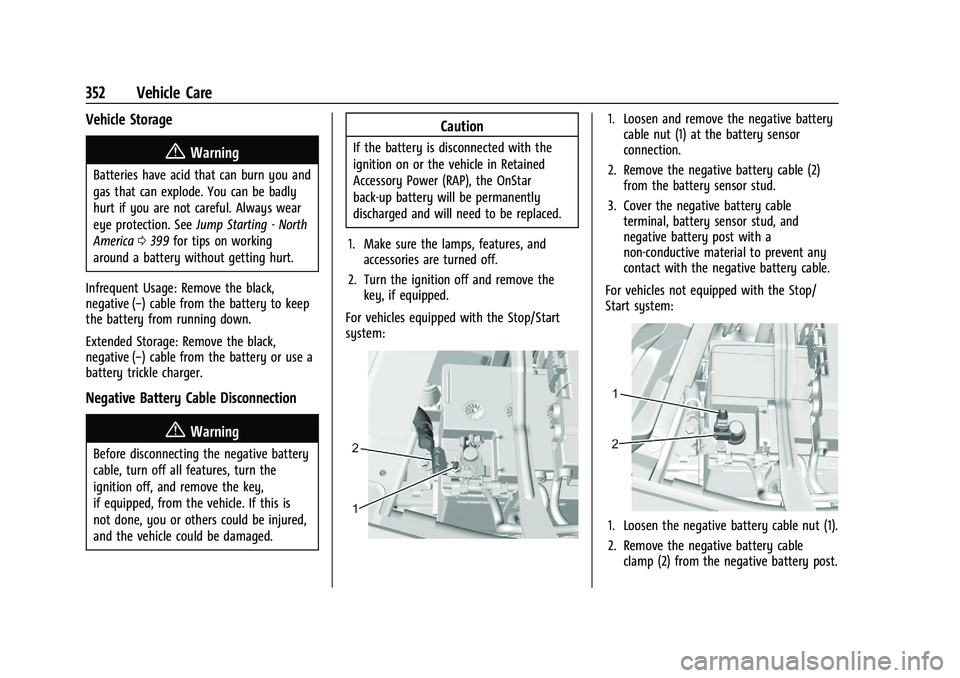
For vehicles equipped with the Stop/Start
system:
1. Loosen and remove the negative battery cable nut (1) at the battery sensor
connection.
2. Remove the negative battery cable (2) from the battery sensor stud.
3. Cover the negative battery cable terminal, battery sensor stud, and
negative battery post with a
non-conductive material to prevent any
contact with the negative battery cable.
For vehicles not equipped with the Stop/
Start system:
1. Loosen the negative battery cable nut (1).
2. Remove the negative battery cable clamp (2) from the negative battery post.
Page 406 of 463
Chevrolet Silverado 1500 Owner Manual (GMNA-Localizing-U.S./Canada/
Mexico/Paraguay-16515119) - 2023 - CRC - 6/2/22
Vehicle Care 405
Only dinghy tow four-wheel-drive vehicles
with a two-speed transfer case that have an
N (Neutral) and a 4
n(Four-Wheel Drive
Low) setting.
{Warning
Shifting a four-wheel-drive vehicle's
transfer case into N (Neutral) can allow
the vehicle to move even if the
transmission is in P (Park). You or others
could be injured. Set the parking brake
and use wheel blocks before shifting the
transfer case to N (Neutral).
To dinghy tow: 1. Position the vehicle being towed behind the tow vehicle, facing forward and on a
level surface.
2. Securely attach the vehicle being towed to the tow vehicle.
3. Apply the parking brake and start the engine.
4. Shift the transfer case to N (Neutral). See “Shifting into N (Neutral)” under
Four-Wheel Drive 0230.
5. With the engine running, release the parking brake and verify that the
transfer case is in N (Neutral) by shifting the transmission to D (Drive) and then to
R (Reverse). There should be no
movement while shifting the
transmission.
6. Shift the transmission to P (Park).
7. Release the parking brake.
8. Turn the vehicle off.
9. Turn on the ignition without starting the engine. To do this, take your foot off the
brake pedal then press and hold ENGINE
START/STOP for five seconds until the
green light on the button is illuminated.
See Ignition Positions 0211.
{Warning
To avoid death, serious injury,
or property damage, before dinghy
towing the vehicle, always disconnect and
secure the negative battery cable and
cover the negative battery post and cable
with a non-conductive material. If the
battery is left connected or the battery
cable contacts the post, the Electric
Parking Brake may activate during
towing, which could cause a crash. 10. Disconnect the negative (–) battery
cable. See “Negative Battery Cable
Disconnection” inBattery - North
America 0351.
Caution
If the steering column is locked, vehicle
damage may occur.
11. Move the steering wheel to make sure the steering column is unlocked.
12. For column shift transmissions, verify the transmission is in P (Park). Failing to put
the transmission into Park before flat
towing can damage the transmission.
13. Keep the remote key outside of the vehicle and manually lock the doors.
Access the vehicle by using the key in
the door lock. See Door Locks019.
Disconnecting the Towed Vehicle
Before disconnecting from the tow vehicle: 1. Park on a level surface. Secure the vehicle with wheel blocks.
2. Re-connect the negative (–) battery. See Battery - North America 0351.
3. Turn on the ignition without starting the engine. With your foot off the brake
pedal, press and hold ENGINE START/
Page 443 of 463
Chevrolet Silverado 1500 Owner Manual (GMNA-Localizing-U.S./Canada/
Mexico/Paraguay-16515119) - 2023 - CRC - 6/2/22
442 OnStar
.Give OnStar Turn-by-Turn Navigation voice
commands.
.Obtain and customize the Wi-Fi hotspot
name or SSID and password, if equipped.
Press
Qto connect to an Advisor to:
.Verify account information or update
contact information.
.Get driving directions.
.Receive a Diagnostic check of the vehicle's
key operating systems.
.Receive Roadside Assistance.
.Manage Wi-Fi Settings, if equipped.
Press
>to get a priority connection to an
OnStar Advisor available 24/7 to:
.Get help for an emergency.
.Be a Good Samaritan or respond to an
AMBER Alert.
.Get assistance in severe weather or other
crisis situations and find evacuation
routes.
OnStar Services
Emergency
Emergency Services require an active safety
and security plan. With Automatic Crash
Response, built-in sensors can automatically
alert a specially trained OnStar Advisor who
is immediately connected in to the vehicle
to help.
Press
>for a priority connection to an
OnStar Advisor who can contact emergency
service providers, direct them to your exact
location, and relay important information.
With OnStar Crisis Assist, specially trained
Advisors are available 24 hours a day, 7 days
a week, to provide a central point of
contact, assistance, and information during a
crisis.
With Roadside Assistance, Advisors can
locate a nearby service provider to help with
a flat tire, a battery jump, or an empty
gas tank.
Security
If equipped, OnStar provides these services:
.With Stolen Vehicle Assistance, OnStar
Advisors can use GPS to pinpoint the
vehicle and help authorities quickly
recover it.
.With Remote Ignition Block, if equipped,
OnStar can block the vehicle from being
restarted.
.With Stolen Vehicle Slowdown,
if equipped, OnStar can work with law
enforcement to gradually slow the
vehicle down.
Theft Alarm Notification
If equipped, if the doors are locked and the
vehicle alarm sounds, a notification by text,
e-mail, or phone call will be sent. If the
vehicle is stolen, an OnStar Advisor can work
with authorities to recover the vehicle.
OnStar Additional
Information
In-Vehicle Audio Messages
Audio messages may play important
information at the following times:
.Prior to vehicle purchase. PressQto set
up an account.
Page 455 of 463
Chevrolet Silverado 1500 Owner Manual (GMNA-Localizing-U.S./Canada/-
Mexico/Paraguay-16515119) - 2023 - CRC - 6/2/22
454 Index
GuidanceProblems with the Route . . . . . . . . . . . . . . 162
H
Halogen Bulbs . . . . . . . . . . . . . . . . . . . . . . . . . . . 357
Hazard Warning Flashers . . . . . . . . . . . . . . . . 140
Head Restraints . . . . . . . . . . . . . . . . . . . . . . . . . . . 43
Head-Up Display (HUD) . . . . . . . . . . . . . . . . . . 129
Headlamps
Aiming . . . . . . . . . . . . . . . . . . . . . . . . . . . . . . . . 356
Automatic . . . . . . . . . . . . . . . . . . . . . . . . . . . . . 139
Bulb Replacement . . . . . . . . . . . . . . . . . . . . . . 357
Daytime Running Lamps (DRL) . . . . . . . . . 139
Flash-to-Pass . . . . . . . . . . . . . . . . . . . . . . . . . . . 139
Headlamps, Front Turn Signal,Sidemarker, and Parking Lamps . . . . . . 357
High-Beam On Light . . . . . . . . . . . . . . . . . . . 124
High/Low Beam Changer . . . . . . . . . . . . . . 139
Lamps On Reminder . . . . . . . . . . . . . . . . . . . 125
Heated Mirrors . . . . . . . . . . . . . . . . . . . . . . . . . . . . . . . . . 34
Rear Seats . . . . . . . . . . . . . . . . . . . . . . . . . . . . . . . 51
Steering Wheel . . . . . . . . . . . . . . . . . . . . . . . . . 99
Ventilated Front Seats . . . . . . . . . . . . . . . . . . 49
Heater Engine . . . . . . . . . . . . . . . . . . . . . . . . . . . . . . . . . 214
Heating . . . . . . . . . . . . . . . . . . . . . . . . . . . . . . 185, 187
High-Beam On Light . . . . . . . . . . . . . . . . . . . . . .124 Hill
Descent Control (HDC) . . . . . . . . . . . . . . . . . 239
Descent Control Light . . . . . . . . . . . . . . . . . . 120
Hill and Mountain Roads . . . . . . . . . . . . . . . . 202
Hill Start Assist (HSA) . . . . . . . . . . . . . . . . . . . . 236
Hood . . . . . . . . . . . . . . . . . . . . . . . . . . . . . . . . . . . . 333
Horn . . . . . . . . . . . . . . . . . . . . . . . . . . . . . . . . . . . . . . 99
How to Wear Seat Belts Properly . . . . . . . . . .53
HVAC . . . . . . . . . . . . . . . . . . . . . . . . . . . . . . . . 185, 187
I
Ignition Positions . . . . . . . . . . . . . . . . . . . . . . . . . 211
Immobilizer . . . . . . . . . . . . . . . . . . . . . . . . . . . . . . . 30
Indicator Pedestrian Ahead . . . . . . . . . . . . . . . . . . . . . . . 121
Vehicle Ahead . . . . . . . . . . . . . . . . . . . . . . . . . . 121
Indicators
Warning Lights and Gauges . . . . . . . . . . . . 105
Infants and Young Children, Restraints . . . . . 71
Information Publication Ordering . . . . . . . . . . . . . . . . . . . 437
Infotainment Using the System . . . . . . . . . . . . . . . . . . . . . . . 151
Infotainment System . . . . . . . . . . . . . . . . . . . . 440
Inspection Multi-Point Vehicle . . . . . . . . . . . . . . . . . . . . 419
Instrument Cluster . . . . . . . . . . . . . . . . . . .106, 107
Instrument Panel Overview . . . . . . . . . . . . . . . . .5 Interior Rearview Mirrors . . . . . . . . . . . . . . . . . .35
Introduction . . . . . . . . . . . . . . . . . . . . . . . . . . . 2, 147
J
Jump
Starting - North America . . . . . . . . . . . . . . . 399
K
Keys . . . . . . . . . . . . . . . . . . . . . . . . . . . . . . . . . . . . . . . 11Remote . . . . . . . . . . . . . . . . . . . . . . . . . . . . . . . . . . 12
Remote Operation . . . . . . . . . . . . . . . . . . . . . . . 12
L
Labeling, Tire Sidewall . . . . . . . . . . . . . . . . . . . . 371
LampsAuxiliary Roof Mounted Lamp . . . . . . . . . 142
Daytime Running (DRL) . . . . . . . . . . . . . . . . 139
Dome . . . . . . . . . . . . . . . . . . . . . . . . . . . . . . . . . . 144
Exterior Cargo . . . . . . . . . . . . . . . . . . . . . . . . . 143
Exterior Controls . . . . . . . . . . . . . . . . . . . . . . . . 137
Exterior Lamps Off Reminder . . . . . . . . . . 139
Exterior Lighting Battery Saver . . . . . . . . 146
Flash-to-Pass . . . . . . . . . . . . . . . . . . . . . . . . . . . 139
Fog . . . . . . . . . . . . . . . . . . . . . . . . . . . . . . . . . . . . . 141
High/Low Beam Changer . . . . . . . . . . . . . . 139
License Plate . . . . . . . . . . . . . . . . . . . . . . . . . . . 359
Malfunction Indicator (CheckEngine) . . . . . . . . . . . . . . . . . . . . . . . . . . . . . . . 116
On Reminder . . . . . . . . . . . . . . . . . . . . . . . . . . 125
Page 458 of 463
Chevrolet Silverado 1500 Owner Manual (GMNA-Localizing-U.S./Canada/-
Mexico/Paraguay-16515119) - 2023 - CRC - 6/2/22
Index 457
Phone (cont'd)Bluetooth . . . . . . . . . . . . . . . . . . . . . 164, 165, 168
Pickup Conversion to Chassis Cab . . . . . . . . 330
Port USB . . . . . . . . . . . . . . . . . . . . . . . . . . . . . . . . . . . . 158
Positioning Vehicle . . . . . . . . . . . . . . . . . . . . . . . . . . . . . . . . 162
Power Assist Steps . . . . . . . . . . . . . . . . . . . . . . . . . . . . . 28
Door Locks . . . . . . . . . . . . . . . . . . . . . . . . . . . . . . 20
Mirrors . . . . . . . . . . . . . . . . . . . . . . . . . . . . . . . . . 33
Outlets . . . . . . . . . . . . . . . . . . . . . . . . . . . . . . . . 101
Protection, Battery . . . . . . . . . . . . . . . . . . . . . 146
Retained Accessory (RAP) . . . . . . . . . . . . . . 216
Seat Adjustment . . . . . . . . . . . . . . . . . . . . . . . . 45
Windows . . . . . . . . . . . . . . . . . . . . . . . . . . . . . . . 38
Pregnancy, Using Seat Belts . . . . . . . . . . . . . . 58
Privacy Vehicle Data Recording . . . . . . . . . . . . . . . . 439
Problems with Route Guidance . . . . . . . . . . 162
Program Courtesy Transportation . . . . . . . . . . . . . . . 435
Prohibited Fuels . . . . . . . . . . . . . . . . . . . . . . . . . 295
Proposition 65 Warning California . . . . . . . . . . . . . . . . . . . . . . . . . . . . . . . . . 1
Proposition 65 Warning, California . . . . . . . 399
Publication Ordering Information . . . . . . . . 437R
Radiator . . . . . . . . . . . . . . . . . . . . . . . . . . . . . . . . . 343
Radio
AM-FM Radio . . . . . . . . . . . . . . . . . . . . . . 153, 155
Data System (RDS) . . . . . . . . . . . . . . . . . . . . . 156
Frequency Statement . . . . . . . . . . . . . . . . . . 438
Reception . . . . . . . . . . . . . . . . . . . . . . . . . . . . . . . 157
Satellite . . . . . . . . . . . . . . . . . . . . . . . . . . . . . . . . 156
Reading Lamps . . . . . . . . . . . . . . . . . . . . . . . . . . 144
Rear Axle . . . . . . . . . . . . . . . . . . . . . . . . . . . . . . . . . . . 354
Camera Mirror . . . . . . . . . . . . . . . . . . . . . . . . . . 35
Cross Traffic Alert (RCTA) System . . . . . . 284
Heated Seats . . . . . . . . . . . . . . . . . . . . . . . . . . . . 51
Locking Axle . . . . . . . . . . . . . . . . . . . . . . . . . . . 244
Pedestrian Alert . . . . . . . . . . . . . . . . . . . . . . . 283
Seats . . . . . . . . . . . . . . . . . . . . . . . . . . . . . . . . . . . 50
Storage . . . . . . . . . . . . . . . . . . . . . . . . . . . . . . . . . 94
Vision Camera (RVC) . . . . . . . . . . . . . . . . . . . 274
Windows . . . . . . . . . . . . . . . . . . . . . . . . . . . . . . . 40
Rearview Mirrors . . . . . . . . . . . . . . . . . . . . . . . . . .35 Automatic Dimming . . . . . . . . . . . . . . . . . . . . 35
Reclining Seatbacks . . . . . . . . . . . . . . . . . . . . . . . 45
Recognition Voice . . . . . . . . . . . . . . . . . . . . . . . . . . . . . . . . . . 162
Recommended Fuel . . . . . . . . . . . . . . . . . . . . . . . . . . . . . . . . . . . . 294
Recommended Fluids and Lubricants . . . . . .421 Records
Maintenance . . . . . . . . . . . . . . . . . . . . . . . . . . . 424
Recreational Vehicle Towing . . . . . . . . . . . . . 403
Reimbursement Program, GM Mobility . . . . . . . . . . . . . . . . . . . . . . . . . . . . . . . 433
Remote Key . . . . . . . . . . . . . . . . . . . . . . . . . . . . . . . . . . . . . . 12
Key Operation . . . . . . . . . . . . . . . . . . . . . . . . . . . 12
Vehicle Start . . . . . . . . . . . . . . . . . . . . . . . . . . . . 18
Replacement Glass . . . . . . . . . . . . . . . . . . . . . . . . . . . . . . . . . . 355
Replacement Parts Airbags . . . . . . . . . . . . . . . . . . . . . . . . . . . . . . . . . 69
Maintenance . . . . . . . . . . . . . . . . . . . . . . . . . . . 422
Replacing Airbag System . . . . . . . . . . . . . . . . . . . . . . . . . . 69
LATCH System Parts After a Crash . . . . . . 86
Seat Belt System Parts after a Crash . . . . 59
Reporting Safety Defects Canadian Government . . . . . . . . . . . . . . . . . 438
General Motors . . . . . . . . . . . . . . . . . . . . . . . . 439
U.S. Government . . . . . . . . . . . . . . . . . . . . . . . 438
Restraints Where to Put . . . . . . . . . . . . . . . . . . . . . . . . . . . 75
Retained Accessory Power (RAP) . . . . . . . . . 216
Reverse Tilt Mirrors . . . . . . . . . . . . . . . . . . . . . . . .35
Ride Control Systems
Enhanced Traction System (ETS) . . . . . . . 243