seats CHEVROLET SILVERADO 2003 1.G Owners Manual
[x] Cancel search | Manufacturer: CHEVROLET, Model Year: 2003, Model line: SILVERADO, Model: CHEVROLET SILVERADO 2003 1.GPages: 556, PDF Size: 3.56 MB
Page 1 of 556
Seats and Restraint Systems........................... 1-1
Front Seats
............................................... 1-3
Rear Seats
............................................... 1-8
Safety Belts
.............................................1-10
Child Restraints
.......................................1-31
Air Bag Systems
......................................1-64
Restraint System Check
............................1-81
Features and Controls..................................... 2-1
Keys
........................................................ 2-3
Doors and Locks
....................................... 2-7
Windows
.................................................2-15
Theft-Deterrent Systems
............................2-18
Starting and Operating Your Vehicle
...........2-20
Mirrors
....................................................2-53
OnStar
žSystem
......................................2-62
Storage Areas
.........................................2-64
Vehicle Personalization
.............................2-66
Instrument Panel............................................. 3-1
Instrument Panel Overview
.......................... 3-4
Climate Controls
......................................3-20
Warning Lights, Gages and Indicators
.........3-33
Driver Information Center (DIC)
..................3-54
Audio System(s)
.......................................3-71
Driving Your Vehicle....................................... 4-1
Your Driving, the Road, and Your Vehicle
..... 4-2
Towing
...................................................4-55Service and Appearance Care.......................... 5-1
Service
..................................................... 5-3
Fuel
......................................................... 5-4
Checking Things Under
the Hood
............................................... 5-8
All-Wheel Drive
........................................5-54
Rear Axle
...............................................5-55
Four-Wheel Drive
.....................................5-56
Noise Control System
...............................5-58
Bulb Replacement
....................................5-59
Windshield Wiper Blade Replacement
.........5-68
Tires
......................................................5-69
Appearance Care
...................................5-100
Vehicle Identi®cation
...............................5-108
Electrical System
....................................5-109
Capacities and Speci®cations
...................5-118
Normal Maintenance Replacement Parts
....5-121
Maintenance Schedule..................................... 6-1
Maintenance Schedule
................................ 6-2
Customer Assistance Information.................... 7-1
Customer Assistance Information
.................. 7-2
Reporting Safety Defects
............................ 7-8
Index................................................................ 1
2003 Chevrolet Silverado Owner ManualM
Page 4 of 556

Vehicle Damage Warnings
Also, in this book you will ®nd these notices:
Notice:These mean there is something that could
damage your vehicle.
A notice will tell you about something that can damage
your vehicle. Many times, this damage would not be
covered by your warranty, and it could be costly. But the
notice will tell you what to do to help avoid the
damage.
When you read other manuals, you might see CAUTION
and NOTICE warnings in different colors or in different
words.
You'll also see warning labels on your vehicle. They use
the same words, CAUTION or NOTICE.
Vehicle Symbols
Your vehicle has components and labels that use
symbols instead of text. Symbols, used on your vehicle,
are shown along with the text describing the operation
or information relating to a speci®c component, control,
message, gage or indicator.
If you need help ®guring out a speci®c name of a
component, gage or indicator, reference the following
topics:
·Seats and Restraint Systems in Section 1
·Features and Controls in Section 2
·Instrument Panel Overview in Section 3
·Climate Controls in Section 3
·Warning Lights, Gages and Indicators in Section 3
·Audio System(s) in Section 3
·Engine Compartment Overview in Section 5
iv
Page 7 of 556
Front Seats......................................................1-3
Manual Seats................................................1-3
Power Seats..................................................1-4
Power Lumbar...............................................1-4
Heated Seats.................................................1-5
Reclining Seatbacks........................................1-5
Head Restraints.............................................1-7
Seatback Latches...........................................1-7
Rear Seats.......................................................1-8
Rear Seat Operation (Extended Cab)................1-8
Rear Seat Operation (Crew Cab)......................1-9
Safety Belts...................................................1-10
Safety Belts: They Are for Everyone................1-10
Questions and Answers About Safety Belts......1-14
How to Wear Safety Belts Properly.................1-15
Driver Position..............................................1-16
Safety Belt Use During Pregnancy..................1-23
Right Front Passenger Position.......................1-24
Center Passenger Position.............................1-24
Rear Seat Passengers..................................1-26
Rear Safety Belt Comfort Guides for Children
and Small Adults.......................................1-29
Safety Belt Extender.....................................1-31Child Restraints.............................................1-31
Older Children..............................................1-31
Infants and Young Children............................1-34
Child Restraint Systems.................................1-38
Where to Put the Restraint.............................1-41
Top Strap....................................................1-42
Top Strap Anchor Location.............................1-44
Lower Anchorages and Top Tethers for
Children (LATCH System)...........................1-47
Securing a Child Restraint Designed for the
LATCH System.........................................1-49
Securing a Child Restraint in a Rear Outside
Seat Position............................................1-50
Securing a Child Restraint in a Center Rear
Seat Position............................................1-52
Securing a Child Restraint in the Center Front
Seat Position............................................1-55
Securing a Child Restraint in the Right Front
Seat Position
(Crew Cab Models)....................................1-55
Securing a Child Restraint in the Right Front
Seat Position (Regular and Extended Cab
Models)....................................................1-58
Section 1 Seats and Restraint Systems
1-1
Page 8 of 556
Air Bag Systems............................................1-64
Where Are the Air Bags?...............................1-66
When Should an Air Bag In¯ate?....................1-68
What Makes an Air Bag In¯ate?.....................1-69
How Does an Air Bag Restrain?.....................1-69
What Will You See After an Air Bag In¯ates? . . .1-70
Air Bag Off Switch........................................1-71
Passenger Sensing System............................1-76Servicing Your Air Bag-Equipped Vehicle.........1-80
Adding Equipment to Your Air Bag-Equipped
Vehicle....................................................1-80
Restraint System Check..................................1-81
Checking Your Restraint Systems...................1-81
Replacing Restraint System Parts After a
Crash......................................................1-82
Section 1 Seats and Restraint Systems
1-2
Page 9 of 556
Front Seats
Manual Seats
{CAUTION:
You can lose control of the vehicle if you try to
adjust a manual driver's seat while the vehicle
is moving. The sudden movement could startle
and confuse you, or make you push a pedal
when you don't want to. Adjust the driver's
seat only when the vehicle is not moving.
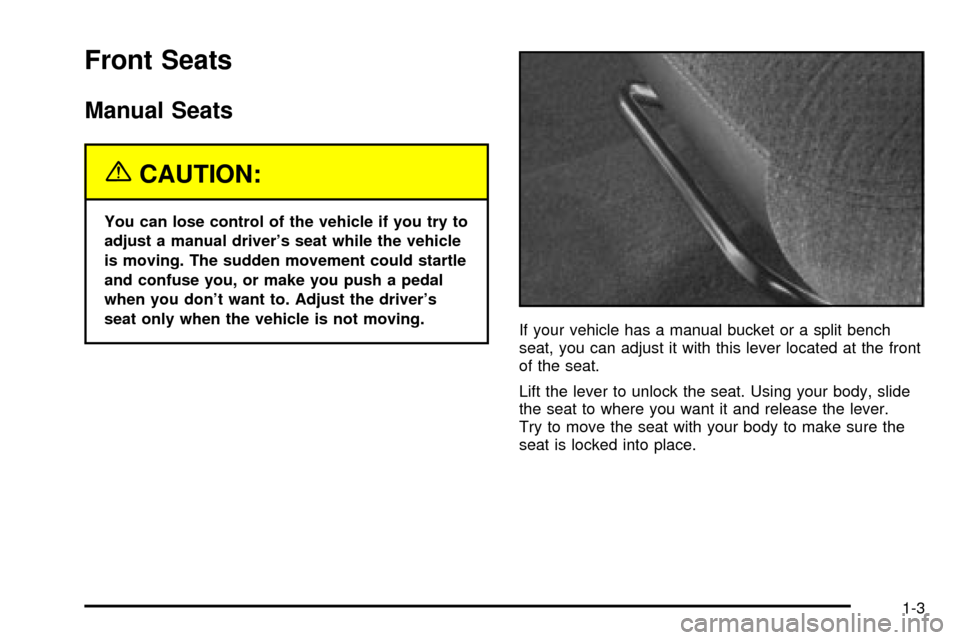
If your vehicle has a manual bucket or a split bench
seat, you can adjust it with this lever located at the front
of the seat.
Lift the lever to unlock the seat. Using your body, slide
the seat to where you want it and release the lever.
Try to move the seat with your body to make sure the
seat is locked into place.
1-3
Page 10 of 556
Power Seats
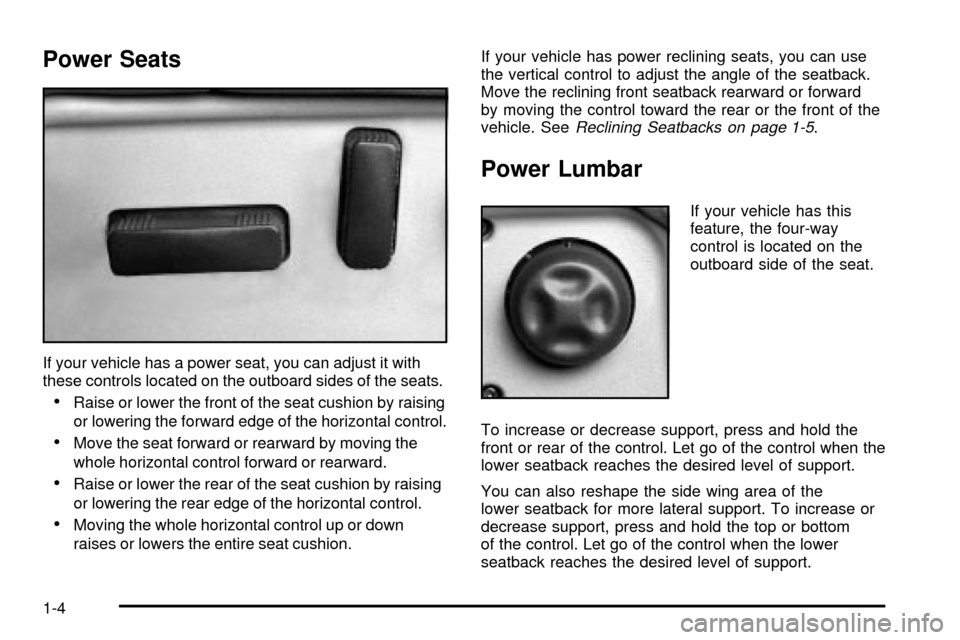
If your vehicle has a power seat, you can adjust it with
these controls located on the outboard sides of the seats.
·Raise or lower the front of the seat cushion by raising
or lowering the forward edge of the horizontal control.
·Move the seat forward or rearward by moving the
whole horizontal control forward or rearward.
·Raise or lower the rear of the seat cushion by raising
or lowering the rear edge of the horizontal control.
·Moving the whole horizontal control up or down
raises or lowers the entire seat cushion.If your vehicle has power reclining seats, you can use
the vertical control to adjust the angle of the seatback.
Move the reclining front seatback rearward or forward
by moving the control toward the rear or the front of the
vehicle. See
Reclining Seatbacks on page 1-5.
Power Lumbar
If your vehicle has this
feature, the four-way
control is located on the
outboard side of the seat.
To increase or decrease support, press and hold the
front or rear of the control. Let go of the control when the
lower seatback reaches the desired level of support.
You can also reshape the side wing area of the
lower seatback for more lateral support. To increase or
decrease support, press and hold the top or bottom
of the control. Let go of the control when the lower
seatback reaches the desired level of support.
1-4
Page 11 of 556
Heated Seats
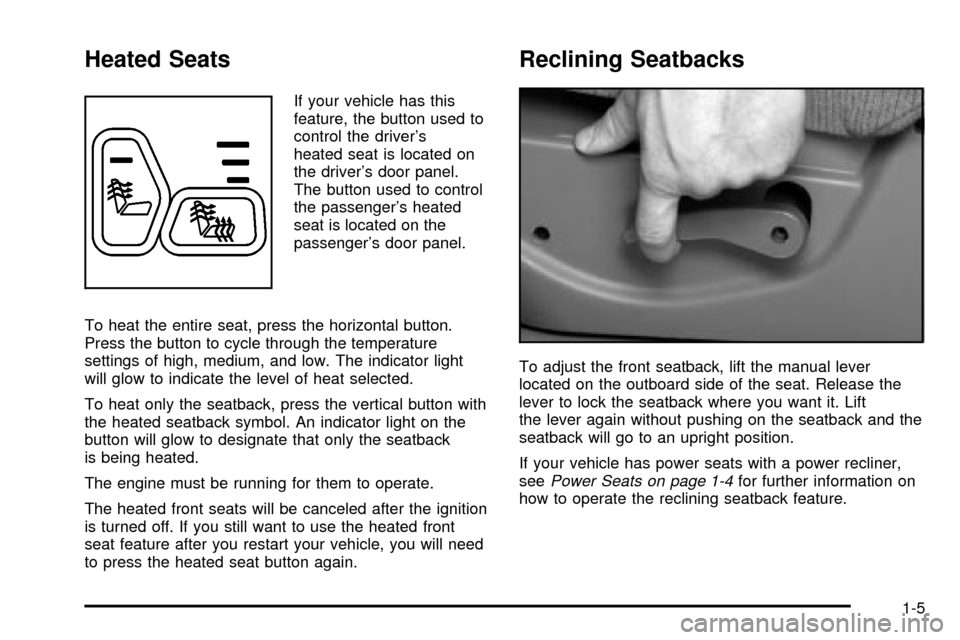
If your vehicle has this
feature, the button used to
control the driver's
heated seat is located on
the driver's door panel.
The button used to control
the passenger's heated
seat is located on the
passenger's door panel.
To heat the entire seat, press the horizontal button.
Press the button to cycle through the temperature
settings of high, medium, and low. The indicator light
will glow to indicate the level of heat selected.
To heat only the seatback, press the vertical button with
the heated seatback symbol. An indicator light on the
button will glow to designate that only the seatback
is being heated.
The engine must be running for them to operate.
The heated front seats will be canceled after the ignition
is turned off. If you still want to use the heated front
seat feature after you restart your vehicle, you will need
to press the heated seat button again.
Reclining Seatbacks
To adjust the front seatback, lift the manual lever
located on the outboard side of the seat. Release the
lever to lock the seatback where you want it. Lift
the lever again without pushing on the seatback and the
seatback will go to an upright position.
If your vehicle has power seats with a power recliner,
see
Power Seats on page 1-4for further information on
how to operate the reclining seatback feature.
1-5
Page 14 of 556
Rear Seats
Rear Seat Operation (Extended Cab)
Folding the Rear Seat
The extended cab's rear seat can be folded up to
provide more cargo space. To fold the seat do the
following:
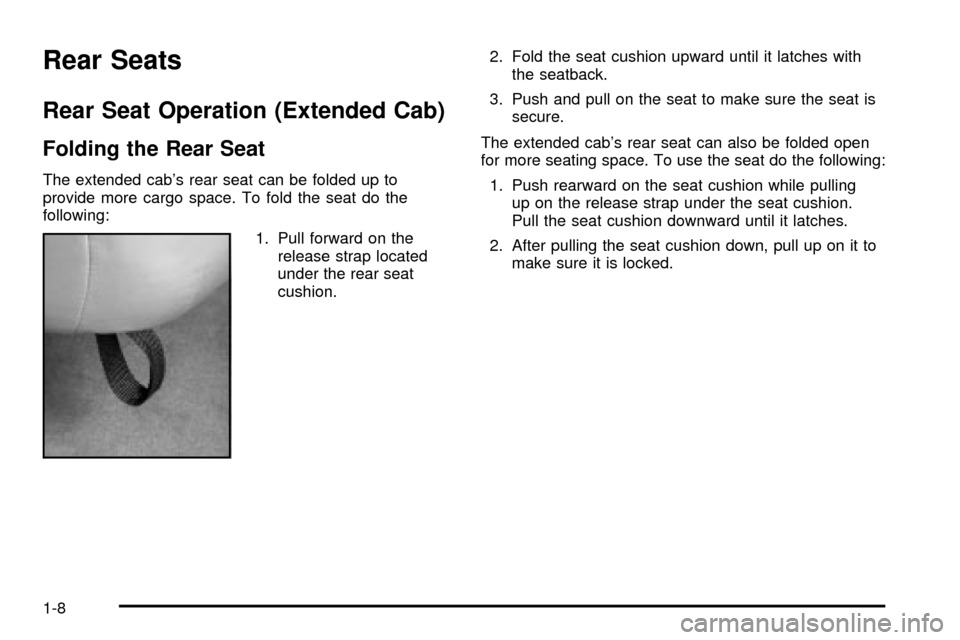
1. Pull forward on the
release strap located
under the rear seat
cushion.2. Fold the seat cushion upward until it latches with
the seatback.
3. Push and pull on the seat to make sure the seat is
secure.
The extended cab's rear seat can also be folded open
for more seating space. To use the seat do the following:
1. Push rearward on the seat cushion while pulling
up on the release strap under the seat cushion.
Pull the seat cushion downward until it latches.
2. After pulling the seat cushion down, pull up on it to
make sure it is locked.
1-8
Page 16 of 556
Safety Belts
Safety Belts: They Are for Everyone
This part of the manual tells you how to use safety
belts properly. It also tells you some things you should
not do with safety belts.
{CAUTION:
Don't let anyone ride where he or she can't
wear a safety belt properly. If you are in a
crash and you're not wearing a safety belt,
your injuries can be much worse. You can hit
things inside the vehicle or be ejected from it.
You can be seriously injured or killed. In the
same crash, you might not be, if you are
buckled up. Always fasten your safety belt,
and check that your passengers' belts are
fastened properly too.
{CAUTION:
It is extremely dangerous to ride in a cargo
area, inside or outside of a vehicle. In a
collision, people riding in these areas are more
likely to be seriously injured or killed. Do not
allow people to ride in any area of your vehicle
that is not equipped with seats and safety
belts. Be sure everyone in your vehicle is in a
seat and using a safety belt properly.
Your vehicle has a light
that comes on as a
reminder to buckle up. See
Safety Belt Reminder
Light on page 3-36.
In most states and in all Canadian provinces, the law
says to wear safety belts. Here's why:
They work.
You never know if you'll be in a crash. If you do have a
crash, you don't know if it will be a bad one.
1-10
Page 22 of 556
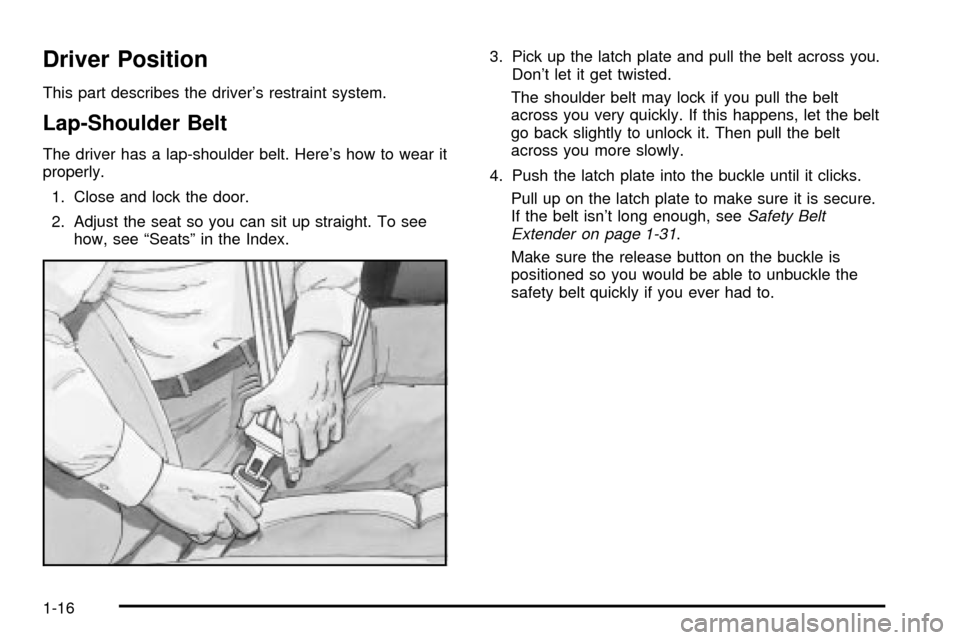
Driver Position
This part describes the driver's restraint system.
Lap-Shoulder Belt
The driver has a lap-shoulder belt. Here's how to wear it
properly.
1. Close and lock the door.
2. Adjust the seat so you can sit up straight. To see
how, see ªSeatsº in the Index.3. Pick up the latch plate and pull the belt across you.
Don't let it get twisted.
The shoulder belt may lock if you pull the belt
across you very quickly. If this happens, let the belt
go back slightly to unlock it. Then pull the belt
across you more slowly.
4. Push the latch plate into the buckle until it clicks.
Pull up on the latch plate to make sure it is secure.
If the belt isn't long enough, see
Safety Belt
Extender on page 1-31.
Make sure the release button on the buckle is
positioned so you would be able to unbuckle the
safety belt quickly if you ever had to.
1-16