ECO mode CHEVROLET SILVERADO 2011 2.G Owner's Manual
[x] Cancel search | Manufacturer: CHEVROLET, Model Year: 2011, Model line: SILVERADO, Model: CHEVROLET SILVERADO 2011 2.GPages: 588, PDF Size: 7.99 MB
Page 266 of 588
Black plate (40,1)Chevrolet Silverado Owner Manual - 2011
7-40 Infotainment System
If the foam ear pads attached to
the headphones become worn or
damaged, the pads can be replaced
separately from the headphone set.
To purchase replacement ear pads,
call 1‐888‐293‐3332, then prompt
zero (0), or contact your dealer.
Battery Replacement
To change the batteries on the
headphones:
1. Turn the screw to loosen thebattery door located on the left
side of the headphones. Slide
the battery door open.
2. Replace the two batteries in the compartment. Make sure that
they are installed correctly, using
the diagram on the inside of the
battery compartment.
3. Replace the battery door and tighten the door screw.
If the headphones are to be stored
for a long period of time, remove the
batteries and keep them in a cool,
dry place.Audio/Video (A/V) Jacks
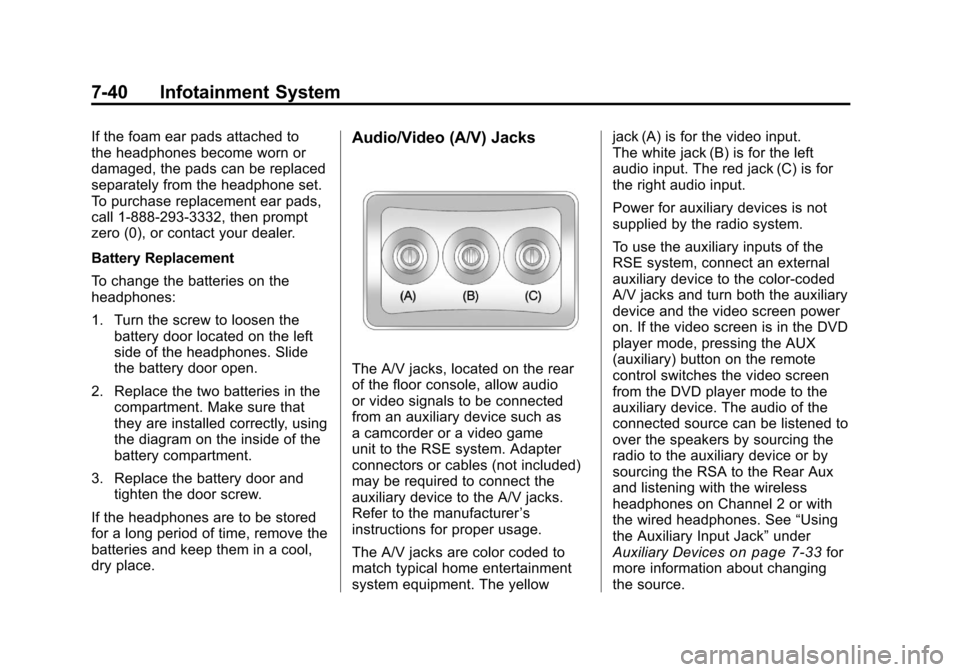
The A/V jacks, located on the rear
of the floor console, allow audio
or video signals to be connected
from an auxiliary device such as
a camcorder or a video game
unit to the RSE system. Adapter
connectors or cables (not included)
may be required to connect the
auxiliary device to the A/V jacks.
Refer to the manufacturer ’s
instructions for proper usage.
The A/V jacks are color coded to
match typical home entertainment
system equipment. The yellow jack (A) is for the video input.
The white jack (B) is for the left
audio input. The red jack (C) is for
the right audio input.
Power for auxiliary devices is not
supplied by the radio system.
To use the auxiliary inputs of the
RSE system, connect an external
auxiliary device to the color-coded
A/V jacks and turn both the auxiliary
device and the video screen power
on. If the video screen is in the DVD
player mode, pressing the AUX
(auxiliary) button on the remote
control switches the video screen
from the DVD player mode to the
auxiliary device. The audio of the
connected source can be listened to
over the speakers by sourcing the
radio to the auxiliary device or by
sourcing the RSA to the Rear Aux
and listening with the wireless
headphones on Channel 2 or with
the wired headphones. See
“Using
the Auxiliary Input Jack” under
Auxiliary Devices
on page 7‑33for
more information about changing
the source.
Page 269 of 588
Black plate (43,1)Chevrolet Silverado Owner Manual - 2011
Infotainment System 7-43
Objects blocking the line of sight
could also affect the function of the
remote control.
If a CD or DVD is in the Radio DVD
slot, the remote control
O(power)
button can be used to turn on the
video screen display and start the
disc. The radio can also turn on the
video screen display. See Operation
on page 7‑2for more information.
Notice: Storing the remote
control in a hot area or in direct
sunlight can damage it, and the
repairs will not be covered by the
warranty. Storage in extreme cold
can weaken the batteries. Keep
the remote control stored in a
cool, dry place.
If the remote control becomes
lost or damaged, a new universal
remote control can be purchased.
If this happens, make sure the
universal remote control uses a
code set of Toshiba
®. Remote Control Buttons
O(Power):
Press this button to
turn the video screen on and off.
P(Illumination): Press this button
to turn the remote control backlight
on. The backlight automatically
times out after 7 to 10 seconds if
no other button is pressed while
the backlight is on.
v(Title): Press this button to
return the DVD to the main menu of
the DVD. This function could vary
for each disc.
y(Main Menu): Press this button
to access the DVD menu. The DVD
menu is different on every DVD.
Use the navigation arrows to move
the cursor around the DVD menu.
After making a selection press the
enter button. This button only
operates when using a DVD.
n,q,p,o(Menu Navigation
Arrows): Use the arrow buttons to
navigate through a menu.
r(Enter): Press this button to
select the choice that is highlighted
in any menu.
z(Display Menu): Press this
button to adjust the brightness,
screen display mode (normal,
full, or zoom), and display the
language menu.
q(Return): Press this button
to exit the current active menu
and return to the previous menu.
This button operates only when
the display menu or a DVD menu
is active.
c(Stop): Press this button to
stop playing, fast reversing, or fast
forwarding a DVD. Press this button
twice to return to the beginning of
the DVD.
s(Play/Pause): Press this
button to start playing a DVD. Press
this button while a DVD is playing to
pause it. Press it again to continue
playing the DVD.
Page 270 of 588

Black plate (44,1)Chevrolet Silverado Owner Manual - 2011
7-44 Infotainment System
While the DVD is playing, the DVD
can be played slowly by pressing
the play/pause button then pressing
the fast forward button. The DVD
continues playing in a slow play
mode. Also, reverse can be played
slowly by pressing the play/pause
button and then pressing the fast
reverse button. To cancel slow play
mode, press the play/pause button.
t(Previous Track/Chapter):
Press this button to return to the
start of the current track or chapter.
Press this button again to go to
the previous track or chapter.
This button might not work when
the DVD is playing the copyright
information or the previews.
u(Next Track/Chapter): Press
this button to go to the beginning
of the next chapter or track. This
button might not work while the
DVD is playing the copyright
information or the previews.
r(Fast Reverse): Press this
button to quickly reverse the DVD
or CD. To stop fast reversing a DVD
video, press the play/pause button.
To stop fast reversing a DVD audio
or CD, release the fast reverse
button. This button might not work
when the DVD is playing the
copyright information or the
previews.
[(Fast Forward): Press this
button to fast forward the DVD or
CD. To stop fast forwarding a DVD
video, press the play/pause button.
To stop fast forwarding a DVD audio
or CD, release the fast forward
button. This button might not work
while the DVD is playing the
copyright information or the
previews.
e(Audio): Press this button to
change audio tracks on DVDs that
have this feature when the DVD is
playing. The format and content of
this function vary for each disc.
{(Subtitles): Press this button to
turn on or off subtitles and to move
through subtitle options when a
DVD is playing. The format and
content of this function vary for
each disc.
AUX (Auxiliary): Press this button
to switch the system between the
DVD player and an auxiliary source.
d(Camera): Press this button to
change camera angles on DVDs
that have this feature while a DVD is
playing. The format and content of
this function vary for each disc.
1 through 0 (Numeric Keypad):
The numeric keypad provides the
capability of direct chapter or track
number selection.
\(Clear): Press this button within
three seconds after entering a
numeric selection, to clear all
numerical inputs.
Page 271 of 588
Black plate (45,1)Chevrolet Silverado Owner Manual - 2011
Infotainment System 7-45
}10 (Double Digit Entries):Press
this button to select chapter or track
numbers greater than nine. Press
this button before entering the
number.
Battery Replacement
To change the remote control
batteries, do the following:
1. Slide the rear cover back on the remote control.
2. Replace the two batteries in the compartment. Make sure they
are installed correctly using the
diagram on the inside of the
remote control.
3. Replace the battery cover.
If the remote control is to be stored
for a long period of time, remove the
batteries and keep them in a cool,
dry place.Tips and Troubleshooting Chart
Problem Recommended Action
There is no power. The ignition might not be turned to
ON/RUN or ACC/ACCESSORY.
The picture does not fill the screen.
There are black borders on the top
and bottom or on both sides, or the
picture looks stretched out. Check the display mode settings
in the setup menu by pressing the
display menu button on the remote
control.
In auxiliary mode, the picture moves
or scrolls. Check the auxiliary input
connections at both devices.
The remote control does not work. Check to make sure there is no obstruction between the remote
control and the transmitter window.
Check the batteries to make sure
they are not dead or installed
incorrectly.
After stopping the player, and
pushing Play, sometimes the
DVD starts where it left off and
sometimes at the beginning. If the stop button was pressed one
time, the DVD player resumes
playing where the DVD was
stopped. If the stop button was
pressed two times, the DVD player
begins to play from the beginning
of the DVD.
Page 272 of 588
Black plate (46,1)Chevrolet Silverado Owner Manual - 2011
7-46 Infotainment System
Tips and Troubleshooting Chart (cont'd)
ProblemRecommended Action
The auxiliary source is running, but
there is no picture or sound. Check that the RSE video screen
is in the auxiliary source mode.
Check the auxiliary input
connections at both devices.
Sometimes the wireless headphone
audio cuts out or buzzes. Check for obstructions, low
batteries, reception range, and
interference from cellular telephone
towers, or use a cellular telephone
in the vehicle.
Check that the headphones are
on correctly using the L (left) and
R (right) on the headphones.
The remote and/or the headphones
are lost. See your dealer for assistance.
The DVD is playing, but there is no
picture or sound. Check that the RSE video screen is
sourced to the DVD player.
DVD Display Error Messages
The DVD display error message
depends on the radio that is in the
vehicle. The video screen can
display one of the following:
Disc Load/Eject Error:
This
message displays when there are
disc load or eject problems.
Disc Format Error: This message
displays if the disc is inserted with
the disc label wrong side up, or if
the disc is damaged.
Disc Region Error: This message
displays if the disc is not from a
correct region.
No Disc Inserted: This message
displays if no disc is present when
EJECT or DVD AUX is pressed on
the radio.
Page 286 of 588
Black plate (4,1)Chevrolet Silverado Owner Manual - 2011
8-4 Climate Controls
Climate Control Systems (with Heater Only)
With this system the heating and ventilation can be controlled.
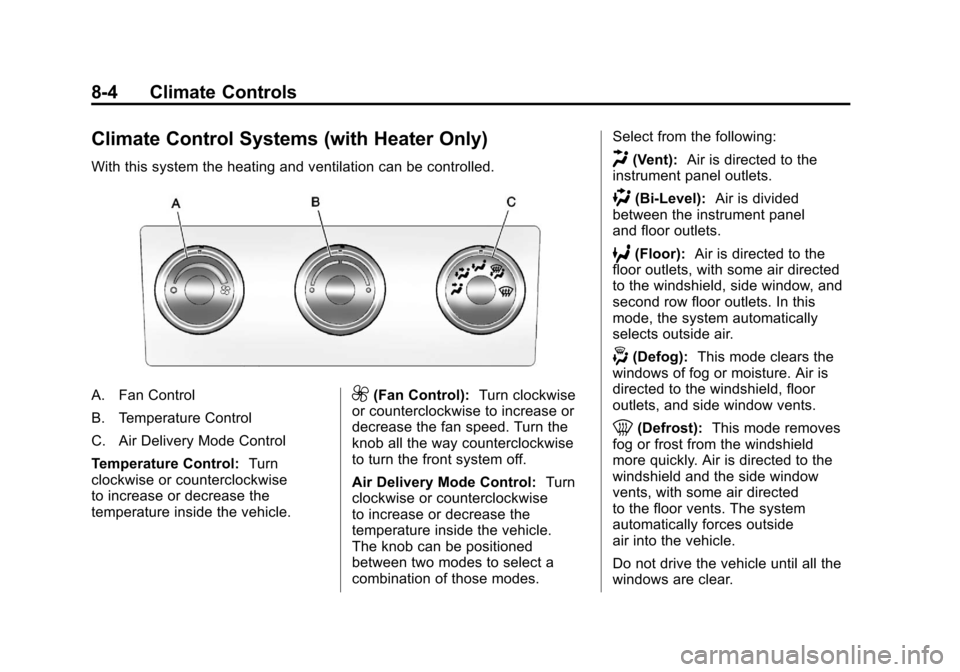
A. Fan Control
B. Temperature Control
C. Air Delivery Mode Control
Temperature Control:Turn
clockwise or counterclockwise
to increase or decrease the
temperature inside the vehicle.9(Fan Control): Turn clockwise
or counterclockwise to increase or
decrease the fan speed. Turn the
knob all the way counterclockwise
to turn the front system off.
Air Delivery Mode Control: Turn
clockwise or counterclockwise
to increase or decrease the
temperature inside the vehicle.
The knob can be positioned
between two modes to select a
combination of those modes. Select from the following:
H(Vent):
Air is directed to the
instrument panel outlets.
)(Bi-Level): Air is divided
between the instrument panel
and floor outlets.
6(Floor): Air is directed to the
floor outlets, with some air directed
to the windshield, side window, and
second row floor outlets. In this
mode, the system automatically
selects outside air.
-(Defog): This mode clears the
windows of fog or moisture. Air is
directed to the windshield, floor
outlets, and side window vents.
0(Defrost): This mode removes
fog or frost from the windshield
more quickly. Air is directed to the
windshield and the side window
vents, with some air directed
to the floor vents. The system
automatically forces outside
air into the vehicle.
Do not drive the vehicle until all the
windows are clear.
Page 288 of 588
Black plate (6,1)Chevrolet Silverado Owner Manual - 2011
8-6 Climate Controls
Driver and Passenger Side
Temperature Controls
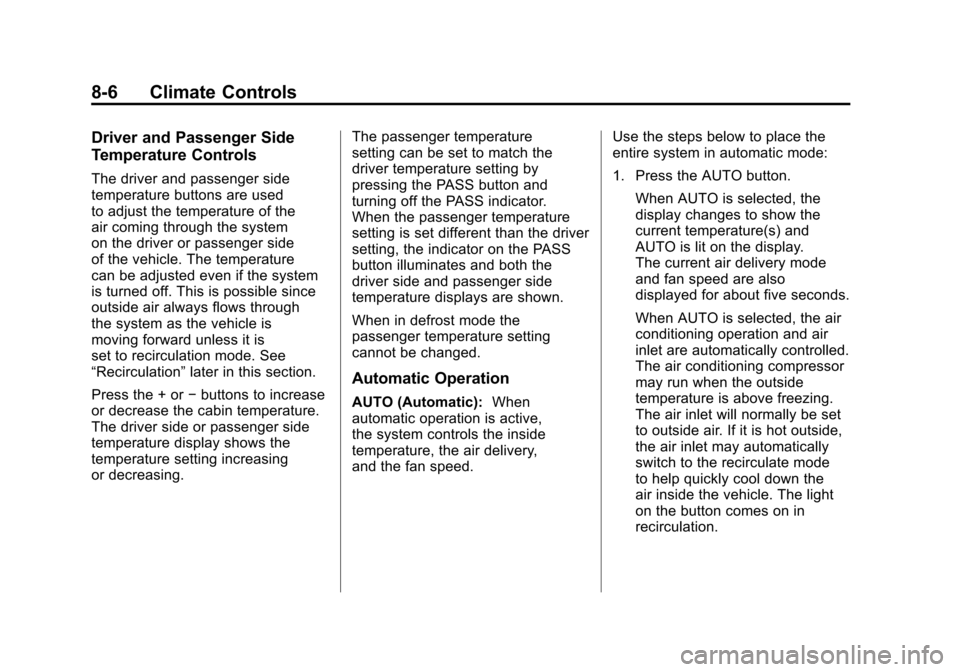
The driver and passenger side
temperature buttons are used
to adjust the temperature of the
air coming through the system
on the driver or passenger side
of the vehicle. The temperature
can be adjusted even if the system
is turned off. This is possible since
outside air always flows through
the system as the vehicle is
moving forward unless it is
set to recirculation mode. See
“Recirculation”later in this section.
Press the + or −buttons to increase
or decrease the cabin temperature.
The driver side or passenger side
temperature display shows the
temperature setting increasing
or decreasing. The passenger temperature
setting can be set to match the
driver temperature setting by
pressing the PASS button and
turning off the PASS indicator.
When the passenger temperature
setting is set different than the driver
setting, the indicator on the PASS
button illuminates and both the
driver side and passenger side
temperature displays are shown.
When in defrost mode the
passenger temperature setting
cannot be changed.
Automatic Operation
AUTO (Automatic):
When
automatic operation is active,
the system controls the inside
temperature, the air delivery,
and the fan speed. Use the steps below to place the
entire system in automatic mode:
1. Press the AUTO button.
When AUTO is selected, the
display changes to show the
current temperature(s) and
AUTO is lit on the display.
The current air delivery mode
and fan speed are also
displayed for about five seconds.
When AUTO is selected, the air
conditioning operation and air
inlet are automatically controlled.
The air conditioning compressor
may run when the outside
temperature is above freezing.
The air inlet will normally be set
to outside air. If it is hot outside,
the air inlet may automatically
switch to the recirculate mode
to help quickly cool down the
air inside the vehicle. The light
on the button comes on in
recirculation.
Page 290 of 588

Black plate (8,1)Chevrolet Silverado Owner Manual - 2011
8-8 Climate Controls
)(Bi-Level):Air is divided
between the instrument panel and
floor outlets. Some air is directed
toward the windshield and side
window outlets.
6(Floor): Air is directed to the
floor outlets, with some to the
windshield, side window outlets,
and second row floor outlets. In this
mode, the system automatically
selects outside air.
-(Defog): This mode clears the
windows of fog or moisture. Air is
directed to the windshield, floor
outlets, and side window vents.
In this mode, the system turns
off recirculation and runs the air
conditioning compressor unless
the outside temperature is close to
freezing. The recirculation mode
cannot be selected while in the
defrost mode.
0(Defrost): This mode removes
fog or frost from the windshield
more quickly. Air is directed to the
windshield and side window vents,
with some directed to the floor
vents. In this mode, the system
automatically forces outside air
into the vehicle and runs the air
conditioning compressor unless
the outside temperature is close to
freezing. The recirculation mode
cannot be selected while in the
defrost mode.
The passenger temperature
control cannot be activated while in
defrost mode. If the PASS button is
pressed, the button indicator flashes
three times and will not work. If the
passenger temperature buttons are
adjusted, the driver temperature
indicator changes. The passenger
temperature will not be displayed. If vent, bi-level, or floor mode is
selected again, the climate control
system displays the previous
temperature settings.
Do not drive the vehicle until all
windows are clear.
#(Air Conditioning):
Press to
turn the air conditioning (A/C)
compressor on and off. An indicator
light comes on to show that the air
conditioning is on.
If this button is pressed when
the air conditioning compressor
is unavailable due to outside
conditions, the indicator flashes
three times and then turns off.
If the air conditioning is on and the
outside temperature drops below a
temperature which is too cool for air
conditioning to be effective, the air
conditioning light turns off to show
that the air conditioning mode has
been canceled.
Page 295 of 588
Black plate (1,1)Chevrolet Silverado Owner Manual - 2011
Driving and Operating 9-1
Driving and
Operating
Driving Information
Defensive Driving . . . . . . . . . . . . . 9-2
Drunk Driving . . . . . . . . . . . . . . . . . 9-2
Control of a Vehicle . . . . . . . . . . . 9-3
Braking . . . . . . . . . . . . . . . . . . . . . . . 9-3
Steering . . . . . . . . . . . . . . . . . . . . . . . 9-4
Off-Road Recovery . . . . . . . . . . . . 9-5
Loss of Control . . . . . . . . . . . . . . . . 9-6
Off-Road Driving . . . . . . . . . . . . . . 9-7
Driving on Wet Roads . . . . . . . 9-18
Highway Hypnosis . . . . . . . . . . . 9-19
Hill and Mountain Roads . . . . . 9-19
Winter Driving . . . . . . . . . . . . . . . 9-20
If the Vehicle is Stuck . . . . . . . . 9-22
Vehicle Load Limits . . . . . . . . . . 9-23
Truck-Camper LoadingInformation . . . . . . . . . . . . . . . . . 9-30
Starting and Operating
New Vehicle Break-In . . . . . . . . 9-32
Adjustable Throttle and BrakePedal . . . . . . . . . . . . . . . . . . . . . . . 9-32
Ignition Positions . . . . . . . . . . . . 9-33 Retained Accessory
Power (RAP) . . . . . . . . . . . . . . . 9-35
Starting the Engine . . . . . . . . . . 9-35
Fast Idle System . . . . . . . . . . . . . 9-37
Engine Coolant Heater . . . . . . . 9-37
Shifting Into Park . . . . . . . . . . . . 9-38
Shifting Out of Park . . . . . . . . . . 9-40
Parking (Manual Transmission) . . . . . . . . . . . . . . 9-41
Parking Over Things That Burn . . . . . . . . . . . . . . . . . . 9-41
Active Fuel Management™ . . . . . . . . . . . . . 9-41
Engine Exhaust
Engine Exhaust . . . . . . . . . . . . . . 9-42
Running the Vehicle While
Parked . . . . . . . . . . . . . . . . . . . . . 9-42
Automatic Transmission
Automatic Transmission . . . . . 9-43
Manual Mode . . . . . . . . . . . . . . . . 9-47
Tow/Haul Mode . . . . . . . . . . . . . . 9-49
Manual Transmission
Manual Transmission . . . . . . . . 9-51
Drive Systems
Four-Wheel Drive . . . . . . . . . . . . 9-53
Brakes
Antilock BrakeSystem (ABS) . . . . . . . . . . . . . . 9-67
Parking Brake . . . . . . . . . . . . . . . 9-68
Brake Assist (Except With 4.3L V6 Engine) . . . . . . . . . . . . 9-69
Hill Start Assist (HSA) . . . . . . . 9-70
Ride Control Systems
StabiliTrak®System . . . . . . . . . 9-70
Locking Rear Axle . . . . . . . . . . . 9-73
Cruise Control
Cruise Control . . . . . . . . . . . . . . . 9-73
Object Detection Systems
Ultrasonic Parking Assist . . . . 9-76
Rear Vision Camera (RVC) . . . . . . . . . . . . . 9-78
Fuel
Fuel . . . . . . . . . . . . . . . . . . . . . . . . . 9-83
Recommended Fuel . . . . . . . . . 9-84
Gasoline Specifications . . . . . . 9-84
California FuelRequirements . . . . . . . . . . . . . . 9-84
Fuels in Foreign Countries . . . 9-85
Fuel Additives . . . . . . . . . . . . . . . 9-85
Page 335 of 588
Black plate (41,1)Chevrolet Silverado Owner Manual - 2011
Driving and Operating 9-41
Parking (Manual
Transmission)
If the vehicle has a manual
transmission, before you get out of
the vehicle, move the shift lever into
R (Reverse), and firmly apply the
parking brake. Once the shift lever
has been placed into R (Reverse)
with the clutch pedal pressed in,
turn the ignition key to LOCK/OFF,
remove the key and release the
clutch.
If you are parking on a hill, or if
the vehicle is pulling a trailer, see
Driving Characteristics and Towing
Tips on page 9‑90.
Parking Over Things
That Burn
{WARNING
Things that can burn could touch
hot exhaust parts under the
vehicle and ignite. Do not park
over papers, leaves, dry grass,
or other things that can burn.
Active Fuel
Management™
Vehicles with V8 engines may have
Active Fuel Management™. This
system allows the engine to operate
on either all or half of its cylinders,
depending on the driving conditions.When less power is required, such
as cruising at a constant vehicle
speed, the system will operate in
the half cylinder mode, allowing
the vehicle to achieve better fuel
economy. When greater power
demands are required, such as
accelerating from a stop, passing,
or merging onto a freeway, the
system will maintain full-cylinder
operation.
If the vehicle has an Active
Fuel Management™
indicator, see
Driver Information Center (DIC)
on
page 5‑34for more information on
using this display.