engine CHEVROLET SILVERADO 2011 2.G Owner's Guide
[x] Cancel search | Manufacturer: CHEVROLET, Model Year: 2011, Model line: SILVERADO, Model: CHEVROLET SILVERADO 2011 2.GPages: 588, PDF Size: 7.99 MB
Page 182 of 588
Black plate (32,1)Chevrolet Silverado Owner Manual - 2011
5-32 Instruments and Controls
The light flashes if the system is
active and is working to assist the
driver with directional control of the
vehicle in difficult driving conditions.
SeeStabiliTrak
®Systemon
page 9‑70for more information.
If the vehicle is a hybrid, see the
hybrid supplement for more
information.
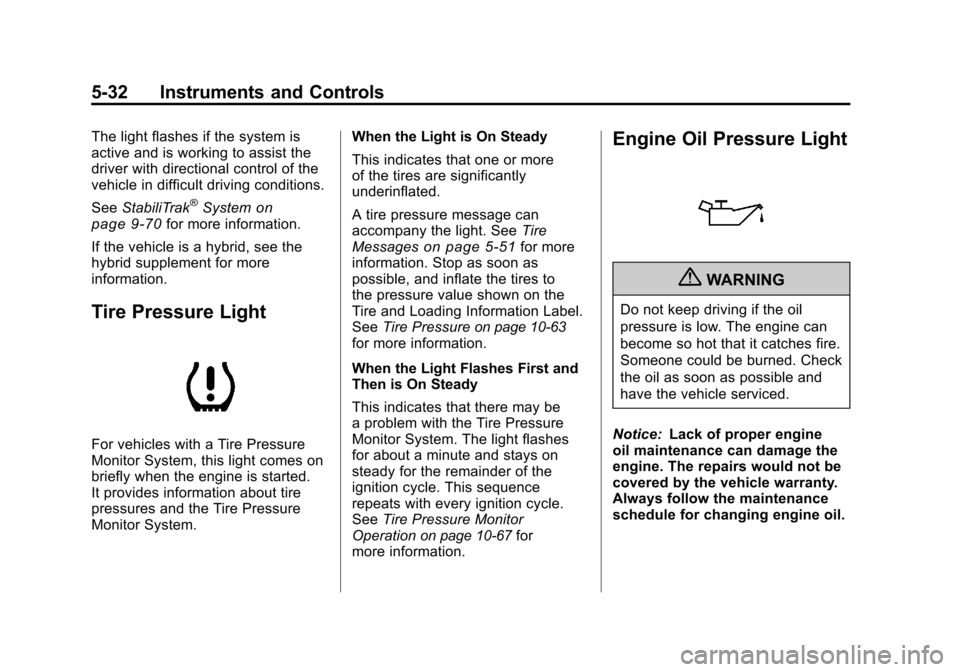
Tire Pressure Light
For vehicles with a Tire Pressure
Monitor System, this light comes on
briefly when the engine is started.
It provides information about tire
pressures and the Tire Pressure
Monitor System. When the Light is On Steady
This indicates that one or more
of the tires are significantly
underinflated.
A tire pressure message can
accompany the light. See
Tire
Messages
on page 5‑51for more
information. Stop as soon as
possible, and inflate the tires to
the pressure value shown on the
Tire and Loading Information Label.
See Tire Pressure
on page 10‑63for more information.
When the Light Flashes First and
Then is On Steady
This indicates that there may be
a problem with the Tire Pressure
Monitor System. The light flashes
for about a minute and stays on
steady for the remainder of the
ignition cycle. This sequence
repeats with every ignition cycle.
SeeTire Pressure Monitor
Operation
on page 10‑67for
more information.
Engine Oil Pressure Light
{WARNING
Do not keep driving if the oil
pressure is low. The engine can
become so hot that it catches fire.
Someone could be burned. Check
the oil as soon as possible and
have the vehicle serviced.
Notice: Lack of proper engine
oil maintenance can damage the
engine. The repairs would not be
covered by the vehicle warranty.
Always follow the maintenance
schedule for changing engine oil.
Page 183 of 588
Black plate (33,1)Chevrolet Silverado Owner Manual - 2011
Instruments and Controls 5-33
This light comes on briefly while
starting the engine. If it does not,
have the vehicle serviced by your
dealer. If the system is working
normally the indicator light then
goes off.
If the light comes on and stays on, it
means that oil is not flowing through
the engine properly. The vehicle
could be low on oil and it might
have some other system problem.
If the vehicle is a hybrid, see
the hybrid supplement for more
information.
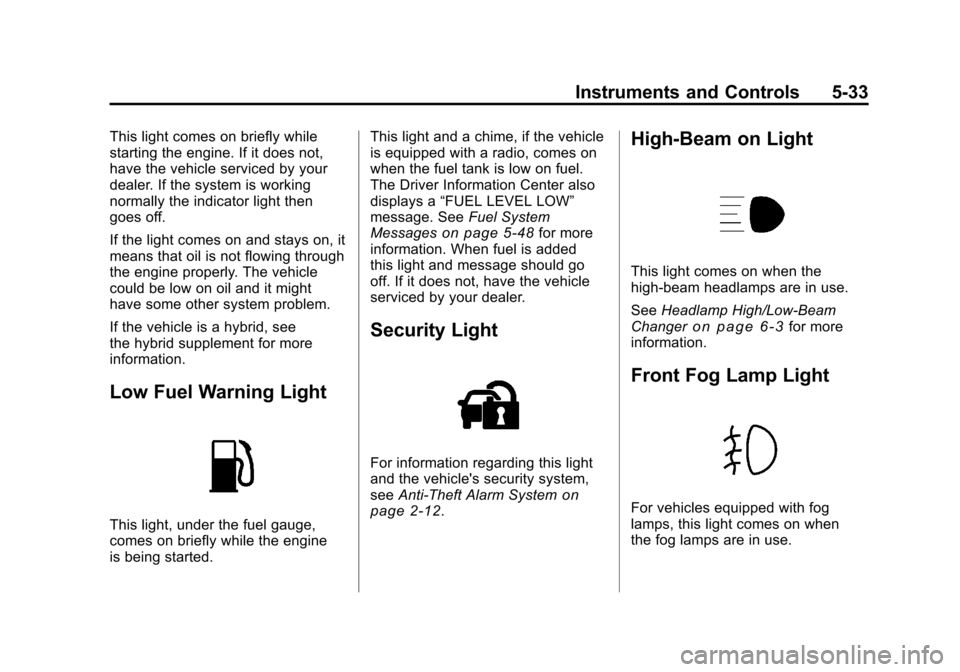
Low Fuel Warning Light
This light, under the fuel gauge,
comes on briefly while the engine
is being started.This light and a chime, if the vehicle
is equipped with a radio, comes on
when the fuel tank is low on fuel.
The Driver Information Center also
displays a
“FUEL LEVEL LOW”
message. See Fuel System
Messages
on page 5‑48for more
information. When fuel is added
this light and message should go
off. If it does not, have the vehicle
serviced by your dealer.
Security Light
For information regarding this light
and the vehicle's security system,
see Anti-Theft Alarm System
on
page 2‑12.
High-Beam on Light
This light comes on when the
high-beam headlamps are in use.
See Headlamp High/Low-Beam
Changer
on page 6‑3for more
information.
Front Fog Lamp Light
For vehicles equipped with fog
lamps, this light comes on when
the fog lamps are in use.
Page 184 of 588
Black plate (34,1)Chevrolet Silverado Owner Manual - 2011
5-34 Instruments and Controls
The light goes out when the fog
lamps are turned off. SeeFog
Lamps
on page 6‑6for more
information.
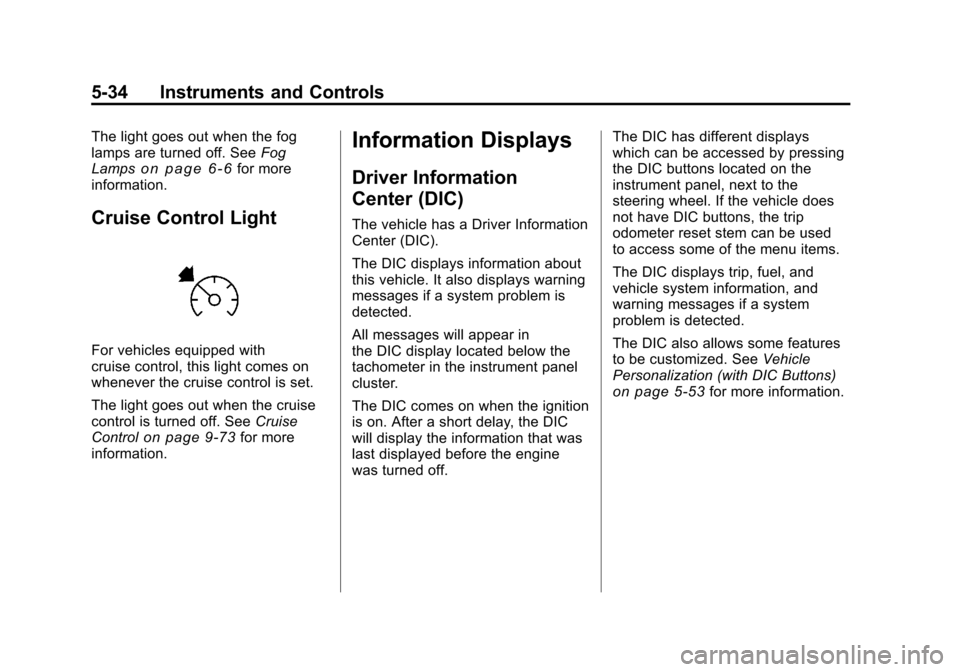
Cruise Control Light
For vehicles equipped with
cruise control, this light comes on
whenever the cruise control is set.
The light goes out when the cruise
control is turned off. See Cruise
Control
on page 9‑73for more
information.
Information Displays
Driver Information
Center (DIC)
The vehicle has a Driver Information
Center (DIC).
The DIC displays information about
this vehicle. It also displays warning
messages if a system problem is
detected.
All messages will appear in
the DIC display located below the
tachometer in the instrument panel
cluster.
The DIC comes on when the ignition
is on. After a short delay, the DIC
will display the information that was
last displayed before the engine
was turned off. The DIC has different displays
which can be accessed by pressing
the DIC buttons located on the
instrument panel, next to the
steering wheel. If the vehicle does
not have DIC buttons, the trip
odometer reset stem can be used
to access some of the menu items.
The DIC displays trip, fuel, and
vehicle system information, and
warning messages if a system
problem is detected.
The DIC also allows some features
to be customized. See
Vehicle
Personalization (with DIC Buttons)
on page 5‑53for more information.
Page 185 of 588
Black plate (35,1)Chevrolet Silverado Owner Manual - 2011
Instruments and Controls 5-35
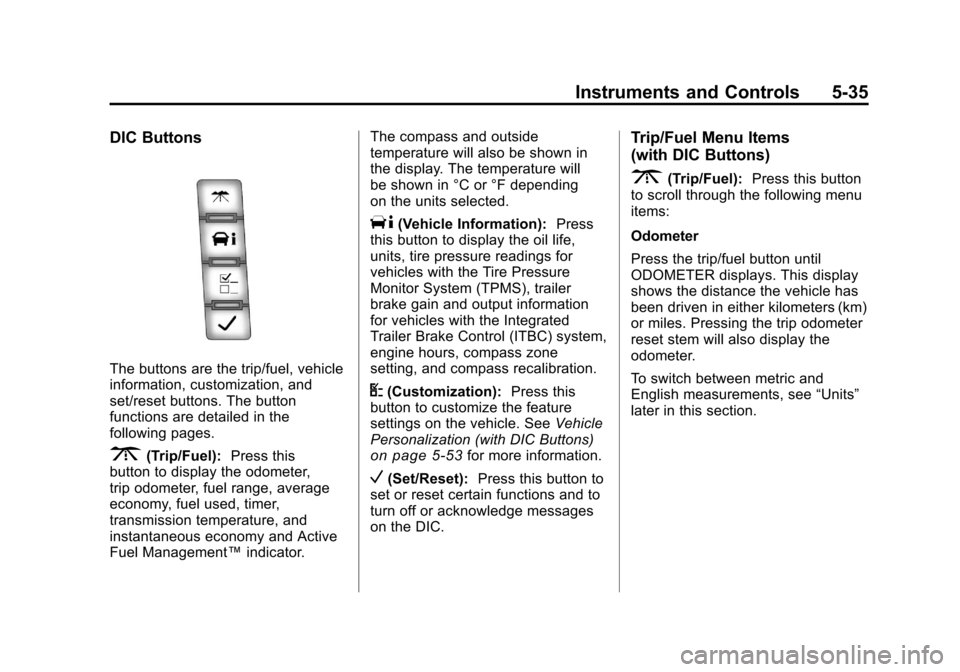
DIC Buttons
The buttons are the trip/fuel, vehicle
information, customization, and
set/reset buttons. The button
functions are detailed in the
following pages.
3(Trip/Fuel):Press this
button to display the odometer,
trip odometer, fuel range, average
economy, fuel used, timer,
transmission temperature, and
instantaneous economy and Active
Fuel Management™ indicator.The compass and outside
temperature will also be shown in
the display. The temperature will
be shown in °C or °F depending
on the units selected.
T(Vehicle Information):
Press
this button to display the oil life,
units, tire pressure readings for
vehicles with the Tire Pressure
Monitor System (TPMS), trailer
brake gain and output information
for vehicles with the Integrated
Trailer Brake Control (ITBC) system,
engine hours, compass zone
setting, and compass recalibration.
U(Customization): Press this
button to customize the feature
settings on the vehicle. See Vehicle
Personalization (with DIC Buttons)
on page 5‑53for more information.
V(Set/Reset): Press this button to
set or reset certain functions and to
turn off or acknowledge messages
on the DIC.
Trip/Fuel Menu Items
(with DIC Buttons)
3(Trip/Fuel): Press this button
to scroll through the following menu
items:
Odometer
Press the trip/fuel button until
ODOMETER displays. This display
shows the distance the vehicle has
been driven in either kilometers (km)
or miles. Pressing the trip odometer
reset stem will also display the
odometer.
To switch between metric and
English measurements, see “Units”
later in this section.
Page 188 of 588
Black plate (38,1)Chevrolet Silverado Owner Manual - 2011
5-38 Instruments and Controls
An Active Fuel Management
indicator displays on the right
side of the DIC, while INST ECON
displays on the left side. Active
Fuel Management allows the engine
to operate on either four or eight
cylinders, depending on driving
demands. When Active Fuel
Management is active, V4 will
display on the DIC. When Active
Fuel Management is inactive,
V8 will display. SeeActive Fuel
Management™
on page 9‑41for more information.
Blank Display
This display shows no information.
Vehicle Information Menu
Items (with DIC Buttons)
T(Vehicle Information): Press
this button to scroll through the
following menu items:
Oil Life
Press the vehicle information
button until OIL LIFE REMAINING
displays. This display shows an
estimate of the oil's remaining useful
life. If you see 99% OIL LIFE
REMAINING on the display, that
means 99% of the current oil life
remains. The engine oil life system
will alert you to change the oil on
a schedule consistent with your
driving conditions.
When the remaining oil life is low,
the CHANGE ENGINE OIL SOON
message will appear on the display.
See “CHANGE ENGINE OIL SOON” under
Engine Oil Messages
on
page 5‑47. You should change
the oil as soon as you can.
See Engine Oil
on page 10‑7.
In addition to the engine oil life
system monitoring the oil life,
additional maintenance is
recommended in the Maintenance
Schedule in this manual. See
Scheduled Maintenance
on
page 11‑2for more information.
Remember, you must reset the
OIL LIFE display after each oil
change. It will not reset itself. Also,
be careful not to reset the OIL LIFE
display accidentally at any time
other than when the oil has just
been changed. It cannot be reset
accurately until the next oil change.
To reset the engine oil life system,
see Engine Oil Life System
on
page 10‑9.
Page 190 of 588
Black plate (40,1)Chevrolet Silverado Owner Manual - 2011
5-40 Instruments and Controls
Engine Hours
Press the vehicle information button
until ENGINE HOURS displays.
This display shows the total number
of hours the engine has run.
Compass Zone Setting
This display allows for setting the
compass zone. SeeCompass
on
page 5‑6for more information.
Compass Recalibration
This display allows for calibrating
the compass. See Compass
on
page 5‑6for more information.
Blank Display
This display shows no information.
Trip Odometer Reset Stem
Menu Items (with DIC Buttons)
Use the trip odometer reset stem
to view the odometer and trip
odometer. The Language selection
and Engine Hours display can also
be accessed with the trip odometer
reset stem. Odometer
Press the trip odometer reset
stem until ODOMETER displays.
This display shows the distance the
vehicle has been driven in either
kilometers (km) or miles (mi).
Trip Odometer
Press the trip odometer reset
stem until TRIP displays. This
display shows the current distance
traveled in either kilometers (km) or
miles (mi) since the last reset for the
trip odometer.
The trip odometer can be reset to
zero by pressing and holding the trip
odometer reset stem while the trip
odometer is displayed.
The trip odometer has a feature
called the retro-active reset. This
can be used to set the trip odometer
to the number of miles (kilometers)
driven since the ignition was last
turned on. This can be used if the
trip odometer is not reset at the
beginning of the trip.
To use the retro-active reset feature,
press and hold the trip odometer
reset stem for at least four seconds.
The trip odometer will display the
number of kilometers (km) or
miles (mi) driven since the ignition
was last turned on and the
vehicle was moving. Once the
vehicle begins moving, the trip
odometer will accumulate mileage.
For example, if the vehicle was
driven 8 km (5 miles) before it
is started again, and then the
retro-active reset feature is
activated, the display will show
8 km (5 miles). As the vehicle
begins moving, the display will
then increase to 8.2 km (5.1 miles),
8.4 km (5.2 miles), etc.
Page 191 of 588
Black plate (41,1)Chevrolet Silverado Owner Manual - 2011
Instruments and Controls 5-41
Language
This display allows you to select
the language in which the DIC
messages will appear. To select a
language:
1. Press the trip odometer resetstem until ODOMETER displays.
2. While in the ODOMETER display, press and hold the
trip odometer reset stem for
three seconds until the currently
set language displays.
3. Continue to press and hold the trip odometer reset stem to scroll
through all of the available
languages.
The available selections
are ENGLISH (default),
FRANCAIS (French),
ESPANOL (Spanish), and
NO CHANGE.
4. Once the desired language is displayed, release the trip
odometer reset stem to set the
choice. Engine Hours
To display the ENGINE HOURS,
place the ignition in LOCK/OFF or
ACC/ACCESSORY, then press and
hold the trip odometer reset stem
for four seconds while viewing the
ODOMETER. This display shows
the total number of hours the engine
has run.
Trip Odometer Reset Stem
Menu Items (without DIC
Buttons)
Language
This display allows you to select
the language in which the DIC
messages will appear. To select a
language:
1. Press the trip odometer reset
stem until ODOMETER displays.
2. While in the ODOMETER display, press and hold the
trip odometer reset stem for
three seconds until the currently
set language displays. 3. Continue to press and hold the
trip odometer reset stem to scroll
through all of the available
languages.
The available languages
are ENGLISH (default),
FRANCAIS (French),
ESPANOL (Spanish), and
NO CHANGE.
4. Once the desired language is displayed, release the trip
odometer reset stem to set the
choice.
Trip Odometer
Press the trip odometer reset stem
until TRIP displays. This display
shows the current distance traveled
in either kilometers (km) or
miles (mi) since the last reset
for the trip odometer.
The trip odometer can be reset to
zero by pressing and holding the trip
odometer reset stem while the trip
odometer is displayed.
Page 192 of 588
Black plate (42,1)Chevrolet Silverado Owner Manual - 2011
5-42 Instruments and Controls
The trip odometer has a feature
called the retro-active reset. This
can be used to set the trip odometer
to the number of miles (kilometers)
driven since the ignition was last
turned on. This can be used if the
trip odometer is not reset at the
beginning of the trip.
To use the retro-active reset feature,
press and hold the trip odometer
reset stem for at least four seconds.
The trip odometer will display
the number of kilometers (km)
or miles (mi) driven since the
ignition was last turned on and
the vehicle was moving. Once
the vehicle begins moving, the trip
odometer will accumulate mileage.
For example, if the vehicle was
driven 8 km (5 miles) before it
is started again, and then the
retro-active reset feature is
activated, the display will show
8 km (5 miles). As the vehicle
begins moving, the display will
then increase to 8.2 km (5.1 miles),
8.4 km (5.2 miles), etc.Transmission Temperature
Press the trip odometer reset
stem until TRANS TEMP displays.
This display shows the temperature
of the automatic transmission fluid
in either degrees Celsius (°C) or
degrees Fahrenheit (°F) .
Trailer Gain and Output
On vehicles with the Integrated
Trailer Brake Control (ITBC) system,
the trailer brake display appears in
the DIC. Press the trip odometer
reset stem until TRAILER GAIN
and OUTPUT display.
TRAILER GAIN shows the trailer
gain setting. This setting can be
adjusted from 0.0 to 10.0 with either
a trailer connected or disconnected.
OUTPUT shows the power output
to the trailer any time a trailer with
electric brakes is connected. Output
is displayed in 0 to 10 bars. Dashes
may appear in the OUTPUT display.
To adjust trailer gain see
“Integrated
Trailer Brake Control System” under
Towing Equipment
on page 9‑111for
more information.
Compass Zone Setting
This display allows for setting the
compass zone. See Compass
on
page 5‑6for more information.
Compass Recalibration
This display allows for calibrating
the compass. See Compass
on
page 5‑6for more information.
Oil Life
To access this display, the vehicle
must be in P (Park). Press the trip
odometer reset stem until OIL LIFE
REMAINING displays. This display
shows an estimate of the oil's
remaining useful life. If you see
99% OIL LIFE REMAINING on the
display, that means 99% of the
current oil life remains. The engine
oil life system will alert you to
change the oil on a schedule
consistent with your driving
conditions.
Page 193 of 588
Black plate (43,1)Chevrolet Silverado Owner Manual - 2011
Instruments and Controls 5-43
When the remaining oil life is low,
the CHANGE ENGINE OIL SOON
message will appear on the display.
See“CHANGE ENGINE OIL SOON”
under Engine Oil Messages
on
page 5‑47. You should change
the oil as soon as you can.
See Engine Oil
on page 10‑7.
In addition to the engine oil life
system monitoring the oil life,
additional maintenance is
recommended in the Maintenance
Schedule in this manual. See
Scheduled Maintenance
on
page 11‑2for more information.
Remember, you must reset the
OIL LIFE display after each oil
change. It will not reset itself. Also,
be careful not to reset the OIL LIFE
display accidentally at any time
other than when the oil has just
been changed. It cannot be reset
accurately until the next oil change.
To reset the engine oil life system,
see Engine Oil Life System
on
page 10‑9.
Vehicle Messages
Messages displayed on the DIC
indicate the status of the vehicle
or some action may be needed
to correct a condition. Multiple
messages may appear one after
another.
The messages that do not
require immediate action can be
acknowledged and cleared by
pressing
V(Set/Reset) or the trip
odometer reset stem.
The messages that require
immediate action cannot be cleared
until that action is performed.
All messages should be taken
seriously and clearing the message
does not correct the problem.
The following are the possible
messages and some information
about them.
Battery Voltage and
Charging Messages
BATTERY LOW START
VEHICLE
When the vehicle’ s battery is
severely discharged, this message
will display and four chimes
will sound. Start the vehicle
immediately. If the vehicle is not
started and the battery continues
to discharge, the climate controls,
heated seats, and audio systems
will shut off and the vehicle may
require a jump start. These systems
will function again after the vehicle
is started.
Page 196 of 588
Black plate (46,1)Chevrolet Silverado Owner Manual - 2011
5-46 Instruments and Controls
RIGHT REAR DOOR OPEN
(Crew Cab)
This message displays and a chime
may sound if the passenger side
rear door is not fully closed and the
vehicle is shifted out of P (Park).
Stop and turn off the vehicle, check
the door for obstructions, and close
the door again. Check to see if the
message still appears on the DIC.
Engine Cooling System
Messages
ENGINE HOT A/C (Air
Conditioning) TURNED OFF
This message displays when the
engine coolant becomes hotter than
the normal operating temperature.
SeeEngine Coolant Temperature
Gauge
on page 5‑19. To avoid
added strain on a hot engine,
the air conditioning compressor
automatically turns off. When the
coolant temperature returns to normal, the air conditioning
compressor turns back on. You can
continue to drive your vehicle.
If this message continues to appear,
have the system repaired by your
dealer as soon as possible to avoid
damage to the engine.
ENGINE OVERHEATED IDLE
ENGINE
Notice:
If you drive the vehicle
while the engine is overheating,
severe engine damage may
occur. If an overheat warning
appears on the instrument panel
cluster and/or DIC, stop the
vehicle as soon as possible.
See Engine Overheating
on
page 10‑24for more information.
This message displays when the
engine coolant temperature is too
hot. Stop and allow the vehicle to
idle until it cools down. See Engine
Coolant Temperature Gauge
on
page 5‑19. See
Overheated Engine Protection
Operating Mode
on page 10‑26for
information on driving to a safe
place in an emergency.
ENGINE OVERHEATED STOP
ENGINE
Notice: If you drive the vehicle
while the engine is overheating,
severe engine damage may
occur. If an overheat warning
appears on the instrument panel
cluster and/or DIC, stop the
vehicle as soon as possible.
See Engine Overheating
on
page 10‑24for more information.
This message displays and a
chime may sound if the engine
cooling system reaches unsafe
temperatures for operation. Stop
and turn off the vehicle as soon as
it is safe to do so to avoid severe
damage. This message clears when
the engine has cooled to a safe
operating temperature.