tow bar CHEVROLET SILVERADO 2011 2.G Owners Manual
[x] Cancel search | Manufacturer: CHEVROLET, Model Year: 2011, Model line: SILVERADO, Model: CHEVROLET SILVERADO 2011 2.GPages: 588, PDF Size: 7.99 MB
Page 189 of 588

Black plate (39,1)Chevrolet Silverado Owner Manual - 2011
Instruments and Controls 5-39
Units
Press the vehicle information button
until UNITS displays. This display
allows you to select between metric
or English units of measurement.
Once in this display, press the
set/reset button to select between
METRIC or ENGLISH units. All of
the vehicle information will then
be displayed in the unit of
measurement selected.
Tire Pressure
If the vehicle has the Tire Pressure
Monitor System (TPMS), the
pressure for each tire can be viewed
in the DIC. The tire pressure will be
shown in either kilopascals (kPa) or
pounds per square inch (psi). Press
the vehicle information button untilthe DIC displays FRONT
TIRES kPa (PSI) LEFT ##
RIGHT ##. Press the vehicle
information button again until the
DIC displays REAR TIRES kPa
(PSI) LEFT ## RIGHT ##.
If a low tire pressure condition
is detected by the system while
driving, a message advising you to
add pressure in a specific tire will
appear in the display. See
Tire
Pressure
on page 10‑63and Tire
Messageson page 5‑51for more
information.
If the tire pressure display shows
dashes instead of a value, there
may be a problem with the vehicle.
If this consistently occurs, see your
dealer for service. Trailer Gain and Output
On vehicles with the Integrated
Trailer Brake Control (ITBC) system,
the trailer brake display appears
in the DIC. Press the vehicle
information button until TRAILER
GAIN and OUTPUT display.
TRAILER GAIN shows the trailer
gain setting. This setting can be
adjusted from 0.0 to 10.0 with either
a trailer connected or disconnected.
OUTPUT shows the power output
to the trailer any time a trailer with
electric brakes is connected. Output
is displayed in 0 to 10 bars. Dashes
may appear in the OUTPUT display.
To adjust trailer gain see
“Integrated
Trailer Brake Control System” under
Towing Equipment
on page 9‑111for
more information.
Page 192 of 588
Black plate (42,1)Chevrolet Silverado Owner Manual - 2011
5-42 Instruments and Controls
The trip odometer has a feature
called the retro-active reset. This
can be used to set the trip odometer
to the number of miles (kilometers)
driven since the ignition was last
turned on. This can be used if the
trip odometer is not reset at the
beginning of the trip.
To use the retro-active reset feature,
press and hold the trip odometer
reset stem for at least four seconds.
The trip odometer will display
the number of kilometers (km)
or miles (mi) driven since the
ignition was last turned on and
the vehicle was moving. Once
the vehicle begins moving, the trip
odometer will accumulate mileage.
For example, if the vehicle was
driven 8 km (5 miles) before it
is started again, and then the
retro-active reset feature is
activated, the display will show
8 km (5 miles). As the vehicle
begins moving, the display will
then increase to 8.2 km (5.1 miles),
8.4 km (5.2 miles), etc.Transmission Temperature
Press the trip odometer reset
stem until TRANS TEMP displays.
This display shows the temperature
of the automatic transmission fluid
in either degrees Celsius (°C) or
degrees Fahrenheit (°F) .
Trailer Gain and Output
On vehicles with the Integrated
Trailer Brake Control (ITBC) system,
the trailer brake display appears in
the DIC. Press the trip odometer
reset stem until TRAILER GAIN
and OUTPUT display.
TRAILER GAIN shows the trailer
gain setting. This setting can be
adjusted from 0.0 to 10.0 with either
a trailer connected or disconnected.
OUTPUT shows the power output
to the trailer any time a trailer with
electric brakes is connected. Output
is displayed in 0 to 10 bars. Dashes
may appear in the OUTPUT display.
To adjust trailer gain see
“Integrated
Trailer Brake Control System” under
Towing Equipment
on page 9‑111for
more information.
Compass Zone Setting
This display allows for setting the
compass zone. See Compass
on
page 5‑6for more information.
Compass Recalibration
This display allows for calibrating
the compass. See Compass
on
page 5‑6for more information.
Oil Life
To access this display, the vehicle
must be in P (Park). Press the trip
odometer reset stem until OIL LIFE
REMAINING displays. This display
shows an estimate of the oil's
remaining useful life. If you see
99% OIL LIFE REMAINING on the
display, that means 99% of the
current oil life remains. The engine
oil life system will alert you to
change the oil on a schedule
consistent with your driving
conditions.
Page 371 of 588
Black plate (77,1)Chevrolet Silverado Owner Manual - 2011
Driving and Operating 9-77
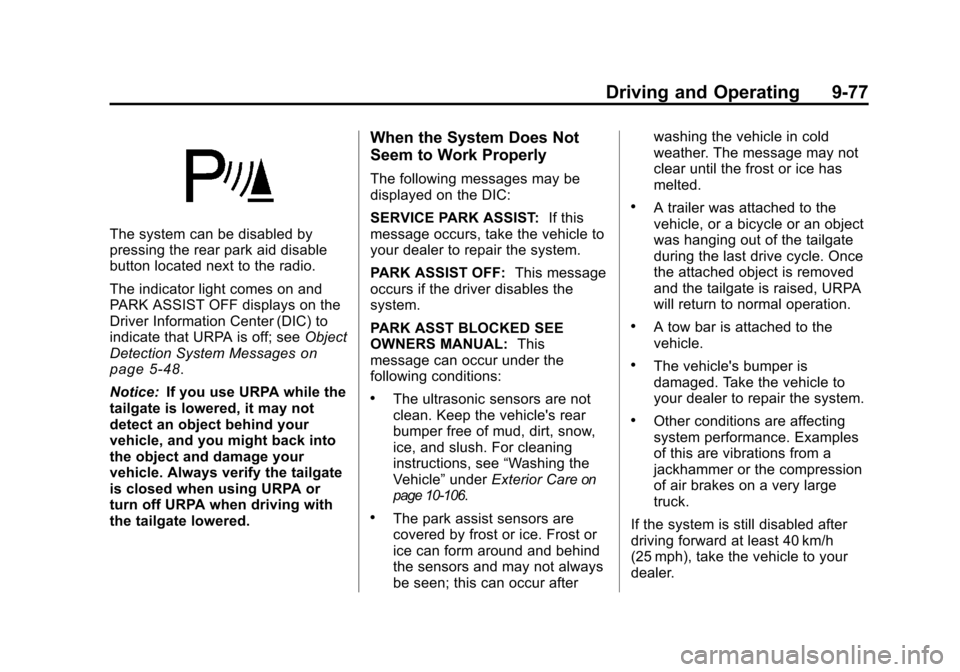
The system can be disabled by
pressing the rear park aid disable
button located next to the radio.
The indicator light comes on and
PARK ASSIST OFF displays on the
Driver Information Center (DIC) to
indicate that URPA is off; seeObject
Detection System Messages
on
page 5‑48.
Notice: If you use URPA while the
tailgate is lowered, it may not
detect an object behind your
vehicle, and you might back into
the object and damage your
vehicle. Always verify the tailgate
is closed when using URPA or
turn off URPA when driving with
the tailgate lowered.
When the System Does Not
Seem to Work Properly
The following messages may be
displayed on the DIC:
SERVICE PARK ASSIST: If this
message occurs, take the vehicle to
your dealer to repair the system.
PARK ASSIST OFF: This message
occurs if the driver disables the
system.
PARK ASST BLOCKED SEE
OWNERS MANUAL: This
message can occur under the
following conditions:
.The ultrasonic sensors are not
clean. Keep the vehicle's rear
bumper free of mud, dirt, snow,
ice, and slush. For cleaning
instructions, see “Washing the
Vehicle” underExterior Care
on
page 10‑106.
.The park assist sensors are
covered by frost or ice. Frost or
ice can form around and behind
the sensors and may not always
be seen; this can occur after washing the vehicle in cold
weather. The message may not
clear until the frost or ice has
melted.
.A trailer was attached to the
vehicle, or a bicycle or an object
was hanging out of the tailgate
during the last drive cycle. Once
the attached object is removed
and the tailgate is raised, URPA
will return to normal operation.
.A tow bar is attached to the
vehicle.
.The vehicle's bumper is
damaged. Take the vehicle to
your dealer to repair the system.
.Other conditions are affecting
system performance. Examples
of this are vibrations from a
jackhammer or the compression
of air brakes on a very large
truck.
If the system is still disabled after
driving forward at least 40 km/h
(25 mph), take the vehicle to your
dealer.
Page 404 of 588
Black plate (110,1)Chevrolet Silverado Owner Manual - 2011
9-110 Driving and Operating
Vehicle Series Hitch TypeMaximum Tongue
Weight
1500 Weight Carrying 272 kg (600 lbs)
2500HD/3500 Weight Carrying 453 kg (1,000 lbs)
1500 Weight Distributing 499 kg (1,100 lbs)
2500HD/3500 Weight Distributing 680 kg (1,500 lbs)
1500 Fifth-Wheel Gooseneck 680 kg (1,500 lbs)
2500HD Fifth-Wheel Gooseneck 1 134 kg (2,500 lbs)
3500 Single Rear
Wheels Fifth-Wheel Gooseneck 1 360 kg (3,000 lbs)
3500 Dual Rear
Wheels Fifth-Wheel Gooseneck 1 587 kg (3,500 lbs)
Do not exceed the maximum
allowable tongue weight for the
vehicle. Choose the shortest hitch
extension that will position the hitch
ball closest to the vehicle. This will
help reduce the effect of trailer
tongue weight on the rear axle. Trailering may be limited by the
vehicle's ability to carry tongue
weight. Tongue or kingpin weight
cannot cause the vehicle to exceed
the GVWR (Gross Vehicle Weight
Rating) or the RGAWR (Rear Gross
Axle Weight Rating). See
“Total
Weight on the Vehicle's Tires” later
in this section for more information. After loading the trailer, weigh
the trailer and then the tongue,
separately, to see if the weights are
proper. If they are not, adjustments
might be made by moving some
items around in the trailer.
Total Weight on the Vehicle's
Tires
Be sure the vehicle's tires are
inflated to the inflation pressures
found on the Certification Tire
label on the drivers door or see
Vehicle Load Limits
on page 9‑23for more information. Make sure not
to exceed the GVWR limit for the
vehicle, or the RGAWR, with the
tow vehicle and trailer fully loaded
for the trip including the weight
of the trailer tongue. If using a
weight-distributing hitch, make sure
not to exceed the RGAWR before
applying the weight distribution
spring bars.
Page 405 of 588
Black plate (111,1)Chevrolet Silverado Owner Manual - 2011
Driving and Operating 9-111
Weight of the Trailering
Combination
It is important that the combination
of the tow vehicle and trailer
does not exceed any of its weight
ratings—GCWR, GVWR, RGAWR,
Trailer Weight Rating, or Tongue
Weight. The only way to be sure it is
not exceeding any of these ratings
is to weigh the tow vehicle and
trailer combination, fully loaded for
the trip, getting individual weights
for each of these items.
Towing Equipment
Hitches
The correct hitch equipment helps
maintain combination control.
Most small-to-medium trailers can
be towed with a weight-carrying
hitch which simply features a
coupler latched to the hitch ball. Larger trailers may require a
weight-distributing hitch that
uses spring bars to distribute
the trailer tongue weight among
the two vehicle and trailer axles.
Fifth-wheel and gooseneck hitches
may also be used. See
“Weight of
the Trailer Tongue” underTrailer
Towing
on page 9‑94for rating
limits with various hitch types.
If a step-bumper hitch will be used,
the bumper could be damaged
in sharp turns. Make sure there
is ample room when turning to avoid
contact between the trailer and the
bumper.
Consider using sway controls
with any trailer. Ask a trailering
professional about sway controls or
refer to the trailer manufacturer's
recommendations and instructions.
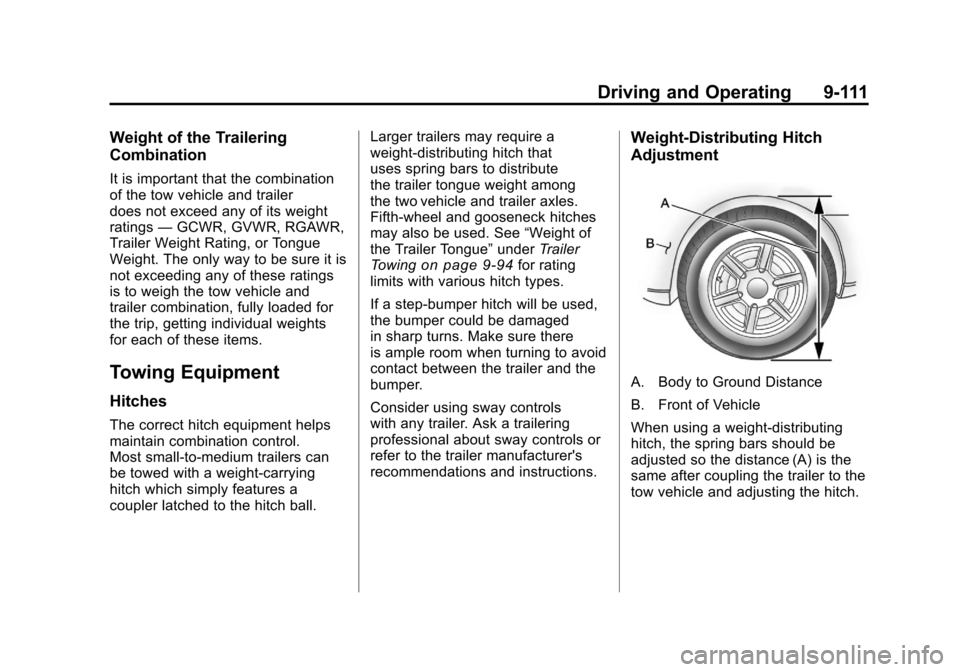
Weight‐Distributing Hitch
Adjustment
A. Body to Ground Distance
B. Front of Vehicle
When using a weight-distributing
hitch, the spring bars should be
adjusted so the distance (A) is the
same after coupling the trailer to the
tow vehicle and adjusting the hitch.
Page 534 of 588
Black plate (112,1)Chevrolet Silverado Owner Manual - 2011
10-112 Vehicle Care
Do not clean the vehicle using:
.A knife or any other sharp object
to remove a soil from any interior
surface.
.A stiff brush. It can cause
damage to the vehicle's interior
surfaces.
.Heavy pressure or aggressive
rubbing with a cleaning cloth.
Use of heavy pressure can
damage the interior and does
not improve the effectiveness of
soil removal.
.Laundry detergents or
dishwashing soaps with
degreasers can leave residue
that streaks and attracts dirt.
For liquid cleaners, about
20 drops per gallon (3.78 L) of
water is a good guide. Use only
mild, neutral-pH soaps.
.Too much cleaner that saturates
the upholstery.
.Organic solvents such as
naptha, alcohol, etc. that can
damage the vehicle's interior.
Fabric/Carpet
Use a vacuum cleaner with a soft
brush attachment frequently to
remove dust and loose dirt.
A canister vacuum with a beater bar
in the nozzle may only be used on
floor carpet and carpeted floor mats.
For any soil, always try to remove it
first with plain water or club soda.
Before cleaning, gently remove as
much of the soil as possible using
one of the following techniques:
.For liquids: gently blot the
remaining soil with a paper
towel. Allow the soil to absorb
into the paper towel until no
more can be removed.
.For solid dry soils: remove as
much as possible and then
vacuum.
To clean:
1. Saturate a lint-free, clean white cloth with water or club soda.
2. Wring the cloth to remove excess moisture. 3. Start on the outside edge of the
soil and gently rub toward the
center. Continue cleaning, using
a clean area of the cloth each
time it becomes soiled.
4. Continue to gently rub the soiled area until the cleaning cloth
remains clean.
5. If the soil is not completely removed, use a mild soap
solution and repeat the cleaning
process that was used with plain
water.
If any of the soil remains, a
commercial fabric cleaner or spot
lifter may be necessary. When a
commercial upholstery cleaner or
spot lifter is to be used, test a small
hidden area for colorfastness first.
If the locally cleaned area gives any
impression that a ring formation may
result, clean the entire surface.
After the cleaning process has been
completed, a paper towel can be
used to blot excess moisture from
the fabric or carpet.
Page 582 of 588

Black plate (8,1)Chevrolet Silverado Owner Manual - 2011
i-8 INDEX
Lights (cont.)Charging System . . . . . . . . . . . . . 5-26
Cruise Control . . . . . . . . . . . . . . . . 5-34
Engine Oil Pressure . . . . . . . . . . 5-32
Flash-to-Pass . . . . . . . . . . . . . . . . . . 6-3
Four-Wheel-Drive . . . . . . . . . . . . . 5-31
Front Fog Lamps . . . . . . . . . . . . . 5-33
High-Beam On . . . . . . . . . . . . . . . . 5-33
High/Low Beam Changer . . . . . . 6-3
Low Fuel Warning . . . . . . . . . . . . 5-33
Safety Belt Reminders . . . . . . . . 5-21
Security . . . . . . . . . . . . . . . . . . . . . . 5-33
StabiliTrak
®Indicator . . . . . . . . . 5-31
Tire Pressure . . . . . . . . . . . . . . . . . 5-32
Tow/Haul Mode . . . . . . . . . . . . . . . 5-31
Locking Rear Axle . . . . . . . . . . . . . 9-73
Locks Automatic Door . . . . . . . . . . . . . . . . 2-9
Delayed Locking . . . . . . . . . . . . . . . 2-9
Door . . . . . . . . . . . . . . . . . . . . . . . . . . . 2-8
Lockout Protection . . . . . . . . . . . . . 2-9
Power Door . . . . . . . . . . . . . . . . . . . . 2-8
Safety . . . . . . . . . . . . . . . . . . . . . . . . . 2-9 Loss of Control . . . . . . . . . . . . . . . . . 9-6
Low Fuel Warning Light . . . . . . . . 5-33
Lower Anchors and Tethers
for Children (LATCH
SYSTEM) . . . . . . . . . . . . . . . . . . . . 3-59
Lumbar Adjustment . . . . . . . . . . . . . 3-7 Front Seats . . . . . . . . . . . . . . . . . . . . 3-7
M
Maintenance
Records . . . . . . . . . . . . . . . . . . . . .11-12
Maintenance Schedule Recommended Fluids and
Lubricants . . . . . . . . . . . . . . . . . . . 11-8
Scheduled Maintenance . . . . . . 11-2
Transfer Case Vent Filter . . . . . 9-53
Malfunction Indicator Lamp . . . . 5-27
Manual Mirrors . . . . . . . . . . . . . . . . 2-16
Manual Mode . . . . . . . . . . . . . . . . . . 9-47
Manual Transmission . . . . . . . . . . 9-51 Fluid . . . . . . . . . . . . . . . . . . . . . . . . 10-17
Manual Windows . . . . . . . . . . . . . . 2-20
Memory Features . . . . . . . . . . . . . . 1-13 Messages
Airbag System . . . . . . . . . . . . . . . . 5-50
Anti-Theft Alarm System . . . . . . 5-50
Battery Voltage and
Charging . . . . . . . . . . . . . . . . . . . . 5-43
Brake System . . . . . . . . . . . . . . . . 5-44
Door Ajar . . . . . . . . . . . . . . . . . . . . . 5-45
Engine Cooling System . . . . . . . 5-46
Engine Oil . . . . . . . . . . . . . . . . . . . . 5-47
Engine Power . . . . . . . . . . . . . . . . 5-47
Fuel System . . . . . . . . . . . . . . . . . . 5-48
Key and Lock . . . . . . . . . . . . . . . . . 5-48
Lamp . . . . . . . . . . . . . . . . . . . . . . . . . 5-48
Object Detection System . . . . . 5-48
Ride Control System . . . . . . . . . . 5-49
Starting the Vehicle . . . . . . . . . . . 5-50
Tire . . . . . . . . . . . . . . . . . . . . . . . . . . . 5-51
Transmission . . . . . . . . . . . . . . . . . 5-52
Vehicle . . . . . . . . . . . . . . . . . . . . . . . 5-43
Vehicle Reminder . . . . . . . . . . . . . 5-52
Washer Fluid . . . . . . . . . . . . . . . . . 5-53