transmission CHEVROLET SILVERADO 2011 2.G Owners Manual
[x] Cancel search | Manufacturer: CHEVROLET, Model Year: 2011, Model line: SILVERADO, Model: CHEVROLET SILVERADO 2011 2.GPages: 588, PDF Size: 7.99 MB
Page 1 of 588

Black plate (1,1)Chevrolet Silverado Owner Manual - 2011
2011 Chevrolet Silverado Owner ManualM
In Brief. . . . . . . . . . . . . . . . . . . . . . . . 1-1
Instrument Panel . . . . . . . . . . . . . . 1-2
Initial Drive Information . . . . . . . . 1-8
Vehicle Features . . . . . . . . . . . . . 1-25
Performance and Maintenance . . . . . . . . . . . . . . . . 1-32
Keys, Doors and Windows . . . 2-1
Keys and Locks . . . . . . . . . . . . . . . 2-2
Doors . . . . . . . . . . . . . . . . . . . . . . . . 2-10
Vehicle Security . . . . . . . . . . . . . . 2-12
Exterior Mirrors . . . . . . . . . . . . . . . 2-15
Interior Mirrors . . . . . . . . . . . . . . . . 2-19
Windows . . . . . . . . . . . . . . . . . . . . . 2-20
Roof . . . . . . . . . . . . . . . . . . . . . . . . . . 2-22
Seats and Restraints . . . . . . . . . 3-1
Head Restraints . . . . . . . . . . . . . . . 3-2
Front Seats . . . . . . . . . . . . . . . . . . . . 3-3
Rear Seats . . . . . . . . . . . . . . . . . . . 3-12
Safety Belts . . . . . . . . . . . . . . . . . . 3-14
Airbag System . . . . . . . . . . . . . . . . 3-31
Child Restraints . . . . . . . . . . . . . . 3-51 Storage
. . . . . . . . . . . . . . . . . . . . . . . 4-1
Storage Compartments . . . . . . . . 4-1
Instruments and Controls . . . . 5-1
Controls . . . . . . . . . . . . . . . . . . . . . . . 5-2
Warning Lights, Gauges, and Indicators . . . . . . . . . . . . . . . . . . . 5-12
Information Displays . . . . . . . . . . 5-34
Vehicle Messages . . . . . . . . . . . . 5-43
Vehicle Personalization . . . . . . . 5-53
Universal Remote System . . . . 5-61
Lighting . . . . . . . . . . . . . . . . . . . . . . . 6-1
Exterior Lighting . . . . . . . . . . . . . . . 6-1
Interior Lighting . . . . . . . . . . . . . . . . 6-7
Lighting Features . . . . . . . . . . . . . . 6-9
Infotainment System . . . . . . . . . 7-1
Introduction . . . . . . . . . . . . . . . . . . . . 7-1
Radio . . . . . . . . . . . . . . . . . . . . . . . . . . 7-8
Audio Players . . . . . . . . . . . . . . . . 7-14
Rear Seat Infotainment . . . . . . . 7-38
Phone . . . . . . . . . . . . . . . . . . . . . . . . 7-49 Climate Controls
. . . . . . . . . . . . . 8-1
Climate Control Systems . . . . . . 8-1
Air Vents . . . . . . . . . . . . . . . . . . . . . 8-11
Driving and Operating . . . . . . . . 9-1
Driving Information . . . . . . . . . . . . . 9-2
Starting and Operating . . . . . . . 9-32
Engine Exhaust . . . . . . . . . . . . . . 9-42
Automatic Transmission . . . . . . 9-43
Manual Transmission . . . . . . . . . 9-51
Drive Systems . . . . . . . . . . . . . . . . 9-53
Brakes . . . . . . . . . . . . . . . . . . . . . . . 9-67
Ride Control Systems . . . . . . . . 9-70
Cruise Control . . . . . . . . . . . . . . . . 9-73
Object Detection Systems . . . . 9-76
Fuel . . . . . . . . . . . . . . . . . . . . . . . . . . 9-83
Towing . . . . . . . . . . . . . . . . . . . . . . . 9-90
Conversions and
Add-Ons . . . . . . . . . . . . . . . . . . . 9-123
Page 7 of 588
Black plate (1,1)Chevrolet Silverado Owner Manual - 2011
In Brief 1-1
In Brief
Instrument Panel
Instrument Panel (Base/UplevelVersion) . . . . . . . . . . . . . . . . . . . . . 1-2
Instrument Panel (Premium Version) . . . . . . . . . . . . . . . . . . . . . 1-6
Initial Drive Information
Initial Drive Information . . . . . . . . 1-8
Remote Keyless Entry (RKE)System . . . . . . . . . . . . . . . . . . . . . . 1-8
Remote Vehicle Start . . . . . . . . . 1-9
Door Locks . . . . . . . . . . . . . . . . . . . 1-9
Windows . . . . . . . . . . . . . . . . . . . . . 1-10
Seat Adjustment . . . . . . . . . . . . . 1-11
Memory Features . . . . . . . . . . . . 1-13
Heated Seats . . . . . . . . . . . . . . . . 1-14
Head Restraint Adjustment . . . . . . . . . . . . . . . . . 1-15
Safety Belt . . . . . . . . . . . . . . . . . . . 1-15 Sensing System for
Passenger Airbag . . . . . . . . . . 1-15
Mirror Adjustment . . . . . . . . . . . . 1-16
Steering Wheel Adjustment . . . . . . . . . . . . . . . . . 1-17
Throttle and Brake Pedal Adjustment . . . . . . . . . . . . . . . . . 1-17
Interior Lighting . . . . . . . . . . . . . . 1-18
Exterior Lighting . . . . . . . . . . . . . 1-19
Windshield Wiper/Washer . . . . 1-19
Climate Controls . . . . . . . . . . . . . 1-20
Transmission . . . . . . . . . . . . . . . . 1-22
Four-Wheel Drive . . . . . . . . . . . . 1-23
Vehicle Features
Radio(s) . . . . . . . . . . . . . . . . . . . . . 1-25
Satellite Radio . . . . . . . . . . . . . . . 1-26
Portable Audio Devices . . . . . . 1-27
Bluetooth
®. . . . . . . . . . . . . . . . . . . 1-27
Steering Wheel Controls . . . . . 1-27
Navigation System . . . . . . . . . . . 1-28 Driver Information
Center (DIC) . . . . . . . . . . . . . . . 1-28
Cruise Control . . . . . . . . . . . . . . . 1-29
Rear Vision Camera (RVC) . . . . . . . . . . . . . 1-30
Ultrasonic Parking Assist . . . . 1-30
Power Outlets . . . . . . . . . . . . . . . 1-30
Universal Remote System . . . 1-31
Sunroof . . . . . . . . . . . . . . . . . . . . . . 1-31
Performance and Maintenance
StabiliTrak®System . . . . . . . . . 1-32
Tire Pressure Monitor . . . . . . . . 1-33
Engine Oil Life System . . . . . . 1-34
Fuel E85 (85% Ethanol) . . . . . 1-34
Driving for Better Fuel Economy . . . . . . . . . . . . . . . . . . . 1-34
Roadside Assistance Program . . . . . . . . . . . . . . . . . . . . 1-35
OnStar
®. . . . . . . . . . . . . . . . . . . . . 1-35
Page 9 of 588

Black plate (3,1)Chevrolet Silverado Owner Manual - 2011
In Brief 1-3
A.Air Vents on page 8‑11.
B. Turn and Lane-Change Signals
on page 6‑6.
Windshield Wiper/Washer
on
page 5‑5.
C. Driver Information Center (DIC) Buttons. See Driver Information
Center (DIC) on page 5‑34.
D. Hazard Warning Flashers
on
page 6‑5.
E. Instrument Cluster
on
page 5‑13.
F. Shift Lever. See Automatic
Transmission
on page 9‑43.
Tow/Haul Selector Button
(If Equipped). See Tow/Haul
Mode on page 9‑49.
Range Selection Mode (Allison
Transmission and Hydra-Matic
®
6‐Speed Button (If Equipped).
See Manual Modeon
page 9‑47. G.
AM-FM Radio on page 7‑8.
H. Instrument Panel Storage
on
page 4‑1.
I. Integrated Trailer Brake Controller (If Equipped).
See Trailer Towing
on
page 9‑94.
J. Exterior Lamp Controls
on
page 6‑1.
K. Data Link Connector (DLC). See Malfunction Indicator Lamp
on page 5‑27.
L. Hood on page 10‑5.
M. Parking Brake on page 9‑68.
N. Dome Lamps on page 6‑8.
Fog Lamps
on page 6‑6(If Equipped).
O. Cruise Control on page 9‑73. P.
Steering Wheel Adjustment
on
page 5‑2.
Q. Horn on page 5‑5.
R. Steering Wheel Controls
on
page 5‑3(If Equipped).
S. Automatic Transfer Case Control (If Equipped).
See Four-Wheel Drive
on
page 10‑32.
T. Ashtray (If Equipped). See Ashtrays
on page 5‑12andCigarette Lighteron
page 5‑11.
U. StabiliTrak
®Systemon
page 9‑70(If Equipped).
Ultrasonic Parking Assist
on
page 9‑76(If Equipped).
Pedal Adjust Button
(If Equipped). See Adjustable
Throttle and Brake Pedal
on
page 9‑32.
Exhaust Brake (If Equipped).
See "Brakes" in the Duramax
Diesel Supplement.
Page 13 of 588

Black plate (7,1)Chevrolet Silverado Owner Manual - 2011
In Brief 1-7
A.Air Vents on page 8‑11.
B. Turn and Lane-Change Signals
on page 6‑6.
Windshield Wiper/Washer
on
page 5‑5.
C. Instrument Cluster
on
page 5‑13.
D. Hazard Warning Flashers
on
page 6‑5.
E. Shift Lever. See Automatic
Transmission on page 9‑43.
F. Tow/Haul Mode
on page 9‑49(If Equipped).
G. Driver Information Center (DIC) Buttons. See Driver Information
Center (DIC) on page 5‑34.
H. AM-FM Radio on page 7‑8.
I. Exterior Lamp Controls
on
page 6‑1.
J. Integrated Trailer Brake Controller (If Equipped).
See Trailer Towing
on
page 9‑94. K.
Dome Lamps
on page 6‑8.
L. Automatic Transfer Case Control. (If Equipped).
See Four-Wheel Drive
on
page 10‑32.
M. Data Link Connector (DLC). See Malfunction Indicator Lamp
on page 5‑27.
N. Hood on page 10‑5.
O. Parking Brake on page 9‑68.
P. Cruise Control on page 9‑73.
Q. Steering Wheel Adjustment
on
page 5‑2.
R. Horn on page 5‑5.
S. Steering Wheel Controls
on
page 5‑3.
T. Climate Control Systems (with
Air Conditioning)
on page 8‑1orClimate Control Systems
(with Heater Only)on
page 8‑4(If equipped).
Dual Automatic Climate
Control System
on page 8‑5(If Equipped). U.
Power Outlets on page 5‑10.
Cigarette Lighter (If Equipped).
See Ashtrays
on page 5‑12andCigarette Lighteron
page 5‑11.
V. StabiliTrak
®Systemon
page 9‑70(If Equipped).
Pedal Adjust Button
(If Equipped). See Adjustable
Throttle and Brake Pedal
on
page 9‑32.
Ultrasonic Parking Assist
on
page 9‑76(If Equipped).
Exhaust Brake (If Equipped).
See "Brakes" in the Duramax
Diesel Supplement.
W. Passenger Airbag Off Control (If Equipped). See Airbag
On-Off Switch on page 3‑39.
X. Glove Box on page 4‑1.
Page 28 of 588
Black plate (22,1)Chevrolet Silverado Owner Manual - 2011
1-22 In Brief
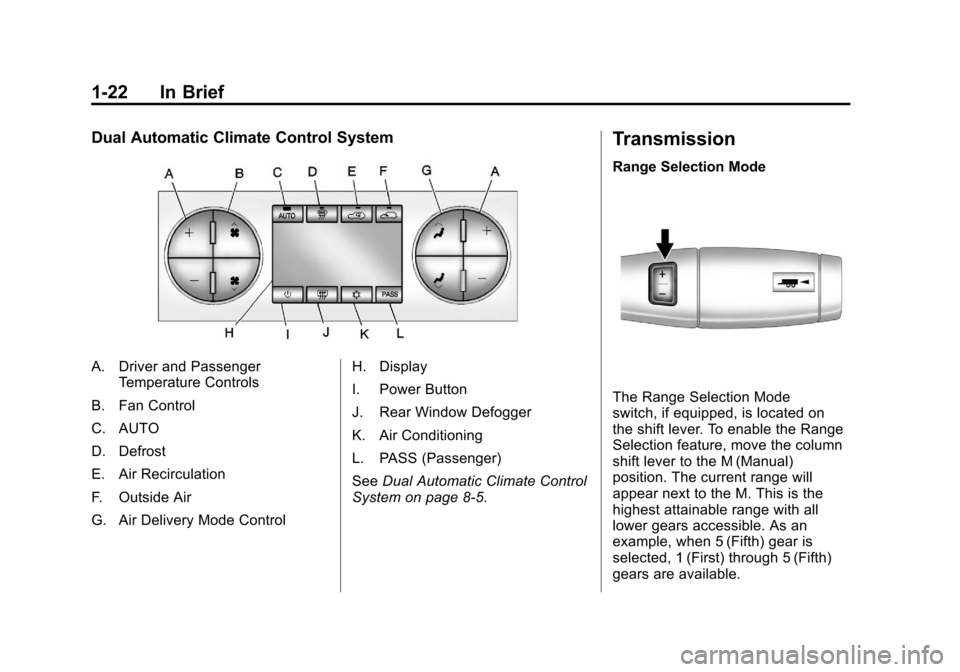
Dual Automatic Climate Control System
A. Driver and PassengerTemperature Controls
B. Fan Control
C. AUTO
D. Defrost
E. Air Recirculation
F. Outside Air
G. Air Delivery Mode Control H. Display
I. Power Button
J. Rear Window Defogger
K. Air Conditioning
L. PASS (Passenger)
See
Dual Automatic Climate Control
System on page 8‑5.
Transmission
Range Selection Mode
The Range Selection Mode
switch, if equipped, is located on
the shift lever. To enable the Range
Selection feature, move the column
shift lever to the M (Manual)
position. The current range will
appear next to the M. This is the
highest attainable range with all
lower gears accessible. As an
example, when 5 (Fifth) gear is
selected, 1 (First) through 5 (Fifth)
gears are available.
Page 34 of 588
Black plate (28,1)Chevrolet Silverado Owner Manual - 2011
1-28 In Brief
Navigation System
The vehicle's navigation system
(if equipped) provides detailed maps
of most major freeways and roads
throughout the United States and
Canada. After a destination has
been set, the system provides
turn-by-turn instructions for reaching
the destination. In addition, the
system can help locate a variety
of points of interest (POI), such
as banks, airports, restaurants,
and more.
See the Navigation System manual
for more information.
Driver Information
Center (DIC)
The DIC display is located at the
bottom of the instrument panel
cluster. It shows the status of
many vehicle systems and enables
access to the personalization menu.
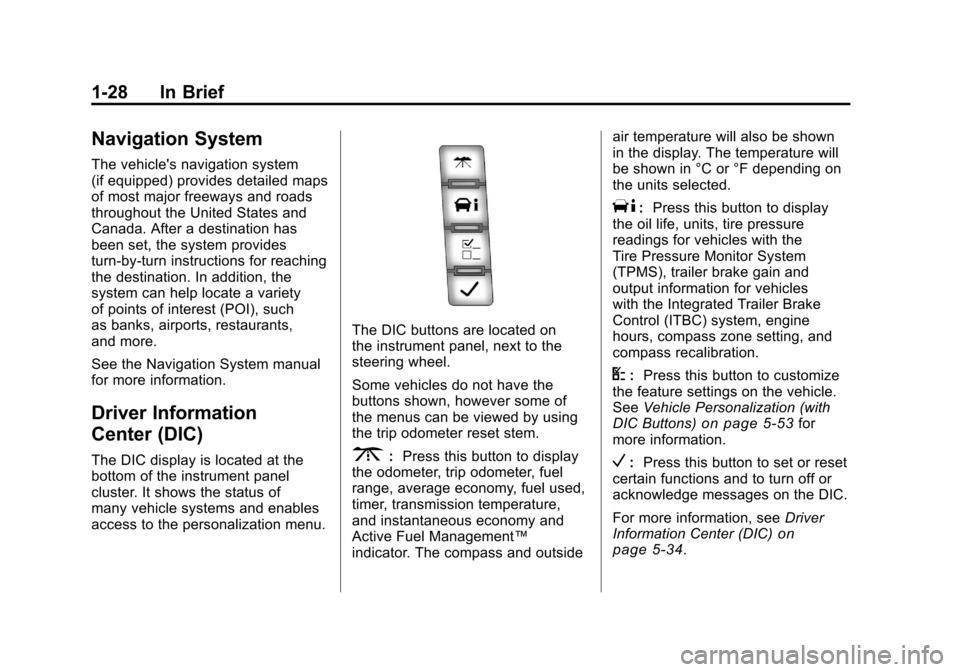
The DIC buttons are located on
the instrument panel, next to the
steering wheel.
Some vehicles do not have the
buttons shown, however some of
the menus can be viewed by using
the trip odometer reset stem.
3:Press this button to display
the odometer, trip odometer, fuel
range, average economy, fuel used,
timer, transmission temperature,
and instantaneous economy and
Active Fuel Management™
indicator. The compass and outside air temperature will also be shown
in the display. The temperature will
be shown in °C or °F depending on
the units selected.
T:
Press this button to display
the oil life, units, tire pressure
readings for vehicles with the
Tire Pressure Monitor System
(TPMS), trailer brake gain and
output information for vehicles
with the Integrated Trailer Brake
Control (ITBC) system, engine
hours, compass zone setting, and
compass recalibration.
U: Press this button to customize
the feature settings on the vehicle.
See Vehicle Personalization (with
DIC Buttons)
on page 5‑53for
more information.
V: Press this button to set or reset
certain functions and to turn off or
acknowledge messages on the DIC.
For more information, see Driver
Information Center (DIC)
on
page 5‑34.
Page 151 of 588
Black plate (1,1)Chevrolet Silverado Owner Manual - 2011
Instruments and Controls 5-1
Instruments and
Controls
Controls
Steering Wheel Adjustment . . . 5-2
Steering Wheel Controls . . . . . . 5-3
Horn . . . . . . . . . . . . . . . . . . . . . . . . . . 5-5
Windshield Wiper/Washer . . . . . 5-5
Compass . . . . . . . . . . . . . . . . . . . . . 5-6
Clock . . . . . . . . . . . . . . . . . . . . . . . . . 5-8
Power Outlets . . . . . . . . . . . . . . . 5-10
Cigarette Lighter . . . . . . . . . . . . . 5-11
Ashtrays . . . . . . . . . . . . . . . . . . . . . 5-12
Warning Lights, Gauges, and
Indicators
Warning Lights, Gauges, andIndicators . . . . . . . . . . . . . . . . . . 5-12
Instrument Cluster . . . . . . . . . . . 5-13
Speedometer . . . . . . . . . . . . . . . . 5-16
Odometer . . . . . . . . . . . . . . . . . . . . 5-16
Trip Odometer . . . . . . . . . . . . . . . 5-16
Tachometer . . . . . . . . . . . . . . . . . . 5-17
Fuel Gauge . . . . . . . . . . . . . . . . . . 5-17
Engine Oil Pressure Gauge . . . . . . . . . . . . . . . . . . . . . . 5-18 Engine Coolant Temperature
Gauge . . . . . . . . . . . . . . . . . . . . . . 5-19
Voltmeter Gauge . . . . . . . . . . . . . 5-20
Safety Belt Reminders . . . . . . . 5-21
Airbag Readiness Light . . . . . . 5-22
Airbag On-Off Light . . . . . . . . . . 5-23
Passenger Airbag Status Indicator . . . . . . . . . . . . . . . . . . . . 5-25
Charging System Light . . . . . . 5-26
Malfunction Indicator Lamp . . . . . . . . . . . . . 5-27
Brake System Warning Light . . . . . . . . . . . . . . . . . . . . . . . 5-29
Antilock Brake System (ABS) Warning Light . . . . . . . . . . . . . . 5-30
Four-Wheel-Drive Light . . . . . . 5-31
Tow/Haul Mode Light . . . . . . . . 5-31
StabiliTrak
®Indicator Light . . . 5-31
Tire Pressure Light . . . . . . . . . . 5-32
Engine Oil Pressure Light . . . . 5-32
Low Fuel Warning Light . . . . . . 5-33
Security Light . . . . . . . . . . . . . . . . 5-33
High-Beam on Light . . . . . . . . . 5-33
Front Fog Lamp Light . . . . . . . . 5-33
Cruise Control Light . . . . . . . . . 5-34
Information Displays
Driver Information Center (DIC) . . . . . . . . . . . . . . . 5-34
Vehicle Messages
Vehicle Messages . . . . . . . . . . . 5-43
Battery Voltage and ChargingMessages . . . . . . . . . . . . . . . . . . 5-43
Brake System Messages . . . . 5-44
Door Ajar Messages . . . . . . . . . 5-45
Engine Cooling System Messages . . . . . . . . . . . . . . . . . . 5-46
Engine Oil Messages . . . . . . . . 5-47
Engine Power Messages . . . . 5-47
Fuel System Messages . . . . . . 5-48
Key and Lock Messages . . . . . 5-48
Lamp Messages . . . . . . . . . . . . . 5-48
Object Detection System Messages . . . . . . . . . . . . . . . . . . 5-48
Ride Control System Messages . . . . . . . . . . . . . . . . . . 5-49
Airbag System Messages . . . . 5-50
Anti-Theft Alarm System Messages . . . . . . . . . . . . . . . . . . 5-50
Starting the Vehicle Messages . . . . . . . . . . . . . . . . . . 5-50
Tire Messages . . . . . . . . . . . . . . . 5-51
Transmission Messages . . . . . 5-52
Vehicle Reminder Messages . . . . . . . . . . . . . . . . . . 5-52
Washer Fluid Messages . . . . . 5-53
Page 165 of 588
Black plate (15,1)Chevrolet Silverado Owner Manual - 2011
Instruments and Controls 5-15
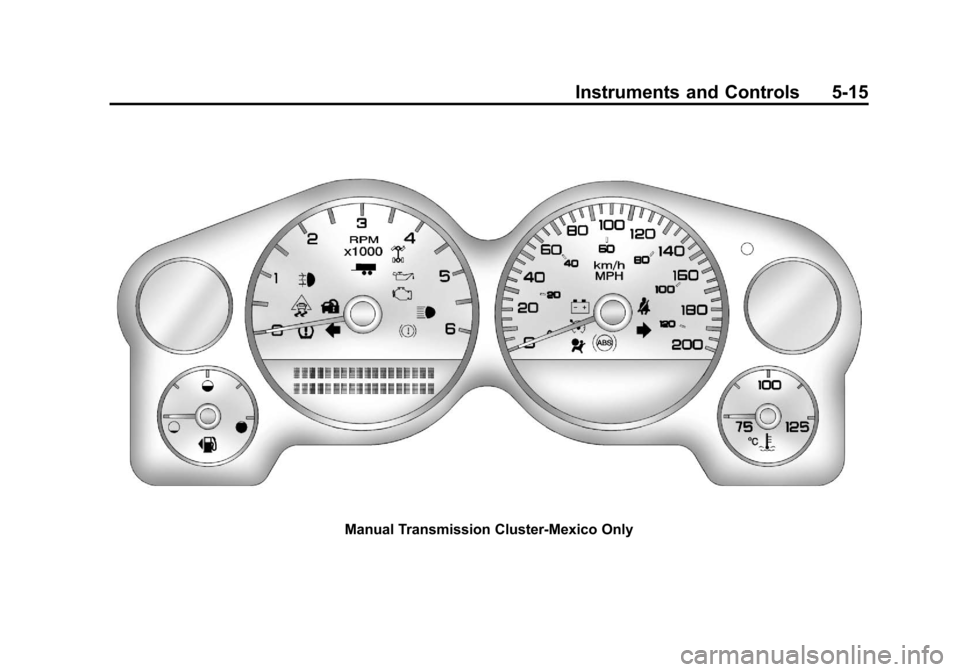
Manual Transmission Cluster-Mexico Only
Page 177 of 588
Black plate (27,1)Chevrolet Silverado Owner Manual - 2011
Instruments and Controls 5-27
Malfunction
Indicator Lamp
A computer system called OBD II
(On-Board Diagnostics-Second
Generation) monitors operation
of the fuel, ignition, and emission
control systems. It ensures that
emissions are at acceptable levels
for the life of the vehicle, helping to
produce a cleaner environment.
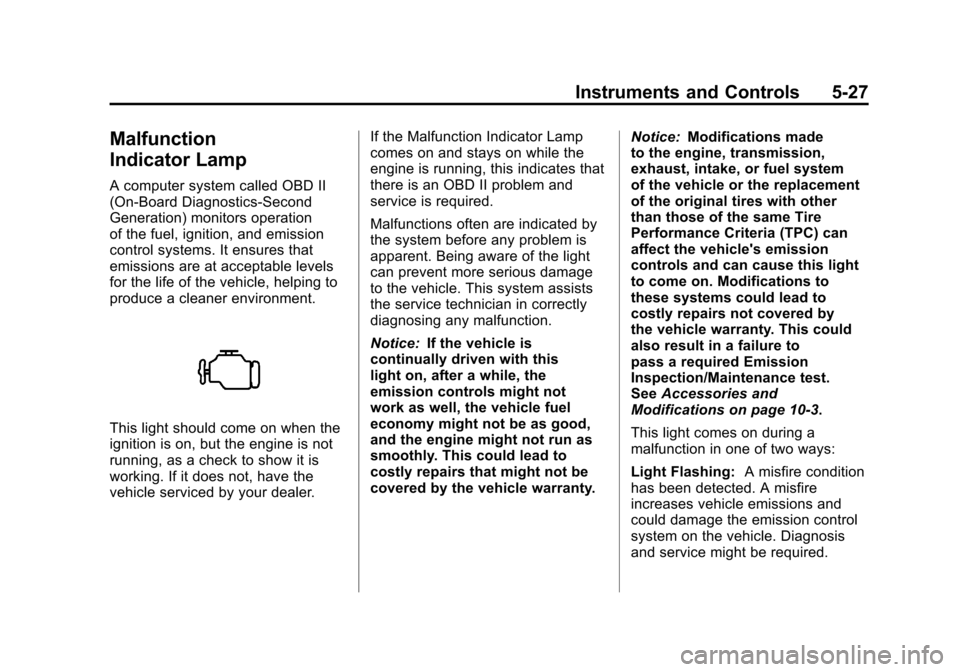
This light should come on when the
ignition is on, but the engine is not
running, as a check to show it is
working. If it does not, have the
vehicle serviced by your dealer.If the Malfunction Indicator Lamp
comes on and stays on while the
engine is running, this indicates that
there is an OBD II problem and
service is required.
Malfunctions often are indicated by
the system before any problem is
apparent. Being aware of the light
can prevent more serious damage
to the vehicle. This system assists
the service technician in correctly
diagnosing any malfunction.
Notice:
If the vehicle is
continually driven with this
light on, after a while, the
emission controls might not
work as well, the vehicle fuel
economy might not be as good,
and the engine might not run as
smoothly. This could lead to
costly repairs that might not be
covered by the vehicle warranty. Notice:
Modifications made
to the engine, transmission,
exhaust, intake, or fuel system
of the vehicle or the replacement
of the original tires with other
than those of the same Tire
Performance Criteria (TPC) can
affect the vehicle's emission
controls and can cause this light
to come on. Modifications to
these systems could lead to
costly repairs not covered by
the vehicle warranty. This could
also result in a failure to
pass a required Emission
Inspection/Maintenance test.
See Accessories and
Modifications on page 10‑3.
This light comes on during a
malfunction in one of two ways:
Light Flashing: A misfire condition
has been detected. A misfire
increases vehicle emissions and
could damage the emission control
system on the vehicle. Diagnosis
and service might be required.
Page 185 of 588
Black plate (35,1)Chevrolet Silverado Owner Manual - 2011
Instruments and Controls 5-35
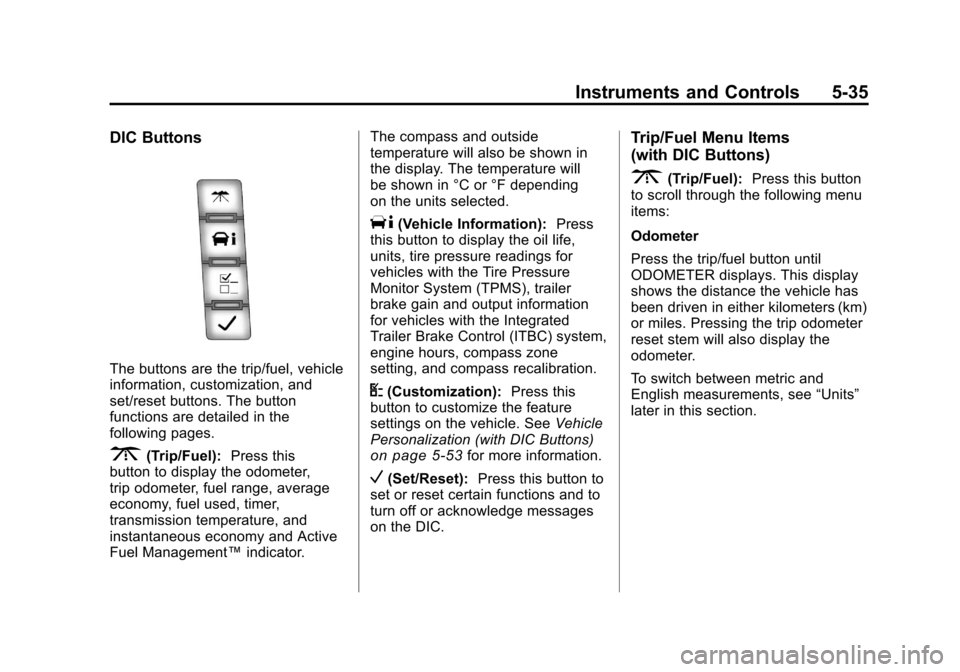
DIC Buttons
The buttons are the trip/fuel, vehicle
information, customization, and
set/reset buttons. The button
functions are detailed in the
following pages.
3(Trip/Fuel):Press this
button to display the odometer,
trip odometer, fuel range, average
economy, fuel used, timer,
transmission temperature, and
instantaneous economy and Active
Fuel Management™ indicator.The compass and outside
temperature will also be shown in
the display. The temperature will
be shown in °C or °F depending
on the units selected.
T(Vehicle Information):
Press
this button to display the oil life,
units, tire pressure readings for
vehicles with the Tire Pressure
Monitor System (TPMS), trailer
brake gain and output information
for vehicles with the Integrated
Trailer Brake Control (ITBC) system,
engine hours, compass zone
setting, and compass recalibration.
U(Customization): Press this
button to customize the feature
settings on the vehicle. See Vehicle
Personalization (with DIC Buttons)
on page 5‑53for more information.
V(Set/Reset): Press this button to
set or reset certain functions and to
turn off or acknowledge messages
on the DIC.
Trip/Fuel Menu Items
(with DIC Buttons)
3(Trip/Fuel): Press this button
to scroll through the following menu
items:
Odometer
Press the trip/fuel button until
ODOMETER displays. This display
shows the distance the vehicle has
been driven in either kilometers (km)
or miles. Pressing the trip odometer
reset stem will also display the
odometer.
To switch between metric and
English measurements, see “Units”
later in this section.