light CHEVROLET SILVERADO 2017 3.G Owners Manual
[x] Cancel search | Manufacturer: CHEVROLET, Model Year: 2017, Model line: SILVERADO, Model: CHEVROLET SILVERADO 2017 3.GPages: 509, PDF Size: 8.87 MB
Page 221 of 509
Chevrolet Silverado Owner Manual (GMNA-Localizing-U.S./Canada/Mexico-9956065) - 2017 - CRC - 4/29/16
220 Infotainment System
The Recent Calls menu allows youto access the phone numbers fromthe Incoming Calls, Outgoing Calls,and Missed Calls menus on the cellphone to make a call.
To m a k e a c a l l u s i n g t h eContacts menu:
1. From the Home Page, turn theMENU knob, then press toselect the PHONE screenbutton.
2. Turn the MENU knob tohighlight Contacts and press toselect.
3. Turn the MENU knob tohighlight the letter group andpress to select.
4. Turn the MENU knob tohighlight the contact and pressto select.
5. Turn the MENU knob tohighlight the desired number,then press the MENU knob tocall the contact.
To m a k e a c a l l u s i n g t h e R e c e n tCalls menu:
1. From the Home Page, turn theMENU knob, then press toselect the PHONE screenbutton.
2. Turn the MENU knob tohighlight Recent Calls andpress to select.
If necessary, select betweenMissed, Recent, and Sent callsby pressing the button belowthe appropriate screen button.
3. Turn the MENU knob tohighlight the contact or thephone number.
4. Press the MENU knob to callthe contact.
Making a Call Using the
Keypad
To m a k e a c a l l :
1. From the Home Page, turn theMENU knob, then press toselect the PHONE screenbutton.
2. Turn the MENU knob andpress to select Keypad.
3. Turn the MENU knob tohighlight the first digit andpress to select. Continue thisprocess through the number.To c a l l , p r e s s t h e b u t t o n j u s tbelow the CALL screen button.
Accepting or Declining a Call
When an incoming call is received,the infotainment system mutes andaringtoneisheardinthevehicle.
Accepting a Call
To a c c e p t a c a l l , d o o n e o f t h efollowing:
.Press the button just below theANSWER screen button.
.Pressgon the steering wheel
controls.
Declining a Call
To d e c l i n e a c a l l , d o o n e o f t h efollowing:
.Press the button just below theIGNORE screen button.
Page 222 of 509
Chevrolet Silverado Owner Manual (GMNA-Localizing-U.S./Canada/Mexico-9956065) - 2017 - CRC - 4/29/16
Infotainment System 221
.Pression the steering wheel
controls.
.Do nothing.
Call Waiting
Call waiting must be supported onthe Bluetooth phone and enabled bythe wireless service carrier to work.
Accepting a Call Waiting Call
To a c c e p t a c a l l w a i t i n g c a l l , d o o n eof the following:
.Press the button just below theSWITCH screen button.
.Pressgon the steering wheel
controls.
Declining a Call Waiting Call
To d e c l i n e a c a l l w a i t i n g c a l l , d o o n eof the following:
.Press the button just below theIGNORE screen button.
.Pression the steering wheel
controls.
.Do nothing.
Ending a Call
To e n d a c a l l , d o o n e o f t h efollowing:
.Press the button just below theEND screen button.
.Pression the steering wheel
controls.
Dual Tone Multi-Frequency
(DTMF) Tones
The in-vehicle Bluetooth system cansend numbers during a call. This isused when calling a menu-drivenphone system.
1. When a call is active, press thebutton just below the KEYPADscreen button.
2. Turn the MENU knob tohighlight the first digit andpress to select.
If not initially in the phoneapplication, from the Home Page,turn the MENU knob, then press toselect the PHONE screen button.From the PHONE main menu, turnthe MENU knob to highlight ActiveCall and press to select.
Bluetooth (Voice
Recognition - Base
Radio)
Using Voice Recognition
To u s e v o i c e r e c o g n i t i o n , p r e s sg
on the steering wheel. Use thecommands below for the variousvoice features. For additionalinformation, say“Help”while youare in a voice recognition menu.
Pairing
Pairing a Phone
1. Pressg.Thesystemresponds
“Ready,”followed by a tone.
2. Say“Bluetooth.”
3. Say“Pair.”The systemresponds with instructions andafour-digitPersonalIdentification Number (PIN).The PIN is used in Step 5.
4. Start the pairing process on thecell phone that you want topair. For help with this process,see your cell phonemanufacturer's user guide.
Page 228 of 509
Chevrolet Silverado Owner Manual (GMNA-Localizing-U.S./Canada/Mexico-9956065) - 2017 - CRC - 4/29/16
Infotainment System 227
paired. If the automatic downloaddoes not occur, proceed with thephone book download on thephone.
Pairing a Phone - SSP and NoPaired Device
When there is no paired device onthe infotainment system and SimpleSecure Pairing (SSP) is supported:
1. Press{.
2. Touch PHONE, press#on the
faceplate, or pressgon the
steering wheel without OnStar.
3. Touch Search Device.
4. Touch the desired device topair on the searched listscreen.
5. Touch Yes on the pop-upscreen of the Bluetooth deviceand infotainment system.
6. When the Bluetooth device andinfotainment system aresuccessfully paired, the phonescreen is displayed on theinfotainment system.
Pairing a Phone - SSP and PairedDevice
When a paired device is on theinfotainment system and SSP issupported:
1. Press{.
2. Touch Settings.
3. Touch Bluetooth, then DeviceManagement.
4. Touch the desired device topair. When the Bluetoothdevice and infotainment system
are successfully paired,Z/5
is displayed on the pair devicescreen. If no desired device isavailable go to Step 5.
5. Touch Search Device to searchfor the desired device.
6. Touch the desired device topair on the searched listscreen.
7. Touch Yes on the pop-upscreen of the Bluetooth deviceand infotainment system.
.The connected phone is
highlighted by5.
.Z/5indicates the hands-free
and phone music functions areenabled.
.5indicates only the hands-free
function is enabled.
.Zindicates only Bluetooth
music is enabled.
Pairing a Phone - No SSP and NoPaired Device
When there is no paired device onthe infotainment system and SSP isnot supported:
1. Press{.
2. Touch PHONE, press#on the
faceplate, or pressgon the
steering wheel without OnStar.
3. Touch Search Device.
4. Touch the desired device topair on the searched listscreen.
5. Input the PersonalIdentification Number (PIN)code (default: 1234) to theBluetooth device. When theBluetooth device and
Page 229 of 509
Chevrolet Silverado Owner Manual (GMNA-Localizing-U.S./Canada/Mexico-9956065) - 2017 - CRC - 4/29/16
228 Infotainment System
infotainment system aresuccessfully paired, thePHONE screen is displayed onthe infotainment system.
When the connection fails, a failuremessage is displayed on theinfotainment system.
If a Bluetooth device was previouslyconnected, the infotainment systemexecutes the auto connection.However, if the Bluetooth setting onthe Bluetooth device is turned off, afailure message is displayed on theinfotainment system.
Pairing a Phone - No SSP andPaired Device
When a paired device is on theinfotainment system and SSP is notsupported:
1. Press{.
2. Touch Settings.
3. Touch Bluetooth, then DeviceManagement.
4. Touch the desired device topair. When the Bluetoothdevice and infotainment system
are successfully paired,Z/5
is displayed on the pair devicescreen. If no desired device isavailable go to Step 5.
5. Touch Search Device to searchfor the desired device.
6. Touch the desired device topair on the searched listscreen.
7. Input the PersonalIdentification Number (PIN)code (default: 1234) to theBluetooth device. When theBluetooth device andinfotainment system are
successfully paired,Z/5is
displayed on the pair devicescreen.
.The connected phone is
highlighted by5.
.Z/5indicates the hands-free
and phone music functions areenabled.
.5indicates only the hands-free
function is enabled.
.Zindicates only Bluetooth
music is enabled.
Connecting a Paired BluetoothDevice
1. Press{.
2. Touch Settings.
3. Touch Bluetooth, then DeviceManagement.
4. Touch the device to beconnected.
Checking the BluetoothConnection
1. Press{.
2. Touch Settings.
3. Touch Bluetooth, then DeviceManagement.
4. The paired device will show.
Disconnecting a Bluetooth Device
1. Press{.
2. Touch Settings.
3. Touch Bluetooth, then DeviceManagement.
Page 238 of 509
Chevrolet Silverado Owner Manual (GMNA-Localizing-U.S./Canada/Mexico-9956065) - 2017 - CRC - 4/29/16
Climate Controls 237
Climate Controls
Climate Control Systems
Climate Control Systems (withHeater Only) . . . . . . . . . . . . . . . . 237Climate Control Systems (withAir Conditioning) . . . . . . . . . . . . 238Dual Automatic ClimateControl System . . . . . . . . . . . . . 240
Air Vents
Air Vents . . . . . . . . . . . . . . . . . . . . . 243
Maintenance
Passenger Compartment AirFilter . . . . . . . . . . . . . . . . . . . . . . . . 244Service . . . . . . . . . . . . . . . . . . . . . . . 245
Climate Control Systems
Climate Control Systems (with Heater Only)
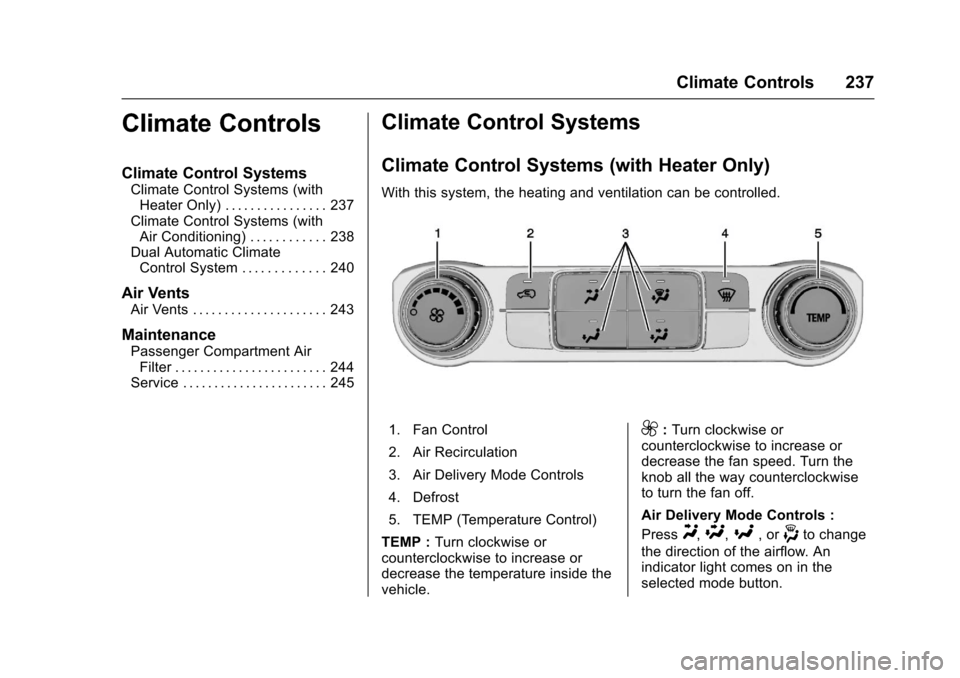
With this system, the heating and ventilation can be controlled.
1. Fan Control
2. Air Recirculation
3. Air Delivery Mode Controls
4. Defrost
5. TEMP (Temperature Control)
TEMP :Turn clockwise orcounterclockwise to increase ordecrease the temperature inside thevehicle.
9:Turn clockwise orcounterclockwise to increase ordecrease the fan speed. Turn theknob all the way counterclockwiseto turn the fan off.
Air Delivery Mode Controls :
PressY,\,[,or-to change
the direction of the airflow. Anindicator light comes on in theselected mode button.
Page 239 of 509
Chevrolet Silverado Owner Manual (GMNA-Localizing-U.S./Canada/Mexico-9956065) - 2017 - CRC - 4/29/16
238 Climate Controls
Y:Air is directed to the instrumentpanel outlets.
\:Air is divided between theinstrument panel and floor outlets.
[:Air is directed to the flooroutlets, with some air directed to thewindshield, side window, andsecond row floor outlets.
-:This mode clears the windowsof fog or moisture. Air is directed tothe windshield, floor outlets, andside window vents.
0:Press to clear the windshieldof fog or frost more quickly. Air isdirected to the windshield and theside window vents. The systemautomatically forces outside air intothe vehicle.
Do not drive the vehicle until all thewindows are clear.
SeeAir Vents0243.
@:Press to turn on recirculation.An indicator light comes on. Air isrecirculated to quickly cool theinside of the vehicle. It can also beused to help reduce outside air andodors that enter the vehicle.
Climate Control Systems (with Air Conditioning)
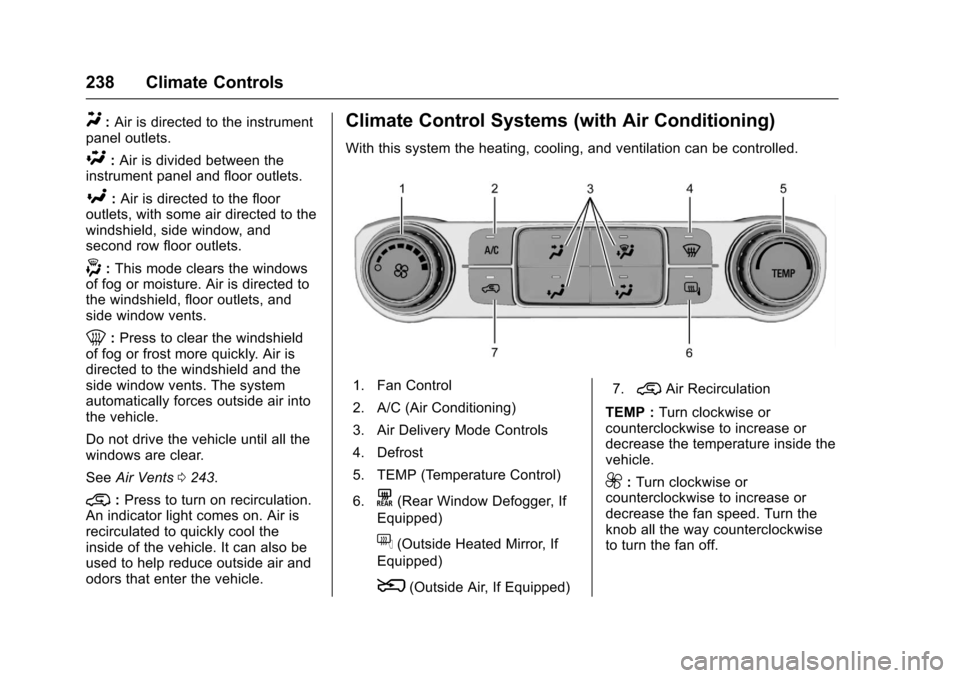
With this system the heating, cooling, and ventilation can be controlled.
1. Fan Control
2. A/C (Air Conditioning)
3. Air Delivery Mode Controls
4. Defrost
5. TEMP (Temperature Control)
6.K(Rear Window Defogger, If
Equipped)
f(Outside Heated Mirror, If
Equipped)
8(Outside Air, If Equipped)
7.@Air Recirculation
TEMP :Turn clockwise orcounterclockwise to increase ordecrease the temperature inside thevehicle.
9:Turn clockwise orcounterclockwise to increase ordecrease the fan speed. Turn theknob all the way counterclockwiseto turn the fan off.
Page 240 of 509
Chevrolet Silverado Owner Manual (GMNA-Localizing-U.S./Canada/Mexico-9956065) - 2017 - CRC - 4/29/16
Climate Controls 239
Air Delivery Mode Controls :
PressY,\,[,or-to change
the direction of the airflow. Anindicator light comes on in theselected mode button.
Y:Air is directed to the instrumentpanel outlets.
\:Air is divided between theinstrument panel and floor outlets.
[:Air is directed to the flooroutlets, with some air directed to thewindshield and side window outlets.
-:This mode clears the windowsof fog or moisture. Air is directed tothe windshield, floor outlets, andside window vents.
0:Press to clear the windshieldof fog or frost more quickly. Air isdirected to the windshield and theside window vents. The systemautomatically forces outside air intothe vehicle and the air conditioningcompressor will run, unless theoutside temperature is close tofreezing.
Do not drive the vehicle until all thewindows are clear.
SeeAir Vents0243.
@:Press to turn on recirculation.An indicator light comes on. Air isrecirculated to quickly cool theinside of the vehicle. It can also beused to help reduce outside air andodors that enter the vehicle.
8:If equipped, press to turn theoutside air mode on. An indicatorlight on the button comes on toshow that outside is on. Whenselected, air from outside thevehicle circulates throughout thevehicle. The recirculation modecannot be used with the outsideair mode.
f:If equipped, press to turn theheated mirrors on or off. SeeHeated Mirrors049.
A/C :Press to turn the airconditioning system on or off. Anindicator light comes on to showthat the air conditioning is enabled.If the fan is turned off, the airconditioner will not run. The A/Clight will stay on even if the outsidetemperatures are below freezing.
Rear Window Defogger
K:If equipped, press to turn therear window defogger on or off. Anindicator light on the button comeson to show that the rear windowdefogger is on.
The rear window defogger onlyworks when the ignition is in ON/RUN. The defogger turns off if theignition is turned to ACC/ACCESSORY or LOCK/OFF.
If equipped with heated outsidemirrors, they turn on when the rearwindow defogger button is on. Theyhelp to clear fog or frost from thesurface of the mirrors.
Caution
Using a razor blade or sharp
object to clear the inside rear
window can damage the rear
window defogger. Repairs would
not be covered by the vehicle
warranty. Do not clear the inside
rear window with sharp objects.
Page 241 of 509
Chevrolet Silverado Owner Manual (GMNA-Localizing-U.S./Canada/Mexico-9956065) - 2017 - CRC - 4/29/16
240 Climate Controls
Dual Automatic Climate Control System
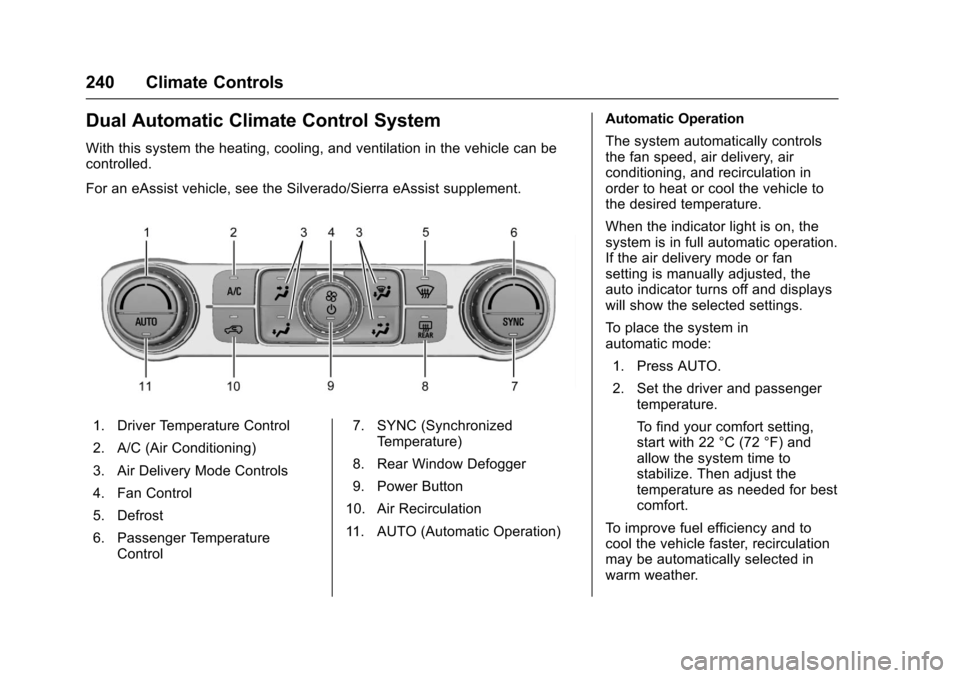
With this system the heating, cooling, and ventilation in the vehicle can becontrolled.
For an eAssist vehicle, see the Silverado/Sierra eAssist supplement.
1. Driver Temperature Control
2. A/C (Air Conditioning)
3. Air Delivery Mode Controls
4. Fan Control
5. Defrost
6. Passenger TemperatureControl
7. SYNC (SynchronizedTe m p e r a t u r e )
8. Rear Window Defogger
9. Power Button
10. Air Recirculation
11 . A U T O ( A u t o m a t i c O p e r a t i o n )
Automatic Operation
The system automatically controlsthe fan speed, air delivery, airconditioning, and recirculation inorder to heat or cool the vehicle tothe desired temperature.
When the indicator light is on, thesystem is in full automatic operation.If the air delivery mode or fansetting is manually adjusted, theauto indicator turns off and displayswill show the selected settings.
To p l a c e t h e s y s t e m i nautomatic mode:
1. Press AUTO.
2. Set the driver and passengertemperature.
To f i n d y o u r c o m f o r t s e t t i n g ,start with 22 °C (72 °F) andallow the system time tostabilize. Then adjust thetemperature as needed for bestcomfort.
To i m p r o v e f u e l e f f i c i e n c y a n d t ocool the vehicle faster, recirculationmay be automatically selected inwarm weather.
Page 242 of 509
Chevrolet Silverado Owner Manual (GMNA-Localizing-U.S./Canada/Mexico-9956065) - 2017 - CRC - 4/29/16
Climate Controls 241
The recirculation light will not comeon when automatically controlled.
Press@to manually select
recirculation; press it again to selectoutside air.
Do not cover the solar sensor on thetop of the instrument panel near thewindshield. This sensor regulatesair temperature based on sun load.See“Sensors”later in this section.
Manual Operation
O:Press to turn the climate controlsystem on or off. Outside air stillenters the vehicle, and is directed tothe floor. This direction can bechanged by pressing the airdelivery mode.
9:Turn clockwise orcounterclockwise to increase ordecrease the fan speed. Press theknob to turn the fan off.
Press AUTO to return to automaticoperation.
Driver and PassengerTe m p e r a t u r e C o n t r o l :Thetemperature can be adjustedseparately for the driver andpassenger.
Turn the knob clockwise orcounterclockwise to increase ordecrease the driver or passengertemperature setting.
SYNC :Press to link the passengertemperature setting to the driversetting. The SYNC indicator light willturn on. When the passenger settingis adjusted, the SYNC indicator lightis off.
The driver side or passenger sidetemperature display shows thetemperature setting increasing ordecreasing.
Air Delivery Mode Control :
PressY,\,[,or-to change
the direction of the airflow. Anindicator light comes on in theselected mode button.
Changing the mode cancels theautomatic operation and the systemgoes into manual mode. PressAUTO to return to automaticoperation.
Y:Air is directed to the instrumentpanel outlets.
\:Air is divided between theinstrument panel and floor outlets.Some air is directed toward thewindshield and side window outlets.
[:Air is directed to the flooroutlets, with some to the windshield,side window outlets, and secondrow floor outlets.
-:This mode clears the windowsof fog or moisture. Air is directed tothe windshield, floor outlets, andside window vents. The systemautomatically forces outside air intothe vehicle and the air conditioningcompressor will run, unless theoutside temperature is close tofreezing.
0:Press to clear the windshieldof fog or frost more quickly. Air isdirected to the windshield and theside window vents. The air
Page 243 of 509
Chevrolet Silverado Owner Manual (GMNA-Localizing-U.S./Canada/Mexico-9956065) - 2017 - CRC - 4/29/16
242 Climate Controls
conditioning compressor also comeson, unless the outside temperatureis below freezing.
Do not drive the vehicle until allwindows are clear.
SeeAir Vents0243.
A/C :Press to turn the airconditioning system on or off. Anindicator light comes on to showthat the air conditioning is enabled.If the fan is turned off, the airconditioner will not run. The A/Clight will stay on even if the outsidetemperatures are below freezing.
@:Press to turn on recirculation.An indicator light comes on. Air isrecirculated to quickly cool theinside of the vehicle. It can also beused to help reduce outside air andodors that enter the vehicle. The airconditioning compressor also comeson when this mode is activated.
Rear Window Defogger
The rear window defogger uses awarming grid to remove fog from therear window.
K:Press to turn the rear windowdefogger on or off. An indicator lighton the button comes on to show thatthe rear window defogger is on.
The rear window defogger onlyworks when the ignition is in ON/RUN. The defogger turns off if theignition is turned to ACC/ACCESSORY or LOCK/OFF.
Caution
Using a razor blade or sharp
object to clear the inside rear
window can damage the rear
window defogger. Repairs would
not be covered by the vehicle
warranty. Do not clear the inside
rear window with sharp objects.
Heated Mirror :If equipped withheated outside rearview mirrors,
pressKto heat the mirrors. See
Heated Mirrors049.
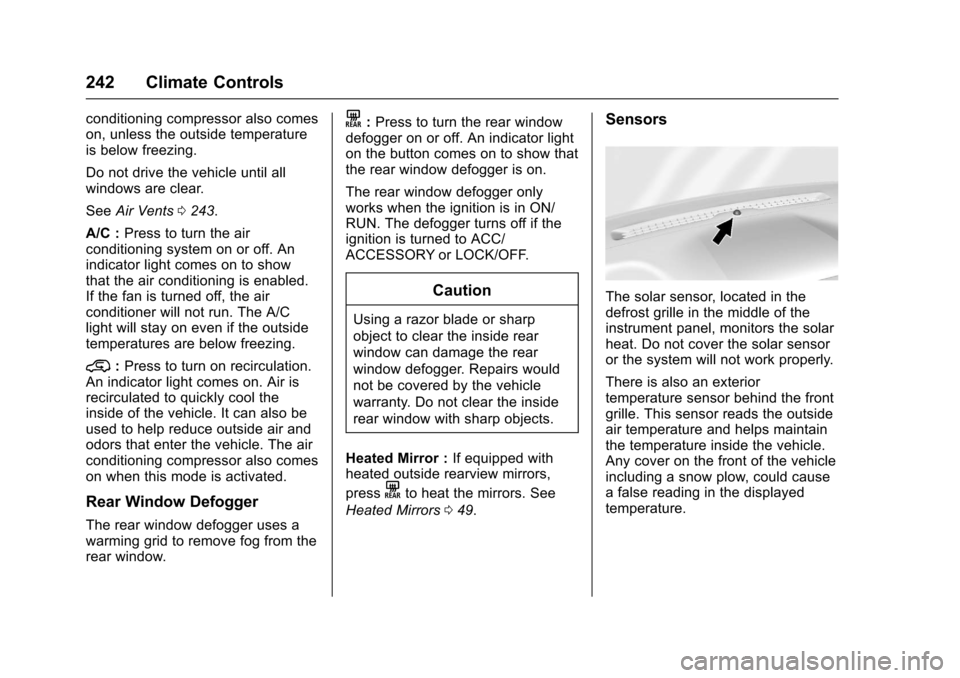
Sensors
The solar sensor, located in thedefrost grille in the middle of theinstrument panel, monitors the solarheat. Do not cover the solar sensoror the system will not work properly.
There is also an exteriortemperature sensor behind the frontgrille. This sensor reads the outsideair temperature and helps maintainthe temperature inside the vehicle.Any cover on the front of the vehicleincluding a snow plow, could causeafalsereadinginthedisplayedtemperature.