display CHEVROLET SILVERADO 2017 3.G Owners Manual
[x] Cancel search | Manufacturer: CHEVROLET, Model Year: 2017, Model line: SILVERADO, Model: CHEVROLET SILVERADO 2017 3.GPages: 509, PDF Size: 8.87 MB
Page 440 of 509
Chevrolet Silverado Owner Manual (GMNA-Localizing-U.S./Canada/Mexico-9956065) - 2017 - CRC - 4/29/16
Vehicle Care 439
See your dealer if the transfercase cannot be shifted out ofN(Neutral).
6. Check that the vehicle is inTw o - W h e e l D r i v e H i g h b yshifting the transmission toR(Reverse)andthentoD(Drive). There should bemovement of the vehicle whileshifting.
7. Shift the transmission toP(Park)andturnofftheignition.
8. Disconnect the vehicle from thetow vehicle.
9. Release the parking brake.
10. Reset any lost presets.
The outside temperaturedisplay will default to 0 °C (32 °F) but will reset with normalusage.
Dolly Towing
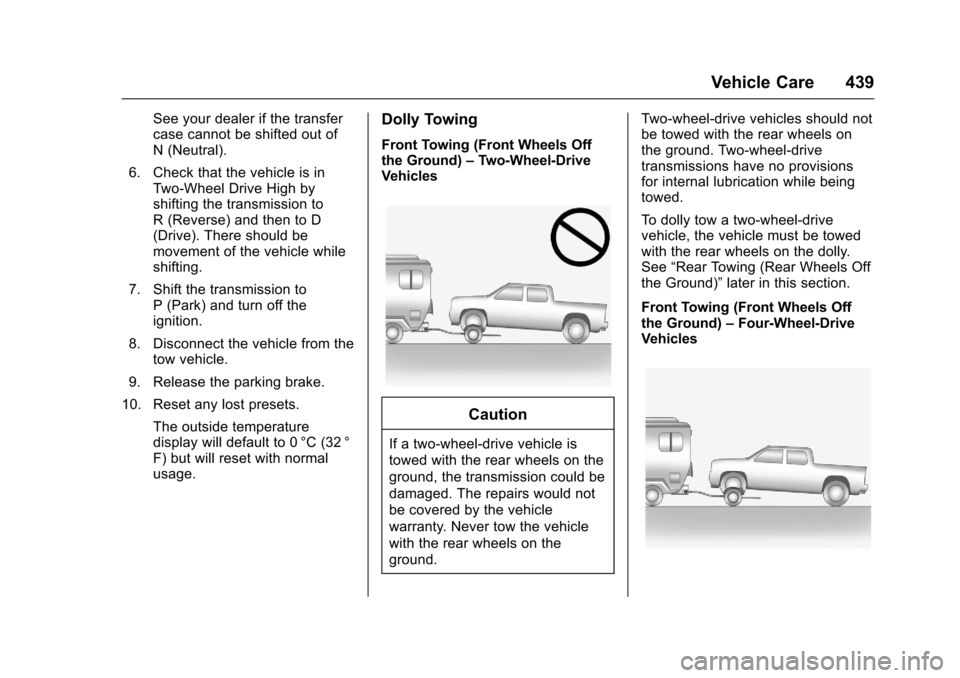
Front Towing (Front Wheels Offthe Ground)–Two-Wheel-DriveVehicles
Caution
If a two-wheel-drive vehicle is
towed with the rear wheels on the
ground, the transmission could be
damaged. The repairs would not
be covered by the vehicle
warranty. Never tow the vehicle
with the rear wheels on the
ground.
Tw o - w h e e l - d r i v e v e h i c l e s s h o u l d n o tbe towed with the rear wheels onthe ground. Two-wheel-drivetransmissions have no provisionsfor internal lubrication while beingtowed.
To d o l l y t o w a t w o - w h e e l - d r i v evehicle, the vehicle must be towedwith the rear wheels on the dolly.See“Rear Towing (Rear Wheels Offthe Ground)”later in this section.
Front Towing (Front Wheels Offthe Ground)–Four-Wheel-DriveVehicles
Page 449 of 509
Chevrolet Silverado Owner Manual (GMNA-Localizing-U.S./Canada/Mexico-9956065) - 2017 - CRC - 4/29/16
448 Vehicle Care
To c l e a n :
1. Saturate a clean, lint-freecolorfast cloth with water.Microfiber cloth isrecommended to prevent linttransfer to the fabric or carpet.
2. Remove excess moisture bygently wringing until water doesnot drip from the cleaning cloth.
3. Start on the outside edge of thesoil and gently rub toward thecenter. Rotate the cleaningcloth to a clean area frequentlyto prevent forcing the soil in tothe fabric.
4. Continue gently rubbing thesoiled area until there is nolonger any color transfer fromthe soil to the cleaning cloth.
5. If the soil is not completelyremoved, use a mild soapsolution followed only by plainwater.
If the soil is not completelyremoved, it may be necessary touse a commercial upholsterycleaner or spot lifter. Test a smallhidden area for colorfastness beforeusing a commercial upholsterycleaner or spot lifter. If ringformation occurs, clean the entirefabric or carpet.
After cleaning use a paper towel toblot excess moisture.
Cleaning High Gloss Surfaces
and Vehicle Information and
Radio Displays
Use a microfiber cloth on high glosssurfaces or vehicle displays. First,use a soft bristle brush to removedirt that can scratch the surface.Then gently clean by rubbing with amicrofiber cloth. Never use windowcleaners or solvents. Periodicallyhand wash the microfiber clothseparately, using mild soap. Do notuse bleach or fabric softener. Rinsethoroughly and air dry beforenext use.
Caution
Do not attach a device with a
suction cup to the display. This
may cause damage and would
not be covered by the vehicle
warranty.
Instrument Panel, Leather,
Vinyl, Other Plastic Surfaces,
Low Gloss Paint Surfaces and
Natural Open Pore Wood
Surfaces
Use a soft microfiber clothdampened with water to removedust and loose dirt. For a morethorough cleaning, use a softmicrofiber cloth dampened with amild soap solution.
Caution
Soaking or saturating leather,
especially perforated leather, as
well as other interior surfaces,
may cause permanent damage.
(Continued)
Page 453 of 509
Chevrolet Silverado Owner Manual (GMNA-Localizing-U.S./Canada/Mexico-9956065) - 2017 - CRC - 4/29/16
452 Service and Maintenance
keep the vehicle in good workingcondition, improves fuel economy,and reduces vehicle emissions.
Because of the way people usevehicles, maintenance needs vary.There may need to be morefrequent checks and services.
Normal Service
All maintenance services, includingthose listed under AdditionalRequired Services, are forvehicles that:
.Carry passengers and cargowithin recommended limits onthe Tire and Loading Informationlabel. SeeVehicle LoadLimits0259.
.Are driven on reasonable roadsurfaces within legal drivinglimits.
.Use the recommended fuel. SeeFuel0311.
Severe Service
In addition to the normal serviceschedule, some vehicles requireservice more often. Severe serviceis for vehicles that are:
.Mainly driven in heavy city trafficin hot weather.
.Mainly driven in hilly ormountainous terrain.
.Frequently towing a trailer.
.Used for high-speed orcompetitive driving.
.Used for taxi, police, or deliveryservice.
{Warning
Performing maintenance work can
be dangerous and can cause
serious injury. Perform
maintenance work only if the
required information, proper tools,
and equipment are available.
If they are not, see your dealer to
have a trained technician do the
work. SeeDoing Your Own
Service Work0353.
Maintenance
Schedule
Owner Checks and Services
At Each Fuel Stop
.Check the engine oil level. SeeEngine Oil0359.
Once a Month
.Check the tire inflationpressures. SeeTirePressure0405.
.Inspect the tires for wear. SeeTire Inspection0411.
.Check the windshield washerfluid level. SeeWasherFluid0375.
Engine Oil Change
When the CHANGE ENGINE OILSOON message displays, have theengine oil and filter changed withinthe next 1 000 km/600 mi. If drivenunder the best conditions, theengine oil life system may notindicate the need for vehicle servicefor up to a year. The engine oil andfilter must be changed at least once
Page 490 of 509
Chevrolet Silverado Owner Manual (GMNA-Localizing-U.S./Canada/Mexico-9956065) - 2017 - CRC - 4/29/16
OnStar 489
from each other and use acombination of letters, numbers,and symbols to increase thesecurity.
.Change the default name of theSSID (Service Set Identifier).This is your network’snamethatis visible to other wirelessdevices. Choose a unique nameand avoid family names orvehicle descriptions.
OnStar Wi-Fi®Hotspot (IfEquipped)
The vehicle may have a built-inWi-Fi hotspot that provides accessto the Internet and web content at4G LTE speed. Up to seven mobiledevices can be connected. A dataplan is required. Use the in-vehiclecontrols only when it is safe todo so.
1. To retrieve Wi-Fi hotspot
information, press=,waitfor
the prompt, then say“Wi-Fisettings.”On some vehicles,touch Wi-Fi Settings on thescreen.
2. The Wi-Fi settings will displaythe Wi-Fi hotspot name (SSID),password, and on somevehicles, the connection type(no Internet connection, 3G,4G, 4G LTE), and signal quality(poor, good, excellent).
3. To change the SSID or
password, pressQor call
1-888-4ONSTAR to connectwith an Advisor.
After initial set-up, your vehicle’sWi-Fi hotspot will connectautomatically to your mobiledevices. Manage data usage byturning Wi-Fi on or off on yourmobile device, using theRemoteLink mobile app, or bycontacting an OnStar Advisor.
OnStar RemoteLink®Mobile App(If Equipped)
Download the OnStar RemoteLinkmobile app to select Apple®
iOS, Android™,BlackBerry®,or Windows®mobile devices.
OnStar Subscribers can access thefollowing services from a mobiledevice:
.Remotely start/stop the vehicle,if factory-equipped.
.Lock/unlock doors, if equippedwith automatic locks.
.Activate the horn and lamps.
.Check the vehicle’sfuellevel,oillife, or tire pressure,if factory-equipped with the TirePressure Monitor System.
.Send directions to the vehicle.
.Locate the vehicle on a map(U.S. market only).
.Turn the vehicle's Wi-Fi hotspoton/off, manage settings, andmonitor data consumption,if equipped.
For OnStar RemoteLink informationand compatibility, seewww.onstar.com (U.S.) orwww.onstar.ca (Canada).